Timed charge from Grid

43 comments started 2023-12-06 last 2023-12-08
GivEnergy ProductsBattery
P
#1 PJT

I am trying to set up my inverter to charge the battery from the grid but I have not managed it yet,.

I have invert model GIV-HY3.6
Battery Capacity
160 Ah | 8.19 kWh | (1 Pack)

From the App I have clicked on Inverter, then on Settings

It is in ECO Mode - This mode will dynamically charge and discharge your batteries to minimise your import from the grid

I clicked on 'TIMED CHARGE' - Start time and End time are entered and the button ENABLED is ON
I have set it for a 2 hour interval initially until I know it is working (But it isn't hence this post)
Charge is set to 100%

I do hope someone can help me set this up, thank you in advance

K
#2 killythebid

Did you click on the submit button once you entered the charge time etc.?

P
#3 PJT

I did but to try everything I have just been back to the settings, set it up for 12:30 to 14:30, 100% and clicked SUBMIT

I will give it half an hour and if working should increase from the 4%. There is no solar gain again today

S
#4 SteveCook

In battery settings have you input the charge and discharge power and battery percentages

P
#5 PJT

I have just checked the App on my iphone

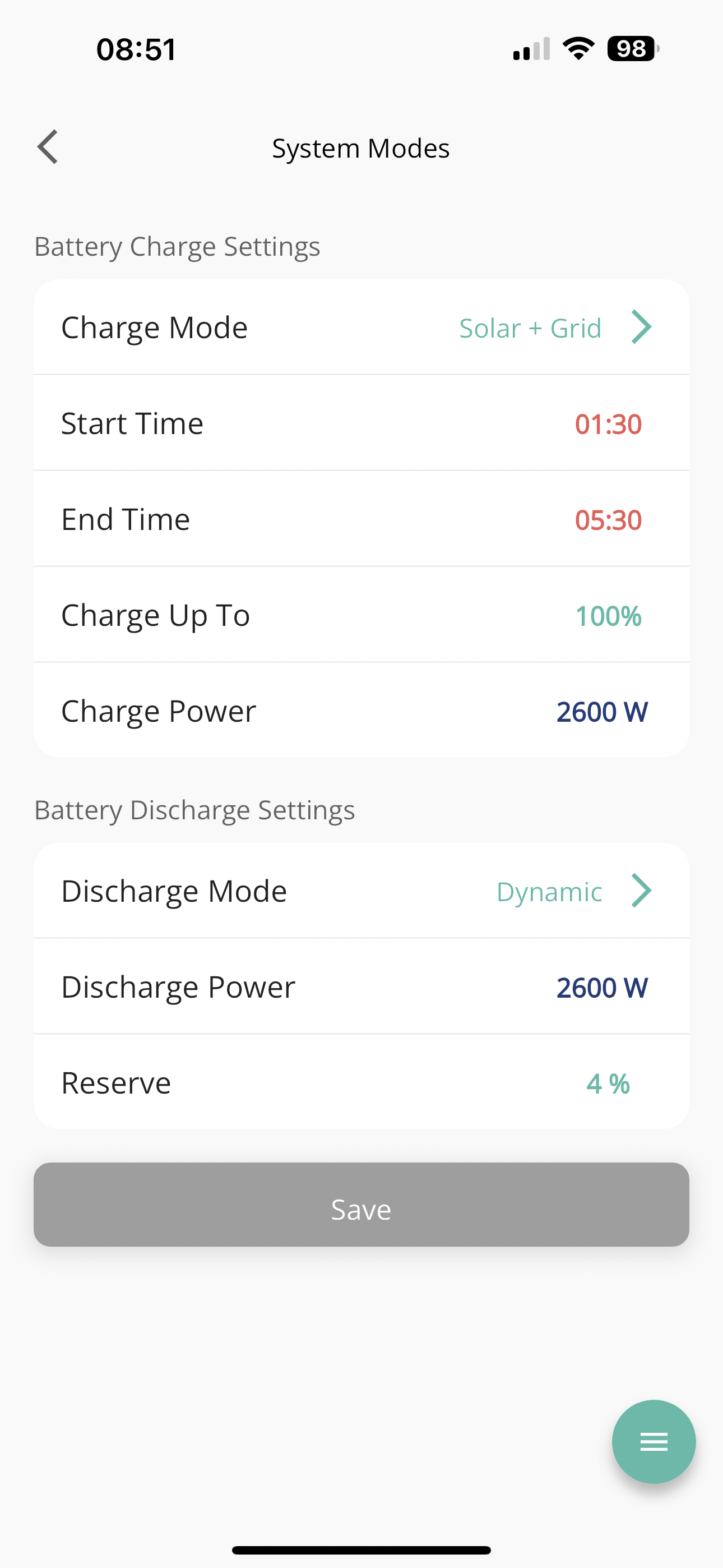
System mode Solar + Grid
Charge up to 100%
These two are green

Start and end times are red???
I am assuming they should all be green

P
#6 PJT

Battery Discharge settings
Dynamic (Should this be scheduled?)
2600 W
Reserve 4%

#7 Cdent

PJT red's fine for the time. When you click Save at the bottom do you get a green tick?

Have you gone to https://portal.givenergy.cloud/dashboard to check the settings are saved on there? If they're not, do a reset to default, wait 30 mins then try reapplying the settings

#8 Cdent

PJT Dynamic is for the battery to meet house demand, it'll discharge only when needed

P
#9 PJT

Cdent
The details on the PC (as from the link you provided) are the same as on the iphone
12:30 to 14:30 (Enabled)

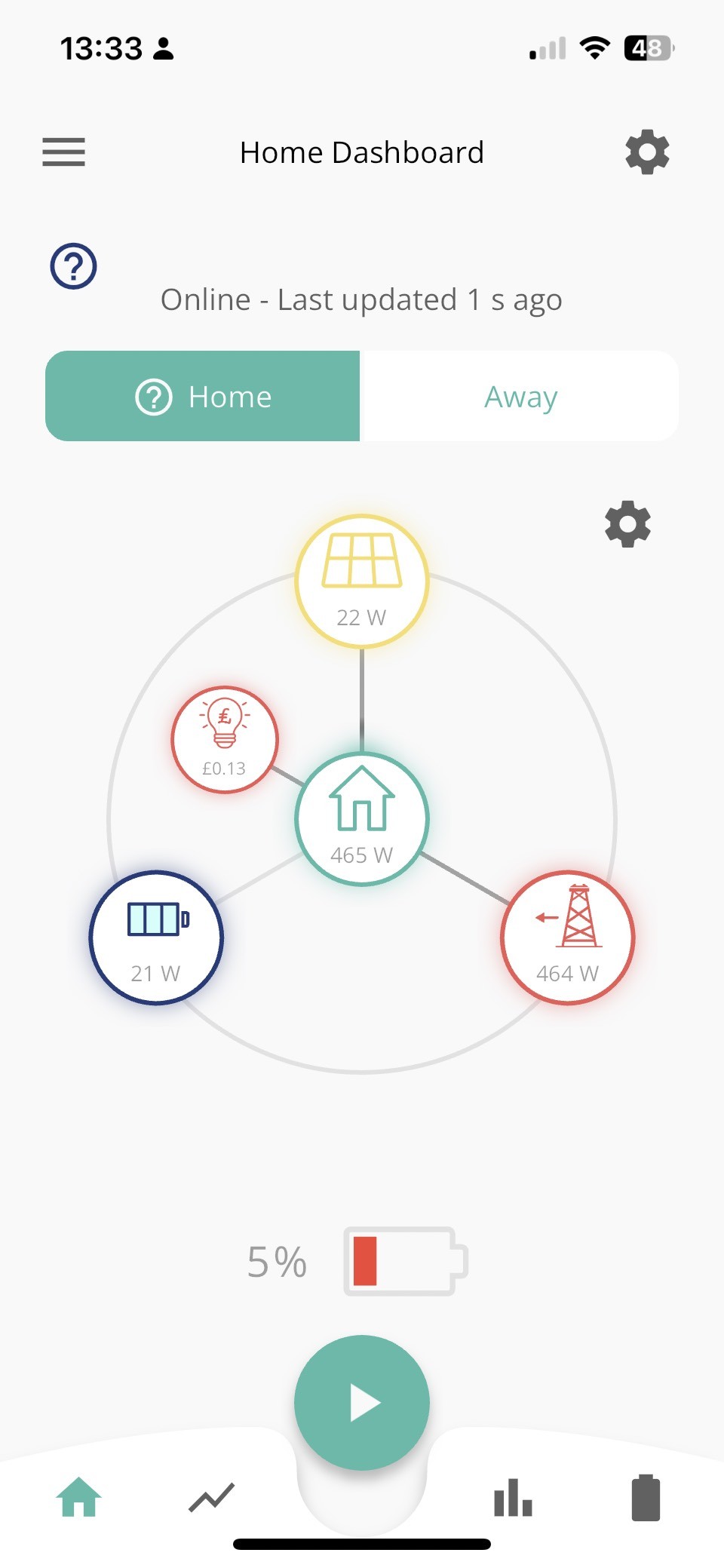
Something else I notice on the iphone App screen, the directional dots are showing for all as working

  • solar 19W to home
  • Grid 225W to home 242W
  • Cost to Home 7p
  • Grid 225W to Battery 22W

Battery to Home nothing as it is on 4%

The progress bar remains on 4%

P
#10 PJT

SteveCook

Only the charge settings

D
#11 DD

It all looks correct. I suppose another possibility is that the time on the inverter is wrong ?

Can you manually force a charge from the app ? You have to enable the 'quick settings' display, and then the play button should pop a + button to force a charge ? (Can someone confirm - not sure I've ever tried it.)

P
#12 PJT

SteveCook

Only the charge settings

Discharge on iphone App states
Dynamic
2600W Discharge power
4% Reserve

P
#13 PJT

DD

I pressed the PLAY and then the Battery +
The wheel spun but there is no change

P
#14 PJT

I am going to do a reset to default and will come back in 30 mins approx.

Paul

P
#15 PJT

I have refreshed pages/app after the reset and submit

  • Time charge is disabled
    Battery charge settings are now
  • MODE - Solar
    Charge Power 2600W

Battery Discharge settings

  • MODE - Dynamic
  • Discharge power 2600W
  • Reserve 4%

This all appears correct (to me, with my little knowledge)

P
#16 PJT

At this stage I think it best to confirm the following in case there have been updates

  • Inverter Firmware Version
    D0.450-A0.451
  • Battery Firmware Version
    3002
D
#17 DD

The battery isn't particularly cold, is it ? Eg if it's outside. I think AC charging is inhibited when it's cold.

P
#18 PJT

DD

The Inverter is not outside

I am going to try complete the details to import electric to the battery, initially I will set it up to do through the day, if working I can then amend the times.

P
#19 PJT

UPDATE
SETTINGS ARE
ECO
TIMED CHARGE - 14:30 TO 16:30
ENABLED 'ON'
CLICKED 'SUBMIT'

It confirmed the details had been updated [Done on PC]

APP on iphone also checked
Charge Mode - Solar + Grid
Start time and end time NOT showing
Charge up to 100%
Charge Power 2600W

Battery Discharge settings
Discharge Mode - Dynamic
Discharge Power 2600W
Reserve 4%

D
#20 DD

I can recommend @Rubikcube's android monitor app, if you've not already tried it. It gives read-only access to the registers, and can confirm that changes really are making it to the inverter, and makes it easy to see lots of interesting settings at a glance.

Oh, one other possibility... not sure if it's been suggested, but the inverter has a battery pause setting, which can suspend charging, discharging, or both. (Not shown on the monitor app, incidentally.) And has it been mentioned that, in the the remote control page, you can force the portal to retrieve the live value from the inverter, rather than relying on the value it last sent. The app allows you to pause both, but not charge/discharge separately. I suppose explicitly pausing then unpausing on the app would probably also ensure that both charge and discharge are unpaused.

[I often pause the battery charging when it gets close to 100% - I don't want it to do lots of small charge/discharge cycles when it's nearly full, and generally let it run down a little before allowing it to charge again.]

P
#21 PJT

The above settings did nothing.

So I have updated in the iphone App, changing the times to 14:45 to 16:45 - Then SAVED

I then checked the detail on the PC and the good news is it has updated both the mobile and the PC

So now we wait and see if it kicks in and imports electric from the grid to the battery

D
#22 DD

PJT Start time and end time NOT showing

That doesn't sound right - if timed charge is enabled, it ought to show the times. But might be an app bug.

P
#23 PJT

There is still an issue, first what appears to be working

The PC shows the flow of electric and includes to the battery
The iPhone App shows the flow of electric same as the PC

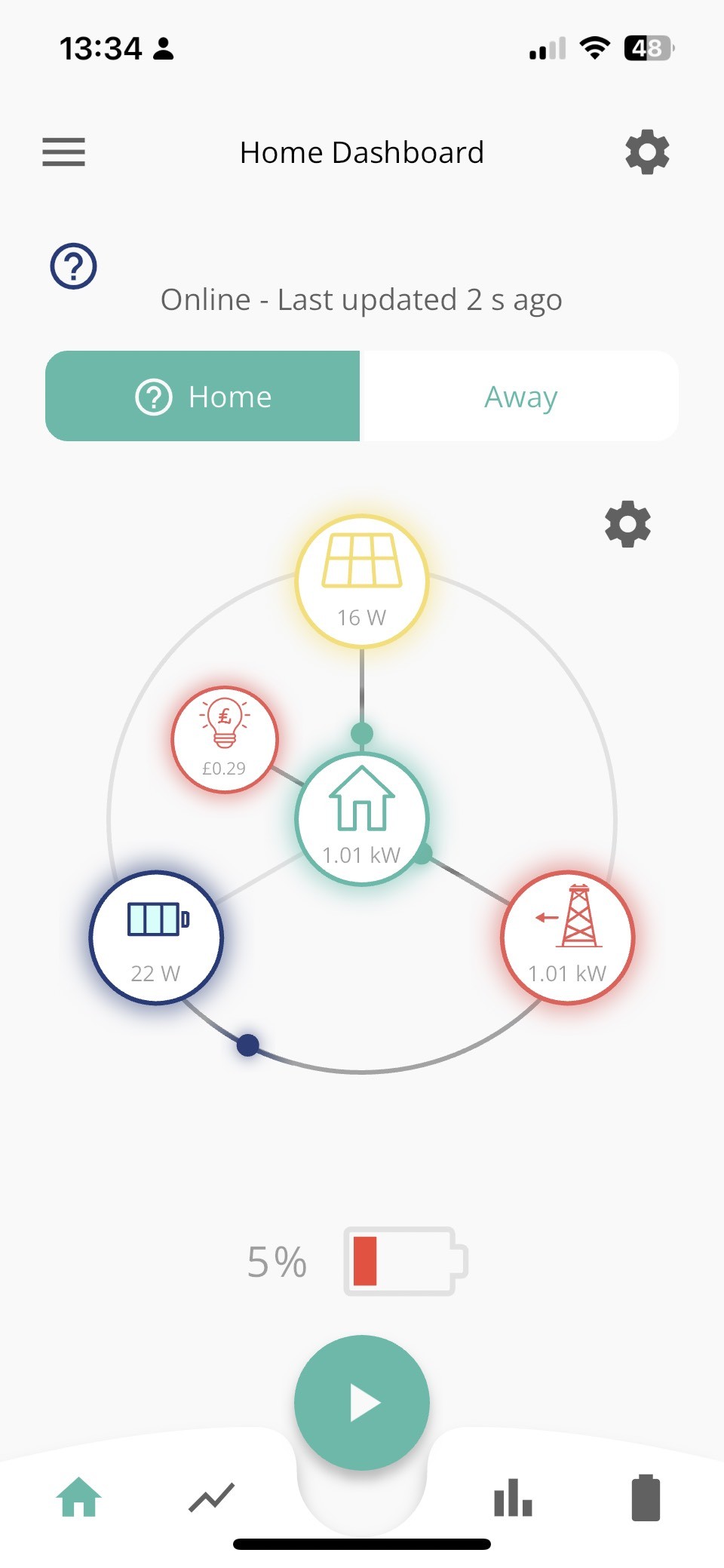
The rate of flow is very low with 307W from the grid to the home and battery, and only 24W to 67W charging the battery.
As expected from this it remains at 4% and it has been running for 10 minutes???

D
#24 DD

Remember that the web shows only snapshots of the system, every 5 or 10 minutes or something. The app updates at more like 30s. You could presumably use your smartmeter IHD to see whether you're importing significant amounts (assuming you have one / haven't lost it).

I see a very low power of around 28W when the battery is paused. I think that may be overhead in running the BMS, or something, rather than genuine charging/discharging.

D
#25 DD

Is this a relatively new system, or one you've had for a while? Does the battery charge from solar, or has it been stuck at 4% for quite a while now?
There's a thread somewhere where someone was talking about having to get GE to kick-start the charging - the charge level had got so low that the system would no longer charge on its own. I'll see if I can find it.

P
#26 PJT

DD

The date of commissioning the system was 2022-03-22

It has run, as set my the company, until yesterday, although set to 4% reserve it dropped to 2%, it has been bad weather for solar gain, so I looked to get the system to do what I am trying to do now, charge a percentage overnight. I am also getting an EV in the next 14 days and want to change tariff as soon as I get the car, so thought now was a good time to do this.

Yesterday I altered the setting and it did work, it clicked in and charged for two hours so I changed the time to 00.00 to 03.00 and 60%, but when I checked this morning it had not charged.

With the Apps now working, but the battery not charging, we have put an oil filled heater next to it. The room temperature the battery is in is 13-14 degrees which should be alright by my thinking, certainly warmer that in a roof void. I have changed the time for this run to end at 15:45. I will let it stop as programmed and let the heater warm the battery then input a new time gap for the charge and see what happens

P
#27 PJT

DD

How do I contact GivEnergy to request a kick start to the charging?

The drop in reserve below 4% may be the reason, when I saw it at 2% I was concerned and it was that which prompted me to start a night time charge to the battery in winter

P
#29 PJT

I will reply to give an update when I get the batteries charging again.

Thanks all for your help

I will try once more, later today, after the heat as warmed the battery

Should you have any further questions or suggestions please let me know

Thank you

Paul

D
#30 DD

The battery temperature is logged on the portal: on the inverter page, there's a row of various things you can display, and one of those is 'battery data'. That has the details.
Or if from the dashboard you go to the power graph, there's a little drop-down which lets you add items to the graph, and one of those is the battery temperature. (I see mine's been as low as 3 degrees once - that's in the garage.)

When you do get grid-charging working, charging at lower power for longer should keep the temperature up overnight, rather than charging at full power for a short time. Your EV tariff should incentivise that anyway.

P
#31 PJT

DD

The battery temperature was 8 degrees this afternoon, is is now 10 degrees

But the battery is still not importing electric from the grid in the set time period.

D
#32 DD

Have you tried turning it off and on again ;-)
Or I guess first thing to try would be a soft restart via the 'power' icon ('restart inverter') on the web portal. Might be worth a try ..?

#33 Hook

This is what mine is set to. It charges up every night during my intelligent Go period.

P
#34 PJT

DD
I hadn't done a soft restart so tried this and still not importing electric to battery

UPDATE 9:10am
The reserve has dropped from 4% to 3%
I set the App on the iPhone to charge 8:30 to 10:30am - it didn't start
I checked the PC and the iPhone App instruction had not updated the PC

So I updated on PC to import electric/charge battery from 9am to 10pm to 100%
It updated the iPhone App - but charging didn't begin

So I raised the minimum charge to 5% and pressed to submit - no change in charging charge is 3%
This was really just to change the value and see if it made any changes nothing more - still no charge

I have just checked, Inverter Data, System Date and the last reading is 2023-12-07 09:15:50 WAITING
WAITING???

So at this point we are no further forward, but have tried many things, thank you.

I sent an email to GivEnergy support tea time yesterday, hopefully they will reply soon. I am understandably concerned, the reserve in the battery has reduced 4% to 3%, and on the mobile the flow dot is showing discharge Battery to Home, with battery showing 12W

P
#35 PJT

Hook

I can confirm mine is exactly the same, except the times are 09:00 and 22:00

D
#36 DD

PJT It was my understanding that if the battery went below the min/reserve value (4%), it tended to automatically recharge back up from grid to reach that, so it's slightly worrying that it has gone below that. On the other hand, different batteries probably have different rules - my 9.5kWh allows 100% DOD, whereas I think older 8.2kWh ones had restrictions. In practise, different batteries probably have different buffers at top and bottom, so it's hard to know what the actual limits are.

I've fortunately never had to contact support - not sure if phone is more likely to get a responsive than email. Perhaps others can comment.

WAITING might just mean that the portal has sent an update to the inverter and has not yet received a response. (Perhaps that coincided with your soft restart ?)

P
#37 PJT

DD
The system until a couple of days ago has been left as commissioned
Charge - Solar
Discharge - Dynamic and 4% minimum

Last winter it dropped to 3% and with solar gain always replaced the loss, but this year has been solar unfriendly for a longer period, seeing 3% didn't bother me when I saw 2% I started to be a little concerned, knowing I will get my EV within the next two weeks I thought now was a good a time as any to set a charge in the night, in hindsight I see it would have been a good idea to have this in winter anyway, but having had no issues last winter I didn't expect any this winter.

What is strange, I think, is that two/three days ago, when I set it up to charge the battery for two hours, or up to 60% it actually worked and raised the charge level to 6%. Maybe I could have charged it longer but when new to these things I always air towards caution.

Maybe that small charge has caused a hiccup, I don't know, all I know is I certainly didn't expect it not to work, especially after the first grid to battery charge.

Contacting GivEnergy by telephone is an issue for me, I am very deaf and cannot use the phone. Giving all this information to my wife to relay to them would be a nightmare for her.

P
#38 PJT

I will add an update in a few hours.

Whilst waiting for support at GivEnergy to reply to my email, I did a search online and it stated the importance of keeping the firmware up to date. So I checked Inverter / software and it says, by updating the firmware, it would flush and recalibrate the battery. That definitely sounds like a kick-start.

So I started the process, it has downloaded and verified the software and also reset the Battery reading to 0%. A message then appeared to say it could take a couple of hours to process, so fingers crossed.

One other thing to note is that charge in the battery will be lost, for me on 3% is nothing,

I will add an update later.

P
#39 PJT

UPDATE

I am partially optimistic! Why partly?

After clicking to update Firmware, the app data was removed and battery showed 0%, over time the percent went up to 2%, 3% (which was the charge showing prior to updating the firmware). It then went to 4% and then to 5%, I was getting really encouraged at that point, but although showing the dot flowing from Grid to Battery it remains on 5%?

So I clicked on the battery icon in the iPhone App, It is showing the following...
LATEST DATA
5%
Charging
between 20 to 25 W varying between updates
52.19 V
11.0 degree C

On the Home App we see the fluctuating rates but it seems to me from the data attached the power is going to the Home
Home and Grid are similar values. Comments and suggestions welcome,, it really does look like it is stuck at 5%

Home

P
#40 PJT

I have just thought of something else. I changed the Reserve to 5% and that is where it has stopped?

Maybe, because it has updated the Firmware and got to the level it is at, 1% above the default reserve, I will reset the system to default settings and then add a charge period back in.

To do this, I am going to put the charge battery period after midnight, into the next day. So my next update will be tomorrow morning

D
#41 DD

PJT In the notifications (first entry on either the web portal pages list, or the app menu), it should have a log if it is performing a calibration. (This is separate from the notifications in the inverter area on the web portal.)

I had
Battery calibration started on FD...
Please leave your system while it calibrates. It will take a few hours. We will let you know when the calibration is finished

and then later,
Battery calibration finished on FD...
Thanks for waiting while your inverter calibrated its batteries. Your inverter will now function as normal

(though some people report that they never receive the 'finished' message.)

Oh, and jus before that, Firmware Update Started and then Firmware Update Finished.

P
#42 PJT

Good new guys

I updated the Firmware and it flushed and recalibrated the battery, but didn't fully sort the problem.

Having emailed support they were aware of the changes made and the update, last night I got the following message from a very helpful guy... I did a bit of work on the system today. I had to change the firmware its on as it was not listening to the timed charge command, it does now however.

I then changed the setting to charge the battery between 1am-5am or 60% and it all worked fine.

Thank you all for your help with this issue, I really appreciate it.

Stay safe and have a very Happy Christmas

Paul

P
#43 PJT

DD I had
Battery calibration started on FD...
Please leave your system while it calibrates. It will take a few hours. We will let you know when the calibration is finished

and then later,
Battery calibration finished on FD...
Thanks for waiting while your inverter calibrated its batteries. Your inverter will now function as normal

(though some people report that they never receive the 'finished' message.)

Oh, and jus before that, Firmware Update Started and then Firmware Update Finished.

That was exactly what I got. I did get an update on my mobile when the process had finished. It also showed in the notifications section top left of the main page, I did however have to press refresh before it showed up.