Understanding the settings on your app and portal

30 comments started 2023-12-13 last 2024-03-20
Mobile AppCloud Portal
D
#1 Daveb01

Hi All,

I am going to look at the settings in each of the three areas, change settings in one area and see what it does in the others.

I will also see what effect it has on my AIO (this may work if you have a Gen1-2-3 as well but can not confirm)

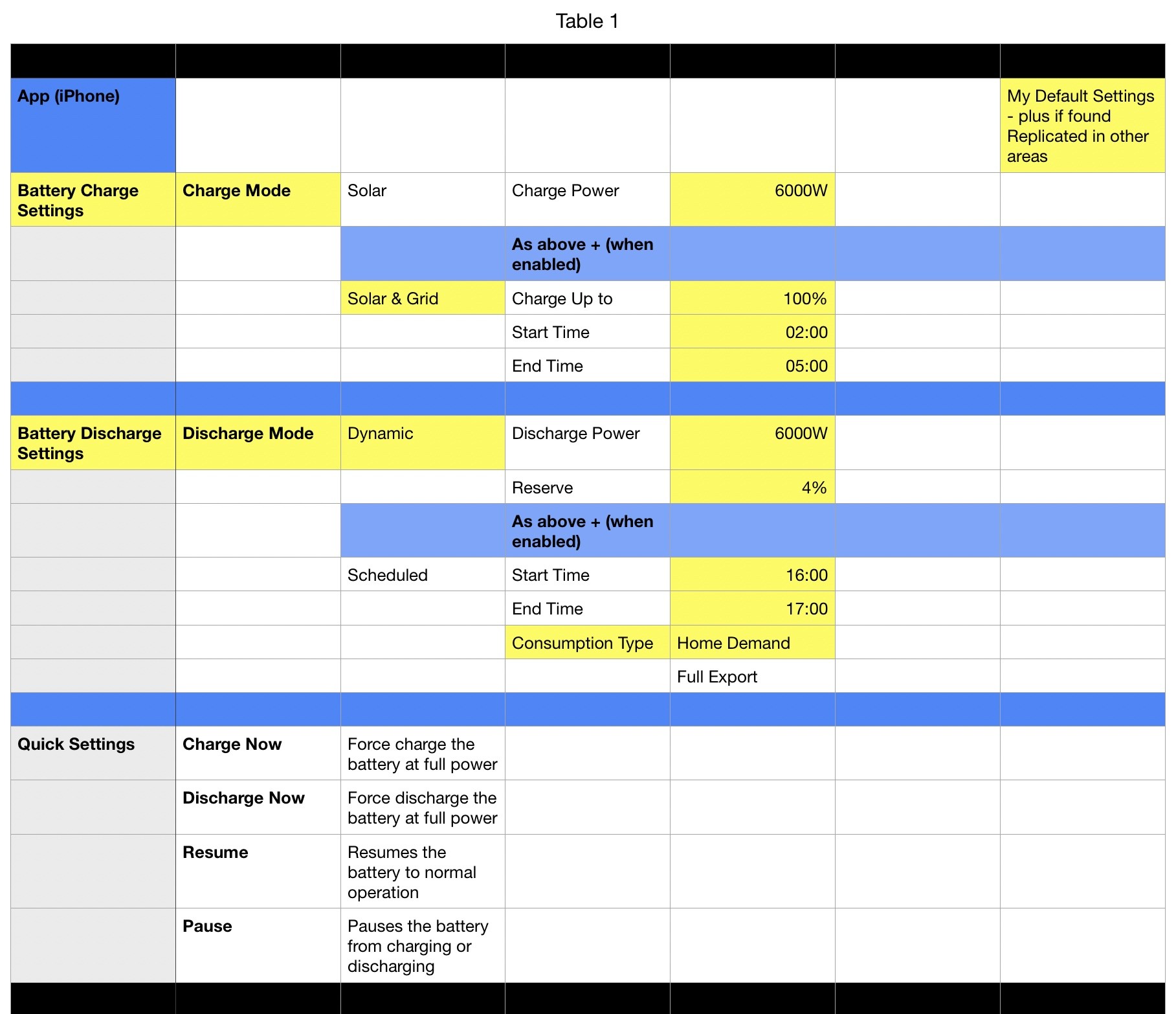
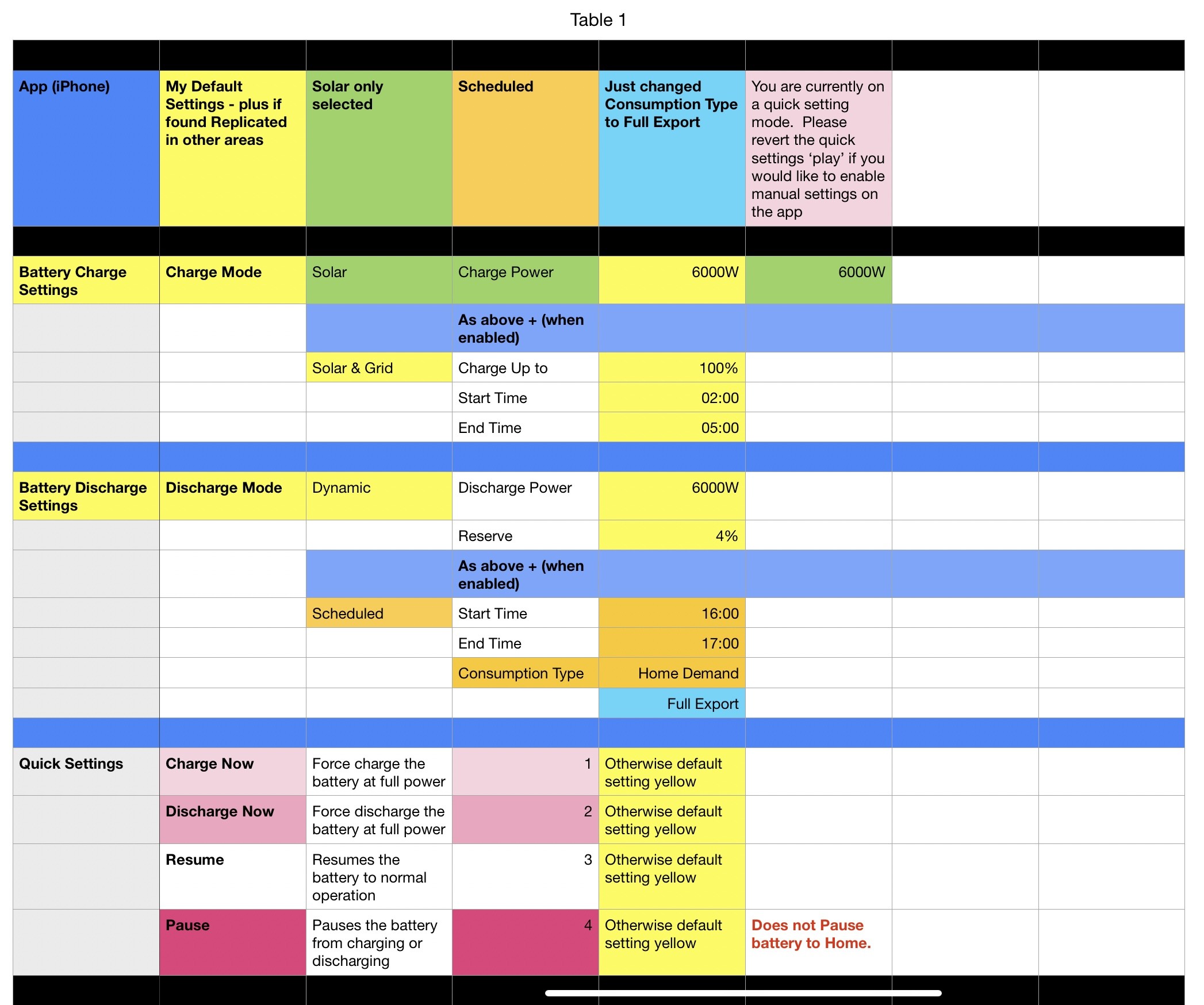
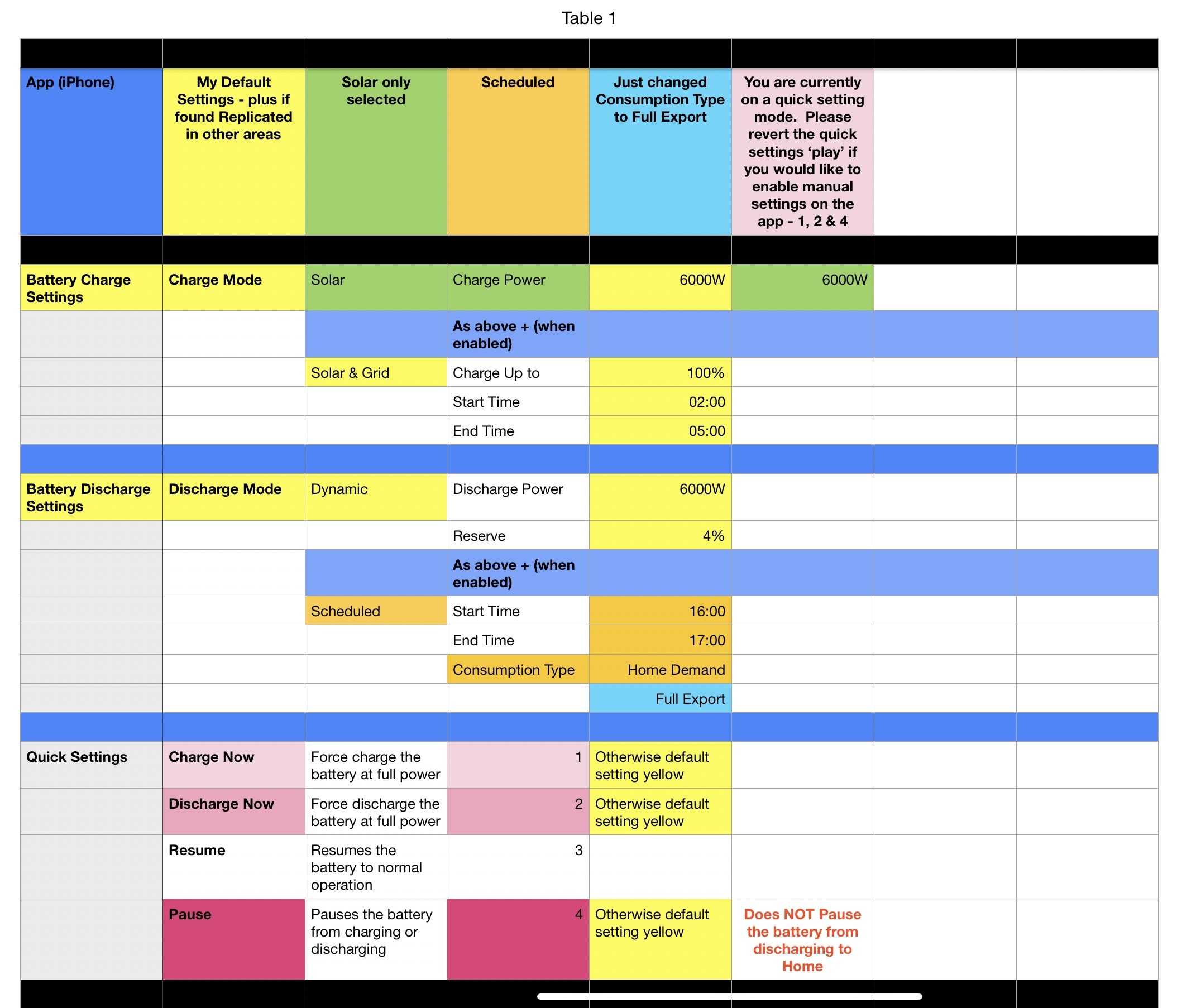
Area 1 - App (System Modes & Quick Settings)
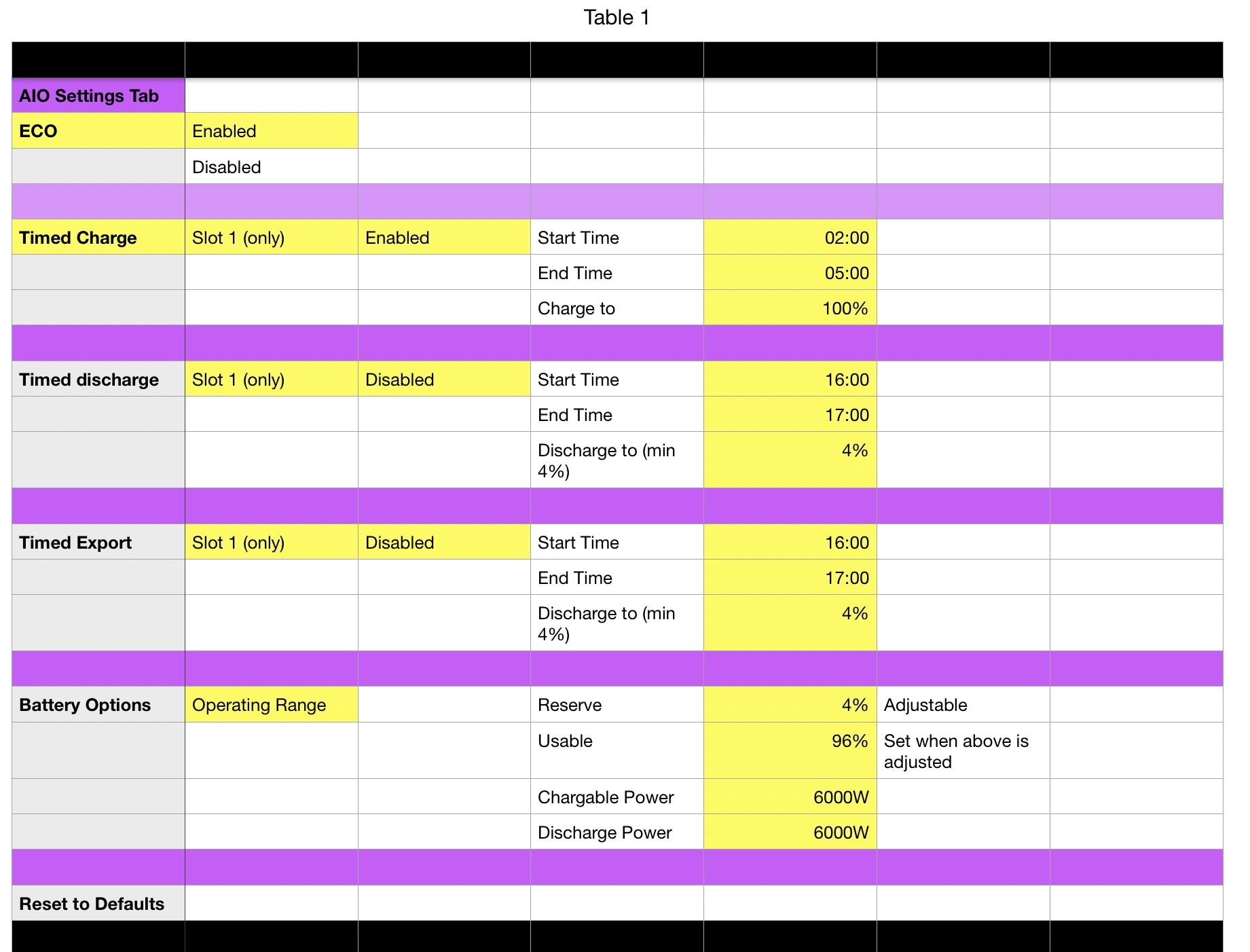
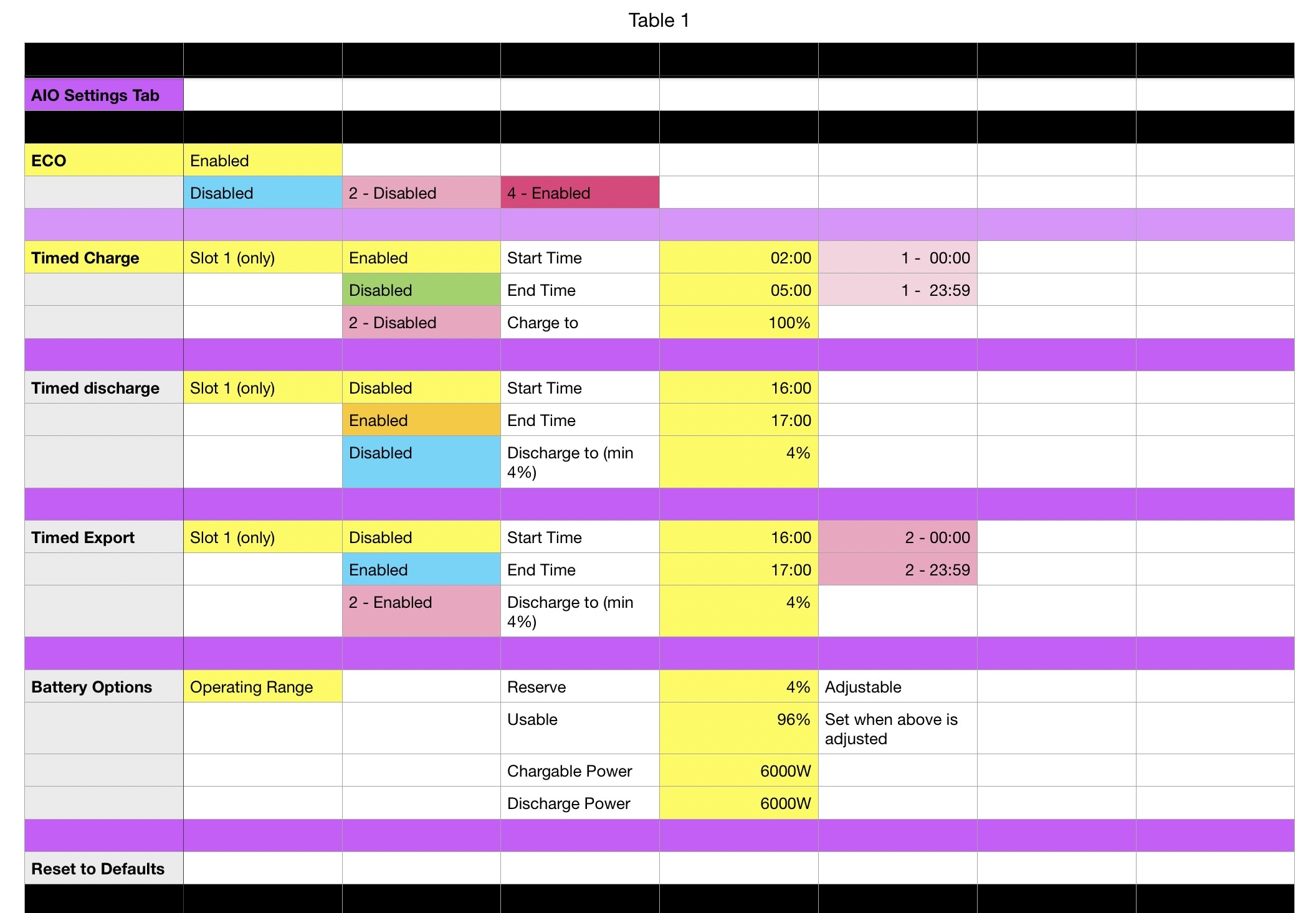
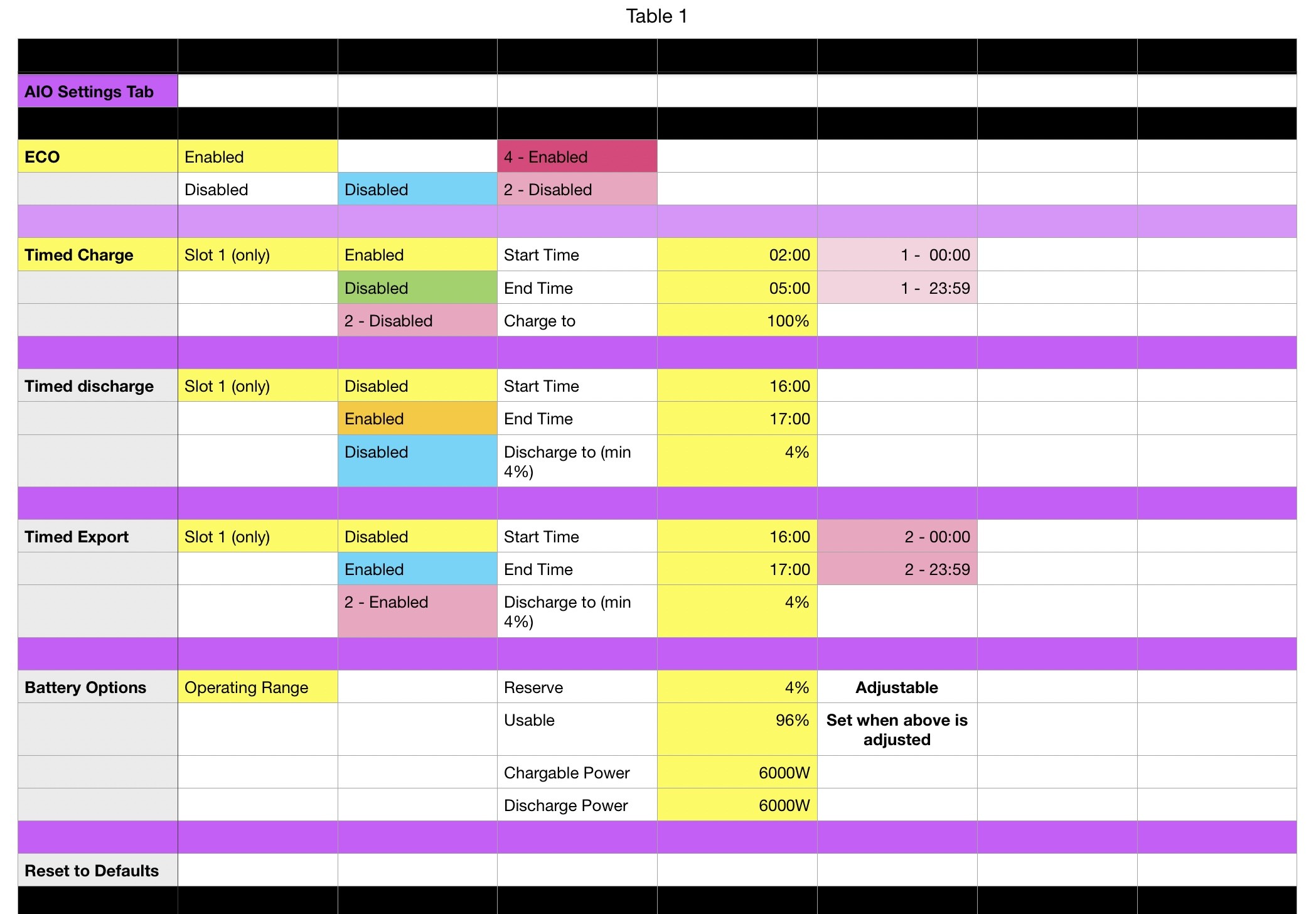
Area 2 - Inverter settings (pic 1)
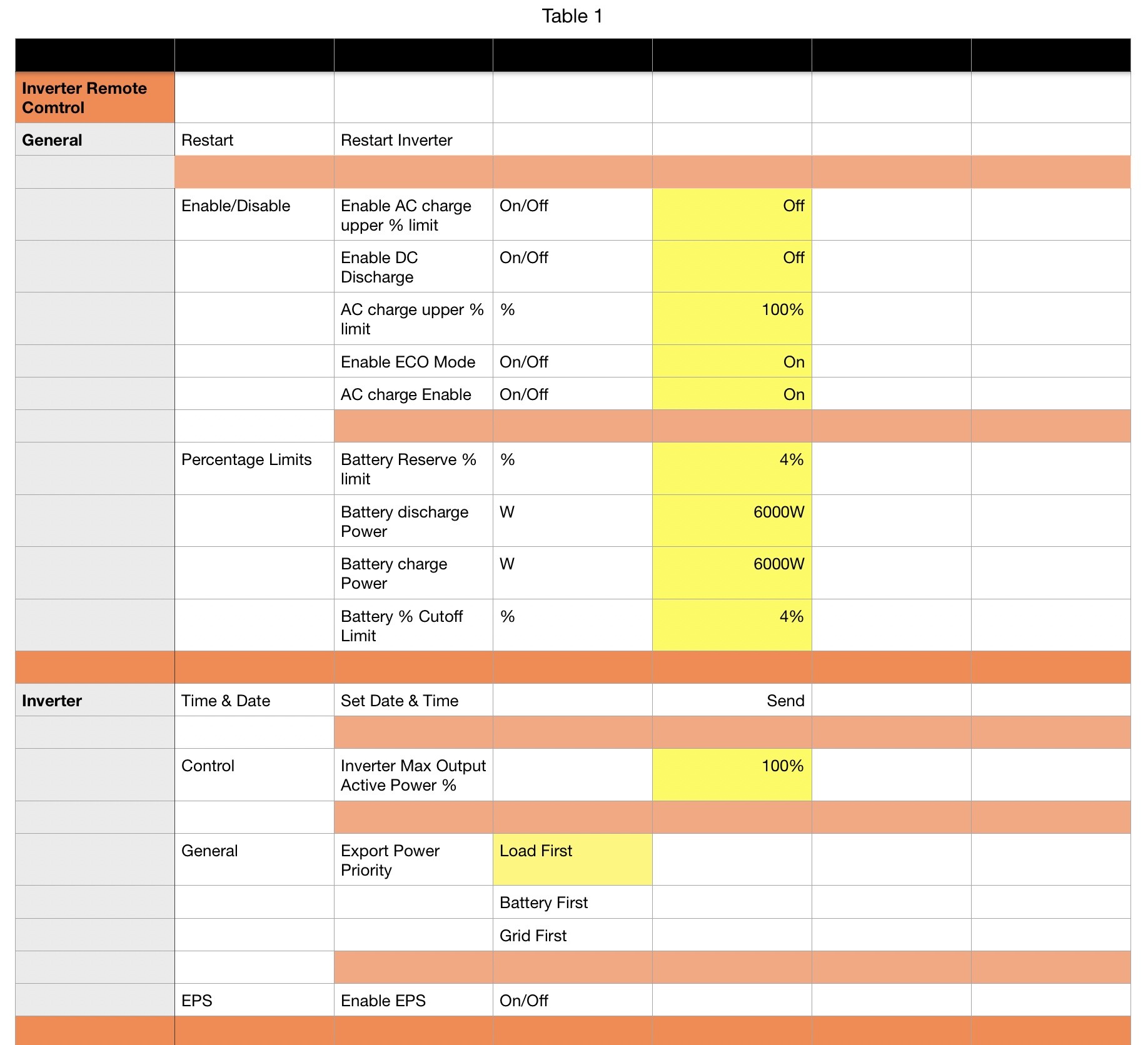
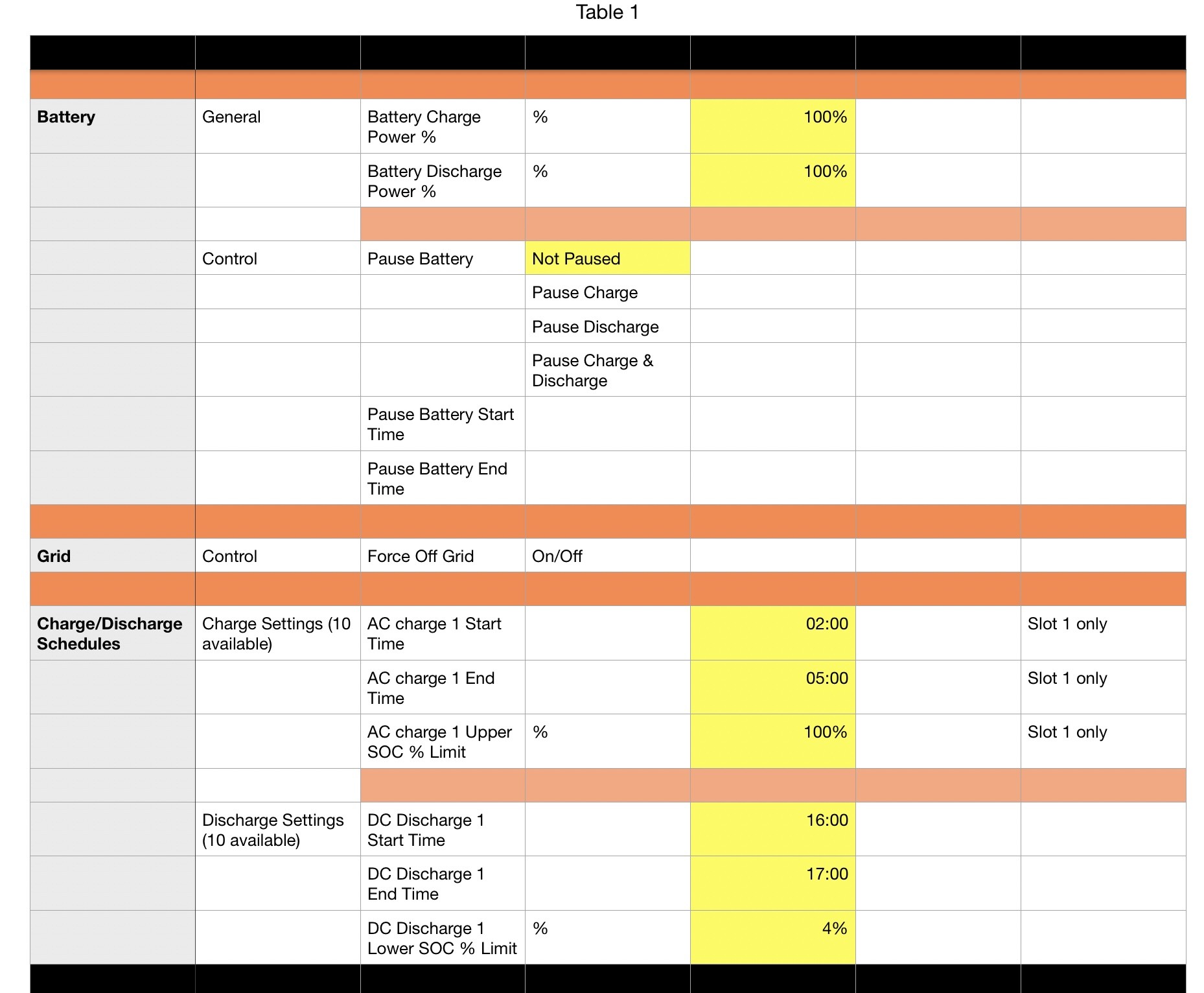
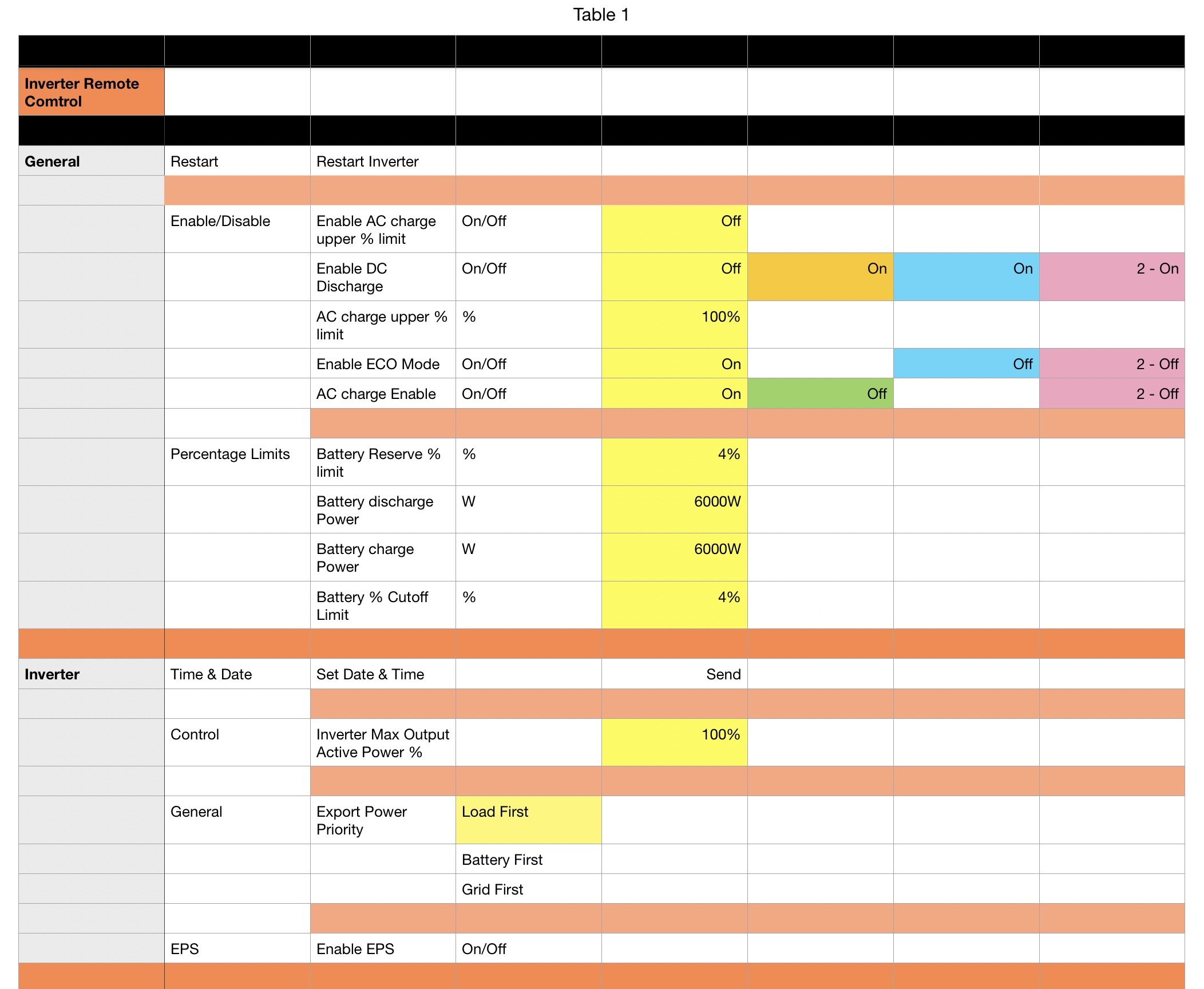
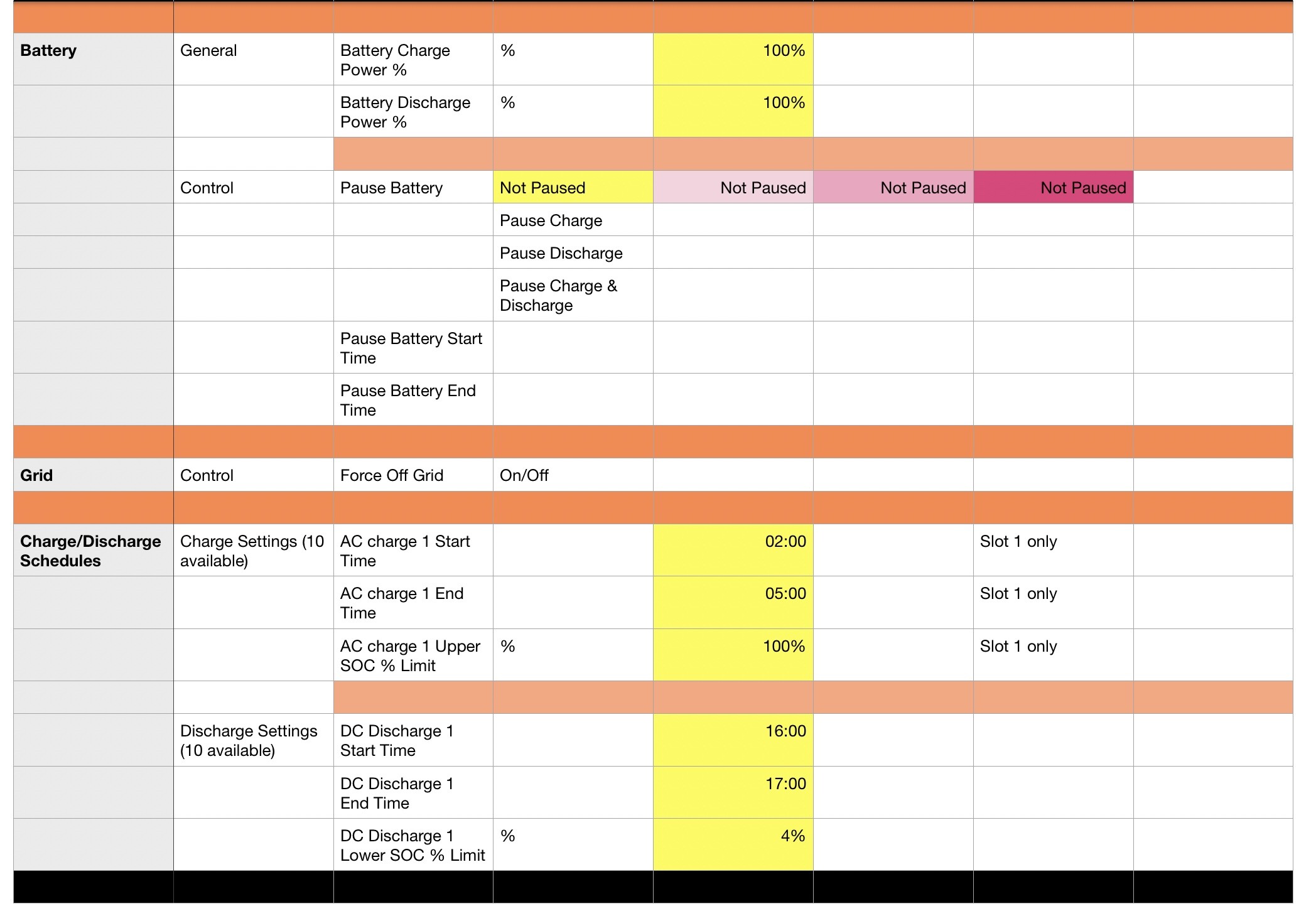
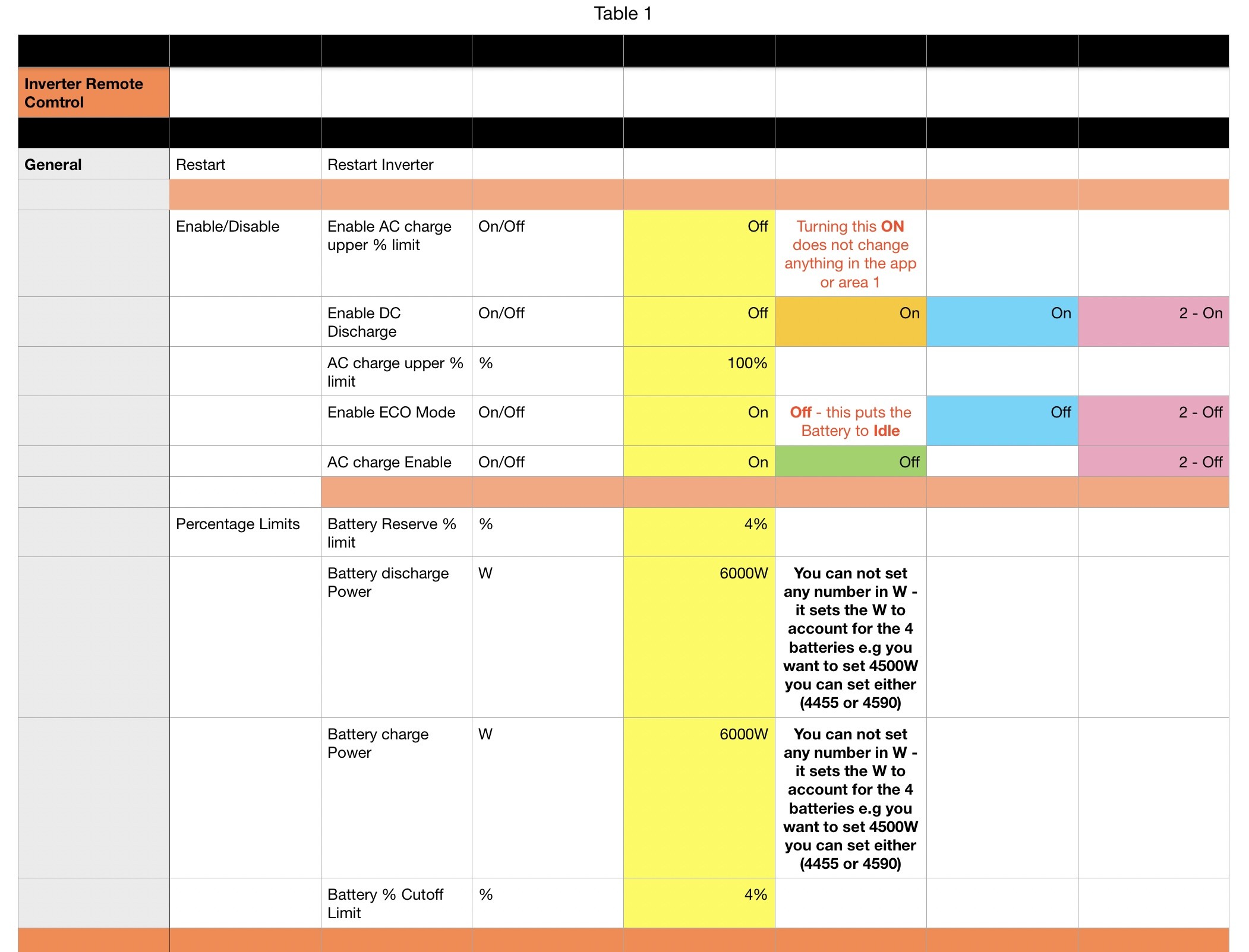
Area 3 - Inverter Remote Control (pic 2)

D
#3 Daveb01

Hi all,

This is part 1

What I have done is applied my default settings in the app on my iPhone.
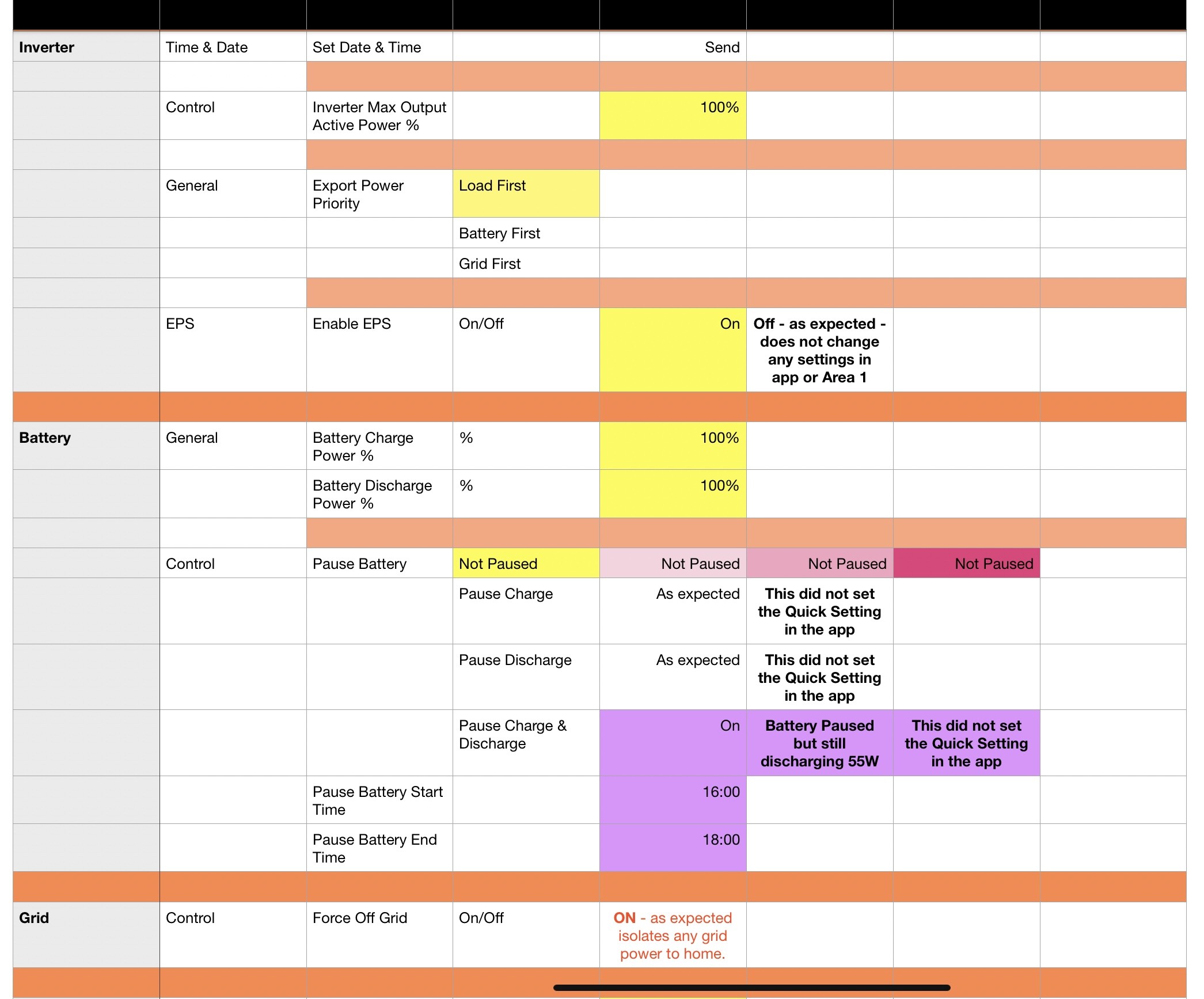
Then looked at the other 2 areas to compare.
What I have tried to do is colour these areas and settings in Yellow.

Please let me know if you you have any issues or it does not make sense?

Part 2 will be to change each setting in the app to see what happens in the other 2 areas.
Part 3 will be to change the settings in area 2 and see what happens in the app and area 3.
Part 4 will be change the settings in area 3 and see what happens in app and area 2.


D
#4 Daveb01

Part 2


D
#5 Daveb01

Part 3


D
#6 Daveb01

Here is the file, but done on a Mac

ge-settings-and-effects.zip
221kB
D
#7 Daveb01

My surprise ones were:

Putting the battery to Idle by turning off ECO in Remote Control only.

The Pause section doing slightly different things to the app version, and the app version not changing if set in Remote Control.

I was hesitant to try the EPS to OFF

I was hesitant to try Force Off Grid to ON

#8 Tenkaykev

Daveb01

Thank you! 👍

D
#9 DD

Daveb01 I think you've recorded that 'pause' in the app quick settings did not actually pause battery discharge. What I found was that the default pause start and end times in 'remote control' were both 00:00. Changing the pause end time to be '23:59' did then enable 'pause' functionality in the app.

D
#10 Daveb01

DD

Thank you for your comment. I have done some testing and the only thing needed to change was the Pause Battery End Time as you say, change it to 23:59.

This does what it says. The flow in the app works but the Quick Setting still is not activated in the app.

I will see if I get any more comments before updating this post and releasing an updated version of the spreadsheet.

#11 hoggy

RE the app pause thing:
Early Gen inverters didn’t have a pause mode, so what actually happens when you press pause is it sets the charge/discharge rate to 0W. (Which worked as expected on those)
For reasons that must make sense to GE but make zero sense to anyone else, the later kit does actually have a pause but it doesn’t work from the same button in the app (nor any button in the app) so it again tries to set the charge/discharge to 0, only this time, the later kit can’t do that so the lowest it goes is 1% (around 300W)

I have no idea why this is still a thing and the app can’t tell which inverter you have but here we are.

#12 nophead

I recently got a firmware update for my Gen3 hybrid and the app pause button stopped working. I discovered what @hoggy, says, it just sets the battery powers to 0 but they lowest value accepted is 1. But why is 1% 300W? My battery has a charge discharge limit of 2600W, so 1% would be 26W.

Why doesn't it accept 0 and turn off as presumably it did on the older firmware?

The pause option of the portal is better because it can pause just discharge or just charge, or both.

D
#13 DD

hoggy what actually happens when you press pause is it sets the charge/discharge rate to 0W

Hmm... I must have misinterpreted my results, then. Perhaps when I saw it not working, it was discharging and, as you say, it doesn't seem able to go to 0. But when I tested later, it was charging (back when we actually had some sunshine), and the pause did work?

#14 hoggy

As I found (and hence why i gave up on the wiki) is that different firmware's do different things even in the same gen - although i wasn't aware this issue has trickled back down to Gen 1, so I assume you have the newer fast response firmware for this to be an issue (my two are too old and well go BANG on that firmware)

I think they've removed the ability to see the actual register being sent from the portal & I'm currently having this exact same discussion on FB so this is copy paste but:

So I'm trying to do this without getting too technical/splitting hairs (ultimately you can't fully "pause" by setting discharge rates to 0 because you can't actually set 0.)
When you change the power slider in the app/portal this is translated numerous times from a value you desire, to one the inverter can actually deliver. (You can via the API set power as a %age value or a Watts value to further confuse things)
Ultimately Givenergy chose an obtuse way to scale power in the inverter such that you have:
The battery capacity (in AH x 0.5) x 51.2V.
The power registers in the inverter are actually scaled 0-50 rather than 0-100, so divide that value /50 gets you your minimum power steps value.
So for a 9.5kWh battery you minimum steps in power are 95W.
8.2kWH packs are 82W (you get the idea)
More than one battery? Well your steps get added together so that becomes your minimum value....
For "reasons" the newer gen stuff seems to struggle with anything less than the first 3 steps so the minimum it'll go to is 285W which given measuring is a bit finger in the air sounds about right yours showing 300W.
I know this is pedantic but unfortunately it's just how it all works.

so @DD I'm not sure if this helps or hinders but that might be a few things to try - incremental steps on the low end in both directions to see what it does

D
#15 DD

hoggy so @DD I'm not sure if this helps or hinders but that might be a few things to try - incremental steps on the low end in both directions to see what it does
Yes, I was aware that fundamentally the inverter register represents power as a percentage of capacity. Also, 50% seems to arbitrarily defined to be the max power, which is actually more like 3600W for my 9.5kWh battery. (The portal displays 50% as 3600W.) The first tangible step down from that is 37%, which translates back to 3524W (so 1% is a little over 95W.)

I hadn't previously realised that it couldn't go down as far as 0. Trying to store 0W ends up as 1% which actually discharges at 295W, close enough to 3% as you say.

#16 nophead

Is this nonsense firmware / software all written by the Chinese? I don't mean to be racist but I don't think I have experienced good software from China. Lots of cheap products simple don't work unless you replace the firmware with an open source rewrite. For example I have a cheap reflow solder oven that needed hardware and firmware mods to make it work and a 50V WiFi bench supply that I will have to replace the firmware with my own to get it to work sensibly.

S
#17 SteveCook

Go to Home Assistant

#18 nophead

But that doesn't fix the firmware. Does it make it look better from a GUI perspective?

I have got HA running to control things in my house but I have never updated it so I don't think it knows anything about GE.

#19 PianSom

hoggy why i gave up on the wiki

That post explains a lot - I was wondering why a wiki hadn't been attempted, when there's a ready community of engaged savvy people around.

And I was also wondering why GivTCP power changes seemed to have an unhealthy obsession with the number 50 when I was messing around yesterday. I wonder if they use a non-linear scale?

S
#20 SteveCook

nophead
Agreed it doesn't fix the firmware but it seems to get around most of the control issues and consistently runs doing what I want it to do.

K
#21 KevinH

SteveCook
I get what you are saying, and for the minority of folk HA is certainly a solution.
However, this kit is installed in 000s of homes and I’d suggest that this necessitates proper working functionality c/w easily understood instructions cum manuals.
If this was a high end TV set up, nobody but nobody would revert to HA, we’d return it as unfit for use.
I really appreciate all the help that you guys offer, sadly it is irreplaceable, but for the great majority HA is not the answer IMO.
So come on GivEnergy, pull your ******* fingers out.
In the meantime, can you guys keep up your excellent work please?
Rant over…apologies, I feel much better now 😀

S
#22 SteveCook

KevinH
Totally agree, but I am too old now to get steamed up around software/firmware not working and patches being issued. I just find ways around it.

It would be nice if we could pay 75% of the purchase price and pay 5% each time a patch or update is issued, it might make companies more thorough and diligent with the sale of their products.

#23 hoggy

PianSom it was attempted but now getting badly out of date. https://wiki.terravolt.co.uk/
Equally the old "beta" chat group I used to frequent during Gen1/GivTCP dev days slowly died and people came and went, I'm no longer in what was once the inner circle of dev, mostly because my kit is now old so has little relevance to the next new thing, and partially I suspect my own doing by publishing an article about Gen1s related cousins which went down like a sh... sandwich.

Anyway, the scaling thing, I did a writeup somewhere about the 0-50 thing but basically your power levels are scaled between 0 and 50 so there is a limited number of "steps" available that translate to Watts. Once you saturate the inverters max power it will jump to just selecting 50 (which is full power)
For example my Gen 1 runs out about step 32 /2600W whereas selecting anything higher just defaults to setting the register to 50.

D
#24 DD

SteveCook It would be nice if we could pay 75% of the purchase price and pay 5% each time a patch or update is issued, it might make companies more thorough and diligent with the sale of their products.

Err... no. Did you hear the story of the software house which rewarded the QA group per bug found. So developers started introducing bugs for the QA group to find, and then they split the proceeds.

D
#25 DD

hoggy So I'm trying to do this without getting too technical/splitting hairs (ultimately you can't fully "pause" by setting discharge rates to 0 because you can't actually set 0.)
...
For "reasons" the newer gen stuff seems to struggle with anything less than the first 3 steps so the minimum it'll go to is 285W which given measuring is a bit finger in the air sounds about right yours showing 300W.

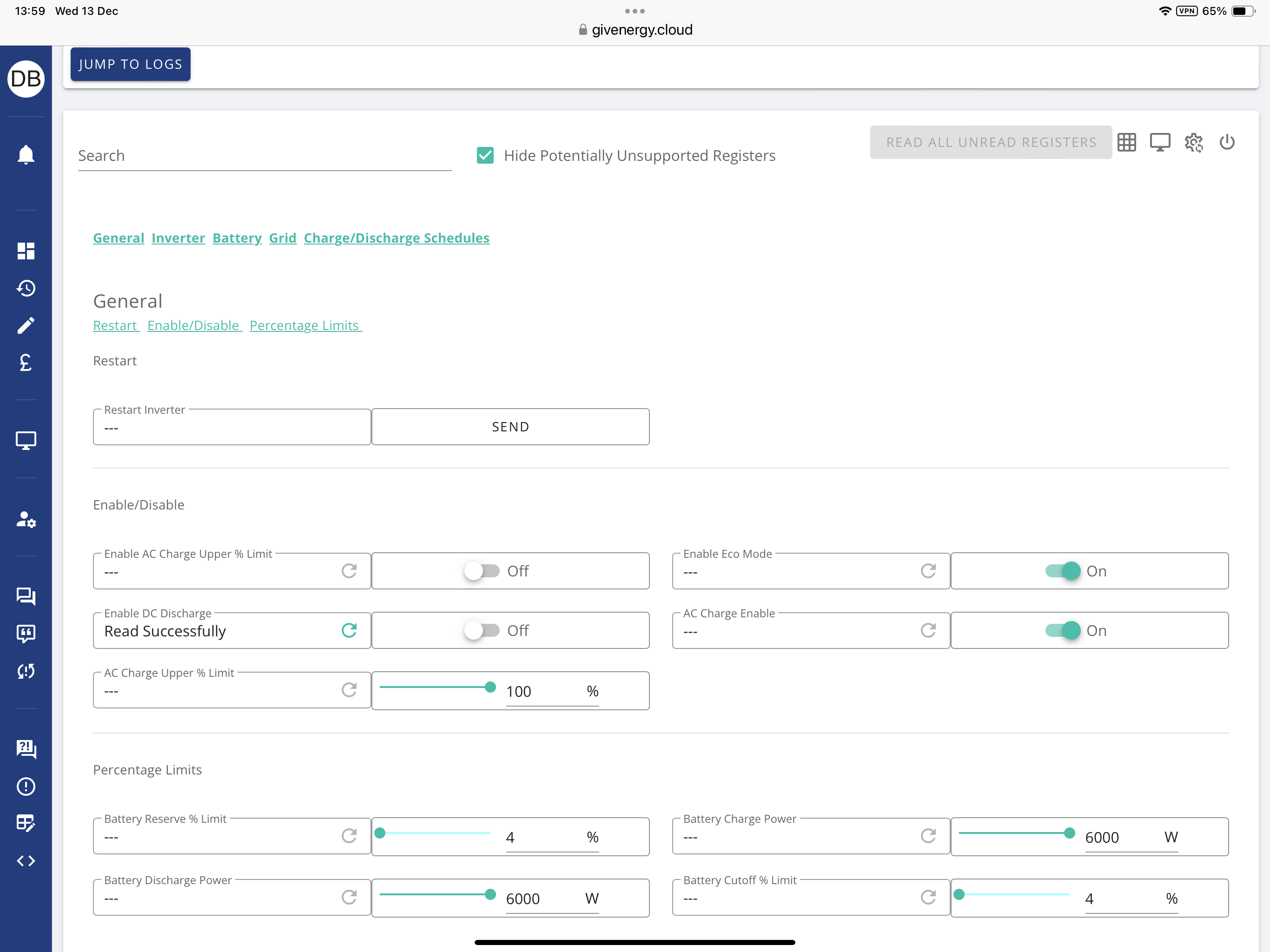
Is there the same constraint for charging? Just trying now (while there's some sun) on gen-3 hybrid: setting charge power to 0, it actually reports charging at 291W. And setting eg 1045, it actually reports charge rate of 1278.

Pause in the remote-control gets it all the way down to 28 ( BMS overheads ?).

(But setting export priority to grid-first still doesn't seem to have any effect.)

#26 hoggy

DD I believe it is an issue in both directions yes on newer gear. Mine is too old to say for sure.
I'm unsure if the other power sliders (in Watts rather than %) have the same constraints. They are entirely seperate registers in the firmware so it is technically a different route to check via the portal remote control.

The app however will still be trying to change the power % ones.

D
#27 DD

Waking an old thread...
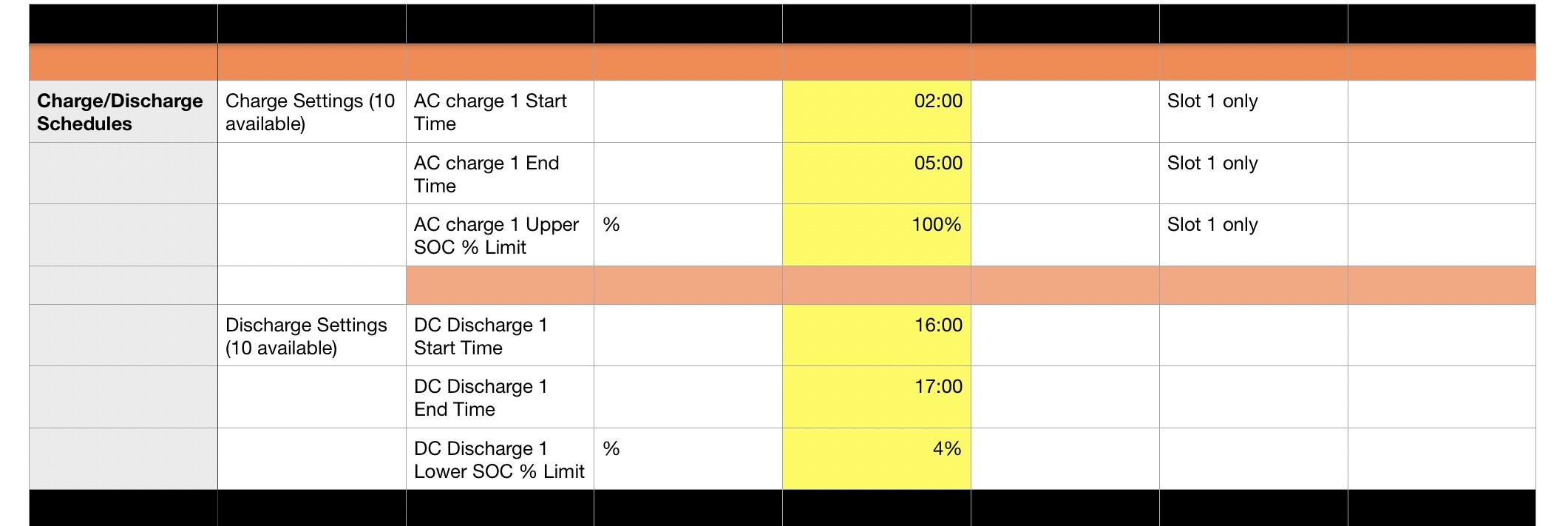
Looking at 'part 1' (3rd post). Unfortunately, all the tables are captioned 'Table 1'. They all have an AC charge upper limit - in the last table, it mentions that there are 10 available.

On my hybrid-gen3 system, the first 3 tables reference one shared setting, but slot #1 in the last table is a distinct setting (can be set with a different value). While the app controls the setting in the 'general' section ("AC charge upper % limit"), my inverter actually uses the one in the last table ("AC charge 1 Upper SOC % Limit").

Just wondering how other systems behave, and whether this explains several posts where the AC charging limit is ignored.

D
#28 DD

I had been under the impression that if you have a charging slot configured, but at the start the battery was already charged higher than the target %, then the battery would just continue to discharge normally, until it got down to the target %, and then it would hold the charge. But trying it just now, it seems to completely idle the battery: while the sun was up, it inhibited solar charging, and then when it dipped, it also inhibited battery discharge (so I was importing).

I have a hybrid gen-3 with slightly-older 305 firmware. Do other systems behave the same ? Or did I just cock up the experiment ?

G
#29 geoffreycoan

DD I believe my Gen 1 hybrid behaves similarly.

The inverter is in charging mode for the timed period, so it won't be discharging the battery. It needs to be in Eco or Discharging mode to discharge the battery.
If the current soc % is above the target soc % then it doesn't pull in from the grid, but where I think mine is different from what you have described is that my gen 1 hybrid will continue to charge from solar regardless of the target % - i.e. the target % ONLY applies to grid import.