
AIO Gateway reset..?

15 comments started 2023-12-13 last 2023-12-16
GivEnergy ProductsAC Coupled
C
#1 couplands

I have a recently installed AIO (1 week ago).

I put Ethernet cable in for the AIO, Gateway an inverter (Solis). All 3 were visible for the first few days and happily running on the wired connections.

However after a couple of days the gateway has gone offline and is showing as “lost” in the portal.

I’ve tested the Ethernet cable and it’s still good. All DIP switches are in the correct position.

What I’d like to do is reset the gateway, I know how to do that for the AIO but how do I reset the gateway..?

Any other fault finding suggestions also welcome.
D
#2 Daveb01

couplands

Have you plugged the Ethernet cable into the LAN port in the Gateway?
It should be plugged into the female connector supplied with the Gateway, then into the male Ethernet cable hanging down on the left hand side of the Gateway.

I would also give it a fixed IP address if you know how.

C
#3 couplands

Daveb01 it's plugged into the black cable with the F-F connector. And it was working for a couple of days.

Any idea how to reset the gateway..?

I know how to assign fixed IP addresses, but I can't currently connect to the gateway to do anything.

D
#4 Daveb01

couplands

I am not sure how your system is wired, each installer does a different thing. Plus it is a MCE requirement to put up the instructions on how to do this.

Because the Gateway acts as an EPS and the supply goes directly to the Gateway from the grid it’s not easy if it does not have isolator switches.

I have isolator switches, but in a nut shell mine says:

  1. Isolate the PV supply to your inverter
  2. Isolate the PV inverter to the Gateway.
  3. Turn off the AIO
  4. Turn off the isolator switch to Gateway (the whole house will loose power)

To turn it back on do the reverse, hope this helps

C
#5 couplands

Thanks for that, I don’t have an isolator between the grid and gateway so I’ll need to speak with the installer.

Is there anyway to reset the comms - WiFi/Ethernet without cycling the gateway power..?

C
#6 couplands

So, this morning the GW has appeared on the network again....I didnt do anything...!

It shows its status as "Waiting" in the portal, but at least its connected with an IP address.

Not sure how I fix the P address in the GW..?

D
#7 Daveb01

You can fix your IP address via your router, but where the settings are would depend on your router.

Also have a look every day for a few days to see last time connected to Portal.

C
#8 couplands

When I fix an IP address is usually fix it both ends, so there's no confusion. I can set it at the router no problem. Just not sure where I can fix it at the GW end.

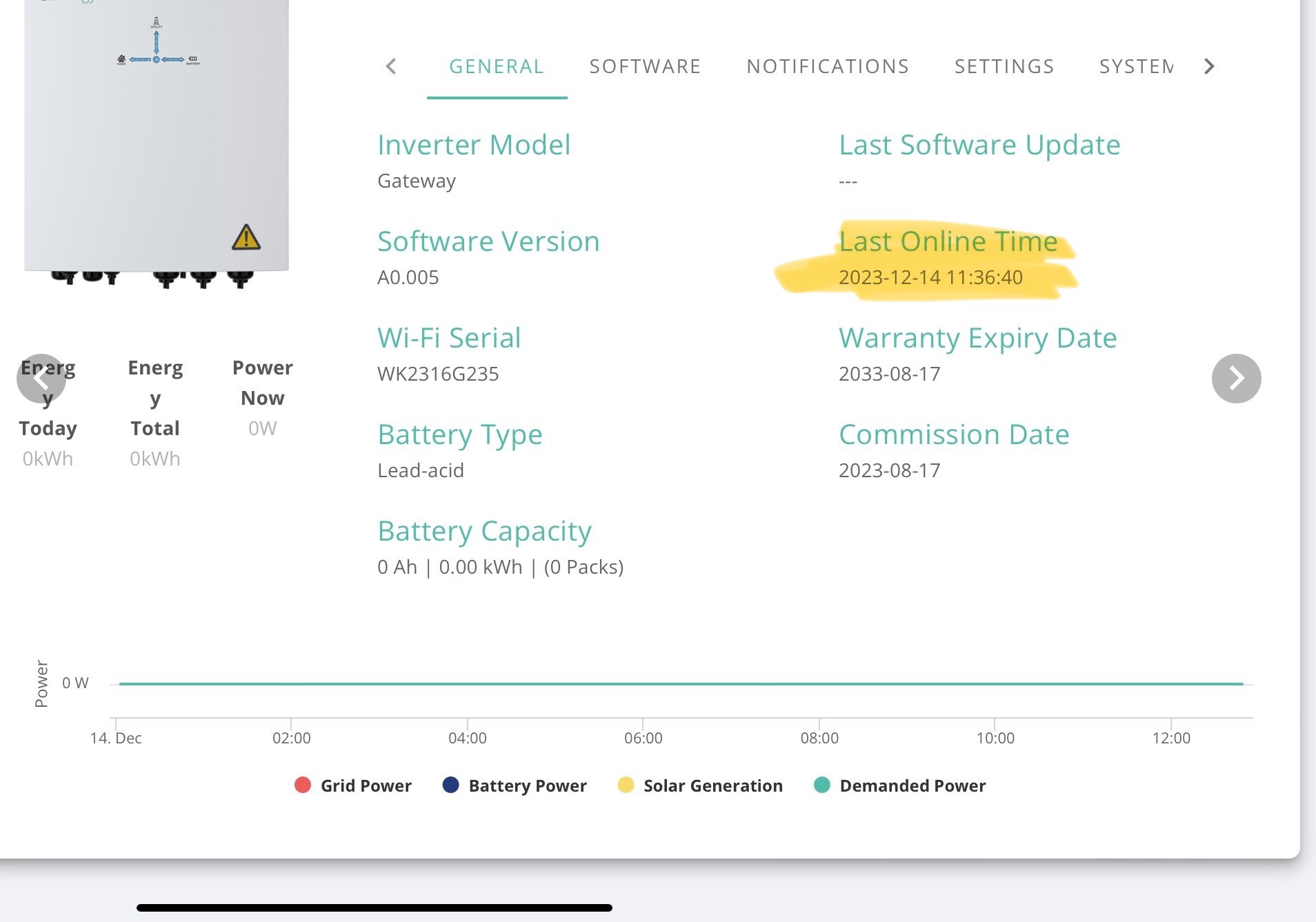
And yes, I'm checking the " :Last Online Time" constantly!

V
#9 Vestas

Daveb01 The "Last Online Time" is frequently complete nonsense, certainly on G1 inverters anyway. Mine currently claims the inverter was last online 5 hours ago, which is nonsense. Worst I've seen was it claiming the inverter hadn't been online for 3 days - again nonsense as the 5 minute data was all there.

I'd take that part of the portal with a HUGE pinch of salt were I you 😉

C
#10 couplands

couplands

EDIT: I found the ipconfig in the GW interface, so all good..;-)

V
#11 Vestas

couplands Its not a good plan to set a static IP address on the device itself.

You WILL at some point find yourself changing the DHCP server (router/AP/whatever) and you won't remember that device because its never been a problem. Then at some point in the future the DHCP server will assign a dynamic IP address to another device which is the same as that device which is going to cause interesting effects. You'll probably reboot the router and it'll all work again - for a while, then rinse, repeat until you finally work it out.

I got that T-shirt about 30 years ago 🙂

C
#12 couplands

Vestas

I always reserve the fixed IP addresses in my router to avoid this problem. I set the server DHCP to only allocate addresses above x.x.x.100 so I know anything below x.x.x.100 can be set as fixed IP.

I use this system on any routers/DHCP servers I install, but happy to learn a new approach..👍

D
#13 Daveb01

couplands

I would not set it in the Gateway either, just on the router. I never set it at both ends.
If you set it just at router end, and it works all good.
If you need to turn off the fixed IP you will still get a connection as the device will get one from the DHCP range.

If you set it at both ends then the DHCP may get confused if there is another device with that IP.

C
#14 couplands

Daveb01 even if I have reserved the fixed IP range in the router/DHCP server..?

When you say fix the IP address, do you mean just convert the address that has been allocated by DHCP to a fixed one..? I prefer all my fixed IP addresses to be in a certain range so usually change them. If I only fix at the router end how does the gateway know which IP address I've allocated..?

D
#15 Daveb01

couplands

Most devices have the ability yo be in Auto, so goes to DHCP server and asks for an IP.
The DHCP will give it one from your range set.
Under the covers it rents this IP for say an hour or a day, then renews it.
If your device goes off during the renew period, the DHCP could give this IP to a different device.
So if you fix it, the device will be given the same IP, and the DHCP knows this, so will give another device the next available IP. You can easily update the DHCP, IP range increase, etc and all devices comply.

You can fix it at both ends, but it is a pain if you need to change anything.

Up to you really.