
From Jan 1st battery charge drops drastically after 2.5 hours.

10 comments started 2024-01-14 last 2024-01-15
GivEnergy ProductsBattery
P
#1 Pete Thomas

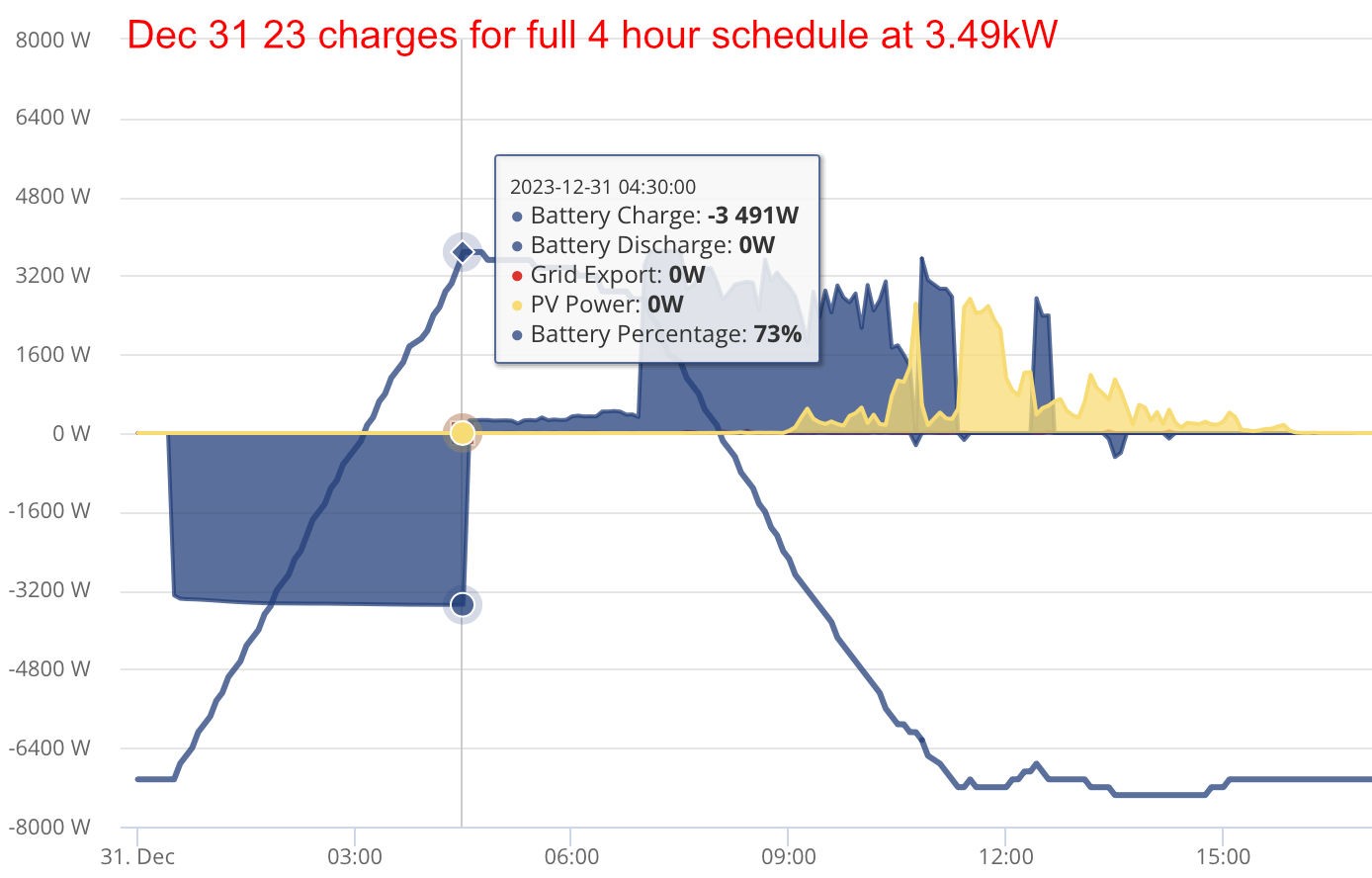
We have two 9.5kWh batteries and a 5kWh inverter. During the day, the batteries charge from solar, but overnight we have them scheduled to charge on a discounted rate: when they were installed, we were on Octopus Go, so this meant cheap electricity between 0030 and 0430. Until Jan 1 2024 the scheduled charging worked as expected, ie it would charge for 4 hours at approx 3.5kWh and consistently charge the battery to >70%

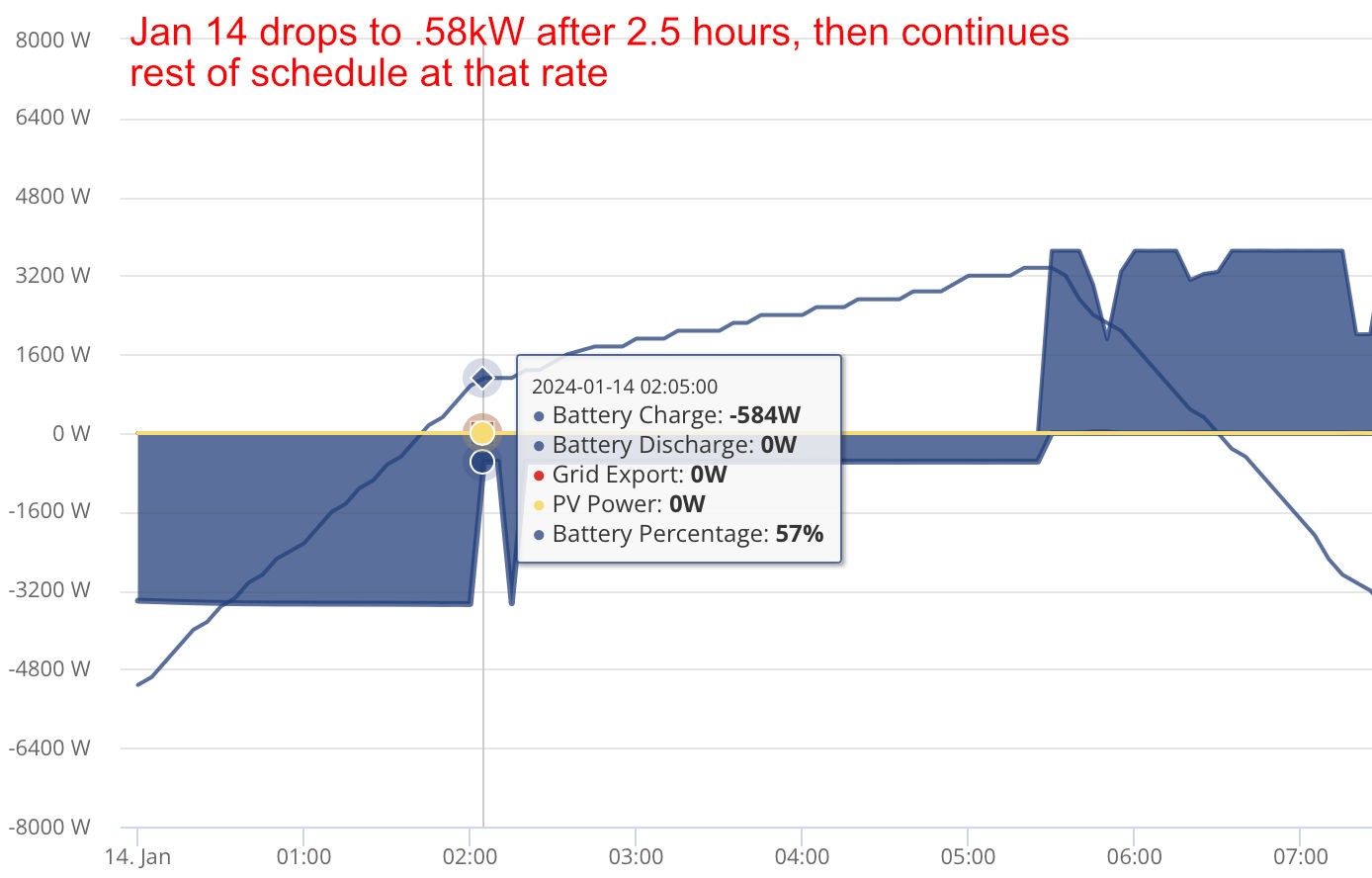
On Jan 1st we noticed that the battery was only charging to about 60% and over the course of a few days would only charge to 50%. I could see on the graph that it would charge at 3.5kWh for about 2.5 hours and then drop down to .5kWh for the rest of the scheduled charge.

We've recently switched to Octopus Intelligent Go, so we changed the schedule to charge between 1130 and 0530. The same issue has occurred. After 2.5 hours it suddenly switches to charging at 3.5kWh to .5kWh and so only achieving 80% charge. Over 6 hours we would expect the batteries to charge fully to 100%.

When I first noticed the issue I spoke to Givenergy support who said they could see a setting that was wrong so they changed it. The next night the issue was still there so they recalibrated the batteries the following morning. This still made no difference, with the charge rate reducing to 0.5kwh after two hours of charging. I reported this back, and the response this time was that there was no problem, and no issue to answer.

The whole response email said: "that looks to me as though it is the ramp down as the inverter is ending the schedule. pretty nominal. the inverter would not just cut-off 3.4kw instantly. it would ramp down to help protect certain parts of the system."

If this response is correct, I do not understand (a) why we saw no evidence of a ramp down before Jan 1 and (b) even if it needed a ramp down why it should take 3.5 hours of charging time.

#2 nophead

Have a look at the battery temperature graphs. Our ramps down when it gets to IIRC 28C, so we charge at a lower rate to keep it happy. Not sure why it would change on Jan 1st though unless you got a firmware update.

I could image if one cell started to degrade it might ramp down to stop it going over voltage. These batteries seem to have a mind of their own.

K
#3 kram

Firmware oops possibly? try resetting the charge window.

Otherwise it did get cold, is your battery outside.

D
#4 DD

There was another thread recently with similar symptom: charging rate reduced prematurely and stopped at 60%, with 2 batteries. It's something you might see if one battery had got close to full, and was throttling charge rate. In their case, only one battery had upgraded firmware (and calibrated ?) leaving them with mismatched SoC.

S
#5 SteveCook

Are both batteries on same firmware
Have both batteries calibrated

#6 hoggy

Amongat other things It can be one single cell going high that causes it to throttle.
Not sure if you have home assistant or the android app from Rubicube to help you spot if it's that (by seeing if any cells are much higher than the others when charging.)

P
#7 Pete UK

Pete Thomas

I had a similar issue to you (I have dual Gen 3 hybrid 5.0 inverters each with 2x 9.5 batteries on each, so 4 in total).

One pair was doing this, whilst the other pair charged “normally” and after a lot of head scratching and conversations with GE, it was finally discovered that one of the batteries had one faulty cell pack. It seems that if one battery is faulty in the pair it “hobbles” the charging of both batteries by reducing the charge rate from the inverter to protect the faulty battery (or a faulty cell or cell pack within the battery). Also I noticed that one battery (the primary) was getting much hotter (like +15-20c) than the other one, and appeared to be “doing all the work”. (This was the one that I thought was faulty -but it was the other one! Or that’s the one they changed anyway)
I’d ask GE support to check to see if you have a faulty cell pack. It sounds very similar to what I experienced.

On a side note(which may or may not be related); Are you finding that you have a large split between the indicated SOC % on each battery as well? Particularly at the upper and lower ends, Even when the voltages are identical (or within 0.1 volts of each other)?

I’ve had this problem since day one and despite changing two batteries (one replaced on each separate inverter) it’s still present. All batteries and inverters are on the latest software with “successful” re-calibrations. One pair is slightly less of a split, which could be 10-15% daily but the other pair could be 30% plus different. They seem to be “working” but I’m not sure if I still have a problem with one battery because I notice that one pair will charge up to 55.5 volts of so (100% ?). And the other pair stop at 54.0 volts or so (96%). Calibrations don’t seem to make any difference!

P
#8 Pete Thomas

I heard from my installer saying that cell 13 is faulty. He had ascertained this with information via the installers' own network

So this seems to explains it, although the issue just seems to be getting worse (only 60% charge in six hours)

It seems odd that an installer can diagnose a faulty battery cell but Givenergy support are unable, surely they should have access to all the same data?

P
#10 Pete Thomas

Pete Thomas It seems odd that an installer can diagnose a faulty battery cell but Givenergy support are unable, surely they should have access to all the same data?

And I had a previous email from Givenergy saying that it is normal because of

  1. conversion loss
  2. resistance drop off
  3. cable length.

So I'm not sure what to do now. The installer has contacted Givenergy but I';ve heard nothing from them so maybe this is going to be difficult to get fixed if they say there is no issue.

Last night, six hours charging only got it to 64% - I'm finding it hard to believe they think this is acceptable
