Timed Export > Eco

15 comments started 2024-01-19 last 2024-01-21
GivEnergy ProductsAC Coupled
D
#1 deanjesper

Maybe I’m not understanding the way this works correctly but if I set a discharge time of say 10pm to 11pm, shouldn’t I be able to stay in Eco mode and when the clock turns 10, my battery should start discharging? It’s a bit of a pain having to turn Eco on/off as at 11pm, if I’ve gone to bed, my battery is “paused”.

J
#2 Jellybaby

What are you trying to discharge, just to home or to grid to dump battery?

Are you wanting your battery to only supply house from a certain time?

What equipment do you have? If you click the below button you get more control options and an option to pause the battery discharge between certain times but it depends on what hardware you have to what options you get I believe.

It is best to leave it on Eco and if you wish to discharge to grid I found that doing it via the app causes the less problems and keeps eco mode on.

S
#3 SilverArt

deanjesper Unfortunately that's not the way it works. The fact that you choose to discharge means you take it out of ECO mode. The simplest answer is to leave it in ECO mode and use Wonder Watt [https://app.wonderwatt.com/](https://) if you don't have a pc permanently on, and/or look at [https://play.google.com/store/apps/details?id=uk.rubikcube.invertermonitor](https://) if you have a tablet permanently on.
You can set your own regular schedules and Wonder Watt even allows day of week scheduling.
Both are free and written by contributors on here.

D
#4 DD

deanjesper it seems to depend on hardware / firmware version. My gen-3 hybrid behaves as you want: remains in eco mode outside the timed window, and discharges at fixed rate within it. I use this for savings sessions, for example. The difference between the two timed modes is whether eco is on or off outside the time window.

D
#5 deanjesper

Thanks all, I use HA for automation but I’ve noticed that it toggles Eco on/off if I force export (dump to the grid) which is annoying, only because of timeouts so it can get stuck turning Eco back on. I have an AIO.

I might just need to create an automation to retry the toggle of Eco in some scenarios.

D
#6 DD

SilverArt Both are free and written by contributors on here

I think the scheduling is a premium feature on the app?

S
#7 SteveCook

I have an automation that makes sure Eco kicks back in

R
#8 Rubikcube

I find the various terms like timed export, force export, pause, and scheduled to be both confusing and misleading. I am sure you appreciate that with a 6kW AIO, if you home is consuming 7kW, and the sun isn't shining, you cannot export no matter what settings you choose.

Simply put it's just a battery and all it can do is either charge or discharge (or neither). That's why the control screen of my app (which is a chargeable premium feature) doesn't use terms like export. All you get is this simplified screen, which has all you need.
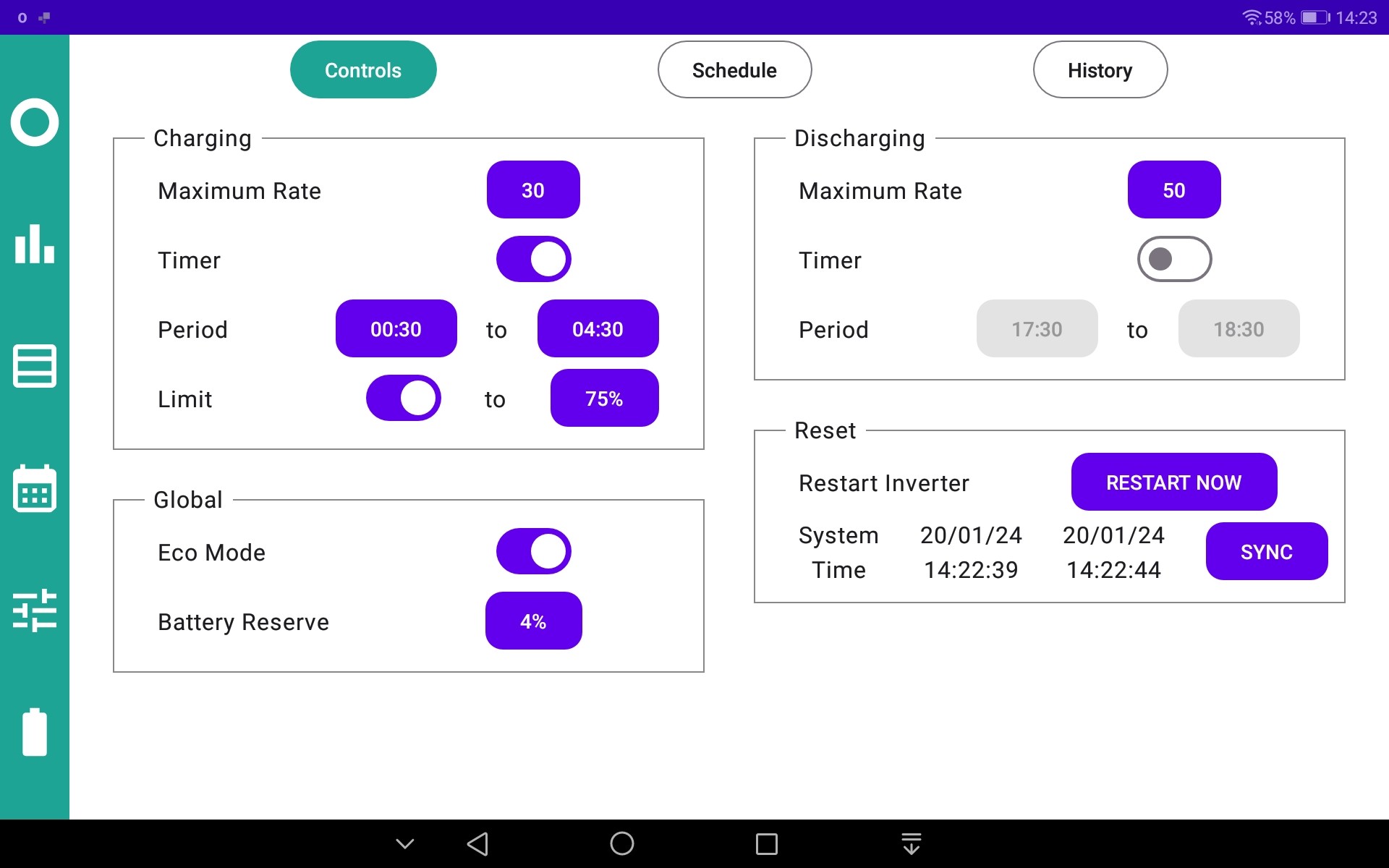
At first sight, for 10 quid, that might seem like a bit of a rip-off. But note the scheduler tab which allows you to adjust those basic controls on an automated schedule. Keep it simple, because complicated isn't the same as better.

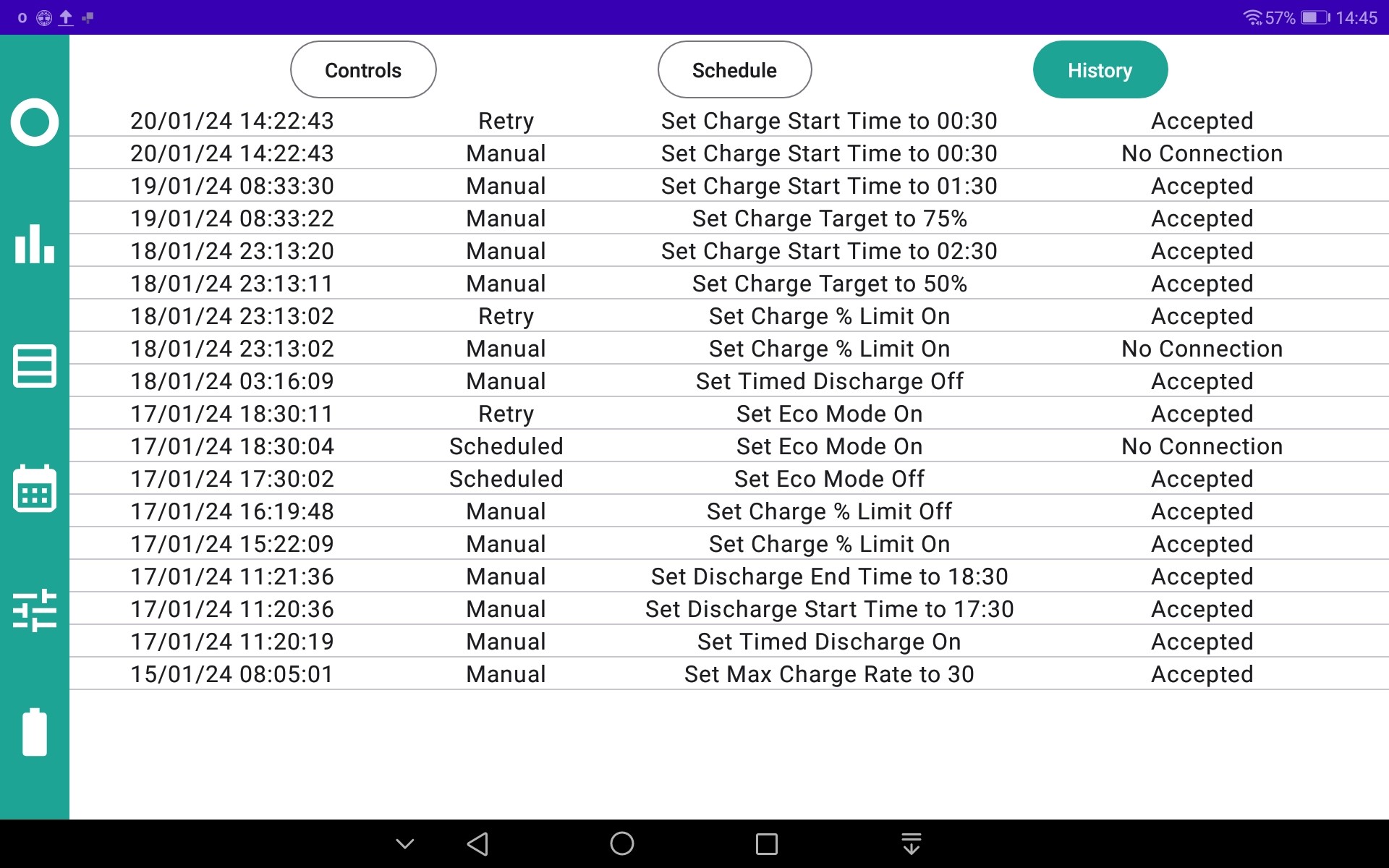
Then there is the issue of inverter disobedience. 98% of the time the inverter does exactly what you ask it to, but the other 2% it just ignores your commands (and once in a blue moon, it randomly recalibrates your battery, but that's another story). To counter this my app has a built in retry mechanism, that catches the misbehaving. Nothing is perfect (because you can't send a command to a broken inverter) but I think my app is ahead of other solutions in this respect. It certainly caught my eco mode after this weeks saving session (17th at 18:30)

G
#9 geoffreycoan

deanjesper Thanks all, I use HA for automation but I’ve noticed that it toggles Eco on/off if I force export (dump to the grid) which is annoying, only because of timeouts so it can get stuck turning Eco back on. I have an AIO.

You could probably change the way you do your automations to resolve this.

Notwithstanding the "inverter sometimes ignores your command" and "givtcp sometimes loses connection", I find these are quite rate and my automations are pretty reliable.

I tend to set the mode I want, i.e. I set force discharge, then when I want to stop I cancel the discharge and set Eco mode. These are all in scripts so my automations just call the right script.

S
#10 SilverArt

DD

DD I think the scheduling is a premium feature on the app?

Sorry, yes you are correct. I'd forgotten about the tenner, for the app scheduling..... old age!

J
#11 Jellybaby

£10 sweet jesus

S
#12 SilverArt

Jellybaby Good value isn't it.
It's well worth it for the well proven monitoring (which is still free) alone in my opinion, never mind the newly added scheduling.
Each to their own of course.

D
#13 deanjesper

£10 is good value, in fact paying for anything that can make life easier is

Does anyone know the impact of setting battery reserve to say 95% is when you’re in a charge window? E.g. battery charges 11:30-5:30 but battery reserve is 95%? Will it still charge? I am assuming yes and at 5:30 it’ll start discharging until it hits 95% and stops?

#14 Tenkaykev

SilverArt
Yep, that's what, A pint and a half of beer? For all the development and ongoing maintenance/ features. Shocking! 😉👍

D
#15 DD

deanjesper Does anyone know the impact of setting battery reserve to say 95% is when you’re in a charge window? E.g. battery charges 11:30-5:30 but battery reserve is 95%? Will it still charge? I am assuming yes and at 5:30 it’ll start discharging until it hits 95% and stops?

I thought the reserve was primarily a discharge limit. So I can't immediately think why it should affect the charging behaviour. (My reserve is down at something like 4%, and I don't expect it to stop charging any time it goes above that.)

Perhaps you mean the charge up-to target ? In which case, yes, seems plausible that it should immediately take notice of changes to that.