Octopus R&D not working

35 comments started 2024-01-22 last 2024-01-28
Beta PortalCloud PortalGivEnergy ProductsBatteryCards - Inverter
B
#1 Barry21

Hello,

I am reaching out for some help regarding the Octopus R&D with flux as have come to my wits end, below is my steps of what I've done.

1- Downloaded Octopus R&D
2- Setup account with octopus R&D
3- Added my octopus flux account number A-...... and can see the rate etc within the R&D
4- GivEnergy cloud portal to create token by going to Account setting - manage account security - manage api tokens - generate new token
5-Added token name - Added a expiry date of 90 days
6- Ticked box API full control - copied API
7- R&D added Device GivEnergy API V1 - Gave it a name - Paste in API Key
8 - R&D can now see my invertor
9- R&D Added a schedule for 02:00 to 05:00 to charge battery 100%
10- Problems start the schedule did not work and tried another time and still no luck.

I feel like I have missed something simple but can not work it out. I have the latest GivEnergy software, reset my inverter and still noting.

Reason for the R&D is I want to set two charge times so I don't get hit with the high import at peak rates if my battery is low and can just top it up if needed.

I should also say if I set the charge time via the GivEnergy cloud portal it works so this is pointing me to the interface between the two.

System
GivEnergy Gen 2 5kw invertor
9.5kw battery
22 350w panels

Any help or advice would be greatly appreciated.
P
#2 pacemaker

can you show the schedule setup that failed? there is another thread recently with examples that work if you take a look in the last few days. But if all you want to do is charge 2-5am, you can just use givenergy portal for that. R&D is really only useful for multiple charge windows per day and/or using Agile tariff

D
#3 DD

Barry21 it doesn't quite match your brief, but does the gen-2 offer a timed pause in the remote control section on the portal. If so, then perhaps rather than doing a second charge during the day, it's sufficient to instead pause discharge if it looks like battery might not last. Probably more efficient to use grid directly than to discharge the battery then have to charge it up again.
Presumably this in turn depends on how much solar you get during the day.

Z
#4 Zakalwe

I'm not sure that the R&D lab is working correctly at the moment. 2 weeks ago I logged in and got an error message saying that it couldn't read my Gen 1 Hybrid. I rechecked the API details, which were correct. I tried deleting the inverter and now cannot get it back onto the R&D Device page. I even deleted my old GivEnergy API, requested a new one and tried that. Every time it reports back an error saying "Cannot read from brand".

This has been with Octopus for over a week and they can't explain it or fix it.

Either the R&D system is booked or there is something wrong at the GE end.

S
#5 SteveCook

What does you R&D history tab show.
Did the events get triggered?

R
#6 Rbor

Barry21 Can you upload a screenshot of a failed schedule? There may be something that you haven't set up properly.
I have been using R&D labs recently, like you, to capture multiple charging slots (AC coupled battery: GE only allows 1 charged slot). I am on Agile and have even used it to pick out lowest rate half-hour slots successfully.

But R&D labs does have its moments......

  • This morning all the charging worked but, for the first time, ECO mode wasn't switched back on. Even after switching it on in the web portal, I had to restart the inverter, I have to restart the inverter to kick it into action.
  • I have also found that a half hour slot within a block may not work (randomly).

For me, it has usually worked really well but I think GE charging is more reliable. R&D labs is beta ..... and I am experimenting with it.
Rob

P
#7 pacemaker

Rbor I had my first dropped half hour window today too, gonna have to top up on higher prices today I think

S
#8 SteveCook

Relying on other servers communicating with each other and then via the internet to my inverter was why I went to Home Assistant.
My server on my network and not having to be reliant on internet vagaries

B
#9 Barry21

DD
Yes it dose support a timed pause on the battery for discharge in the remote section so I shall give this a go and see how it works for now.

Thanks for your advice too regarding charge and discharging the battery I had not thought in it this way.

B
#10 Barry21

Rbor
Am affriad I don't have any as I deleted it all last night at 2:30am and started again using the GivEnergy inverter as did not want to miss out in yet another charge session.

I can confirm that the R&D said it was sucessfull though as this what threw me even more.

I am going to give pausing my battery a go for now like DD suggested as am away to be working away from home for 3 weeks and want it to be reliable till I return back and hopefully by then will have a better understanding with some research of what I've been doing wrong.

They more I research the more it seems to have a mind of its own with relying on servers trying to speak to each other.

B
#11 Barry21

SteveCook
When I return home from working away for three weeks if you're willing to share on how to setup Home assist with a few bullet points that would be greatly appreciated or even point me in the direction of somewhere that dose.

I am new to this whole energy stuff and smart home technology so all is a first time learning curve.

S
#12 SteveCook

Barry21 Will do later as I am out today

S
#13 SteveCook

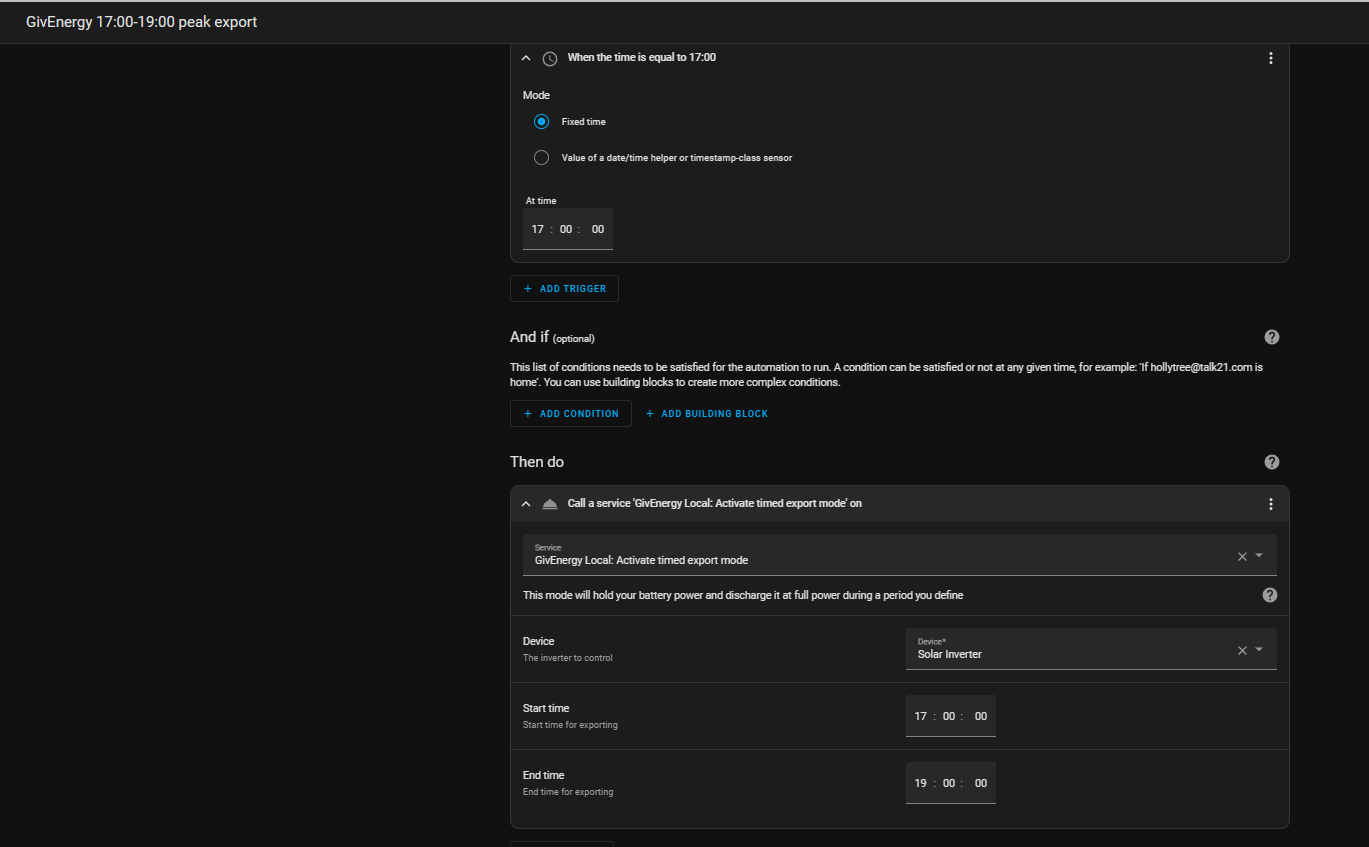
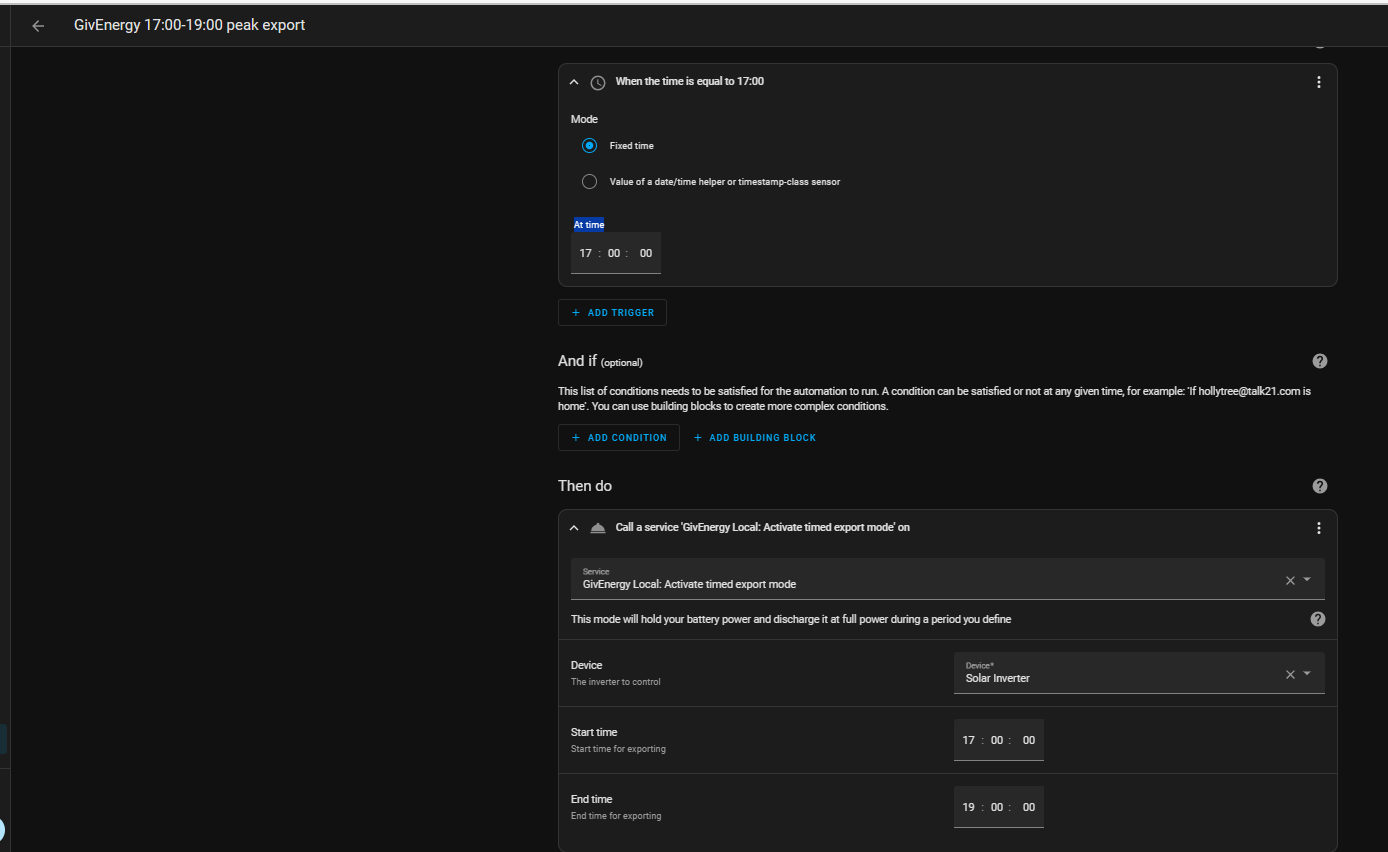
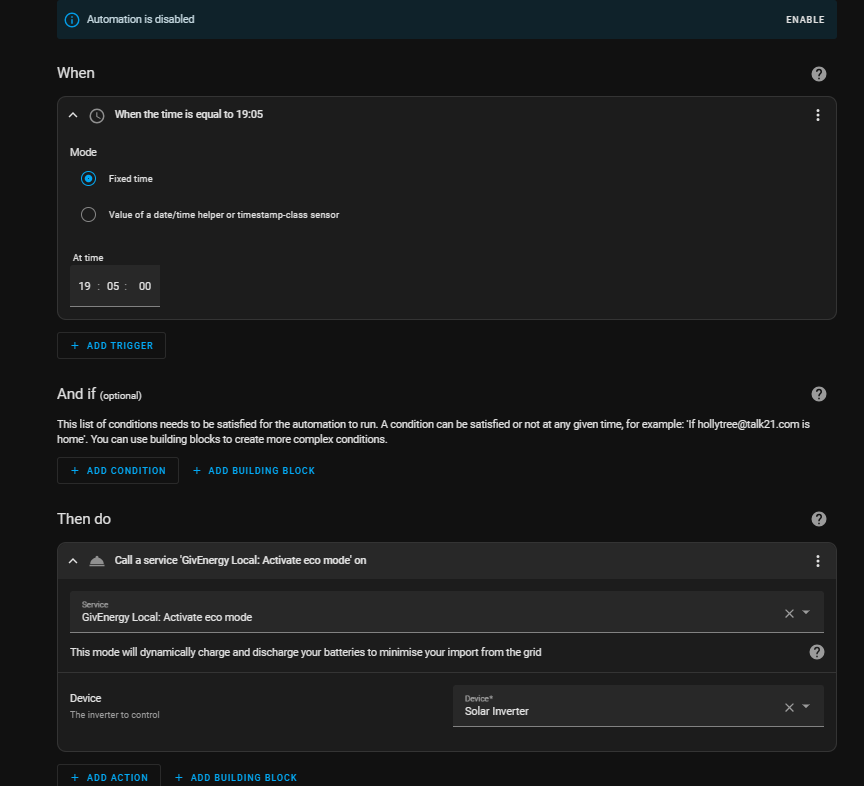
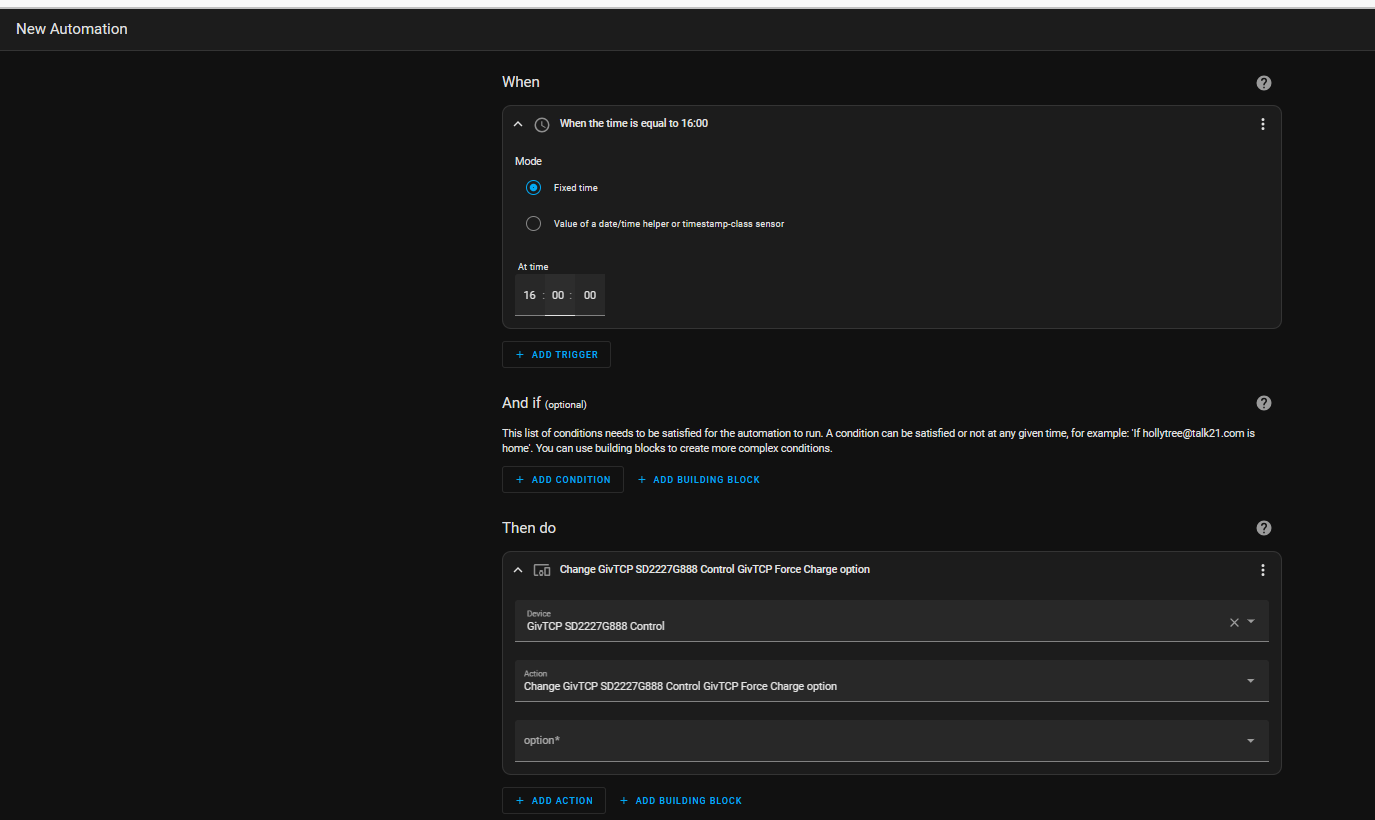
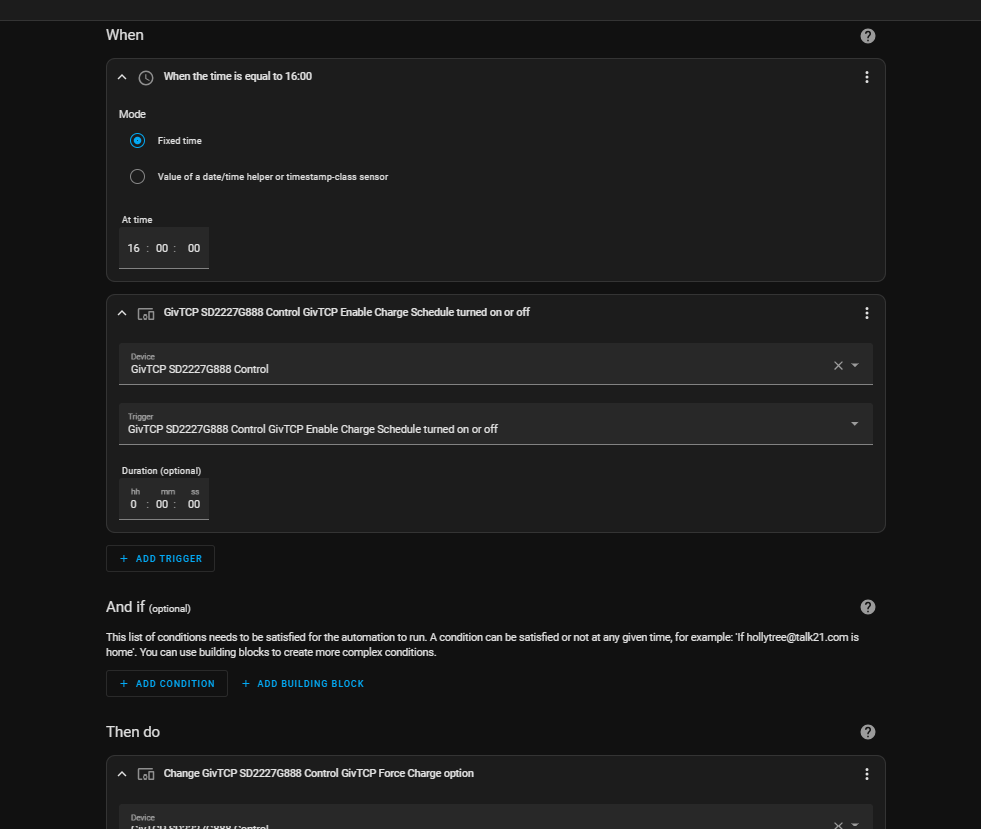
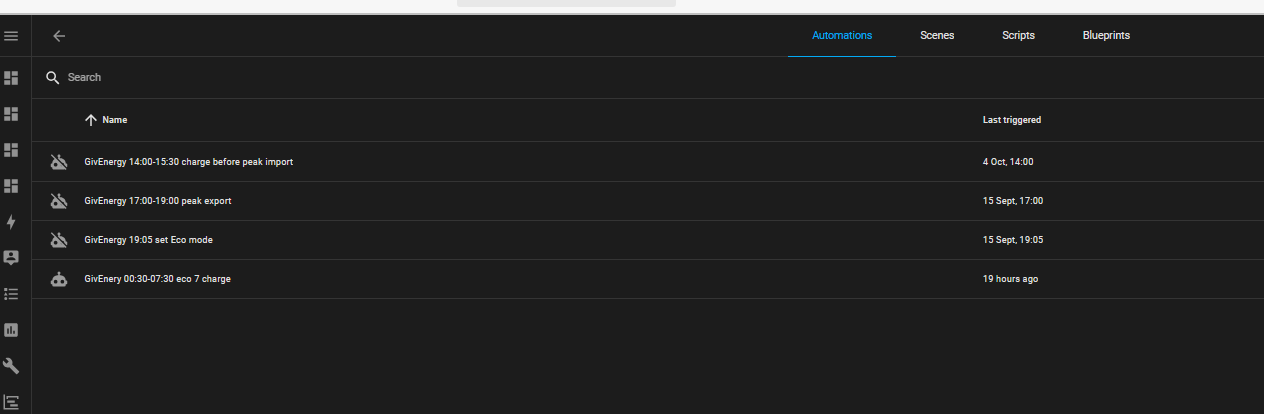
I created these 4 automations in Home Assistant for using Flux
Off peak charge, day top up charge before peak, peak discharge and a reset to Eco just in case.
I have expanded one of them so you can see what they look like

S
#14 SteveCook

Get a raspberry pi or similar. (i pinched an unused one from my son). Put Home Assistant on it.
Away you go. Took me about half a day.
Lots of simple guides on web how to get going.
Hardest thing will be getting a cheap pi
https://lazyadmin.nl/home-network/install-home-assistant-raspberry-pi/
https://www.makeuseof.com/how-to-install-and-setup-home-assistant-on-raspberry-pi-for-home-automation/#:~:text=Connect%20the%20Micro%20SD%20card%20to%20your%20system,Home%20Assistant%20OS%20image%20to%20an%20SD%20card.
https://www.home-assistant.io/installation/raspberrypi/
https://www.youtube.com/watch?v=NQ84z_Wa19k&t=89s&ab_channel=SpeaktotheGeek

B
#15 Barry21

SteveCook
Thank you very much for your help and guidance on it all.

I have managed to get the battery to charge and pause discharge but 100% will be looking into HA and your methods.

Once again thanks Steve and to all who gave advise, would be lost without forms like these.

R
#16 Rbor

SteveCook Steve
I had tried to set up automations in HA, I have watched Youtube videos, but every time I get completely lost.
In your expanded screenshot of your GivEnergy export automation, how do I go about setting this up?
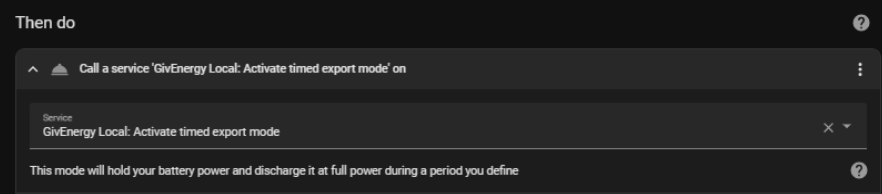
In the 'Then do section', you have the lines:

Where is this service? How do I set it up? Is it a script? Do I have to write this in yaml? I haven't a clue!
... and this is where I go back to the GE app to set up charging sessions.

Thanks for any help. I am usually pretty good with code but automations in HA have me stumped.
I feel like a numpty.

Rob

R
#17 Rubikcube

If you just want multiple charging periods, there is an easier way with an Android device (or emulator).

https://givenergymonitor.wixsite.com/tutorials/tariffs

See the Cosy section for multiple charge periods.

In the words of Homer Simpson: "If at first you don't succeed, give up!"

S
#18 SteveCook

Rbor
I did not use any yaml.
I just used the drop downs.
I put in an Eco reset just in case

R
#19 Rbor

Thanks.

I have had a look at the link and it looks useful.
Unfortunately, I am currently using Agile Octopus on an iPhone (iOS).

Rob

R
#20 Rbor

SteveCook Steve,

Thanks for the rapid reply.

My problem is a line:
Call a service 'GivEnergy Local: Activate timed export mode' on
Where do I find this service? And the similar line for Eco?
Or does this refer to a givtcp entity which you have given this description to?

It is this 'Call Service line that always gets me stumped.
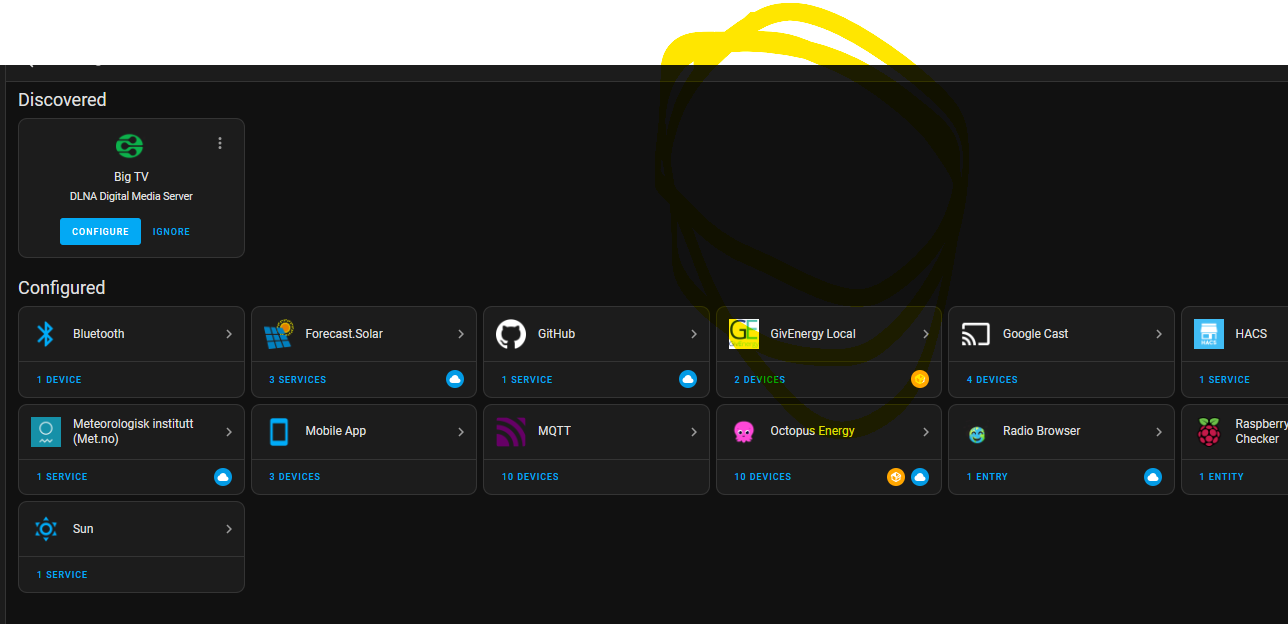
I have Givtcp installed in HA and I can see data such as SOC by selecting entities.

Thanks

Rob

S
#21 SteveCook

Rbor
Do you have Giv Energy Local installed.
I have and was using all these automations during the summer.
Octopus have somehow broken my smart metering and I am now on preconfigured Eco7 meter (an in discussion with Ombudsman). I want/need to get back onto Flux by Easter if I can.
There was talk that Giv Energy local was "broken" in recent HA update, but because I have not been using automations - see above - I cannot confirm or otherwise.

S
#22 SteveCook

SteveCook
i just tried to set up a GivTCP one. Take a look. Might need some tweaking

S
#23 SteveCook

S
#24 SteveCook

Just checked and all my Giv Energy local stuff is working

R
#25 Rbor

Thanks, I will give Giv Energy local a go. I had heard that updates of HA broke it so I will see.

Meanwhile, I have been looking at predbat but it is not for the faint of heart.
Setting it up is a challenge and it looks like a project.
The inquisitive geek in me ...... but I am thinking I am out of my depth.

Rob

G
#26 geoffreycoan

Rbor I think the latest firmware update from GivEnergy broke GivEnergy.local as they included extra security requirements (encryption?) that GE local doesn't comply with.

I think the developer of GE local is working to fix it, but if you are on a new firmware you may find it doesn't work.

GivTCP is the alternative to Givenergy local and this DOES work with the newer firmware, encryption requirements, etc.

If you do venture towards Predbat then it requires GivTCP. I started on GivTCP just because that's what the speak to the geek video walked me through setting up. I think the main difference is that giv local is simpler, it hides more of the inverter complexity away, so for a charge or discharge in givtcp you have to set multiple controls in the right sequence. Once you understand them (or borrow someone else's) you can put it in a script and job done.

Predbat is comprehensive. There's quite a few people here using Predbat including some that have recently gone onto it. Whether you need/want that level of battery and solar prediction, personal decision. Have a look at other forum posts

R
#27 Rbor

geoffreycoan Thanks for your advice.
I am going to look at the GivTCP automation that Steve Cook suggested.
I will also try running Giv Energy Local again although I am now running firmware 3015 on my GE AV coupled inverter and it may still be broken.

Meanwhile, I have dipped my feet into predbat, spent half a week grappling with Trefor's instructions and express-speed Youtube videos (paused and rerun many times), to say nothing of HA's cumbersome way of doing anything. I now have Predbat set up in monitor mode and have copied in various charts. I wanted to observe what it was and how it works. I have also looked at many contributions in the 'First night live on PredBat' thread.

In predbat, I haven't got anything recorded from Solcast – all the readings are zero. HA had accepted my API but no luck (logs state 'WARN: No solar data has been configured.')
Do you have any idea what is going wrong (I have plenty of API calls left according to my Solcast account; I got an account a long tome ago and still qualify for 50 a day)

I have to admit though that predbat looks mighty scary. I am unsure that I would want to hand over my system to this beast! But at least I know what it does, even if I don't choose to use it.

Rob

#28 Wonder Watt

Rbor If you run out of patience of fiddling with HA - as fun as that is for our inner geeks! - you're welcome to try our service out too. Multiple import and export slots are supported, even on Gen1 Giv hardware.

R
#29 Rbor

Rbor I have now cracked what I was doing wrong in setting up Solcast within PredBat.
I regenerated an API key and I now have solor stats in PredBat.

More exploring to do, looking at more of Trefor's videos and the 'First night live on PredBat' thread.

Rob

R
#30 Rbor

Wonder Watt Thanks.
I did have a look at WonderWatt and played around with the schedules.
Then I looked at the GE app and I seemed to have set up a scary schedule. I then changed the settings back to 'default' on the app and went back into Wonder Watt to make sure that I hadn't set any schedules as active.
I did find the Active/inactive slider confusing. I expected the button to be active when it was next to the 'Active:' prompt. I didn't realise that the 'Inactive' caption would change. Maybe something to look at.

I will take another look and perhaps test the system. It is good having many options to explore.

I do like R&D labs scheduling but it has sometimes dropped some half-hour slots randomly and once it didn't switch back to ECO mode at the end. A problem when trying to charging with cheapest Agile slots overnight.
There is a need for the type of system that you are setting up. Such a pity that the GE AC coupled inverter doesn't support more than 1 charging slots.

Rob


#31 Wonder Watt

Rbor Thanks for the feedback, and yes, loads of options to explore. Would be great to have more of your feedback when you look at it again, cheers!

R
#32 Rbor

Wonder Watt WW,
Thanks for your replies.

I did have another look at WW last night but as soon I scrolled down to the Agile section of WW, my battery started to charge. On the app and portal, the charge rate had been reduced and I think other setting had been changed. I then had to change my settings back to 'default' to get out of what WW had done! In WW, Agile was shown as 'Active', something I hadn't done. I then tried choosing a charging period but no slots had been highlighted in blue.
I have now tried to remove all my credentials from WW and have logged out.

On another note, both your active and Pause sliders are so confusing. You would do better with 'Action' or 'Pause' above the slider with 'Off on the left and 'On' on the right. As it stands, the choice is counterintuitive.

So I have departed from Wonder Watt until it works reliably for me for charging Agile. It has real potential but I don't see it ready for the wider audience yet.

I hope my feedback to you is useful.

Sorry ......

Rob

#33 Wonder Watt

Rbor Thanks for the feedback.

On the app and portal, the charge rate had been reduced and I think other setting had been changed. I then had to change my settings back to 'default' to get out of what WW had done!

No instructions are sent by just scrolling down to the Agile section of WW, unless you selected a 30 min slot that was due to run? So I'm not quite sure what you mean here.

We log all interactions in terms of API and there doesn't seem to be any logging for inverter instructions at all that were sent for your account?

I then tried choosing a charging period but no slots had been highlighted in blue.

When you initially choose a charge window, the slots won't get pre-selected for the current day. Probably something that should be done, good point.

On another note, both your active and Pause sliders are so confusing. You would do better with 'Action' or 'Pause' above the slider with 'Off on the left and 'On' on the right. As it stands, the choice is counterintuitive.

We updated the Slider buttons to have a message on the right that says "ON" or "OFF" as well as what that means now.

So I have departed from Wonder Watt until it works reliably for me for charging Agile.

Shame, we're always trying to improve and have a lot of happy users on Agile already as evidenced by feedback on our forums.

Always more to be done though, so thanks again for your feedback.

Cheers,
Wim

R
#34 Rbor

Wonder Watt I will login from time to time to see how the system is coming on.
In the Agile page, the text does state:
"The slots highlighted in blue are pre-selected automatically for charging based on your settings."
But this doesn't happen (at least it doesn't for me). This is what I was referring to above.

Best of luck with developing the system. I may be back!

Rob

#35 Wonder Watt

Rbor Thanks Rob - I see, makes sense to pre-select the slots upon Saving too. It actually happens as a background task at 16:15 and 23:00.

Good feedback, thanks again!