M
Hi everyone,
Looking at my Inverter Remote Control log, I see this:
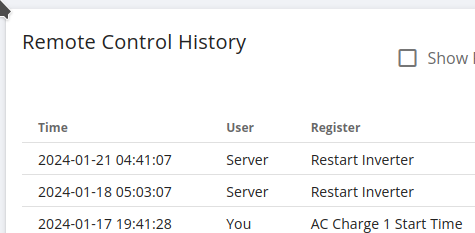
Is this "user" internal to my property or is there some deity (somewhere) watching over all 70k installs?
Regards, M.

Hi everyone,
Looking at my Inverter Remote Control log, I see this:
Is this "user" internal to my property or is there some deity (somewhere) watching over all 70k installs?
Regards, M.

mprowe tell you what i am?..."I'm afraid I can't do that. Dave."
Server is Givenergys server looking over all installs. Quite why it's decided to restart yours twice in a week is a little odd, does it do this each few nights or just started doing it?
During firmware upgrades it does that and it used to auto restart if certain things were not quite right although can't remember which specific things it was looking for!
Thank you hoggy (•‿•),
I think that this is new behaviour? It may (see below) be related to moving on to an Octpus TOU tarrif and overnight charging?
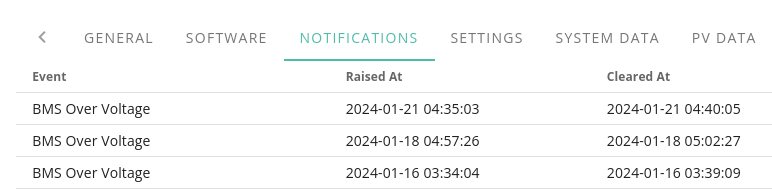
Looking around, I find this:
Now I look at the voltages for those three days:
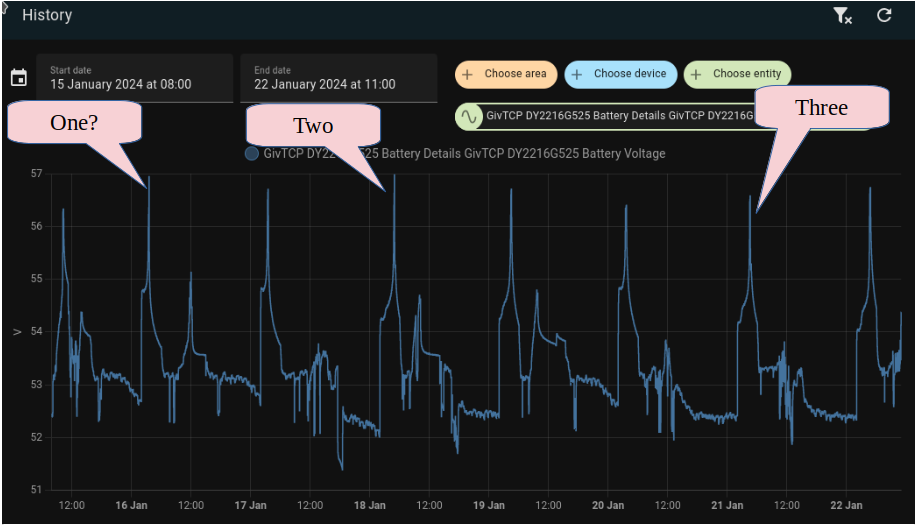
Not entirely convincing.... But maybe the low sampling (5min?) rate between my inverter and "the server" gives a different story to the above (GivTCL/Home Assistant) log?
I will, of course, experiment but what would you suggest is the most likly setting to reduce this problem (if it is indeed a problem)? Reduce the "Target SoC" or "Battery Charge Rate"?
Regards, M.
Just had exactly the same thing happen. Inverter went "idle" and needed a complete power-cycle to function again.
Unacceptable to remotely restart the inverter if its going to require a manual reboot.
I did ask GE. They are going to check if BMS Overvoltage has suddenly become a trigger for remote restarts to be fired. They weren't currently aware it was so could be either a bug or some change in the back end that they are unaware of.
If that's what they're doing then there's a problem with G1 inverters (maybe G2/G3).
Basically if the inverter is reset remotely during a timed charge when the SoC is at 100% then the inverter will go idle, dongle flashes blue & won't connect* until the inverter is power cycled. The inverter simply doesn't see the end of the timed charge cycle and stays idle/offline.
If that's what they're doing then this inverter is getting disconnected from their servers until they rectify their bugs.
*the dongle was actually connected to wifi & I can see it being given an IP address (static, set at DHCP side) but it wouldn't accept any commands for the inverter via the portal or app. It was however transmitting data to the servers and givTCP/HA despite the dongle flashing blue. Next time I'll try using givTCP/HA to reboot the inverter.
hoggy That's interesting, I hadn't noticed before but I have two server requested 'Restart Inverters' 5-10 minutes after BMS Over Voltage notifications - previous BMS Over Voltage notifications this month didn't have the same response. 16th Jan - no restart, 18th and 22nd Jan had restarts. Be interesting to see what happens in a few hours if the battery fills up.
Gen1 inverter here, normal operation continued after restart - but it was charging from PV in ECO mode.
Vestas I seldom look at the remote control log as all of my control work is done from HA which doesn't show there.
Just charged the battery to 100%, no BMS Over Voltage notification (first time since I went to 3015 - battery voltage did peak higher than some of the previous notifications), no inverter restart, but the inverter did miss one of the updates to the Givenergy cloud at around the same time the battery became full - perhaps the cloud missed it.

Two server initiated restarts today following BMS Over Voltage notifications, one of them when I switched the battery back on after shutting down the inverter for a replacement Smart Meter, one when the battery was fully charged.
Clearly GE are seeing a LOT of BMS Overvoltage notifications across their customer base with v3015 & I'm not in the slightest bit surprised.
About time they got someone who knows what they're doing with firmware as clearly the current incumbent isn't capable of doing the job.
...and shurely shome coincidence that the inverter notifications have defaulted to NOT being shown on the portal after all this time.....
... and another yesterday morning:
"Event","Raised At","Cleared At"

"BMS Over Voltage","2024-01-26 10:29:22","2024-01-26 10:34:24"

"BMS Over Voltage","2024-01-21 04:35:03","2024-01-21 04:40:05"

"BMS Over Voltage","2024-01-18 04:57:26","2024-01-18 05:02:27"

"BMS Over Voltage","2024-01-16 03:34:04","2024-01-16 03:39:09"
Must have been the sunshine! And its not even spring yet!
I've had two BMS over voltage alerts during sunny afternoons, 25 and 26 January
Around the time those faults cleared (according to the portal notifications), there is also a log entry for an inverter restart.
I've had three other over voltage alerts prior to the above ones that did not have a reboot (16 Jan, 9 Jan, Christmas Day). The only other reboot log entries are all on the commissioning day.
Gen3 hybrid here on 3015 battery and beta (I think) inverter firmware D0.307-A0.307.
I've also noticed that the total import today and total export today get reset to zero when my inverter is rebooted. GivEnergy have been able to replicate that and have raised it as a bug.
...and now no notifications at all on the portal. I guess that's one way of hiding major problems eh?
I too appear to have lost all notification history. Problem solved, no more BMS OV!
I sometimes have to click the refresh button under the table to see mine.
The good thing is that I have had 2 notifications and no restarts.
If I go into inverter/notifications from the portal sidebar inverter icon I can see the complete history but if I go into inverter/notifications from the expanded dashboard inverter card I see nothing.