
Notification of Grid Fault/Power cut on AIO

24 comments started 2024-01-23 last 2024-03-14
GivEnergy ProductsAC Coupled
J
#1 JTG

Hi - we're in the middle of a power cut tonight (1 hour in), and the AIO has made it painless 👍

Aside from a slight flicker of the lights, the first we actually knew the grid had gone down was when a neighbour called around to ask how come we still had lights on. On the GE App it looks like the icon for the Grid has a line through it, but it's pretty subtle. The cloud dashboard shows the grid voltage drop to zero at the time of the power cut too... but i wondered if i'm missing something and there was a more obvious way of knowing a power cut was happening. No obvious lights on the Gateway and no notification through the app?

#2 26Left

JTG You are correct - no notifications. Only way to tell I have found is the same as you, by checking the GE app to see that the grid is grey with a line through it, or checking the grid voltage and seeing it at zero.

Hopefully @TheDragon (GivEnergy) can pass on the feature request - a notification / email / alert of some variety would be helpful so that you could choose to reduce consumption to improve endurance in a power cut.

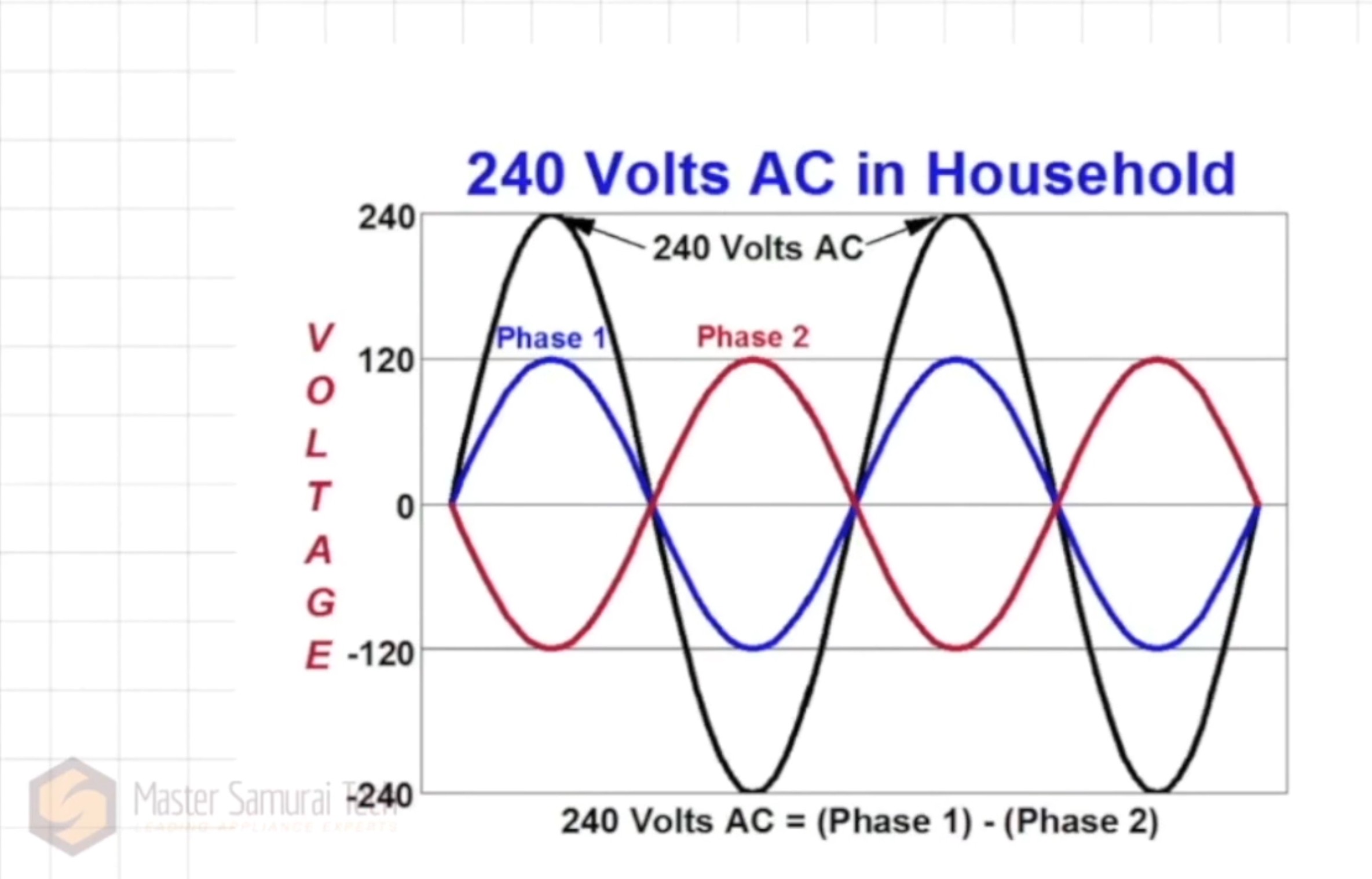
The only other thought I have is for something plugged in that would sound a buzzer due to the fact that the AIO runs in split phase when in island mode.

G
#3 gco

I've just gone live with a new installation here and I was surprised to find that there's no notification facility for grid failures. Until now I've been able to interrogate my router to see what's going on (it fails over to LTE and sends me a text if there's a broadband problem, and disappears completely if it's a power failure) but now with the AIO if there's a grid failure it just keeps going. We get more than our fair share of power failures here and a major reason for getting battery backup was to cover these. As you say, it would be very helpful to get a notification from the mobile app when the grid power status changes (fails or is restored) so we can conserve energy when necessary.

I
#4 Ivan

For Home Assistant users someone previously posted this automation either here or on one of the Facebook groups to advise of a Power cut or grid restoration.

Just need to replace xxxxxxxxx with your inverter serial number (5 occasions) and your mobile phone identifier (once).

alias: Grid Status Notifications
description: Notifies loss / resumption of grid status to home battery system
trigger:

  • platform: state
    entity_id:
    • binary_sensor.grid_status
      from: "off"
      to: "on"
      for:
      hours: 0
      minutes: 0
      seconds: 10
      id: grid_lost
  • platform: state
    entity_id:
    • binary_sensor.grid_status
      from: "on"
      to: "off"
      for:
      hours: 0
      minutes: 0
      seconds: 10
      id: grid_resumed
      condition: []
      action:
  • if:
    • condition: trigger
      id:
      • grid_lost
        then:
      • service: notify.mobile_app_moto_g62_5g
        metadata: {}
        data:
        title: Power Cut
        message: >-
        Connection to the grid lost - house is on battery.
        Current load is {{
        states('sensor.givtcp_xxxxxxxxxxx_load_power')|int
        }}W. Current state of charge is {{
        states('sensor.givtcp_xxxxxxxxx_soc')|int }}%.
        Battery will last approximately {{
        ((states('sensor.givtcp_xxxxxxxxxxx_discharge_time_remaining')|int)/60)|int
        }} hours.
  • if:
    • condition: trigger
      id:
      • grid_resumed
        then:
      • service: notify.mobile_app_xxxxxxxxxxx
        metadata: {}
        data:
        title: Grid Restored
        message: >-
        Connection to the grid resumed. Current load is {{
        states('sensor.givtcp_xxxxxxxxx_load_power')|int
        }}W. Current battery state of charge is {{
        states('sensor.givtcp_xxxxxxxxxxxxxx_soc')|int }}%.
        mode: single
        ``
#5 26Left

Ivan Nice. But also Eugh - another reason why I probably need to invest in learning HA and YAML in order to get simple functionality out of kit that cost 000s...

#6 PianSom

Ivan
Please can you re-post with three back ticks before and after the yaml? Thanks!

like this ```
V
#7 Vestas

PianSom ...and this is why we all love markup languages which happily validate nonsense code as long as you got the indents right 🙁

D
#8 DreadorUK

Im not seeing anything obvious as on or off in API I can see grid voltage, current, power, frequency

Im going to try power (9 when live here) as a bulb (homekit) as 0 off else on and hope its 0 when there is a power cut then I can put automation out to notify - just then need a power cut to test 🙂

Yeah I like to be different as I don't have solar I don't need to go full on HA and get what I need from node-red

#9 PianSom

Vestas
Oh, I so LOATHE yaml!

V
#10 Vestas

PianSom you don't know the meaning of loathe until you've experienced manufacturer-specific implementations of json. You simply have a mild dislike for yaml 😉

I
#11 Ivan

PianSom

Hopefully it looks better now!

alias: Grid Status Notifications
description: Notifies loss / resumption of grid status to home battery system
trigger:
  - platform: state
    entity_id:
      - binary_sensor.grid_status
    from: "off"
    to: "on"
    for:
      hours: 0
      minutes: 0
      seconds: 10
    id: grid_lost
  - platform: state
    entity_id:
      - binary_sensor.grid_status
    from: "on"
    to: "off"
    for:
      hours: 0
      minutes: 0
      seconds: 10
    id: grid_resumed
condition: []
action:
  - if:
      - condition: trigger
        id:
          - grid_lost
    then:
      - service: notify.mobile_app_yyyyyyyyyy
        metadata: {}
        data:
          title: Power Cut
          message: >-
            Connection to the grid lost - house is on battery.                
Current load is {{ states('sensor.xxxxxxxxx_load_power')|int
}}W. Current state of charge is {{
states('sensor.givtcp_xxxxxxxx_soc')|int }}%.
Battery will last approximately {{
((states('sensor.givtcp_xxxxxxxx_discharge_time_remaining')|int)/60)|int
}} hours. - if: - condition: trigger id: - grid_resumed then: - service: notify.mobile_app_yyyyyyy metadata: {} data: title: Grid Restored message: >- Connection to the grid resumed. Current load is {{ states('sensor.givtcp_xxxxxxxx_load_power')|int
}}W. Current battery state of charge is {{
states('sensor.givtcp_xxxxxxxx_soc')|int }}%. mode: single
#12 PianSom

Ivan
Thanks!

But that is just an automation which issues notifications if the entity binary_sensor.grid_status changes. That entity does not exist by default. How is it created and kept updated? Is there code for a template entity that you also have?

I
#13 Ivan

PianSom

Yep sorry - ibeen a month or so since I set this up and had forgotten the detail. Have this defined in my templates.yaml
Just uses the grid frequency.

      - name: Grid Status
        state: "{{ states('sensor.givtcp_xxxxxxxxxx_grid_frequency')|int < 49 }}"

        
G
#14 geoffreycoan

Nice automation thanks for passing it on.

Other than reuse in other automations/dashboards I can’t see there’s a particular advantage for creating the binary sensor and you could instead just directly trigger the automation based on grid frequency?
One less sensor and makes the automation then stand-alone.

I’d also suggest adding the following to the notify service call so a sound is played and the notification is persistent (has to be cancelled off the home screen):

  message: >-
    xxxxxx whatever
  data:
        visibility: public
        persistent: true
        push:
          sound:
            name: default
            critical: 1
T
#15 TX200

geoffreycoan just make sure your mobile phone or tablet is in silent mode overnight. Unless you really want to be woken at 3am cuz the grid has gone. 🤣

T
#17 TX200

PianSom I’m on android, won’t break through dnd by default it seems. 😂

And the iPad is downstairs, the mobiles upstairs but with Wi-Fi and mobile data off overnight 😀

P
#18 Patrick

It looks like when I get a grid power cut, the AIO kicks in and trips the sockets RCD in the house. Anyone else get that?

P
#19 Patrick

Patrick

Nvm, it was the washing machine.

To pull the conversation back on track, it would be nice to see an inverter log entry to say grid failure or EPS kicked in, because it was a pure guess that the RCD kept tripping because of intermittent power cuts and the EPS was kicking in (confirmed by a force off grid setting test)

J
#20 Jellybaby

Patrick Why would washing machine cause a trip?

P
#21 Patrick

Jellybaby

I don’t know yet, still investigating - it only happens on EPS, and it doesn’t need to be in active use. Just being plugged in and switched on at the socket (any socket) is enough to trip in the consumer unit.

Assume it might be a fault in the appliance, it is 9 years old, but strange it doesn’t happen when the grid is active - not on EPS.

#22 Tenkaykev

Patrick
Someone on another thread posted that the AIO has en exotic way of supplying 240v to the house after mains failure ( 120 - 0 - 120 instead of 0 - 240 ) and was causing rcd tripping. Sorry can't remember the thread but a forum search should find it.

V
#23 Vestas

Tenkaykev It apparently transpires that GE have chosen to use an IT system on the AIO, which I'm pretty sure doesn't comply with domestic wiring regs as it'll prevent RCDs tripping fast enough, if at all if there's a fault to earth. Anyone with RCDs tripping on switchover probably has a N-E fault somewhere on their existing wiring. Edit - and there was a particular type/brand which always tripped, can't remember what it was.

P
#24 Patrick

Thanks Tenkaykev , thanks Vestas

Sounds like it might be worth doing a little digging. I’ll see what I can find, and see about getting the washer safety tested.

Mines a hotpoint washer dryer, in case someone else has the same and finds this in search.

