EV charger settings guide

33 comments started 2024-01-26 last 2024-03-07
GivEnergy ProductsEV Charger
M
#1 Mark_LaPensee

Hi all
I have had an EVC for a few weeks now and this is the first day where I have had sufficient excess above the 1.4Kw (6A) threshold to experiment with pushing the excess to my car.
I am finding it incredibly difficult to get this to work reliably. Is there a guide?
In summary (on the portal, not the mobile app as I don't want to confuse things)

  • I set the config to "solar only".
  • do I need to set "plug and go" on or off?
  • do I need to set the "max charge power" to anything in particular?
  • why isn't the car simply getting all the excess? why do I have to configure anything at all?! Car plugged in... house battery full, excess being pushed to grid... stop... push to car... surely I shouldn't need ANY settings for this to work?

Help - very frustrated

#2 Smurfy

I am having the exact same issue.
Where can we get help from?

G
#3 Gadget

Possibly you could look up a Youtuber called "EVM" who has done a review on the charger and has just accepted a job working for Givenergy.

This video of his might help... [https://www.youtube.com/watch?v=ifGzGNC9I20](https://)

He seems like a very friendly and helpful chap so maybe you could ask in the comments of one of his videos?

R
#4 robwadd

In exactly the same boat. The settings and app are confusing and there is no manual to help setup the most basic of things (eg solar divert working).

You should only really skip writing a manual if your apps UX is so straight forward and natural that no one needs it.

M
#5 michaelhoskins

Yes, echo this. Today had some sun and had left the EV plugged in from a timed charge overnight. Thought I would see how it works, so switched to Hybrid Mode, which talks about excess solar going to the car. Seemed to work for a bit, but when the solar dropped off, rather than stopping charging, it started pulling from the grid instead, which is precisely the opposite of what I want to happen.

Appreciate everyone's use is different, but what I would like is a simple way to achieve:

  1. Timed charge at night if the car is plugged in (can achieve this currently).
  2. Charge from excess solar during the day (if battery full, though the option to prioritise one over the over, which I think is intended by the "split" option now, is probably useful) .
  3. Rarely use battery to charge car (though maybe some sort of override button to force battery to car in a pinch).

Just not sure how to consistently achieve this.

Thanks

Michael

D
#6 DD

michaelhoskins switched to Hybrid Mode, which talks about excess solar going to the car.

Looking at the EVSE install manual, it says hybrid mode is the one where it charges at at least 6A, or more if there is sufficient solar. Which does sound like the behaviour you saw. Was it solar mode you wanted?

The app docs seems to have different names for the modes: eco is solar only; eco+ is solar + grid, always charging at min of 6A, or more if there is enough solar.

Charge from excess solar during the day (if battery full, though the option to prioritise one over the over, which I think is intended by the "split" option now, is probably useful) .

I think there's a case for letting EV use peak-time before, even before house battery has filled, since EVSE has a minimum power requirement. House battery will charge with only a little bit of solar power available.
(Sorry, don't know how to configure that, though - may need to use API or an external agent.)

M
#7 michaelhoskins

Thanks. I think it's hybrid I want, to use both Solar when available and the grid at night.

Your comments make sense. I just think it could be a bit more intuitive particularly as it's part of the same ecosystem.

Another example is that the car shows as house load on the app and graphs etc. Again, it doesn't make much difference in practice, but just harder to look at the data.

Overall still very satisfied.

D
#8 DD

michaelhoskins no, I don't think hybrid means that. I have a zappi, and it offers the same mode: "I want to be charging now: use the grid if you have to, but increase the rate when solar is available".

Zappi would call it a "boost" to charge from grid overnight, but if you want to charge from only solar during the day (and stop when the sun goes in), I think it would be solar mode you want, not hybrid.

D
#9 Dabz

I'm really struggling with the EV charger - it just doesn't do what it's supposed to.

On Grid mode it's still using the solar generation to charge the car and reducing the draw from the grid. In hybrid mode, no matter what I toggle for battery/ev, nothing goes in to the battery.

The toggle to prevent the batteries being drained doesn't do anything.

C
#10 c_squared

Configuration D just doesn’t seem to work well. I installed mine with its own EM115 so run it in configuration C. Very fast to respond to changes in solar and currently no issues with the different settings or schedules.

For a period of time I have config D a go, just to see what it was like with the ‘extra’ settings to avoid battery drain etc. It just didn’t live up to expectations for me. Back to C it was.

M
#11 michaelhoskins

DD thanks for that. I may have misunderstood the different modes then. So if it's on solar mode, would it still allow a night grid charge?

Just more evidence that some fuller guides would be helpful...!

D
#12 DD

michaelhoskins sorry, don't know. I'm sure it ought to be possible, but...

C
#13 c_squared

michaelhoskins yes, if you set a scheduled charge.

This might be an over simplified view. Solar/hybrid/grid are like your day time charge settings. A schedule is most likely going to fit in overnight with a time of use tariff.

Solar only, you’ll need a healthy amount of PV being exported. Hybrid gives a bit more balance as it will blend solar and battery/grid to keep the minimum above 1.4kw. Grid only is maybe going to be those times when you need extra miles outside of a time of use cheap period.

L
#14 Lab140

c_squared what modbus address is the meter set at ?

C
#15 c_squared

Lab140 sorry, I don’t have the tech knowledge to answer that, let alone understand the question! 😂

M
#16 michaelhoskins

Interesting behaviour last night.

Settings were: Hybrid Mode, 0% from battery, scheduled charge between 0030 and 0430. Charge power at 32a. (7kw).

I also have a scheduled charge for my battery at the same time.

Reasonable expectation (which is what happened when grid mode) is that both the EV and battery charge from the grid at that time and then stop.

What actually happened is the EV drained the battery at 1.3kw (and actually still going at 0600) so that neither charged fully and the battery is fully drained.

No idea why - I don't see how those settings could produce that result!?

Good job I don't need to drive far today!

#17 blameTECHIE

I've had a lot of back & forth with GE support about the charger and it not working as expected via the available options.

It appears the bottom-line is that, when in configuration D, the inverter takes control and pretty much all other options are ignored - whether they be solar-only, solar-generation split, battery usage and it will pull from the grid if required.

This was also the case with a scheduled charge - set for 0200-0530 daily, plug the car in during the day - immediately started charging.

The only workaround I've found, at least until someone produces an interface that disables options depending on which config/settings (or at least some decent tool-tips/help files) is to set the charging on the car directly for the 0200-0530 window and rely on that to restrict the charging,

But it's a mess - and, as I noticed when going out to the car to check things over, in the app the advanced settings are 'beta'.

When my chromebox arrives then I'm hoping that HomeAssistant will be more configurable and be able to manage this a lot better - I'd really like to be charging the car in the day from excess PV power than relying on cheap charging at night and recovering that cost through SEG (even though I'd make a few more pennies through the excess PV back to the grid).

V
#18 Vestas

blameTECHIE So unsurprisingly its another half-working (bug-ridden) product from GE....

M
#19 michaelhoskins

blameTECHIE thanks. That makes sense because it charged great overnight when I used the cars setting for a coordinated slot, but was hoping I could rely on the charger.

I'll go back to that and hope there are some improvements...

L
#20 Lab140

blameTECHIE Interesting that's the same experience I have had with my charger. I've been speaking to support who have been telling me it's working fine as it's charging at 7.5kw in solar mode flattening the battery and drawing from the grid. I just want them to acknowledge it's not working and it's been worked on and not tell me it's working when it's clearly not.

I imagine they will receive a lot more complaints now it's getting a bit sunnier and the solar mode is becoming useful.

M
#21 Mg151

blameTECHIE have GE support acknowledged that it's not working as intended?

We've had some back and forth with them but no acknowledgement that anything is wrong.

You'd hope as we get more daylight hours they'd fix this ASAP.

V
#22 Vestas

Lab140 I imagine they will receive a lot more complaints now

They're only going to take notice of installers complaining if the AIO is any sort of indication.

D
#23 DD

michaelhoskins AIUI hybrid mode is intended to behave (approximately) like that - charge only at min power while there's insufficient solar. For overnight charging, it would be grid mode you want, wouldn't it (charge at fixed, configurable power).
Draining battery doesn't sound good, though - especially if you tell it explicitly not to.

R
#24 RichardNewbold

So, we're essentially saying that Config D and Solar just won't work as intended? Its mad.

M
#25 murrad

So i got my car yesterday and have set it up to grid only, no battery, etc, lo and behold, it pulls from the battery 🙁

I'm also on configuration D.

I have a 2nd issue in that set-up would not complete via the app, so GE did it over the phone with the installer, problem is my app still thinks it needs set-up so i have no control of the charger from my phone

D
#26 Dabz

I REALLY wish I hadn't gone with the GE charger, it just doesn't do what it's supposed to. If I could get my money back I would

D
#27 DD

Dabz If I could get my money back I would

Out of interest, have you tried? According to
https://www.which.co.uk/consumer-rights/advice/what-do-i-do-if-i-have-a-faulty-product-aTTEK2g0YuEy
within 6 months, faults are assumed to have been there from the outset.

If you've owned the item for less than six months, the retailer must give you a full refund if an attempt at a repair or replacement is unsuccessful.
The retailer can't make any deduction from a refund in the first six months.
...
However, you may find that the retailer will conclude that the product is of satisfactory quality by taking the product in for an ‘in-house’ inspection or arranging for it to be looked at by the manufacturer.

D
#28 Dabz

DD I don't think GE would accept it as a fault, it's just that the product has been launched before full software functionality is ready. It does what it says on the tin - charges your EV - but it just doesn't have the user control expected in terms of stopping battery drain, solar only, grid only etc.

R
#29 RichardNewbold

I've essentially made my peace that if the sun is out and I plug it in, it'll pull from my battery first and to just drop the charging ampage all the way down so it never pulls off the grid. That way I'm not importing or wasting the sun and keeping my battery in broadly a full state and putting something into the car.

D
#30 DD

Dabz it's just that the product has been launched before full software functionality is ready

https://givenergy.co.uk/products/ev-charger/

Charge your EV for free using excess solar, wind, or hydro generation.
Manipulate the flow of energy from your storage battery to your EV charger.

If it doesn't do those things, it surely fails the "as described" criterion ?

M
#31 murrad

murrad I have a 2nd issue in that set-up would not complete via the app, so GE did it over the phone with the installer, problem is my app still thinks it needs set-up so i have no control of the charger from my phone

just in case it helps anyone else, i fixed this issue by trying the set-up on an iPhone and it went through and completed after not working on two different Android phones

L
#32 Lab140

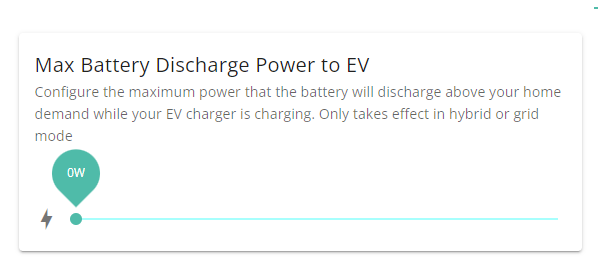
RichardNewbold I've discovered if you press the mode Prevent Battery From Discharging to E.V. switch in the advanced ( beta ) section it will limit your battery discharge setting to the house value at that time. The issue is it never updates it again until you press the switch again. ( Which does not stay on ) So if your willing to keep pressing the switch it does work.

The whole thing is a buggy mess and I just want them to acknowledge config D does not work and they will fix it. Support don't seem to understand how it should work either

M
#33 murrad

After managing to get my set-up to show complete in the app, and after getting my Audi Q4 registered for IOG, I started playing to get it set for charging and not using the battery.

I've configured mine on grid mode,, max charge power and plug and go

The "prevent battery discharging to EV" toggle, appears to just change this setting in the portal.

I then plugged my car in, car started charging, waited a short time and as Octopus go didn't notify to say it set a schedule i stopped the charge, unplugged, and plugged in again.

This time, octopus go set the schedule, checking the GE app, it was not discharging the battery, then the charging stopped itself and went into idle, so looks to be ready for tonight.

I then checked that app again and noticed i was drawing from the grid so changed the discharge power back up to max.

I then noticed later the discharge power went back down to close to the house load, so turned the toaster on. It pinged up drawing from the grid, then after the app updated 10s later, it was drawing from the battery. Discharge power was back up matching the house load. I've left it, and sure enough, it's gone back down to match the house load.

This combo does seem to work for me, just takes a little longer to react, so if you are watching the app, it looks