Batteries

38 comments started 2024-02-10 last 2024-02-13
GivEnergy Products
B
#1 Bolts

Hi can anyone please give me an answer to my problem.
I have 2 x 9.4 KWh Givenergy batteries.
Example. They start at 100% state of charge but the primary battery gets used more than the secondary battery over a few weeks the difference between them is very concerning Primary 32% Secondary 70%.
I phone up Givenergy who then do a battery calibration which merely drains down both of my batteries to the grid then fully charges both batteries from the grid which takes many hours and costs me money.
I’m insistent that there is a problem but the reply is always it’s a firmware issue.
I’m not a battery expert but if you put 2 or more batteries in series or parallel they drain evenly.
Can anyone with 2 batteries please let me know how they preform.
Or anyone with a comment or idea how they should behave.
Am I the only one with this issue.
Help
Steven

S
#2 SteveCook

Are they fed from a single inverter?
What kit do you have?

G
#3 geoffreycoan

If you have both batteries connected to the same inverter then the inverter sees them as a single large battery, but it doesn't really matter if one drains more than the other, when one is empty the other will still supply load.
Yes aesthetically they're not discharging the same but the system still works fine

K
#4 killythebid

Bolts You would think they do. One issue is that you are dealing with two battery sets with two different BMS systems in them and from what I have observed on mine they do not necessarily report accurately what the battery's SOC is.

BTW each of your battery sets is made up of many individual cells (or batteries) and they are connected in series and parallel to get the full battery voltage and amperage capacity. Any of them can read slightly differently to each other.

I have a similar issue to yours. I have 2 5.2kWh batteries. After calibration, the BMS systems will report matching SOC but after 24 hours it will drift apart until it gets to about 10% difference in a few days. Often when one battery is reporting 100% the other will be reporting 90% but the voltage is the same which suggests the BMS are not reporting correctly.

For my pair, it is always the primary that is reporting ahead of the secondary but one thing you need to consider is that just because a system reports a number to you it is not necessarily correct. I do not think my secondary BMS is reporting the correct state and possibly the primary too. The inverter pretty much always reports incorrectly too in that its single battery SOC will not be an average of the pair but something else sometimes higher than the average sometimes lower and not just by a percent or two.

I have decided that the best thing to do with my system is to ignore it as long as the whole system is behaving as I want/expect it to i.e. does it run the house without a grid when there is enough solar and in the winter do the batteries run the house during peak tariff hours from an overnight charge.

I have spoken to GE a couple of times but no real answer has been offered other than suggesting to get on the latest firmware that never makes a difference if I do. Updating firmware is often a whole other tale of trouble. It's nice when you stop beating your head against a brick wall.

Z
#5 Zakalwe

What firmware are you on? For me (Gen 1 HY-5, 2x8.2 batteries, 5.2kWp south facing array) 3012 is the best firmware. I tried 3013 and it was a disaster, with many SOC drops. 3012 seems to give the balance for me.
I do charge to 100% every night and I'm using Predbat which drives the batteries hard. I have it set to discharge to 18% every day. This routine seems to keep the batteries in shape with a small SOC jump at the top end ( normally less than 5%). I do not get any SOC drops.
How are you running your batteries? From my experience I think that these need regular charging to 100%. It might also be worth doing an OCV....discharge to about 20%, idle the batteries and leave them like that for at least an hour. After 30 minutes idle the BMS will try and balance the cells.

I do still get an imbalance between the batteries. Normally it is about 10-20%, but not as bad as it used to be on 3010 or 3011. It's just a fact of life with this system GivEnergy are incapable of creating a firmware that balances the batteries, does not kill the cells with over-voltage or causes massive SOC drops. If you are lucky, you might 2 out of three, but not all 3!

P
#6 Pete UK

Bolts

Hi,

Welcome to the club.

I’ve got the exact same issue as you. Since install in June 2023. I’ve spoken to GE on many many occasions and they say they use the voltage to do the balancing so the SOC is not as important (!?) - although it is as it cuts off/ reduces the powers in/out to the other battery on the pair and that’s what we all ‘use’ to control and look at what’s going on with the system! (I’m also on the software balancer beta trial)

I’ve got 4x 9.5 batteries. Two of each on a Gen3 Hybrid 5.0 inverter. On latest updates; Batteries on ver 3015. Inverter on ver 307.

I discharge them to almost empty (10-20% is all the SOC gets down to! - when I say that I mean primary 0%, secondary 40%, next pair primary 8% secondary 22%) and charge “fully” every night.
When they discharge, one battery (of the worst offending pair) gets down to 0% when the other could be on 40%. The primary battery has its voltage at 49v and the other one has it at 50v or so.
It does appear like the primary battery does more heavy lifting than the secondary on both pairs but particularly on the first pair. This is inferred by Looking at the temperatures of each battery on a pair. Primary might be 37c secondary might be 22c.

When charging;
(First pair never gets to over 96% and 54.0 volts, then trickle charges; the other pair ‘usually’ gets to 55 or 55.5 volts and 100%, although not always 100% !) sometimes it jumps up the last 4%, sometimes not, sometimes I see it at idle but mostly I see it charging or discharging at 38w for ever until end of cheap rate.

I get 40% split in indicated SOC on the first pair every single day even after a calibration. The other pair is more like 10-20%. The voltages are on the whole very similar (except at the low end on the more suspect pair).

It’s kind of a bit true that it doesn’t matter if they discharge unevenly except that it does, because once one of the batteries on a pair gets to 0%, it stops both discharging and the other one could be at 40% indicated with power left in it and a higher voltage indicated, so that is effectively unusable energy trapped.

I’ve had two of the secondary batteries replaced already one on each inverter. But I’m suspecting there may be an issue with the primary on the first pair but as I don’t use home assistant, Giv TCP or have an android phone I can’t monitor the individual cells, I am reliant on GE checking the individual cell voltages for me. Which they usually say is “fine”. But I still experience the massive SOC split same as you.

N
#7 Newman

AC3 and 2 x 8.2 203 / 3015

I have a similar issue and it is related to 3015 update, no problems with 3012.
Both batteries run very similar voltages but massive discrepancy with SOC. When SOC gets to 40/45% it drops c.25%.
I will ask for a new calibration when temperatures are better, if that fails I will ask to revert to 3012.

P
#8 Pete UK

Mine has been the same on all s/w versions I’ve tried.
Didn’t make any difference 3012,3013, 3015.
All the same.

No sudden drops in SOC though - Just the exact same symptoms as the OP

P
#9 Pete UK

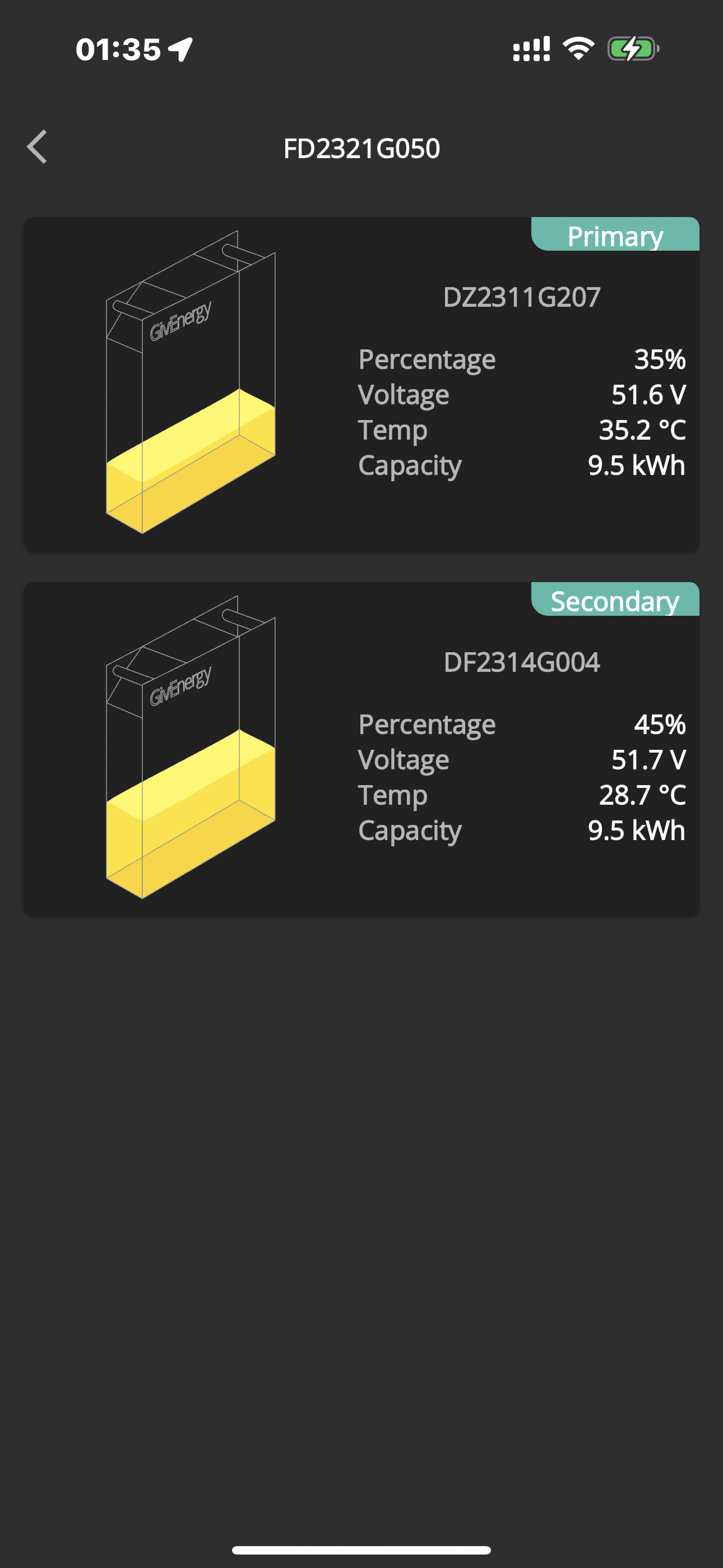
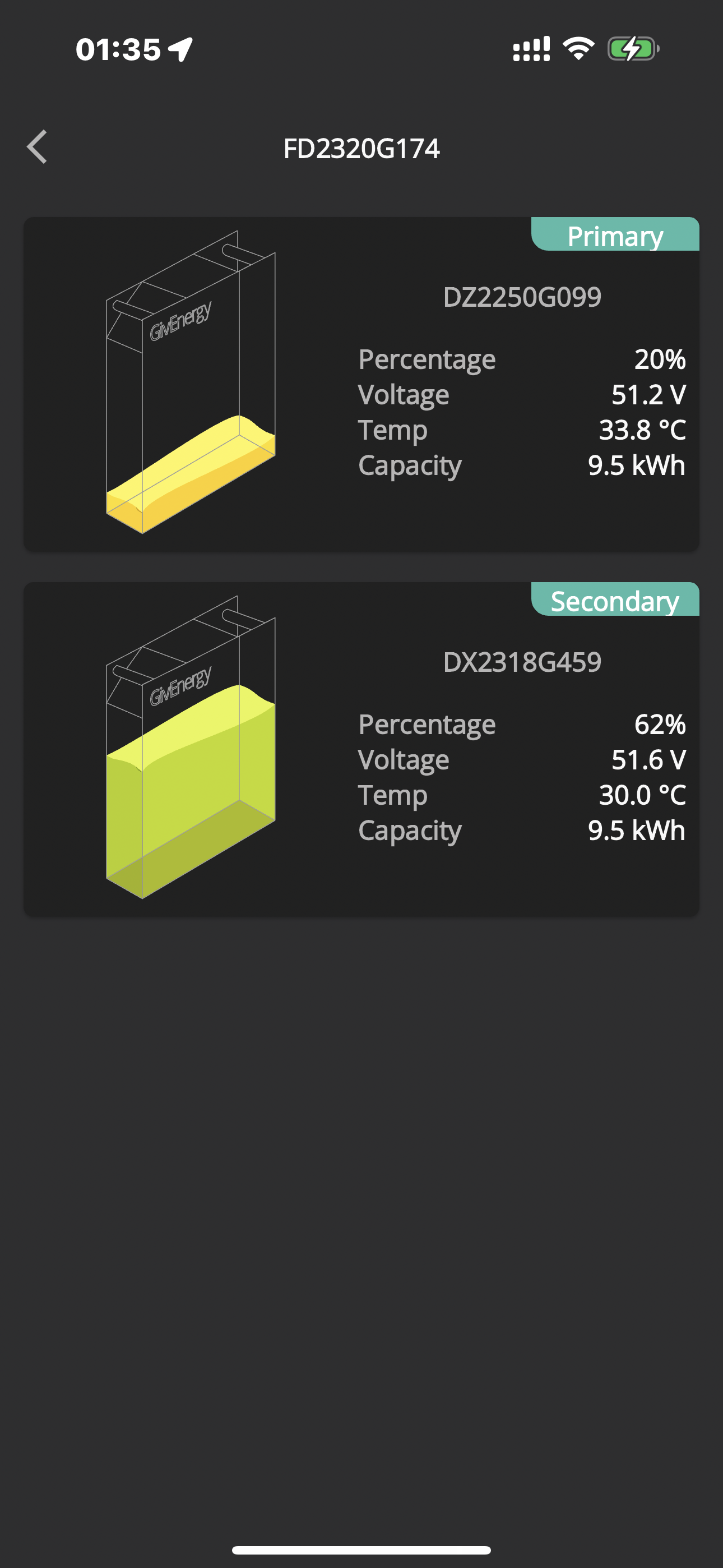
This is right now (12:50)

On the first screenshot the primary started the day at 94% (54.0v) at 04:30 and the secondary started the day at 100% (54.0v) at 05:00. They never got above that voltage.

On the second screenshot the primary started the day at 97% (54.9v) at 05:00 and the secondary started the day at 97% (54.9v) at 05:00. Why 1volt less on the first inverter pair? And why never about 54.0v …?

Both set to continue charging until 05:30.

All the voltages are balanced right now but the SOC difference will just increase to over 40% difference as the day goes on and after the discharge period in the evening. (an hour and a half or so before 23:30)’


K
#10 killythebid

Why are you all seemingly accepting the SOC displayed as accurate?

Especially if GE is using voltage rather than SOC percentage to manage things as stated above.

On my 2 battery system, I get different individual SOCs and an inaccurate combined SOC the combined SOC is never the average of the two battery percentages.

#11 Simon_C

Pete UK It’s kind of a bit true that it doesn’t matter if they discharge unevenly except that it does, because once one of the batteries on a pair gets to 0%, it stops both discharging and the other one could be at 40% indicated with power left in it and a higher voltage indicated, so that is effectively unusable energy trapped.

P
#12 Pete UK

killythebid

Errrrmmm. We’re not. We’re saying it’s not accurate.

And because of that it makes things very awkward for charging/ discharging and setting limits because the only settings the user can set are based on these “not accurate” SOC percentages not voltage !

The inverter may “see” two packs as one big one but it’s a pain when the two packs are charging/ discharging at different rates and to different levels at any given time. For example; both stop when one battery goes down to 0% and 49.0volts, while the other one is at 42% and 51.0 volts.

Are you seeing over 40% difference?

K
#13 killythebid

Pete UK

40% difference in what the SOC? We have just agreed I thought that the SOC stated is not accurate so how do you know it is 40% different?

Usually in my 2 battery system as I have stated above is around a stated 10% but usually very similar voltage. I pretty much ignore the stated SOC it is not useful.

We should all remember that voltage can be measured directly from the battery SOC cannot, it is at best calculated by the BMS or worse guessed at by the BMS. The SOC of lithium batteries is not as easy as a lead acid-based battery tech .

K
#14 killythebid

Simon_C That is true but the BMS does recover some of the unused capacity. I have noticed a couple of times when the overall SOC gets to the 4% reserve it shuts down to idle only for the BMS to realise there are a few more Wh down the back of the sofa so to speak and restart the battery with a revised SOC of about 11% then starts feeding the house again for a while until it again gets to the reserve value.

P
#15 Pete UK

killythebid

I’m aware of what you’re saying.

If I only saw a 10% split and only after a few days like you, I’d be ecstatic right now !

Ok, so if we ignore the reported batteries SOC %, and one battery says 49.0v and the other one says 51.2v;
How long are you going to discharge to export for?
How many kW are left in each battery?
How do you get anything out of the second battery when the inverter has decided they are both empty and stops discharging from either battery?
How would you know how long they would last for? (If at all !)

This is the issue.

It’s not just an aesthetics problem it’s a “Trapped unusable energy” in the secondary battery problem.

K
#16 killythebid

Pete UK Your second sentence means you do not get what I am saying.

I do not know if the difference is 10% at all it is just what the system is reporting it could be anything more or less or they are the same as each other. This is just the same for the 40% difference stated on your system. If is agreed that the SOC is inaccurate one cannot use it to compare the two batteries.

I realise not knowing makes for confusion if you are using the system in a more involved way but I do not. I just charge the battery at night (during the winter) to 100% (or as much as it will take) and drain the next day until I can recharge again. Some sunny winter days that may mean starting charging again at a stated 50% (who knows) or a stated 10% or so on dull rainy winter days.

The inaccuracy of the BMS is frustrating and it should be much better but I just realise that GE is just not there with its firmware as yet. However, my system overall is working as I expect and I just let it get on with it.

As in my response to Simon_C the "trapped" capacity is not fully trapped as the BMS in my observations realises that there is some charge still there and restarts the battery supply after around 20-30 mins of idle.

P
#17 Pete UK

No, I do get exactly what you’re saying but it’s not just the percentage split. It’s also a split in the voltages as well 49.0v on one and 51.0 on the secondary (in my case anyway), at the lower end. If you’re not discharging to almost zero every day, you may not be seeing it.

I’d love to charge down to 10% on both. Or zero even.
It’s just that they both don’t because when the primary on the pair gets to indicated 0% (49v) the other one is indicating 40% (51v). They BOTH stop discharging. So at least 51-49 volts worth remains in the secondary battery ! However many kW/% that is !

So when one is at zero and the other is at 40% the minimum (combined) I can get to is 20% “indicated” - or 50v on average BUT one has 49v and the other has 51v so it’s not empty.

Can’t explain it any simpler than that.

B
#18 Bolts

Wow I not pleased but reassured that I’m not the only one having issues. I genuinely thought it was a fault with one or both batteries and was going to insist on getting replacement batteries. It is basically a product not fit for purpose why should I be responsible for monitoring the system and getting GivEnergy to recalibrate the batteries.
You guys seem very knowledgeable can you answer a questIon.
If one battery is much lower than the other is there a way of switching that battery off and only using the other battery?

P
#19 Pete UK

Bolts

Well yeah, you could turn one off using the button on the top RHS side. But then you’ve lost half your system. They also don’t like being stored for long periods when empty, so make sure it’s charged before you turn it off. And don’t leave it off for a really long time (weeks), otherwise it might not start up again 🙄 !
Personally I’d just leave it on. My system is ‘working’ but I’m only able to charge and discharge about 32kW instead of the advertised 100% DOD of 38kW for 4x 9.5kW batteries.

You might actually have a problem with one battery or the other. And so might I bearing in mind they have replaced two already. For me, it’s hard to tell exactly being on the balancer beta trial, and being told “it’s working fine”, “the cells look ok”, “don’t worry about the indicated SOC we use voltages”, etc, so I’m not sure if it’s the hardware or beta balancer software limiting the system. But it seems like at least the two of us have the exact same problem where the split in the ‘INDICATED’ SOC becomes a massive 40-45%.

There are a lot of people complaining about 10% ish difference between battery pairs indicated SOC but nothing like 40-45%. and nothing that interferes with the operation too badly. Which to be fair if it was me I wouldn’t be too concerned either.

Are you seeing a difference in voltages between both batteries at the lower end and large differences in the temperature of primary and secondary battery when charging/ discharging at the lower and perhaps upper) ends as well as me?

It’s always the primary that gets much hotter, and then when it’s almost full or empty, it cools down slightly and the secondary then gets a bit hotter ~ almost as hot as the primary and very occasionally similar or hotter but usually the inverter cuts the power right down before the secondary catches up in terms of temperature.

Do post back and let us know how you get on.

R
#20 Rogerbu

I had the same issue. A widening SOC discrepancy between two 9.5 batteries on a AC3.0 inverter. The primary battery having the lower SOC.

I used the DIP switches and cables to flip primary & secondary batteries. The discrepancy narrowed to almost nothing.
6 months later, the discrepancy is coming back again, but it is again the primary that is lowest SOC. ie the other physical battery.

So despite the physics, it seems to me that the primary is being used harder.
I will again flip primary and secondary soon.

D
#21 DD

Pete UK Well yeah, you could turn one off using the button on the top RHS side. But then you’ve lost half your system.

Is there any benefit in turning one off, charging the other to 100, then reversing to charge the other to 100%? (Or I guess you don't need to turn one off initially - can just charge until one maxes, then turn it off to allow the other to fill.) Out of intersest, does the lower one contine to charge (even very slowly) afer the leading one reaches 100%, or does it completely stop?

I think the BMS does benefit by seeing a charge to 100% from time to time - I just had a big jump from about 80% to 100% this morning (on a single-battery system), but I generally just run about 80% to 20% most days, so it had been a while since it saw 100%. The BMS does seem to lose track a bit.

P
#22 Pete UK

Rogerbu

Very interesting. Thats very helpful. This is what I suspect also; the primary is doing more work. Next time I am physically back in the UK I will try swapping them over (I work abroad, which makes things a bit harder.)

In the meantime I am also going to ask GE to check the cells again when the battery (batteries) are at ‘empty’ and ‘full’ to see if I have a dead cell bank on the primary.

What are you seeing for the voltage when your batteries are ‘empty’ and ‘full’ ?

P
#23 Pete UK

DD

Also I’ll give this a try when back in the UK.

Yes, I am seeing the charge drop off rapidly to “1,500w”, 858w, 200w or 300w, then 38w, and the secondary continues to charge a bit more, but it’s so slow that it never really catches up with the primary in the off peak period and rarely gets to “idle”. This dropping off in power happens always at about 90% (at 03:30/ 04:00) on the first inverter pair. And then both end up about 94% to 96% (54.0 volts) at 05:30.
The other pair continues to charge to 94%, sometimes one jumps up to 100% after a while, sometimes not. (55.5v or 55.0v) sometimes they both get to 100% sometimes not. I think this pair is working more ‘correctly’ - albeit with 10-20% discrepancy over the range (Usually 10-14%) and the jump up at the top end.

The first pair is acting more like the OP’s though.

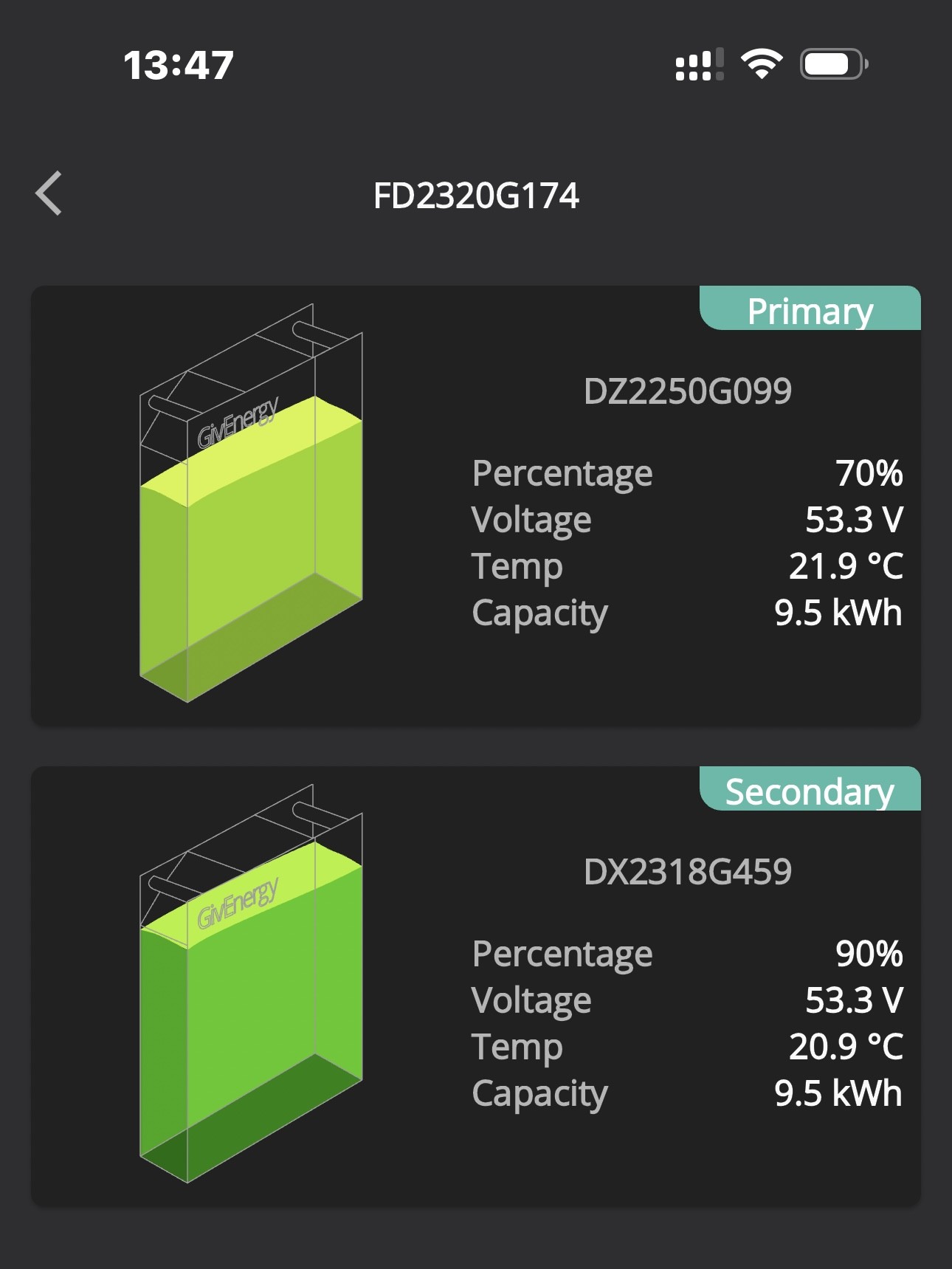
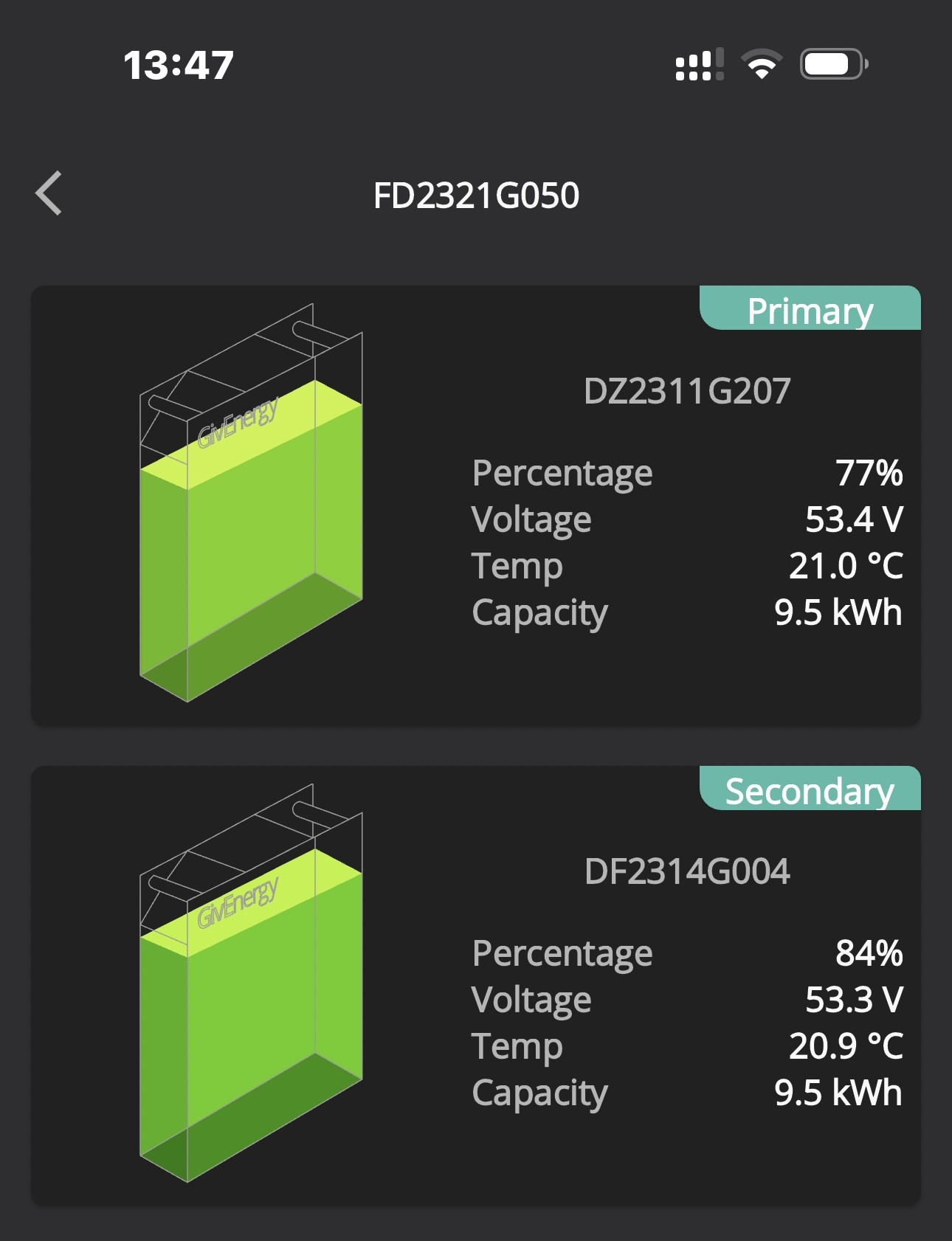
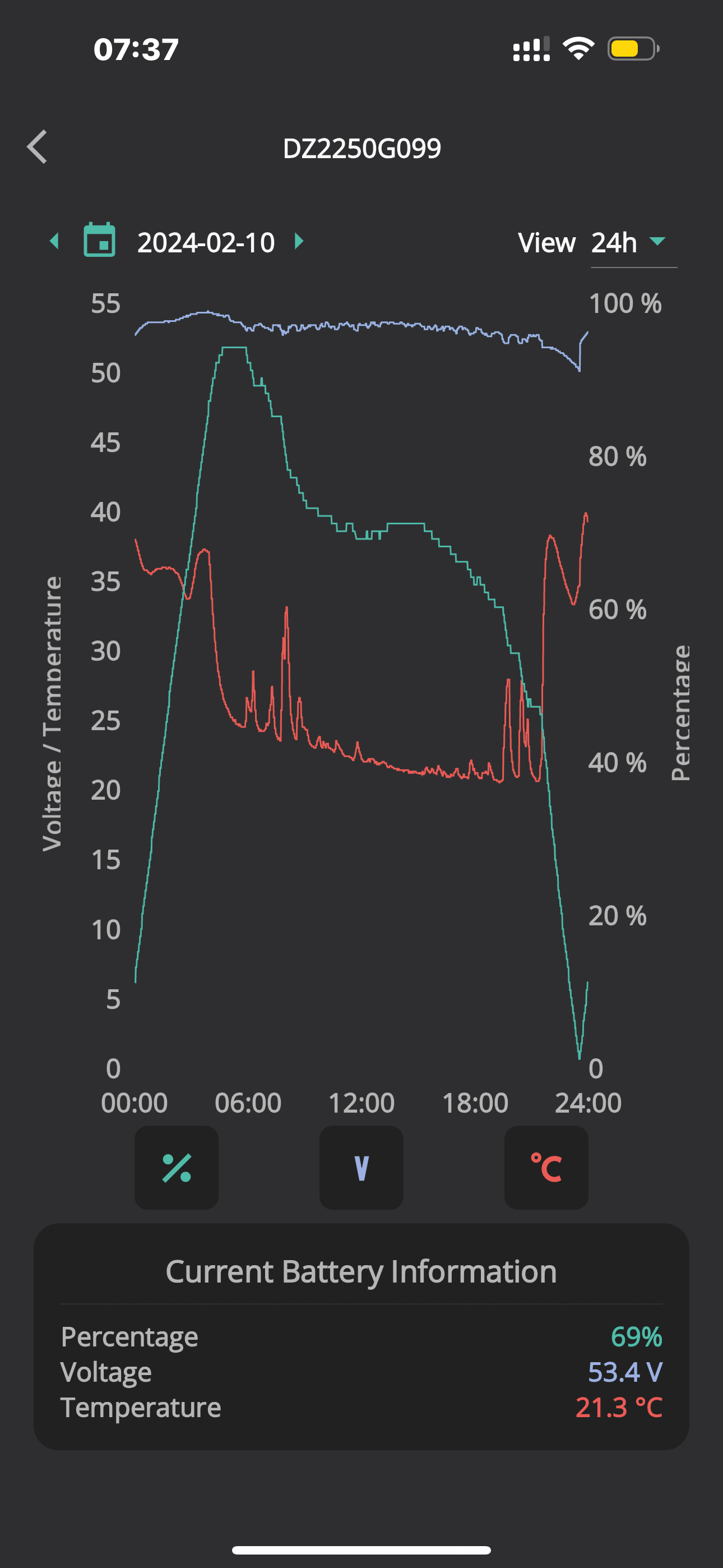
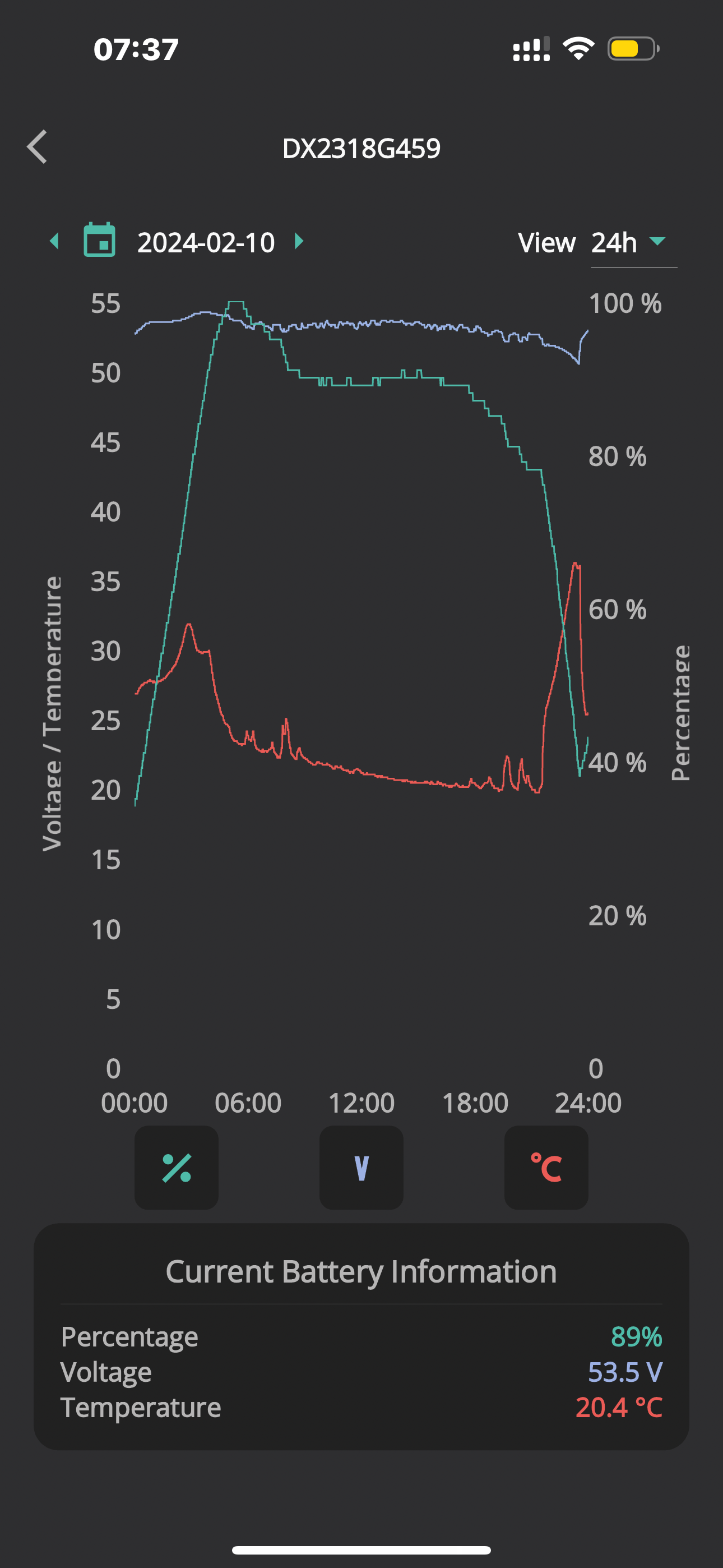
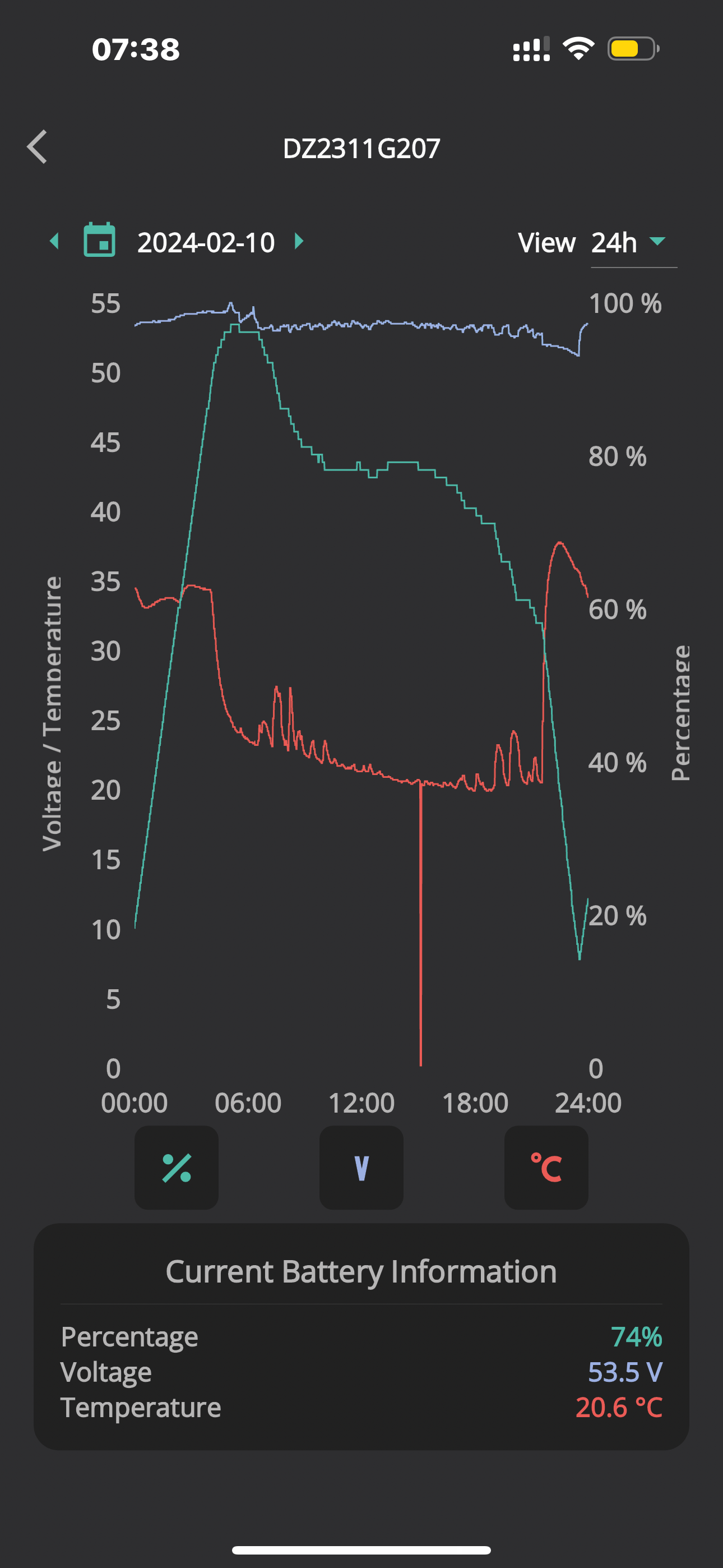
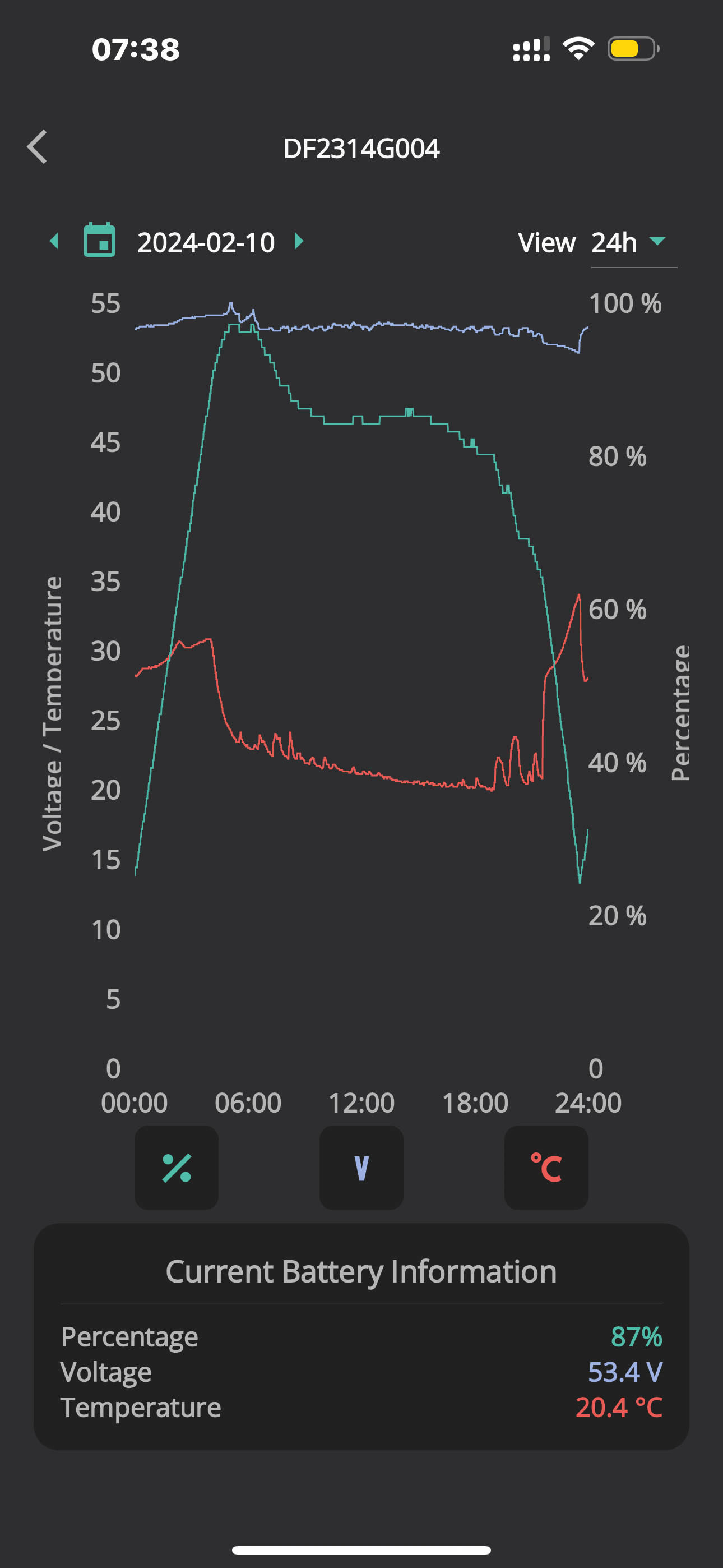
This is the batteries on inverter “A” - the more suspect pair, followed by the pair on inverter “B”;

PRIMARY on A:

SECONDARY on A:

PRIMARY on B:

SECONDARY on B:

R
#24 Rogerbu

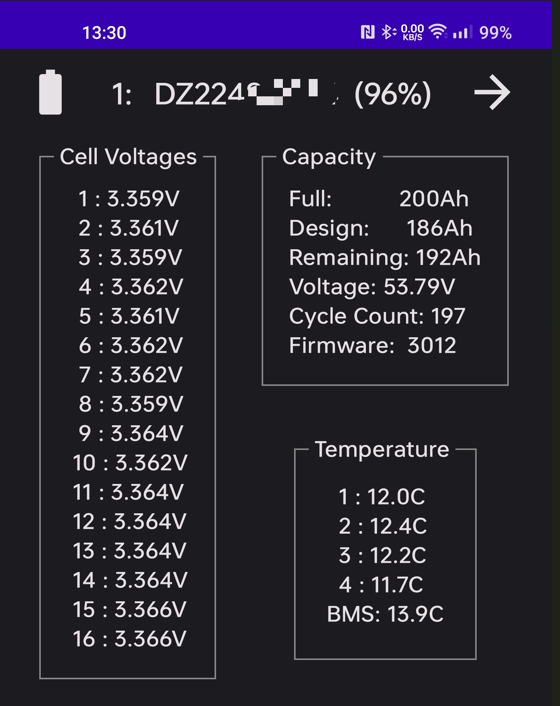
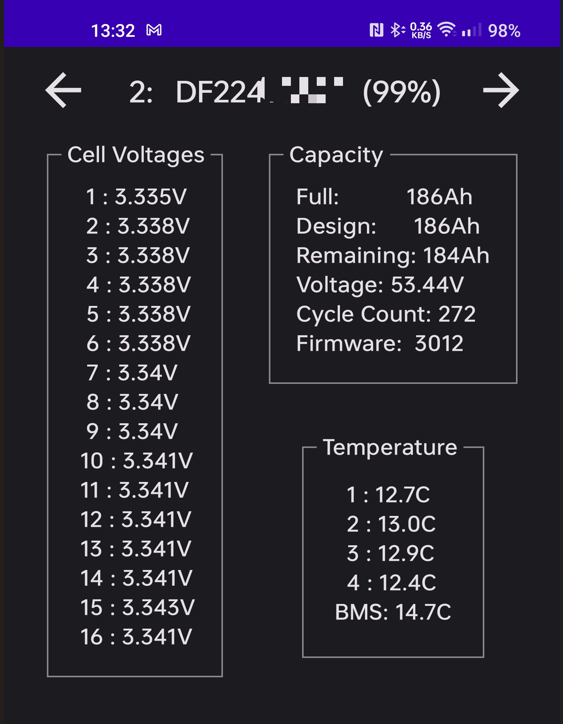
Pete UK These are my current cells etc

P
#25 Pete UK

This is what I need to see myself.

I don’t have Android or use any secondary controllers. Can I see that info somehow with an iPhone?

I see you have a DZ and a DF battery. Was the DF a replacement?

My original ones were DZ but I got the secondaries replaced with a DF and a DX - any idea what the letters stand for?

(The numbers are: YY:WW: (G=unit number)
year of manufacture:week of production and unit number.

R
#26 Rogerbu

Pete UK No idea what the letters mean.
I had the DF battery installed in Feb 02. I soon realised that 9.5 wasn't enough, so I got a second battery (the DZ) in the summer.

The data came from the Inverter App which is I believe an Android only app. Try emailing the builder at inverter dot monitor dot app at gmail dot com to see whether he has a iphone version.

#28 hoggy

As far as I can tell the letters denote both the battery type/size (pretty sure D is always a 9.5) the second letter is perhaps a revision (so maybe different cells or some sort of BMS revision)
This is just guessing from what I've seen on here.

R
#29 Rubikcube

Sorry, there is no iphone version of my app. Android devices and quite cheap, and you may find a friend or family member has an old one they no longer use. Needs to be android 5 or later (from about 2018 on).

If you really can't beg, buy, or borrow a real android device, you can run android in a virtual machine on any modern windows, mac, or linux computer. Minimum requirement would be 8GB of memory, but 16GB or more will work better.

There are many way to run android, but personally I would download Android Studio and follow a tutorial to write your first app (which likely just displays "Hello Android" on an emulator screen). Once you have an emulator running, log it into a google account (create one if necessary), search the play store for givenergy, and install the app.

If you want to create your own AVD with device manager (in android studio), I would recommend the pixel tablet and API 27, as a good combination for this app.

D
#30 DD

Pete UK you can run a python script to read inverter registers directly. Givenergy-modbus was the original but has rotted. I use the copy that is maintained as part of givtcp on GitHub. More details if you need them.

P
#31 Pete UK

Great thanks both.

I think the easiest way is going to be for me to buy a cheap android phone. But I’ll look at a few options.

Does the app work remotely, or do I have to be on the local WiFi?

I discharged all the batteries to ‘empty’ last night, no reserve: Inverter A’s batteries got there about 20 mins before B. As of just now I only see 34.7kW out of 38kW added to them all at 05:10 when they have stopped charging.

Batteries on inverter A are:
Primary: 94% (53.6v). Secondary: 100% (53.7v) Inverter A: IDLE

Inverter B:
Primary: 91% (55.0v). Secondary: 97% (54.8v)
Inverter: Charging: 53w

Inverter A has added: 16.9kW out of a potential 19kW
Inverter B has added: 17.5kW out of a potential 19kW

I’m interested to know if this is a “normal” capacity range/ behaviour. For a pair (or two pairs) on an inverter or not. Is this what others see/ get? This is ignoring losses - just what the GivEnergy cloud reports going into them (which looks accurate).

Thanks again.

Edit: 05:30 Inverter B’s secondary has now jumped up to 100% and they are both just over 55v now. (55.3v / 55.1v). Inverter A’s have both dropped 0.1v same as before %

D
#32 DD

Pete UK Does the app work remotely, or do I have to be on the local WiFi?

It requires a direct connection to the inverter.

You could run a VPN from within your local network - I've not tried it, but in principle it means your remote device is operating as if it's within your local network, and so can see all local machines.

#33 nophead

I use a Wireguard VPN to my home network to use either app on my phone when away from home, for example in Tenerife.

T
#34 TX200

Pete UK the other option is monitor and control everything via Home Assistant.

I setup a VPN on the Raspberry Pi following the videos on speak to the geek's YouTube channel.

The Home Assistant app then works wether I'm home or out and about.

(You can instead pay for Home Assistant remote access, maybe slightly easier to setup, but a monthly cost).

R
#35 Rogerbu

Pete UK A cheap 2nd hand Android tablet would probably be cheaper than a 2nd hand Android phone.
So long as the WiFi works and the Android is at 5 or later, you should be able to run the Inverter app and/or the GE app as a permanatly on monitor

P
#36 Pete UK

I’m a bit stuck, as I’m only home for a few weeks a year (work abroad) and most of that time is filled
up doing other more fun (and also necessary mundane) things 😂

I’m on the Beta Balancer trial, so I don’t think I can/should/ will please the GE beta people if I integrate home assistant and it starts interfering with the commands they are sending to my inverters to continuously keep the cross charging under control !
I did try and set up HA on an old Mac-mini but there was a file missing during the process and I never managed to locate the missing file anywhere on the internet, so never got it up and running near the final hurdle. Then I got an offer of the Beta trial and took that instead whilst waiting for the “out soon” EMS. (The cross charging was insane before getting on the beta trial !)

Thanks all or the helpful input.

The question remains though, is the throughput I’m seeing similar/reasonable compared to others?

I kind of assumed when purchasing that 100% DOD would mean that I could actually charge and discharge the full 38kW from 0% to 100% and I’d be able to tell exactly how much power was in the batteries at any given time like you can with an EV or a phone.

Don’t get me wrong my system “works” reasonably well just now and I like the features but a lot of the shine has been removed from problems on day one because of;

1) The SOC indication problems
2) Two faulty batteries
3) The cross charging (mostly solved for now)
4) The balancing of batteries on the same inverter (half solved for now)
5) The balancing of the battery pairs between inverters. (Solved for now)
6) The numbers on the portal and app don’t make sense.
7) The amount of time it takes to get a fault rectified - 4-8 weeks.
8) Requiring a third party integration because you can’t get your system to do what you want with the supplied software.
9) Not seeing 100% of the storage you paid for going in and out of the battery.

Apart from that list of things I’m pleased with it.

4
#37 4monks

Rogerbu Could you detail battery flip process please? Thx.

S
#38 SteveCook

I have a gen1 Hy5.0 and 9.5 battery and am on Eco7 . I would like to add another 9.5,battery but is the general opinion saying it will not work very well?