P
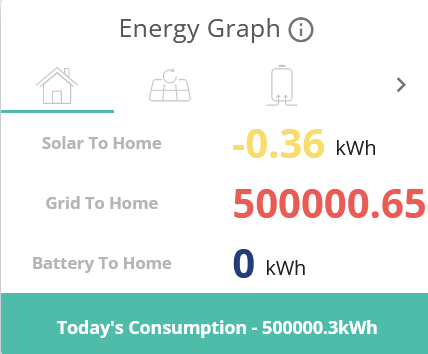
Power graph used to work, but since early Feb (6th) it is totally screwed up. Shows either all zeros, or a couple of ludicrous values straight after midnight and then all zeros
and here is yesterday:
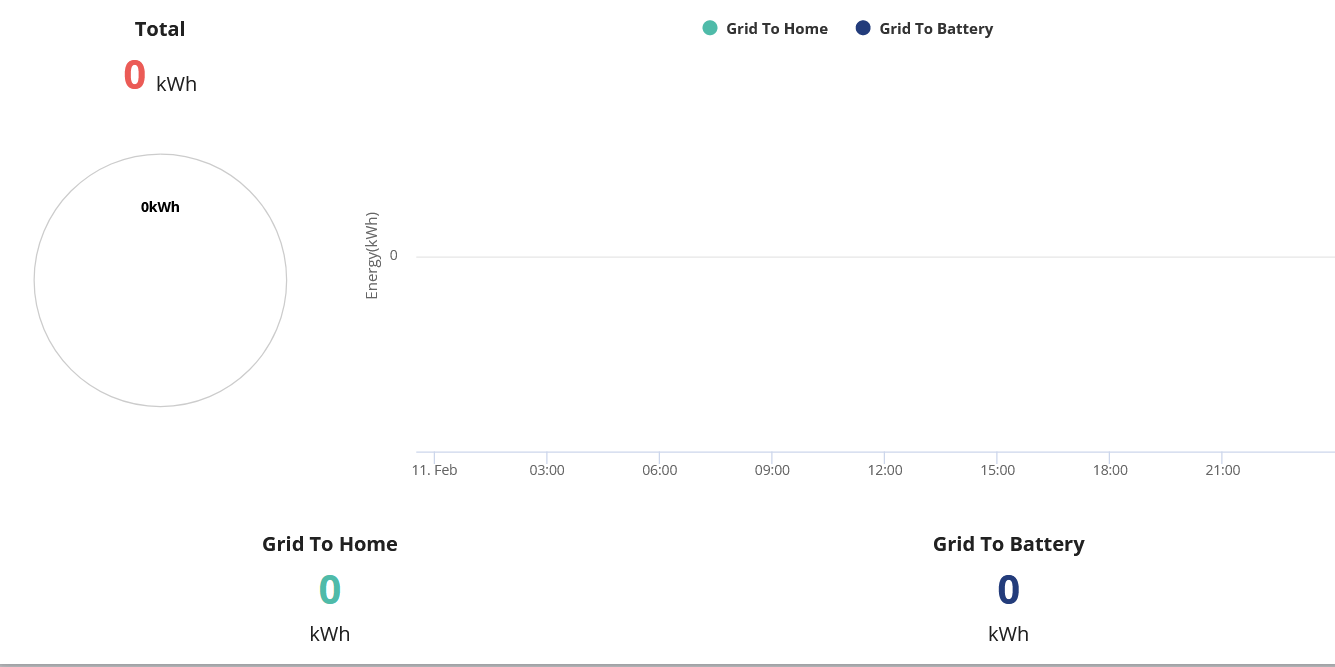

Power graph used to work, but since early Feb (6th) it is totally screwed up. Shows either all zeros, or a couple of ludicrous values straight after midnight and then all zeros
and here is yesterday:
Mine's fine.
Try it using a different Browser. Firefox, Chrome etc or a different computer, mobile etc
If that's ok clearing the original browser's cache and/or logout and reconnect might help
Pootle Is it possible that the CT clamp has been disturbed, or a connection has come loose? The EM115 meter in my install is protected by an RCD - if that were to trip, presumably I'd lose access to the metering. If this is a recent install, could ask the installer to double-check things.
Are the numbers on the animation on the app main screen also wrong?
If you have android, could try installing the monitor app to see if that also reports similar weirdness.
The Em115 should be glowing blue/green and showing numbers if it is powered up and working
500,000 KWh inport! have the neighbours tapped your supply for a vast underground cannabis farm 😃
Try using the portal to sync the time on your inverter. I think the energy graph uses the day figures and if the clock in your inverter is fast then it will reset them at it's midnight. It then sends zeros to the portal which records them as the last reading before midnight, hence the days figures are zero in yesterday's energy graph. The big numbers must come from dividing something by something near zero, but what is being divided by what is beyond me.
I called support about this on Monday and now they seem to be in limp mode.
I get a few numbers - mostly in the morning.....!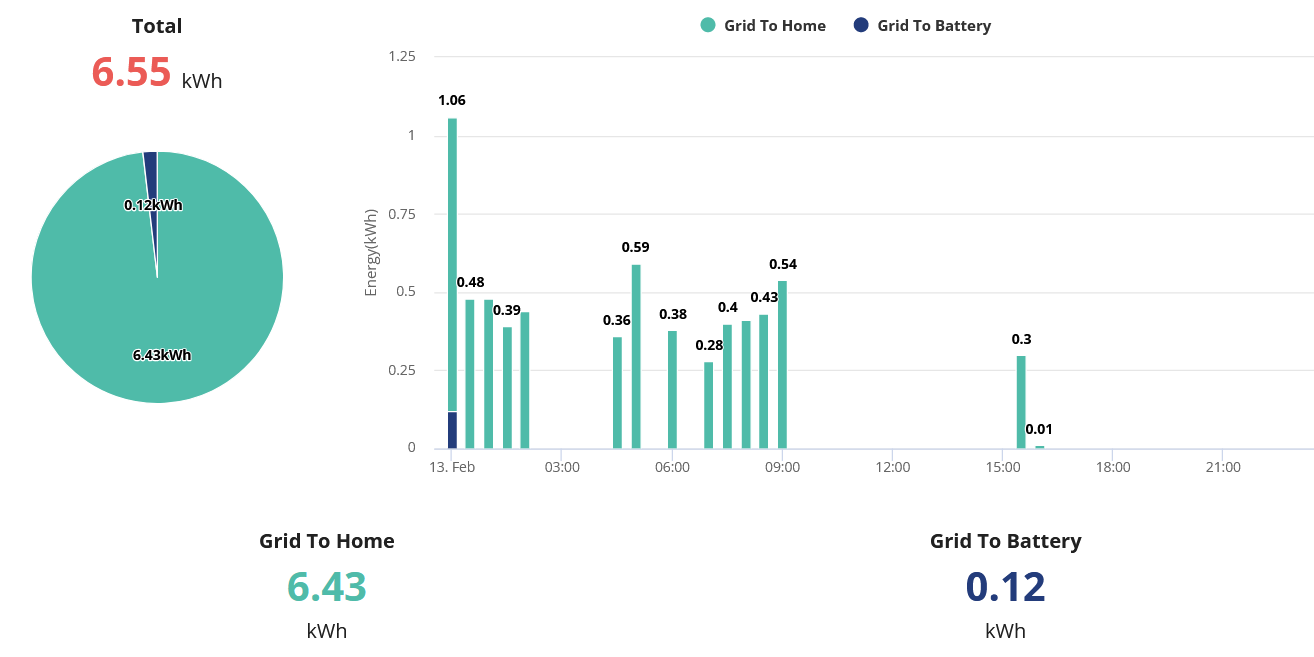
Pootle The EM115 is a small module that should be installed in the consumer unit powering the inverter. You may have to lift a flap to see it. Its display cycles through lots of readings, such as grid votage, frequency, etc.
https://kb.givenergy.cloud/article.php?id=117&oid=19
I think some installs have a different part number. GEM120 perhaps ?
But if the live display on the app is correct, it's probably not that.
Okay... since it's not the CT clamp, let's start again...
I'm now wondering if your inverter is having intermitten internet access. Do you have the (official) app running on Android or iOS ? (I use Android, but I'll assume iOS is similar.) It offers 'home' and 'away' views. Do they give similar sorts of numbers? 'away' only gets snapshots every 5 minutes or so, so they'll never match, but, ignoring peaks like kettles, they should be similar. If 'away' isn't working, that might confirm that the inverter can't (reliably) send data to the cloud.
DD I'm running the app on Android and it has no problem locally connecting 99% of the time. I added a Wireless Access Point directly above the inverters when they were installed because the wifi signal from the router is almost non-existent there (and the car charger could not connect at all until I put in the AP), so there is great signal there.
I am just wondering though about the various numbers. I suspect that the power figures (which appear to be instantaneous readings taken every few minutes) are direct from the internal inverter circuitry, but the energy figures come from the GEM120.
If I could check on the modbus setup, I could potentially stick another device on the bus to read the meter, but I suspect it is setup as a single master bus so this probably isn't practical.
Pootle I am just wondering though about the various numbers. I suspect that the power figures (which appear to be instantaneous readings taken every few minutes) are direct from the internal inverter circuitry, but the energy figures come from the GEM120.
Sorry, all this is now moving outside things I've explored. I think the GEM120 only senses the power from the CT around the tails - in principle, the power to the inverter could be wired through a module which can measure it directly. (Someone else posted recently, asking about GEM120 and some other module. Do you just have the one meter module, or a second one? It had a 'D' in its name somewhere - DCT or DECT or something or other.)
That said, if you look on the portal in the inverter tab, and look along the various categories of data, the 'meter' one has 5 categories: grid import, grid export, PV generation, battery charge, battery discharge. (All as a delta and total). I assume the inverter has its own internal metering for battery and solar, since I can't see how they could be measured by the GEM120 / CT115. (Since on a hybrid inverter, power can pass from PV to battery as DC, without getting converted to AC. So perhaps the metering for solar and battery are on the DC side ?)
Have you had any further feedback from support on your issue?
My set-up had an issue this week after a firmware update, something to do with the number of meters it though my system had.
Support fixed that quickly, but afterwards i had bogus data for that day. I've logged a call and been told they can't delete this. Bit annoying as it means my energy graphs are a bit useless now.
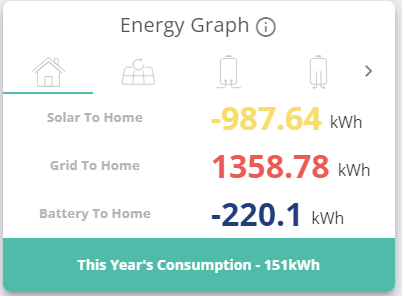
Sorry, didn't get notification on your post, yes it is fixed now after a couple of false starts and a few calls to the help desk.
Since middle of last month the graphs are sensible and complete - and the energy flow readings through the API likewise now give me sensible data