Automating Octopus Power Up events into Predbat

84 comments started 2024-02-12 last 2024-11-23
Home AutomationHome Assistant
G
#1 geoffreycoan

This might be a bit niche, but I know other people use Home Assistant, Predbat to automate their batteries, and are lucky enough to be in one of the Octopus Power-up postcodes.

The solution can easily be adapted for other energy providers that have special rate offers at certain times, but at the moment its written for the Octopus Power Up that gives zero pence import electricity for a period of time when supply is plentiful. e.g. we've got one tomorrow, 13/2, 8-10pm.

The problem is that Octopus don't provide an API to make the power up date and times available, they send you an email, you have to click a link and opt into the event, and then you have to program Predbat with the zero rate period - which is a pain needing a file editor to edit the predbat config apps.yaml file. I have an additional step to do as I have Home Assistant automations that swap the energy tariff in use so it doesn't count as charged electricity in my Energy dashboard, and I also turn on some electric heaters in outside workshops as the electricity is free for the period.

My solution combines the last two together, based on entering the date, start time and end time into Home Assistant entities, it then automatically writes the correct price rate override to Predbat's apps.yaml file.

Here's the bits of the solution:

  1. Three helper date time entities in Home Assistant, octopus_power_up_date, octopus_power_up_start_time and octopus_power_up_end_time

  2. A dashboard for the helper entities so you can see and change the power up date & times, and provide an 'add to predbat button' that invokes the unix shell command to add the times to predbat

  - title: Powerup
    path: powerup
    icon: mdi:arrow-collapse-up
    badges: []
    cards:
      - type: entities
        entities:
          - entity: input_datetime.octopus_power_up_date
          - entity: input_datetime.octopus_power_up_start_time
          - entity: input_datetime.octopus_power_up_end_time
      - show_name: true
        show_icon: false
        type: button
        tap_action:
          action: call-service
          service: shell_command.predbat_add_power_up_event
          target: {}
        name: Save Power Up event to Predbat
  1. A shell command adding to Home Assistant's configuration.yaml, this will pass the 3 entity values to a shell script when invoked by pressing the dashboard button:
# Shell command to update Predbat with Power up event
shell_command:
  predbat_add_power_up_event: /bin/bash -c "/config/predbat_add_powerup_event.sh '{{ states("input_datetime.octopus_power_up_date")}}' '{{states("input_datetime.octopus_power_up_start_time")}}' '{{states("input_datetime.octopus_power_up_end_time")}}' >>/config/appdaemon/apps/batpred/config/apps.yaml"

(restart HA after adding this to configuration.yaml)

  1. A unix shell script called predbat_add_powerup_event.sh which is stored in the /config directory of Home Assistant:
echo "    -  date: '$1'"
echo "       start: '$2'"
echo "       end: '$3'"
echo "       rate: 0"
echo "       load_scaling: 3.0"
  1. You will have to make the above script executable, so open a ssh window and type the following commands:

cd /config
chmod +x predbat_add_powerup_event.sh

  1. Finally, the script works by appending the power up date and rates to the end of Predbat's apps.yaml file so you need to move the 'import_rates_override' section in apps.yaml to the end of the file so when the script runs it can simply append the new rate details onto the end of apps.yaml, Predbat will see the change and will automatically reload itself with the new rates detail.

e.g. end of my apps.yaml file containing a previous import_rates_override:

  # Import rates can be overridden with rates_import_override
  # Export rates can be overridden with rates_export_override
  # Use the same format as above, but a date can be included if it just applies for a set day (e.g. Octopus power ups)
  # This will override even the Octopus plugin rates if enabled
  rates_import_override:
    -  date: '2024-02-09'
       start: '12:00:00'
       end: '15:00:00'
       rate: 0
       load_scaling: 3.0

And that's it. It looks complex but is fairly simple in what each job does in turn.
I'd call this the mark 1 script. Ideally I didn't want to have to have a bespoke unix shell script, but HA didn't like me writing yaml direct from a shell_command in configuration.yaml so it was a way to get it to work.
I'd also want to remove the restriction on having to have the import_rates_override at the end of apps.yaml and be able to insert the rate into the file regardless of how apps.yaml is sequenced. This needs use of sed or awk to insert part way through the file, something I haven't looked into yet.

Enjoy, hope it is useful to others

#2 PianSom

geoffreycoan
Nicely done! I was thinking of doing the same - but couldn't quite summon up the energy

A thing I was thinking of doing was to automate your steps 1+2 by parsing the email subject to scrape the necessary info from Pete's notification emails. See this, for example, to see the sort of thing I had in mind. The Subject is spat out as an attribute, and then it's a simple regex manipulation to get the three inputs.

Of course, one would still have to action the email manually. Which is a bit disappointing.

EDIT - Actually this would be the way to go

G
#3 geoffreycoan

PianSom Yes I had thought about reading the email and parsing it into the helper entities, it took me enough wrangling (and many many HA reboots to pick up the revised configuration.yaml each time) to invoke the shell commands properly from HA. It turns out that HA invokes the command shell differently depending on whether you have entities in the command line or not.

The links you provided are useful, at the moment I haven’t got any IMAP integration into HA. It is an obvious thing to do though.

It would also be possible to invoke the enrolment semi automatically as well. It’s just a HTTP GET of a URL with your customer number and the session date as URL parameters. Probably then a POST with the enrol option set in the post body.

I did consider adding this to the Predbat code but felt it was quite specific to a small group of users it didn’t really fit so I created it to wrap around Predbat.

I’ll think about the v2. At the moment I’m back on updating Predbat documentation ….

#4 PianSom

Power-ups 3 days in a row - your automation must be getting a good workout!

G
#5 geoffreycoan

PianSom Yep, its being used regularly. Am thinking about investigating IMAP integration to automatically populate the entities - will see how easy that is!

3 events? I’ve seen this before when you have events that I don’t. Had one yesterday 12-3, today 12-3:30, but it was about a week ago the previous one and we’ve not been invited for one tomorrow

#6 PianSom

geoffreycoan
I'm not sure I'm ready to give HA access to my inbox, even after using it for about 7y now. I was going to set up a burner email and then forward all emails from Pete to the burner, where HA could pick them up. If I had ever got around to doing it, that is.

I got invited to tomorrow's 9.30-12.30 at 2.45pm this afternoon. Now I feel special! 🙂

G
#7 geoffreycoan

PianSom Found it, tomorrow’s invite was in my spam folder but I only found the email when I used webmail to view my mailbox, the mail app on my phone hasn’t downloaded the spam at all. Stupid Yahoo, I think they try to persuade me to move to a premium service by giving a poor free service that times out frequently

Opted in and clicked automated the predbat session setup for tomorrow.

#8 PianSom

geoffreycoan
Now I don't feel special any more 🙁

W
#9 Wavy Davy

geoffreycoan
Geoff,
Can you have a look at my shell command. I cant get it to write to the apps.yaml file.

shell_command:
predbat_add_power_up_event: /bin/bash -c "/config/predbat_add_powerup_event.sh '{{ states("input_datetime.octopus_power_up_date")}}' '{{states("input_datetime.octopus_power_up_start_time")}}' '{{states("input_datetime.octopus_power_up_end_time")}}' >>/addon_configs/6adb4f0d_predbat/apps.yaml"

I'm not using appdaemon so I have amended the shell to suit, but still cant get it to write.
One thing I noticed was that when I run item 5, I don't get any confirmation that it's worked. Is this normal?
Also I didn't have a config directory in my homeassistant directory so I created one, and put the Predate.....sh file in there.

W
#10 Wavy Davy

have just also added "homeassistant" to the predbat.......sh address, so its now
predbat_add_power_up_event: /bin/bash -c "/homeassistant/config/predbat_add_powerup_event.sh '{{ states("input_datetime.octopus_power_up_date")}}' '{{states("input_datetime.octopus_power_up_start_time")}}' '{{states("input_datetime.octopus_power_up_end_time")}}' >>/addon_configs/6adb4f0d_predbat/apps.yaml"

Still no luck

D
#11 DD

Wavy Davy you've got nested double-quotes in there - one set around the entire shell line, plus inside the yaml statements. that might cause a problem.

W
#12 Wavy Davy

DD thanks, but no different.

W
#13 Wavy Davy

Still can't get it to work and there is a power-uo at 13:00 today, so just manually changed the apps.yaml file with the date and time of the power-up.
Hopefully that works.

G
#14 geoffreycoan

Wavy Davy when you say it doesn't work, what happens?

There isn't any confirmation of it working, but if its not working you should see some errors in the HA system logfile (setting/system/logs).

the first bit of bash -c

/bin/bash -c "/config/predbat_add_powerup_event.sh

tells HA where you find the predbat_add_powerup_event.sh script that you have saved. I put mine in the /config directory but you can put it anywhere you want to. /homeassistant and /config are synonymous (one is linked to the other) so not sure the /homeassistant/config/ path is 'normal', but if you have created that subdirectory and put the script in there, its fine.

next thing is the script has to be executable. In unix files have three basic permissions, readable, writeable and executable, if its not executable then you can't run the script. step 5 does that. Obviously change the cd command to wherever you have stored the script

the rest of it looks OK, the double quotes around the whole command and single quotes within, and the correct apps.yaml pathname

D
#15 DD

geoffreycoan when you say it doesn't work, what happens?

There isn't any confirmation of it working, but if its not working you should see some errors in the HA system logfile (setting/system/logs).

Or if it's working but generating incorrect output, what gets appended to /addon_configs/6adb4f0d_predbat/apps.yaml ?

W
#16 Wavy Davy

Decided to try again with this.
Its writes the data into the 3 date time entities correctly, so I'm sure its a problem with the shell commands.
Either I haven't put the predbat_add_powerup_event.sh into the correct location, or I'm not enabling it correctly.
I didn't have a config directory in homeassistant, so I created one and put it into that.
this is the location /homeassistant/config/predbat_add_powerup_event.sh.
I then used home assistant terminal.
I used cd to get to the homeassistant directory, then cd config and used chmod +x predbat_add_powerup_event.sh to make it executable.
I think my problem is the shell command shell_command: predbat_add_power_up_event: /bin/bash -c "/config/predbat_add_powerup_event.sh '{{ states("input_datetime.octopus_power_up_date")}}' '{{states("input_datetime.octopus_power_up_start_time")}}' '{{states("input_datetime.octopus_power_up_end_time")}}' >>/config/appdaemon/apps/batpred/config/apps.yaml"

I've also tried changing the bin/bash -c "/config to bin/bash -c "homeassistant/config in case that was the problem, but still won't work.

If it helps here is the file structure I have.

W
#17 Wavy Davy

Checking the log it says
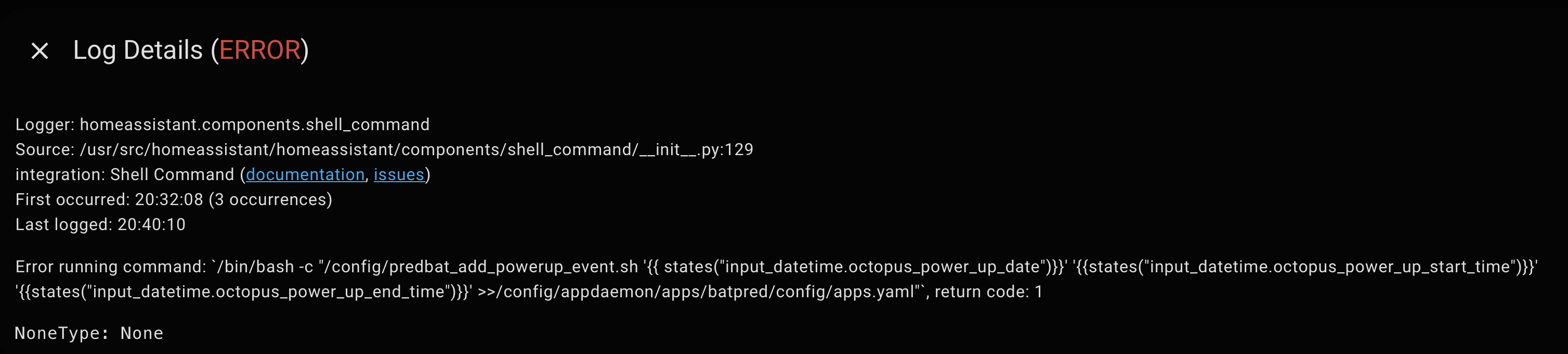
Error running command: /bin/bash -c "/config/predbat_add_powerup_event.sh'{{ states("input_datetime.octopus_power_up_date")}}' '{{states("input_datetime.octopus_power_up_start_time")}}' '{{states("input_datetime.octopus_power_up_end_time")}}' >>/config/appdaemon/apps/batpred/config/apps.yaml", return code: 1
NoneType: None

So it is a problem with item 3 the shell command.

P
#18 Phil_H

Wavy Davy I'm not certain but I think the old config directory has been renamed (or symlinked so both versions still work) to homeassistant. Meaning that you just want it in the homeassistant folder, not homeassistant/config

D
#19 DD

Wavy Davy the nested double-quotes look worrying... I'd try escaping them ie \"
Or put it in a file and let bash load it.

W
#20 Wavy Davy

Phil_H Have tried putting it into the homeassistant directory and no luck. Also tried changing the command to /bin/bash -c "/ and also tried /bin/bash -c "/homeassistant
still no luck. Driving me mad.

DD Not sure what you mean by double quotes, I assume its the arguments inside the first set of quotes, in which case that causes a error when I try to save the times in the dashboard.
Also geoff in his reply said that they were ok.

W
#21 Wavy Davy

One thing I have noticed is that when I created the file predbat_add_powerup_event.sh and listed the Homeassistant directory in terminal it was white lettering. After I ran the command to make it executable it turned to green. I assume/hope that confirms that it is executable, and that part is ok.
So it leads me to think there is a problem with step 3, but how to resolve it I've no idea.

D
#22 DD

Wavy Davy
Single quotes = '
Double quotes = "

consider
bash -c "echo 'hello "quoted" world'"

You might consider the string to be displayed is
hello "quoted" world

But because quotes do not nest, the correct way to group that line into tokens is:
bash
-c
"echo 'hello "
quoted
" world'"

In order to tell the tokeniser that the inner quotes need to be preserved, I'd expect they need to be escaped:

bash -c "echo 'hello \"quoted\" world'"

But much simpler to put the command into a file, which allows you to get rid rid of the outer double quotes (starting after bash -c), removing the entire problem.

D
#23 DD

Now that I'm at computer, I can test those... didn't get it quite right, for a different reason...

$ bash -c "echo 'hello "quoted" world'"
hello quoted world
$ bash -c "echo 'hello \"quoted\" world'"
hello "quoted" world

I was expecting the first one to give an error, but overlooked one detail: because there is no spaces within the inner quoted string, it doesn't actually get split there. Consider instead:

$ bash -c "echo 'hello "quoted bit" world'"
bit world': -c: line 1: unexpected EOF while looking for matching `''
bit world': -c: line 2: syntax error: unexpected end of file
$ bash -c "echo 'hello \"quoted bit\" world'"
hello "quoted bit" world

The first one is grouped as
bash
-c
"echo 'hello "quoted
bit" world'"

W
#24 Wavy Davy

DD Sorry DD just had chance to look at your reply, and I have to admit I don't know what you've done, or what I need to do.
the first part of my command is
predbat_add_power_up_event: /bin/bash -c "/config/predbat_add_powerup_event.sh '{{ states("input_datetime.octopus_power_up_date")}}'

Do you mean change it to
predbat_add_power_up_event: /bin/bash -c "/config/predbat_add_powerup_event.sh '{{ states("'input_datetime.octopus_power_up_date'")}}'
added the ' inside the "

W
#25 Wavy Davy

I have put the shell command back to what Geoff had and this is the error I get

D
#26 DD

Wavy Davy By far the simplest thing to do is put

#!/bin/bash
/config/predbat_add_powerup_event.sh '{{ states("input_datetime.octopus_power_up_date")}}' '{{states("input_datetime.octopus_power_up_start_time")}}' '{{states("input_datetime.octopus_power_up_end_time")}}' >>/config/appdaemon/apps/batpred/config/apps.yaml

into a file, say /tmp/test.sh, and then in the config,
predbat_add_power_up_event: /bin/bash /tmp/test.sh

Plus you can test it outside of predbat by just invoking it explicitly. Up to you whether you put the redirection inside the file or not - advantage of not is that it makes it easier to test the script standalone.

I don't know what you've done, or what I need to do.

/bin/bash -c "/config/predbat_add_powerup_event.sh '{{states("input_datetime.octopus_power_up_date")}}'

just scan that character by character as the shell tokeniser would... after the -c it finds a double-quote character, so it now scans forwards until it finds another double-quote character to close the string. That character occurs within states("input so that's where it stops.

But you don't want the shell to interpret that as the end of the string. So the normal way to do that is to escape with a backslash - that tells the tokeniser that the next character should not be interpreted in any special way (ie closing the string that started after the -c), but just treat it as a literal.

The point is that you cannot nest double-quote characters like you can with brackets... with
aaa ( bbb ( ccc ) ddd ) eee
the ccc is inside 2 levels of nested brackets. But with
aaa " bbb " ccc " ddd " eee
bbb and ddd are inside one level of double-quotes, aaa ccc and eee are outside all double-quoted groupings, even if you intended ccc to be inside a nested context.

W
#27 Wavy Davy

DD Thanks DD for your help, but I feel I'm just going round in circles with it.
I will leave it for now and maybe come back to it another time.

G
#28 geoffreycoan

Wavy Davy I can absolutely assure you that the code I posted works correctly, vis:

shell_command:
  predbat_add_power_up_event: /bin/bash -c "/config/predbat_add_powerup_event.sh '{{ states("input_datetime.octopus_power_up_date")}}' '{{states("input_datetime.octopus_power_up_start_time")}}' '{{states("input_datetime.octopus_power_up_end_time")}}' >>/config/appdaemon/apps/batpred/apps.yaml"

there is a mixture of Jinja code within {{ }} and bash command line code. I think the order of precedence is that the Jinja code gets evaluated by HA first so what gets passed to bash is not the literal text ‘{{ states(“…. end_time”)}}’ but rather the results of the Jinja evaluation, i.e. bash is given the command line “/config/predbat_add_powerup_event.sh ‘dd/mm/yy hh:mm:ss hh:mm:ss’ “

Wavy Davy I have put the shell command back to what Geoff had and this is the error I get

This error suggests to me that bash can’t find the script.

In my example I stored the script in /config (where configuration.yaml, secrets.yaml, etc are). Your path above is /predbat_a … - i.e. it’s trying to look in the root directory which it probably won’t find the file there.

In earlier message you said you’d had to create /homeassistant/config. As @Phil_H says, Home Assistant now links /homeassistant to /config so the two should be synonymous. To be honest it doesn’t really matter where you put the script, put it in /homeassistant directly, just make sure the bash command path matches

G
#29 geoffreycoan

And if anyone is interested I now pull the Octopus Power up and Octopus free electricity events into the above sensors using REST services onto https://github.com/8none1/octopus_powerups and a few more automation scripts so its now just a few clicks in HA to retrieve and write the session details to Predbat.

Happy to share these. But you need the above script working first !

W
#30 Wavy Davy

geoffreycoan Thanks Geoff, will have another look, but will probably be after the weekend before I get chance.

#31 PianSom

geoffreycoan
Damn! For the first time today I subscribed to a Power-up event and then forgot to add it to Predbat.

MUST get around to doing the automation thing.

G
#32 geoffreycoan

Here’s what I have setup in my HA. It’s not fully automated but its got all the bones together that I could automate it if I wanted to.

  1. The ‘write power up event script’ based upon on 3 helper sensors (date, start time, end time) as above.

  2. REST API calls to retrieve the times of the power up and free electricity events https://github.com/8none1/octopus_powerups
    These are setup in configuration.yaml to retrieve the times into HA sensors

  3. Scripts that decode the start/end date/times from the above HA sensors and write the REST API sensors into the 3 helper sensors

  4. A dashboard which shows the helper entities (and manually change them), write those sensors to predbat’s apps.yaml, see the REST API sensors (with the retrieved Octopus event details) and invoke the scripts that decode those sensors into the helper entities.

  5. An automation to alert me that there is a new power up or free electricity event. At the moment I’ve not got this last component working properly but can check the dashboard periodically to see the sensors and invoke the scripts

Here’s the bits of code:

  1. Write to predbat script as above

  2. my configuration.yaml:

    sensor: !include sensors.yaml

sensors.yaml:

  # Octopus Power up times
  - platform: rest
    name: "Octopus Power Up Times"
    unique_id: octopus_power_up_times
    resource: "https://www.whizzy.org/octopus_powerups/powerup.json"
    scan_interval: 900
    json_attributes_path: "$.[0]"
    json_attributes:
      - start
      - end

  # Octopus Free electricity times
  - platform: rest
    name: "Octopus Free Electricity Times"
    unique_id: octopus_free_electricity_times
    resource: "https://www.whizzy.org/octopus_powerups/free_electricity_session.json"
    scan_interval: 900
    json_attributes_path: "$.[0]"
    json_attributes:
      - start
      - end

3 & 4. I’ll have to copy/paste these when I am back home, copying on my ipad the formatting is all messed up.

#33 Hook

I just go into the script and change the date.

But I'm lazy.

G
#34 geoffreycoan

geoffreycoan Here's parts 3 & 4:

Script to retrieve the free electricity times from the REST API and write them into the 3 octopus power up helper entities.
The REST API gets the Octopus date and time in UTC so have to convert to unix time and then back to local time in the right format to write to the helper time entities:

alias: Set Octopus Power Up helpers from free electricity REST sensor
sequence:
  - action: input_datetime.set_datetime
    target:
      entity_id: input_datetime.octopus_power_up_date
    data:
      date: >-
        {% set dt=state_attr('sensor.octopus_free_electricity_times','start') %}
        {% if dt != None %}
          {{ as_timestamp(dt)|timestamp_custom('%Y-%m-%d') }}
        {% endif %}
  - action: input_datetime.set_datetime
    target:
      entity_id: input_datetime.octopus_power_up_start_time
    data:
      time: >-
        {% set
        st_time=state_attr('sensor.octopus_free_electricity_times','start') %}
        {% if st_time != None %}
          {{ as_timestamp(st_time)|timestamp_custom('%X') }}
        {% endif %}
  - action: input_datetime.set_datetime
    target:
      entity_id: input_datetime.octopus_power_up_end_time
    data:
      time: >-
        {% set en_time=state_attr('sensor.octopus_free_electricity_times','end')
        %} {% if en_time != None %}
          {{ as_timestamp(en_time)|timestamp_custom('%X') }}
        {% endif %}
description: ""

3b Ditto script for Power up events:

alias: Set Octopus Power Up helpers from Power Up electricity REST sensor
sequence:
  - action: input_datetime.set_datetime
    target:
      entity_id: input_datetime.octopus_power_up_date
    data:
      date: >-
        {% set dt=state_attr('sensor.octopus_power_up_times','start') %} {% if
        dt != None %}
          {{ as_timestamp(dt)|timestamp_custom('%Y-%m-%d') }}
        {% endif %}
  - action: input_datetime.set_datetime
    target:
      entity_id: input_datetime.octopus_power_up_start_time
    data:
      time: >-
        {% set st_time=state_attr('sensor.octopus_power_up_times','start') %} {%
        if st_time != None %}
          {{ as_timestamp(st_time)|timestamp_custom('%X') }}
        {% endif %}
  - action: input_datetime.set_datetime
    target:
      entity_id: input_datetime.octopus_power_up_end_time
    data:
      time: >-
        {% set en_time=state_attr('sensor.octopus_power_up_times','end') %} {%
        if en_time != None %}
          {{ as_timestamp(en_time)|timestamp_custom('%X') }}
        {% endif %}
description: ""
  1. Dashboard card to pull all these bits together.
type: entities
entities:
  - entity: input_datetime.octopus_power_up_date
  - entity: input_datetime.octopus_power_up_start_time
  - entity: input_datetime.octopus_power_up_end_time
  - type: button
    name: Save Power Up event to Predbat
    icon: mdi:script-text-play-outline
    action_name: Execute
    tap_action:
      action: perform-action
      perform_action: shell_command.predbat_add_power_up_event
  - type: divider
  - entity: sensor.octopus_free_electricity_times
  - type: button
    icon: mdi:script-text-play-outline
    name: Set free electricity times
    action_name: Execute
    tap_action:
      action: perform-action
      perform_action: script.set_octopus_power_up_helpers_from_free_electricity_rest_sensor
  - type: divider
  - entity: sensor.octopus_power_up_times
  - type: button
    icon: mdi:script-text-play-outline
    name: Set Power Up electricity times
    action_name: Execute
    tap_action:
      action: perform-action
      perform_action: >-
        script.set_octopus_power_up_helpers_from_power_up_electricity_rest_sensor

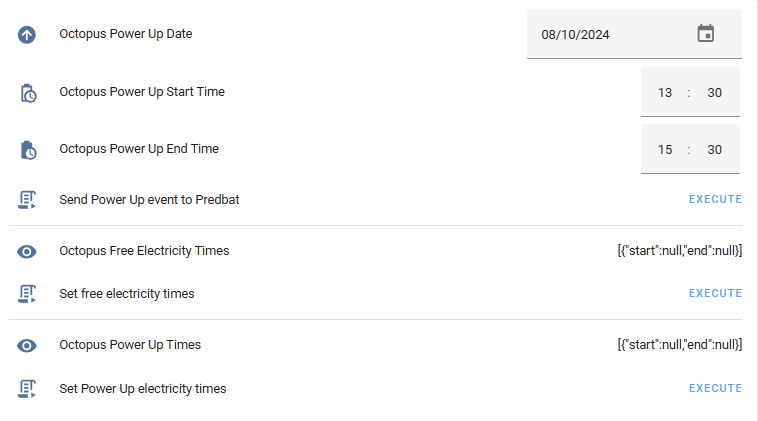
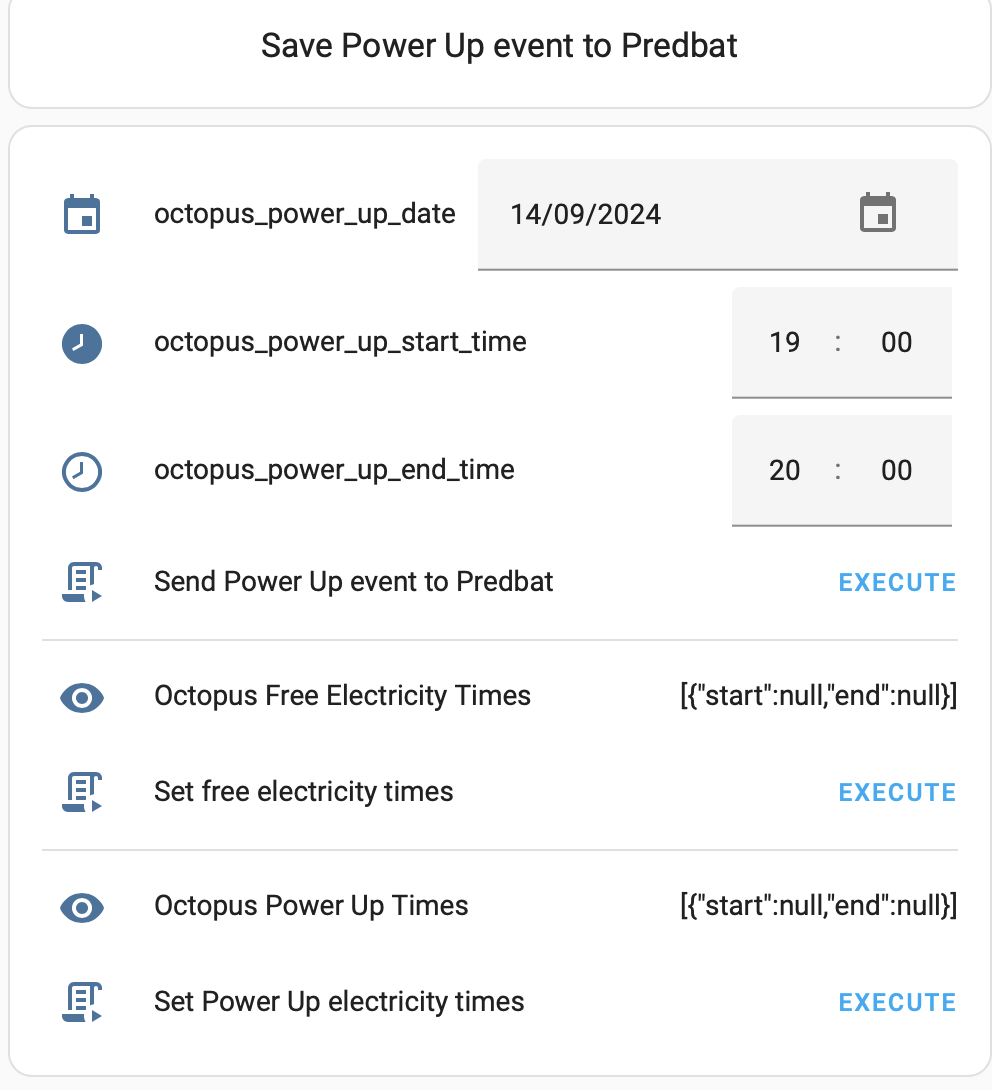
Its basically a matter of clicking Execute on the Free electricity or Power up script which copies the rest data into the helper entities at the top of the screen, then execute the 'write to predbat' script.

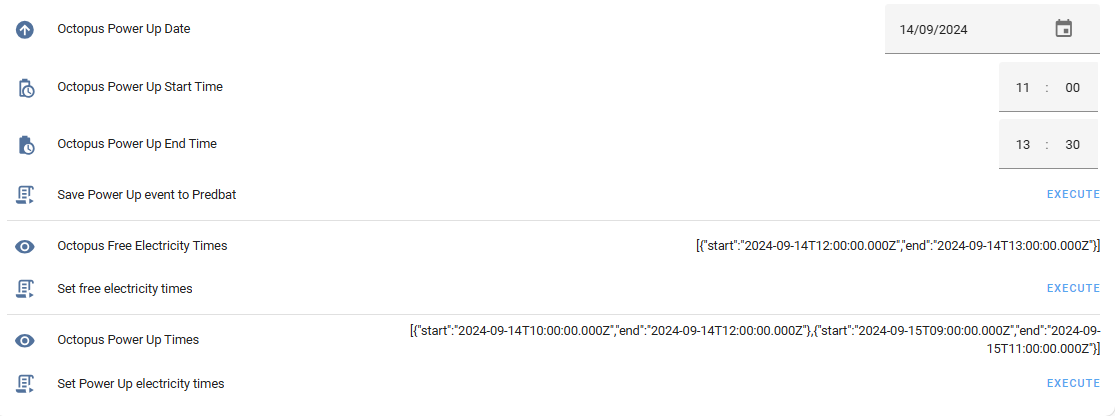
And this is what the dashboard looks like:

  1. The automation to alert when there is a new powerup or free electricity event, still working on this, it doesn't get triggered at present!
W
#35 Wavy Davy

I have had another go at this.
I Have created a new folder homeassistant /config and file predbat_add_powerup_event.sh in it.
and the shell command
shell_command:
predbat_add_power_up_event: /bin/bash -c "/config/predbat_add_powerup_event.sh '{{ states("input_datetime.octopus_power_up_date")}}' '{{states("input_datetime.octopus_power_up_start_time")}}' '{{states("input_datetime.octopus_power_up_end_time")}}' >>/config/appdaemon/apps/batpred/config/apps.yaml"
All this is (I think) as per geoffs locations and instructions.
I have open terminal and opened the homeassistant/config directory
and used
chmod +x predbat_add_powerup_event.sh
I believe this has worked as it changed the file name from white to bright green text.
when I use the "add power up event to predbat" i get the following log error

W
#36 Wavy Davy

if it helps if I check the file "predbat_add_powerup_event.sh" I get -rwxr-xr-x 1 root root

G
#37 geoffreycoan

Wavy Davy just a thought, are you running predbat under appdaemon or predbat add-on?

I’m running under appdaemon so the pathname “>>/config/appdaemon/…’ to apps.yaml is specific to my predbat install location. If you are using the predbat addon then your apps.yaml path will be different and will need changing to the correct pathname (as per the install instructions)

W
#38 Wavy Davy

I'm running as addon

W
#39 Wavy Davy

my app.yaml file is "/addon_configs/6adb4f0d_predbat/apps.yaml" so I have tried
predbat_add_power_up_event: /bin/bash -c "/config/predbat_add_powerup_event.sh '{{ states("input_datetime.octopus_power_up_date")}}' '{{states("input_datetime.octopus_power_up_start_time")}}' '{{states("input_datetime.octopus_power_up_end_time")}}' >>/addon_configs/6adb4f0d_predbat/apps.yaml"
but still no joy.

G
#40 geoffreycoan

Wavy Davy There must be something really stupidly obvious that's wrong, either with my instructions or your setup. But I'm struggling to work out what it is.

Firstly let's check the script again.

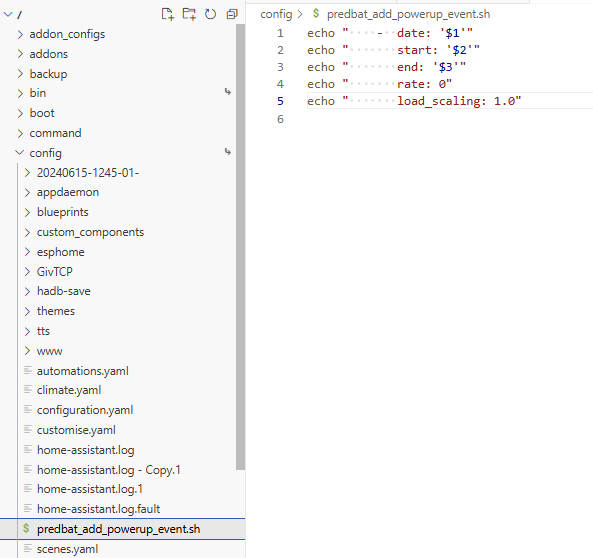
Here's what I have in my HA, viewed with Visual Studio server. There's a root folder called /config which has all the HA config files in, and the script is in there. Does yours match this:

Next, let's try debugging the script invocation itself.

First you need to create a HA script called notify_all_devices that sends an alert to your mobile/ipad. You need to be running the HA companion app on a mobile device to use this. I use this in other automations, just to make it easier to send messages to myself. There's parameters to the script that are pretty self evident:

alias: Notify all devices
fields:
  title:
    selector:
      text: null
    name: Title
    default: “”
  message:
    selector:
      text: null
    name: Message
    required: true
  critical:
    selector:
      text: null
    name: Critical
    default: "N"
  url:
    selector:
      text: null
    name: Url
    default: ""
sequence:
  - data:
      title: |
        {{ title }}
      message: |
        {{ now().timestamp() | timestamp_custom('%-d %b %H:%M') }} {{ message }}
      data:
        visibility: public
        persistent: true
        url: |
          {{ url }}
        push:
          sound:
            name: default
            critical: |
              {{ '1' if (critical == 'Y') else '0' }}
            volume: 0.8
    action: notify.all_devices
mode: single
icon: mdi:message-alert-outline

For this to work you either need to create a group called 'all devices' in configuration.yaml, mine looks like this:

# All devices notification group
notify:
  - name: all_devices
    platform: group
    services:
      - service: mobile_app_geoffrey_s_iphone_12
      - service: mobile_app_geoffreys_ipad_air_4
      - service: mobile_app_geoffreys_ipad_mini_4

Or replace the notify.all_devices in the above script with notify.<device name> to notify a single device.
Test this script and check you can run it and send yourself alert messages. Its a useful freebie to have for other alerting purposes.

And finally, a script to run the predbat write script but it will send the error output to your mobile, At the moment you are just getting an error code and we need to see what the error log says.
There may be other ways of doing this but this is how I wrote and debugged the script

alias: Save Powerup event to Predbat apps.yaml
sequence:
  - data: {}
    response_variable: script_response
    action: shell_command.predbat_add_power_up_event
  - if:
      - condition: template
        value_template: "{{ script_response['returncode'] == 0 }}"
    then:
      - data:
          title: Predbat save power up resp
          message: "{{ script_response['stdout'] }}"
        action: script.notify_all_devices
    else:
      - data:
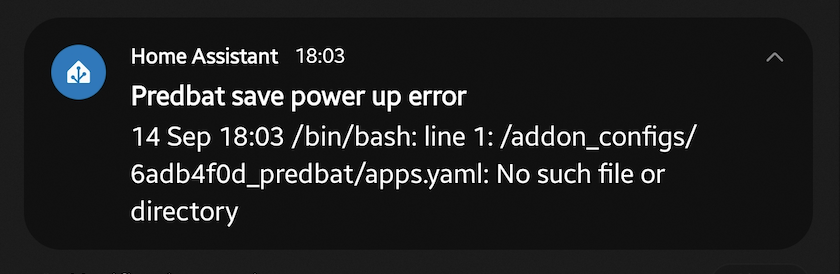
          title: Predbat save power up error
          message: "{{ script_response['stderr'] }}"
        action: script.notify_all_devices
mode: single

Run this script, it will execute the predbat script and we can see what the error details are

Enjoy !

W
#41 Wavy Davy

Geoff I'm viewing my files using file editor, I see your using visual studio, which I do have.
How are you getting to view them using that, do you download them and put them in or can you view them direct from Visual studio, or does it not matter?

G
#42 geoffreycoan

Wavy Davy It shouldn’t make any difference whether you use visual studio or file editor. The benefit of using visual studio is that it’s a better editor and you can see the hierarchical tree folder structure of where the files are located. In the back of my mind is the thought that something is mis-located.
If you want to use file editor, fine, just share a screen shot of what’s in your config folder, it should be very similar to mine.

You only need file editor/visual studio to edit the predbat….sh and apps.yaml files (and configuration.yaml). All the scripts above are created in HA using System/Automations/Scripts

W
#43 Wavy Davy

When I look at the root folder in file editor there is no config file. If I look in terminal there is.

W
#44 Wavy Davy

I created a config in the homeassistant directory and put the .sh file in there.
the shell command points to that.

G
#45 geoffreycoan

Wavy Davy created a config in the homeassistant directory and put the .sh file in there.
the shell command points to that.

The screen shots are confusing me a bit

/config is a I believe a symbolic link to /homeassistant which is why in the second screen shot it appears in pale blue.
Maybe file editor doesn’t follow the symbolic link properly which is why you couldn’t find it in file editor.

The file editor shows that your script is /homeassistant/config/predbat_add_powerup_event.sh (you created the config folder in homeassistant) but earlier you said:

Wavy Davy
shell_command:
predbat_add_power_up_event: /bin/bash -c "/config/predbat_add_powerup_event.sh '{{ states("input_datetime.octopus_power_up_date")}}' '{{states("input_datetime.octopus_power_up_start_time")}}' '{{states("input_datetime.octopus_power_up_end_time")}}' >>/config/appdaemon/apps/batpred/config/apps.yaml"

Which points to the script being stored as /config/…..sh

And the error message when you invoke the script also says that the script is in /config

So I think the issue is that your configuration.yaml definition of where the script is and where the script is in the file system isn’t matching.

Three alternative fixes.

  1. Change configuration.yaml to point to the script being in /homeassistant/config/…. sh, reboot HA and try the script again (leave the script where it is)

  2. Move the script from /homeassistant/config/…..sh directly to /homeassistant/……sh, change configuration.yaml to point to the new path, reboot HA and try the script again

  3. Move the script from /homeassistant/config/…sh to /config/….sh, you shouldn’t I think need to change configuration.yaml or reboot, and try the script again

W
#46 Wavy Davy

Tried all 3 and no luck.
Geoff, your help is very much appreciated, but i feel guilty taking so much of your time. I'm sure you have much more valuable things to be getting on with.
I'll continue having a look at it, and try your suggstions above,but in the meantime i'll edit it manually.
I am looking at connecting Visual studio as I think it will be easier to edit stuff once set up.

G
#47 geoffreycoan

Hey it’s no problem Wavy Davy gives me something to do, and it’s now slightly annoying me that having created it, I can’t share it.

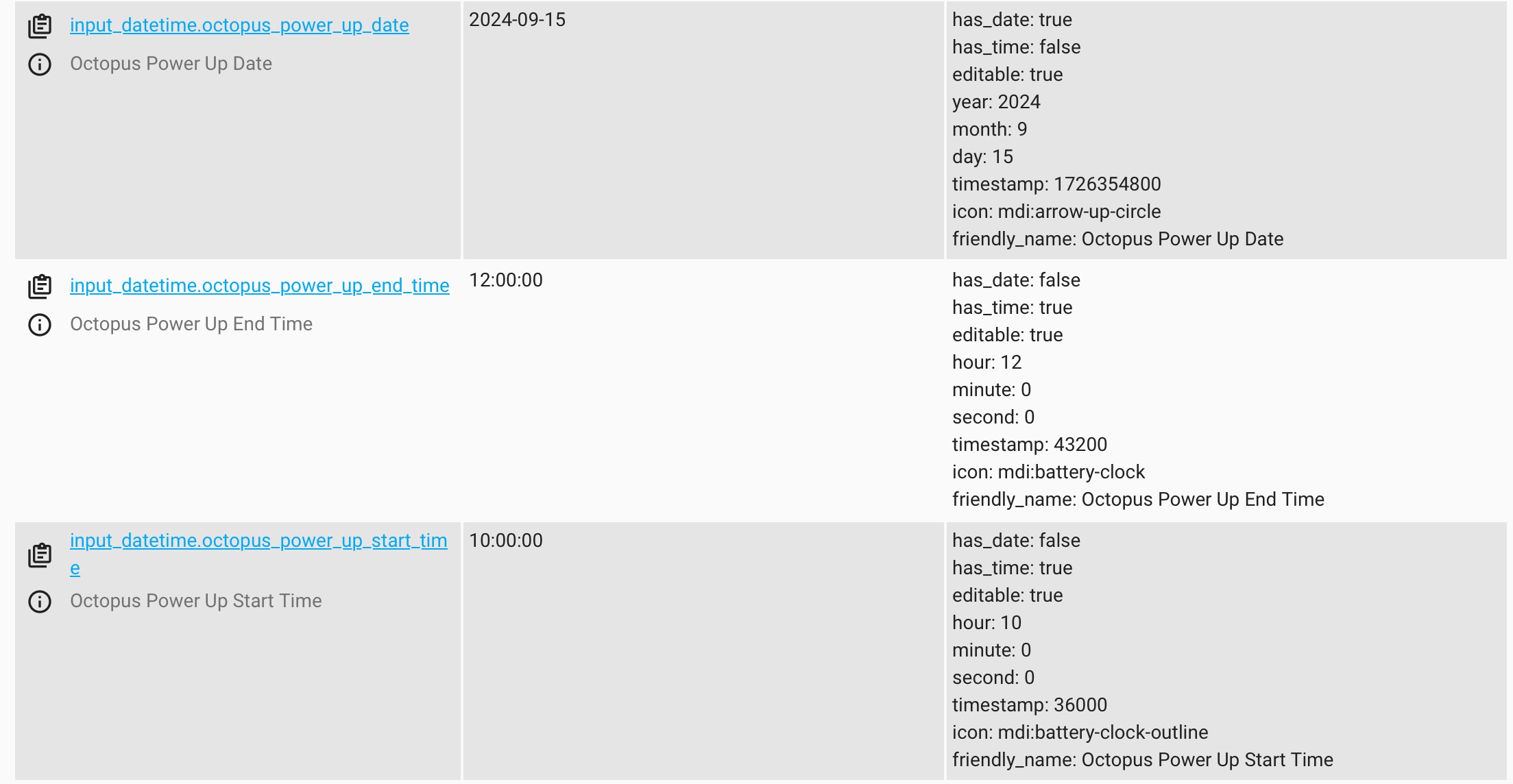
Another idea, can we check the three helper entities. If you go to developer tools/states and filter on power_up, do you see three helper entities like this:

Looking back at the original instructions I realised I wasn’t explicit about how the three helpers have to be setup, the date helper is date only and the start and end times are time only. None of them are date and time.

Double check yours are named the same as mine and contain the same contents as mine. If not, delete them and recreate them.

If still not working, can you share the contents of the directory where you have the .sh file (ls -l) and the full path cd command to get to it, then the extract of configuration.yaml where you defined the service call.

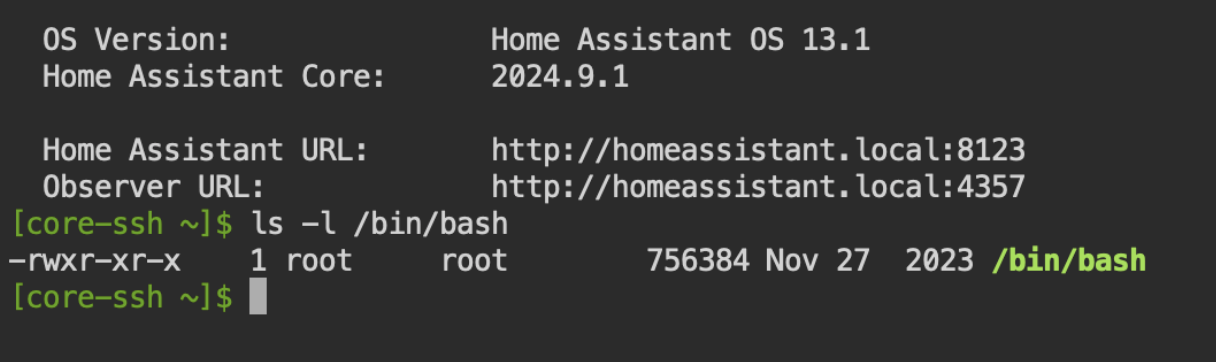
One more check, ls -l /bin/bash to confirm it is installed in the same place as my HA.

If you feel OK to do so I think it would be worth then installing the scripts I gave above to notify to all devices (configure for your mobile/tablet name, has to be running the HA companion app), and try running the script to call the service and capture the stderr.

W
#48 Wavy Davy

geoffreycoan Done all this geoff and get the following:-

So I think something is still pointing to the wrong file location.

the config yaml has

shell_command:
predbat_add_power_up_event: /bin/bash -c "/config/predbat_add_powerup_event.sh '{{ states("input_datetime.octopus_power_up_date")}}' '{{states("input_datetime.octopus_power_up_start_time")}}' '{{states("input_datetime.octopus_power_up_end_time")}}' >>/addon_configs/6adb4f0d_predbat/apps.yaml"

So don't think its that as the apps.yaml is in that location.

W
#49 Wavy Davy

geoffreycoan Geoff, I have already done the scripts to notify as mentioned above (I hadn't refreshed the browser so didn't see your message).

I have the 3 entities exactly as yours so there ok.
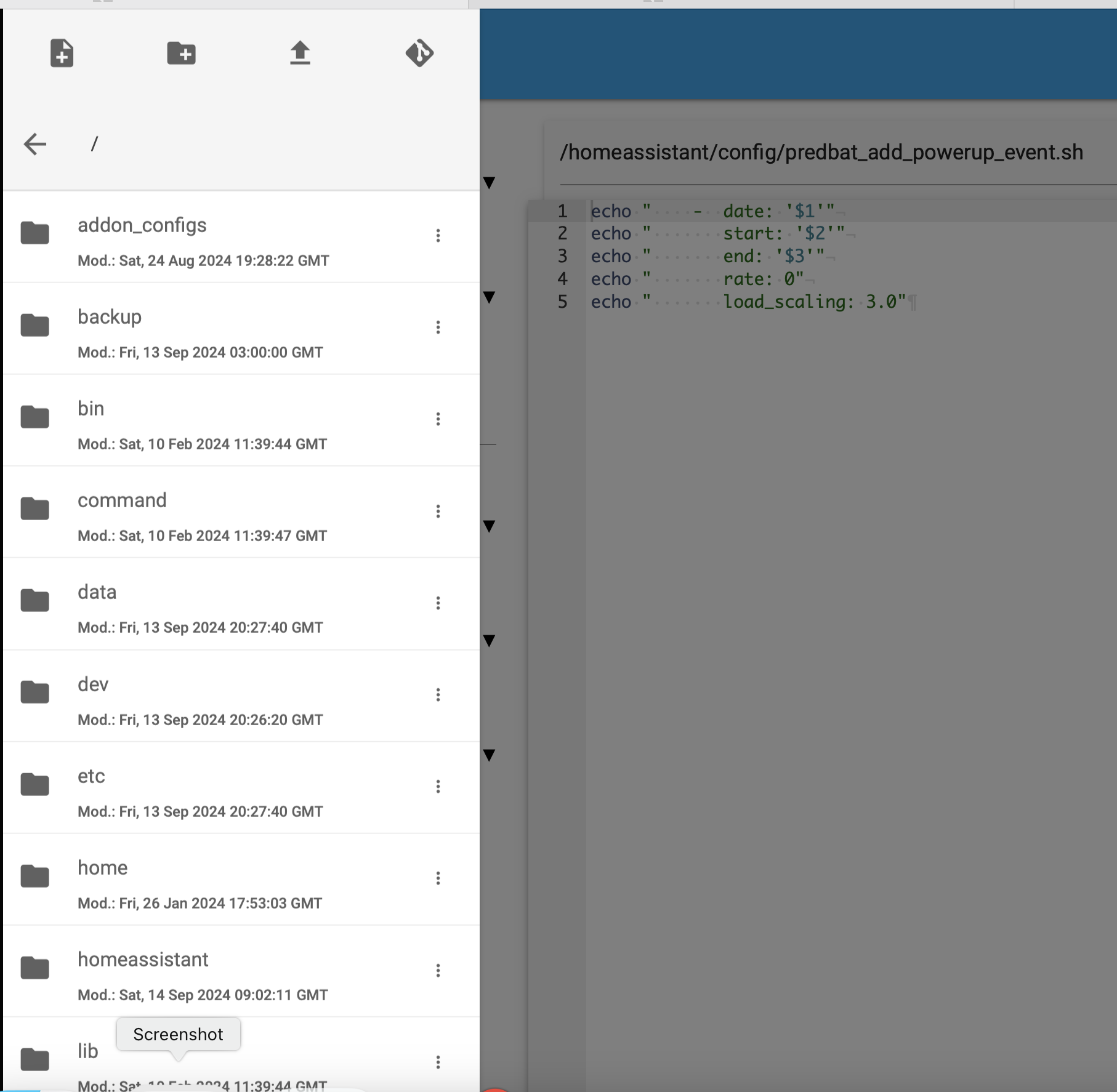
I had moved the sh file into the hidden config in the root directory and here a screenshot of visual editor showing the config directory list, including the sh file and the first part of the shell command showing where I have the bin/bash command pointing to the sh file.
Also ls -l /bin/bash gives me

I also think the helper entities instructions are fine, even I managed to get them set up..

G
#50 geoffreycoan

@Wavy Davy Good news

(ish)

I can recreate your error. From my system logfile:

2024-09-14 21:10:33.473 ERROR (MainThread) [homeassistant.components.shell_command] Error running command: /bin/bash -c "/config/predbat_add_powerup_event.sh '{{ states("input_datetime.octopus_power_up_date")}}' '{{states("input_datetime.octopus_power_up_start_time")}}' '{{states("input_datetime.octopus_power_up_end_time")}}' >>/addon_configs/6adb4f0d_predbat/apps.yaml", return code: 1

And running the script to capture the stderr output gives the same 'no such file or directory' error you got.

So, how I managed to change mine from working perfectly to generating the same error as yours was I changed my shell_command in configuration.yaml to write to apps.yaml in the predbat add-on directory, not to the appdaemon directory. I've always been running the appdaemon add-on for Predbat but am preparing to swap over to the predbat add-on, but required me finding an alternative solution for octoblock that I also run in appdaemon that works out the cheapest blocks of agile time to put the washing machine or dishwasher on overnight.

Anyway, when I try to write to the predbat apps.yaml I get the same error message as you whereas writing to the appdaemon apps.yaml it works. Suggests to me its a permissions problem somewhere. I'll look deeper into it but at least I can recreate the issue - and I'll need to fix it to be able to use the predbat addon myself !!

W
#51 Wavy Davy

that is excellent news, For me at least. I was beginning to think I was completely incompetent, now I think Its just slightly! And I've learn how to view ha files in Visual studio, although I've yet to figure out how to navigate properly.

G
#52 geoffreycoan

Wavy Davy So after more debugging and testing I now know what the underlying problem is, but not how to fix it (yet)

The problem appears to be the way HA segments its addons. Whilst ssh, file editor and visual studio server can all see /addon_configs, it appears that when you run a shell_command from HA, it can't see that directory at all.

Modifying the script to remove the >> /addon_configs/.... and adding 'ls / >/config/x.txt' into the script has revealed that the shell command can 'see' the following directories:

total 96
-rw-r--r--    1 root     root            76 Aug 25 15:10 OFFICIAL_IMAGE
drwxr-xr-x    1 root     root          4096 Jun 22 16:44 bin
drwxr-xr-x    2 root     root         12288 Jun 22 13:24 command
drwxr-xr-x   15 root     root          4096 Sep 14 21:46 config
drwxr-xr-x   17 root     root          3400 Sep 13 21:42 dev
drwxr-xr-x    1 root     root          4096 Aug 27 05:58 etc
drwxr-xr-x    2 root     root          4096 Jun 18 15:16 home
-rwxr-xr-x    1 root     root          1090 Aug 25 15:10 init
drwxr-xr-x    1 root     root          4096 Jun 22 16:44 lib
drwxr-xr-x    2 root     root          4096 Aug  8  2023 media
drwxr-xr-x    2 root     root          4096 Jun 18 15:16 mnt
drwxr-xr-x    2 root     root          4096 Jun 18 15:16 opt
drwxr-xr-x    6 root     root          4096 Nov 20  2023 package
dr-xr-xr-x  396 root     root             0 Sep 14 21:36 proc
drwx------    1 root     root          4096 Aug 25 15:11 root
drwxr-xr-x    1 root     root          4096 Sep 14 21:36 run
drwxr-xr-x    1 root     root          4096 Jun 22 16:44 sbin
drwxr-xr-x    2 root     root          4096 Aug  8  2023 share
drwxr-xr-x    2 root     root          4096 Jun 18 15:16 srv
drwxr-xr-x    3 root     root          4096 Apr  9 18:32 ssl
dr-xr-xr-x   13 root     root             0 Sep 13 21:42 sys
drwxrwxrwt    2 root     root            40 Sep 14 21:36 tmp
drwxr-xr-x    1 root     root          4096 Jun 22 16:44 usr
drwxr-xr-x    1 root     root          4096 Jun 22 16:44 var

Run the same command from ssh and it shows /addon_configs, /addons and /backup directories, none of which the shell command seems to be able to 'see' so no wonder the script to write to predbat fails for you.
I will have to do some more google searching to try to work out what is happening and how I fix this. At the moment though my personal move to the predbat addon is on hold.

Supplement: think its related to this blog post https://developers.home-assistant.io/blog/2023/11/06/public-addon-config/

W
#53 Wavy Davy

My move to predbat addon went relatively smoothly except I got the following "Warn: Inverter 0: inverter definition is not a dictionary" which turned out to be a apps.yaml problem. I made a change to the file which solved it, but prompted me to change to the latest template. But then I don't run octoblock. I must admit I like the web gui.

G
#54 geoffreycoan

geoffreycoan At the moment I can’t see an easy way around this because by default the HA supervisor puts boundaries around add-ons directories and files so HA can’t see the /addon_configs tree at all.

You have to set special permissions for the addon to be able to see these protected file systems. ssh and Studio Code Server have these permissions set which is why we can see predbat’s apps.yaml but not write to it with a shell_command.

Possible I could cook up something with the shell command invoking an ssh to then access the file system, but this is starting to become a more precarious pile of cards.

I’ve raised an enhancement request on predbat to see if predbat can provide an API or mechanism to squirt the session time details in remotely https://github.com/springfall2008/batpred/issues/1457

G
#55 geoffreycoan

geoffreycoan Final bit of the power-up/free electricity jigsaw, an automation that detects when there is a new power up or free electricity event (as registered by the REST sensor) and raises an alert.

Could quite easily automate this to invoke the scripts to decode the REST response and update the helper date/time entities (and write it to predbat), but I'd prefer to be a bit more in control. Amend the URL in the automation to the pathname of the Powerup dashboard so clicking on the notification results in the correct dashboard page being opened.

  1. Automation:
alias: Octopus New Power up Alert
description: Alert when new Octopus Power up or Free Electricity period
trigger:
  - platform: state
    entity_id:
      - sensor.octopus_free_electricity_times
    from: "[{\"start\":null,\"end\":null}]"
    variables:
      alert_text: New Free Electricity times
  - platform: state
    entity_id:
      - sensor.octopus_power_up_times
    from: "[{\"start\":null,\"end\":null}]"
    variables:
      alert_text: New Power up electricity times
action:
  - action: notify.all_devices
    data:
      title: Octopus Electricity session
      message: |
        {{ now().timestamp() | timestamp_custom('%-d %b %H:%M') }} INFO: {{ alert_text }}
      data:
        visibility: public
        persistent: true
        url: /dashboard-givenergy/powerup
        push:
          sound:
            name: default
            critical: 0
            volume: 0.8
mode: single
G
#56 geoffreycoan

All (and especially @Wavy Davy) I have a revised version of the solution for automating Predbat with the Octopus Power Up or Free Electricity events.

This now doesn't rely on shell scripts or appending things to apps.yaml, it uses a brand new Predbat manual API that Trefor has developed. Its currently in the 'main' code branch so you will need to upgrade to that, but I'm sure it will be released into 8.4.12 quite soon.

The complete solution is now as follows:

  1. Three helper date time entities in Home Assistant, octopus_power_up_date, octopus_power_up_start_time and octopus_power_up_end_time (the first being of type date, the second and third of type time)

  2. REST API calls to retrieve the times of the power up and free electricity events https://github.com/8none1/octopus_powerups
    These are setup in configuration.yaml to retrieve the times into HA sensors

  3. Three scripts that are invoked from a custom dashboard. These scripts:
    a. Reformat and send the Octopus helper date/time entities to Predbat
    b. Reformat and copy the free electricity sensor values to the helper date/time entities
    c. Reformat and copy the power up sensor values to the helper date/time entities

  4. A dashboard to control everything. It contains:
    a. The three date/time helper entities so you can see and manually change the power up date & times if you want
    b. A button to send the current Octopus helper dates and times to Predbat as an import rate override
    c. Details of the latest Free electricity event (retrieved by the REST API) and a button to copy the free electricity event times to the helper entities
    d. Details of the latest Power up event (retrieved by the REST API) and a button to copy the power up event times to the helper entities

  5. An automation to alert you when there's a new free electricity or power up event
    NB: You'll still need to click the button in the power up email to accept the event, I am working on integrating this to the dashboard as well, but not there yet

Here's the bits of code:

  1. Create the helpers through the HA UI. Settings / Devices and Services / Helpers
    Create Helper / Date and/or time
    octopus_power_up_date of type Date
    octopus_power_up_start_time of type Time
    octopus_power_up_end_time of type Time

Suggest you keep the names the same as mine or else you will need to amend the scripts to match.

  1. My configuration.yaml contains the line:

sensor: !include sensors.yaml

And my sensors.yaml contains:

  # Octopus Power up times
  - platform: rest
    name: "Octopus Power Up Times"
    unique_id: octopus_power_up_times
    resource: "https://www.whizzy.org/octopus_powerups/powerup.json"
    scan_interval: 900
    json_attributes_path: "$.[0]"
    json_attributes:
      - start
      - end

  # Octopus Free electricity times
  - platform: rest
    name: "Octopus Free Electricity Times"
    unique_id: octopus_free_electricity_times
    resource: "https://www.whizzy.org/octopus_powerups/free_electricity_session.json"
    scan_interval: 900
    json_attributes_path: "$.[0]"
    json_attributes:
      - start
      - end
  1. Scripts that are invoked from the dashboard:

a. Send to Predbat API:

alias: Send Powerup event to Predbat manual API
sequence:
  - action: select.select_option
    data:
      option: >-
        rates_import_override?date={{          
        states('input_datetime.octopus_power_up_date')| as_timestamp |          
        timestamp_custom('%Y-%m-%d') }}&start={{          
        states('input_datetime.octopus_power_up_start_time') }}&end={{          
        states('input_datetime.octopus_power_up_end_time') }}&rate=0
    target:
      entity_id: select.predbat_manual_api
mode: single
description: ""

b. Free event electricity script:

alias: Set Octopus Power Up helpers from free electricity REST sensor
sequence:
  - action: input_datetime.set_datetime
    target:
      entity_id: input_datetime.octopus_power_up_date
    data:
      date: >-
        {% set dt=state_attr('sensor.octopus_free_electricity_times','start') %}
        {% if dt != None %}
          {{ as_timestamp(dt)|timestamp_custom('%Y-%m-%d') }}
        {% endif %}
  - action: input_datetime.set_datetime
    target:
      entity_id: input_datetime.octopus_power_up_start_time
    data:
      time: >-
        {% set
        st_time=state_attr('sensor.octopus_free_electricity_times','start') %}
        {% if st_time != None %}
          {{ as_timestamp(st_time)|timestamp_custom('%X') }}
        {% endif %}
  - action: input_datetime.set_datetime
    target:
      entity_id: input_datetime.octopus_power_up_end_time
    data:
      time: >-
        {% set en_time=state_attr('sensor.octopus_free_electricity_times','end')
        %} {% if en_time != None %}
          {{ as_timestamp(en_time)|timestamp_custom('%X') }}
        {% endif %}
description: ""

c. Powerup electricity event script:

alias: Set Octopus Power Up helpers from free electricity REST sensor
sequence:
  - action: input_datetime.set_datetime
    target:
      entity_id: input_datetime.octopus_power_up_date
    data:
      date: >-
        {% set dt=state_attr('sensor.octopus_free_electricity_times','start') %}
        {% if dt != None %}
          {{ as_timestamp(dt)|timestamp_custom('%Y-%m-%d') }}
        {% endif %}
  - action: input_datetime.set_datetime
    target:
      entity_id: input_datetime.octopus_power_up_start_time
    data:
      time: >-
        {% set
        st_time=state_attr('sensor.octopus_free_electricity_times','start') %}
        {% if st_time != None %}
          {{ as_timestamp(st_time)|timestamp_custom('%X') }}
        {% endif %}
  - action: input_datetime.set_datetime
    target:
      entity_id: input_datetime.octopus_power_up_end_time
    data:
      time: >-
        {% set en_time=state_attr('sensor.octopus_free_electricity_times','end')
        %} {% if en_time != None %}
          {{ as_timestamp(en_time)|timestamp_custom('%X') }}
        {% endif %}
description: ""
  1. Control card (put this anywhere you want on your own dashboard):

    type: entities
    entities:
      - entity: input_datetime.octopus_power_up_date
      - entity: input_datetime.octopus_power_up_start_time
      - entity: input_datetime.octopus_power_up_end_time
      - type: button
        name: Send Power Up event to Predbat
        icon: mdi:script-text-play-outline
        action_name: Execute
        tap_action:
          action: perform-action
          perform_action: script.send_powerup_event_to_predbat_manual_api
      - type: divider
      - entity: sensor.octopus_free_electricity_times
      - type: button
        icon: mdi:script-text-play-outline
        name: Set free electricity times
        action_name: Execute
        tap_action:
          action: perform-action
          perform_action: script.set_octopus_power_up_helpers_from_free_electricity_rest_sensor
      - type: divider
      - entity: sensor.octopus_power_up_times
      - type: button
        icon: mdi:script-text-play-outline
        name: Set Power Up electricity times
        action_name: Execute
        tap_action:
          action: perform-action
          perform_action: >-
            script.set_octopus_power_up_helpers_from_power_up_electricity_rest_sensor
  2. Automation to alert you when there's a new event:

    alias: Octopus New Power up Alert
    description: Alert when new Octopus Power up or Free Electricity period
    trigger:
      - platform: state
        entity_id:
          - sensor.octopus_free_electricity_times
        from: "[{\"start\":null,\"end\":null}]"
        variables:
          alert_text: New Free Electricity times
      - platform: state
        entity_id:
          - sensor.octopus_power_up_times
        from: "[{\"start\":null,\"end\":null}]"
        variables:
          alert_text: New Power up electricity times
    action:
      - action: notify.YOURMOBILEDEVICE
        data:
          title: Octopus Electricity session
          message: |
            {{ now().timestamp() | timestamp_custom('%-d %b %H:%M') }} INFO: {{ alert_text }}
          data:
            visibility: public
            persistent: true
            url: /dashboard-givenergy/powerup
            push:
              sound:
                name: default
                critical: 0
                volume: 0.8
    mode: single
W
#57 Wavy Davy

geoffreycoan Geoff, can you talk me through how to do the scripts from a dashboard please.

G
#58 geoffreycoan

Wavy Davy Geoff, can you talk me through how to do the scripts from a dashboard please.

Basically, on a dashboard of your choice, edit the dashboard, click 'add card', scroll down to the end of the list of cards and select the last entry 'manual'

You'll get a template (manual) card configuration (type: ''), select and delete the template code and copy paste the dashboard code above. This will create an entities card with all the controls to invoke the different scripts described above.

Then Save.

That's it.

If you don't have Power up events in your region, just the free electricity events you can delete the REST sensor and 'execute' button for the power up script.

G
#60 geoffreycoan

geoffreycoan And here's what it looks like on a dashboard. This is after the power up event we had today, and there's no further power up or free electricity sessions coming up so both of the "times" are blank:

L
#61 Leeshore

Wavy Davy automations & scenes and then scripts at top

W
#62 Wavy Davy

geoffreycoan & Leeshore Thanks Geoff and Lee, It was the 3 scripts I was having trouble with not the dashboard.. When I tried to create them and pressed save they disappeared. I've since checked and the first 2 they are there, so either a senior moment or I needed to update the browser. Thanks anyway.

W
#63 Wavy Davy

Geoff, I'm not sure if it's me but I think you have duplicated the last 2 scripts (b & c). They look the same, unless there is some subtle difference I missed.

G
#64 geoffreycoan

Wavy Davy Geoff, I'm not sure if it's me but I think you have duplicated the last 2 scripts (b & c). They look the same, unless there is some subtle difference I missed.

B*m, I did, here is the missing power up helper script c. It is almost identical to the free electricity one, just a different source REST sensor:

alias: Set Octopus Power Up helpers from Power Up electricity REST sensor
sequence:
  - action: input_datetime.set_datetime
    target:
      entity_id: input_datetime.octopus_power_up_date
    data:
      date: >-
        {% set dt=state_attr('sensor.octopus_power_up_times','start') %} {% if
        dt != None %}
          {{ as_timestamp(dt)|timestamp_custom('%Y-%m-%d') }}
        {% endif %}
  - action: input_datetime.set_datetime
    target:
      entity_id: input_datetime.octopus_power_up_start_time
    data:
      time: >-
        {% set st_time=state_attr('sensor.octopus_power_up_times','start') %} {%
        if st_time != None %}
          {{ as_timestamp(st_time)|timestamp_custom('%X') }}
        {% endif %}
  - action: input_datetime.set_datetime
    target:
      entity_id: input_datetime.octopus_power_up_end_time
    data:
      time: >-
        {% set en_time=state_attr('sensor.octopus_power_up_times','end') %} {%
        if en_time != None %}
          {{ as_timestamp(en_time)|timestamp_custom('%X') }}
        {% endif %}
description: ""
W
#65 Wavy Davy

geoffreycoan Geoff, do you have a separate forum topic for GivTCP activity monitor? having an issue with it.

G
#66 geoffreycoan

Wavy Davy geoffreycoan Geoff, do you have a separate forum topic for GivTCP activity monitor? having an issue with it

There isn’t a separate topic for it, but feel free to either create one or add to ‘first night live with Predbat’

Cheers

W
#67 Wavy Davy

Geoff, how far in advance does the Octopus new Power up alert automation send it's alert?
Is it when it happens or does it do it as soon as its on the plan?
Looking at the sensor "sensor.octopus_power_up_times" its never triggered and has the value [{"start":null,"end":null}]. Is this correct?

G
#68 geoffreycoan

Wavy Davy Geoff, how far in advance does the Octopus new Power up alert automation send it's alert?
Is it when it happens or does it do it as soon as its on the plan?

The REST API is set to poll from HA every 15 minutes. I think the service at the other end checks for emails about every 30 minutes, so in practice it can be up to an hour after you get the Octopus email, but in practice I’ve never had an issue, the sensor is populated about 2-4pm for an event the next day so you’ve plenty of time to instruct it into Predbat

W
#69 Wavy Davy

I think I have the wrong idea about it. The last email about free electricity I got was 14 Sept, and the helper shows that date, but the start/end times have the wrong times on them. But they have no history to check.
I was wondering if the free or negative periods that happen without the email would be picked up, but now realise that won't happen.

W
#70 Wavy Davy

Does this look correct to you?


W as wondering about the Null bits

W
#71 Wavy Davy

Also if I run "script.set_octopus_power_up_helpers_from_power_up_electricity_rest_sensor" I get

so not sure this is correct.

G
#72 geoffreycoan

Wavy Davy there’s 3 bits to this, reading from the bottom:

  • time and date of the next power up event. Currently null as there’s no future date
  • time and data of the next free electricity event. Ditto null
  • time and date of the next event you want to program into Predbat. Currently 14/9 as that was the last event you must have had

When there is next an Octopus event the bottom or middle date will be populated. You press execute underneath that and it will decode the REST values and copy it to the top entry, press execute and it sends it through to predbat

Wavy Davy I was wondering if the free or negative periods that happen without the email would be picked up, but now realise that won't happen.

Normal free or negative agile price periods will come through on the Octopus Integration sensors and Predbat will handle these automatically. This is all to handle the special events that come through on email and are not reflected in the agile price sensors so we need to override and program Predbat with them

G
#73 geoffreycoan

Wavy Davy Also if I run "script.set_octopus_power_up_helpers_from_power_up_electricity_rest_sensor" I get

I thought I had trapped this so if the rest sensor was null it wouldn’t error out, but since there is no date and time set, it won’t do anything. I’ll have a look at the script, but until there is an Octopus power up event and the rest sensor populated, it won’t be able to do anything

W
#74 Wavy Davy

Cheers Geoff, I'll leave you in peace (for as long as possible anyway)

G
#75 geoffreycoan

geoffreycoan

Here's updated versions of the two 'copy REST sensor to input_datetime' scripts that now won't error as Wavy Davy found when the REST sensor values are empty. The script will now just leave the input_datetime fields unchanged.

Free electricity event script:

alias: Set Octopus Power Up helpers from free electricity REST sensor
sequence:
  - action: input_datetime.set_datetime
    target:
      entity_id: input_datetime.octopus_power_up_date
    data:
      date: >-
        {% set dt=state_attr('sensor.octopus_free_electricity_times','start') %}
        {% if dt != None %}
          {{ as_timestamp(dt)|timestamp_custom('%Y-%m-%d') }}
        {% else %}
          {{ states('input_datetime.octopus_power_up_date') }}
        {% endif %}
  - action: input_datetime.set_datetime
    target:
      entity_id: input_datetime.octopus_power_up_start_time
    data:
      time: >-
        {% set
        st_time=state_attr('sensor.octopus_free_electricity_times','start') %}
        {% if st_time != None %}
          {{ as_timestamp(st_time)|timestamp_custom('%X') }}
        {% else %}
          {{ states('input_datetime.octopus_power_up_start_time') }}
        {% endif %}
  - action: input_datetime.set_datetime
    target:
      entity_id: input_datetime.octopus_power_up_end_time
    data:
      time: >-
        {% set en_time=state_attr('sensor.octopus_free_electricity_times','end')
        %} {% if en_time != None %}
          {{ as_timestamp(en_time)|timestamp_custom('%X') }}
        {% else %}
          {{ states('input_datetime.octopus_power_up_end_time') }}
        {% endif %}
description: ""

Power up event script:

alias: Set Octopus Power Up helpers from Power Up electricity REST sensor
sequence:
  - action: input_datetime.set_datetime
    target:
      entity_id: input_datetime.octopus_power_up_date
    data:
      date: >-
        {% set dt=state_attr('sensor.octopus_power_up_times','start') %} {% if
        dt != None %}
          {{ as_timestamp(dt)|timestamp_custom('%Y-%m-%d') }}
        {% else %}
          {{ states('input_datetime.octopus_power_up_date') }}
        {% endif %}
  - action: input_datetime.set_datetime
    target:
      entity_id: input_datetime.octopus_power_up_start_time
    data:
      time: >-
        {% set st_time=state_attr('sensor.octopus_power_up_times','start') %} {%
        if st_time != None %}
          {{ as_timestamp(st_time)|timestamp_custom('%X') }}
        {% else %}
          {{ states('input_datetime.octopus_power_up_start_time') }}
        {% endif %}
  - action: input_datetime.set_datetime
    target:
      entity_id: input_datetime.octopus_power_up_end_time
    data:
      time: >-
        {% set en_time=state_attr('sensor.octopus_power_up_times','end') %} {%
        if en_time != None %}
          {{ as_timestamp(en_time)|timestamp_custom('%X') }}
        {% else %}
          {{ states('input_datetime.octopus_power_up_end_time') }}
        {% endif %}
description: ""
N
#76 neomancer

I'm guessing the reason for this not being 100% automated is because its using a 3rd party API and requiring verification is a security feature?

G
#77 geoffreycoan

neomancer I'm guessing the reason for this not being 100% automated is because its using a 3rd party API and requiring verification is a security feature?

No, I just didn’t particularly want to fully automate it. I prefer to get the automated event alert, run the script to copy the rest sensor into HA entities and then run the second script to send the event into predbat.

You certainly could trigger the appropriate scripts from the automation (item 5) above.

However, there is one gotcha if there are multiple events in short succession.

So far this has only happened once to me, there was a free electricity event and then a powerup event the next day. I use the input_datetime start/end/date fields in other automations in HA (principally I swap between a ‘day’ utility meter for import and a ‘free’ utility meter so I can see the correct prices and consumption split on the energy dashboard). If you have events in quick succession and overwrite the fields with the second event before the first event is completed, the automations that use those fields don’t work. This isn’t an issue for Predbat as the event has already been sent to Predbat, but is the main reason why I didn’t fully automate it.

N
#78 neomancer

geoffreycoan

Good point, I'd not considered the back to back events.

L
#79 Lincs_Will

Clues for the clueless please! I'm trying to get free electricity sessions automated/as automated as possible.

What I think I need to do is this:
1 - Follow steps 1, 3, 4, 5 and 6 in @geoffreycoan's first post.
2 - Follow steps 2-5 in geoffreycoan's post on 13 Sep. Step 1 has already been completed by doing the above.

Can someone confirm my approach is correct? I'm already having issues trying to get some of the dashboard code posted here to work correctly when I paste it into the dashboard raw code editor but I want to know I'm going the right things before working out niggles along the way.

For me once I've got Predbat to charge & discharge the battery sensibly around free electricity sessions I'll also want to:

  1. Automate car charging. To do this I think I'd use the Octopus Energy integration (switch.octopus_energy{{ACCOUNT_ID}}intelligent_smart_charge) to disable smart charging and then use the MyEnergi integration to set a timed slot for our Zappi to charge the car during the free electricity session. I suppose a simpler way would be to just enable Octopus' Bump Charging for the duration of the session?

  2. Automate water heating. In the fullness of time I'd like to add a smart immersion heater switch to the house and get HA to control it to come on overnight when Predbat wants to charge the house battery (GivEnergy 9.5kwh) so Predbat can schedule battery discharge around IOG charging slots to recover as much money as possible by exporting at 15p/kwh vs the IOG import rate of 7p/kwh. My immersion heater has a built in thermostat but I'd also like to limit the running time to 2hrs, and link it to free electricity sessions so it avoids running overnight, or maybe only runs for 1hr, to make the best use of the free electricity.

Best not try and run before I can walk though!

G
#80 geoffreycoan

Lincs_Will Clues for the clueless please! I'm trying to get free electricity sessions automated/as automated as possible.

What I think I need to do is this:
1 - Follow steps 1, 3, 4, 5 and 6 in @geoffreycoan's first post.
2 - Follow steps 2-5 in geoffreycoan's post on 13 Sep. Step 1 has already been completed by doing the above.

Can someone confirm my approach is correct?

It’s a bit simpler than that.

I posted the whole latest solution in early October - see geoffreycoan - just follow all the steps in that and you will have a working solution.

One caveat was that I hadn’t trapped an empty REST sensor in the ‘copy from REST to HA entities’ scripts properly so if you ran the scripts when there wasn’t a power up or free electricity event then you’d get an error as Wavy Davy found. Revised scripts are in the post geoffreycoan

r/e car charging. Depends whether you want Octopus Intelligent Go to schedule your charging or Predbat. If you schedule in any other way such as MyEnergi then Predbat won’t know about it and so won’t be controlling the battery - potentially you may discharge the battery into the car unless you manually force the battery action in Predbat.
If you have IOG then the easiest way would be to let IOG do the scheduling and let Predbat know about the IOG actions (see car charging in the documentation)

Water heating probably best to do as an automation in HA

L
#81 Lincs_Will

geoffreycoan Thanks! My Predbat version is v8.5.1. Does that include the new manual API? The method you linked to is much easier, and it helped that I'd achieved most of it yesterday. I'll have to think through the car charging, presumably there is a way to get Predbat to charge the home battery when the car is charging, though I'd expect Predbat to want to charge the battery anyway as i assume your automated method for dealing with free electricity sessions sets the import price to 0?

G
#82 geoffreycoan

Lincs_Will Thanks! My Predbat version is v8.5.1. Does that include the new manual API?

Yes, the manual API was introduced in Predbat 8.5.0 so you have it available to you

Lincs_Will I'll have to think through the car charging, presumably there is a way to get Predbat to charge the home battery when the car is charging, though I'd expect Predbat to want to charge the battery anyway as i assume your automated method for dealing with free electricity sessions sets the import price to 0?

Yes, the scripts set the import price to 0, and yes, usually Predbat will choose to charge the battery at that time, BUT it might not do. If its a sunny day and you are already generating more solar energy than your inverter charge rate, there's no point to discharge the batteries before the event and grid recharge at 0p during the event. I saw this happen a few times with the power up events. As we are getting into winter and greyer days but windy, it should be less of an issue

N
#83 Northwarks

I’ve been following this thread - I imagine we will have some saving sessions over the coming winter, how will Predbat manage those, can they be managed in the same way? I have an automation (outside of Predbat) currently that may interfere with Predbat ?

N
#84 Northwarks

I’ll answer my own question - Its in the documentation 🙂

G
#85 geoffreycoan

geoffreycoan Automation to alert you when there's a new event:

You may have noticed that Trefor has added free electricity event detection to the latest release of Predbat so some of this solution could be redundant. But if you have power up events in your area, don’t use Predbat, or you still want the flexibility of the event times in helper entities so you can run your own automations (such as charging your EV), then this might still be useful.

Here’s an enhanced version of the automation (component number 5) from above that now includes the date/time of the start of the powerup/free electricity event in the mobile alert it sends:

alias: Octopus New Power up Alert
description: Alert when new Octopus Power up or Free Electricity period
triggers:
  - trigger: state
    entity_id:
      - sensor.octopus_free_electricity_times
    from: "[{\"start\":null,\"end\":null}]"
    variables:
      alert_text: New Free Electricity times
      date: >-
        {% set dt=state_attr('sensor.octopus_free_electricity_times','start') %}
        {% if dt != None %}
          {{ as_timestamp(dt)|timestamp_custom('%a %-I:%M %p') }}
        {% else %}
          unknown date
        {% endif %}
  - trigger: state
    entity_id:
      - sensor.octopus_power_up_times
    from: "[{\"start\":null,\"end\":null}]"
    variables:
      alert_text: New Power up electricity times
      date: >-
        {% set dt=state_attr('sensor.octopus_power_up_times','start') %} {% if
        dt != None %}
          {{ as_timestamp(dt)|timestamp_custom('%a %-I:%M %p') }}
        {% else %}
          unknown date
        {% endif %}
actions:
  - action: notify.YOURMOBILEDEVICE
    data:
      title: Octopus Electricity session
      message: |
        {{ now().timestamp() | timestamp_custom('%-d %b %H:%M') }} INFO: {{ alert_text }} starting {{ date }}
      data:
        visibility: public
        persistent: true
        url: /dashboard-givenergy/powerup
        push:
          sound:
            name: default
            critical: 0
            volume: 0.8
mode: single