S
There seems to be an issue with setting the maximum grid charge limit on my inverter. I’ve tried setting in the app and the cloud and the battery charges over the 70% limit I’ve set.
Any ideas would be gratefully appreciated

There seems to be an issue with setting the maximum grid charge limit on my inverter. I’ve tried setting in the app and the cloud and the battery charges over the 70% limit I’ve set.
Any ideas would be gratefully appreciated
ShaneC hi, welcome to the forum. Not quite sure what to suggest - works fine for me. Is this a newly-installed system? What inverter model? Could ask GE support, or your installer, who can see the settings on your inverter.
(It wasn't a calibration cycle, was it - that would ignore any limits you set.)
Could post a screenshot of the system modes page on the app, but I think there's only really one parameter to set.
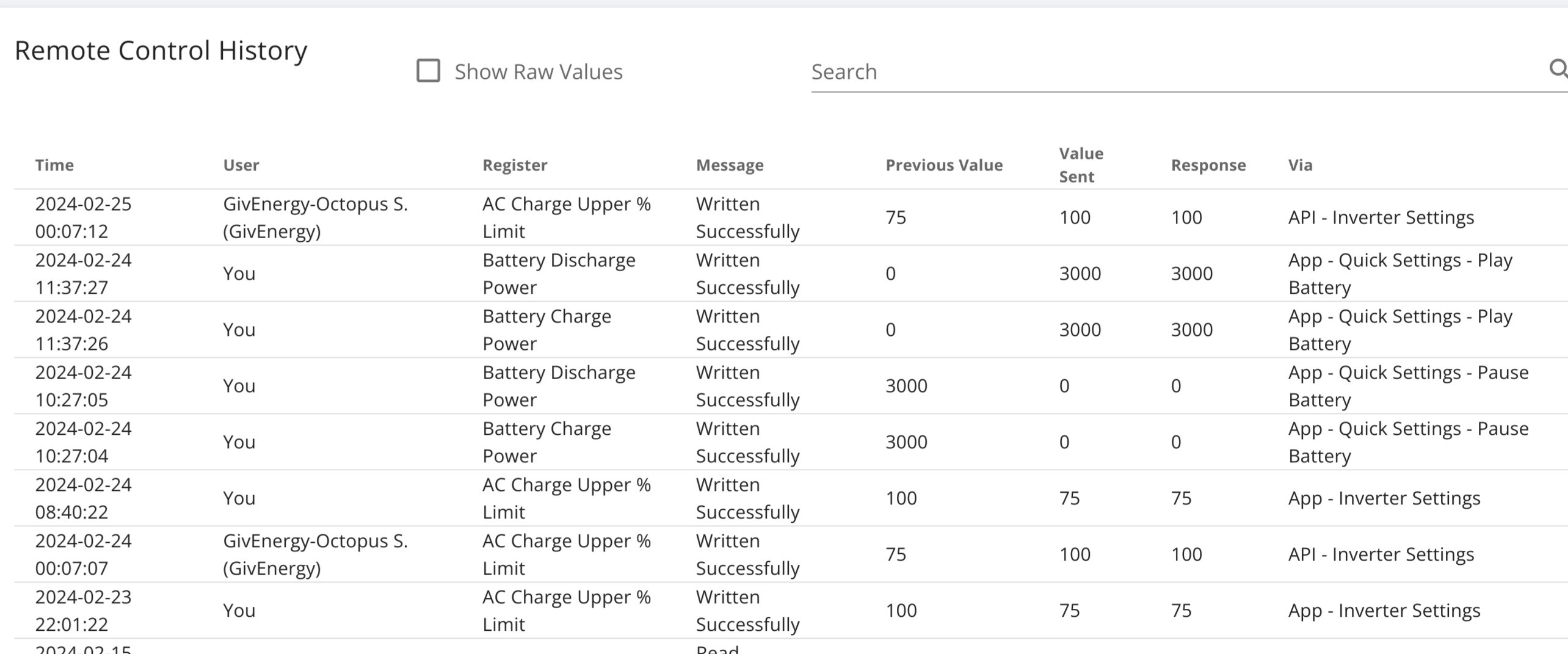
Hi, I'm getting the same issue. I set my charge limit to 75% and the system resets to 100%, this started happening from Jan 24, where the system overrides my choice. Any ideas? I've had my battery 8.2kwh Gen 1 for 18 months with no issue, and I always amend as the season changes, Winter 100%, Spring/Autumn 75% Summer 50%. This is a pain as I want to limit my downloads from the grid and maximise my solar gain as i dont get paid for exporting. Any help or guidance would be appreciated.
Hi all, I am a newbie to battery and solar having only getting my 7kW array and all in one with gateway installed a couple of weeks ago.
I was having the same issue with overcharging over the limit set. I rang givenergy and they did a firmware update which seems to have worked. I have yet to fully test it but overnight it did seem to only top up to the setpoint I entered.
Firmware update also seems to give me the option to do up to 10 times charges and discharges which I didn't think was possible. Haven't tested yet either.
NeilC, do you have a smart tariff linked to your account? As I say no expert but a couple of other discussions seem to think smart tariffs linked may write over the manual setpoints. It looks (to me anyway) like from your screenshot that the setpoint is being changed from something linked to octopus.
Morning, many thanks for the replies. I'm not sure what the latest firmware update for the inverter & battery, but I'm currently using Inverter Firmware Version D0.535-A0.535 & Battery Firmware Version 3015, these were updated Jul 2023. Thanks for the heads up, I'm having another battery installed tomorrow, I'll expect they will hopefully sync the batteries update both at the same time. As for Octopus, yep that is strange as I'm on the standard Go Tariff, not any of the intelligent Tariffs, this only started happeningfrom January 24, and ive been on the Go tariff for 2 years, I've not signed over anything to Octopus to remotely charge or discharge the battery. So it seems to be a givenergy input that amends the request at 00:07 each day.
NeilC A timing of 12:07 does seem consistent with something preparing for the Go cheap rate at 12:30. I think I'd guess that "GIvenergy-Octopus S. (Givenergy)" means that it's givenergy themselves doing it, and the reason is an Octopus Smart tariff. (Go is still considered a smart tariff, even though it's fixed hours.)
It seems that I have told GivEnergy about my Octopus account - don't remember doing that, but in settings->smart tariff, it is able to access my pricing details, so I guess I must have.
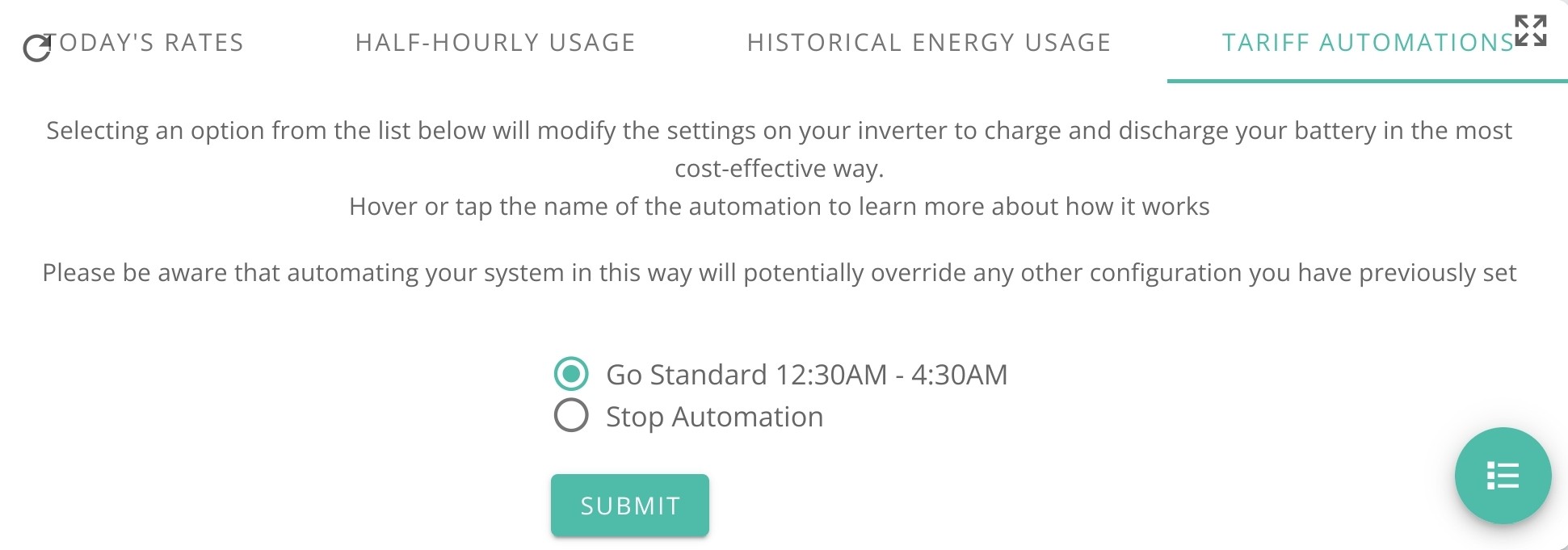
Just double check that under 'automations', it's showing you 'None'. And you may as well go in and "stop the automation that is currently running" - I can't see that doing any harm. I don't think I've ever been offered anything in here. (Like you, I'd been on Go since before signing up to GE, though I'm now on IOG.)
Easy fix, when you have the information. Now that I have deselected the smart tariff I can amend my times and they were saved last night and all worked normally, but you do loose current live data from Octopus. We live and learn, Thanks for engagement. Have a nice day.