BMS Over Voltage Alert

37 comments started 2024-03-03 last 2024-04-03
GivEnergy ProductsBattery
P
#1 Phil89a

Gen-3 Inverter plus 2 x 9.5 kWh Batteries

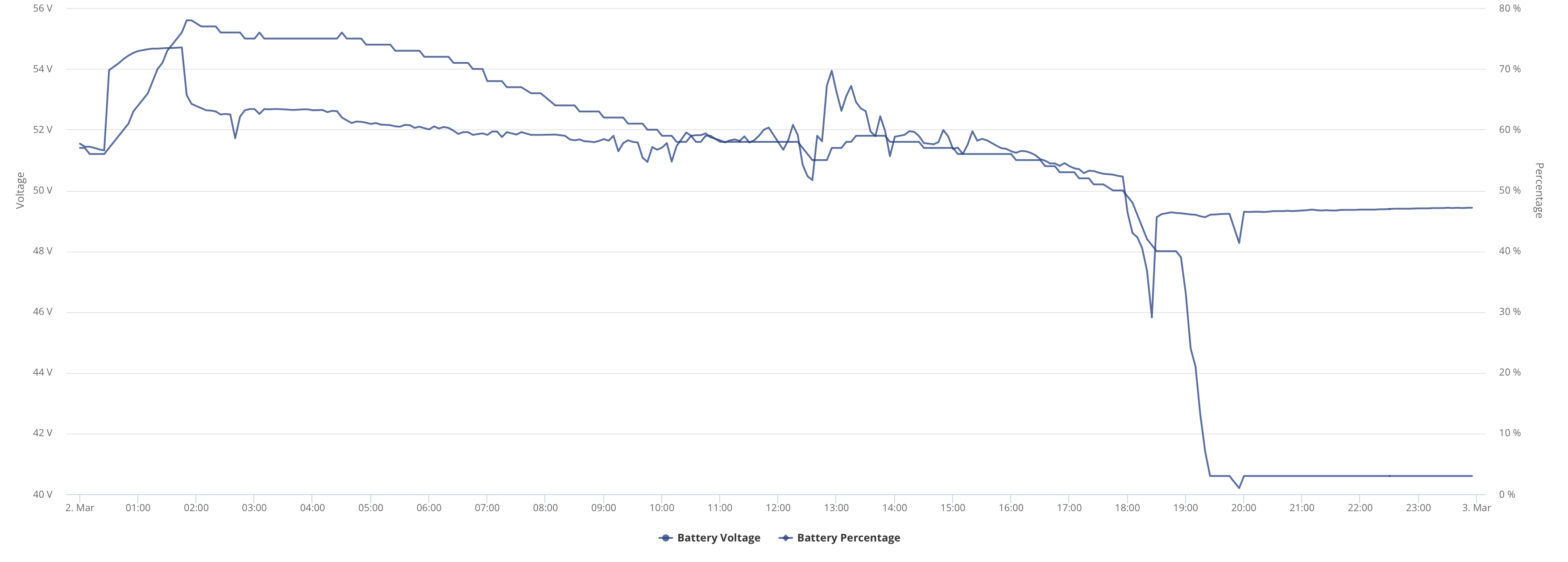
Last night after the Octopus Saver Session, I disabled the Timed Export and reenabled the ECO mode (as I always do). However, the battery stopped discharging completely except for a reported 100W to the house and then the SOC started to drop and over the next 30 minutes, dropped from 40% to 3%. In this time, apart from the reported 100W, the house was being supplied from the grid. Nothing was reported going to the Grid from the battery. See graph below...

As I was behind on Firmware I then tried to update the firmware, but after 2 hours the update failed.

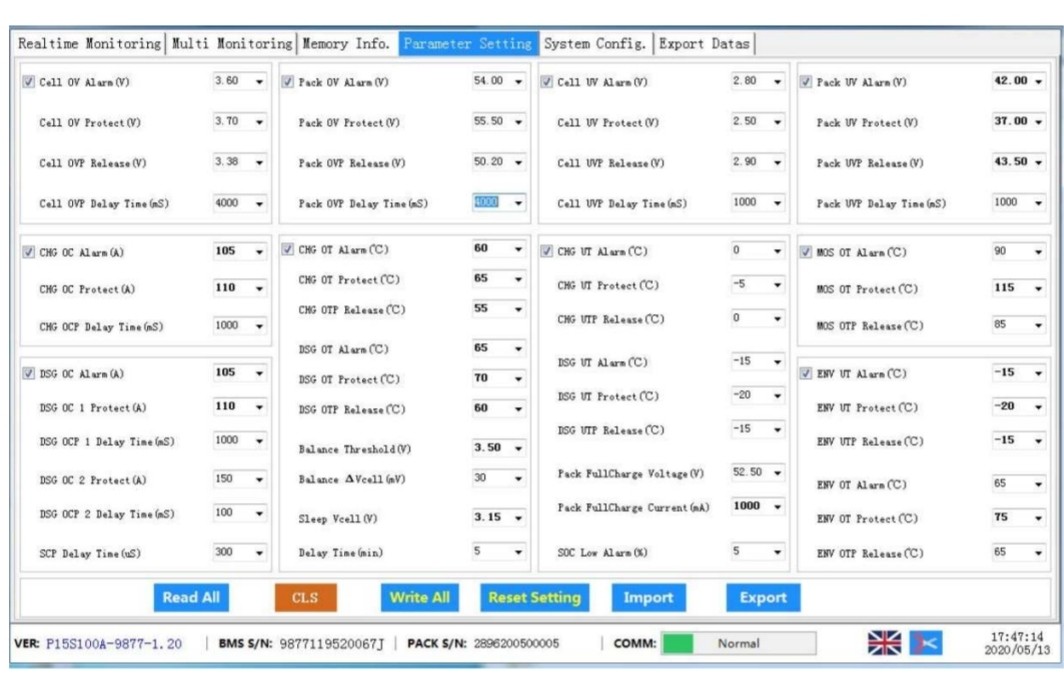
About 30 minutes after hitting 3%, I noticed the following errors on the inverter (see below)

Any ideas - do I have a problem?

P
#2 Phil89a

Can anyone help?

D
#3 DD

Phil89a what firmware are you on? One thing I have heard when there are two batteries is if they end up different firmware. That could have happened here, since the update hadn't completed.
But things had already gone weird before then...

(Have you tried timed discharge? For me, it's identical to timed export except that it doesn't turn off eco flag. You can schedule it for the savings session and just forget about it .)

I think that when SoC goes below 4% it does an "emergency" charge from grid to bring it back up. But this shouldn't really have voltage up anywhere near over-voltage territory. I have heard that latest battery firmware (3015) is prone to giving over-voltage reports - no idea if they are genuine or spurious. (I've not yet updated.)

Since you have two batteries, not sure what the voltage/charge graph shows. Is it some sort of virtual battery showing a composite signal? On the app, you can access the date for each battery separately (through more information). I assume you can also see that on the portal?

Probably need to speak to installer or support who can inspect your system remotely. Having started a firmware update, probably need to get that completed.

V
#4 Vestas

DD I have heard that latest battery firmware (3015) is prone to giving over-voltage reports - no idea if they are genuine or spurious.

They're genuine.

v3015 is screwed up in that it charges to calibration limits which it shouldn't be doing. I've seen cells over 3.65V which is way too much. The G2 inverters got a f/w update to suppress (not fix) the errors but G1 will continue to error and overcharge the batteries. I don't see a "fix" to suppress the errors on G3 listed.

That's on whoever screwed up the firmware, same person that screwed up v3013 so badly it had to be pulled & ultimately it'll be GE replacing damaged batteries under warranty.

P
#5 Phil89a

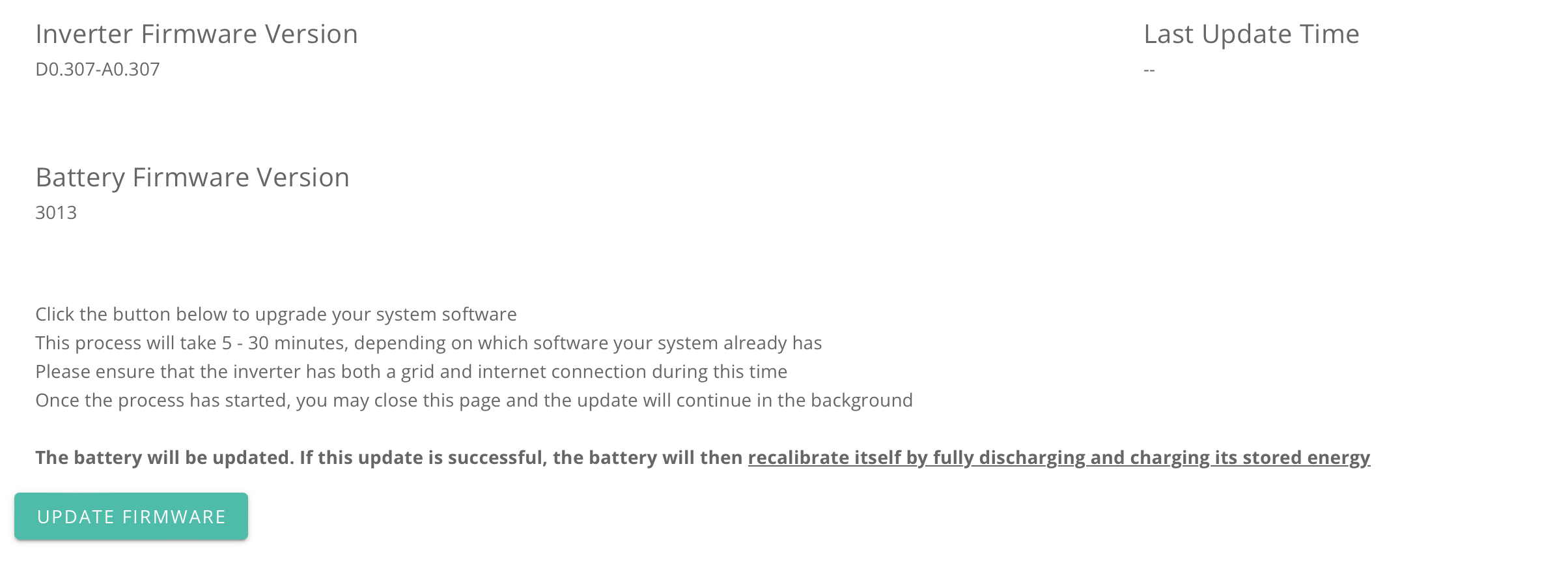
DD Firmware is shown below....

It seems firmware-wise I may be a bit stuffed. I am on 3013 which has issues and the latest has these issues 🙁

Will have a word with my installer.

Thanks

N
#6 Newman

AC3 and 2 x 8.2
My suggestion would be to contact help desk and ask to be put onto 3012. I had all sorts of SOC problems on 3015 and 3013 is know to flatten batteries.

Z
#7 Zakalwe

Speak to the helpline and request that they put you on 3012.

D
#8 DD

Is it possible to upgrade just the inverter, but not the BMS ? I'm currently on 305 + 3012, and (I think) I'd like to update inverter, since there's at least one feature I'd like to use that doesn't work on 305 and might work on 307; but am happy with 3012.

Perhaps going the route of downloading the firmware, rather than OTA ?

S
#9 SteveCook

I had warnings when I went to 3013.
GivEnergy helpdesk emailed me 3012 and I installed that (hardest part was getting the glue off the USB stick in the battery).
3012 installed easily and then upgraded OTA to 3015 which has been working fine for months

P
#10 Phil89a

Thanks all

My installer has passed the problem to GivEnergy, so hopefully someone will come back to me soon.

V
#11 Vestas

Phil89a v3015 is considerably safer for your battery than v3013, which was a disaster. At least with v3015 you can at least set the SoC target to 95% and that more or less stops the overvoltage. Wasn't much you could do without automations to stop v3013 taking the battery all the way down to 45V.

S
#12 SteveCook

Vestas
Thanks. If I was to get another 9.5 added, should I get them both on 3015?

V
#13 Vestas

SteveCook You'll need them on same f/w (whatever that is) or you'll have SoC problems. Installer will have to discharge both batteries to same SoC, update f/w then run full calibration.

If your options are only 3013 or 3015 then 3015 is the one to go for.

D
#14 DD

I see there's now a 308, which fixes one of the bugs I'd recently encountered. It also has "Added the quick protection function of battery overvoltage interruption." is that actually fixing the problem with BMS 3015, or hiding them, or preventing them happening, or ..?

Q
#15 Qyaunos1

Vestas are the voltage issues with cells charging to 3.65v being looked at by givenergy and have they acknowledged the issue?

Reason I'm asking is because I'm imminently going to get a replacement battery because of cell deviation issues (you helped with it initially on this forum).

V
#16 Vestas

Qyaunos1 are the voltage issues with cells charging to 3.65v being looked at by givenergy and have they acknowledged the issue?

No they haven't.

B
#17 bdwalk

Hello,
Is anyone getting intermittent 'BMS Over Voltage' Alert Notifications with a Giv Engergy Inverter 1 and Gen 2 Battery . What advice can you give . Is this serious fault ?

My Battery Firmware is : 3015, inverter firmware - D0.450-A0.451

The system was working fine , and this notification occured only after applying the 3015 firmware ..

S
#18 SteveCook

bdwalk
Has the calibration cycle taken place.
Turn the battery off and on again (reboot) with the button on the RHS

V
#19 Vestas

SteveCook Has the calibration cycle taken place.

Won't make any difference, mine over-voltaged on the calibration routine when v3015 was installed, GE didn't seem to think that was an issue. The problem is that v3015 charges the battery to the calibration limits (and beyond) instead of charging to the "inverter limits", which should be 3 or 4% lower.

The choice is revert firmware, set a SoC target of 97% max, or use an automation to pause then reduce charging power once the battery hits 90% or so.

B
#20 bdwalk

Hello,
Calibration cycle done as part of firmware update & was successful, then notification events regular occured , and then intermittent pattern. I have raised this with my installer & Giv Energy, and have done seond Calibration successfully. Still get intermittent BMS Over Voltage notification . The problem only intermittent occurs when battery is 100% full ( Grid or Solar charge) .
Giv Energy have suggested reseting the BMS.


T
#21 TimHutchings

I have the same issue with a Gen 1 inverter and a 9.5kw battery. It seems to happen every few days. It does therefore seem to be a 3015 firmware issue. Until there's a fix, I'll try dropping the charge to 99% to see if that helps.

V
#22 Vestas

TimHutchings You'll probably have to drop to 96-97% - there's 3-4% difference between what the inverter and the BMS thinks the SoC is. The battery should be charging to the inverter limit (which is what you see on the app/portal) and not the BMS limit.

GE clearly know there's a problem as they suppressed the errors on G2 inverters, tried automatic resetting on overvoltage from the portal and finally hid the portal notifications for a week or so - before people here noticed and called them out on it.

#23 Tenkaykev

With that attitude and their response to the Givenergy plug ratings they're risking becoming the Currys / PC World of renewables.

V
#24 Vestas

Tenkaykev Whoever was responsible for v3012 to v3015 has a consistent record of failure (v3013 actually killed batteries) so I fully expect the next revision to be broken as well. It'll just be broken in a different way.

They're going to have lots of G2 mid-life failures/warranty claims after what some of these batteries (mine included) have been subjected to in terms of low and high voltages. That's on them though, assuming they're still around.

T
#25 TimHutchings

Vestas Don't think on a Gen 1 I've got any control over solar charging though. The only adjustment I can make is on AC charging in the portal. Don't know if that that also covers solar charge? Obviously on these sunnier, longer, milder days, I may not need to use AC charging at all, as the A2A heat pump is just using a few hundred watts an hour.
It's beginning to look like it's about the time I need to move back to Flux from Cosy, as I seem to be exporting on many days now.

V
#26 Vestas

TimHutchings It shouldn't happen so frequently if its PV input which takes it over 97% (BMS reading) but that largely depends on whether the SoC is even vaguely accurate. If it isn't then all bets are off.

I'm coming to the distinct impression that the only way to keep the SoC accurate is to let the battery rebalance the cells probably once every couple of days in summer. That's going to mean ideally being well below 20% SoC and having the battery idle for at least an hour (2 is better) so the internal rebalancing routines happen.

The only saving grace here is GivTCP. I mean that. The GE s/w, f/w and h/w is basically average at best, bad at worst. GivTCP allows us to at least ameliorate some of the truly bad stuff.

V
#27 Vestas

Assuming GivTCP/HA then probably the best way to keep the battery in check without SoC balancing is looking at the voltages under charge.

You could for example set an arbitrary level at which all battery charge ceased.

For example if cells 4, 8, 12 & 16 hit 3.4V for 3 minutes then pause charge.

That's simple enough using the graphical automation editor in HA.

Edit - keep the pause until PV power goes below a certain level for a certain time.

S
#28 SJB

Vestas All great fun but is the battery/cell voltage really triggering the alert?
I had an alert yesterday after the battery got to 100% and no alert today on reaching 100%. Yes the voltages are always high when close to 100%, but the voltages yesterday were lower than today so why didn't I get an alert today?

V
#29 Vestas

SJB Simply because one or more of the cells were above 3.6/3.55V.

https://kb.givenergy.cloud/article.php?id=22&oid=25 - look at calibration limits in v3014

The battery itself might be OK in terms of total voltage limits but some of the cells are unbalanced because the BMS rarely gets a chance to run the internal calibration routine to balance the cells.

If you're running GivTCP/HA you can see which cells are likely to get to those limits fairly easily. There's usually one for each block of cells which isn't surprising given the BMS.

Rebalance and its good as gold until the SoC drifts.....

S
#30 SJB

Vestas In both cases multiple cells were above 3.55V but I didn't get an alert when only 1 cell was below 3.55V. So I'm none the wiser 🙂

V
#31 Vestas

SJB Well if you've got multiple cells over 3.55V then its over the calibration limits regardless of whether the portal alarms or not. That's an overcharged battery.

S
#32 SJB

Vestas Maybe, but it looks as though they've been tweaking those limits for a while. I suspect they'll change the limits again if they ever update the battery firmware again.

#33 hoggy

Most BMS will have some sort of time delay before triggering, so it is theoretically possibly to briefly have more go over.
Wouldn't expect it to be long though. It'll be similar to this (don't get too excited this isn't a GE pack)

G
#34 geoffreycoan

I had a new 9.5 battery installed on Wednesday 28th last week, so my whole system had to be re-commissioned. The new 9.5 came with 3015 and the existing 5.2 battery was upgraded to 3015 (I think).

Since then, I had a BMS under-voltage and over-voltage reported on the 5.2, but they correspond to when the calibration was being done, so that’s OK? On the 9.5 I didn’t have any errors when the calibration was being done, but since then I’ve had 4 BMS under-voltage errors and no over-voltage errors at all.

Batteries are connected to Gen 1 hybrids which were upgraded to D0.450-A0.451 during the re-commissioning.

I have noticed that the 9.5 has been drained down to 1% SoC and the HA SoC logs corresond to these BMS under voltage errors.

Q
#35 qwertz

Similar problem here (I think).

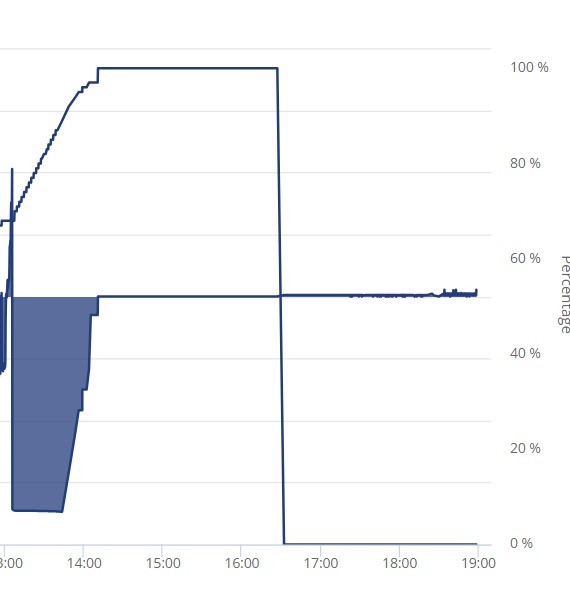
Solar/Inverter/9.5kwH battery installed 11/23. This afternoon battery went from 100% to 0% (see photo).

Notifications swap between "BMS Over Voltage" & "Battery Voltage High" every 10min or so. The indicator lights on the battery still show 100% charge, but the status light is orange. Drawing 20-100W at the moment, rest is being imported from the grid (at peak rates!) ...

Inverter Model
GIV-HY3.6
Software Version
D0.305-A0.305
Inverter Firmware Version
D0.305-A0.305
Battery Firmware Version
3012

What's going on GE?

Edit: Have turned the battery off & on again after a few hours and it seems to be working normally again (for now).

M
#36 Marren2016

Looking through my error logs i havean BMS Overvoltage at 18:30 one evening. With that time being displayed it must be because we pulled toomuch power from the battery? Thats peak rate electric so it cant be because it was charging and the sun wouldnt be out at 6:30. Am i missing something?

O
#37 Ortwin

I've just had a BMS over voltage at 15:41 today just as my system was reaching 100% SOC. I have a 2nd gen 5Kw inverter and two 9.5 Kw batteries the second one was installed in Feb this year and am running 913 and 3015 on the batteries. My second battery has stayed at 100% and I now can only see the primary battery discharging which has gone down to 30% as i had set the system to discharge at the peak time. Not sure if/how to the both batteries working together?