Home Assistant

136 comments started 2024-03-10 last 2024-08-31
Home Automation
#1 Midlands_Solar

Hi all,

I’m thinking of building a HA on a Raspberry Pi, are there any advantages of doing this in terms of better battery management and automation?

Looking to optimise the charge cycles and cost, is there analysis and trending built into the application to provide this?

T
#2 TX200

Yes plenty of benefits. Check out Speak to the Geek on YouTube.

G
#3 geoffreycoan

Midlands_Solar Yes do look at speak to the geek.

Be aware that Home Assistant is a general purpose home automation/monitoring platform so there’s no 1 “application” that does everything for you.

There are lots of integrations and add-on’s for HA, to talk to your inverter (GivTCP), to pull in Solar forecasts (solcast), to retrieve your energy prices from Octopus/other suppliers.

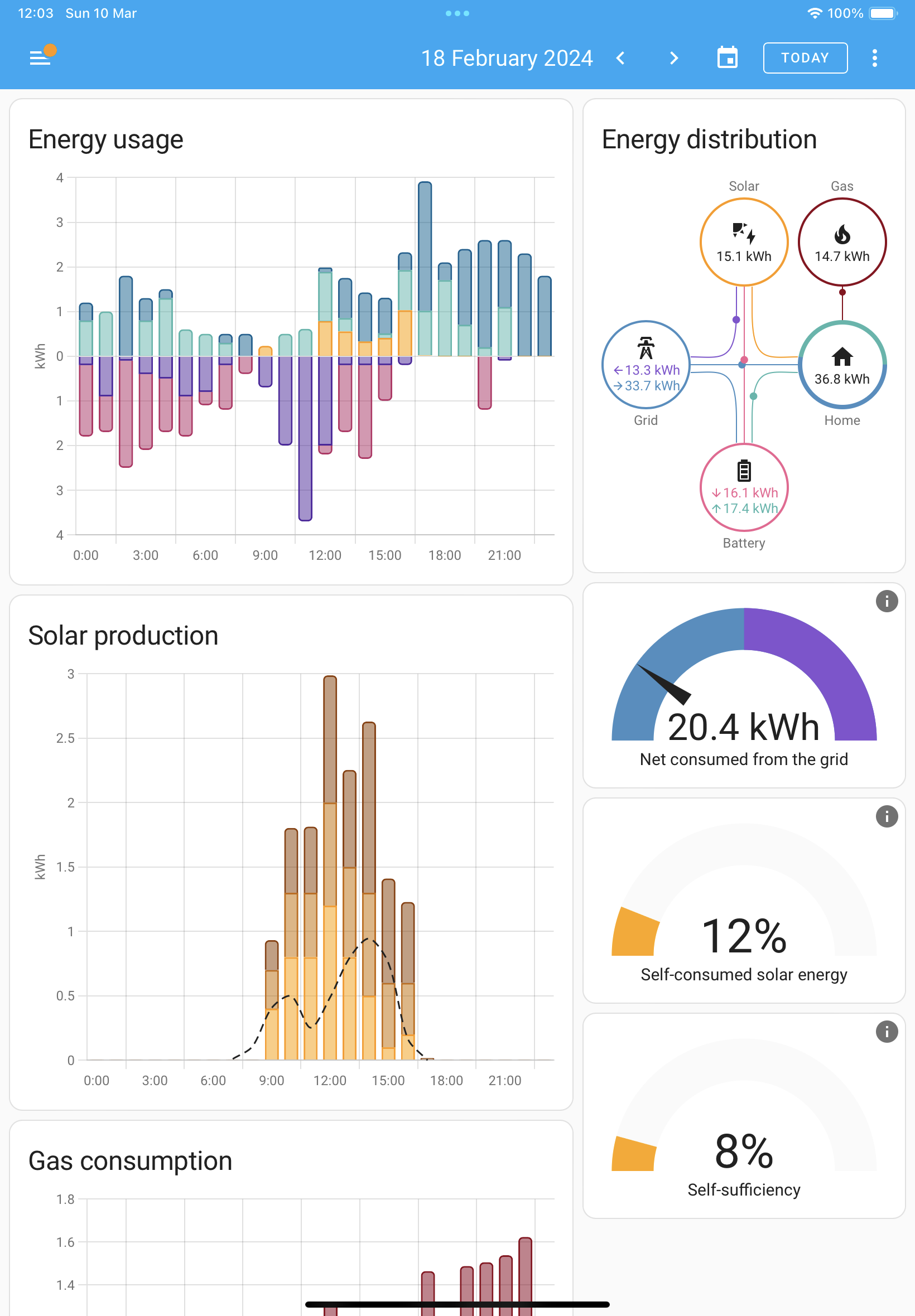
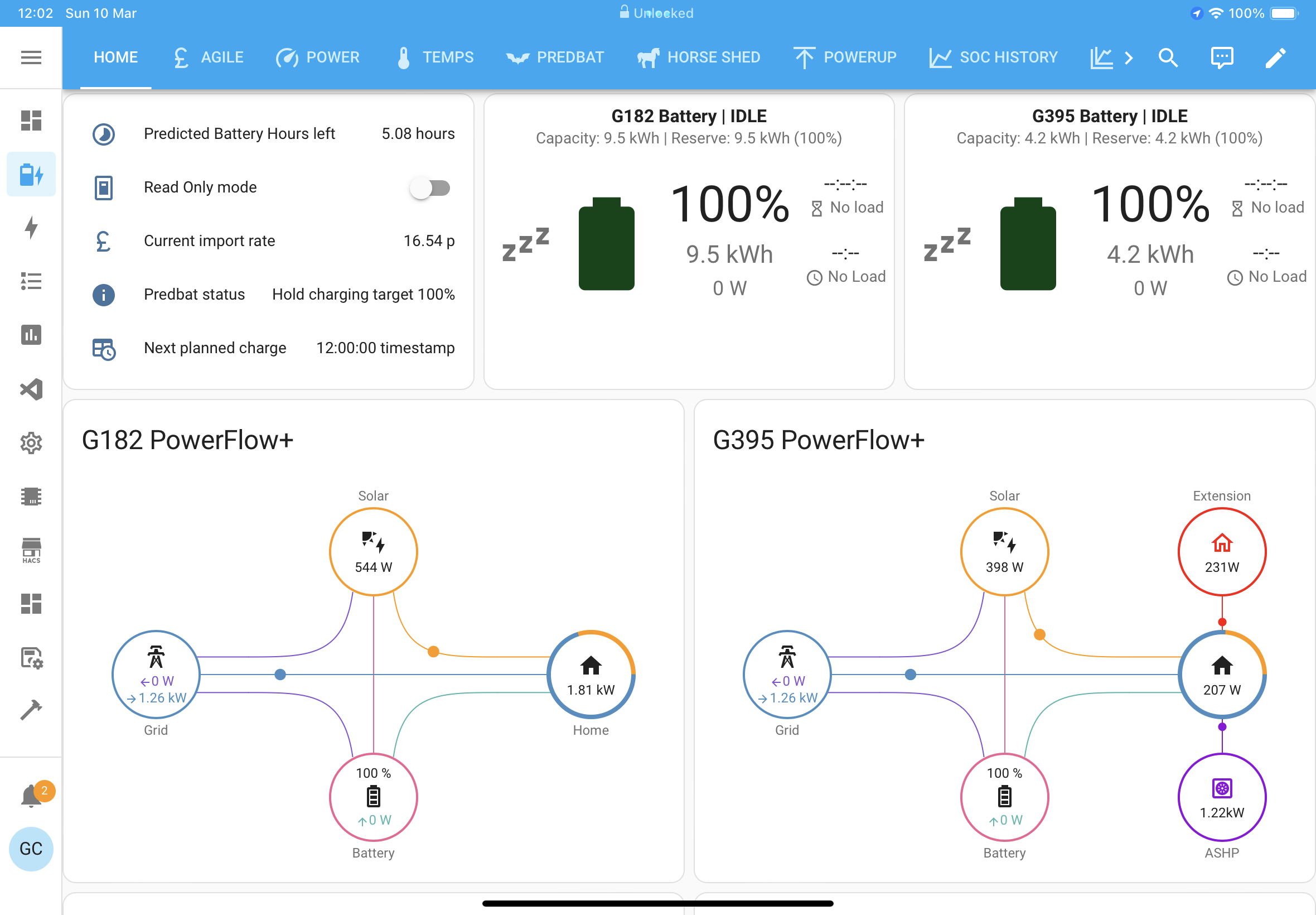
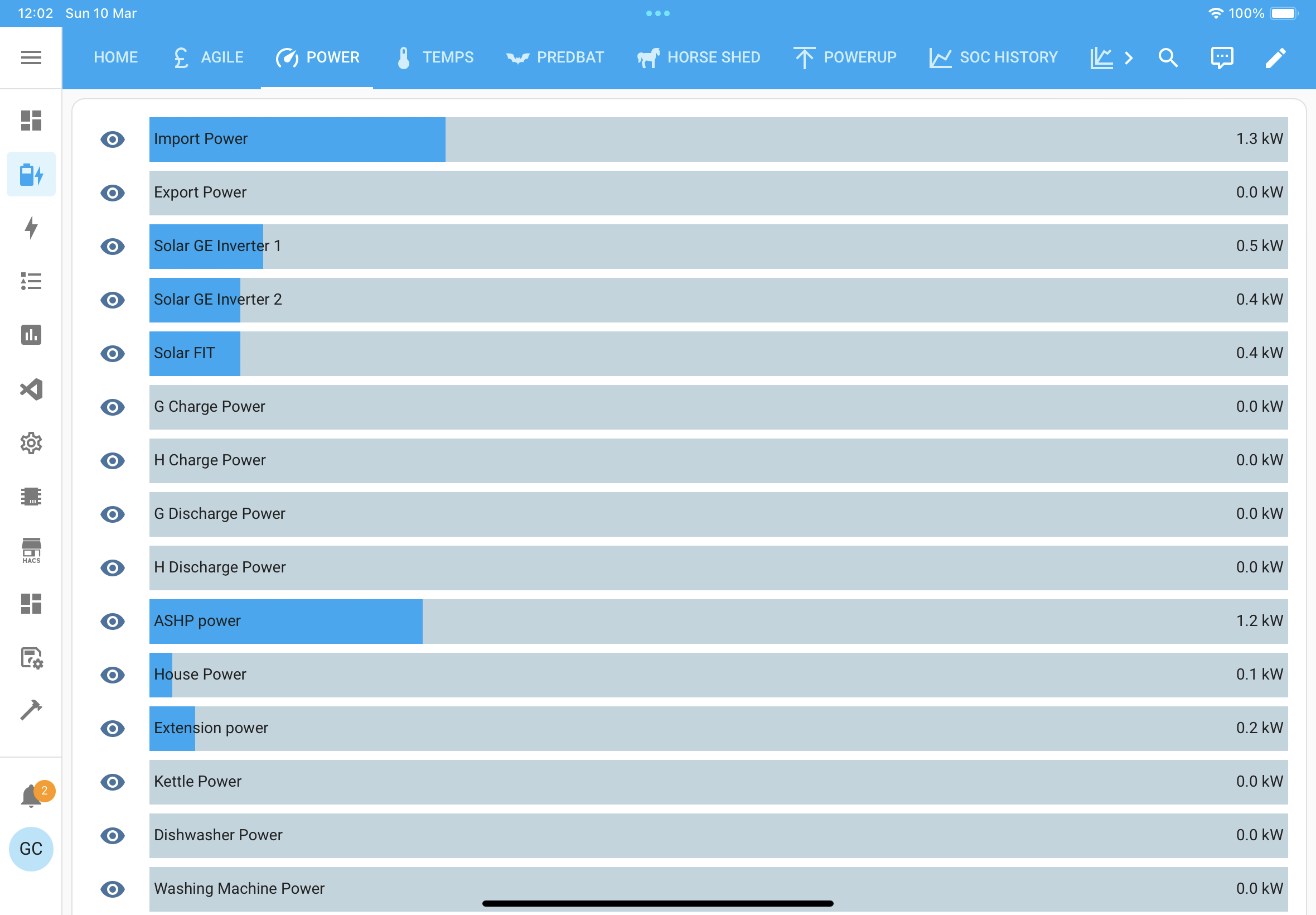
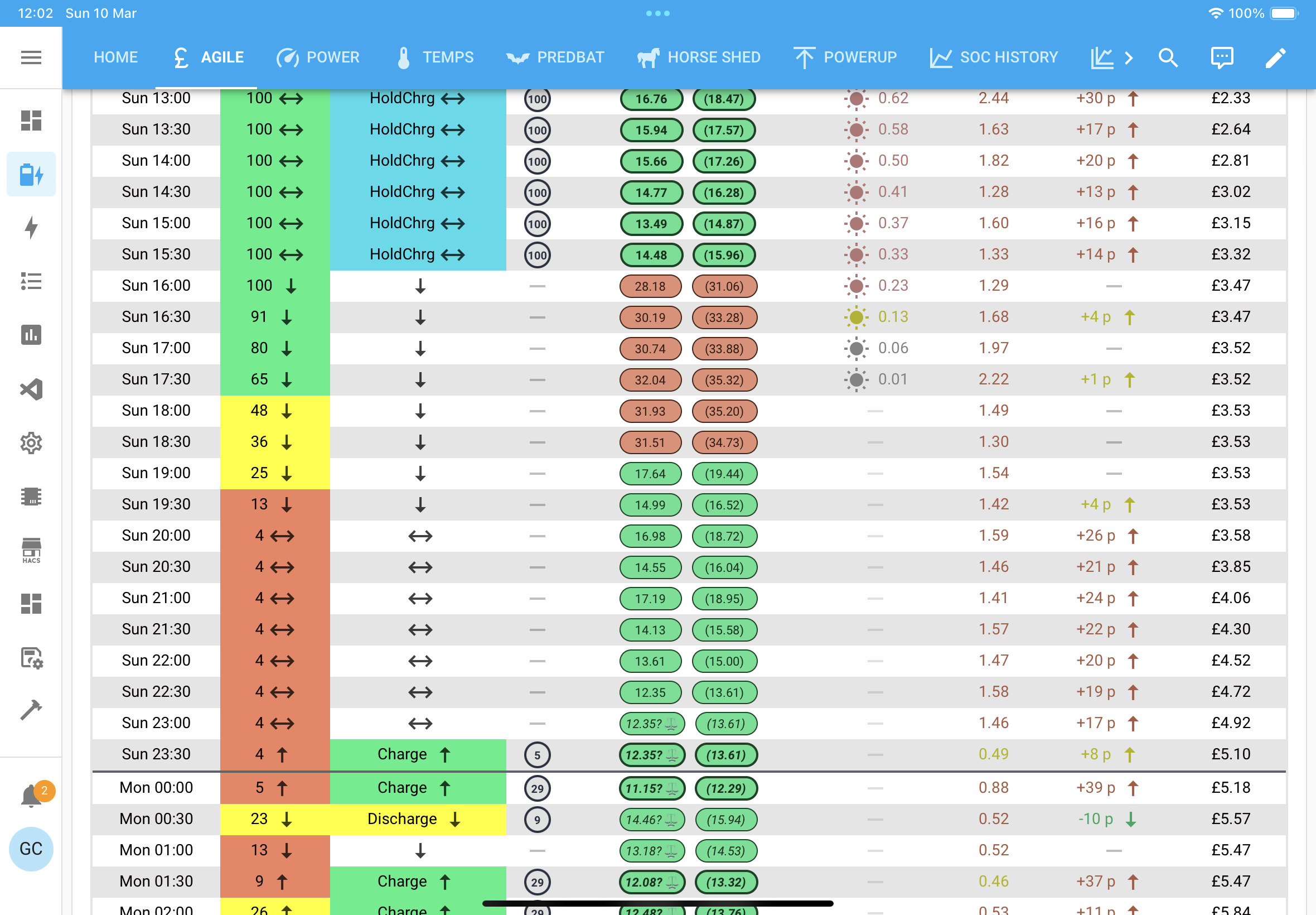
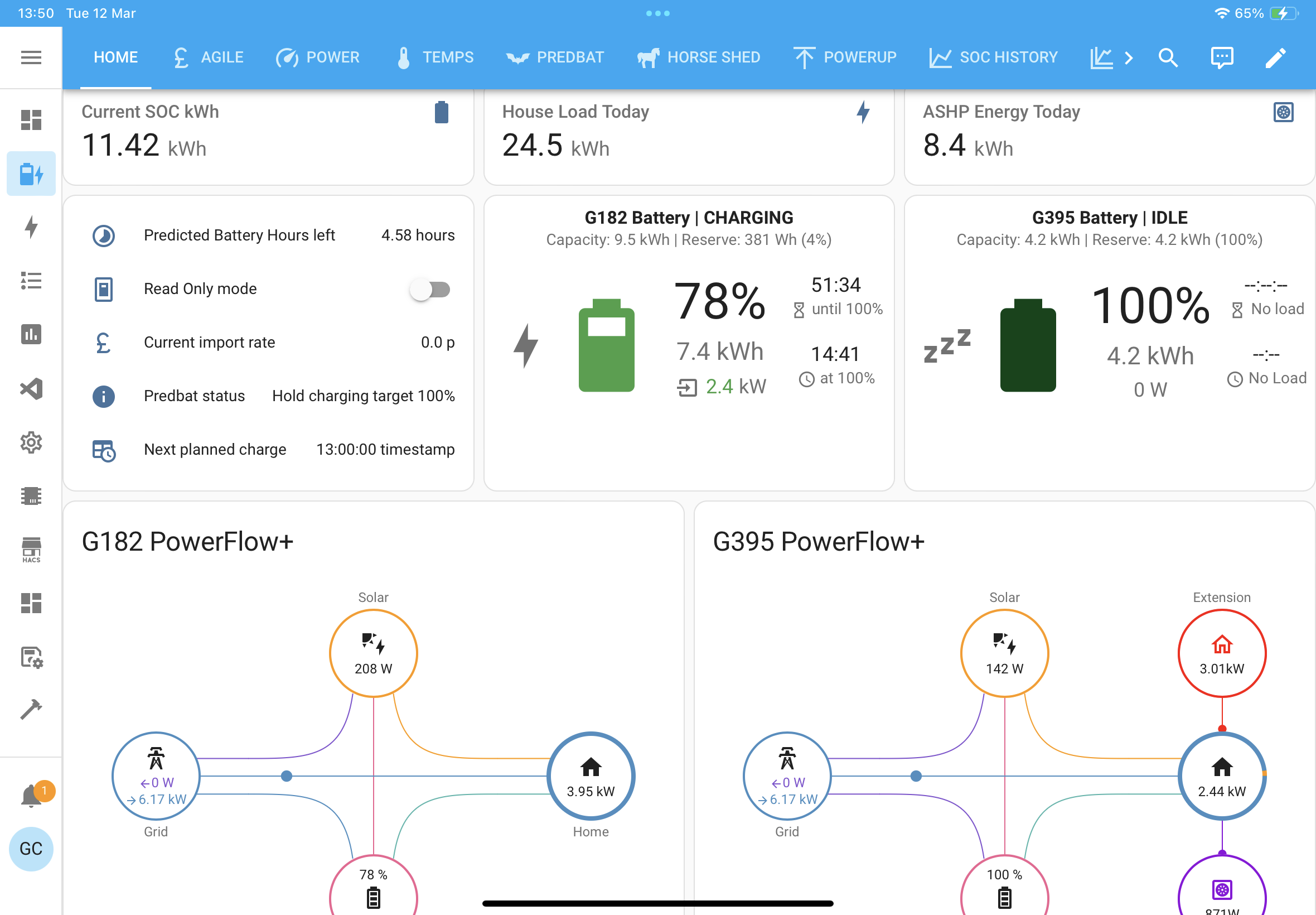
You can build dashboards like this:


From there you can write your own automation scripts to control the battery depending on how sophisticated you want to get. The GivTCP add-on has basic automation built in to it, and there’s a speak to the geek video on that.

A number of us use Predbat which is another piece of HA code that predicts battery charging and discharging based on price, home demand and solar generation, using historical data to do all that. Plenty of other conversations on this forum about using Predbat, but it is a learning curve to set it up and understand how it works.

V
#4 Vestas

Also if you're getting a Raspberry Pi 5 (little to no point getting an earlier model) then be aware that while there's now official support for HAOS it still has some bugs which will get sorted over the next few updates.

I can recommend the Argon NEO 5 Case - keeps the Pi 5 under 75C on a one hour stressberry test overclocked to 2.8GHz (no overvoltage). Back at sane settings of standard clock settings it maxes out at 70C on the same test. 23C ambient temp.

Normal HAOS usage and the fan doesn't kick in at all.

I'd put a link up and it'd get modded away (rightly so) but one of the main Pi retailers in the UK sells them for £18.

Edit - the difference between Pi 5 and Pi 4 in HAOS is basically night & day and that's because the SD card bandwidth has more than doubled. Makes pulling stats/generating dashboards a lot less tedious 🙂 I'm not convinced there's a lot of point in putting an NVME disk in - I have a Steam Deck & there's not a lot in it between the internal nvme drive and the 512GB SD card in terms of 30 second throughput, SD card falls off faster than nvme drive after that time but it's a lot cheaper. If its not really noticeable in games then it isn't going to be an issue for HAOS.

G
#5 geoffreycoan

Vestas Unless things have changed since I last looked, I would absolutely recommend putting an SSD drive (or similar) on a Raspberry Pi and not relying on the SD card.

Any drive can of course fail but SD cards have a limited number of read/write cycles and running something like Home Assistant with its inbuilt database on it will throw a lot of cycles to the SD card. I've certainly seen messages of people finding this out the hard way with HA.

Of course if you use a decent backup regime (I personally use the Google drive add-on to HA) and are prepared to restore if need be then the cheapness of the SD can be attractive.

Agree with getting a Pi 5 not a 4.

#6 PianSom

+1 for avoiding SD cards, and for going for a Pi5.

One other tip - if there are still supply issues with Pi's and you can't get hold of one, then if you know someone who lives near Cambridge they can usually be bought over the counter from the Pi Shop there. I believe there is also a Pi Shop in Leeds, but have no personal knowledge of that.

D
#7 deepanshus

Vestas I have pi 4 and for the HA alone, it’s sufficient plus it’s less power hungry and lower needs of cooling. Also I have a Google drive plugin with full backup in case the card fails, not sure about the life expectancy!!

V
#8 Vestas

geoffreycoan Depends on the SD card really, endurance models have similar lifespan to mainstream SSDs - for example a Samsung Pro Endurance is rated for 140,160 hours of 4k video rewrites. That's 16 years continuous rewriting.

I'll take my chances with the SD card 🙂

V
#9 Vestas

deepanshus The Pi4 is OK for HAOS but there's no point in buying one now. Pi5 doesn't actually require any cooling, it'll just throttle the clock down if it gets too hot. It'll still be faster than the Pi4 when it does that 🙂

P
#10 pacemaker

FWIW I purchased a Home Assistant Green, which depending on your level of "can I be bothered?", the HA Green works out of the box. Plug it in, turn it on, and start playing 🙂 https://www.home-assistant.io/green/

L
#11 lee

Following advice here I avoid going the route of raspberry pi and opted to run HA on a Dell Wyse 5070 thin client. Purchased cheaply on ebay already with SSD. It has been running fine for almost a year now. (Just to add something else to consider)

I wouldn't be without HA now. I find it far more reliable for scheduling charges/discharge. I can easily automate limiting battery output on low PV days to save for peak time and also control smart plugs based on excess PV in the summer. This goes together with the ability to pull data and present data from other sources.

M
#12 MarkyG82

I had a pi2 running HA a while back and pretty much forgot about it as it just chugged along. Then it started to fail so I rebuilt it onto a new sd (after 3-4 years of use). The pi2 got damaged in the move in 2021 so got a pi4 with one of those cases listed above and an eMMC for the storage. Initial setup with the SD was ok but the speed increase with the eMMC was crazy. Well worth the effort.
However, if I were to do it again I would get the HA green. I spent about £150 on all the bits I got. HA green with either zigbee or zwave usb sticks works out about the same and far less hassle.

6
#13 666tim666

geoffreycoan I am interested in your opinion concerning SD cards. I have a pi5 and a Crucial NVME SSD in a USB case (I wasn't sure about using the NVME socket on the pi board).

So, Home Assistant seem to recommend or prefer the SD card to remain as the boot drive and the SSD card to be used for the data, and they provide a process for transferring the data. I have on the other hand seen a youtube which explains how to make the SSD the boot drive. What do you think?

I have attempted the transfer of my data to the crucial SSD using the Home Assistant process and the transfer failed. The data was moved and the system booted and then opened the SSD drive and carried out most of the boot process, but then failed on the starting of the docker component which is I think the last item in the boot process. The system then looped, rebooting and failing at the same point. So I am back on the SD card at the moment but its only 32GB and so there is a limit there.

G
#14 geoffreycoan

666tim666 My Home Assistant runs on a tiny PC so I don’t have any personal experience of running HA on a Pi.

In general I would recommend running Home Assistant as HA recommend and not following a youtube video as those videos could (a) be old or (b) require more ongoing technical support than you wish to do!
As a case in point there are a lot of people who have opted to swap from the in built SQLite database to MariaDB as its a higher performance database and handles large volumes history much better. Plenty of YT videos from a couple of years ago of people showing you how to do that. Since then though Home Assistant has introduced long term statistics and it handles the data internally much better. As one of the lead developers said on a video I saw, “we still provide the option to move your database, but be aware that if you do so, you are on your own in terms of support”.

I’d suggest giving the HA data transfer routine another go. I did an upgrade to the Home assistant operating system (HAOS) v12 a few days ago and it failed at the end. Re-ran it last night and it worked perfectly.
If it still fails then try searching the home assistant forum for the same issue.

6
#15 666tim666

geoffreycoan Interesting. I had Home assistant running on a PC but it was OTT as it was a VM in Windows 10 and the whole thing cost quite a lot to run and had other limitations.

The problem with running major alterations such as changing systems or disks is time, and partly also risk that something will break. Although I have to admit that the system restore process works very well on a PI5.

I will try the transfer again and then ask on GitHub if it fails. I want to have plenty of space before I tackle BatPred.

G
#16 geoffreycoan

666tim666 I am running HA as a VM under Windows 10 as well. I’ve found it gives me an extra PC to use for Home Assistant and its useful to be able to open multiple windows at once. Other than that I don’t use the PC for anything else really.

I have the PC and my internet router plugged into the same power strip which is plugged in via a smart plug. It measures about 1kWh a day consumption so its not great but its not too terrible either.

Oh one thing to say, however you do run Home Assistant, I suggest you physically connect the computer to your internet router with an Ethernet cable. I initially had mine connected via wifi and despite them being only about a foot apart I still got occasional disconnects and errors from GivTCP connecting to my inverters.

6
#17 666tim666

geoffreycoan When I had Home Assistant running under VM on a Windows 10 Dell laptop the power consumption was initially 20 watts. Investigation revealed that I was using a cheap substitute power supply and so I put in a Dell power supply and the consumption dropped to 10 watts. My Raspberry Pi5 is using less than 4 watts most of the time. With the laptop I kept the system awake all of the time because I thought that if it went to sleep then the VM wouldn't run. I don't know if that is correct.

I don't know what my internet router and an adjacent 16 port switch use - I will have to measure them.

The laptop had an advantage that it continued working, on battery, if the power went off. This is not true of the Pi5. The Pi5 is powered from the EPS output of the inverter but I don't yet know exactly how smooth the load transfer would be in the event of a grid outage and therefore whether or not the Pi5 system would go down.

Yes, we use Ethernet cables on all of our fixed systems. It makes me cross that my AC3.0 inverter will only operate over wireless. The Ethernet socket sited immediately next to it has a TPlink wireless repeater plugged in, just for the inverter.

G
#18 geoffreycoan

666tim666 The Pi5 is powered from the EPS output of the inverter but I don't yet know exactly how smooth the load transfer would be in the event of a grid outage and therefore whether or not the Pi5 system would go down.

There’s about a 5 second cutover time for the inverter EPS to kick in I believe but you can ask GivEnergy support to reduce this, to near instantaneous. Whether it’ll keep a PC (and the internet router) running, I don’t know.

The newer Gen 3 inverters have an ethernet port. But my gen 1 isn’t exactly old technology when my 10 year old home PVR has an ethernet port (but annoyingly no wifi so I had to put a powerline and now mesh wifi repeater next to it). Technology !

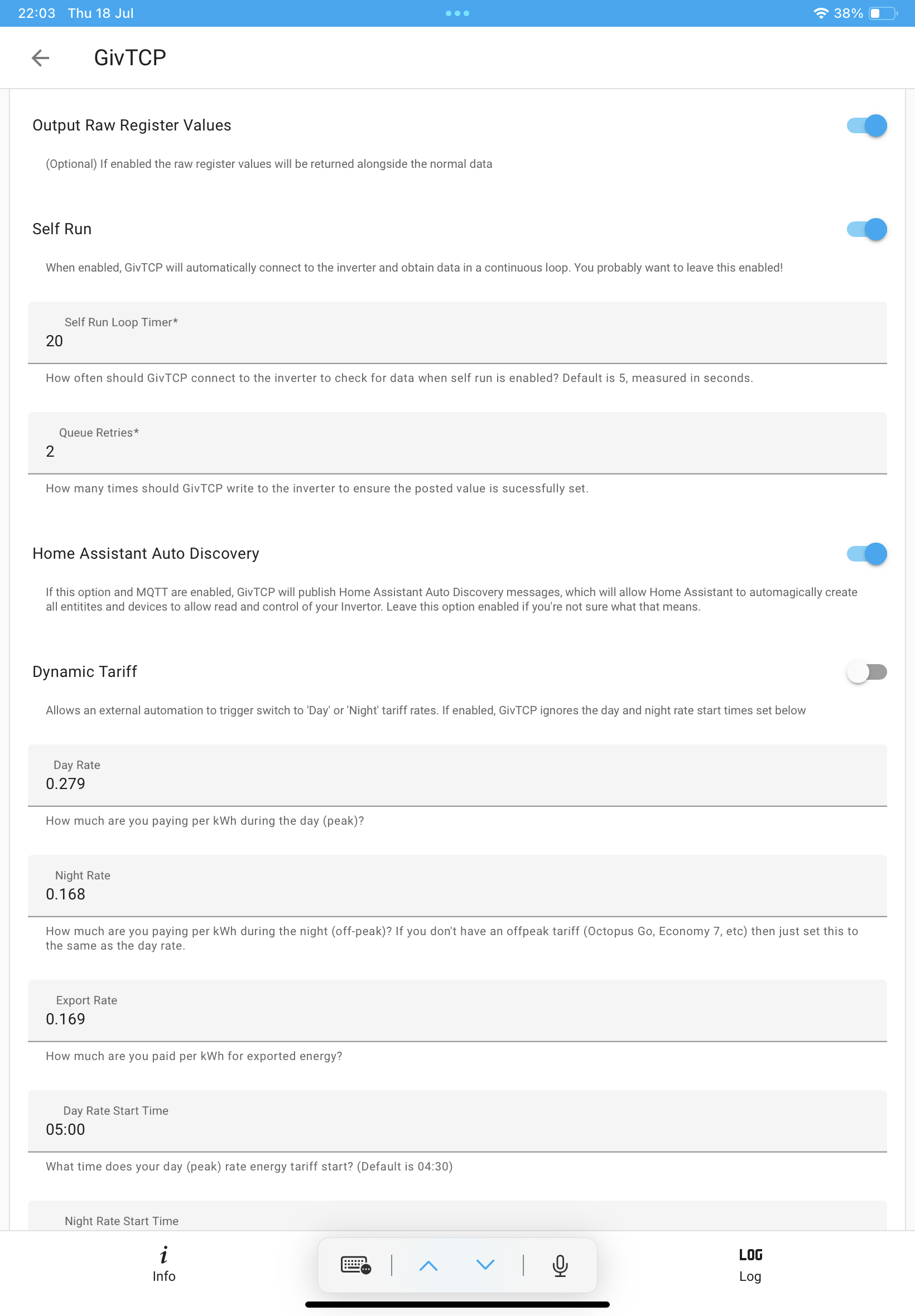
I am using the genuine IBM/Lenovo power supply for my tiny PC. Have to have a look at what it is using. Interesting that you got such a reduction with a power supply swap.

V
#19 Vestas

geoffreycoan Probably better off using a small UPS to keep the broadband connection/HA up rather than relying on the EPS switching over quickly enough.

We use a couple of APC BackUPS 850 to keep the ONT/Router/Switches/Rack/WAP/External 5G router up & running. That's probably about 100-150W max as the NAS boxes will shutdown if the power goes off.

Those UPS have the unusual (unsupported) ability to be connected in series if you set the sensitivity to low. First one goes flat, second one kicks in, etc. Its fine as long as the load is fairly low.

We had a lot of power cuts in late 2022 when a local 50MW generator (incinerator) came online, that and the PV farm in the other direction so they came in useful. Still useful last year, PV/battery getting installed so power on/off a fair bit. Wife was working in her office and apart from noise didn't notice anything when power went on/off.

They're cheap enough and its a cheap lead-acid battery inside so its easy to recycle/replace maybe every 5 years or so.

V
#20 Vestas

666tim666 Investigation revealed that I was using a cheap substitute power supply and so I put in a Dell power supply and the consumption dropped to 10 watts.

Not too surprising. Most clone PSUs aren't very efficient unless you operate them at 60-70% load.

#21 PianSom

Vestas
Do you have any thoughts on using APC BackupUPS's with the AIO (ie split phase in Island mode)?

I have several (plus one or two cheap Amazon ones), and read somewhere that there may be issues...

V
#22 Vestas

PianSom Can't see any of the 230V ones liking that but obviously I've never tried it.

#23 hoggy

Hard to say, Turns out it's not true split phase / centre tapped as I thought but IT earthed. There is no Neutral Earth bond relay.
So in off grid mode you can theoretically bang your live straight to earth and nothing will happen (because there is no "earth path" back to the source / AIO.) To complete the circuit and therefore no earth leakage for the RCD to detect.
Doing so ironically then creates a Neutral Earth bond.
Joining L to N will however force a trip.

I naively assumed that nobody would be mad enough to employ IT earthing in a domestic environment hence why "split phase" was the logical reason for having 120V between N-E but I was wrong. (IT would produce similar voltage readings)
Proves how little installers check though, you'd never get an RCD trip test time in off grid mode as it simply won't trip and yet its taken this long for people to fathom it out.

J
#24 Jellybaby

geoffreycoan Do you find the dashboards can take a while to load, even when I assigned 6 cores and 4gb of memory just the givtcp cards you get took a few seconds to load and for some reason when I accessed HA from my 24/7 PC it takes like 3-4x longer for dashboards to load.

J
#25 Jellybaby

Vestas I got a "CyberPower CP1500EPFCLCD-UK PFC Series, 1500VA/900W" UPS and I got the following plugged into it, purchased December 2022.

Superhub (virgin media modem)
Landline
24/7 PC (3570k + 1080 GTX)
Gaming PC (12700k + 3080 FE)
2x Monitors

1x PC and Monitor are split between two surge protected strips.

With just 24/7 PC on and idle with monitor on the power draw is 108 watts and it would take just over 50m to empty, has kept the broadband up when power had to go out to fit the solar stuff and saved me during a power outage.

G
#26 geoffreycoan

Jellybaby Do you find the dashboards can take a while to load, even when I assigned 6 cores and 4gb of memory just the givtcp cards you get took a few seconds to load and for some reason when I accessed HA from my 24/7 PC it takes like 3-4x longer for dashboards to load.

I’m assuming you are referring to the default ‘Home’ dashboard that has every entity loaded on it? Yes I find this one can take a few seconds to load as its loading a lot of controls. If you hit the pencil icon you can make a couple of changes that reduce the number of entities loaded: can omit the energy card and can omit entities that don’t have any area assigned.

TBH I don’t use that dashboard all that much, its useful for a ‘see everything’ view but I built a custom dashboard with different tabs for an overview of the battery status (givtcp battery card) and power flow meters (Power flow plus) to show the flow of energy between solar, battery and house. I then have separate tabs (views) for temperature charts, power meters, controlling predbat, etc.
This dashboard loads pretty much instantaneous. It is just a bit of a pain to build up gradually bit by bit

J
#27 Jellybaby

geoffreycoan I did make a separate dashboard with JUST the givtcp stuff and that still takes about 5s to load which is odd on the PC that contains the VM but on the other it can take longer.

V
#28 Vestas

hoggy How is that compliant with wiring regs?

V
#29 Vestas

Jellybaby Heh, play a game on either and watch it drop like a stone. Steam Deck > PC in a power cut 🙂

J
#30 Jellybaby

Vestas With Gaming PC idle its ~ 180w load 45m remaining, when im gaming its about 30 minutes but in the event of a power cut the UPS makes a very loud beeping noise so it would be ALT+F4 time to any games and then see if its just a trip or outage, if outage then PC's go off as well, drops the consumption to about 10-30 watts for modem and landline.

#31 hoggy

Vestas I'm derailing the thread a fair bit but short answer "I don't know for sure."
Would have thought it would fall foul under 826.1.1.2.2
But even if not there are a lot of considerations elsewhere specific to IT earthed systems that need to be done and documented.

V
#32 Vestas

hoggy I'm curious because there's a couple of Octopus vans along the road installing one today.

Personally I thought the split phase idea was bad enough given some of the (DIY/cowboy) wiring likely to be found in anything bar the most modern of houses, lighting circuits being the poster child of that mess.

V
#33 Vestas

Back on topic for the power consumption for keeping your internet/etc up...

ONT for FTTP is 10-15W max, more like 8W but I think the Openreach-supplied wall-wart PSU is eating most of that;
Router around 15-40W would be a sensible assumption if its ISP-supplied & you're using its wifi;
Switches depends really, most unmanaged will be very low power, maybe 5-10W;
Wireless access points would be 10-20W each (PoE) ;
External 5G router - 20W max which is surprisingly low considering its got a 200/40Mbps connection with a 4G/5G cell nearly 5km away.

Adds up depending on what you have/need.

#34 hoggy

Vestas can always ask them, they might not even know! (I'm aware that there are some newer gateways coming through now that have type A rather than AC RCDs, some insulation on the grid input side busbar and also a seemingly working N-E bond relay. Take from that what you will)

M
#35 michaelmcgoldrick

geoffreycoan i found even in UPS mode my pi/pc would reboot in a power outage failure when plugged into a circuit on the EPS from the inverter. I added a small APC UPS which works perfectly. First few times it happened i lost my HA config even with using an SSD drive.. i've since migrated to using a dell micro pc to run ha and its night and day a better experience. I was running on a pi 3b so that would have been pretty basic. The dell only use about 8 watts on average to power.

R
#36 rjp

Vestas I'm actually measuring mine with a smart plug connected in to HA.

My 'network' socket powers the following:

  • Gigaclear fibre modem
  • Unifi Security Gateway
  • Unifi 16-port managed switch
  • Unifi LR Access point (via POE from switch)
  • Raspberry Pi 4 running HA, Unifi Console, etc.
  • Gigaset N300 DECT/Voip gateway

All running 24/7. Power consumption is pretty much rock-solid at 37W all day.

G
#37 geoffreycoan

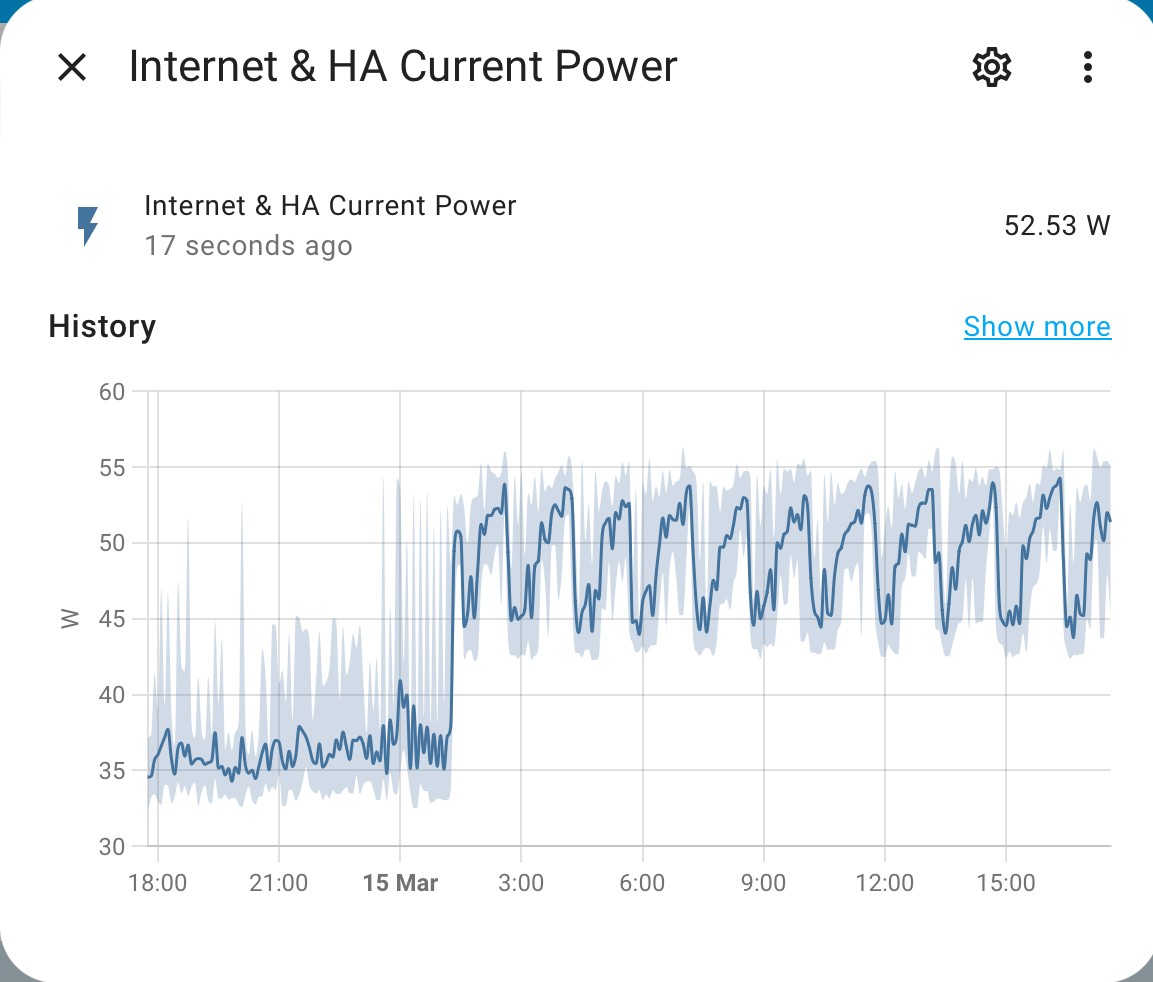
rjp I also have a smart plug monitoring my ‘network socket’ with the Broadband router, the HA Tiny PC and Mesh wifi node on it.

Its recording 53W at the moment which sounds reasonable except that it adds up to 1.2kW a day.

And there’s a really weird cycle to the power draw where it rises over a couple of hour period and then drops back down again. Garbage collection on the PC or HAOS?

I plan to add another power monitor plug so I can see more discretely which device is using all the power.

I might have to get a UPS. We do get occasional power cuts here although of course none since I had the EPS circuit board connected a few weeks ago. So far none of the crashes have affected HA but the database did corrupt itself last year and I lost 2 months of history which was annoying.
Any UPS recommendations?

#38 Wonder Watt

I plan to add another power monitor plug so I can see more discretely which device is using all the power.

Yeah - exactly, try and isolate it so you can narrow it down. I'd guess it has to be the HA Tiny PC...

Any UPS recommendations?

I swear by APC myself. Which model, highly depends on your needs in terms of wattage req and runtime. But definitely worth checking out.

G
#39 geoffreycoan

Wonder Watt Self inflicted HA crash tonight.

The host PC needed to apply some Windows updates so I installed them and shut HA and the PC down. Fitted a spare smart plug and rebooted all good.

Unfortunately I'd forgotten that the smart plug was one I'd used for Christmas lights and the Christmas light automation was still active so at midnight the HA PC promptly powered off when the automation fired. Grr

Sorted it out but then found that all the daily energy utility meters hadn't reset at midnight as HA was powered off.
Double Grr
There's a service called utility_meter.reset that is supposed to reset the utility meter but I couldn't get it to work but fortunately utility_meter.calibrate and set all the meter's to zero worked.

Get a UPS and I won't have these issues ...

#40 PianSom

I have various ups’s about and active - a hangover from my last house, which was prone to power cuts.

I have lots of IT kit distributed around the house, mostly with dedicated ups (main network hub with poe cameras and ap’s, garage outpost with nvr, switch and poe cameras, living room with switch, ap and poe camera, plus main workstation). Mostly they are APC Back-UPS Pro - recommended. One is a cheap Amazon Basics model - not recommended.

Note that you will need also to buy plug adapters to use a ups - a kettle plug to multiple 3pin sockets.

But I do worry about the ups’s. I wonder whether (a) due to inefficiency they contribute in a significant way to the power usage of my network and hence materially increase my background load, and (b) whether they will actually work properly with the AIO EPS, given the on-going discussion on this forum about power phasing when it’s active and the number of RCBOs I have.

I haven’t had a power cut in the 6m I’ve had an AIO, so I think maybe I should stop using them, eliminate the running cost and take my chances that the AIO EPS works properly. In which case - I have ups’s to sell!

V
#41 Vez

PianSom There's still the use case that something trips in the house, and your IT kit is safe, or it gives you a window if you need to do a little electrical work. Mine powers NAS, NUC, Unifi kit, Super hub, 2 x PoE PI's & PoE wifi. I'd have to power a load of stuff down in specific order which would be a pain.

BIG fan of HA of PI (runs seamlessly and reliably with the right SD card), will be migrating to PI 5 and decommissioning both my PI 4's (I say decom, free up for other projects 😃 ). Just waiting on a PI 5 PoE hat 🙂

#42 PianSom

Vez
Sounds like we have a lot in common - at least, a house stuffed with Unifi kit and Pi's! I run my HA under Docker on a NUC (alongside a media server and other bits and bobs), which I prefer to running on a Pi. Although I do run Pihole on a couple of Pi4's (with PoE hats). (Must get around to implementing Unbound and sort out DoH/DoT.)

Vez There's still the use case that something trips in the house, and your IT kit is safe, or it gives you a window if you need to do a little electrical work.

This is a fair point. Whether it is worth it for me really depends on the energy used by a UPS . Which I believe is negatively impacted by sub-spec loads, which I generally have. 🙁

And I am very concerned by Hoggy's posts above, about split phases. When I got installed, I asked my installer to pull my main fuse, to check the EPS. He did, and many RBCO's tripped - and then tripped again on re-installing the fuse. He explained this away as being due to phase differences, but I wonder. It could be that the UPS's are causing a problem. Who knows.

On balance, I'm still minded to lose the UPS's.

J
#43 Jellybaby

geoffreycoan hahaha you plonker

M
#44 michaelhoskins

So, a Home Assistant and EV charger question.
I have very limited HA experience, having followed the excellent instructions to install PredBat and show some basic info.

I'm not sure I would benefit that much from PredBat as not too interested is maximising export etc.

I would like to know if there was a HA integration or rules that would allow the EV charger to work as I think it should (but currently doesn't). In other words, are there rules I could set up to say that charging should start when export is 1.4kw and the battery is full, should use all excess solar to charge (if plugged in) and vary the charge according to the generation. Once generation drops below a certain level, charging should stop.

I haven't been able to get the EV charger working like this (have lots of back and forth with support) as none of the different modes seem to work as expected.

Would someone with more HA knowledge know if this is possible?

I have the GivTCP integration.

Thanks.

G
#45 geoffreycoan

michaelhoskins I assume you have the GivEnergy EV charger?

The latest version (2.4) of GivTCP includes control and monitoring of the Giv Energy EV charger so what you are asking for could be accomplished with automation scripts in Home Assistant. You’d need to look at the EV charger controls to see whether the charge rate can be varied, but otherwise it looks do-able.

Have a look at the documentation for the add-on https://github.com/britkat1980/giv_tcp

Just to clarify, Predbat is about minimising your overall electricity bill, charging the battery enough so that it can meet home demand alongside your solar generation. If you want it to manage discharging and export you can, or you can leave it on just managing the battery charging/Eco mode.
Of course very much depends on what tariff you are on as to how much benefits you get from this.

D
#46 DreadorUK

Just getting into HA (though finding half the things I had in NR and HB Im having to revert back to lol) and noticed Speak to the Geek did a video to control EV Charger through cloud API

https://www.youtube.com/watch?v=uBmra2CW_5Q

I was going to reverse engineer this for cloud battery view but then went back to NR as I prefer its integration

M
#47 michaelhoskins

geoffreycoan thanks. Yes, it's the GivEnergy EV Charger (with a gen2 hybrid inverter and 9.5kwh battery).

I'm on Octopus Go (not intelligent) and just thought it should all work (i.e. use solar or house load first, then battery, then car (if sunny enough), and allow a cheap overnight charge for the car (and battery) when needed.

Haven't been able to get that to work at all as EVC seems to want to draw from Grid/battery whatever the mode and settings are (though it all works fine for just an overnight charge on a schedule).

Thanks for the info about PredBat. Its been running in "monitor" mode for a while now so should probably look again as we're approaching the time of year I don't need a 100% charge overnight.

M
#48 michaelhoskins

DreadorUK thanks. Yes, I saw the video and (mostly) understood. I can see it for monitoring purposes but wasn't sure about actually creating "rules" for control.

What's "NR and HB"?

J
#49 Jellybaby

@geoffreycoan Whelp, that plonker comment came back to bite in my the backside, just tonight I realised I didn't turn off discharge schedule after the last Saving Session we had

#50 Tenkaykev

Jellybaby
I did that on a previous saving session. Three days before I noticed the early evening export to grid.😁

J
#51 Jellybaby

Tenkaykev Could have been worse, coulda been a 1h session lol

D
#52 DreadorUK

michaelhoskins

Node Red and Home Bridge 🙂

#53 Tenkaykev

I've read through the thread and been pondering whether to dive in with H.A. as I'm an inveterate tinkerer. While I've got an old Intel MacBook Air circa 2012 and I suppose that I could install Linux on it, I'm more minded to go down the more straightforward option and an " out of the box " solution. What triggered this is I had an Email advising me that a Home Assistant Green was back in stock. I see that there's the Rasperry Pi 5 available also. Are they both equally good solutions or is one or the other the preferred / more flexible option. I've also read about to run the software in " Monitor " mode to see what choices are made, and then going " Live " when familiar and happy with the way the system is running.

G
#54 geoffreycoan

Tenkaykev My understanding is that the Home Assistant Green is a ready-to-use box with HA already installed on it so for plug-in-and-go, its a lot quicker and easier to use.

For the Raspberry Pi you’ll need to download the HA operating system onto an SD card (e.g. using a PC) and then boot the Pi from that. So a bit more effort to get it running. You will also need to add the cost of an external SSD - you can run from an SD card but repeated read/writes to an SD card are not good.

Looking at the specs the Green https://www.home-assistant.io/green/ comes with 32Gb of storage which is reasonable but not a lot, and I don’t think its expandable. I think they are not massively high spec CPU wise./

Personally I would by a Pi

#55 PianSom

Tenkaykev
Geoffrey has summed things up well, and come to the same conclusions as I would have suggested.

I would be aiming on getting a Pi5 and putting in some decent storage.

Though it would not be wildly eccentric to use your MacBook Air to dip your toe into the waters first, without spending any dosh. Installing Linux and then HA and then all the necessary addons will be not a small amount of effort. But if you have time to enjoy your tinkering and are happy to treat it as a learning experience then go for it.

D
#56 DreadorUK

For clarification with pi5 you can install it onto the SSD directly you don't need to mess about with SD card at all

@"Tenkaykev" Id say go for it - I resisted for ages with trying to get homekit + homebridge + node red working for my needs but about a month ago went home assistant + node red and not looked back since

S
#57 shawry

geoffreycoan Is that Agile dashboard, the predbat plan, but modified? I like the look of that a lot, how do I get that 🙂

G
#58 geoffreycoan

shawry There were several screenshots there!

Standard HA Energy dashboard
A custom one showing power flow cards and GivTCP battery card
Bar graphs to show power of different devices
Then I assume the one you mean, a custom version of the Predbat HTML plan which uses Predbat table card https://github.com/pacemaker82/PredBat-Table-Card to restyle the standard Predbat output

#59 Tenkaykev

Thanks for the advice folks. I just remembered that I've got a Mac Mini of about 2014 vintage in the cupboard. I added an internal 500GB ssd ( I remember how challenging that was! ) I could hoik that out and perhaps find a suitable adaptor to enable me to use it with a Pi 5 🤔
EDIT: I mean to take the ssd out of the Mini .

#60 PianSom

Tenkaykev
Go big, or go home.

If you are going to invest in a Pi5 then buy a modern storage medium to go with it, rather than try to shoe-horn an old SSD. It will be faster, more reliable and last you longer.

#61 Tenkaykev

PianSom
I hear you, what plays nicely with a Pi?

D
#62 DreadorUK

I went for a Verbatim Vi550 256gb and a green enclosure

#63 PianSom

Tenkaykev
Sorry - not got a Pi5 yet. Waiting on the official PoE hat before I go in.

R
#64 Rbor

I have Predbat working on HA on a Pi4 attached to a 500Gb Samsung SSD drive which wasn't being used.
An SSD drive is so much faster than an SSD card (which also wears out).
I run the Pi headless so I can access the Pi from any external device. There is some setting up to do but there are many excellent Youtube videos and web sites that tell you exactly what to do.
I transfer files to the Pi using Samba (which I set up using instructions from the web).
One huge advantage of the Pi is its low power requirement so mine runs 24/7 for minimal cost.

I have recently purchased a Pi5, together with an NVMe SSD attached by a 'Hat' beneath the Pi. I haven't yet cloned my Pi4 set up to it yet – I got diverted and am currently using my Pi5 for my digitised music collection!
I purchased everything from Pimoroni, https://shop.pimoroni.com. I received everything the following day.
There is supposed to be an official hat for the pi5 but this has been promised for quite a time now.

I think the NVMe may have been overkill.
Speak to the Geek has an excellent video on setting up HA on an external SSD:
https://www.youtube.com/watch?v=WAolAvektlw
...... and he has plenty of other useful videos on his Youtube channel.

It is actually 'fun' setting up a Pi from scratch!

Rob

S
#65 shawry

To Hijack this, I've found I'm at work a lot and I keep wishing I could look at whats going on. Is the cloud remote access worth getting? Do others use it / is it secure?

V
#66 Vestas

shawry I wouldn't expose HA to the internet other than possibly through a VPN you run yourself.

Even then I wouldn't do it 🙂

The whole point of HA is that (unlike the Amazon/Google offerings) it doesn't need to be connected to the internet at all.

T
#67 TX200

shawry I find it very useful to keep an eye on things when away.

Although I'm not using the nebu casa option

I'm using a custom VPN on the Pi following the instructions from Speak to the Geek (YouTube channel).

#68 PianSom

shawry
For a while I did expose my HA to the internet. I used a reverse proxy (Traefik) with heavy security (Authelia) and made sure all traffic was encrypted. It was a pain in the bum to keep maintained. Not recommended.

These days I rely on a router-based WireGuard vpn to access my home network. This has the huge advantage that it’s all kept up to date by the network kit manufacturer, and can be used to access anything I want on any of my machines. When I’m out and about I connect to my VPN by default, so I can use my own ad blocking dns, use the Inverter app, and so on.

The kit is not cheap though; I use Unifi router, network switches, WiFi access points, cameras and network video recorder.

#69 Hook

Mines on my pc. I just use Google remote to check up every now and then.

If it was a headless device, I’d probably use NordVPN meshnet .

G
#70 geoffreycoan

shawry I use the DuckDNS add-on to create a dynamic DNS entry for my home router, then a port forward on the router to my HA PC. The add-on includes Lets Encrypt so this enforces HTTPS for accessing HA (both locally and remote).

With this setup I can use the Home Assistant Companion app to access my HA remotely, or browser access to my duckdns domain over HTTPS.

Annoyingly my mobile provider O2 blocks all traffic to the duckdns domain so whilst the above works on my iPad with a vodafone sim, it doesn’t work on my phone.

I’ve subsequently installed the WireGuard add-on to HA and with the client on my phone I can then connect the VPN and remote access then works fine. I probably at some point will uninstall DuckDNS as the VPN gives me more security than HTTPS and I won’t get local certificate errors trying to access homeassistant.local on my homenetwork (as the certificate is only for the duck DNS domain).

Did try WireGuard running on the windows PC that runs the HA VM but long story short the VM and Wireguard would sometimes clash and I’d lose connectivity.

D
#71 DreadorUK

I just expose things I want online to homekit and use that.

#72 hoggy

I've found nearly a dozen people to date with exposed HA that use GivTCP (so i could take full control of your inverter) so please do make sure you use a secure method - in my case I simply poll for the serial number and report it to GE who go and tell them - others may not be so nice.

#73 Cdent

shawry I use the Cloudflared add on, doesn't expose any ports but does need a domain (which I bought for £6)

#74 PianSom

geoffreycoan Annoyingly my mobile provider O2 blocks all traffic to the duckdns domain so whilst the above works on my iPad with a vodafone sim, it doesn’t work on my phone.

You may want to look at dnsomatic - this is an aggressing ddns service, so will update lots of ddns providers (duckdns, ddns, cloudflare, ...) if and when your IP changes. Obviously you need something to tell dnsomatic about an IP change, but many routers will do this. If not, there are lots of small programs which will sit quietly keeping an eye on your IP.

That way you will not be beholden to one ddns provider - if O2 start blocking one you can just use another. That said, no-one is going to block cloudflare (famous last words) so if you want to choose one then just go with them.

But Wireguard for the win, every time. I use dnsomatic to keep track of my home IP, and then use Wireguard to connect to any one one of several ddns services (duckdns, ddns, noip) which are kept up to date by dnsomatic.

G
#76 geoffreycoan

PianSom But Wireguard for the win, every time. I use dnsomatic to keep track of my home IP, and then use Wireguard to connect to any one one of several ddns services (duckdns, ddns, noip) which are kept up to date by dnsomatic.

Thanks for the suggestions. I see that Dnsomatic is free and there’s perl scripts I could run on my HA host PC to update the DNS when required.

I’m not sure practically how often the external IP address actually ever changes. Looking at my wireguard VPN I see its actually setup using the router’s IP address not a domain name and that’s been working fine ever since I set it up - probably tempting fate and it’ll stop working next time I am out now.

Oh, other thing, use 2FA for Home Assistant to further strengthen against remote connection attempts.

@James L interested to hear your experience of the HA cloud service. What’s it like for ease of use for installing add-in’s, connecting givtcp to your inverter or using other local devices such as Shelly or smart plugs in HA?

S
#77 shawry

James L Actually set this up this morning for the free trial.

Essentially its remote access, seems to give me full functionality, but I only want so I can see whats going on a bit better, just on the off chance I need to change anything (not that I will have to)

J
#78 James L

geoffreycoan My understanding, and experience to date (only used it briefly so far) is that it has all the functionality of being locally connected. It's just available externally via the cloud service - I assume securely!

Regards,

James

V
#79 Vez

migrated from PI4 to PI5 with NVME, followed recommended path of initial boot from SSD then move of data drive to NVME. REALLY quick boot, backup/restore was flawless other than "Advance SSH" addon. Blazingly fast on reboot, and surprisingly speeds up FireHD 10 rendering performance no end!

G
#80 geoffreycoan

PianSom You may want to look at dnsomatic - this is an aggressing ddns service, so will update lots of ddns providers (duckdns, ddns, cloudflare, ...) if and when your IP changes. Obviously you need something to tell dnsomatic about an IP change, but many routers will do this. If not, there are lots of small programs which will sit quietly keeping an eye on your IP.

Struggling ...

dnsomatic said that they are not taking registrations any more, so sent me to opendns where I was able to register an account OK, have created a personal network for my current IP address, but I can't find any way to then choose a domain name to link to that network. OpenDNS only seems to offer web content filtering.

dnsomatic now recognises my opendns login, I can add my opendns service and its sitting there 'waiting for first update' - but without having chosen a domain name I don't see how I could update it?

My internet router does support dynamic dns updating but most of the services it has pre built in are either paid or now defunct. no-ip is supported and they offer free domain names that I have to renew every 30 days so maybe them?
The only other free option (on my router list) I could find was changeip.com which has to be renewed every 6 months. Selected the domain name, added to cart ($0.00), had to enter payment card details but couldn't complete the purchase as website would let me tick the 'accept terms and conditions' box.

#81 PianSom

geoffreycoan My internet router does support dynamic dns updating but most of the services it has pre built in are either paid or now defunct. no-ip is supported and they offer free domain names that I have to renew every 30 days so maybe them?

Does your router allow dyndns as an option? Mine does, and will accept my dnsomatic credentials (which, as you say, are managed by opendns). I need to give my router my opendns username and password, specify what server to update (all.dnsomatic.com) and on my system also need to give a string which contains my new ip (in my case updates.dnsomatic.com/\/nic/update?hostname=%h&myip=%i but this will vary by system).

If you can't get your router to update dnsomatic with your ip then they helpfully supply a list of programs which will do it - https://dnsomatic.com/docs/software

duckdns, dynu.com and noip.com are zero cost. I believe Cloudflare have a free option (though am not a user myself). Sign up with any or all of these, enter your creds on the dnsomatic dashboard, make sure you have something which will update dnsomatic (your router or one of the programs running on a device on your network) and you will be all set.

J
#83 JymDastardly

Hi all.

I have 2x givenergy 9.5 batteries and a 5KW gen 3 hybrid inverter. I also have a myenergi zappi. My question is, can I use HA to stop the zappi draining the batteries when charging the car?

I use HA for basic stuff like monitoring and for activating cooling fans for the inverter. I know nothing about scripts etc so, any help would be appreciated.

G
#84 geoffreycoan

JymDastardly Yes you certainly can. I assume you have GivTCP already installed to monitor and control your inverter and do you have the Zappi inverter integration installed?

Here's a link to a video that explains how to install GivTCP if you haven't got it installed: https://www.youtube.com/watch?v=ygD9KyciX54

All depends how sophisticated you want to be for the automation. If you always charge the car at a certain time you can write an automation or script that pauses battery discharge during those hours, or you can be a bit cleverer and whenever Home Assistant detects that the car is charging you can do the pause.

If you are on a tariff with a low overnight charge rate such as Octopus Go then it may be worthwhile automating charging your battery at the same time, and again this can be done in HA.

Can certainly help you write an automation/share scripts to do this.

M
#85 MichaelHambly

I'm reposting this post here as it is probably a more appropriate topic than where I originally posted it.

I'm running my Gen 2 inverter via my LAN and have been trying to get GivTCP with HA working without success.

I have established the inverter IP address on my LAN and set it up as a fixed IP address.

In the GivTCP setup, it asks for the IP address and the Inverter_Name. Does anyone know where I would find the Inverter_Name? It's the only thing I can think of that I might have wrong.

At present, I can see from the GivTCP log files that GivTCP cannot log into my Inverter so I seem to be missing something. I followed the video by speaktothegeek and just can't spot what I am missing.

My HA is bang up to date and I am working with the most recent version of GivTCP. Any experts out there who could offer suggestions?

#86 hoggy

Have you tried the "New firmware" or "old inverter" toggle (sorry I don't use GivTCP since forever but recall that setting being the key one that legs most people up.) So can't remember the exact name of it.

M
#87 MichaelHambly

Thanks Hoggy, I know the settings you're referring to. Tried all the various permutations and it made no difference.

G
#88 geoffreycoan

MichaelHambly That’s very strange, I have never heard of Givtcp needing the inverter name, only the IP address.

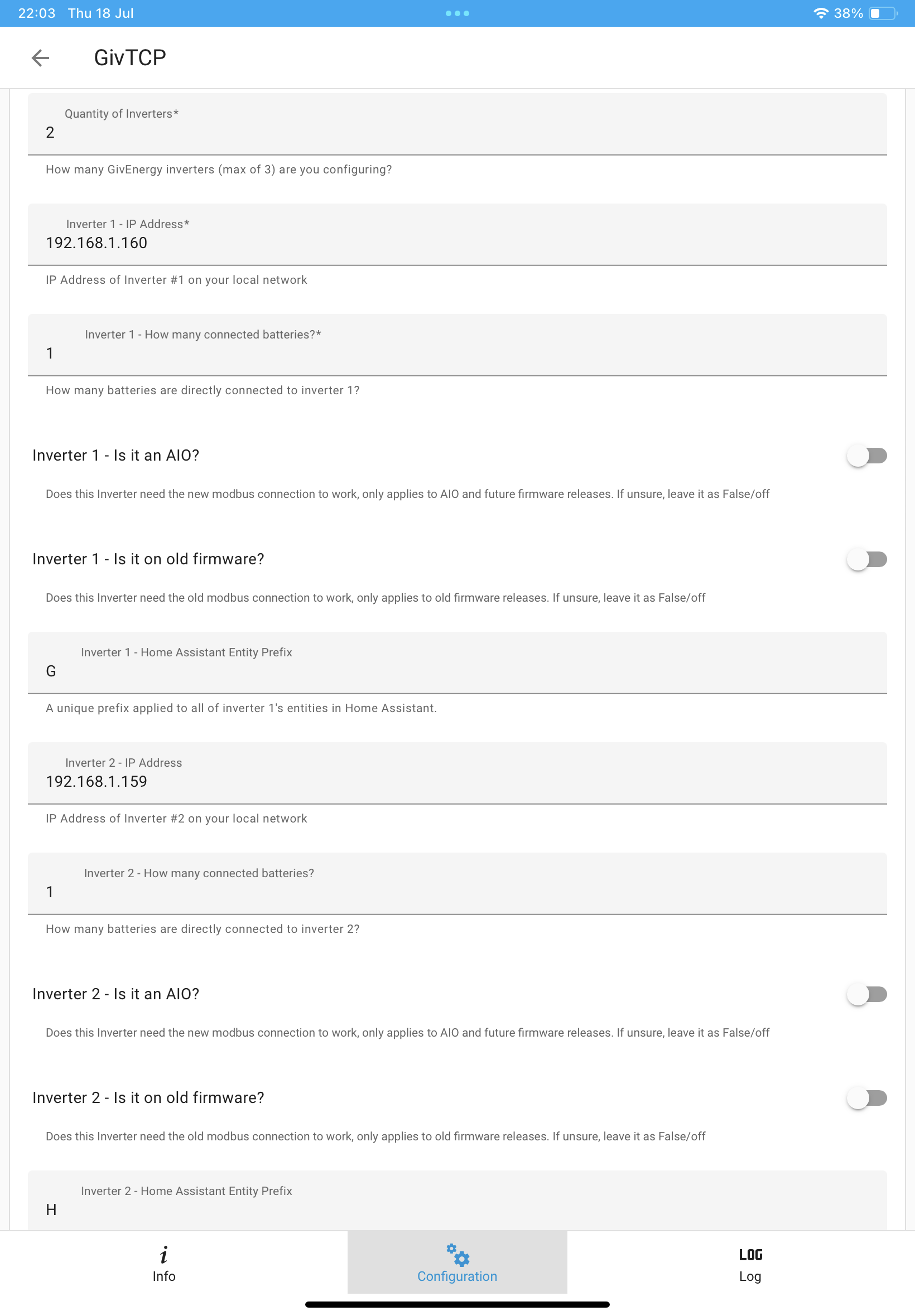
Here’ what’s in my config:


(I have two inverters and changed the prefix from givtcp to G and H).

For a gen 2 the ‘old firmware’ is off

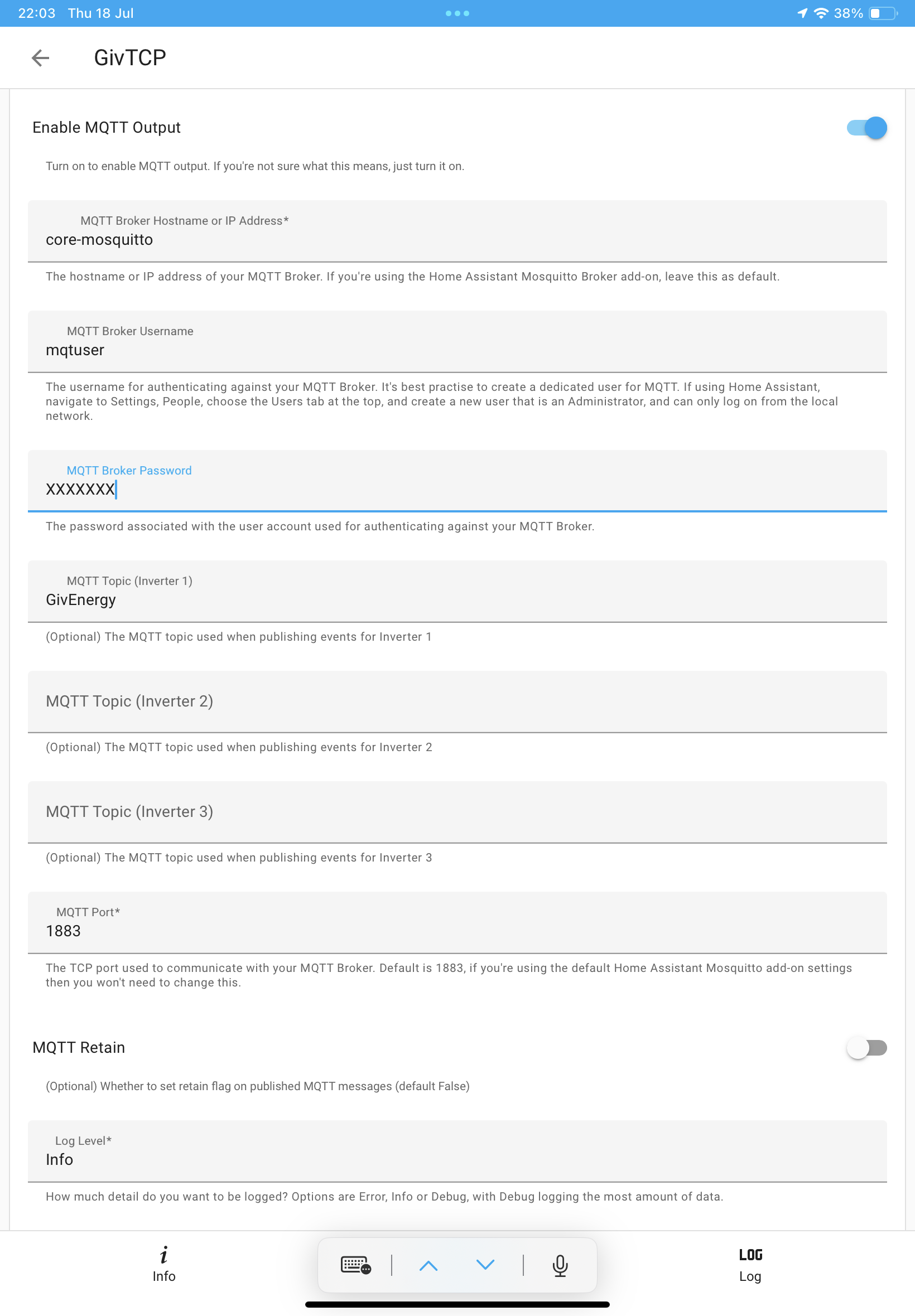
Have you installed MQTT as well? Here’ a video from Oli speak to the geek that covers the process: https://www.youtube.com/watch?v=ygD9KyciX54

M
#89 MichaelHambly

Many thanks, my setup is pretty well identical to yours and I have the same basic settings. I'm beginning to think I have a problem with my network addressing as the error messages seem to indicate the Inverter is simply not being found at the address I give although my router shows the address as allocated to GivEnergy and when I scan the network using Advanced IP scanner it also shows the address as live.

Very curious.

G
#90 geoffreycoan

MichaelHambly It may be. Do you have a segmented network or separate vlan for the inverter?

Mine is a simple network. The HA server is plugged into the broadband router and there’s a mesh network also plugged into the router. The broadband router does all the IP allocation. The inverter connects to the nearest mesh node to it.
Flat network, fixed IP for all the IOT devices, no segmentation or vlans or anything.

I think port 8899 needs to be open to communicate to the inverter, but I’m not sure if thats it or there’s more

M
#91 MichaelHambly

geoffreycoan Again, we are very similar in our setup except my inverter is hard wired via CAT5 back to my main switch. Router is set up for one network, split into a fixed address block up to 199 for all my IOT and automation stuff then DHCP for addresses 200 to 254 with the option to allocate an address from the upper range when needed.

Personally, I would like to allocate a fixed IP to the inverter but can't find out how to do it.

#92 Hook

@MichaelHambly have you setup HA on a vm?

If so has it given you a virtualised ip address?

M
#93 MichaelHambly

Thought I would give an update on where I am with this issue and what I have discovered about how to set a fixed IP Address on the GivEnergy Inverter.

After several frustrating days of trying to get GivTcp working on my HA Installation without ever getting it to see my Invertor I decided to give up and start with a fresh Install following various YouTube videos . Long story short, It still does not work and the error logs show that it cannot see my Invertor.

So, I reset my entire network, flushed it to ensure there were no strange address anomalies and tried again. Still no luck.

I then set about trying to establish how to set a fixed IP Address on the Inverter. It was surprisingly easy. I logged into the IP address shown in the GivEnergy app via a web interface. That brought up a login box asking for a username and password. These are the default values for the HF-A21 module used by GivEnergy and supplied by a Chinese company (admin, admin). Once in you can set up or change various default settings. I have not figured out yet what they all do ( and I would not recommend randomly changing any or you could be in a world of pain) but from the drop down menu on the left hand side I chose "STA Interface Setting" which revealed a section named "WAN Connection Type:". This was set to DHCP by default. By setting it from the drop down menu to Fixed IP you could then enter your fixed IP address, subnet mask, and Default Gateway.

If you try this it is on your own head. I make no guarantees it will work for you.

I have tried it and it seems to have given a fixed IP address to my Inverter without causing any other issues.

However, sadly, GivTCP will still not recognise or read values from my now firmly identified Inverter.

At this point, I don't want to waste any more time so reluctantly I think I will give up on using GivTCP and go back to writing my own interface in Node-Red.

I hope this insight into setting a fixed IP address might help someone and would like to thank all those who offered suggestions and help.

kind regards

Michael.

G
#94 geoffreycoan

MichaelHambly are you using the beta version of givtcp or the main public release?

I’m still deeply confused about the inverter name box which I just don’t get on my setup. And it sounds like your network is straight forward, a single flat network with no subnets and a single 192.168.x.x address range for everything.
How are you running Home Assistant, is it running as a VM or native? If running as a VM, have you set the adapter up correctly per the HA install instructions (bridged adapter from memory).

If you’re still stuck suggest you raise an issue and share the logfile on the givtcp github page

A
#95 Arg0t

MichaelHambly

Try pasting in my givtcp config in yaml mode, update INVERTOR_IP_1:, MQTT_ADDRESS:, HOSTIP: and NUMBATTERIES_1 to reflect the correct values for your setup.

Inverter name is a config option in 2.4.3 but not a mandatory 1, it appears in the gui editor on a new install.

NUMINVERTORS: 1
INVERTOR_IP_1: 192.168.1.30
INVERTOR_AIO_1: false
INVERTOR_AC_1: false
NUMBATTERIES_1: 2
HADEVICEPREFIX: GivTCP
INVERTOR_IP_2: ""
NUMBATTERIES_2: 1
INVERTOR_AIO_2: false
INVERTOR_AC_2: true
HADEVICEPREFIX_2: GivTCP2
INVERTOR_IP_3: ""
NUMBATTERIES_3: 1
INVERTOR_AIO_3: false
INVERTOR_AC_3: true
HADEVICEPREFIX_3: GivTCP3
MQTT_OUTPUT: true
MQTT_ADDRESS: 10.0.0.51
MQTT_USERNAME: ""
MQTT_PASSWORD: ""
MQTT_TOPIC: GivTCP
MQTT_TOPIC_2: ""
MQTT_TOPIC_3: ""
MQTT_PORT: 1883
MQTT_RETAIN: false
LOG_LEVEL: Error
PRINT_RAW: true
SELF_RUN: true
SELF_RUN_LOOP_TIMER: 5
QUEUE_RETRIES: 5
HA_AUTO_D: true
DYNAMICTARIFF: false
DAYRATE: "0.155"
NIGHTRATE: "0.055"
EXPORTRATE: "0.04"
DAYRATESTART: "04:30"
NIGHTRATESTART: "00:30"
INFLUX_OUTPUT: false
INFLUX_URL: ""
INFLUX_TOKEN: ""
INFLUX_BUCKET: ""
INFLUX_ORG: ""
PYTHONPATH: /app
TZ: Europe/London
WEB_DASH: false
WEB_DASH_PORT: 3000
HOSTIP: 10.0.0.10
CACHELOCATION: /config/GivTCP
DATASMOOTHER: medium
SMARTTARGET: false
PALM_WINTER: 01,02,11,12
PALM_SHOULDER: 03,04,09,10
PALM_MIN_SOC_TARGET: 25
PALM_MAX_SOC_TARGET: 45
PALM_BATT_RESERVE: 4
PALM_BATT_UTILISATION: 0.85
PALM_WEIGHT: 35
GEAPI: ""
SOLCASTAPI: ""
SOLCASTSITEID: ""
SOLCASTSITEID2: ""
LOAD_HIST_WEIGHT: "1"
EVC_ENABLE: false
EVC_IP_ADDRESS: ""
EVC_SELF_RUN_TIMER: 5
M
#96 MichaelHambly

Arg0t Thanks for the suggestion, I will try it later.

I should explain, I am supposed to be recovering from a major operation and keep getting told off by my wife for sitting at my computer so bear with me while I take a short rest.

Michael.

V
#97 Valex1p

If I may hijack the thread a little...

I have a new (released Nov. '23) GE 3 Phase inverter but cannot get GIVTCP to talk to it correctly. I’ve tried all the various config combinations of AIO/old firmware. The debugs seem to suggest connection is being made but GIVTCP sits in a loop requesting presumably because the data/response is invalid:-

2024-07-30 10:47:48,201 - Inv1 - payload - [DEBUG ] - [b’\x00\x00’, b’\x00\x00’, b’\x00\x00’, b’\x00\x8a’]
2024-07-30 10:47:48,202 - Inv1 - transaction - [DEBUG ] - Adding transaction 3
2024-07-30 10:47:48,203 - Inv1 - transaction - [DEBUG ] - Changing transaction state from ‘PROCESSING REPLY’ to ‘TRANSACTION_COMPLETE’

Eventually you end up with ‘No serial_number found in MQTT queue. MQTT Control not available’

I wonder if these new 3Ph devices are different in someway? The latest version of GIVTCP was released just before the 3Ph inverters were launched.

Interestingly GIVTCP debugs report the device as a GEN1 hybrid inverter but this could be a red herring.

Setup is HA running on HA Green. MQTT+GIVTCP (v2.4.3). Flat network with hardwired connection and fixed IP

Any thoughts or ideas gratefully received

#98 PianSom

Valex1p
Are you using the GE GivTCP, or Britkat's?

If the former you may want to check out the latter, and in particular his latest beta versions. I see from the changelog that he has starting supporting 3 phase read-only over the last couple of months.

https://github.com/britkat1980/ha-addons

D
#102 DD

Valex1p I have a new (released Nov. '23) GE 3 Phase inverter but cannot get GIVTCP to talk to it correctly. I’ve tried all the various config combinations of AIO/old firmware. The debugs seem to suggest connection is being made but GIVTCP sits in a loop requesting presumably because the data/response is invali

if you're willing, I'd be interested in getting traffic recordings from a 3-ph device. I don't use GivTCP, but do work on the lower-level library it shares.
See https://community.givenergy.cloud/d/4730-modbus-volunteers-wanted-register-collections for more details.

V
#103 Valex1p

hmm not sure I have the competency to install a beta - I've only every installed on HA OS using add-ons from repositories

Unless I'm missing something?

V
#104 Valex1p

PianSom Thanks!

Just read this which gives me the repository info I am familiar with

M
#105 MichaelHambly

Hello @Arg0t @geoffreycoan

So my short break ended up being longer than anticipated but now I am back from my enforced "post op rest" trying once again to get GivTCP working in HA.

Short update, out of curiosity today I decided to check out the web dashboard before starting anything else. To my surprise, it seems to be mostly up and running. Peak Import and Export don't seem to be receiving data but everything else is accurate. That prompted me to try something that should have occurred to me sooner, looking at the MQTT output using MQTT.fx to see if anything was coming out of the Mosquitto MQTT server. Again, to my surprise, despite my belief that GivTCP was not running I am seeing a constant stream of data from my Inverter and batteries. Chooseing a couple of obvious messages at random the MQTT data does match what is actually happening at my invertor.

Despite this, I am still getting GivTCP error messages in my log files saying GivTCP cannot connect to my inverter but, having said that, if I keep hitting refresh and reading further down the log files I see the following messages and I am intrigued by the lines "Running Redis" and "using the epoll event method" :-

2024-08-08 20:34:25,849 - startup - [CRITICAL] - Running Redis
2024-08-08 20:34:25,861 - startup - [CRITICAL] - Setting up invertor: 1 of 1
2024/08/08 20:34:25 [notice] 188#188: using the "epoll" event method
2024/08/08 20:34:25 [notice] 188#188: nginx/1.20.2
2024/08/08 20:34:25 [notice] 188#188: OS: Linux 6.6.31-haos-raspi
2024/08/08 20:34:25 [notice] 188#188: getrlimit(RLIMIT_NOFILE): 1073741816:1073741816
2024/08/08 20:34:25 [notice] 188#188: start worker processes
2024/08/08 20:34:25 [notice] 188#188: start worker process 193
2024/08/08 20:34:25 [notice] 188#188: start worker process 194
2024/08/08 20:34:25 [notice] 188#188: start worker process 195
2024/08/08 20:34:25 [notice] 188#188: start worker process 196
2024-08-08 20:34:26,043 - startup - [CRITICAL] - Running RQ worker to queue and process givernergy-modbus calls
2024-08-08 20:34:26,044 - startup - [CRITICAL] - Running Invertor (192.168.30.20) read loop every 15s
2024-08-08 20:34:26,052 - startup - [CRITICAL] - Subscribing MQTT Broker for control
2024-08-08 20:34:26,060 - startup - [CRITICAL] - Starting Gunicorn on port 6345
2024-08-08 20:34:26,079 - startup - [CRITICAL] - Serving Web Dashboard from port 3042

From this it seems something is working and now I am not sure if I am misunderstanding the log files and that perhaps GivTCP is at least partially functional. If that is true then it begs the question why can't I see or find any GivTCP entities?

As you might have guessed, I am not very profficiant with HA so I could just be doing something stupid. Any help trying to figure out what is going on would be very welcome.

Michael.

G
#106 geoffreycoan

MichaelHambly That is a normal startup sequence for GivTCP, from that it looks to be working OK.

You say its not populating any HA entities though, and where are you getting errors connecting to the inverter, in the givtcp log?
If you are getting regular errors then it usually indicates an underlying network issue, that the HA server isn’t getting a reliable connection through your home network to the inverter. Is the HA server on an ethernet connection and the inverters on wifi or lan cable?

If you look at the logbook, what do you see? You should see a steady stream of HA entities being updated, in particular the inverter time and last updated time.

Assuming you followed all the steps in the video I linked earlier. In particular ensure you configure MQTT add-on with a username and password, use those in the givtcp config, and create the MQTT integration

M
#107 MichaelHambly

Thanks for the reply, the errors I could see were in the initial GivTCP startup log and typically showed:-

2024-08-09 16:24:52,322 - startup - [CRITICAL] - HA MQTT Service has been found at core-mosquitto
2024-08-09 16:24:52,333 - startup - [INFO] - Supervisor Timezone: Europe/London
2024-08-09 16:24:54,347 - startup - [CRITICAL] - Scanning network for GivEnergy Devices...
2024-08-09 16:24:57,611 - startup - [ERROR] - Gathering inverter details for 192.168.xx.xx f failed.
2024-08-09 16:24:57,611 - startup - [ERROR] - Unable to interrogate inverter to get base details
2024-08-09 16:24:57,809 - startup - [ERROR] - Gathering inverter details for 192.168.xx.xx f failed.
2024-08-09 16:24:57,810 - startup - [ERROR] - Unable to interrogate inverter to get base details
2024-08-09 16:24:57,811 - startup - [INFO] - Searching for Inverters again
2024-08-09 16:24:57,811 - startup - [CRITICAL] - Scanning network for GivEnergy Devices...
2024-08-09 16:25:01,111 - startup - [ERROR] - Gathering inverter details for 192.168.xx.xx f failed.
2024-08-09 16:25:01,111 - startup - [ERROR] - Unable to interrogate inverter to get base details
2024-08-09 16:25:01,311 - startup - [ERROR] - Gathering inverter details for 192.168.xx.xx f failed.
2024-08-09 16:25:01,311 - startup - [ERROR] - Unable to interrogate inverter to get base details
2024-08-09 16:25:01,312 - startup - [INFO] - Searching for Inverters again
2024-08-09 16:25:01,313 - startup - [CRITICAL] - Scanning network for GivEnergy Devices...
2024-08-09 16:25:04,591 - startup - [ERROR] - Gathering inverter details for 192.168.xx.xx failed.
2024-08-09 16:25:04,592 - startup - [ERROR] - Unable to interrogate inverter to get base details
2024-08-09 16:25:04,790 - startup - [ERROR] - Gathering inverter details for 192.168.xx.xx f failed.
2024-08-09 16:25:04,791 - startup - [ERROR] - Unable to interrogate inverter to get base details

But as I noted in the earlier post, later in the logs it seemed to show a startup using something called "Redis" and "epoll event method" which I assume means that GivTCP has started with an alternative method.

I am coming to the conclusion that the problem lies with my MQTT servers (plural) . The HA system I am using was set up initially on a stand-alone Raspberry Pi to try out HA. During the initial setup I installed the Mosquitto MQTT broker.

When I added the HA Pi to my network I forgot that I have a stand-alone MQTT server already running on a Pi which manages my Home Automation built using Node-Red. I think the issue could be around a conflict with my HA running a core.mosquitto server and my stand-alone MQTT server (also Mosquitto). I'm not sure why there should be a conflict as they both run at different addresses (although use the same port 1883) but I do remember "Speak to the Geek" mentioning a possibility of conflict with HA if you run more that one MQTT server.

Any thoughts?

Michael.

G
#108 geoffreycoan

MichaelHambly I certainly don’t get the repeated scans for inverters on my network. I have configured the two IP addresses of my two inverters in GivTCP but it always does a scan, finds some random other device it thinks is an inverter, then tries to connect and decides its not an inverter, then it finds my two real inverters.

I get this every time but it starts up normally, the redis and epoll stuff then gunicorn and then a message about publishing HA discovery messages. I can’t see a normal startup in my logs so can’t share it with you, but if need be I can shut my givtcp down and start it up again to get the logs for you.

The issue could be due to the two mqtt’s, could you temporarily shutdown the one that you use for node red to see if that makes the startup any cleaner?

In the givtcp config I assume you have core-mosquitto as the broker name, then a user and password you created as a home assistant user? I pretty much followed the speak to the geek video and it worked straight away for me

M
#109 MichaelHambly

GivTCP. I finally have it working.

After deleting my HA MQTT service and deleting all instances of its use, I reinstalled Mosquitto from within HA and stayed with the standard core.mosquitto install. I reset my GivTCP MQTT server address to core.mosquitto, restarted everything and within minutes entities started to appear. Seems to be working fine now.

I think what was happening was that my original HA MQTT server had been set up to use the address of my external MQTT server running on a Pi. That was working fine for all my other external devices (Tasmota in particular) and meant I was seeing external entities and could manually read GivTCP MQTT published messages.

But, for some reason, my HA installation would not play nice with GivTCP talking to my external MQTT server and would not auto-discover the new GivEnergy entities despite everything else on my system working fine. Now of course, my HA is no longer auto-discovering my Home Brew Automation system built around Node-Red but that is not a big issue as I rarely use HA.

When I get time, I might try rebuilding a fresh HA system on a spare Pi, and see if I can get it to talk to GivTCP via my external MQTT server to find out what the problem with not discovering new entities was. Hope that makes sense.

Anyway, thanks for all the help, much appreciated.

PS, I can't log in to the Solcast server to get an API key. I get a message saying "Hmm. We’re having trouble finding that site.." Has anyone else had a similar problem?

#110 PianSom

MichaelHambly PS, I can't log in to the Solcast server to get an API key. I get a message saying "Hmm. We’re having trouble finding that site.." Has anyone else had a similar problem?

Try https://solcast.com (ie with no www.)

G
#111 geoffreycoan

MichaelHambly glad to hear you got it working OK in the end

M
#112 MichaelHambly

geoffreycoan

Hi, thanks for all the help to date. As someone who seems to have good knowledge of HA and how it works, I wonder if you would allow me to pick your brains a little more.

I have had my GivEnergy system installed for almost 6 weeks and have started to get to grips with it. Normally I would use Node-Red to read the GivEnergy API and build my automations around that data. However, I first need to figure out how to read the API and extract data. In the meantime, I have an urgent problem with my Ohme car charger trying to eat my GivEnergy battery every time my car is on charge (Octopus Smart Charge). I have a temporary fix that involves setting my GivEnergy batteries to charge during the Ohme charging period but it is imperfect as smart charging can (and does) move the Ohme charge times around and it needs me to remember to set it each time.

From what I can gather, working with GivTCP and the Octopus HA integration it might be possible to create an automation in HA that detects smart charging and prevents the GivEnergy batteries from discharging. Sadly, my knowledge of HA is very limited hence my question, is this possible (practical) or am I hoping for too much?.

Hope you don't mind me asking but any HA pointers would be appreciated.

Again, many thanks.

M
#113 MichaelHambly

PianSom

Thanks, I have tried everything, even trying to log in with my mobile but always the same result. I suspected it had something to do with the security and anti tracking software I have installed in my network. I have seen similar problems before when a website uses extensive fingerprinting, tracking cookies and other javascript scripts to follow, track and log users.

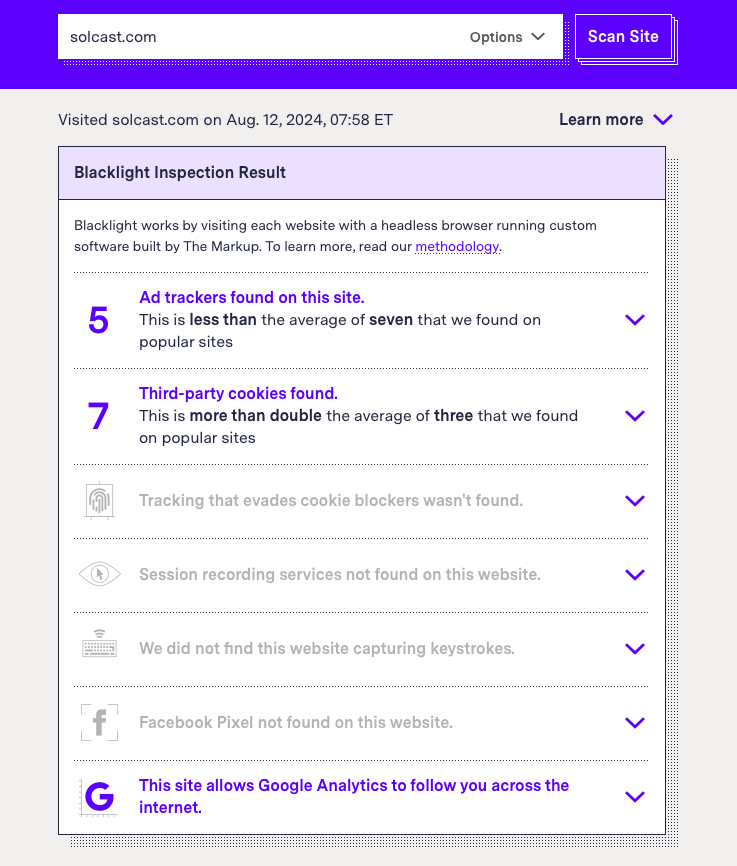
Running the website through TheMarkup, Blacklight [https://themarkup.org/series/blacklight] did find some interesting stats besides the usual cookie stuff and I have shown just two below for information:

This website loads trackers on your computer that are designed to evade third-party cookie blockers_

_Canvas fingerprinting was detected on this website. This technique is designed to identify users even if they block third-party cookies. It can be used to track users' behavior across sites. This technique was used by six percent of popular sites when we scanned them in September 2020..

This website could be monitoring your keystrokes and mouse clicks.

_Blacklight detected the use of a session recorder, which tracks user mouse movement, clicks, taps, scrolls, or even network activity. This data is compiled into videos and heat maps that website owners can watch to see how users interact with the site. Research has shown these practices can be insecure and make sensitive user data such as passwords and credit card information more vulnerable to leaks. This technique was used by fifteen percent of popular websites when we scanned them in September 2020.

Blacklight detected a script belonging to the company FullStory doing this on this site._

I think the moral of this story is "If it's free you can guarantee it aint". Also worth noting the point about the security of such scripts.

I suppose it's a case of do the benefits of the API outweigh the security and privacy risks..

Michael.

#114 PianSom

MichaelHambly
Odd - sounds like you get VERY different results from me!

M
#115 MichaelHambly

I think you are running the base website URL through Blacklight. I tried it using the sign up url. [toolkit.solcast.com.au/register].

Confess I'm a little paranoid about who can put what on my computer without asking first. Sadly, in these modern times, your personal data is worth far more than people realise and is freely traded through data brokers who will sell to anyone including hackers. I try to keep my PC and network free of anything that allows third parties from tracking my Internet use or accessing my data (keyboard, mouse, webcam etc.). Try running [https://coveryourtracks.eff.org/]. You might be surprised.

V
#116 Vestas

MichaelHambly NoScript on default settings blocks pretty much everything there as its not going to run javascript.

They can ID the browser due to that more than anything else 🙂

D
#117 DD

MichaelHambly I have a temporary fix that involves setting my GivEnergy batteries to charge during the Ohme charging period but it is imperfect as smart charging can (and does) move the Ohme charge times around and it needs me to remember to set it each time.

Not sure if it's helpful, but my first somewhat crude approach was to simply turn max discharge power to around 200W overnight - just enough to cover base load, but any car-charging would be forced to use grid rather than battery. I asked for the car to be ready by 7am, which was when we woke and started using power.

I now use an API call to find the IOG charging slots, but I think Ohme does things differently from other IOG integrations, and I'm not sure if the schedule is available through the same (graphql) interface.

By far the simplest is to have the wiring set up such that the GE does not see the car charger at all. You do however lose the car-charging numbers in the GE reporting, so it depends how much you care about that.

M
#118 MichaelHambly

DD

Thanks. Some interesting ideas. Just out of curiosity how can the wiring affect if GE sees the car charging? As far as I can tell, the clamp reporting total consumption to GE is just before the meter and will pick up car charging current as well or am I missing something?

I like and have followed bottlecapdaves work but as you say the HA integration does not play well with Ohme (On a different note, I missed out on the free GE charger with every Inverter by two weeks, that would have made life easier :-) ).

In the past, to take advantage of the extra smart charging slots I have used an NR script to read a clamp I placed around the Charger feed and used that to tell me when charging was active and by default the 7p rate. Crude but it worked, I could reuse that script but to control the GE battery still means getting my head around the GE API which at first look seems fairly complex. That's why I wondered if there was a simple automation for HA.

Think I might start reading up on the GE API calls. Sigh. Getting too old for this.

Michael.

D
#119 DD

MichaelHambly Just out of curiosity how can the wiring affect if GE sees the car charging? As far as I can tell, the clamp reporting total consumption to GE is just before the meter and will pick up car charging current as well or am I missing something?

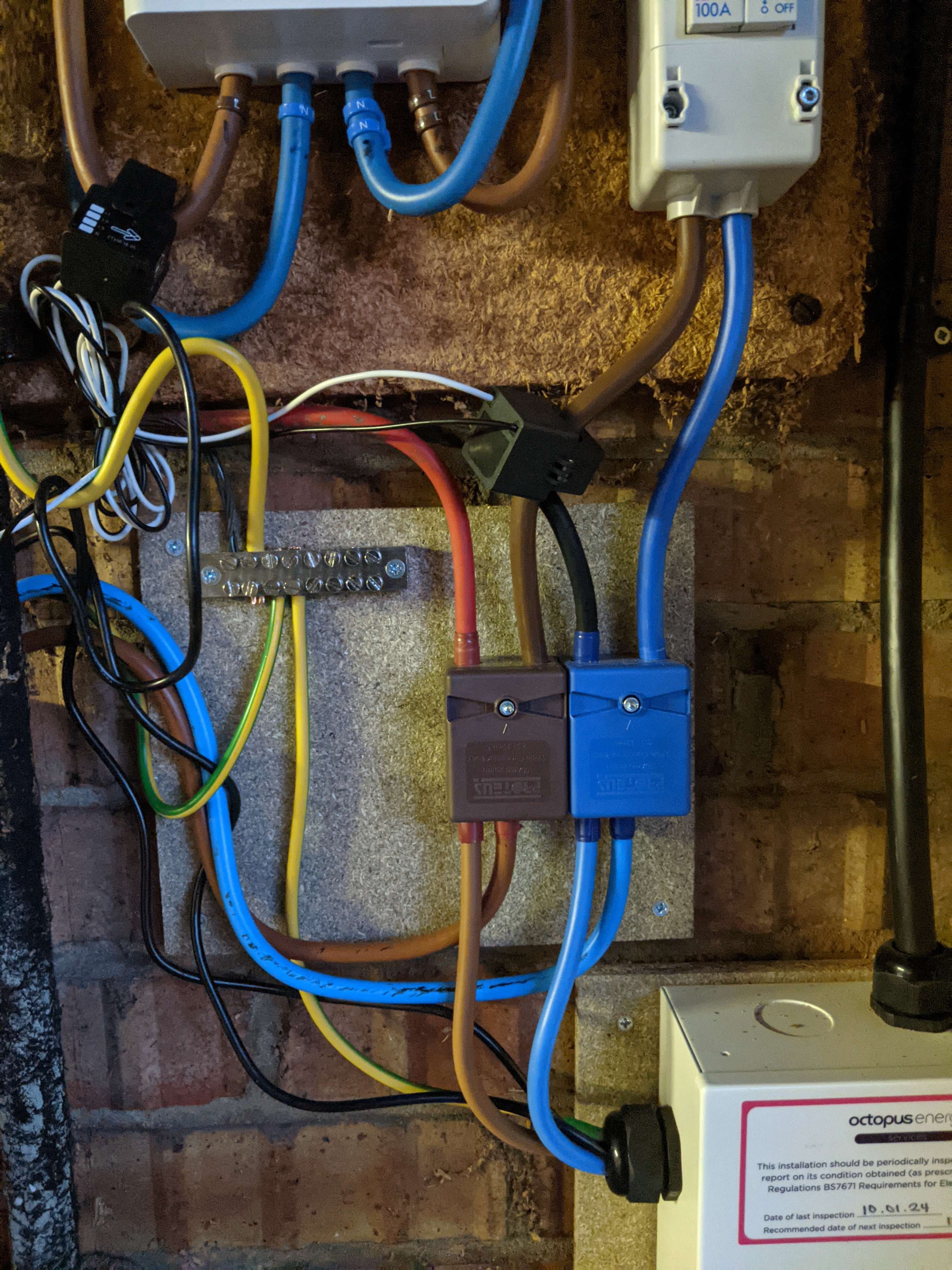
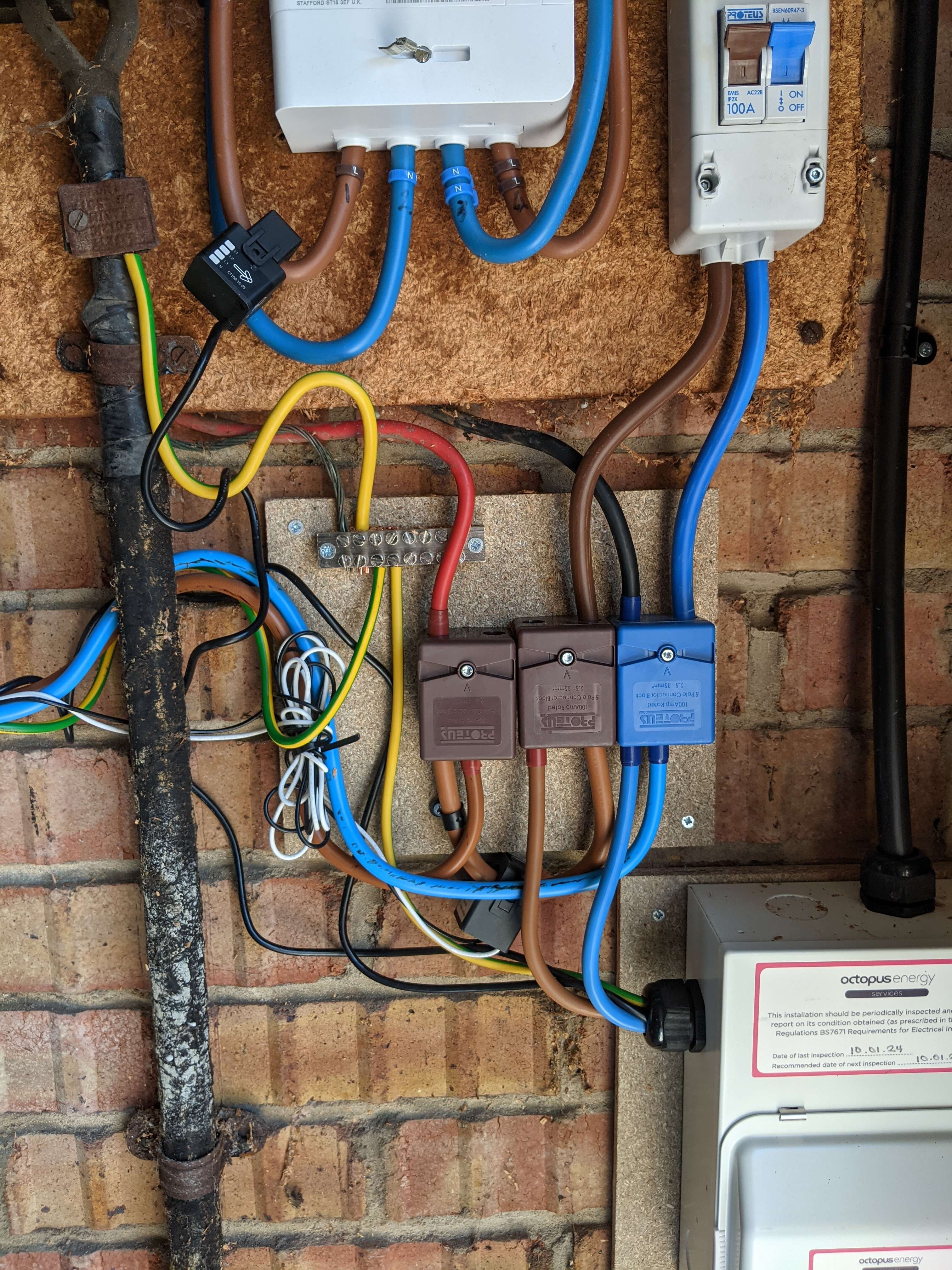
before and after shots for how I had my wiring changed:

smartmeter is at the top, and the CT clamp on there is for my Zappi charger, which sees all consumption.

The mini-cu at bottom right is for the Zappi, and is taken from the first block. The net effect of the change is to move the GE CT clamp from before the Zappi to after it, so that it does not see the load from the chargepoint itself.

I have some python scripts at https://github.com/divenal/givenergy-scripts you're welcome to reuse.

#120 PianSom

MichaelHambly I think you are running the base website URL through Blacklight. I tried it using the sign up url. [toolkit.solcast.com.au/register].

Fair point.

When I use that address then it does show the warnings you mention.

BUT the third party cookie blocker is used by Stripe - a well-known payments company - and is therefore likely a sidestep of people (like me) who block third party cookies but still want to access third party services (like potential payment for API access). Stripe already has my bank details, so I guess I trust them.

And the keystroke logger is from Fullstory. They say this is used for website design and optimisation. But I can't really see anything about the company as it is blocked by my (pihole) ad blocker. I'm surprised it's not blocked by yours?

So I think Solcast is ok personally. But each to their own.

PS According to the EFF link I am doing pretty well - all tracking ads and all invisible tracking blocked, but fingerprinting "has some gaps" 1 in 3700 browsers has my fingerprint. Not bad. 🙂

G
#121 geoffreycoan

@MichaelHambly Since you have got GivTCP now working and have a reasonably recent GivEnergy inverter, you should be able to use the Octopus integration to stop your inverter battery discharging during the OIG period

In your automation, use binary_sensor.octopus_energy{{ACCOUNT_ID}}intelligent_dispatching to indicate whether you are in an IOG session or not, although it does say that OHME only reports when its in a standard offpeak session.

https://bottlecapdave.github.io/HomeAssistant-OctopusEnergy/entities/intelligent/

You can then set select.givtcp_SERIALNO_battery_pause_mode to PauseDischarge to stop the battery charging, and Disabled when you want to let it support the house load (Eco)

Forcing the battery to charge in the IOG periods can also be done via GivTCP, its just a few more commands that you have to do in sequence. I can share my scripts etc if you need them.

And BTW the GivEnergy EV charger doesn't currently support IOG at all. Apparently its waiting Octopus testing, but its been like that for quite a while

M
#122 MichaelHambly

Many thanks for the pictures. I can see what you have done.

I'm not sure I can do something similar as my mains setup is different. When I had my house built in 2009 I tried to anticipate all my future home automation and home generation eventualities so I laid specific hi amp generation cables for mains out to my Garage where I had built a space for batteries etc together with ducted low signal cables for clamps and CAT6 for comms. I also did the same for my future EV and charger and a separate backup generation cable for mains backup. Each of these has its own fuse box with separate feeds. Net result, the Incomer meter board is very clean and all my clamps arrive on pre-fitted low signal cable via ducting so I only have the one incoming fuse and cable feeding three fuse boxes. I think I could try to put clamps around cables within the fuse boxes but I suspect it would be a bit complicated to do. I need to have a think...

M
#123 MichaelHambly

geoffreycoan

Appreciate the feedback and some useful ideas. I haven't tried to see if bottlecapDaves integration works with my ohme yet, I assumed it would not based on his comments. The select.givtcp_SERIALNO_battery_pause_mode is new to me, I had not spotted that so might have a play with it.

If you don't mind sharing your scripts I would be interested in learning from them.

Still figuring HA out and it is still all a bit new to me.

Thanks
Michael.

M
#124 MichaelHambly

PianSom

" I can't really see anything about the company as it is blocked by my (pihole) ad blocker. I'm surprised it's not blocked by yours?"

That made me smile, it is blocked by my pihole. We obviously think alike and both like Raspberry Pi. I have 6 running in my network including my MQTT server running on the first Pi I ever bought and still going strong.

#125 PianSom

MichaelHambly I have 6 running in my network

Snap!

1 - pihole1
2 - pihole2 (for redundancy on a different network branch)
3 - Zigbee2MQTT1 (location dependent)
4 - Zigbee2MQTT2
5 - general workhorse
6 - a new pi5, to manage an energy-only instance of HA one day soon

I moved pretty much everything off Pi's a few years ago, on to a little NUC which now runs Docker containers for most of my needs (eg HA, MQTT broker, media stuff, ...). I still have a small pile of unused Pi's sitting waiting for a use case. 🙂

G
#126 geoffreycoan

MichaelHambly My scripts are a bit more complex / all inclusive than they need to be because I deliberately ensure the inverter is set to a known clean state before I start charging or discharging. You could certainly simplify and as ever with everything on Home Assistant there are several ways to do things.

script to start charging now at full rate (change the battery charge rate to the maximum for your inverter):

alias: G182 Inv1 Force Charge
sequence:
  - data:
      option: Normal
    target:
      entity_id:
        - select.givtcp_SERIALNO_temp_pause_charge
    action: select.select_option
  - data:
      value: "100"
    target:
      entity_id:
        - number.givtcp_SERIALNO_target_soc
    action: number.set_value
  - data:
      option: "00:00:00"
    target:
      entity_id:
        - select.givtcp_SERIALNO_charge_start_time_slot_1
    enabled: true
    action: select.select_option
  - data:
      option: "23:59:00"
    target:
      entity_id:
        - select.givtcp_SERIALNO_charge_end_time_slot_1
    enabled: true
    action: select.select_option
  - data:
      option: Eco
    target:
      entity_id:
        - select.givtcp_SERIALNO_mode
    enabled: true
    action: select.select_option
  - delay:
      seconds: 20
  - data:
      option: Disabled
    target:
      entity_id: select.givtcp_SERIALNO_battery_pause_mode
    action: select.select_option
  - delay:
      seconds: 5
  - data:
      value: "2600"
    target:
      entity_id:
        - number.givtcp_SERIALNO_battery_charge_rate
    action: number.set_value
  - data:
      option: Running
    target:
      entity_id:
        - select.givtcp_SERIALNO_force_charge
    action: select.select_option
  - data: {}
    target:
      entity_id:
        - switch.givtcp_SERIALNO_enable_discharge
    action: switch.turn_off
description: Force a full rate battery charge
mode: single
icon: mdi:battery-charging-30

Put the inverter into Eco mode (stop any forced charging or discharging):

alias: G182 Inv1 Eco Mode
sequence:
  - data:
      option: Normal
    target:
      entity_id:
        - select.givtcp_SERIALNO_force_charge
    action: select.select_option
  - delay:
      seconds: 20
  - data:
      option: Eco
    target:
      entity_id:
        - select.givtcp_SERIALNO_mode
    action: select.select_option
  - data: {}
    target:
      entity_id:
        - switch.givtcp_SERIALNO_enable_discharge
    action: switch.turn_on
  - data:
      value: "2600"
    target:
      entity_id:
        - number.givtcp_SERIALNO_battery_discharge_rate
        - number.givtcp_SERIALNO_battery_charge_rate
    action: number.set_value
  - data:
      value: "4"
    target:
      entity_id:
        - number.givtcp_SERIALNO_battery_power_reserve
    action: number.set_value
  - data: {}
    target:
      entity_id:
        - switch.givtcp_SERIALNO_enable_charge_schedule
        - switch.givtcp_SERIALNO_enable_discharge_schedule
    action: switch.turn_off
  - data:
      option: "00:00:00"
    target:
      entity_id:
        - select.givtcp_SERIALNO_charge_start_time_slot_1
        - select.givtcp_SERIALNO_charge_end_time_slot_1
        - select.givtcp_SERIALNO_discharge_start_time_slot_1
        - select.givtcp_SERIALNO_discharge_end_time_slot_1
    action: select.select_option
  - metadata: {}
    data:
      option: Disabled
    target:
      entity_id:
        - select.givtcp_SERIALNO_battery_pause_mode
    action: select.select_option
description: Return the inverter to Eco mode, cancel any forced charge or discharge
mode: single
icon: mdi:battery-lock-open

Start forced discharging at full rate (change the battery discharge rate to max for your inverter):

alias: G182 Inv1 Force Discharge
description: Force a full rate battery discharge and export of excess power
sequence:
  - data:
      option: "00:00:00"
    target:
      entity_id: select.givtcp_SERIALNO_discharge_start_time_slot_1
    action: select.select_option
  - data:
      option: "23:59:00"
    target:
      entity_id: select.givtcp_SERIALNO_discharge_end_time_slot_1
    action: select.select_option
  - data:
      value: "2600"
    target:
      entity_id: number.givtcp_SERIALNO_battery_discharge_rate
    action: number.set_value
  - data:
      value: "4"
    target:
      entity_id: number.givtcp_SERIALNO_battery_power_reserve
    action: number.set_value
  - delay:
      seconds: 15
  - data:
      option: Disabled
    target:
      entity_id: select.givtcp_SERIALNO_battery_pause_mode
    action: select.select_option
  - delay:
      seconds: 5
  - data:
      option: Timed Export
    target:
      entity_id: select.givtcp_SERIALNO_mode
    action: select.select_option
mode: single
icon: mdi:battery-minus-outline

Note that these are scripts not automations. Advantage of using scripts is you can then easily call them from your own automations

M
#127 MichaelHambly

geoffreycoan

Many thanks for these. Time to go and play. I will let you know how I get on.

Michael.

D
#128 DD

Not really related to HA, but perhaps something exists within it's realm... I'm looking for a generic android alert app which I can use to allow scripts running on rpi to get my attention with an audible alarm and message. I suppose even a free SMS service/API would do the job, if such a thing exists.

#129 hoggy

DD the Givenergy API push notification system works fine (plus free)

#130 PianSom

DD
But if you are looking for a HA solution, then just do a notification to your phone and make it a Critical Notification

I use these for eg a grid outage, so my phone makes a noise even if in silent mode

D
#131 DD

PianSom does that require something specific running on the phone to receive the notification?

#132 PianSom

DD
Not iOS. No idea about Android.

Though the HA page suggests not.

S
#133 SamM

DD you would need the Home Assistant app installed on the device(s) that you want to receive notifications on.

#134 PianSom

SamM you would need the Home Assistant app installed

Oops. Yes. This.

D
#135 DD

I did come across 'ntfy' which looks like it's what I was originally looking for. A mqtt-like interface, where the app can subscribe to topics, and then you can publish to those topics via http to alert the phone. Can either self-host, or can subscribe to use a central server.

https://ntfy.sh/

D
#136 DD

hoggy Okay, got that working. Didn't make a noise, but I'll look around to see if that's something I can configure somewhere. (ntfy does allow an importance to be set when the message is posted.)