Discharge on schedule but keep reserve for home consumption (eco mode)

14 comments started 2024-03-21 last 2024-03-24
GivEnergy Products
S
#1 systemparadox

We are on Octopus Flux. What I'm attempting to do is automatically export during peak times (1700-1900) but ensure that we keep enough reserve for our own usage.

I've discovered that whilst the app only lets you set a single schedule you can configure multiple schedules on the "remote control" section of givenergy.cloud web interface, so that's good.

However, from my testing it appears that if you set "Enable DC discharge" and add a schedule for say 1700-1900 with a reserve of 40%, what actually happens is the discharge schedule effectively disables ECO mode while it is active:

  • It uses battery power for home consumption fine up until 1700
  • Then at 1700 it starts discharging+exporting until it reaches 40%
  • Once it's reached the 40% limit it stops discharging, but it also prevents the battery being used to power the home so we're now importing electricity at peak rate
  • At 1900 the schedule ends and it goes back to using battery power for home consumption

Is there a setting I am missing or is this something GivEnergy needs to fix?

Thanks.

D
#2 DD

systemparadox If you set 'enable dc discharge' via the remote control section, it shouldn't tinker with any other flags. It's when you try to do it via the app or the friendlier 'settings' part of the portal that it goes wrong.

On my system, the only difference between 'timed discharge' and 'timed export' is that the latter turns off the eco flag, whereas the former leaves it on. On the app, it's a discharge mode 'scheduled' with a type of 'home demand'.

Ah - yes, if you control the discharge by setting a lower limit, then yes, when it hits that, it stops discharging. And that means it won't discharge to cover house demand either. I don't think there's a setting you're missing, but equally I don't think it's necessarily broken and requiring a fix. A lower limit on discharge means just that - stop discharging, and that includes covering home demand.

I don't use the lower limit on a timed discharge for that very reason. Instead, I'd balance the discharge power and the duration of the discharge so that it stops at about the level I want.

If you want this kind of control over the system, you probably need some sort of external control to manipulate the parameters. It might be helpful to distinguish the low-level software (such as actually implementing eco mode, balancing battery discharge rate to home demand) which has to happen inside the inverter, from higher-level software which implements bigger decision making. One helpful terminology is "mechanism" vs "policy" - the former is what set of controls the inverter offers, and the latter is how to use those controls to implement a master plan. IMHO it's better to keep policy decisions out of the inverter itself.

Many here use Home Assistant. I just run simple python scripts to manipulate settings via the API. There's also a (currently free) web-based agent wonderwatt.com which some people use.

G
#3 geoffreycoan

systemparadox This is unfortunately the way it works, the battery can basically be in one of three modes: Eco, discharging or charging and there isn’t really combination modes. So when its in discharging mode (for a time period) and it reaches the reserve limit you set, it won’t discharge any further because you have hit the reserve level and thus if there’s home demand it has to be imported.

My advice is to set the discharge level and start/end times carefully to ensure that this doesn’t impact you.

e.g. (using rounded numbers to make the maths simple, but plug your own figures in)
If your inverter discharges at 3kW an hour and you have a 9kW battery then it will fully discharge the battery in 3 hours.
If the battery is on 100% at the beginning and you want the battery to finish on 50% at the end of the period then you can discharge for 1.5 hours so set the start time as 17:30 and the finish time as 19:00.

Where this becomes less easy is if your battery isn’t at 100% at the beginning and then the discharge would finish before 19:00. You’d have to adjust the start time to ensure the discharge finished at your required time.

You’re now starting to get into automation that is above what you can do in the GivEnergy portal and you’d need to look at a more flexible solution such as Home Assistant or writing your own control scripts.

D
#4 DD

systemparadox disables ECO mode while it is active

Ah... sorry, I didn't read carefully enough: while active. Yes, as geoffreycoan says, either it is discharging at a fixed power, or it is discharging just enough to match the household consumption.

(It is a common complaint that enabling 'timed export' turns off the eco flag, and I just assumed that was what you were talking about. Sorry.)

R
#5 Rubikcube

systemparadox You are correct, this is something that GivEnergy should fix, but it's been like this for years and many here have given up waiting. Three main solutions are Home Assistant (with GivTCP and predbat?), WonderWatt, or my Android App.

As you have found, you don't want to stop at a particular percentage, because you may reach it within the peak period. The ideal would be to use the percentage to select the start time so that you finish with about 40%ish at 19:00. I am on Flux and do this with a time ladder in my app.

https://givenergymonitor.wixsite.com/tutorials/tariffs#flux

To use my app, you will need an android device (that is NOT your phone), readily available from many shops and online retailers, or you might find a friend or family member has an old one you can get for free. The app is free to download and use as a monitor, but to control your inverter and use a schedule you will need the premium upgrade which costs a tenner.

D
#6 DD

Rubikcube this is something that GivEnergy should fix

I'm not really sure what else it should do. Perhaps leave timed mode when either the end time is reached, or the min charge is reached?
Logically, they should also change AC charging to do the same: end timed-charge mode (and start discharging) as soon as the target is reached, rather holding charge until the end. I know I wouldn't want it to do that...

G
#7 geoffreycoan

Ideally there would be more configurability and control in these settings, but there will be people who want one way of of it working and others that want another. Which means you either upset a different group of people or you have to start introducing more control on/off switches to set different behaviours - which adds to the complexity of the user interface and user experience and some of the older devices wouldn’t have the memory space so now you’ve got different inverters behaving differently (again).

As I said earlier, its getting outside the scope of what the inverter can do and you need a separate control system. Home Assistant with/without Predbat at the Android app are good approaches

D
#8 DD

geoffreycoan I wonder if GE should make that sort of higher-level functionality available via services running on the web, rather than in the inverter. So much easier to develop and test than on the inverter itself. (Which does unfortunately also mean likely to break more regularly, if they roll out updates without the same level of testing. Though they can mitigate that by having a testing server for those willing to run cutting-edge, and a stable server which runs a week or so behind, after changes have been beta-tested.)

G
#9 geoffreycoan

DD Great idea. There would be some delay in the portal not responding as quickly as an inverter change, but for most people this wouldn’t be a major issue.

There is mention on a recent GivEnergy instagram live that multiple slots are going to be made available to the older inverters via the portal, so this might be the direction of travel that things move in.

#10 hoggy

There was talk (looooong ago) of a portal rewrite that would have essentially a scheduler built in. A bit like the Octopus's R&D one but more drag and drop. You just block book operation states into it like a calendar and the cloud sorted the rest.
Never saw it trialled so unsure if it ever got off the drawing board or not. I don't fancy it's chances now the portal code is essentially being ported/sold to other brands like Polar etc...

#11 Wonder Watt

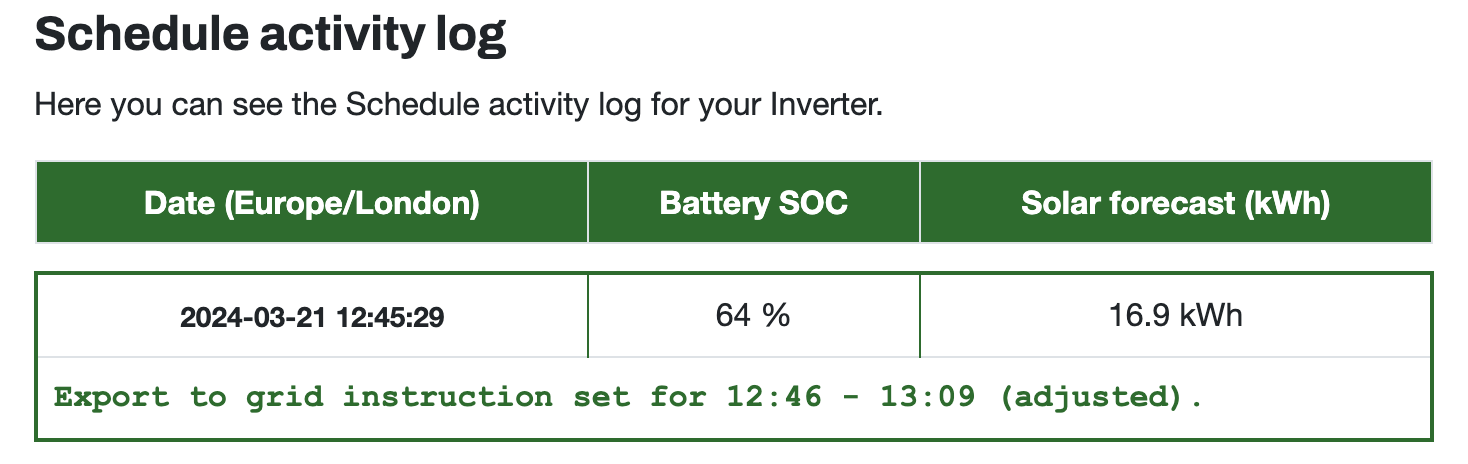
systemparadox We do cater for this, regardless of the window end time you set for your export, we calculate given your max discharge rate, SOC and SOC stop % how long it would take for your battery to reach this percentage.

We store that and internally use that to cut the export window short and reset back to Eco.

The '(adjusted)' suffix in the log indicates this has happened here and target stop SOC estimated to be reached at 13:09.

S
#12 systemparadox

Ok thanks for the replies, I was planning to connect my own control system to this at some point anyway so looks like I need to get on and do that.

#13 Wonder Watt

DD Wasn't that the whole idea behind the presets? At least I assume it was.

Multiple settings bundled into one preset - ideally executed as one atomic compound operation. Unfortunately, the presets endpoint has been incredibly flakey and far more likely to fail with Inverter Timeout messages.

D
#14 DD

Wonder Watt Hmm... I've never actually explored the presets. I was aware of them, but there didn't seem to be anything that I couldn't do via the the settings. And 'timed charge' correspond to a single setting anyway. (And since the "added value" of timed-discharge and timed-export is to mess with the eco flag, best avoided IMHO.)

'Reset to defaults', I suppose, is available only through that route.

They would become much more interesting if you could define your own presets, so that they became a bit like macros you could invoke with a single request. Even better if they were stored on the inverter itself, so that a single transaction really could make an atomic set of changes.