Idiot Guide - Battery Idle Stuck at x%

38 comments started 2024-03-25 last 2024-03-28
GivEnergy ProductsAC CoupledBattery
M
#1 M_J

Morning I thought it would be useful to set up a separate thread to help folk if they have this issue on steps they can do if they get a Battery Idle situation.

I had noticed yesterday that the battery was stuck at 85% and idle around 11am

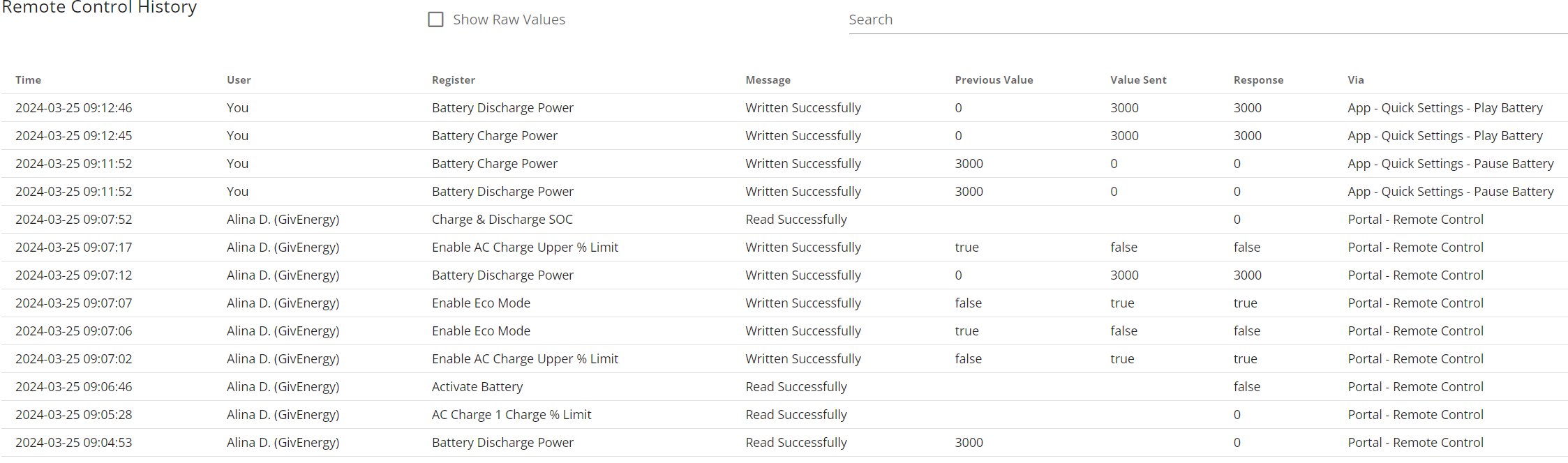
I phoned support this morning and these are the actions they took on my system according to the Log.

It now seems to be working OK and the tech suggested that I might have paused the system via the app. I don't think I did and I can see no command given yesterday in the log. I am still non the wiser as to why it got stuck....

But I did not think of trying the app - as I was using the web portal to try and kick it back into life. So one to try next time - but it should be no different than using the Web Portal commands...

It seems the command to set the Battery Discharge level to 3000 seemed to work - so maybe one to try next time - This is the first time this has happened in a couple of years. Battery stuck at Idle and not discharging.

D
#2 DD

Looks like battery discharge power had become set to 0. However, if I'm reading the log correctly, the portal thought it was 3000 ("previous value" from the oldest line in the log). AFAIK, the portal only sends changes to the inverter: if the portal thought it was already 3000, it won't let you send that (and a reset-to-defaults may not bother sending it). Support forced a read, which updated the portal from the inverter, which then allowed the portal to send the value it previously thought was already set to. Setting registers to random values before setting the value to what you actually want is another way to ensure that it actually sends an update to the inverter.

As you have found, the pause quick-setting works by setting charge and discharge power to 0. But if you had used that, the portal should have known that it was set to 0.

M
#3 M_J

OK DD so I think what you are saying is that if I wanted to do what they did this morning is to have changed the Battery Charge / Discharge Power to a random value and then change it back to 3000?

D
#4 DD

M_J Yes. That's not exactly what they did, but it would have had the same effect. (They used the button on the remote-control page to force the portal to read the value, but the net effect is the same: portal and inverter agree on what the live value is.)

One thing I'm not quite sure about is: when you use the app quick-setting to pause, it sets charge and discharge power to 0. But it needs to remember the previous values so that it can put them back when you unpause. I'm not sure if that's done in a hidden place on the portal, or in the app itself.
I wouldn't surprise me if it became confused if you use the quick-pause, but then modify one of the powers rather than unpausing.

R
#5 Rubikcube

M_J Thank you for posting these logs they are most helpful.

You have been confused twice in one day by seeing out of date information. First you wondered why energy was exporting when the battery showed 85%, but in fact the 85% was an out of date figure and the battery had reached 100%. Second you wondered why the battery wouldn't discharge when the discharge rate was showing 3000, but the 3000 figure was out of date and the actual figure was 0.

If you have an android device, you can download my app which shows the latest info direct from the inverter (or NO CONNECTION if there is a problem) so you less likely to be confused by out of date readings.

What actually happened to stop your inverter is classic data corruption, which I'll explain in the next message.

R
#6 Rubikcube

All commands sent to a givenergy inverter boil down to set register x to value y. Command corruption is when the command received (and actioned) by the inverter is not the command that was sent.

The most common corruption reported is the unscheduled calibration. This is often started by the command to turn eco on. Turn eco on is set register 27 to 1. Start calibration is set register 29 to 1.

In this case at 12:44:29 a command was sent to turn off charging. This equates to set register 96 to 0, but I believe this was received as set register 112 to 0. Register 112 is the discharge power.

Why would 96 get changed to 112? The answer lies in binary.
01100000 = 96
01110000 = 112

The more examples I see of this data corruption, the more I now think it is an issue of UART timing.

R
#7 Rubikcube

The final thing that interests me is Alina's actions. Alina identified and fixed the issue in under 3 minutes, which is excellent. However the log shows that Alina read "Activate Battery" (register 58?) and "Charge & Discharge SOC" (register 43). Neither of these registers can by altered by the end user, so have support staff seen examples of these registers being corrupted I wonder?

V
#8 Vestas

Rubikcube Do you (or anyone else) have any idea what the minimum timing between commands actually is?

I don't have empirical evidence, just subjective, but (using HA/GivTCP) I've started putting 10 second delays between automation writes and I seem to end up with less instances of the inverter going into "odd" modes which require a reset settings to default.

I'd imagine that G2/G3 inverters are more resilient given GE introduced CRC on comms last year?

M
#9 M_J

Rubikcube Hi just FYI the battery was at 85% and it had for some reason around 11am unrecorded it had set the charging value to 0 and hence set the battery to idle.

I had issued no commands on Sunday morning previous to this time so why the value got changed is a mystery.

All activities after 11am on Sunday were attempts to get the batteries discharging again until this was successful on Monday morning when I phoned support.

BTW thanks for the insights and explanations. Useful to know that the GivEnergy staff have access to registers we don't.

D
#11 DD

hoggy Hmm... from the activity log above, updates were being sent a lot faster than that ! And when I use the API, I don't have any delays - I don't know if the web adds any delay when it is forwarding them back to the inverter (I've not looked at timings).

V
#12 Vestas

hoggy 1000ms sounds very much like them just allowing for possible latency/out of order packets on the TCP/IP connection or is that figure for the modbus itself?

G
#13 geoffreycoan

Does anyone know if the GivTCP add-on to Home Assistant automatically includes a 1000ms or similar delay?

I have been putting delays in my HA scripts before critical commands but not before every command which are usually in a series. e.g.

  • set charge rate to 2600
  • set discharge rate to 0
  • cancel battery pause
  • set battery reserve to 100
  • set charge start time to 00:00:00
  • set charge end time to 23:00:00
  • delay 30 seconds
  • set force charge to Running

(Rough sequence of commands, not copied from any script)

And then there’d be a question of whether predbat needs such delays if GivTCP doesn’t do it automatically

V
#14 Vestas

geoffreycoan There seems to be a sleep function of 500ms in client.py called between read queries.

Quick scan over other files & I don't see anything obvious but that doesn't mean it isn't there 🙂

#15 hoggy

No delay that I'm specifically aware of built in (but it's a long time ago now!) - GivTCP & anything else that uses that library will basically be fired in machine gun format as opposed to "one hit" for the simple fact that it does not support Function 16 to write multiple registers at once.

  • func (1 byte) is the command to be executed:
    * 0x03 - read holding registers
    * 0x04 - read input registers
    * 0x06 - write single holding register
    * 0x10 - write multiple holding registers (not implemented by this library)*
V
#16 Vestas

hoggy The 1000ms delay can't be for the modbus then.

Must be for confirmation of the write command, so that'd probably explain the 500ms sleep called between client read queries.

I guess someone sensibly assumed that 500ms latency to write a command was entirely possible over the internet. 500ms to write, 500ms delay to check the write.

#17 PianSom

geoffreycoan Does anyone know if the GivTCP add-on to Home Assistant automatically includes a 1000ms or similar delay?

Not sure about a delay, but GivTCP does seem to have some level of error correction via retry. See eg this excerpt from my log last night.

G
#18 geoffreycoan

Vestas @hoggy

I do see in GivTCP that it does a read after write confirmation after about 1.5seconds and sometimes you see where commands have failed to be sent and are retried:

2024-03-26 12:20:24,551 - Inv1 - write       -  [INFO    ] - Setting battery charge rate to: 0 (0)
2024-03-26 12:20:28,334 - Inv1 - write       -  [INFO    ] - Setting battery charge rate 0 was a success
2024-03-26 12:20:34,474 - Inv2 - write       -  [INFO    ] - Setting Battery Mode to: Timed Export
2024-03-26 12:20:34,856 - Inv2 - write       -  [INFO    ] - Setting export mode failed: (<class 'AssertionError'>, AssertionError('Unexpected response from remote end: Modbus Error: [Input/Output] No Response received from the remote unit/Unable to decode response'), <traceback object at 0x7f6eb98447c0>)
2024-03-26 12:20:35,256 - Inv2 - write       -  [INFO    ] - Enabling Discharge failed: (<class 'AssertionError'>, AssertionError('Unexpected response from remote end: Modbus Error: [Input/Output] No Response received from the remote unit/Unable to decode response'), <traceback object at 0x7f6ebb4a97c0>)
2024-03-26 12:20:41,406 - Inv2 - write       -  [INFO    ] - Setting Battery Mode to: Timed Export
2024-03-26 12:20:45,710 - Inv2 - write       -  [INFO    ] - Setting export mode was a success
2024-03-26 12:20:47,513 - Inv2 - write       -  [INFO    ] - Enabling Discharge was a success
2024-03-26 12:20:53,494 - Inv2 - write       -  [INFO    ] - Setting battery reserve target to: 88
2024-03-26 12:20:55,027 - Inv2 - write       -  [INFO    ] - Setting shallow charge 88 was a success
2024-03-26 12:21:01,307 - Inv2 - write       -  [INFO    ] - Setting battery charge rate to: 0 (0)
2024-03-26 12:21:02,845 - Inv2 - write       -  [INFO    ] - Setting battery charge rate 0 was a success
2024-03-26 12:21:38,559 - Inv1 - write       -  [INFO    ] - Setting Discharge Slot 1 to: 12:00 - 12:31
2024-03-26 12:21:41,473 - Inv1 - write       -  [INFO    ] - Setting Discharge Slot 1 was a success
2024-03-26 12:21:47,588 - Inv2 - write       -  [INFO    ] - Setting Discharge Slot 1 to: 12:00 - 12:31
2024-03-26 12:21:50,373 - Inv2 - write       -  [INFO    ] - Setting Discharge Slot 1 was a success
2024-03-26 12:30:30,607 - Inv1 - write       -  [INFO    ] - Setting battery reserve target to: 84
2024-03-26 12:30:32,649 - Inv1 - write       -  [INFO    ] - Setting shallow charge 84 was a success
2024-03-26 12:30:38,900 - Inv2 - write       -  [INFO    ] - Setting battery reserve target to: 84
2024-03-26 12:30:39,421 - Inv2 - write       -  [INFO    ] - Setting shallow charge 84 failed: (<class 'AssertionError'>, AssertionError('Unexpected response from remote end: Modbus Error: [Input/Output] No Response received from the remote unit/Unable to decode response'), <traceback object at 0x7f6eb984c7c0>)

Sooo given that GivTCP does a read after write which will slow-down the machine gun command firing - which you can see in the logs, do we need to do anything else such as adding extra delays? Having looked at the GivTCP logfile I’m inclined to think not as its naturally delaying itself

V
#19 Vestas

geoffreycoan Probably not, and there must be a write delay too if its 1.5 seconds but I can't see it in the code - although my Python skills are non-existant 🙂

I reckon the errors/corruption are largely caused by a collision with another client's frames - portal or app (app most likely) and there's nothing much can be done about that. In theory if you're not using the app then the odds of a failure are probably in the range of 2-3%. Actually since you use predbat can you parse the log and see what the percentage chance is over 24 hours?

Sorry about partial derail of thread....again 🙁

Edit - also probably worth noting that (AFAIK) geoffreycoan @Rubikcube hoggy and I all have G1 inverters on D450-A451 firmware. That means the comms have no error-checking (CRC in this instance) built in. The odds of corruption of registers is therefore significantly higher than G2/G3 owners.

G
#20 geoffreycoan

(more off topic, sorry)

I agree it looks like GivTCP is handling the errors and buffering of commands enough anyway. Its not very often I see the inverters saying the wrong command and if they ever do its usually a home network comms issue.

Vestas Up until yesterday I was on D450-A451, but last night GivEnergy support upgraded both of my G1 inverters to D0.191-A0.193

I had seen a persistent issue over the last few weeks that when I did a force discharge of both inverters & batteries such as in a DFS session or Predbat maximising my export income, I would often see that the inverters failed to discharge at the same time. One inverter would reach 2.4kW the other would ramp up then ramp down and then idle. Didn’t seem any pattern to it, sometimes both would discharge at full whack but often I’d only get one discharging and the other stuck on idle.

The inverter firmware upgrade was to hopefully fix this. I don’t know what this does differently as the version is numbered quite differently and is not in the firmware release notes https://kb.givenergy.cloud/article.php?id=24&oid=23
Not needed to tick the ‘new firmware’ box on GivTCP
Bit early to tell what difference this has made. I saw two periods in the overnight charge where one inverter was charging at 2.4kW and the other at 1.8 despite both being set to max rate, but after an hour and a half of this they both started charging at 2.4kW (which is OK).

V
#21 Vestas

geoffreycoan if they ever do its usually a home network comms issue.

I'd be very surprised if that was the case.

Re your batteries - you have a G1 and a G2 of different capacities, f/w is probably a fix for something specific to that?

T
#22 TimHutchings

geoffreycoan I believe the new firmware for G1 inverters (if it ever goes on public release) is supposed to cure the quite large response times in reaction between solar, battery and grid , when one or other changes.
It may well do other things too, but I would be interested to know if you notice any difference now you've been upgraded, or any other benefits you may notice.
This G1 upgrade was supposed to happen in the middle of last year, but I'm beginning to think it may never be released now without a call to support to upgrade.

V
#23 Vestas

TimHutchings It won't be. You need the "right capacitor" for fast response and the build records aren't good enough to identify which ones do and don't have it.

T
#24 TimHutchings

Vestas I have a late model G1 installed in Nov '22 as G2s had become unavailable due to the Chinese lockdown. Very irritating as the G2 supply date kept getting pushed back, even though there had been some in the country since June but had run out.
Do you know what else the firmware was supposed to improve?

G
#26 geoffreycoan

TimHutchings I'll keep a note of my observations with this firmware version and post it on the forum - under the right topic! At the moment both are discharging, one at 2.88kW and the other at 2.65kW so it seems to be better for the specific issue I had

My inverter serial numbers are 2022 week 37 but were installed in Jan 23. Similar situation as Tim

R
#27 Rubikcube

Vestas what the minimum timing between commands actually is?

As hoggy said, the minimum recommended timing is 1 second, however I think you are wise to make a 10 second delay between commands. Firing commands rapidly at the dongle is likely to upset it.

The scheduler in my app only allows you to specify one command per minute (hence a maximum of 1,440 commands per day!). After the minute starts, the on screen display gets first go at getting readings, and if it fails there is no retry, it reports "No Connection" and will retry normally 10 seconds later. Then the history collection has 3 retries at getting data for the history graph. These are typically 1.5 seconds apart. If it fails the graph shows a blank for that minute. Then if there is a command scheduled for that minute, the command is sent and the result checked to effectively the same level as GivTCP. If it fails, it is retried every 6 seconds until the minute is up (so about 8 retries would be possible).

My app also uses a system of "Time Channels" to allow the app to run on up to 5 devices with no risk of conflict and minimise conflict with the GE app and GivTCP.

D
#28 DD

Rubikcube somewhat off topic, but I wonder if anyone has tried with multiple TCP connections, rather than doing everything onto one. Obviously the dongle then has to serialise them onto the modbus connection - depends how good it is at doing that.

R
#29 Rubikcube

DD tried with multiple TCP connections

At least you are trying to think outside the box. I doubt that would help, but if you have the coding skills you are welcome to try.

Thinking further outside the box, I see the dongle as the weak link. Essentially the dongle is a wifi to usb adapter. What if the dongle were removed and a HA box connected directly to the inverter with a usb cable? You would of course need software to replace GivTCP and drive the usb connection instead.

Developing GivUSB would be a difficult challenge, and I doubt many would be interested in using it, so I'm not going to waste my time, but it is open to anyone else to try.

#30 hoggy

Rubikcube been down that road and it requires the inverter firmware to be modified. It is however how the new CEMS boxes (not the first ones that got dished out) work. They go in via USB, removing the dongle from the equation.
I'm currently seeing if you can achieve the middle ground option of going in via the RS485 lines directly the same as the metering does.

#31 hoggy

Vestas / @TimHutchings off the top of my head so take with a pinch of salt:
The newer "faster" firmware is supposed to add things like:
Faster Reaction to loads,
Better PV tracking (there was a weird bug where one of the strings would sit idle until a reboot)
Pause Timeslot but not extra charge slots (I think?) as you can't set power to 0 like before.
Track/store energy from other sources*
CRC Checking on commands sent to inverter (this means you need to adjust GivTCP to cope with that change)

*by default the original G1 ignores any other generation source hence why they play relatively nicely in pairs/triple. Newer firmware means they can start doing odd things like cross charging that wasn't an issue before.

V
#32 Vestas

hoggy I see elsewhere that apparently all G1 inverters manufactured after week 10 2022 will be getting the f/w update. We'll see but @geoffreycoan will definitely want to keep an eye on things from what you've said.

#33 hoggy

Vestas I don't think you'll be forced onto it if >week 10 2022 but equally the temptation will be there for people to press it. I guess they are waiting to get all the AC3 ones done first in batches before they start this one.

All 3 of mine are old (none capacitor mod) so it won't be offered to any of mine anyway.

Can't remember if it also "hides" the battery OV alarms or if that's just a Gen 2 onwards. There's no release notes for this odd Gen1.5 middle ground.

V
#34 Vestas

hoggy I think I've got the overvoltage sorted now in HA - needs different limits/logic for the three charging scenarios. I daresay it'll need a bit of tweaking when there's more PV input but the principle seems to work.

PV tracking is better after I asked support to reduce the startup voltage to 120V (short strings) although still seems to track a bit low on voltage.

T
#35 TimHutchings

hoggy Thanks for the info on the new firmware for late G1s. Any ideas on when it might finally be released?

#36 hoggy

TimHutchings I think you can just ask support to load it already? (If your serial number is greater than the week 10 cut off)

M
#38 M_J

Thanks for posting the link I am considering a GivEnergy EV charger so good to know it is potentially ready for Octopus integration.





