Can’t stop GivEnergy battery from exporting to grid

39 comments started 2024-03-28 last 2024-04-14
GivEnergy ProductsBattery
7
#1 7Foretown

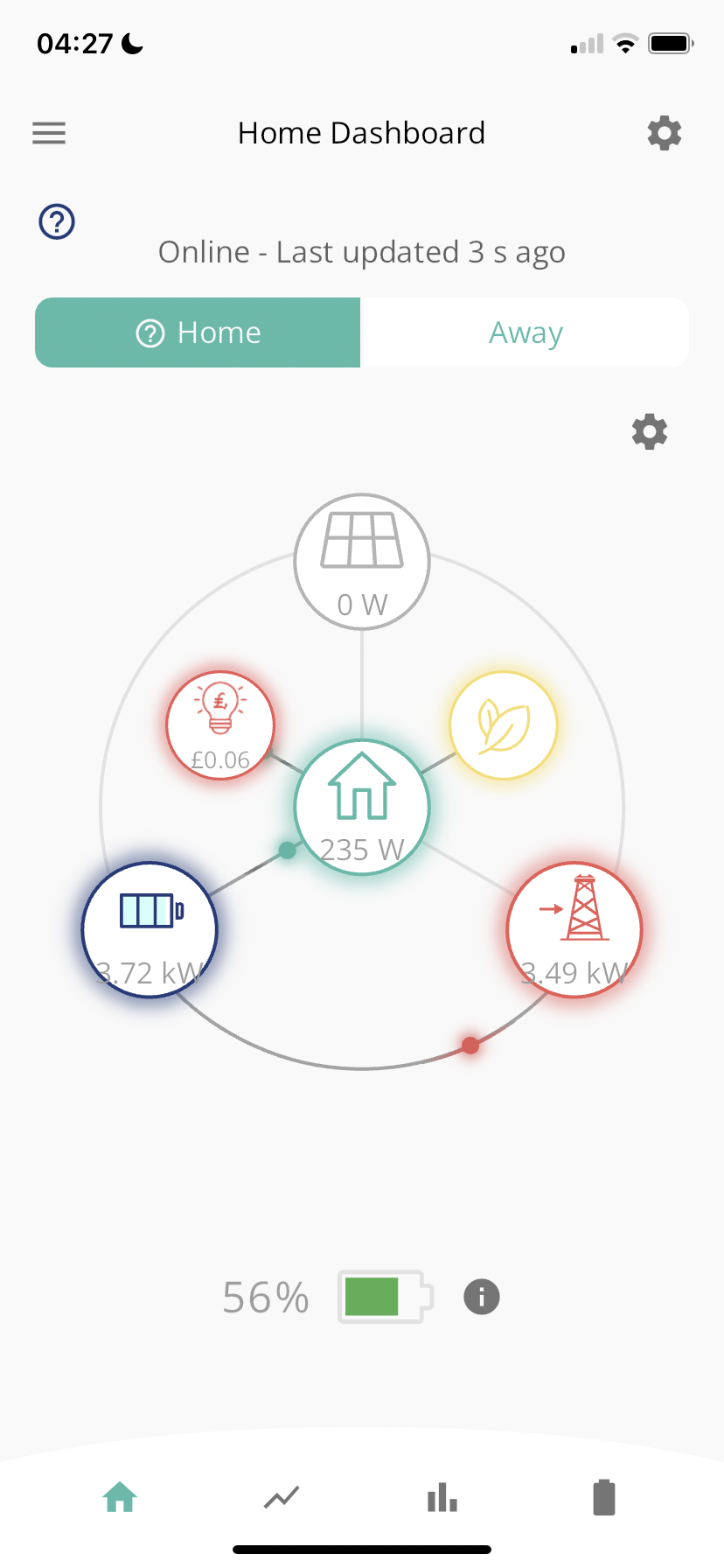
Very annoyingly my newly installed battery insists on exporting to the grid during morning and evening peaks. This results in the battery running low and then having to import from the grid during the peak times. I would much rather be keeping the power in the battery and using it in the home. I have tried adjusting the settings on the GivEnergy app but the battery still exports.

Any advice or reference to another thread would be appreciated. Thanks Clive

S
#2 SteveCook

7Foretown
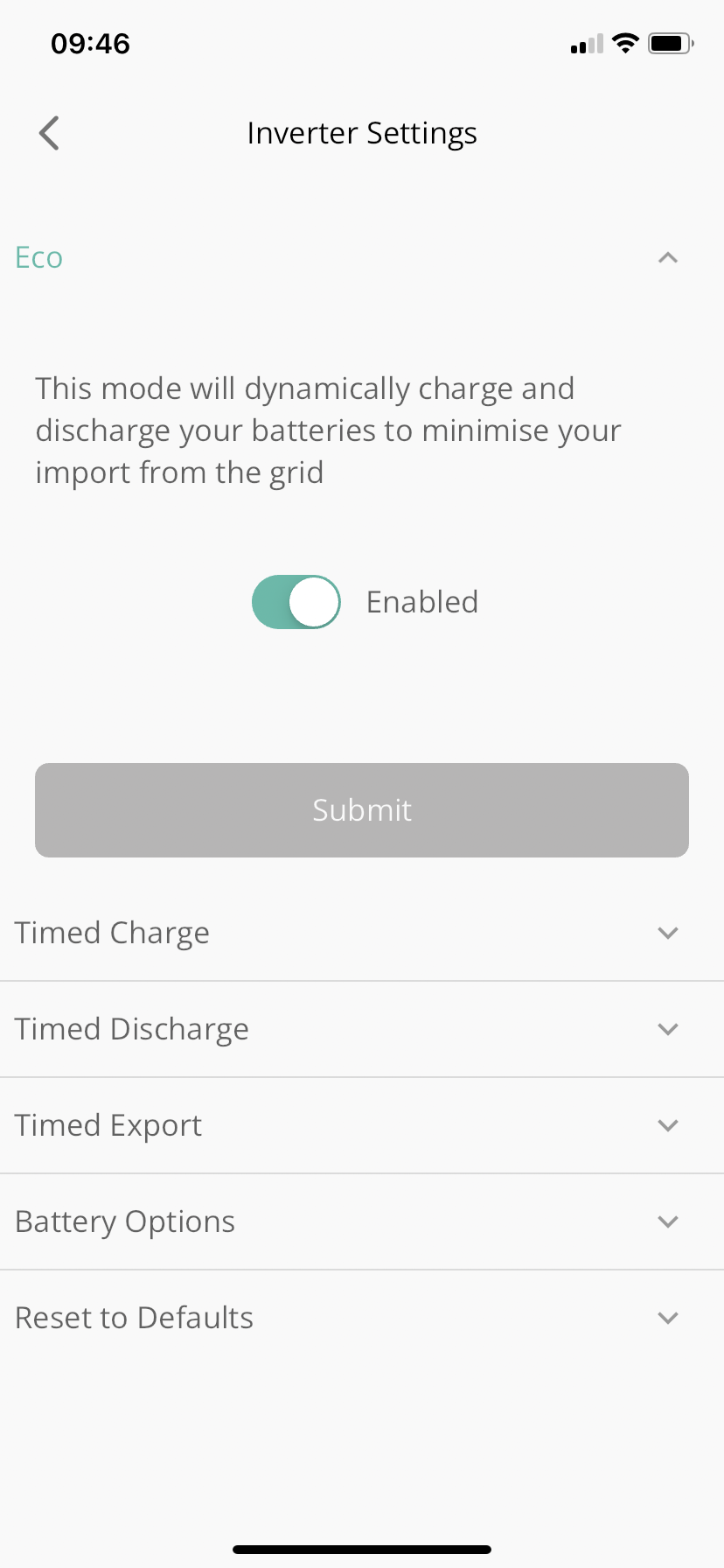
Set ECO in the portal and hit save and make sure it saves

D
#3 DD

7Foretown The default behaviour is to charge battery from solar, and discharge just enough to cover home demand (eco mode). If it's not behaving like this, you may well have set up some parameters incorrectly (or at least sub-optimally).
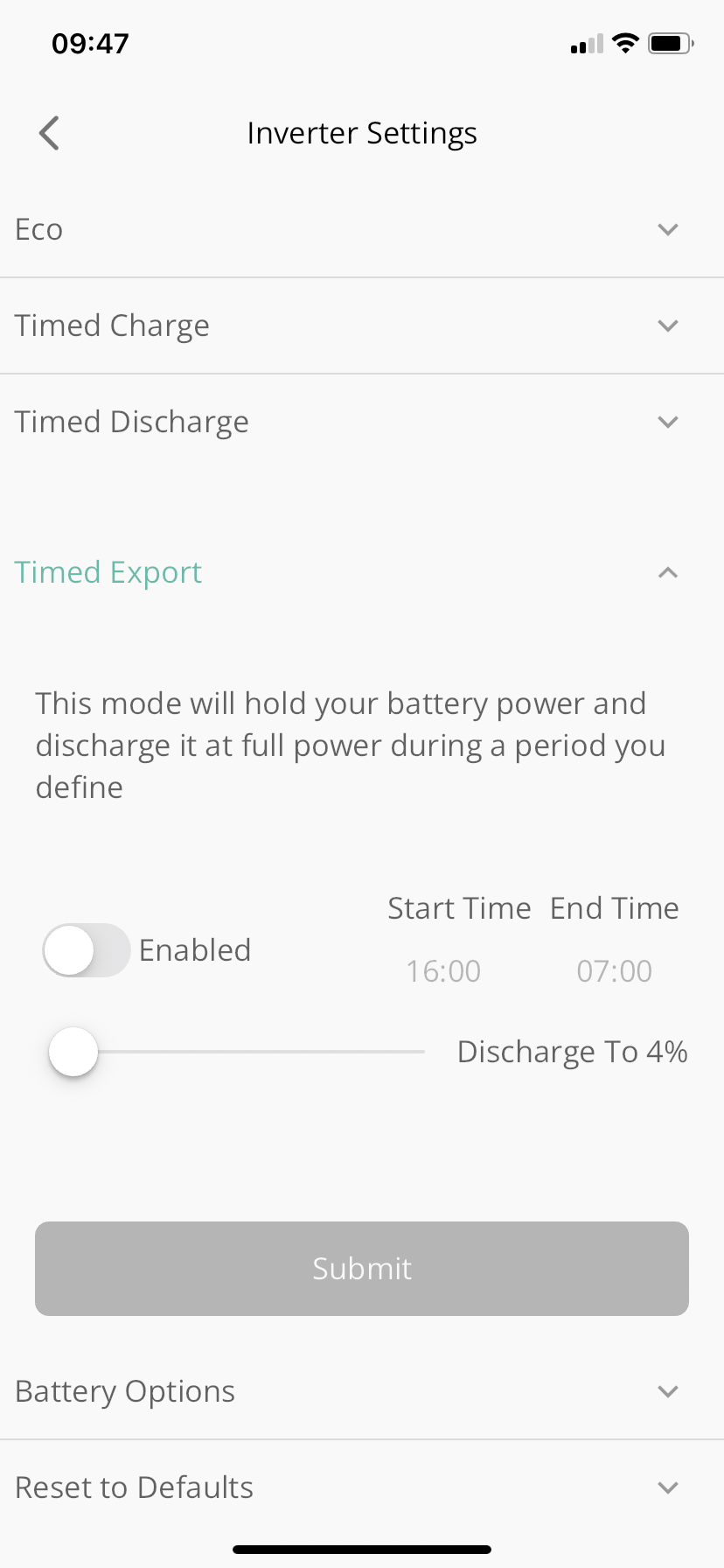
Have you configured a timed-export or timed-discharge ? (Terminology used on the portal : the app may use different terminology.)

7
#4 7Foretown

Thank you for your comments these are the settings on the app.

Z
#5 Zaz

It might just be me but I've found sometimes changing some settings either makes no difference or takes longer than my patience will wait for it to react. If all else fails I normally do a "reset to defaults" and that normally stops it.

G
#6 geoffreycoan

You could try ‘reset to defaults’, that can cure issues with the inverter being confused. Its also possible that you have additional charge/discharge slots configured - the app only shows slot 1 but there are up to 10 slots you can set in the portal, do check those as well.

If you could post screen shots of your battery activity from the givenergy portal over a day it would help, like to see how much solar is being generated, the state of charge (soc) of the battery and the house load.

Its possible your CT clamp has been fitted the wrong way round https://community.givenergy.cloud/d/4232-solar-not-charging-batteries/11 but should try to eliminate other issues first.

7
#7 7Foretown

Thank you. I’ll try the reset as I have messed with the settings a lot. I’ll get back to you with a screen shot of the graph.

G
#8 geoffreycoan

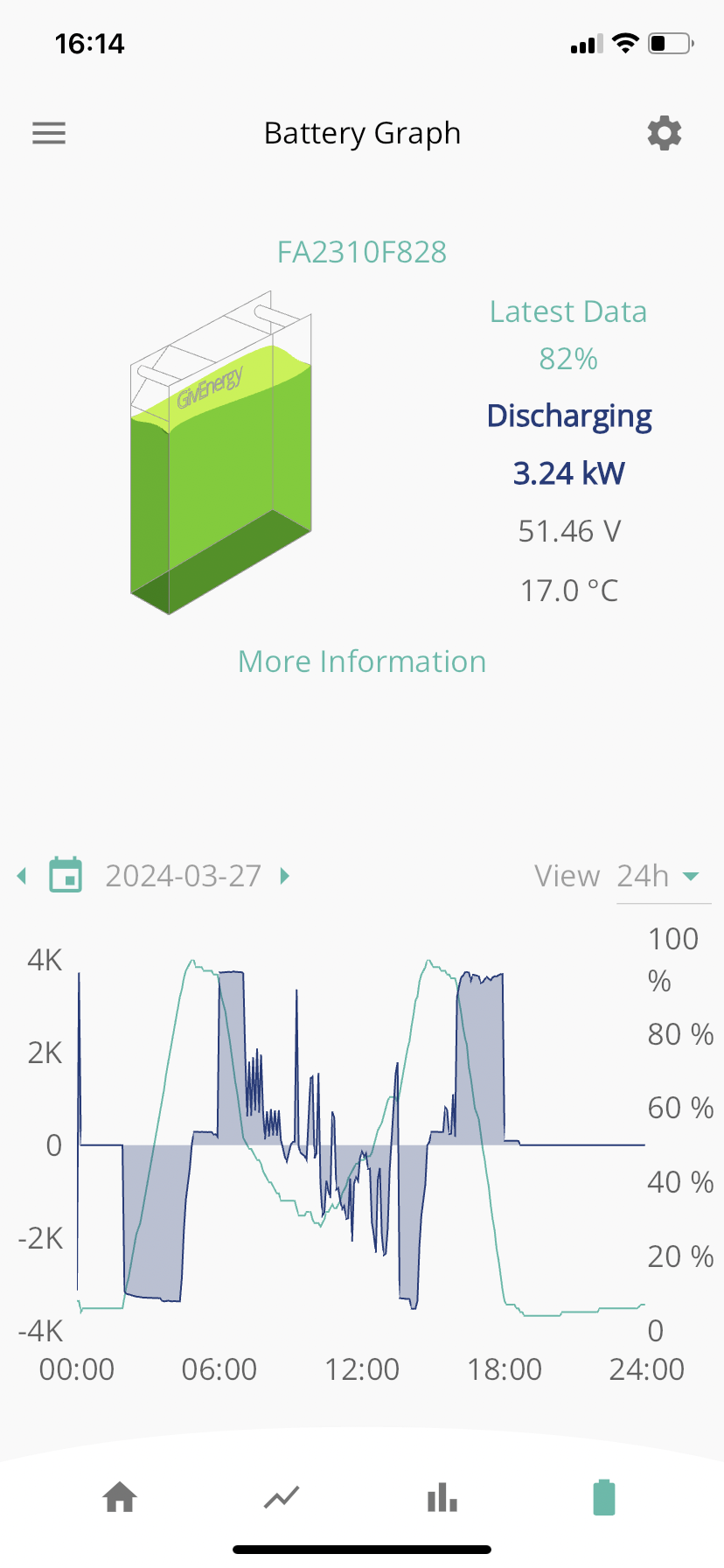
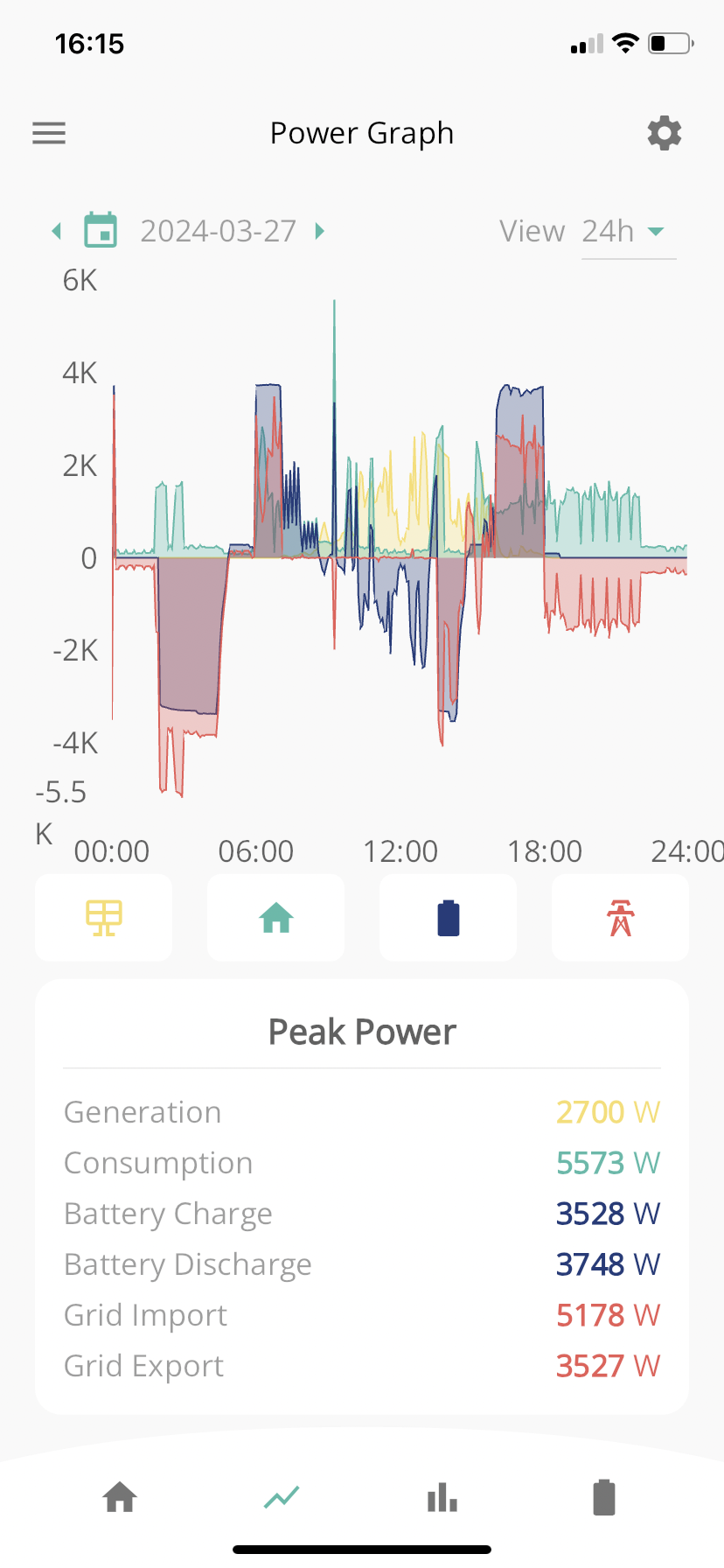
7Foretown This looks from the graphs very much like you have described it:

  1. There is a forced battery charge overnight : the power graph shows blue (battery charge) and red (grid import) both below the line 01:00-05:00 and the battery level rises to 100%
  2. There’s home consumption in the morning that discharges the battery : power graph shows blue (battery discharge) and green (home consumption) above the line 06:00-11:00 and the battery level drops
  3. Battery level then rises in the afternoon with solar charging : yellow lines on the power graph
  4. Then there is a big discharge and export in the evening around 18:00

So something is controlling these charges and discharges. You’ve shown there’s no charge or discharge set in slot 1 in the app, the other sources could be:
a. Some of the other charging/discharging slots that are changeable only in the portal are set
b. You’ve set a ‘smart tarriff automation’ in the portal that is controlling your charging or discharging
c. You’re using something like Octopus Intelligent Flux to manage your battery

Assume you don’t have an EV that is in here as well. That might cause your battery to discharge but wouldn’t create the charging

D
#9 DD

7Foretown that does look like two configured ac-charging slots and two configured timed-discharge slots. The additional slots are only available via the remote-control part of the portal (or the API), so you'd need to look there to clear them (or the reset-to-defaults should do it). Are you on Cosy tariff? That would be a good reason for two charging slots. Is the rather jagged consumption pattern a sign of a heat-pump (or am I over-analysing as usual)?

The description of timed-discharge is very poor, misleading people into thinking they need to actually tell the battery to discharge to meet house demand.

T
#10 The_Engineer

Also just check that your CT [current transformer] clamps are fitted in the correct place and the correct way round.

D
#11 DD

The_Engineer Is there something in the graph indicating that problem ? The direction of the grid activity seems consistent with the consumption and solar activity.

(Only slightly odd thing is that, on the first export period, the top is flat, as you'd expect from discharging at fixed power, whereas the second one in the afternoon, it's a bit bumpy. But that might be sampling errors given the spiky consumption.)

7
#12 7Foretown

Well thanks for your contribution to this situation and your analysis. So let me add some context. We have an air source heat pump providing heating and hot water and that kicks in in the morning and again from 3pm. I also have the Octopus Agile tariff which makes the evening exporting even more annoying, as once the battery is discharged we have to buy grid power at premium rates. There is no electric vehicle.

7
#13 7Foretown

Forgot to say the forced battery charge during the night is a deliberate action to charge the battery when the Agile rates are at their lowest and the battery is fully charged for the morning peak. This part of the system is working very well. Although I think again there are indications that it is also exporting which is not required. The only time I want to export to the grid is when the battery is full and there is surplus solar generation.

D
#14 DD

7Foretown in your second post you showed that eco mode was on and timed export was off. Have you also checked timed discharge ?

Or on the remote control page (gears icon), can you locate the setting for 'enable DC discharge' ?

7
#15 7Foretown

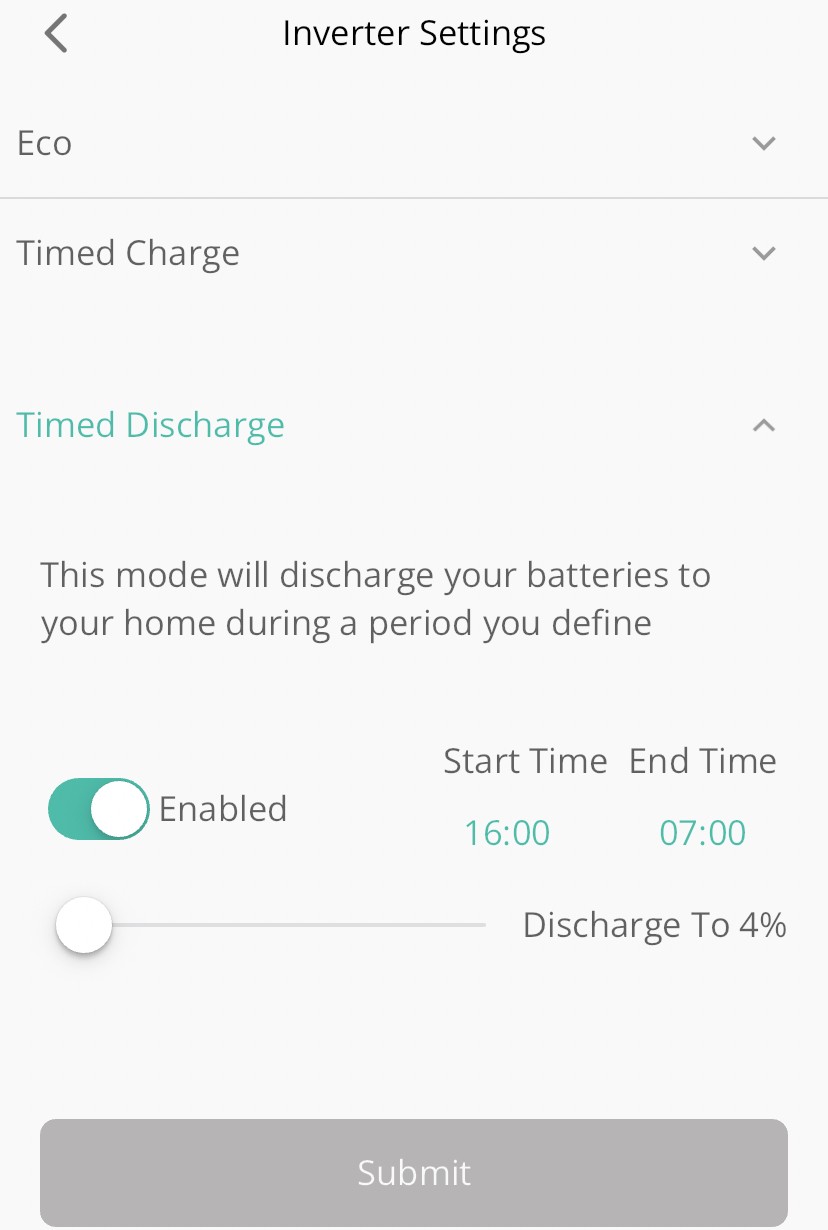
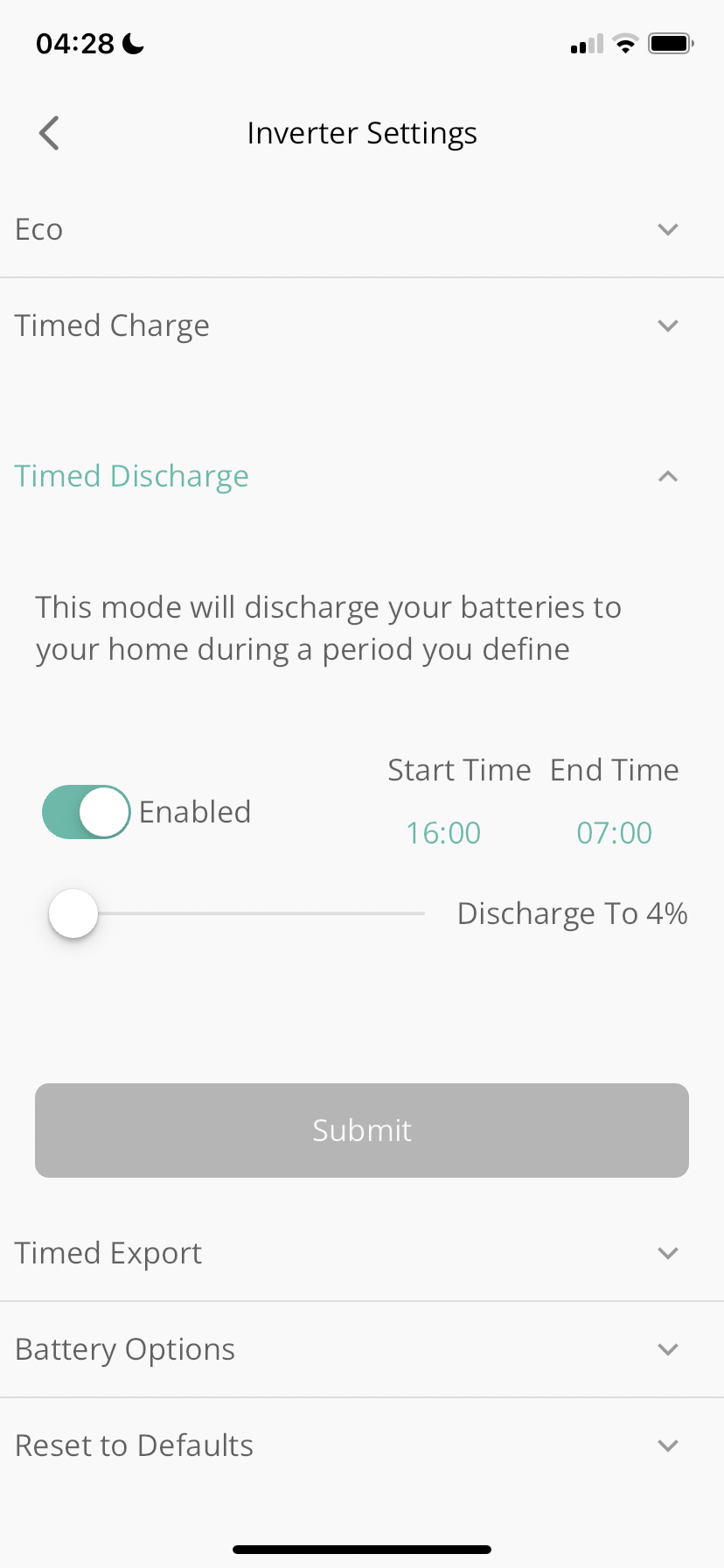
Hi DD. I have had timed discharge enabled as it clearly says this is discharge to the home. I attached the screenshot below.

Yesterday I did a reset and have just left the inverter on Eco, but it has automatically enabled timed discharge and a timed early hours charge which is what I want as long as it doesn’t export.

D
#16 DD

7Foretown yeah... Turn that off. The documentation is just completely wrong. Eco mode is all you need.

7
#17 7Foretown

It’s 16:45 and the system is exporting to the grid. So I have just turned off the timed discharge. See if that stops the export.

7
#18 7Foretown

Can’t believe it, the export has immediately stopped. That is soo poor that the explanation of timed discharge is so miss-leading. I’ll keep an eye on this over the Easter weekend but thank you all for your help.

D
#19 DD

7Foretown I think maybe the description is correct for 1st gen? But they really need to fix the docs.

D
#20 DD

7Foretown oh... Sorry, just remembered - turning off timed discharge may turn off eco
Make sure that is on. Otherwise battery will not discharge at all.

7
#21 7Foretown

Hello guys, it’s been a couple of weeks now and your suggestions have helped me gain control of my system, stopping it from exporting during the evening peak and enabling the battery to supply the home with enough ppwer through the evening peak.

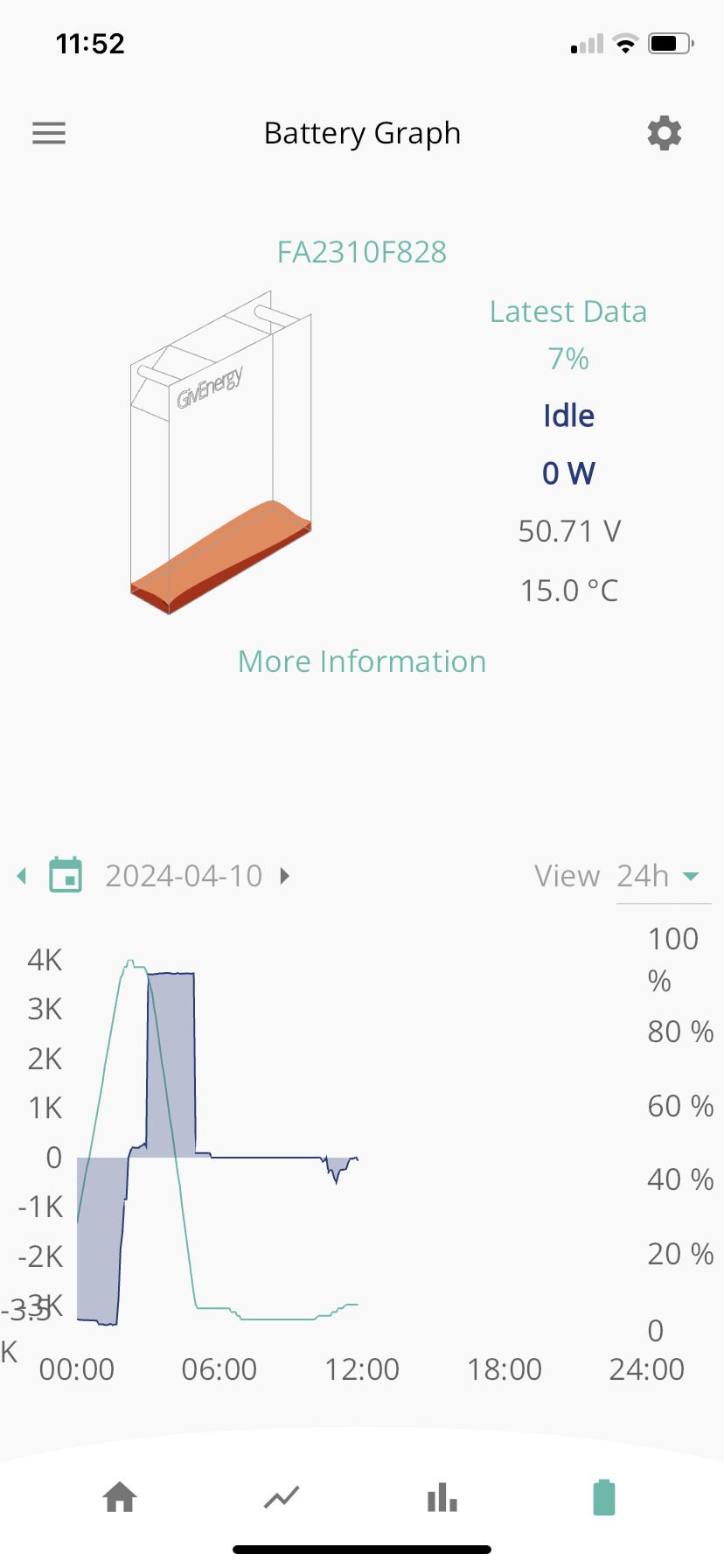
However, I have the same thing happening during the early hours of the morning as can be seen from the attached screenshot. Something is causing the settings on my app to change as I have checked the app during the through night and found the system exporting either because Eco has got switched off or Timed discharge has been enabled, so I have been able to stop the export. Last night however I didn’t wake up during the night and woke up in the morning to a flat battery. It seems very bizarre that the battery charged to 100% and then within a short period exported to the grid until the battery was flat.

Any ideas as to why the settings could be changing without my involvement?

G
#22 geoffreycoan

Suggest in the first instance you have a look through the portal settings, whether you set a timed discharge in the early morning for instance? The portal allows newer inverters to have up to 10 charge and discharge slots but the app only shows the first one.

Other thing to look at it is whether you configured a ‘smart tariff’ in the portal that could be automating your battery activity

7
#23 7Foretown

Thank you Geoffrey, I definitely hadn’t set a timed discharge. To me it makes no sense to immediately export everything from the battery back to the grid.

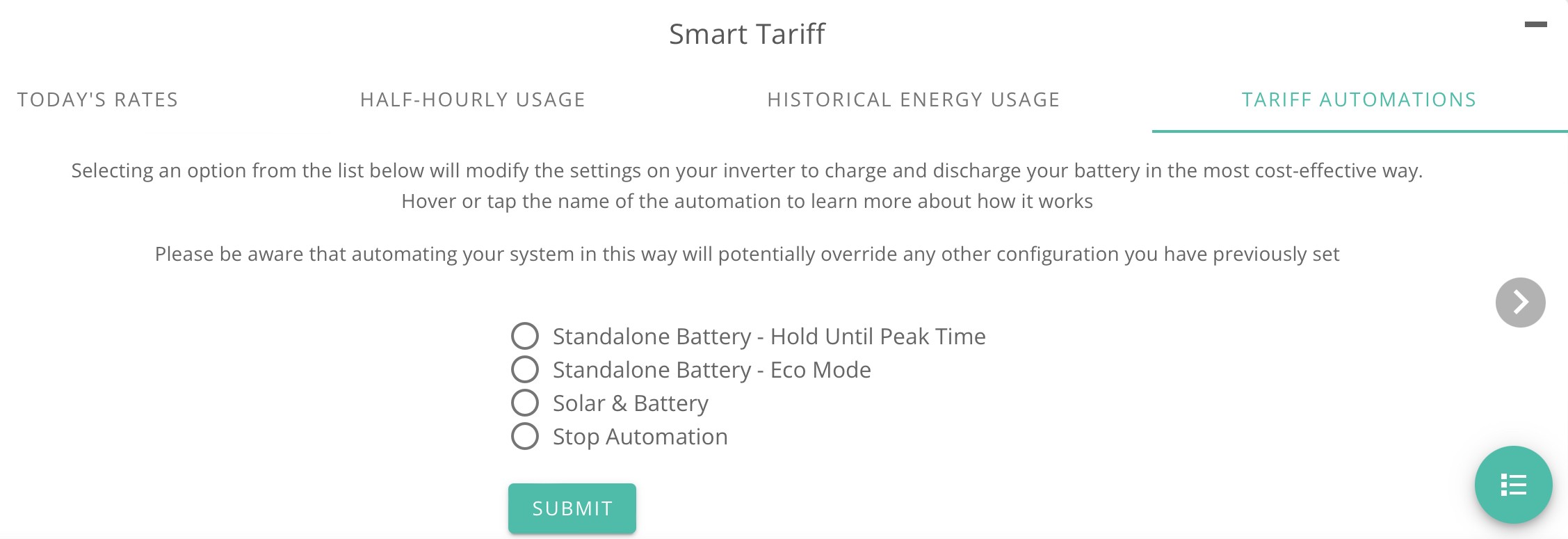
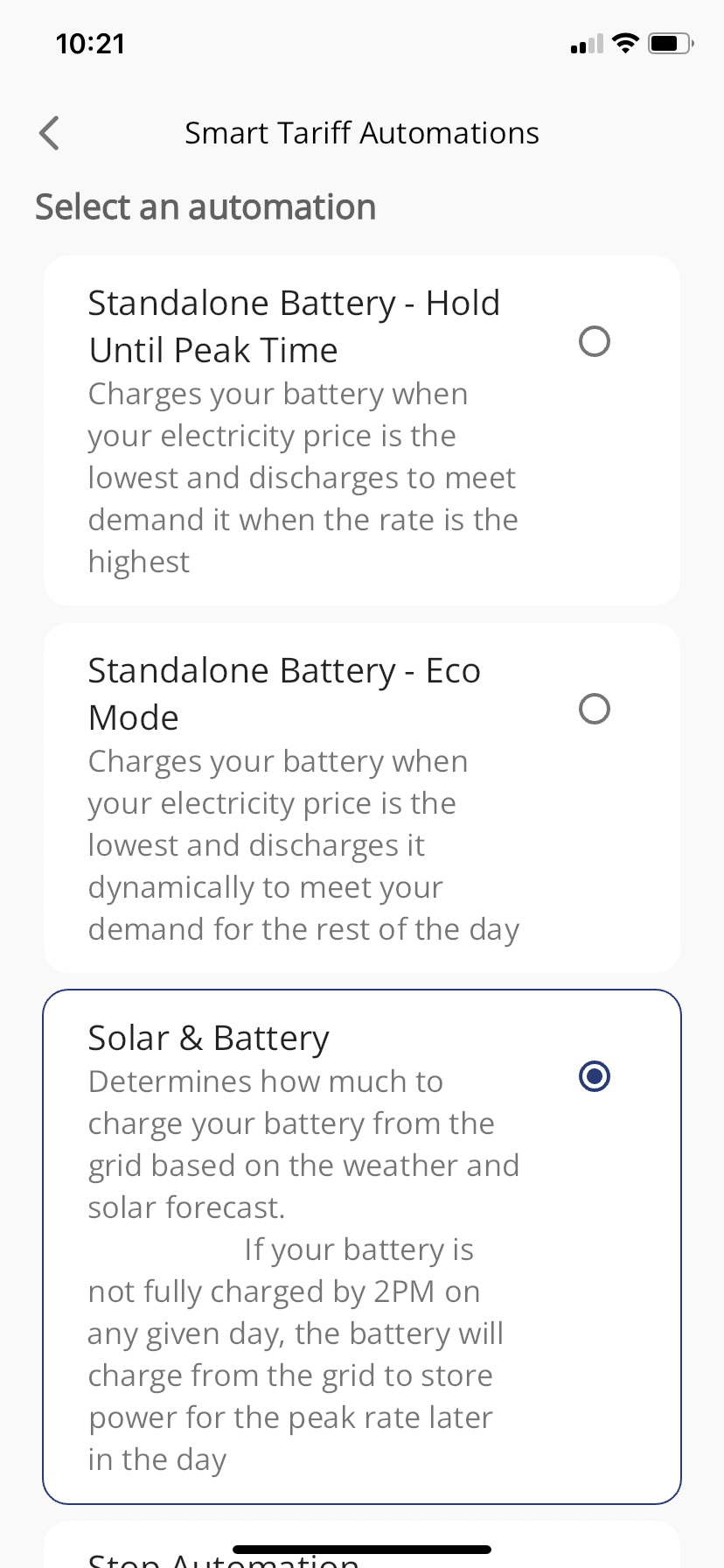
Also I have selected the “solar and battery” smart tariff option in the GivEnergy app.

I’m getting impression that the portal is different from the app so how do I access the portal for my battery?

Thanks for your interest.

Clive

D
#24 DD

Something I've wondered on and off for a while... it would be very useful if there was a simple way where people could publish a summary of their settings. But I've never come with a way that's terribly convenient, since it requires that either they run a script locally which uses either modbus or api to collect the data, or they have to make a key available to a third party to allow them to collect the settings.

@Rubikcube perhaps there would be a simple way your app could add a feature to collect the holding registers (excluding any sensitive info) and write them out somewhere ? Obviously that only covers Android users, but it's somewhere to start. Or the bbc-basic application I often hear about, which can run on multiple platforms.

G
#25 geoffreycoan

7Foretown Also I have selected the “solar and battery” smart tariff option in the GivEnergy app.

If in the GE app you go menu, Smart Tariff does it show anything in the ‘Automations’ line ?

This might be the issue …

D
#26 DD

7Foretown Also I have selected the “solar and battery” smart tariff option in the GivEnergy app.

Hmm...

Have a look in the activity log - I assume any changes it makes to your inverter through the API will show up in there. On the web dashboard https://givenergy.cloud/ , choose 'inverter' and then in the top right there's a gears icon which takes you to the remote-control page. At the bottom of that, there's a Remote Control History.

#27 hoggy

DD Would be nice to give an easy way to dump actual live settings for users to post/attach here.
I guess you could write a simple API script to grab the settings list then iterate through it? Not massively convenient.
The cli thing I've been building up would work but requires the complete faff of installing python which on the average windows box is a lot of effort.

R
#28 Rubikcube

DD I think there are 180 registers on the older (gen1) kit and 360 on the newer stuff. Displaying everything that might be needed on a screen of limited (and unknown) size is usually solved by allowing the screen to scroll. Unfortunately scrolling and screenshots don't really mix.

D
#29 DD

Rubikcube Hmm... in my world, you just redirect the output to a file, and then upload that. Or even just copy/paste it. (ISTR that even in windows, you can copy/paste more than a screenful of text.)

I find screenshots a very odd way to communicate text...

7
#30 7Foretown

geoffreycoan

I found the automation page, you were asking about the screenshot follows:-

7
#31 7Foretown

So last night caught it exporting after it had fully charged as per my timed charge setting.
Got up at 4:30 and found it exporting. First screen shot.

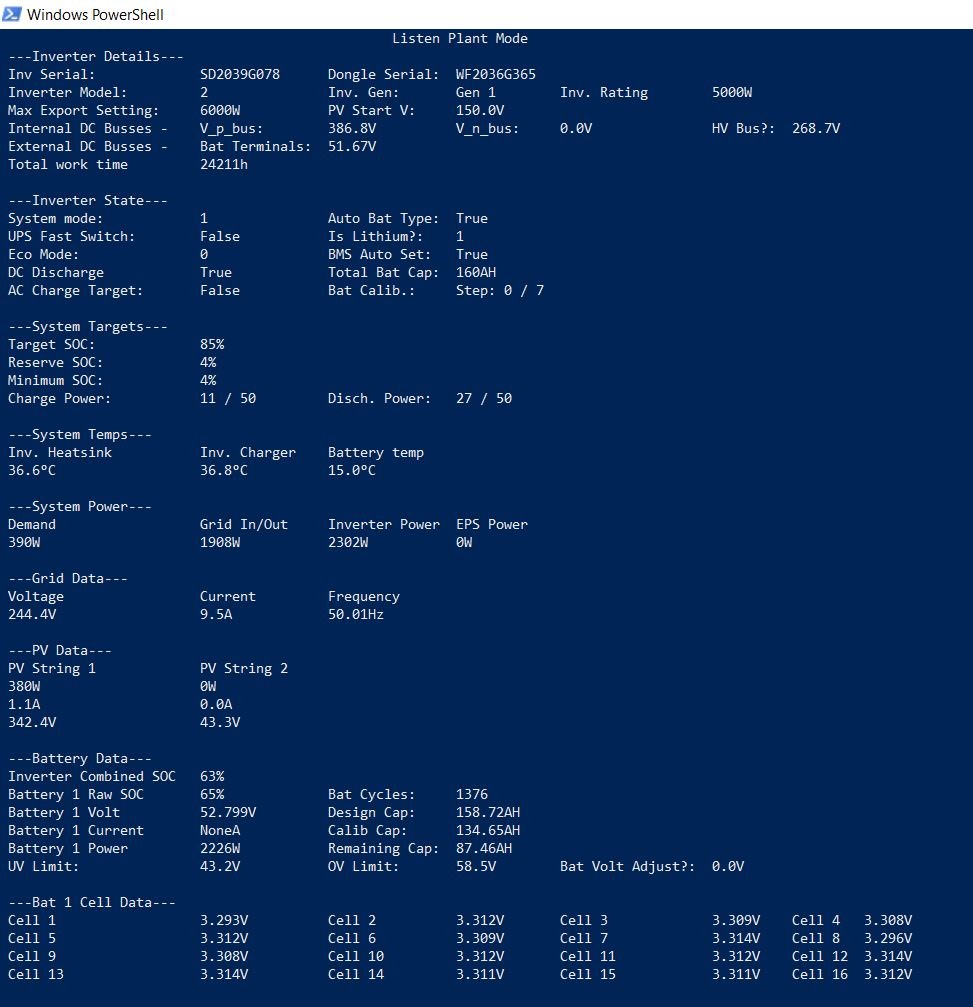
Checked settings and found timed discharge enabled. 2nd screenshot.

I did not enable this! So I disabled timed discharge and the exporting stopped. So reset timed charge to top up battery.

My theory is that once the battery is fully charged, could the system automatically enable the timed discharge? Once enabled, the time discharge period was set from 4pm to 7am, therefore discharging through night was allowed.

So tonight, although timed discharge will be disabled, I will make sure the period is set at 4pm to 8pm therefore when the battery is fully charged if this does trip and enable the time discharged it shouldn’t discharge in the night due to the time period set.

V
#32 Vestas

You either use the built-in portal automation and DON'T change any settings manually OR you turn off the built-in portal automation and change settings manually/use something like GivTCP/HA.

You DON'T mix and match because you end up with nonsense results - like you're getting now.

D
#33 DD

7Foretown I can't remember if you ever said which tariff you are on. Is it Flux ?

Unfortunately, it turns out that timed-discharge behaves very differently on gen-1 systems and newer systems. Did you follow the discussion on
https://community.givenergy.cloud/d/4284-confused-about-export
Your system clearly behaves like mine, and 'timed discharge' is just a better 'timed export'. But on older systems, configuring a timed discharge like this actually serves to inhibit solar charging during the time window. (ie from 16:00). [If I correctly remember the takeaway - I'll need to check.] This would make sense if you are on flux, since exporting is preferable to charging the battery.

Unfortunately, on your system, this has the effect of exporting to grid if an opportunity presents itself before 7am. Which is exactly what happened - your AC charging (which takes precendence) finished around 3am or something, and that immediately allowed the timed discharge to happen.

If it was me, I'd turn off that smart tariff stuff immediately... But then I'm much happier controlling my system myself, using API calls (and I'm currently working on some modbus-based monitoring...). And solar forecasting (the tricky part) is not currently something I need to worry about.

G
#34 geoffreycoan

I agree, turn off the automation in the portal, set the inverter to Eco mode and then add whatever charges or discharges you want. You are getting conflicting behaviour from the portal managing discharges for you - presumably it is discharging ahead of a good solar day.

7
#35 7Foretown

DD

Hi DD,

My system was installed in January this year and I am on Octopus Agile.

Okay so I get the message not to mix manual settings with an automation.

Thank you.

D
#36 DD

7Foretown Might be worth a look at wonderwatt.com - currently a free service, and they can control your inverter remotely to make good use of Agile. They probably do a much better job of it than GivEnergy. And much more likely to respond to questions/problems - you can speak to them on here, as user wonderwatt.

(I've never used it myself, but quite a few people on here report success with it.)

7
#37 7Foretown

DD thank you DD.

7
#38 7Foretown

Vestas so I am trying the automation only first. Just using Solar + battery. All the manual settings are off. What do you suggest I do about the ECO setting on or off?

G
#39 geoffreycoan

7Foretown General advice is to leave Eco on, charge in solar generation and give the demand out to the house.

The only potential downside to this is if your battery isn’t enough to see you through the afternoon/evening peak rate period, e.g. battery is fully discharged by 6pm leaving you on peak grid imports. In which case you are starting to get into manual scheduling to hold the charge to say 5pm.
But simplest is to leave Eco on