Tuning Solcast to make it more accurate

11 comments started 2024-03-31 last 2024-04-01
Home AutomationHome Assistant
#1 PianSom

At around the start of the month I noticed that my Solcast forecasts were being too optimistic. I "tuned" the forecast by reducing the efficiency that Solcast assumes (even though I have new PVs, which should still be highly efficient).

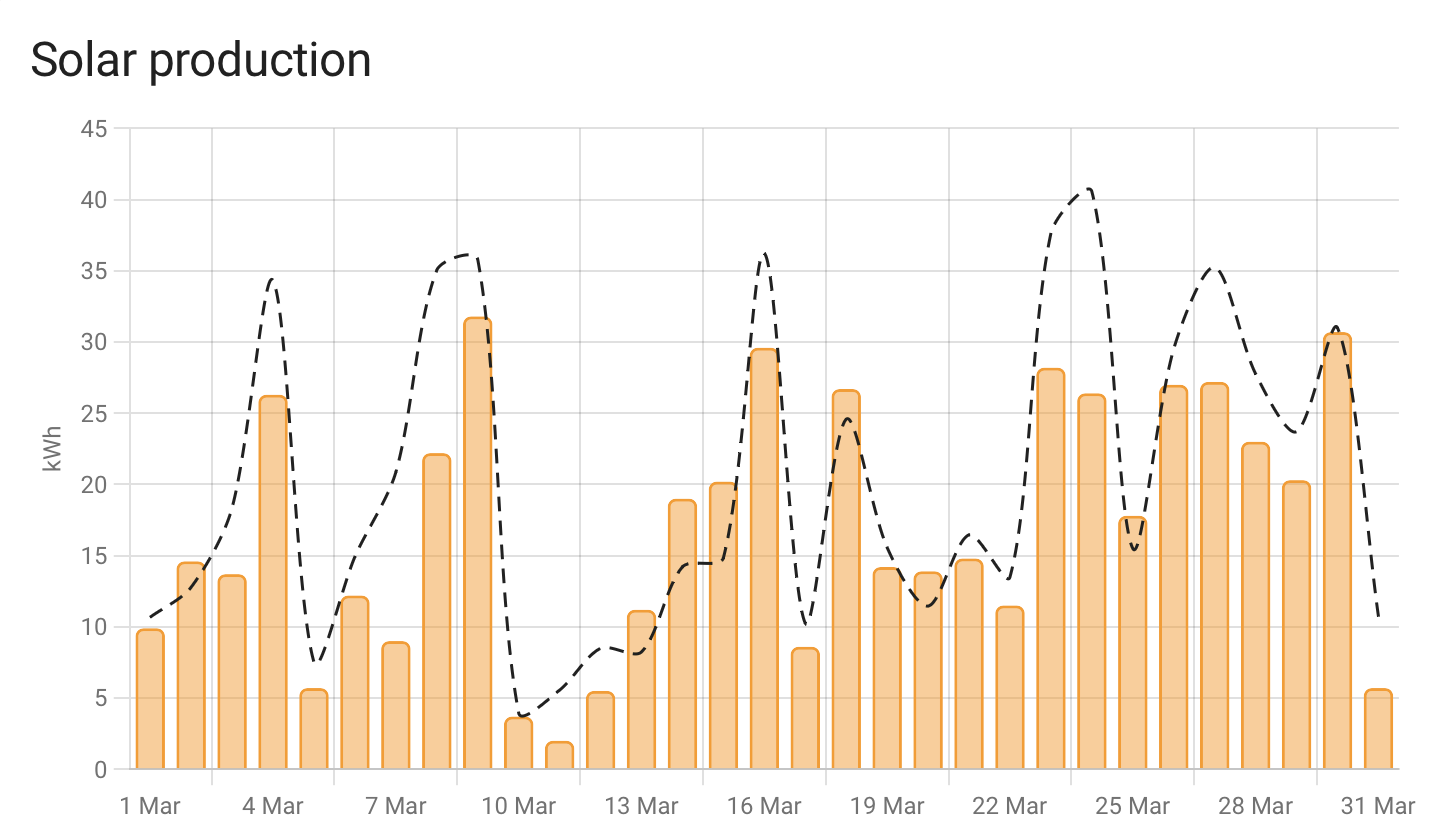
Below is the HA chart from the Energy dashboard showing a comparison between forecast and achieved in March - still looks pretty optimistic. I am interested to hear how this level of accuracy compares to other users. Is mine reasonable?

D
#2 DD

I have an entire directory full of daily solcast forecasts (in addition to data from api.forecast.solar and weather data from api.open-meteo.com) from when I had my system installed, waiting for me to actually go back and do some analysis.

solcast provides 3 datapoints: 10%, 50% and 90% confidence. I assume givenergy uses the 50% one ?
One of the tools (maybe predbat, maybe the palm one) found that a mixture of 10% and 50% gave the best results. (Which seems to confirm that the 50% one is on the optimistic side.)

S
#3 SJB

I too have found default Solcast forecast to be rather inaccurate - sometimes too high or too low by 10-15kWh. However, it can never be accurate - you just have to choose the forecast the gives you the accuracy to fits you needs.
There are three forecasts available:
Rooftop PV Power Output. PV power output from the Rooftop PV Model. Output is in terms of inverter (AC) output
Rooftop PV Power Output - 10th. PV power output from the Rooftop PV Model, based on 10th percentile clearness. Output is in terms of the inverter (AC) output, in the 10th percentile scenario of clearness (i.e. more cloudy than expected).
Rooftop PV Power Output - 90th. PV power output from the Rooftop PV Model, based on 90th percentile clearness. Output is in terms of the inverter (AC) output, in the 90th percentile scenario of clearness (i.e. less cloudy than expected).

You also have to consider at what time you got the forecast - to far in advance and the accuracy will suffer.
If the weather changeable it cannot be accurate.

In the winter I take the 10th forecast at the beginning of the day to use to drive any charge/discharge - I've found that to almost always be below the generated PV.

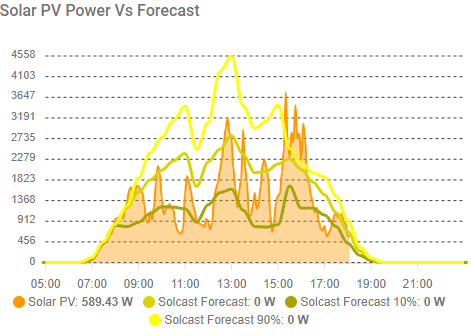
This is my forecast and generation for today:

The pessimist forecast was 9.6kWh, the expected forecast 20.7kWh and the actual generation so far is 15kWh.

As DD says Predbat will allows some blending of the forecasts to achieve better results.

#4 PianSom

Thanks for the feedback, both

I guess what I would mean by a good forecast is one which is too high and too low with roughly the same frequency and with roughly the same standard error in both directions.

I was aware that Solcast delivers three outputs. My working assumption (which I should really check) is that HA picks up the 50% forecast. I had also assumed that HA records the last daily forecast, rather than anything far in advance. Hence using that as my benchmark against delivered generation.

And yes, I know that Predbat does allow you to put a weighting on the 10% forecast. But the Predbat docs also say "Have you tuned Solcast to match your output accurately?". I had imagined that that meant adjusting Solcast as described, since the firm recommendation elsewhere in the docs is to leave the 10% forecast weighting at 0.15.

Perhaps I have been over-thinking this, and there is already good evidence that using the Predbat recommended weightings has proven to give a reasonable forecast in most circumstances??


G
#5 geoffreycoan

Here’s some graphs from my HA.

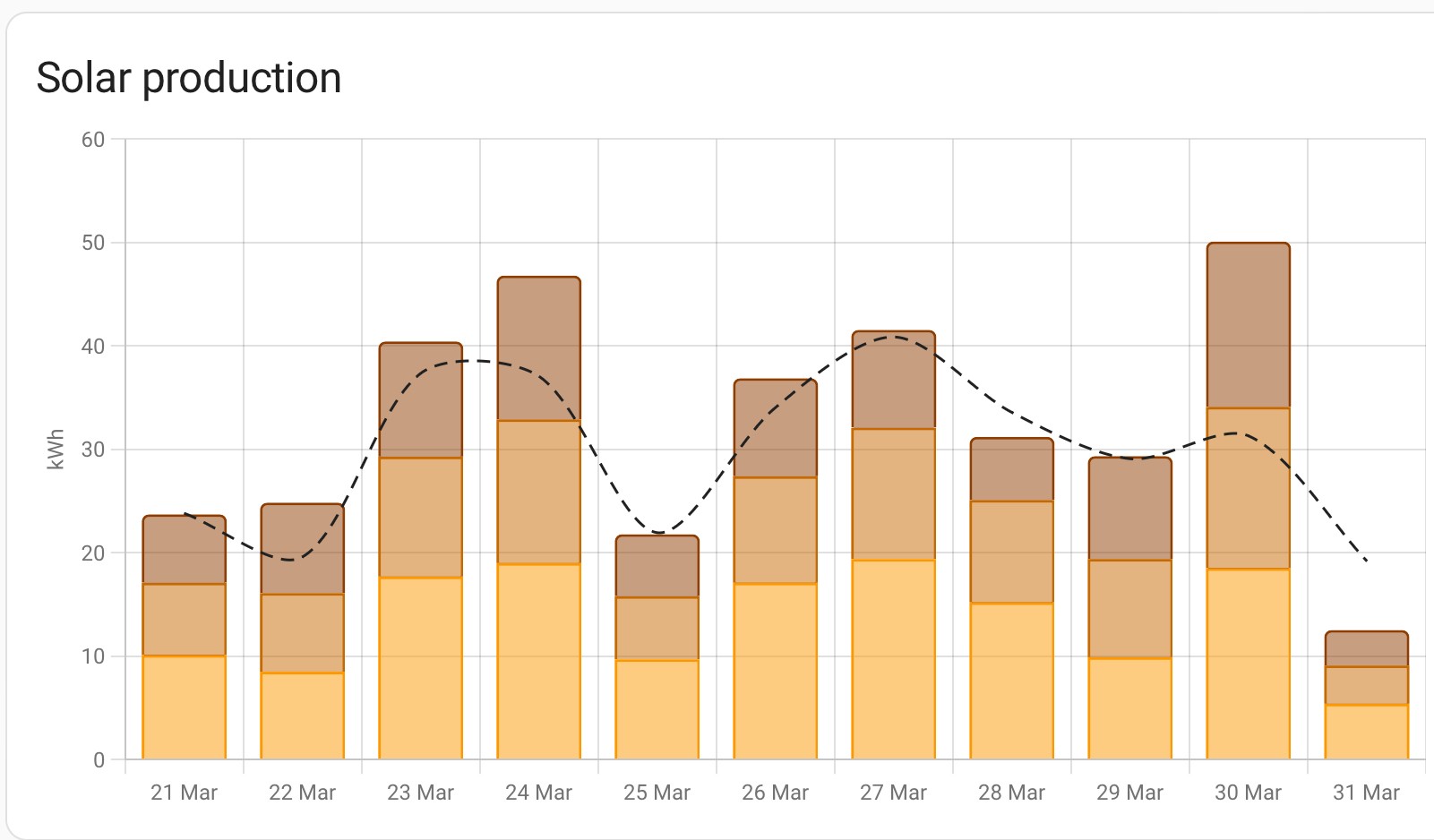
Energy dashboard. I have three arrays, 2x GivEnergy and 1x Growatt FIT. My Solcast forecast deliberately doesn’t include the Growatt FIT as that AC inverter doesn’t have any batteries attached (my GE’s are hybrid inverters).
Maybe in hindsight I should have had AC-coupled battery storage from GivEnergy but multiple AC’s definitely don’t play nicely together in a plant config.

Anyway, point to make is that the dark yellow solar generation is not in my Solcast forecast and if you ignore that, the solcast estimate in the Energy dashboard is over-estimated on every day apart from the 30th

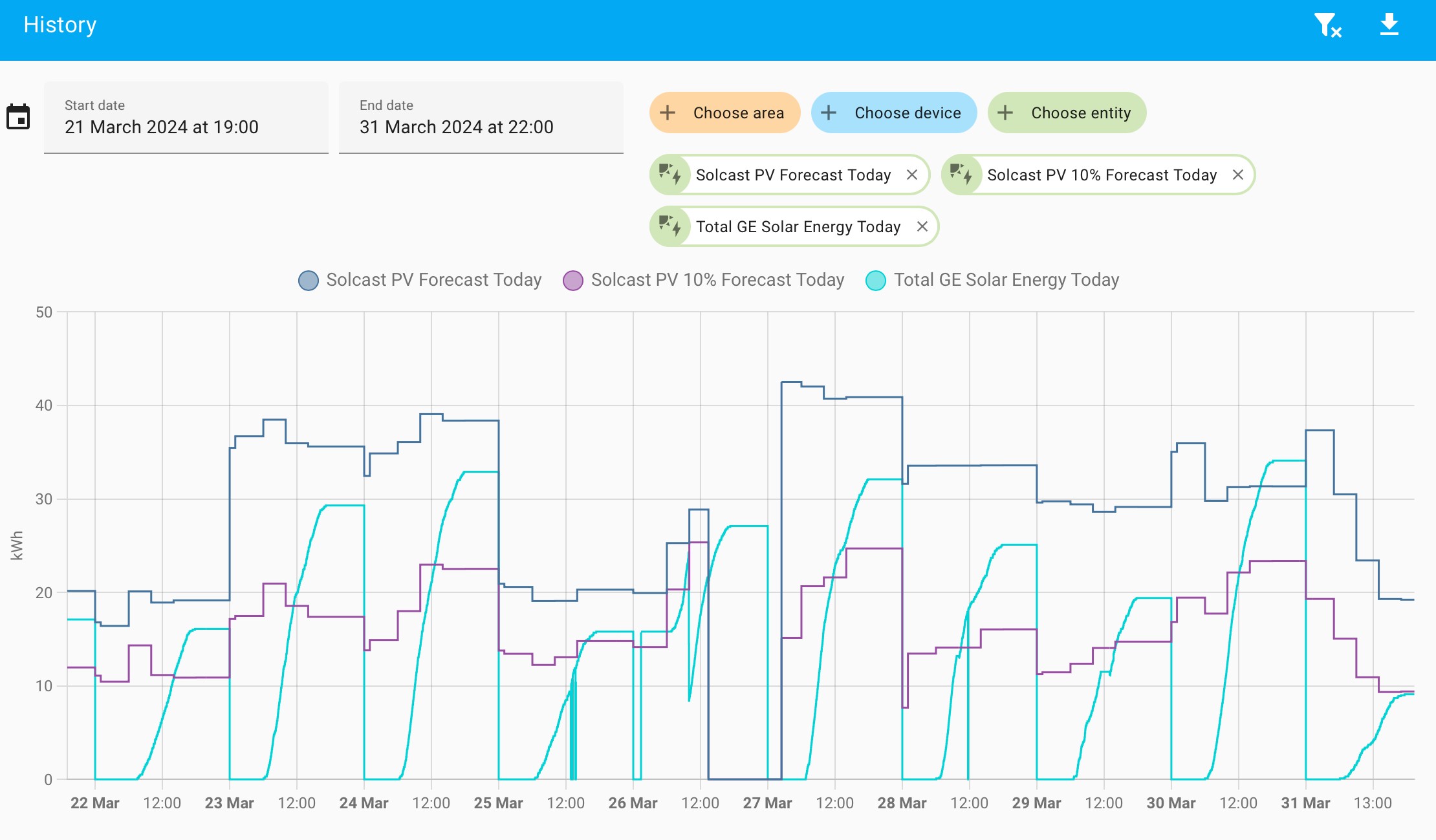
Looking in more detail at the Solcast 50% sensor, my Solcast 10% sensor and my GE generation sensor, I can see:

  • quite a bit of variation in the Solcast 50% and Solcast 10% through the day as I re-poll solcast (5 times a day)
  • the solcast figure on the Energy dashboard corresponds to the end-of-day solcast 50% prediction
  • my GivEnergy generation seems to pretty much always land around 70% of the way between solcast’s PV50 and PV10. Two exceptions, the 27th is empty I think because my solcast integration glitched after a reboot and wasn’t presenting any data to HA, and today when my generation was actually slightly below the PV10%

#6 PianSom

geoffreycoan my GivEnergy generation seems to pretty much always land around 70% of the way between solcast’s PV50 and PV10

Thanks. This quote is especially interesting. Does this relationship hold for you over a longer period, do you know?

G
#7 geoffreycoan

PianSom I don’t know. On the history graph my solcast sensors don’t seem to go back any further than the 18th March, so I’m guessing that they are not being stored in HA statistics.
There was a new release of the solcast integration I installed yesterday which had as part of the change log something about storing data in statistics so maybe its never been stored in statistics and now it is.
I’ll try to see if I can find an easy way of pulling the data out of HA and confirm what the generation to PV forecast ratio is, the 70% was a guess just looking at the graph, it being somewhere around there

S
#8 stevelewis

PALM uses a combination of P10, P50 and P90. The default weighting is set to 35, a linear interpolation between P10 and P50 rather than a true P35. The reason for selecting 35 is to ensure that the forecast generation is exceeded more often than not as (generally speaking) an empty battery costs more than some export.

The second factor to consider is the time at which the forecast is obtained. The nearer to sunrise, the more accurate it will be (refer to "the Greeks" in finacial forecasting parlance). The standalone version of PALM runs a second forecast an hour before the end of the overnight off-peak period in case there has been a significant change.

#9 PianSom

stevelewis The reason for selecting 35 is to ensure that the forecast generation is exceeded more often than not

Thanks. Yes, I understand that. What was the thinking behind settling on "P35" as being the right compromise, rather than, say, 30 or 40? Did you do some kind of regression analysis, or was it more of a finger-in-the-air kind of thing? If the former, how stable over time was it?

I am starting to think that you are right, and I may be better off using a weighting parameter of P10 and P50, rather than trying to tune the Solcast efficiency input.

V
#10 Vestas

One thing to bear in mind with Solcast forecasts is that many people simply set the initial array parameters wrong.

One classic is they get the direction the array is pointing in the wrong way around. Eg the array faces SE but if you don't RTFM with Solcast then many people will set it up as SW. There's many other ways to screw it up too 🙂

I find that we usually get 80% of the PV power Solcast forecasts. Doesn't vary much and I suspect the reason for the discrepancy is because we're down a hill facing SE so full PV kicks in later than Solcast is aware of.

S
#11 stevelewis

PianSom I looked at sample data from my system for good and bad days and then chose a finger-in-the-air value that seems to work.

The three figures represent a skewed distribution and the level of skew depends on the predictability of the weather. Going too far below the P50 introduces too much conservatism when the dataset has a long tail.

My advice would be to keep the Solcast tuning as true to your system as possible and then weight the results once you have samples for a number of different types of day/weather patterns, rather than forcing the right answer on a certain day by faking the input parameters. Solcast is all about probabilities, not absolutes.