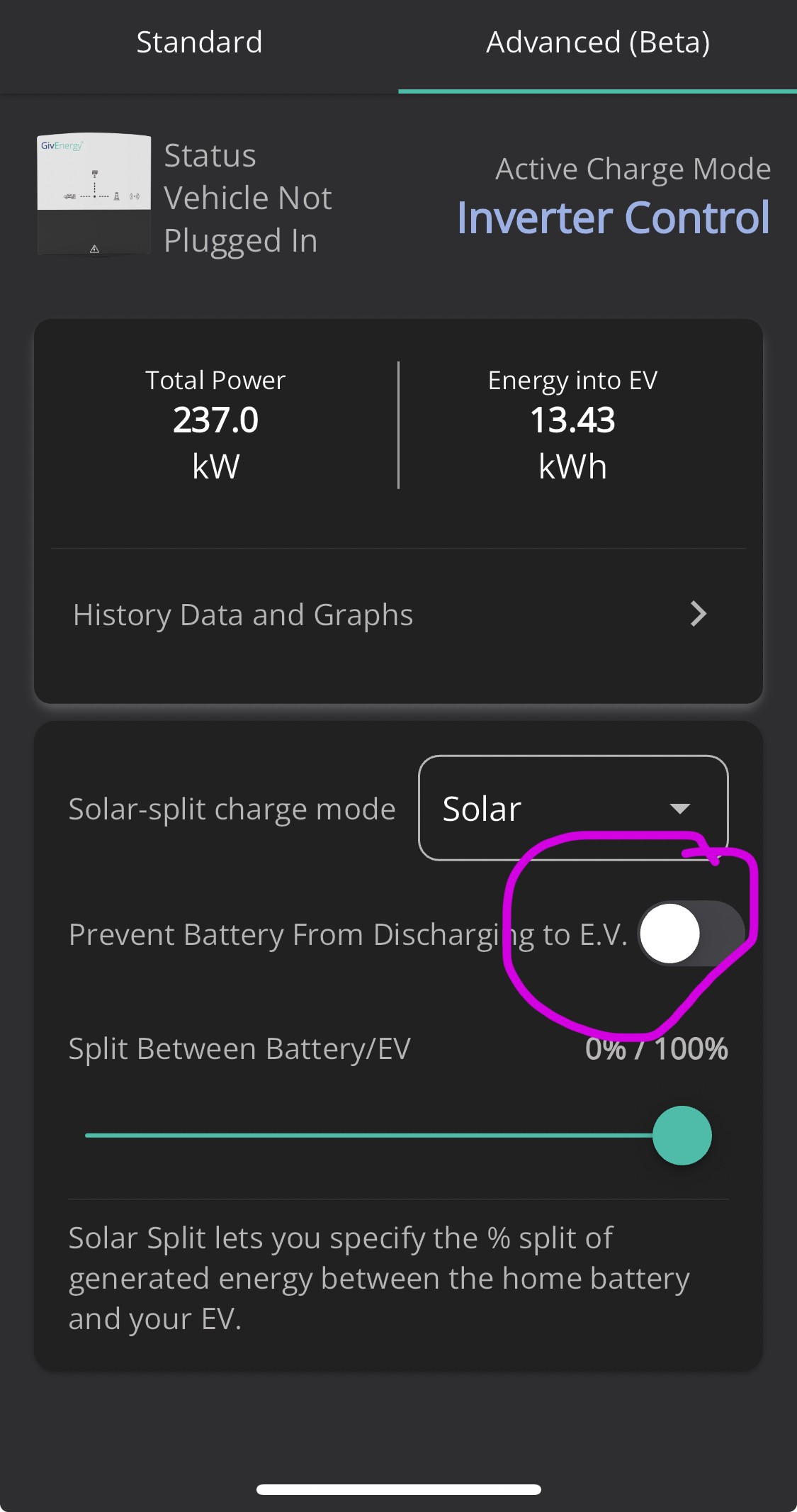
Set up a schedule last night to charge my car. Have done this before and it’s been fine.
Last night though it emptied my battery to my EV.
I have the settings as below. Is there something else I may have changed to ignore the settings below?
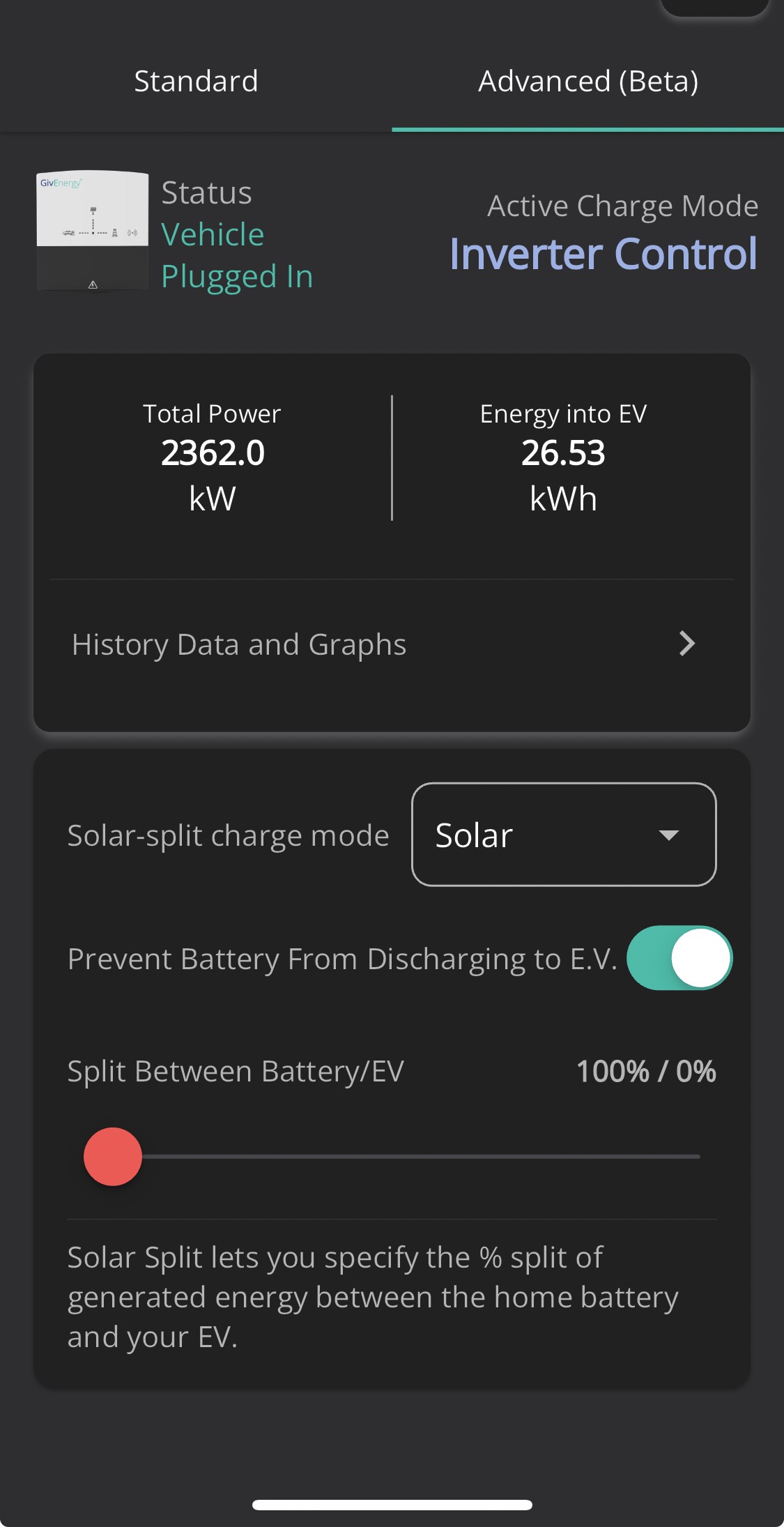

Set up a schedule last night to charge my car. Have done this before and it’s been fine.
Last night though it emptied my battery to my EV.
I have the settings as below. Is there something else I may have changed to ignore the settings below?
I'm three weeks in and still trying to figure the EV charger out. Doesn't help when there is no user guide - I find that just as baffling!
I found the web interface is more comprehensive in describing what the charger does, and that by making changes on web app and looking at how that is rendered on the phone app, you can figure out what you need to do.
That's no help to you of course for this scenario, and the other issue I'm encountering is both my inverter and ev falling off the network frequently (has been the case ever since the EV charger was installed and I suspect related to EV using the inverter as an access point perhaps?) so it takes a while for the web app and phone app to sync up.
And then there's the recurring ground fault issue ...
Frustrating business this 🙂
westwallpoma on the portal version I can’t see the setting to tell it not to drain the battery to the EV. Maybe I’m missing something.
They really do need some proper documentation explaining what different settings do on both the app and the portal for all the products.
Very frustrating
Hi, I don't have the EV Charger but unless the Battery inverter can be told that the car is charging it will dump the battery to meet ANY load on the house.
The way to avoid this is to charge the battery at same time as the car..
I found this pdf online, and page 8 gave me a bit more of an insight into the "charging modes" - https://midsummerwholesale.co.uk/pdfs/installation-manual---ev-charger---11.10.23.pdf
I'm using the web portal to configure all this - the phone app is a bit funky to follow.
EV charger: Settings > Advanced Mode -> Mode
[Grid]
Will charge, regardless of solar generation value. This implies you'll be consuming from the grid regardless.
[Hybrid]
will use solar as a priority if solar generation exceeds 6A / 1.4kw and any excess will use grid
[Solar]
will only use solar, and only if solar generation exceeds 6A / 1.4hW
-- I leave mine set to Solar ; this means the charger will only start charging if there is sufficient generation. It won't consume from the grid or the battery ("grid" == Grid or Battery in the case of the app).
Each of these modes can be further customised by clicking on the Config option.
[Config]
"consuming from the grid" is a misnomer in that it includes a combination of battery + grid if a battery is available.
So you have the Max Battery Discharge Power to EV.
Configure the maximum power that the battery will discharge above your home demand while your EV charger is charging. Only takes effect in hybrid or grid mode
-- I have this set to 1400W ; it is not used while I am in solar mode, but if I need to charge the car later in the day from battery, this allows me to switch to Hybrid and trickle charge and 1400W.
Solar Export Split %
Configure where excess solar is stored. 100% means 100% of the power is used to charge the EV. Any remaining power, or if the EV is full/cannot be charged for any reason, will be used to charge the battery. Only takes effect in hybrid or solar mode when more than 6A of power is being exported
-- I have this set to 100% EV
There is another setting ; Max Charge Power. This setting is found under Settings -> Other and - is important in that can govern the consumption from the "grid" in Grid or Hybrid mode. (Remember, grid means "battery + grid" when you have a battery).
Setting to 32A means it will pull from the grid to make up any excess that it cannot obtain from the batter + solar.
When I'm using hybrid mode to charge just from the battery, therefore I will adjust Max Charge Power to 9A (the max that my inverter can pull from the battery). Or if I have decent amount of solar (my max gen is 6kW and I want to also use the battery, then I would adjust that slider to 27A (9kW @ 240v) if my panels were working to 100% but I also wanted to use my battery. (That only works in hybrid or grid mode).
I generally leave this at 9A as that matches the 3kW pulled either from my battery or any solar during the day, but will fiddle with it if the weather is sketchy and I want a bit more control over the charging (e.g. when the car's not been plugged in during the sunny period).
[Schedules]
Today, I'm going to start playing with schedules. As far as I can tell, schedules will use the current selected operating mode. I have a daily schedule 1000 to 1600 (start 1000, duration "06h 00m"). I switched to "hybrid" mode and my charger started pulling from the grid + battery. I switched across to "solar" (cloudy day, generating < 1.4kW, and it stopped charging.
My car has a schedule set from charge to 80% daily from 0001 to 2359. This means that charging will start at 1000 and either the car will stop charging @ 80% capacity ; or the charger will stop charging at 1600hrs.
(I'm going by the assumption that your EV charger is configuration setting D - e.g. controlled by the inverter)
What I think you need is (using the web interface, not the phone app)
EV Charger ->. Settings -> Advanced Mode -> Mode
Select [hybrid] or [grid]
Next, click on [Config] and then for "Max Battery Discharge Power to EV"
Slide this left all the way to 0W and that should ensure your inverter will not use the battery storage when you are charging the car from "the grid".
westwallpoma I found this pdf online, and page 8 gave me a bit more of an insight into the "charging modes" - https://midsummerwholesale.co.uk/pdfs/installation-manual---ev-charger---11.10.23.pdf
(Also available from givenergy knowledge base:
https://kb.givenergy.cloud/category.php?id=1
)
I have a Zappi, 2 x 9.5kWh batts & a 3.6kW Gen2 Inverter. I have solved-ish this problem by pausing the battery discharge between the Intell Go cheap rate every night between 11.30pm to 5.30am period. This prevents the car sucking the battery dry when it's plugged in overnight when I'm running appliances & recharging batteries. It's not the most elegant solution but it's the only way I've found so far to solve the problem without having to re-wire my system or invest in a complicated home automation system.
Its not hard to move a ct clamp. Also free if diy
SimonClarke not trivial, though - originally, I had solar, zappi and home feeds all coming out of a single block, so there was no suitable cable to attach the CT clamp to.
Had to get it rewired to add a second block, so that CT clamp could go on the cable between the two blocks.
Just move the export margin on the Zappi to above the inverter output. Then it won't take any solar excess or battery discharge. I do this as my export on Intelligent Go is 15p/kwh so I never want the car to take the excess as is cheaper to charge overnight on the cheap window.
cbowen Just move the export margin on the Zappi to above the inverter output. Then it won't take any solar excess or battery discharge.
That's what my installer kept trying to tell me, but that's not the problem. Yes, that stops the Zappi starting to charge when I'm exporting. But it doesn't stop the inverter desperately trying to cover the Zappi's consumption when it's charging from grid.
SimonClarke hi. I’ve seen the comment about placement elsewhere - I’m about to get my set up installed (new build) , where should I make sure my clamps are (Emm115s) I’ll be having PV, battery, inverter, Ev. I’ll also be running HA which should enable me to control it better but would like to make sure the clamp is in the best position.
PNAmble is it a GE chargepoint you're installing, or a 3rd party one? The approach might be different since, one might hope, the integrated one would communicate with/under control of the inverter, and so they should be able to co-ordinate their activities.
That said, if there is a bit of cable exposed that carries all load except the chargepoint, you have some choice of using that or the meter tails directly
I have managed to make it charge without emptying the givenergy battery but it seems the switch on the app is back to front!
So on my app the switch like this does not drain the battery. But the other way it does?!