System misbehaving after electrical work carried out.

18 comments started 2024-06-21 last 2024-06-22
GivEnergy Products
T
#1 Tony_W

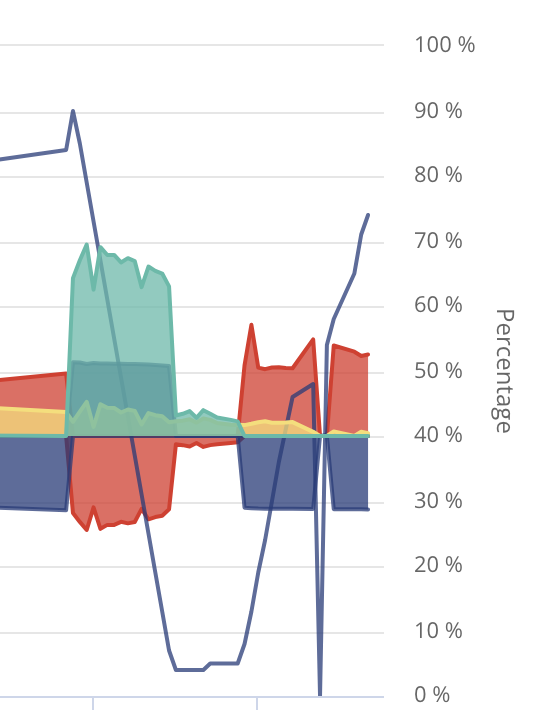
I've had some electrical work done today and my system was off for several hours, after switching back on, the behaviour of the system has been strange, at times it's claimed that the battery is being charged (2.7kW), with 3kW being exported & load is 0. I've reset inverter and restarted battery, but I have no idea how to proceed further, any ideas?

D
#2 DD

Tony_W The CT clamp is the obvious thing to check - that's how the system discovers import/export, from which it can infer house load.

T
#3 Tony_W

DD Thanks, I'm not sure what the CT clamp is, but it's possible that what is happening is that the battery is being charged from the grid, but the dashboard incorrectly thinks that it's exporting, the figures I'm seeing at the moment suggest that, as the smart meter display indicates import, is it possible that the battery is recalibrating itself, I did press the reset button as I'd read that might help?

#4 Maxwell

Tony_W I'll be interested to know how yours plays out. I have a similar issue and initially GE said it was a meter issue and one for the installer to sort. Installer visted and said everything is ok. Back over to GE. No further forward. Over a month now since i first raised this. And every time GE come back to me they ask the same questions their colleagues did on the original emails. Clearly they have no proper ticketing system.

T
#5 TX200

Tony_W

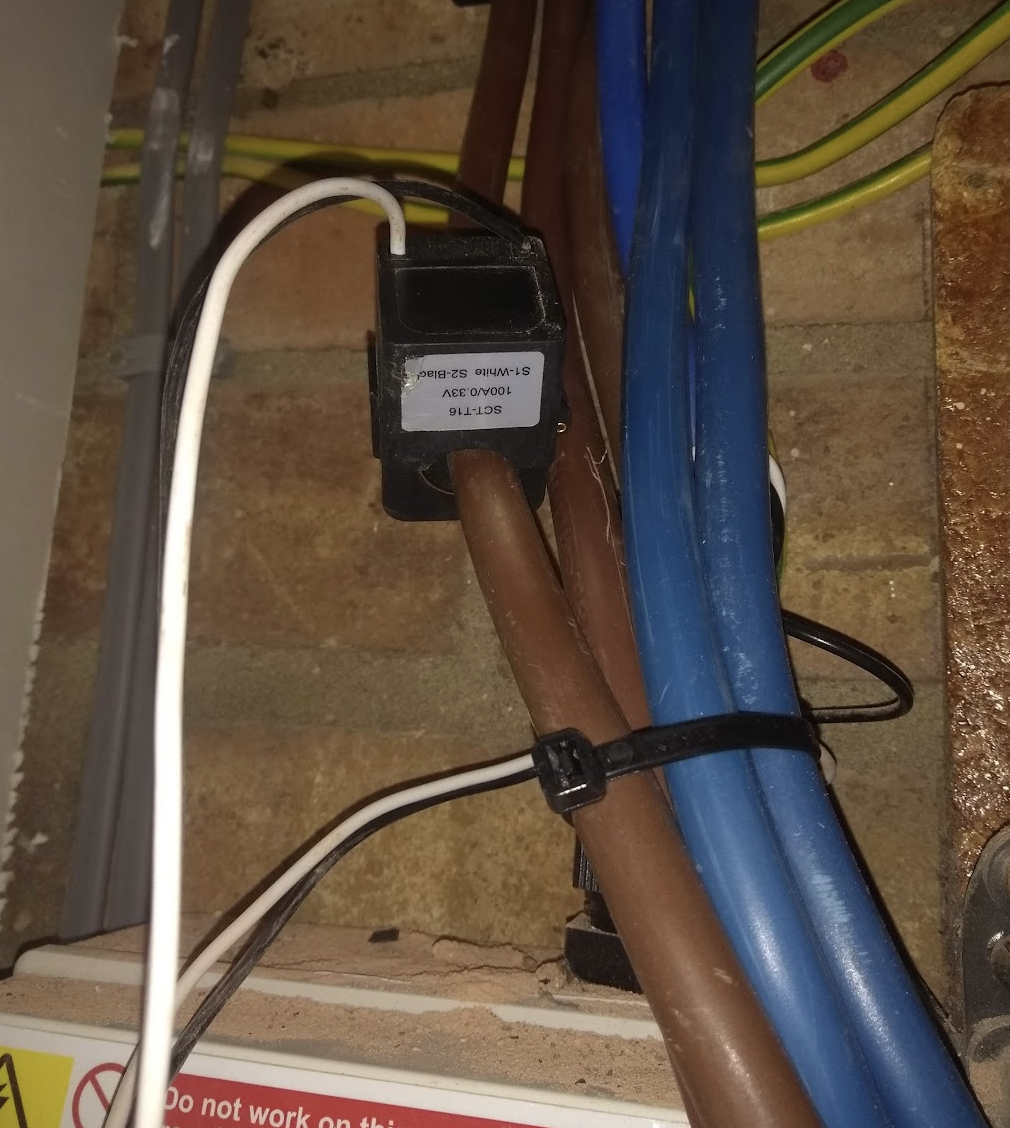
It'll look something like this, wrapped around ONE of the tails near your electric meter or possibly the other end in the incoming tail at the consumer unit.

Check the meter cupboard first, as it's normally there and that's easier than taking the cover off the consumer unit - here be dragons (or a big shock if you touch a bus bar in the consumer unit!).

All you'll probably need to do is unclip it, turn it around so the arrow points the other way down the wire (usually arrow towards the consumer unit - but that's not guaranteed - e.g. if other end wired wrong or software set wrong or a dodgy batch with the arrow the wrong way around 😁🤦)

Clip it back on the correct way around and hopefully all will be good.

It only goes around one wire, if you put live and neutral inside the clip they'll cancel each other out and you'll get no data.

T
#7 Tony_W

So it's this one, right? So today we've had a new fuseboard installed and the electrician has probably remounted it the wrong way round, I guess. Is it safe for me to just turn it round?
Or should I just get them to come back and do it? It's a bugger missing out on all the sunshine over the w/e!
Thanks for your help!

G
#8 geoffreycoan

Tony_W Yes it’s almost certainly been installed the wrong way round. I had exactly the same happen to me by the Octopus engineer. Battery continually discharging to meet what it thought was an import load but was actually the solar panels exporting.

Push the little black clip on the side to unclip it, turn it 180 degrees and clip it back on again.

Totally safe, no risk of electrocution etc. 10 second job

T
#9 Tony_W

So I just checked with the electrician who apologised and assured me that it was absolutely safe to unclip it and turn it around, the system is now functioning perfectly, thanks for the advice!

K
#10 killythebid

Tony_W Superficially at least it looks like your CT clamp is the wrong way round as others have mentioned. Logically it explains the figures you posted.

#11 Maxwell

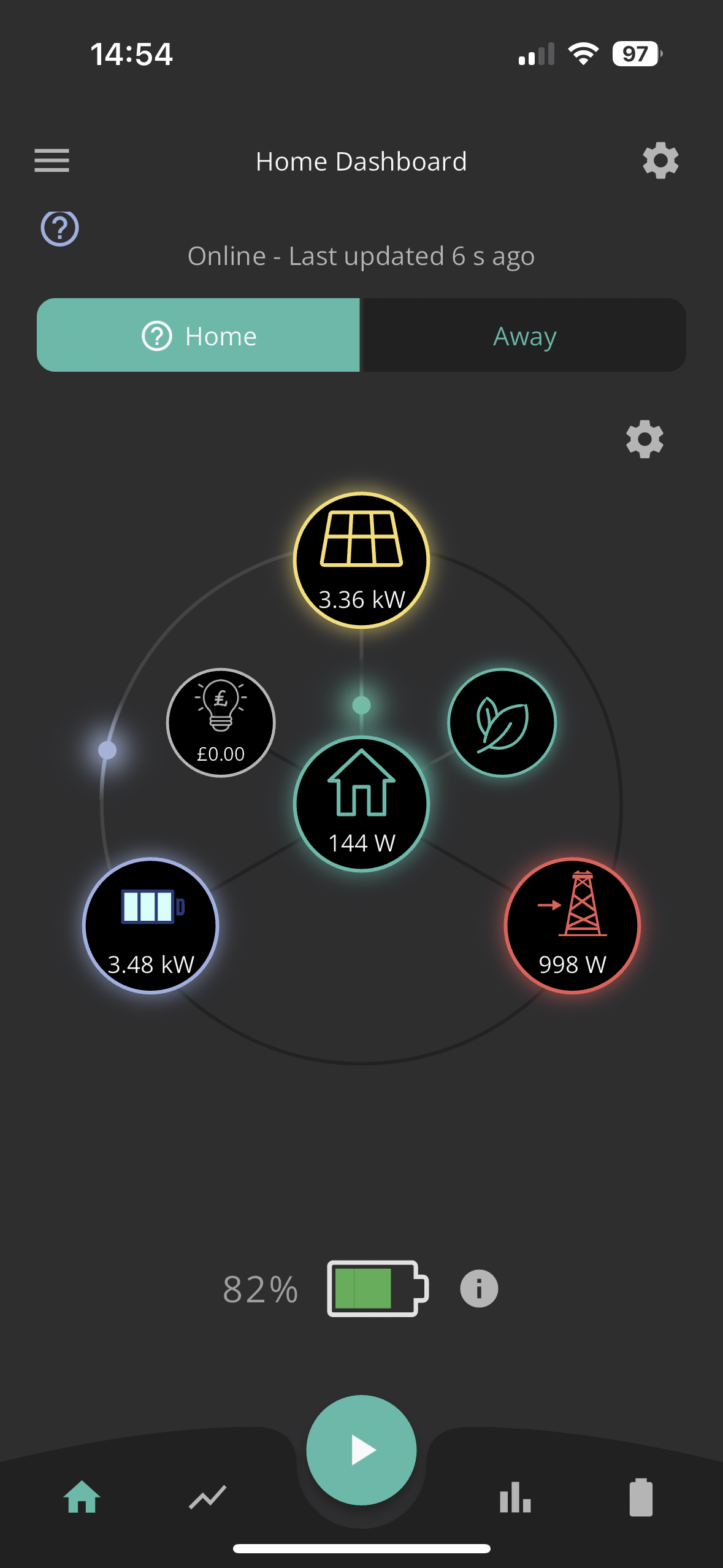
Here is another example of the erroneous data i'm seeing in the app. And as with Tony_W we get the similar patterns showing in the portal. I was told to disable the "show calculated load" option in the app. I think that stopped my zero house load showing. But hasn't stopped the other data integrity issues. And no before anyone asks there are no additional generation sources in our house. Anyone know how disabling the calculated load feature in the app would affect the results you see in the portal ?

K
#12 killythebid

Tony_W Oops I did not see your last post. I am glad you got it sorted out easily.

G
#13 geoffreycoan

Maxwell The ‘show calculated load’ option changes the house load figure to make the numbers “all add up”.

Basically you will get some inconsistencies due to timing differences but mainly due to the losses incurred in the battery charging/discharging and the inverter conversion. I wouldn’t worry about it too much, its a snapshot of what’s happening at best.

#14 Maxwell

geoffreycoan Thanks. But, i've had my system now for over 12months and this issue has only recently started with my system. So, my previous app screen shot had the house load option disabled. But, yet i don't see the figures adding up.

Here is a shot frrom the portal just now. Again i can't make the figures add up. But as i say up until a month ago i never had any issues, even with the calulate house load enabled. So, something has changed and it is impacting the integrity of the data. So, i read is like this. The panels are generating 1400W and my house is using 432W So, that leaves 968W for either battery charging and or grid export. Yet this shows my battery charging with 1400W and exporting another 29W. So, never mid the magic money tree I have the magic lecky tree...Or am i calculating it wrongly ?

G
#15 geoffreycoan

Maxwell my house is using 432W

You are calculating it correctly and the sums definitely don’t add up

One thing to remember is that the inverter has no way of working out what the house consumption actually is, it can only infer it from import - export + generation + battery discharge - battery charge so the house load figure you see is a calculated figure.
My guess is this is calculated wrongly for some reason

#16 Maxwell

geoffreycoan Glad to know i'm not having a layer 8 or picnic issue. And of course once you see results like this it then leaves you wondering which if any of the figures are correct. So, if the installer is correct and there are no meter or sensor issues in the house then this has to be a software/firmware issue would that be a fair statement ?

T
#17 TX200

Isn't part of the issue you have to account for the energy the inverter uses to operate?

#18 Maxwell

TX200 I'd assume that this is already factored in the calculations before the data is displayed to the end user. Also, as i said before this is the first time in over 12months of use that i have experienced this anaomalous data. From my view something outside my control changed to cause this. But what ?

#19 Maxwell

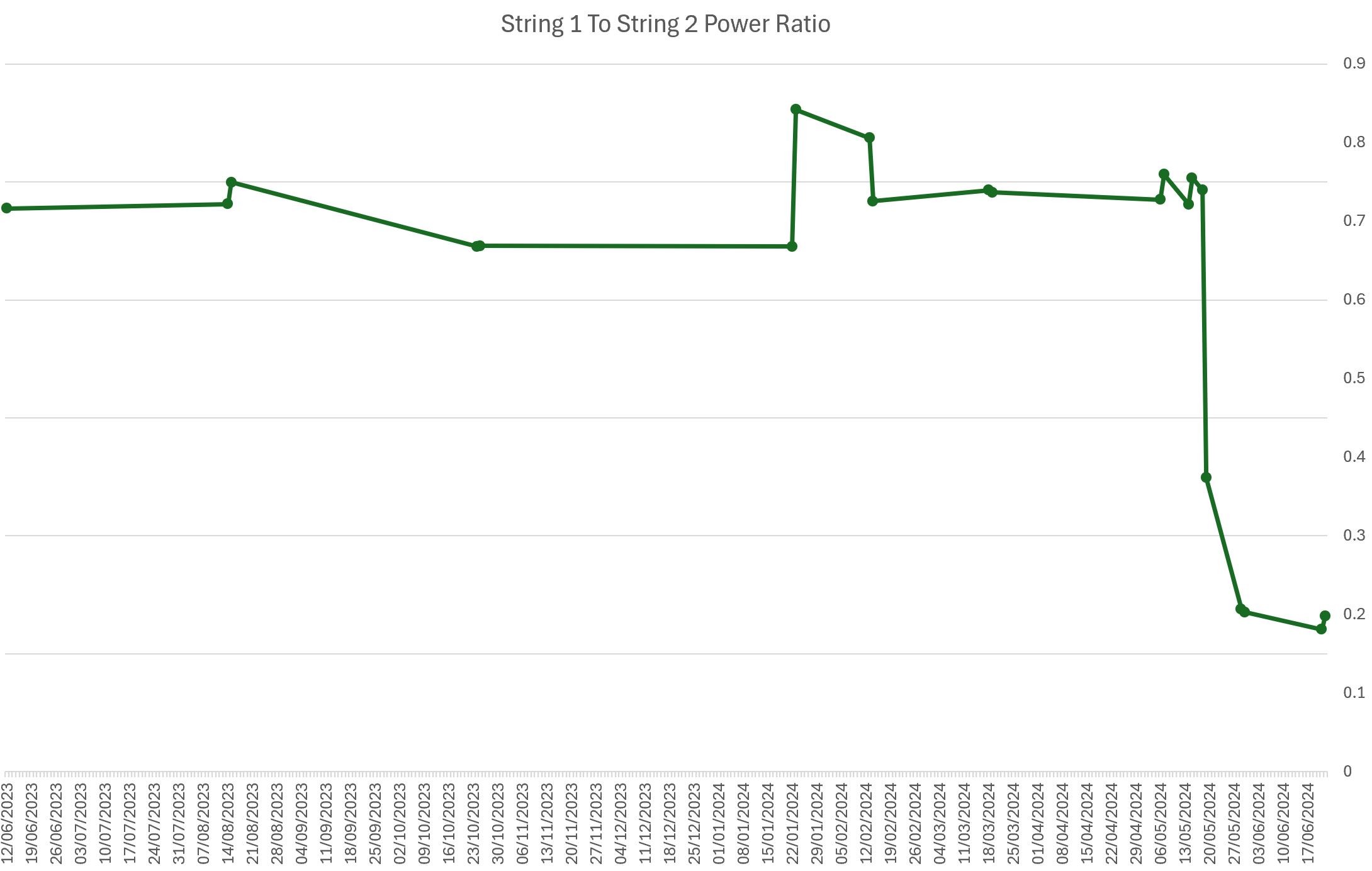
Today when i looked at either the app or portal i noticed that the solar output figures looked lower than i thought they would be given that is was a strong sunny day. I looked at the pv data power graphs and the output of string 1 looked way lower than i felt it should be. I know that the two strings don't have the same number of panels and as such you wouldn't expect to see similar values. So, i went back through the data in the portal and for a number of different dates going back to Jun last year noted string 1 & string 2 power at or near the same time each day. And i then calculated the ratio of string 1 to string 2. And the day before i called GE to raise the above issue of dodgy data the ratio dropped off the cliff, see enclosed chart. Now there is no obvious shading or partial shading that has sprung up. So, is this showing an issue with one or more of the panels in that string or an issue with the inverter and it's handling of string 1 and if any of these then how would this result in the dodgy data i'm seeing ?