
My power line network is going offline when the battery is turned on.
Clearly the battery is normally on but I noticed this morning my inverter was offline so by a process of elimination I've established that the connection is fine as long as the battery is turned off but as soon as I turn it on the power line dies.
I've got multiple power line plugs and they all do the same.
I don't have a wifi dongle so I can't fall back on that and I don't know how to access the ethernet plug in the inverter to try a different cable.
Really frustrating that it's happened today as I was going to make full use of cheap Agile prices.
I've sent an email to GivEnergy support but if anybody has any thoughts they'd be welcome.
Power line network dies when battery is turned on
What products do you have, so we can try to help.
How are you connecting your inverter to the powerline plug? An ethernet cable hanging out the bottom of the inverter?
5kWh gen 3 hybrid inverter.
9.6kWh battery.
Yes, ethernet cable is coming out of the bottom of the inverter.
This isn't caused by the battery, it did seem odd that it would be to be honest.
I just restarted the inverter and left the battery off, the system stayed online for 5 minutes before the power line network failed.
I guess I'm going to have to buy a new power line system as a first step, but it's an expensive test if it doesn't solve the issue.
Paul H I suspect your issue is noise on the electrical ring main, either caused by your inverter or something else plugged in such as cheap USB charger.
I had a powerline network and it was variable the reliability. Electrical noise on the line really affected it, you could see that with a bandwidth speed tester.
Two things I found caused the noise:
- Cheap electronic rodent plug in things
- A mains plug with built in USB sockets, again cheap electronics in the USB adapters
In the end I gave up with the powerline as it was just unreliable. I was using mine as a wifi repeater and it was the other side of a wall from the inverters. When it worked, it worked fine, but it would drop out randomly every month or so and had to unplug and replug it in to re-establish the connection.
Bought a mesh network instead
I'd been thinking about investing in a mesh network.
I'll ask my installer if they can supply a wifi dongle.
I think the ethernet connection is in the bottom of the inverter. Unscrew the black plastic cover but be carful you dont pull out meter comms cables - not most secure from my own experience
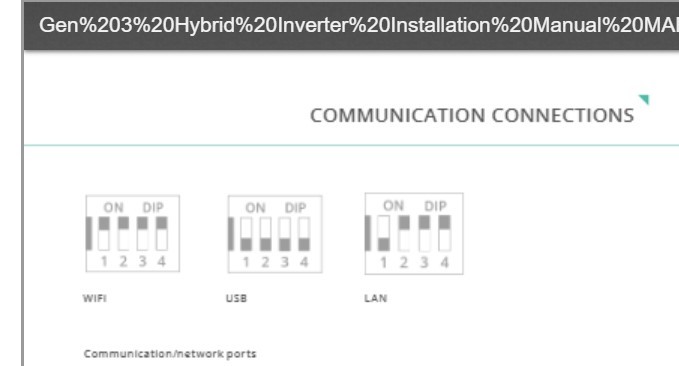
I think Gen3 has built in wifi and you can use either wifi or LAN depending on how you set dip switches
https://kb.givenergy.cloud/article.php?id=84&oid=1
Is there anyway you can buy a drum of Cat5/6 cable and some RJ45 plugs/crimping tool to install cable direct from inverter to router- possibly easier said than done, I know!
Paul H
Does Gen3 need a dongle?
I've just run an extension lead to a socket next to the router connected adapter and the power line works fine like that so looks like I need to ditch them.
Cheers
SteveCook I have no idea how to move it to a wifi connection, I've emailed my installer.
Paul H
Flip the Dip switches I think

Thanks Steve, I'll have a read of the manual
I think there are other posts on this. I think if you change dip switch settings you need to do an inverter reboot to get settings to take effect
Good luck.
Might be better to call/mail GivEnergy and ask their advice/suggestion
Most of the mesh units have ethernet ports, so you don't need to use wifi on the inverter.
I have google mesh system. One of them is plugged in next to my inverter in the garage and I run an ethernet cable from the inverter to the that. Works fine