R
Hi,
I prefer to keep the WiFi off at night and to maybe move away from WiFi at some point, so I prefer wired connections. Is it possible to get an Ethernet adaptor I can plug into the inverter to replace the WiFi dongle?
Thanks

Hi,
I prefer to keep the WiFi off at night and to maybe move away from WiFi at some point, so I prefer wired connections. Is it possible to get an Ethernet adaptor I can plug into the inverter to replace the WiFi dongle?
Thanks
Russ I thought the gen2 already had a LAN connection, see here?
https://givenergy.co.uk/wp-content/uploads/UK-Datasheet-Hybrid-Gen-2-3.6.pdf
I have a LAN connection rather than use the WiFi dongle. You will need to remove the dongle (and cover up the hole) then change the dip switches to 1 Down, 2,3 & 4 Up = LAN and then use your inverter serial number as the login. Mine goes through a network switch to my hub
I have a gen. 2 wired to router. As noted above, the network socket is already there on the u/s, no need to remove the dongle, just plug in and flip the switches as noted. There's a guide on the website somewhere I seem to remember.
Only problem I had was a standard network cable won't pass through the hole in the cover you have to remove, you need to terminate a cable once passed through, which I haven't got around to yet, so the cover is just dangling until I find the time!
Gen 1 has an RJ45 socket. Unfortunately, there's no one at home behind it 🙁
My gen2 would not communicate when both the WiFi dongle and LAN connection were connected hence I took out the dongle and made a cover to keep out the spiders.
Slightly off-topic but I'm running my Gen 2 inverter via my LAN and have been trying to get GivTCP with HA working without success. I have established the inverter IP address on my LAN and set it up as a fixed IP.
In the GivTCP setup, it asks for the IP address and the Inverter_Name. Does anyone know where I would find the Inverter_Name? At present, I can see from the log files that GivTCP cannot log into my Inverter so I seem to be missing something.

MichaelHambly Is the Inverter name not the Serial No? WJ2327***** for example.
Thanks Tenkaykev, I guessed at that but it didn't work so back to square one. Must be doing something wrong!
MichaelHambly
I just looked at my Givenergy portal on the web and noticed that although my inverted is shown on WiFi as WJ2327***** in the portal the prefix is CH2327*****. Might be worth a try.
I don't see a field for inverter name in the GivTCP config. Where are you putting this name?
The inverter adapters are showing up as HF-A21 on my router
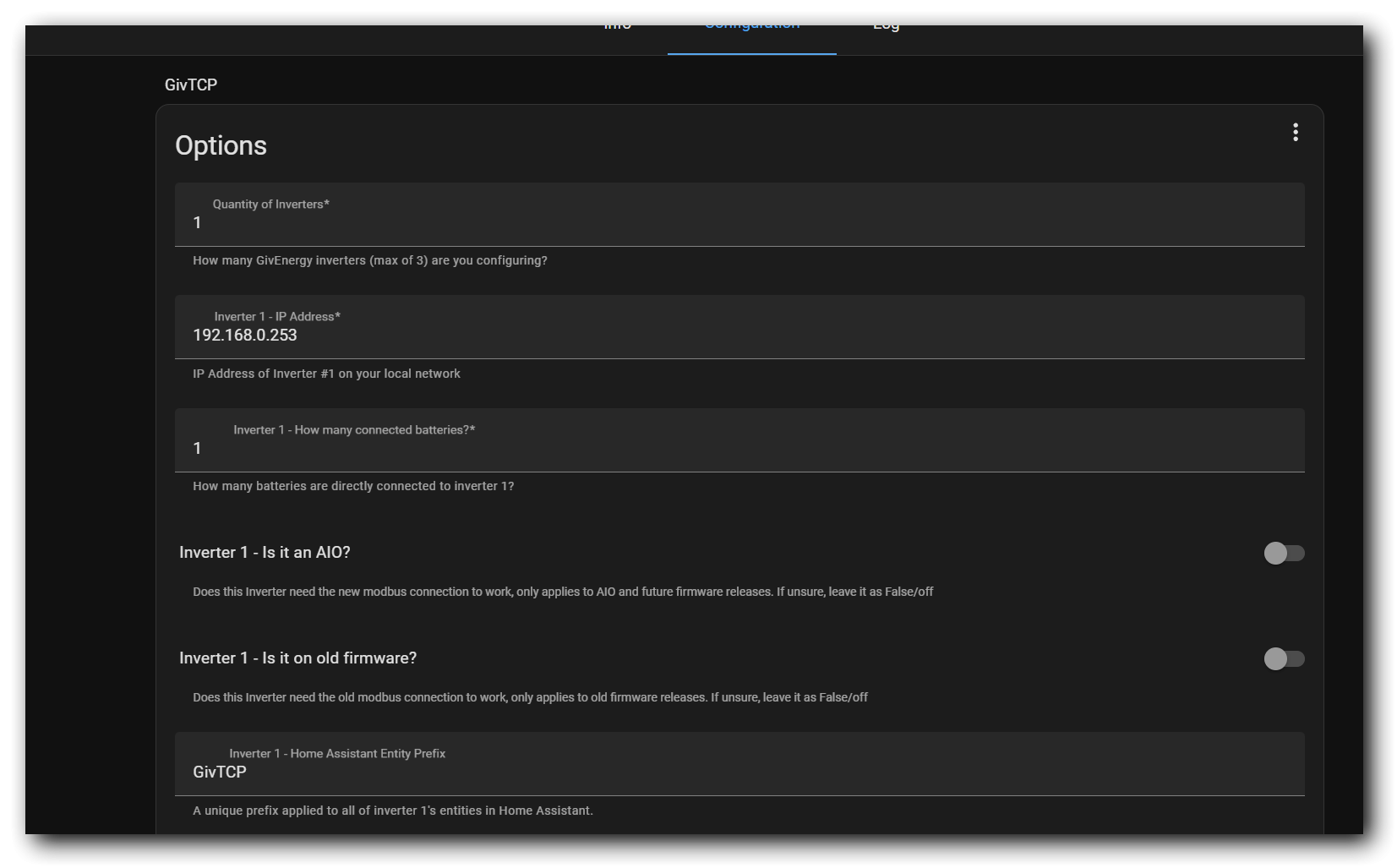
I think you just put in the IP address. That is all have
Do you have to tick/untick the "is it on old firmware box". I am on Gen1 and have to have that turned on?
Have you enabled MQTT output and sorted that?
I have a box immediately below the box labeled " Inverter 1 - IP Address" and it says in red "INVERTER_NAME_1". I am assuming this is where I put the Inverter name. Sorry I would post a picture but I'm still finding out how to use the forum to post pictures.
SteveCook . I have tried just putting in the IP address and also tried various combinations of "is it on old firmware box" but still get the error message in the logs that it fails to onnect to the inverter. See a section of the log below.
2024-07-19 13:57:53,326 - startup - [ERROR] - Gathering inverter details for 192.168.xx.xxx failed.
2024-07-19 13:57:53,327 - startup - [ERROR] - Unable to interrogate inverter to get base details
2024-07-19 13:57:53,526 - startup - [ERROR] - Gathering inverter details for 192.168.xx.xxx failed.
2024-07-19 13:57:53,527 - startup - [ERROR] - Unable to interrogate inverter to get base details
2024-07-19 13:57:53,539 - startup - [CRITICAL] - Running Redis
2024-07-19 13:57:53,549 - startup - [CRITICAL] - Setting up invertor: 1 of 1
2024/07/19 13:57:53 [notice] 189#189: using the "epoll" event method
Note that I replaced the IP address with x in this example as I don't want to publicise my internal IP address

MichaelHambly not to sound like "that guy" but your definitely pointing it to the right IP? (and if you ping it from the machine your trying to run this on it can contact the address?)
Another thought.
I would have liked to give the inverter a fixed IP address from a fixed pool I reserve for my Home automation products but could not find out how to set the Inverter IP address so accepted the address given from the block xxx.xxx.xxx.200 to xxx.xxx.xxx.254 which I normally reserved on the router DHCP server for guest devices. I then found the given DHCP address by looking it up on my router and then reserving that address for the inverter using its MAC address. I have used this method in the past without problem but I wonder if this could be causing the issue.
Does anyone here know how to set up the IP address on the GivEnery inverter so I can allocate an address from my fixed pool. Just for clarification, my inverter does not use a dongle and WiFi but is hard-wired into my LAN.
MichaelHambly that’s exactly the same way I allocate the IP addresses to the inverter and other IOT devices, let the router DHCP server allocate the IP address then mark it as fixed on the router.
Have you got IP/port restrictions in place to/from the home automation IP address block, and assume you have your HA server in that block. It is sounding like a problem with either port restrictions or address blocks.
Have you tried it without the WiFi dongle connected. Mine would not communicate with WiFi and LAN connected.
Thought I would give an update on where I am with this issue and what I have discovered about how to set a fixed IP Address on the GivEnergy Inverter.
After several frustrating days of trying to get GivTcp working on my HA Installation without ever getting it to see my Invertor I decided to give up and start with a fresh Install following various YouTube videos . Long story short, It still does not work and the error logs show that it cannot see my Invertor.
So, I reset my entire network, flushed it to ensure there were no strange address anomalies and tried again. Still no luck.
I then set about trying to establish how to set a fixed IP Address on the Inverter. It was surprisingly easy. I logged into the IP address shown in the GivEnergy app via a web interface. That brought up a login box asking for a username and password. These are the default values for the HF-A21 module used by GivEnergy and supplied by a Chinese company (admin, admin). Once in you can set up or change various default settings. I have not figured out yet what they all do ( and I would not recommend randomly changing any or you could be in a world of pain) but from the drop down menu on the left hand side I chose "STA Interface Setting" which revealed a section named "WAN Connection Type:". This was set to DHCP by default. By setting it from the drop down menu to Fixed IP you could then enter your fixed IP address, subnet mask, and Default Gateway.
If you try this it is on your own head. I make no guarantees it will work for you.
I have tried it and it seems to have given a fixed IP address to my Inverter without causing any other issues.
However, sadly, GivTCP will still not recognise or read values from my now firmly identified Inverter.
At this point, I don't want to waste any more time so reluctantly I think I will give up on using GivTCP and go back to writing my own interface in Node-Red.
I hope this insight into setting a fixed IP address might help someone and would like to thank all those who offered suggestions and help.
kind regards
Michael.
rjp
That would explain why they had trouble getting my Gen2 system communicating with the network as they had put a WiFi dongle in the usb slot. It's also why I still see the WiFi card for the inverter on my network hub. So of you don't need the separate dongle, why did they not supply a blanking plate for the USB port?
MichaelHambly
As you know, your Wifi system/router has a DHCP server which is responsible for assigning IP addresses. Pretty much every one I've seen has a way of 'fixing' an IP address for a specific device (based on it's MAC address). I'd recommend doing this rather than fixing the address 'inside' the inverter, because it means all address assignments are stored in one place, and there's much less risk of an accidental clash of addresses.
You need to make sure that the address you manually assigned is not in the range of addresses that the DHCP server may allocate, otherwise you can end up with two devices using the same address.
Also, your 192.168.x.x addresses are just internal. Nobody can use them to access your devices unless they're already inside your network, at which point they can see everything anyway...
I still have no idea why you'd see a prompt for 'INVERTOR_NAME_1' anywhere. You're sure you have an official version of GivTCP?
Also, re. inverter access - assuming you can ping the inverter, you should also check that the TCP port 8899 is not firewalled somewhere. Try telnetting into that port.
Thanks for the feedback. I set my router up in the way I do as its important for me to create fixed blocks of address for specific types of devices, ie Thermostats, Proximity detectors, Switches, Zigbee, RaspberryPis, etc. I keep a spreadsheet of addresses I have allocated so I know where everything is. I know it is possible to reserve a DCHP allocated address but they tend to allocate randomly and that prevents me from keeping similar devices together. It just makes my planning easier as I have over 80 sensors and various ESP (Tasmota) devices along with 5 Raspberry Pi's and Zigbee all running various bits of automation such as Heating, Security, Lighting etc. I mostly base my Home automation around Node-Red which I run on Raspberr Pi's giving a high degree of redundancy.
I allocate the DCHP block (xxx.xxx.xxx.200 to 254 for guest devices.
I would probably do things differently if I started from scratch again but my system has been built up over four years and I am 74 so don't want the hassle.
I recently installed my GivEnergy system and have been starting to look at integrating it into my existing automation. I had hoped that GivTCP would give me a leg up but given the problems I have been having, I think I will stick to Node-Red and MQTT. I already have that sort of working and spitting out data using the GivEnergy API.
Michael.
TimHutchings
Okay. I'm surprised there isn't a work around this?
Is this true @DD ?

TimHutchings I had to go down that route recently when a new 2.4GHz WIFI network appeared locally and kept hopping onto the same channel the inverter dongle is using. 🙁
Anyone think GivEnergy would part exchange my gen 1 for a newer version with a Lan port?
alan_johnston I've also fixed the IP address in the main router which also seems to have made the connection more stable. Don't think I've lost the connection this year on the app.
Now watch it all go wrong! 🤣🤣
I'm sure I read somewhere on here that someone very close to GE created a USB dongle that had an ethernet port in the end. Kinda rough and ready playing in a lab rather than something official though.
Don't get your hopes up though as I imagine it wouldn't be a priority.
Yes there are new more secure dongles to come, but I doubt an official version of a bodged together ethernet dongle is on the cards.
Russ
I placed my order early 2022 and installer confirmed in writing it was Gen2. I wanted Gen2 because of higher charge rate and LAN.
When installed late 2022 i discovered it was Gen1 (Installer did not seem to know there was a difference).
I made a fuss, but that was all that was available because of Covid.
It was easier to stay with Gen1 than to wait some unknown time before Gen2s ever arrived.
I have never had any wifi issues