Connect to Sky Broadband - Security Level WPA3-T

65 comments started 2024-08-24 last 2024-11-11
GivEnergy Products
P
#1 philgough

I’ve just changed broadband provider to Sky and the router security level is set to the default WPA3-T, now essential to work from home. It is a transitional security level and should allow devices with WPA2 to connect. However, the Give Energy dongle fails to connect. Any guidance to resolve would be welcome.

T
#2 TX200

philgough what generation of inverter is it? Is there an option for a LAN cable ? (That's a no if it's gen1 unfortunately).

You could consider putting the inverter on a different network although it makes it a bit awkward when using apps to control it (e.g. have to switch your phone etc to the same network).

There was talk about some new dongles to come. Not sure if @TheDragon (GivEnergy) can give us an update on that? 🤞

G
#3 geoffreycoan

philgough Have you tried turning the 5GHz signal off on the WiFi router? The Givenergy dongles only work on 2.4GHz and the presence of the 5GHz signal can sometimes cause them to fail to connect.

Once connected to the new wifi on 2.4 you can then turn the 5GHz network back on.

#4 TheDragon (GivEnergy)

If it allows WPA2 the dongle should connect.
We do actually have a dongle update to load that helps with stability overall with wifi.

It's loaded directly at the dongle in the Web interface.
Send support a message saying you have wifi instability and can they send you the chipset update.
I'm overseas so a bit sporadic access. Else I'd help direct.

V
#5 Vestas

The Sky forums (and beta test forums) are full of complaints like this regarding older devices.

I'd suggest that Sky should be your first port of call as their "transitional mode" doesn't work properly.

#6 pgbish

I had the exact same problem yesterday when my New Sky Max Hub arrived. I have now removed it and reverted to my old router.
It doesn't work with a Gen2 inverter, in as much that the inverter would not connect up to the internet, despite renaming my new hub to same name/password as the old inverter.
I spoke with GivEnergy who suggested that the security was the issue.
When I finally got into the detail of the new hub, it is set to WPA3 security and the option to change and many other options are greyed out in the admin settings of the new hub.
Also, the 5Ghz wifi system is given the same name as the 2.4Ghz wifi and this is also greyed out.
I spoke to sky, and eventually got the WPA3 changed to WPA2, but then the 5ghz naming wasn't changeable. Sky did their usual and just threw their arms up and said that there was nothing else they could do. It still didn't work with just the WPa2 change.
Despite the various setting changes, the inverter failed to connect up, so i finally abandoned the sky max hub and reverted to my old one.

G
#7 geoffreycoan

pgbish the 5ghz naming wasn't changeable

In my experience, having the 2.4 and 5GHz networks named the same isn’t a problem for the GivEnergy inverters, as long as you can temporarily disable the 5GHz network so that the inverter can connect for the first time to the 2.4 signal. Once connected you can then re-enable the 5 with the same name and it all works fine - at least that’s the experience I have had.

If you can’t turn off the 5 network then you are stuffed.

S
#9 SteveCook

pgbish
Maybe have to buy a router rather than rely on the ISP issued one, which has features that you can control yourself.

I am getting worried as I am still on copper but BT have been running fibre everywhere around the village and at some point will want to get me off copper and onto fibre and presumably change the router to a newer version!

#10 Windy Miller

Not on Sky but avoided a similar problem on Virgin by using the Virgin box purely as a dumb cable modem i.e. turning off all its own Wifi and network services. Then using a wired connection to a Linksys Router running DD-WRT software which allows me to control every aspect of my network as well as giving me proper logging. I use three interconnected Linksys routers to cover the whole house with one near to the GE kit in the garage. My network has 75 devices in its DHCP device list.

V
#11 Vestas

Windy Miller using the Virgin box purely as a dumb cable modem

Unfortunately that's no longer an option on their latest router. No modem mode, no plans for modem mode, suck it up or sod off is basically their attitude to that.

Thankfully I have nothing to do with Virgin these days.

#12 Windy Miller

Vestas Really! Can you turn the network stuff off manually? I would just connect my router to one port but don't really want the Virgin box blatting out Wifi and reducing the available channels.

P
#13 pwdst

Also handing out conflicting DHCP addresses if you cannot turn that off....

#14 Windy Miller

pwdst Yes I connect the superhub to the WAN port on the router to avoid this problem as it creates its own firewalled network for the house.

#15 Hook

The Virgin hub 5 can't go into modem mode? That's v.poor.

Do they have any plans to change that? I have the hub 4 with the mesh system, so that would be a deal breaker for me. Although I do now have access to an altnet, who do 1gig up and down for £30.

#16 PianSom

Hook
No, the Hub 5 can do modem mode. I've been using it like that for about 6 months (at 1.15gig down, 100meg up, £33). V jealous of your altnet.

I believe that Virgin's new fibre offering uses the Hub 5x - which doesn't have modem mode, even though it is cosmetically similar to the Hub 5.

I read somewhere that that was because the fibre is a JV, and if the OLT was in modem mode then Virgin would not be able to manage their traffic. So double NAT or nothing.

V
#17 Vestas

PianSom Yeah its the 5x, which is where all the Virgin kit is heading in terms of management.

Fibre is not a JV, Liberty Global effectively own it all.

Virgin have been installing their own fibre for years now which is a bit of a hybrid monstrosity at the customer end even on new builds in the last 3 years. RF over Glass (RFoG) where the fibre terminates in the premises into a ONT which then converts to RF/coax. Unlike BT they don't pre-install the ONT or pull the fibre (drawstring is there) on a new build which is pretty dumb really.

Thankfully the altnets they've aquired might have changed that culture as coax/RFoG has no place in any sane expansion of comms.

#18 PianSom

Vestas
Going WAAYYYY off topic here, but ...

You may well be far more knowledgeable than me, but I thought that new Virgin fibre product which uses the Hub 5x is FTTP and is off the back of Nexfibre's network. And they are only 25% owned by Liberty Global (the balance being PE and Telefonica) https://en.wikipedia.org/wiki/Nexfibre

V
#19 Vestas

PianSom Liberty Global own O2 who were (and still are for certain govt contracts) Telefonica UK and so on.

The tl;dr is Nexfibre is as much Liberty Global as Openreach is BT. Edit - with the exception that unlike Openreach there's no PIA (duct sharing) agreement, which of course wouldn't ever be Liberty Global's intention 😉

R
#20 Rbor

SteveCook With copper, I had a BT Smart Hub 2 with three disks dotted around the house. The Smart Hub 2 also acted as a modem.
I moved onto fibre from copper about 6 months ago. With fibre, I got an Openreach modem (or ONT) installed. This little white box connects to a fibre-optic cable that runs to my house enabling me to access the FTTP fibre network for broadband and voice.

The router just plugs into the ONT. My Smart Hub 2 wasn't changed and I uses the same credentials as on my old copper system. This ensures that all my network just continued working with same IP addresses. The fibre connectivity is very good.
.............So you should be OK.

The downside is that the BT Smart Hub 2 is getting pretty long in the tooth and there is a warning from other comments that replacement routers supplied may break things. I think that sky don't allow credentials to be changed.

My plan for the future is to move onto a modern mesh network, essentially using the technique described by Windy Miller :
i.e. Switching wifi off on the BT router to which I would connect the mesh network for wifi, using the BT router as a DHCP distributor of IP addresses. The golden rule is to use the same wifi SSID and password as before – then all wifi should continue to work.

Ideally, I would like to connect a mesh router directly to fibre but that would change the DHCP device list.
I have another year of my current contract to run so no immediate decision for me here.

On Virgin, they are calling at houses in my road, trying to drum up business. They told me that they would just connect their router to the ONT. I asked whether 3rd party routers could be hooked up to the fibre and they told me 'Yes' (........ but can I believe them?). I would guess that Sky would do the same. I think that BT, Sky, Virgin etc can just 'rent' the fibre line from Openreach, if they are not using their own fibre, or an alternative provider from Openreach.

I hope this helps to reassure you. But I would want BT to assure you as well!

Finally, think about whether you want the fibre connection connected to a different position in your house. My old connection came into an upstairs bedroom! The installer should be able to move the connection elsewhere and it doesn't cost at this stage. If you want a connection moved later on, there is quite a hefty cost, £150 ish I think.

Rob

S
#21 SteveCook

Rbor
Thanks.
We have already dumped the landline as we never used it and nobody ever called us on it.
Presently I have smart hub 2, but have set the FFTP mode to off, so I get to use all 4 LAN ports in the back.
I think we will have fun when they get round to connecting the house. We are about 100m from the road and there is a pole in the neighbors garden where an overhead cable goes on the way to the street.
Will I need an ONT, even if I dont want voice?

V
#22 Vestas

Rbor Virgin don't rent from Openreach (or anyone else) for end-user connections. The virgin cold calling salesman is lying (they all do) - you can't connect a Virgin router to an Openreach ONT and expect it to work. Edit - nor can you expect to connect a Sky (for example) router to a Virgin ONT and expect it to work

R
#23 Rbor

SteveCook An ONT is needed as this where the fibre goes into your house. It is also the 'modem'.

My road gets connectivity: phone and broadband, via an overhead cable from a street pole to my house. The overhead cable contains the fragile fibre which is finer than a human hair. This replaced my old copper cable. It is boggling that the fibre can carry so much data. My installer showed me how he exposed the fibre and connected it to a box on the outside of my house and then into the ONT inside my house.

You will know when fibre has been installed in your road as you will see large rectangular black boxes attached to the top of the poles.

So an overhead cable is also likely to also be the route to your house.
If your current broadband comes to your house underground, the cable should be in a conduit and that would likely be the route for your fibre.

Rob

G
#24 geoffreycoan

Rbor Gigaclear have been cabling my village with fibre and I’m due to be connected in December.

The current ADSL broadband is underground to my house and I’m pretty sure it’s not in a conduit, but Gigaclear have said they’d lay the fibre underground to me. Their connection point is in the BT duct on the opposite side of the road, then it’ll have to run down the driveway I share with my neighbour, across the front of his garden, then through my garden to get to the house.
Plenty of digging …

#25 positor1

I have had fibre installed from "youfibre"
They supply an Amazon eero router for their front end, I couldn't find a way of turning its wifi off and was told that only one of their engineers could so I have removed it and connected my asus mesh xt8 directly to their modem without the eero. works as before.

S
#26 SteveCook

Rbor
Rob
Thanks
The big black boxes have been fitted to the poles over the last 18 months, but still no option to upgrade.
I guess they are still working on the exchange.
BT Openreach map suggests end of 2025 "completion"

R
#27 Rbor

geoffreycoan Underground would have been my preference. The overground cables have to battle with the branches of mature lime trees down my road.
With December digging, the diggers will be hoping that the ground isn't frozen.

I now use the landline solely for broadband now – mobile for phone calls.

What are your plans for router and mesh network? The BT (out of date) router works fine as do the discs. But I am tempted by 3rd party mesh systems such as TP-Link Deco or Eero.

Rob

R
#28 Rbor

positor1 I aim to do similar with a mesh setup, either using my BT router as the dumb connection, serving IP addresses via DHCP, or connecting directly to the ONT.

When you connected the asus mesh xt8 directly, were fresh IP addresses generated and, if so, were any static IP addresses that you had set up maintained?
I presume that you used your old wifi credentials so that you didn't need to set up every wifi device again.

I am surprised that there was no way to turn off the wifi from the Amazon Eero. This is easy with the BT router but there are some worrying comments about others such as the latest routers supplied by Sky and Virgin.
On the BT front, there is supposed to be a up-to-date EE router which may supersede the Smart Hub 2 (which dates back to Nov 2018). Hopefully wifi can be switched off from any EE replacement.

Rob

G
#29 geoffreycoan

Rbor With December digging, the diggers will be hoping that the ground isn't frozen.

Yes I’m thinking the same. They will also have to dig the road up to get from the duct on the other side of the road to our houses. Be making the most of my free installation!

I now use the landline solely for broadband now – mobile for phone calls.

Me too, I discontinued the landline call package and we use our mobiles. Only calls I get on the landline are scam callers so 99% of the time we never even answer the phone. But stupidly it was cheaper to renew our current ADSL + phone line service for a year whilst we waited for the gigaclear fibre than it was to take out a broadband-only service.

What are your plans for router and mesh network? The BT (out of date) router works fine as do the discs. But I am tempted by 3rd party mesh systems such as TP-Link Deco or Eero.

I used to use powerline adapters to extend my wifi but about a year ago I bought a set of three Mercusys AX3000 mesh wifi nodes and then bought another 3 on eBay so we use that as our main network; it works very well, consistent wifi signal on the same SSID all around the house and garden.
I only use the original Plusnet router for DHCP (Mercusys set to passthrough) and firewall stuff so hopefully it will be straight forward to swap to a new fibre altogether will have to do all the static IP allocation again ☹️

#30 nophead

We got FTTP from Plusnet recently. Our phone cable came out the ground inside our integral garage, so they were able to pull a fibre through the same duct, so no digging or holes drilled in our property. The duct was blocked at the other end of the road so they had to send out a dig team to dig up the pavement. It was blocked by a Virgin duct intersecting it and OpenReach said they would get compensation! It took nearly a month to get it sorted because we went away for two weeks and they needed access inside the property as that is where the splice is. It would normally be on the wall outside. They paid £164.70 compensation, so happy days.

The ONT just needs a router that can log in to PPPoE with my Plusnet password so I sent the Plusnet router back and connected it directly to my Google mesh system. So none of my devices noticed the change and I use a bit less power because the ONT uses less than a router.

T
#31 TX200

nophead I’ve just renewed my PlusNet FTTP, was pleasantly suprised by the renewal options.

It was cheaper than BT, Zen and Vodafone when looking at their new customer options.

I could save money based on my current price and keep the same speed. I could upgrade the speed to 300Mbps and still save based on my current price. Or go onto a rolling monthly contract and pay more (I chose to renew and increase my speed).

They also showed what a new customer would be offered for my package but said I couldn’t take that package as I wouldn’t be a new customer. The two fixed term renewal offers I got were lower than the new customer price anyway.

#32 nophead

I got 500Mbps for £31.99, a little less than my previous contract that was FTTC giving about 50Mbps. If I had renewed that it would have been a lot cheaper though. I got it mainly for the better upload speed as I use that for all my traffic when we are in Tenerife.

R
#33 Rbor

nophead TX200 I’ve just renewed my PlusNet FTTP, was pleasantly suprised by the renewal options.

I am currently with BT and my current contract for 500Mbps Fibre expires at start of next March.
I have a BT Smart Hub 2 with 3 discs. I currently pay £64.72 for this lot (including line rental).
I will carry out some homework on Plusnet.

The ONT sounds the same as yours, installed by Openreach. My ideal would be to replace the outdated Smart Hub and discs with a modern Mesh system.

nophead The ONT just needs a router that can log in to PPPoE with my Plusnet password so I sent the Plusnet router back and connected it directly to my Google mesh system.

I presume that your Google mesh routers set up DHCP with new IP addresses.
Did you then have to set up any static IP addresses and 'important' IP addresses (such as to my Inverter and Home Assistant) on the new router?

If I go this route, I would use the existing Smart Hub SSID and password to maintain connectivity to wifi. I can always plug the mesh into the old BT Smart Hub 2, using it as a dumb DHCP server

Thanks

Rob

G
#34 geoffreycoan

Rbor I am currently with BT and my current contract for 500Mbps Fibre expires at start of next March.
I have a BT Smart Hub 2 with 3 discs. I currently pay £64.72 for this lot (including line rental).

ouch that sounds like a lot of money, I bet BT are charging a premium on the ‘everything connectivity’ of the smart hub and discs. You can buy a set of mesh nodes for ~ £150-600. I bought the Mercusys AX3000’s which are the cheaper range of TP Link Deco’s, £180 on Amazon.

I’m on Plusnet FTTC 38Mbps and pay £27 I think (inc line rental). And our village/exchange isn’t big enough for full exchange equipment unbundling so we don’t get the best deals possible. We’re limited to BT, Plusnet, Vodafone and I think EE. The gigaclear contact which will be fibre to the home will be £19 a month but I suspect like hard drugs they want to get you hooked and then pay the full price after the introductory contract expires.

Plusnet is owned by BT but sometimes is cheaper. Crazy.

R
#35 Rbor

geoffreycoan Plusnet is owned by BT but sometimes is cheaper. Crazy.

I thought Plusnet was an offshoot of BT.

And the BT Smart Hub 2 and discs were introduced sometime between 2018 and 2020, so 4–6 years old technology.
I found your Mercusys AX3000’s in Amazon. I was interested in the Deco's and have watched some video reviews.
I don't like the way all this is going with doubling up of broadband and mobile providers: BT + EE; Virgin + O2; Vodofone and Three? Once they have captured punters with the contracts (mainly 2 years) they raise the rates every year.
Sounds like I am being fleeced.

Rob

#36 positor1

Rbor
All static remained, everything connected and operated as before.
Interestingly with the eero at the front end and the xt8's connected via lan everything was fine apart from the xt8;s showing a red led ( sating no lan connection) perhaps i had it connected to the wrong port but more importantly I didn't want another wireless network being broadcast congesting and interfering with the available bandwidths.
Apparently they could have communicated with the eero for fault diagnosis so i need to keep it available if anything does fail in the future.

#37 nophead

Rbor I have used my Google Nest mesh system as the main router for years. everything in the house connects to it over Wifi or hard wired and it is does the DHCP at 192.168.1.x. Any devices I want to have fixed IP addresses I just click pin in the Home app. I tend to do that on most things because why do I ever want the IP to change?

The last few routers from my ISPs were just used as ADSL modems. I set the DHCP to 192.168.2.xx and turn off the Wifi. The only thing connected to it was the Google Nest on Ethernet. I did have to port forward my VPN twice and it didn't work on the LAN so I had to turn it off on my phone whenever I came home. Since I got rid of the Plusnet router the loopback works properly and the port forward I had set up on the Google Nest just worked without any changes.

I got fed up of the routers supplied by ISPs. They kept sending new ones to try to fix problems but they never did. They got worse over time and needed rebooting etc. When they were just used with one device connected on Ethernet they seemed a lot more reliable and it doesn't matter how bad the Wifi is or what security standards they want to impose. The ISP can also cannot spy on my network as I think some of them do.

L
#38 Lynn

pgbish
Having had the same problems how did you revert back to your old router? We have same Max hub. Sky engineer who helped with awful connection in house, needed 2 extension pods, suggested turning off the Broadband Shield. Unfortunately this didn't work. Any help with using our old hub would be really helpful although maybe the extension pods wouldn't work.

#39 pgbish

Lynn We have just been through a cycle connecting the new sky hub up again (after several unsuccessful attempts), and this time, so far so good.
The general info i have is that the older black coloured sky hubs are much more customisable than the new white sky hubs and you can edit settings by logging into the hub itself.
With the new sky hub (wifi6) you MUST set the security level in the MySky App to WPA2. This is a must!
We logged into the new sky hub and changed the WIFI name and password to the same as the old one, that was so ALL our old devices that used WIFI (including GivEnergy solar system) didn't have to be reconfigured.
If your new sky hub WIFI has a new name/password and you don't want to change it then you have to log into the GE inverter dongle and reconfigure to use the new WIFI/password.
I found in the end that you didn't have to switch off the 5GHz WIFI system in sky as it worked as it was set up with it on.
With regard to using the old hub, which we did for a while, we just plugged it in and it retained all its old settings, and everything connected back up. If you changed the inverter dongle connection settings then you have to reconfigure as i mentioned above.
The new PODS do NOT work with the old hub.

D
#40 Daveb01

pgbish

I am with Sky at the moment, I don’t use there Modem/Router, I went for the Draytek 166 (from Amazon)
It comes already in Bridge mode. So you get the IP direct from the ISP to your router.

Make sure your router can configure option 61, this is very important.

I then use my router to configure the connection. DHCP option 61, user name and password.
(User name - abcdefgh@skydsl)
(Password - 1234567890abcdef)

If it has just one value put abcdefgh@skydsl|abcdefgh. (A vertical line in between the user name and pw)

L
#41 Lynn

pgbish
Thank you for this. Yrs I looked on app and saw that it was possible to change security level to WPA2 but haven't tried it yet as thought it hadn't worked. So that's next thing to try and hope it works. Yes I have changed Sky router to old router name and password so hopefully it will work.
Thanks again!

V
#42 Vestas

Lynn It will be WPA3 which is the problem for the dongle as its not capable of authenticating using that.

Using WPA2 should fix your problem.

R
#43 Rbor

This has been an interesting thread which throws up so many issues with using routers supplied by our Broadband providers.

After reading comments here, I realised that I was paying well over the odds and I initiated a switch from BT (£64.20 monthly) to Plusnet (to £32.99 monthly).
I still had 4 months on my contract and BT wanted £172 as cancellation fees. So I thought I was stuck with BT until next March.

Plusnet came back to me 2 days later, saying that they could transfer me to EE for £34.99 monthly, with EE paying up to £300 in cancellation fees (Offer till mid November or beyond). So this is what I am doing.
This is crazy as BT, Plusnet and EE are essentially the same company.
BT want a cancellation fee which EE will pay.

At the same time, I have just purchased a TpLink Deco Mesh network from Amazon, which I have set up to replace my current BT Smart Hub 2 with Discs. Over 1 year, the saving by moving from BT will pay for my new Mesh network.
The connectivity of the Deco system is superb and shows just how poor the BT with Discs performs.

If you can and don't mind the potential upheaval, I would recommend plugging a 3rd party router directly to the OpenReach ONT. Use the old SSID and password from your old router for wifi and all your wifi devices should connect. Otherwise, use the old router with wifi switched off (if you can).
My Deco router did allocate new IP addresses.
Before I removed my BT router, I took screenshots of the Mac addresses of my existing devices. I could then match everything up (time consuming but rewarding when done). I have also been able to set up some static IP addresses, something, something I had failed to manage with my BT router.

I don't know if you can plug in a 3rd Party router to the ONT, instead of the Sky router.
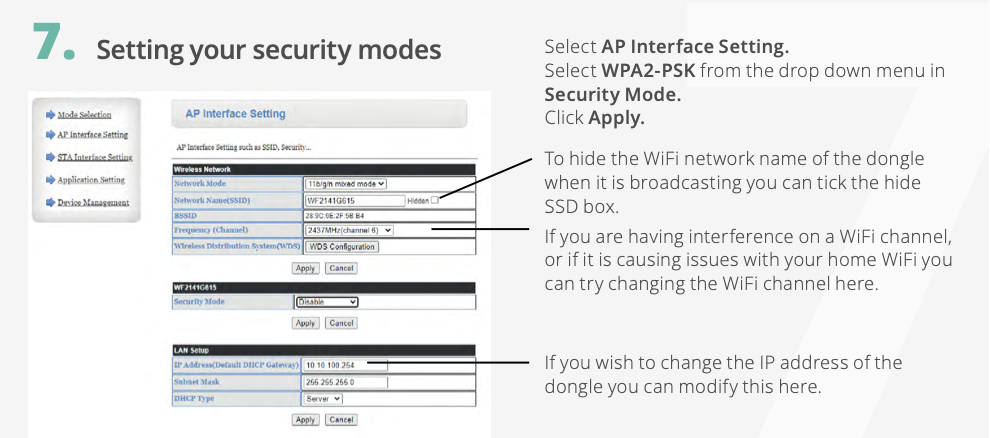
Givenergy use WPA2-PSK for security with their Gen 1 dongle.

As I have learnt from this thread, Virgin seem to do their own thing ......

Rob

G
#44 geoffreycoan

Rbor All a bit crazy Rob, especially with Plusnet offering to set you up an EE service. I thought they ran as different businesses.

Oh well, you’ve saved £ in the end and got a free mesh network. As I’ve said before I’ve got the Mercusys mesh network which is a cheaper version of Tplink Deco but the same software. It is night and day better than anything I’ve had before.
I did end up buying a few additional nodes from ebay to extend the range in the garden and garage, but its been trouble free unlike the powerline I had before

#45 pgbish

Lynn As a footnote to this, i found that the sky hub needed a significant amount of time to settle after booting up (1 hour or so). I couldn't log into the router for some time and the pods took a while to connect/disconnect and reconnect again. It may have been doing an update or something, but it certainly took a while for the hub and pods to "settle" down. So all i can say is be patient for a while after switching it on.
It may have been my willingness to get it working sooner rather than later that caused the sky hub to play up in the beginning.

R
#46 Rbor

Lynn Givenergy use WPA2-PSK for security with their Gen 1 dongle.
This is from the GE wi-fi guide when configuring the dongle:

GE link: https://givenergy.co.uk/wp-content/uploads/WiFi-Dongle-Guide-2024.pdf
You can check in this document if the instructions match your dongle.

So WPA2-PSK may be a better option if you can set in the Sky Router.

Rob

L
#47 Lynn

Hi . Thanks to everyone who has posted help here. Have just been by the inverter which is generation 3. I changed security to WPA2 in Sky app and tried setting up the dongle in Givenergy app. No idea where the dongle is in inverter so hovered until there was indication of wifi. Had turned off mobile data on phone. Eventually it picked up the inverter's wifi name on phone and said would connect temporarily. Wifi connection to inverter then dropped out and said couldn't connect. Tried this over and over and same result.
Tomorrow will try the long way shown in givenergy video.
Only good thing is extension pods have helped through house but no success with inverter.
Thanks again.

V
#48 Vestas

geoffreycoan I thought they ran as different businesses.

It's all one parent company though, so apart from the additional layer of management there's probably not a lot in it in terms of costs incurred transferring customers from one to the other.

I rather thought the plan was for BT Broadband to be phased out, with EE Broadband replacing it.

Plusnet is another matter.

It was bought in the mid-00s after the great proliferation of ISPs in the 90s/00s as by that point nobody sane trusted BT Retail to be their ISP, so they needed more than just another rebrand.

Plusnet has been somewhat of a "red-headed stepchild" ever since in terms of periodic attention/love from the parent company. TBH I'm not sure why Plusnet are still open, other than closing down/reconciling their billing systems would be akin to sorting out Horizon 😉

As an aside I knew the people who setup Plusnet back in the 90s - they had a small warehouse in Worksop which sold computer peripherals and I had a trade account with them. They opened a sideline called Force9 Internet and the PC parts business wasn't around for much longer - much more money in dial-up internet.....

R
#49 Rbor

Vestas Thanks for your interesting history on Plusnet. I remember buying some software from a pet in an industrial site just west of Worksop in the 1990s.

When Plusnet came back to me, offering to pay my BT cancellation fee to move to EE, I did ask about Plusnet's position. The guy I was speaking to suggested that Plusnet was likely to disappear, absorbed into EE.

BT phoned me asking why I was cancelling and I asked about BT/EE positions. Similar answer. I reckon internally they are working to combine everything. I wouldn't be surprised if BT continues to offer BT Broadband but it will really be EE. I think BT and EE are amalgamating although one may be taking over the other.

I now have an EE router to add to my collection. I will then need to send my BT router and disks back to BT.
For the EE router, the login details to the ONT are:
username: bthomehub@btbroadband.com;
Password BT (or left blank).
..... Identical to BT router ......
....... and this is what I added to connect my new Tp-link Mesh router.

Rob

R
#50 Rbor

Lynn In the GE guide, the credentials for me to get into the inverter wi-fi were:
admin
admin
!

Rob

L
#51 Lynn

Rbor oh ok. Will try that tomorrow. Thank you.

L
#52 Lynn

Rbor Thank you everybody. Finally finally have now connected the inverter. A nightmare as at each stage the phone woukd go dumb as if inverter lost connection to phone. However, should I put back up the security on router or leave it as OH wants in case we lose connection again? Having literally spent days trying to connect and researching the problem someone somewhere has not considered that new technology moves forward. They should have been aware that different types of appliances with connectivity will also need to move forward.
Well after that rant thank you once again for suggestions and help.

L
#53 Lynn

pgbish Yes turned down the security level to WPA2. Finally got success despite each time appearing to lose 'connectivity' to inverter going through the steps. Is it OK to up the security level again? Don't want to go through this nightmare again.

Surely this is going to be a much more common problem as internet providers up their technology.
Thank you for your help and suggestions. Much appreciated.

V
#54 Vestas

Lynn No, you can't put it back to WPA3 as the dongle will fail to authenticate (connect) again.

I suspect the hardware on the dongle is incapable of handling WPA3, simple as that. It also fails to retry authentication if its been rejected/ignored once so that's probably why WPA3-T (mix of WPA2/WPA3) on the Sky router doesn't work.

Although I'm on Sky I haven't used any of their routers for a while now but it might be possible to only turn WPA3 on for the 5GHz band and have WPA2 for the 2.4GHz band.

Most older devices will be 2.4GHz anyway and having 5GHz using WPA3 is unlikely to cause problems - and will stop certain phones from whinging about "insecure networks" 🙂

L
#55 Lynn

Thank you for that. OH right then not to risk it. We only have 5GHz on our Sky router. Will leave ut on lower security and hope none of phones/tablets are affected.
Can't use a different router than Sky as we have their extender pods and I don't think they'll work with another router.
Thanks again.

V
#56 Vestas

Lynn You probably wouldn't want another router 🙂

You will have 2.4GHz and 5GHz on the router and the pods and I'm sure Sky (like all big ISPs) have made sure their pods are useless without a Sky router or a lot of hassle. I may as well ask on the forums for you in terms of WPA2/3 etc.

#57 pgbish

Lynn Only use WPA2. I suspect maybe GivEnergy will do an upgrade at some point in time to WPA3!

#58 nophead

I don't think any of the GE products support 5GHz so you must have a 2.4GHz channel it it connects.

Also 5GHz doesn't go through the walls in our house so it would be useless without 2.4GHz for us. Fortunately we have a Google mesh and don't use anything from the ISP.

V
#59 Vestas

pgbish I suspect maybe GivEnergy will do an upgrade at some point in time to WPA3!

Not on the USB dongles they won't.

T
#60 TX200

There was some talk about new dongles, but not sure where they are in terms of development cycles.

V
#61 Vestas

TX200 ...or who is going to pay for them presumably?

L
#62 Lynn

Vestas If 2.4GHz is on router there is no evidence of being able to change 5GHz to anything! I wish there had been evidence it would have saved me days of struggling with getting it to connect.

R
#63 Rbor

Lynn This has been a really informative thread. Our suppliers are really striving to tie us down to using their equipment, often to use their TV packages. My No 1 need is the Broadband connection.

I have looked at some Virgin and Sky internet threads and I can't believe how they are trying to tie down their routers. I have had a 2nd Virgin cold caller today and they just lie. These snake-oil salesman will say anything to get their commissions. Glad I haven't been tempted by Virgin, especially as they fibre connection seems to be proprietary.

I can't understand why they are trying to restrict wifi to WPA3. Load of devices are WPA2 and surely we can't be expected to purchase newer WPA3 devices when the majority use WPA2 and 2.4 GHz?

I managed to replace my old BT router with my new Tp-link Deco Mesh system by connecting directly to my Openreach ONT. I used my old wifi SSID and password and had no problems logging onto 2.4GHz or 5GHz devices. The default security on the Deco is WPA2 (I think WPA-PSK). I am so relieved to have got rid of my old BT router.
The Sky WPA3-T should work as it should accept WPA2 and connects to an Openreach ONT. However their 'WPA3-T' obviously doesn't work in this way!

Rob

V
#64 Vestas

Lynn As I expected the Sky router (Sky Max) isn't capable of applying different encryption standards to SSIDs so if you ever need to use WPA3 then you'll have to buy a third-party wireless access point which is capable of it & connect the dongle to that.

V
#65 Vestas

Rbor I have looked at some Virgin and Sky internet threads and I can't believe how they are trying to tie down their routers.

I can. They're both owned by USA companies where that's the norm. Edit - as is renting the equipment to you which they both do with their wifi extenders.