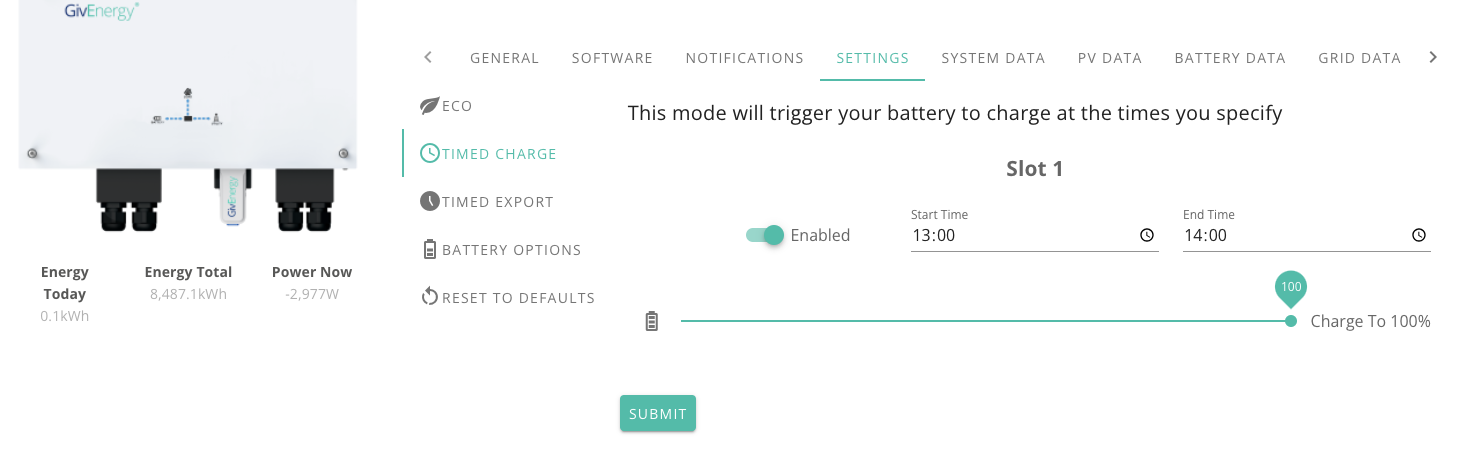
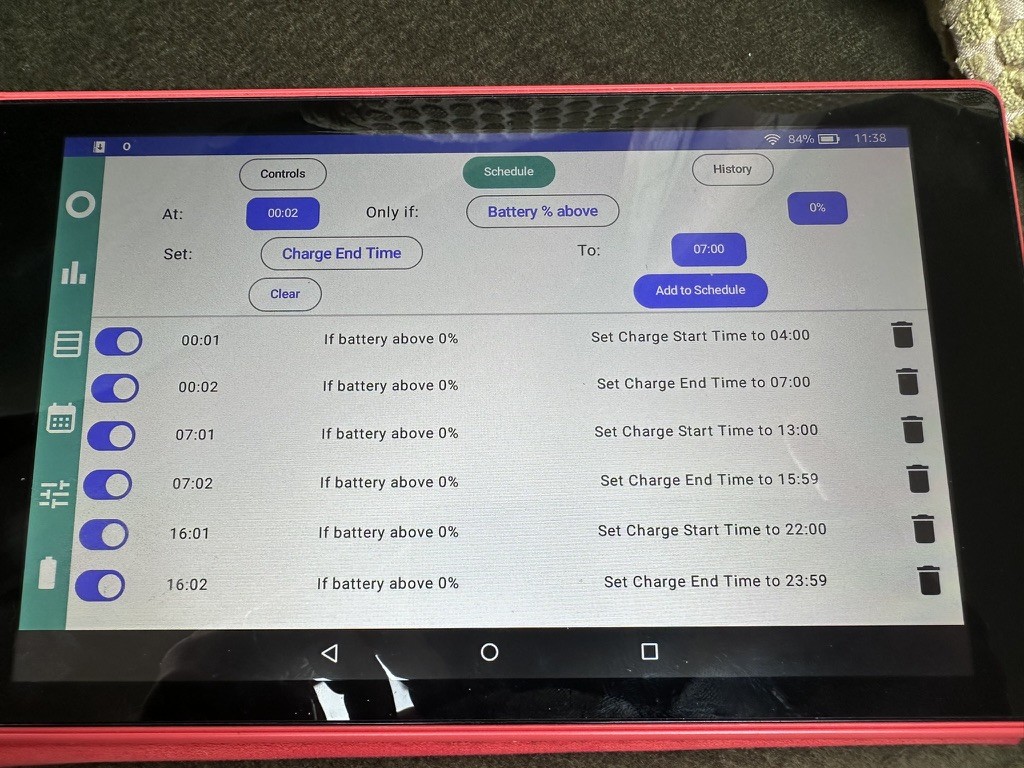
We’re on Octopus Cosy tariff and have been since February 2023. This has 2 off peak cheap windows but it is only possible in the app to set one window. So we have to set reminders to change it twice per day every day, which is a real hassle. I raised a feature request 18 months ago but nothing has happened. Even setting it up via a web Interface would be fine. Anyone found a way of doing this? Thanks
Multiple charge windows

You have to do this on the web interface of the inverter via the portal
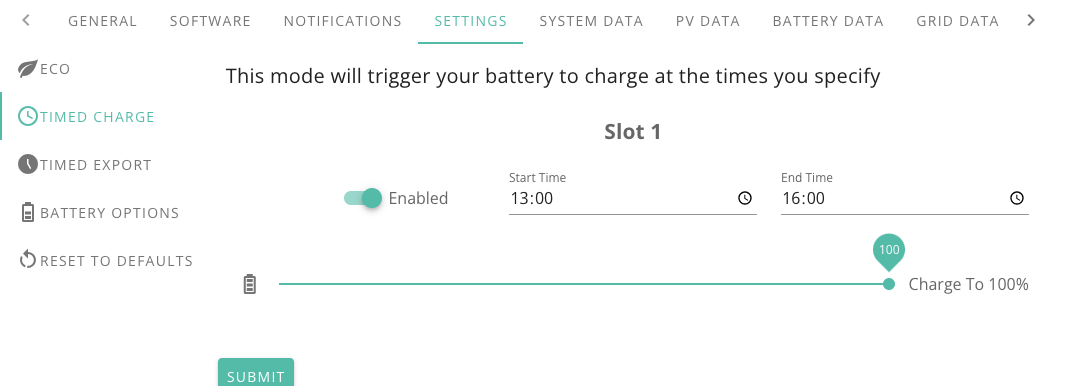
I can't see how to add a 2nd slot?

chrisdrye Has to be the remote-control part of the web interface - in the top-right look for a 'gears' icon. (For me, it's now hiding in the drop-down list from the ...)
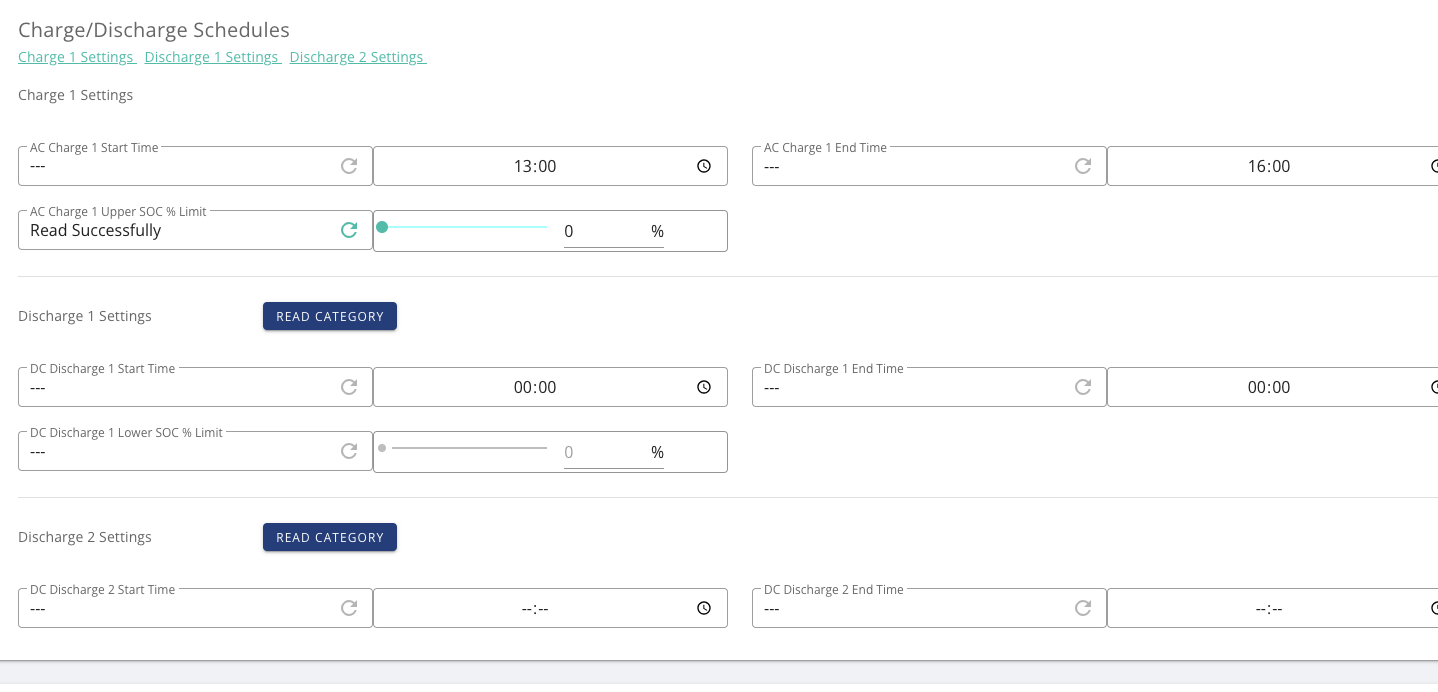
Then scroll down, and near the bottom you may find multiple charging slots. Note, however, that some older inverters don't provide this feature.
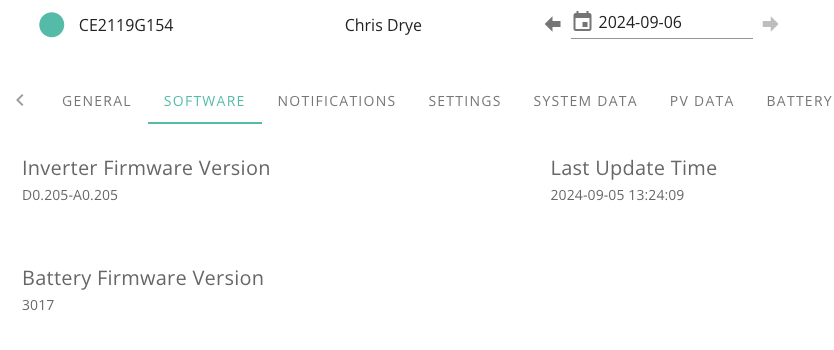
There was an inverter / battery firmware update so I’m just running that and will then take a look, thanks
Found the remote section as described but there is only one charge slot :-(

Disappointing if my inverter is "too old" for this functionality, its warrantied for another 3 years from today!


Take a look at Wonderwatt, it might achieve your needs.

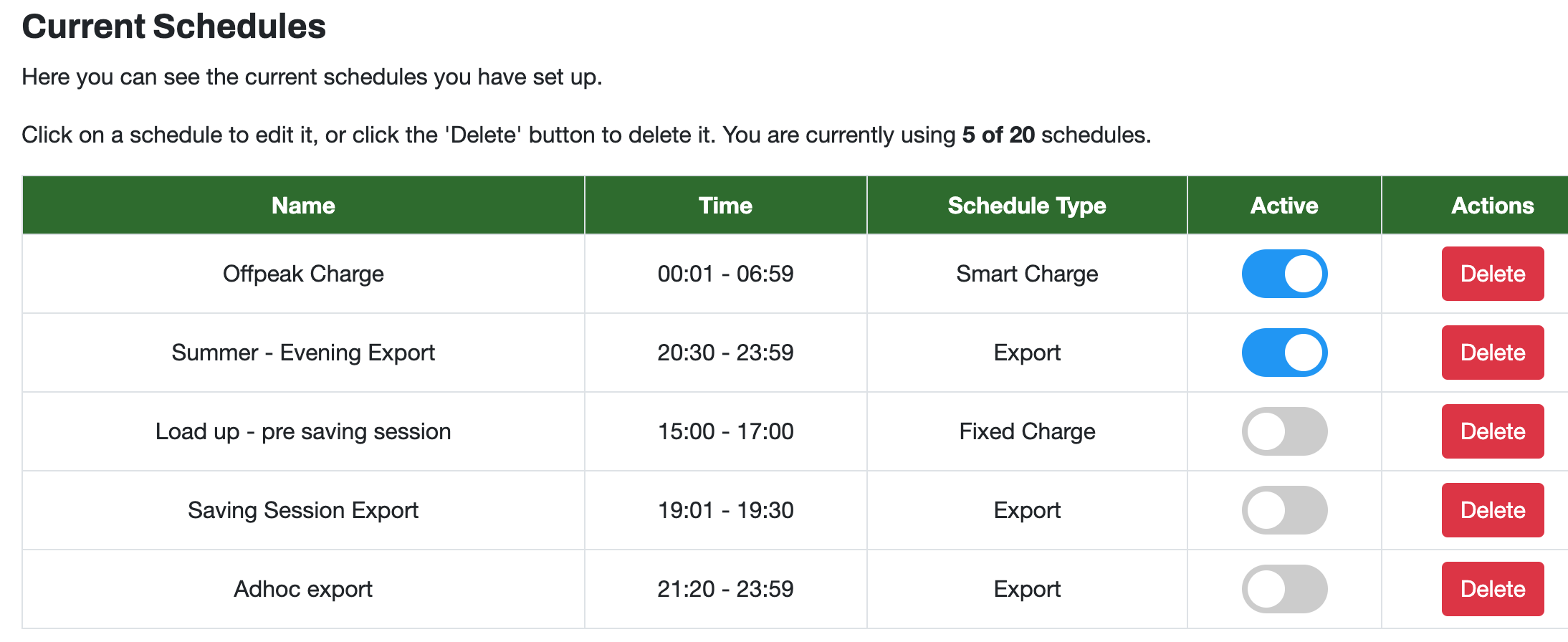
chrisdrye We now offer 20 charge and discharge schedules with advanced conditionals like current state of SOC and solar forecast.
This allows users to configure seasonal schedules with specific settings which they can then simply deactivate, rather than tweak values again or write them down for winter vs spring, summer etc.

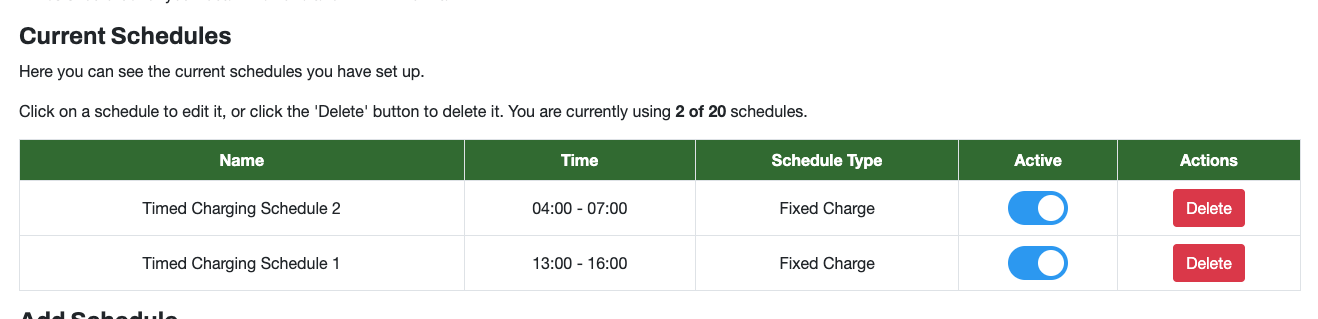
Looks amazing, thanks! Should I turn off the single charge window in the GivEnergy inverter web interface, or leave that one slot on? I've set up the 2 slots I want in Wonderwatt and its all connected via API etc.
For example the 13:00-16:00 window has passed but the GIvEnergy has not been changed to 04:00 yet?
I can't wait to try the predictive solar charging, but will start with the basic fixed windows

this is still set like this in the GivEnergy web interface

chrisdrye This has 2 off peak cheap windows
I think it's now three ..? 0400 to 0700, 1300 to 1600, 2200 to 0000
https://octopus.energy/smart/cosy-octopus/

chrisdrye
Switch Eco on and delete you GE instructions I would say.
No doubt WW admin will be following and advise, they are shhhh hot!

chrisdrye You can leave the Timed Charge in place, we will overwrite it closer to the time when your next window is due, so that will be a few mins before 4AM.

lol, sorry!

Watcher No, you're right, normally we ask people to disable them, but that's mainly when they already have multiple slots, because we use the first, default slot. But in this scenario, it doesn't matter. 😉
Wonder Watt Have you got it running on an EMS plant setup? If you want to try it pm me.
Guys, this is amazing thank you so much. I can’t believe this tool exists and there’s literally developers on this thread helping to set it up restores faith in the world!
I had no idea they changed that thank you. That’s an excellent tip.!

Slartibartfast Thanks - we recently worked through some changes to support a dual AIO system with a gateway to send instructions to. Is this something similar?
Hi @Wonder Watt , the 22:00-00:00 charge window automatically changed which was great....

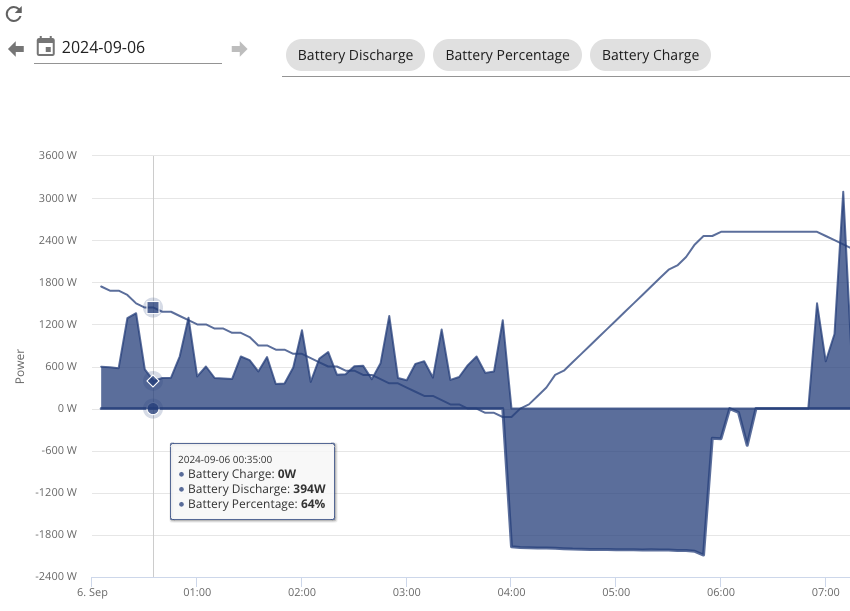
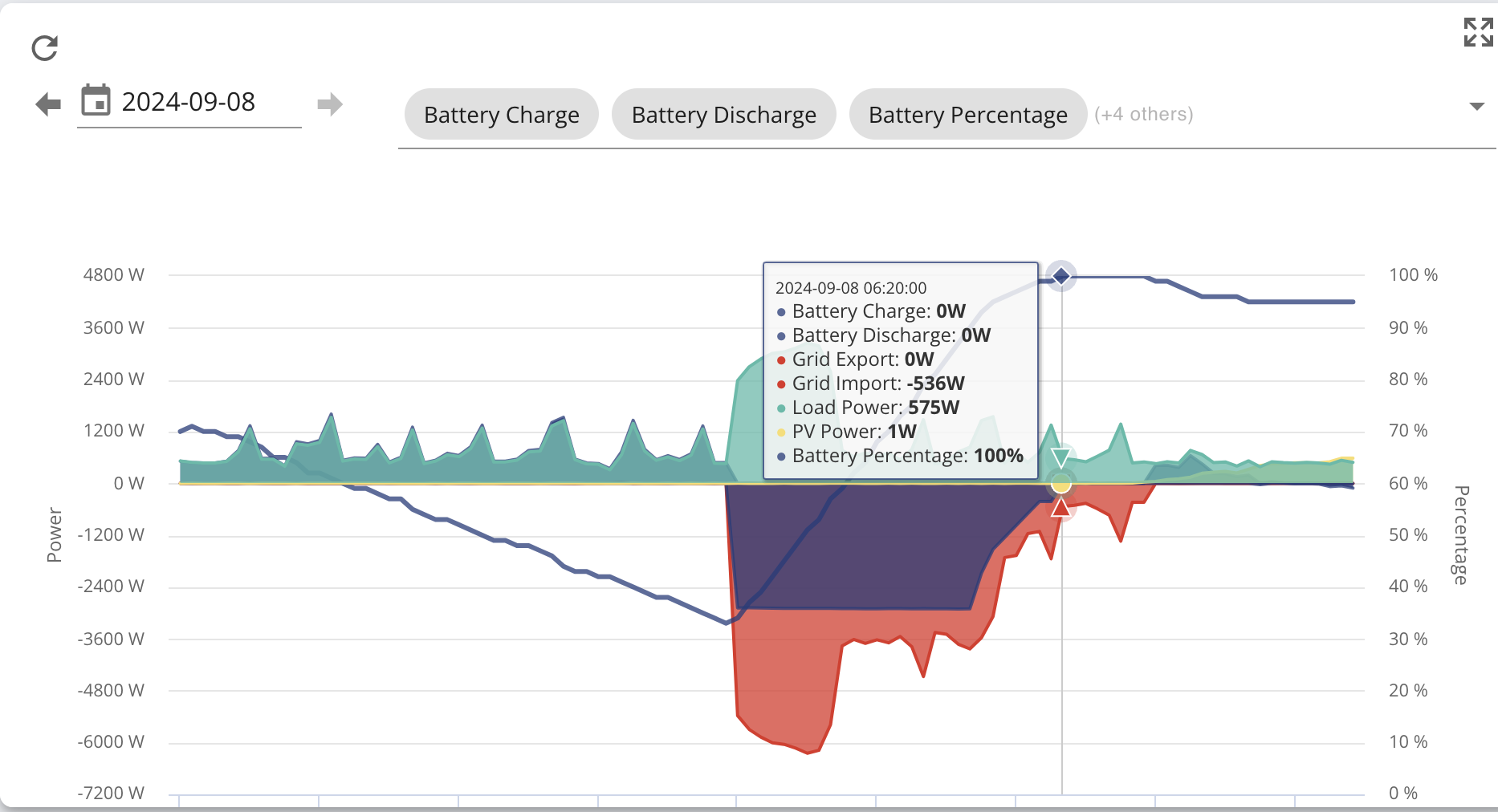
Although the 04:00-07:00 window seemed to stop around 06:00 at around 80%? all of my slots appear to have the same settings?

my WattID is concerned-tough
Thanks in advance!
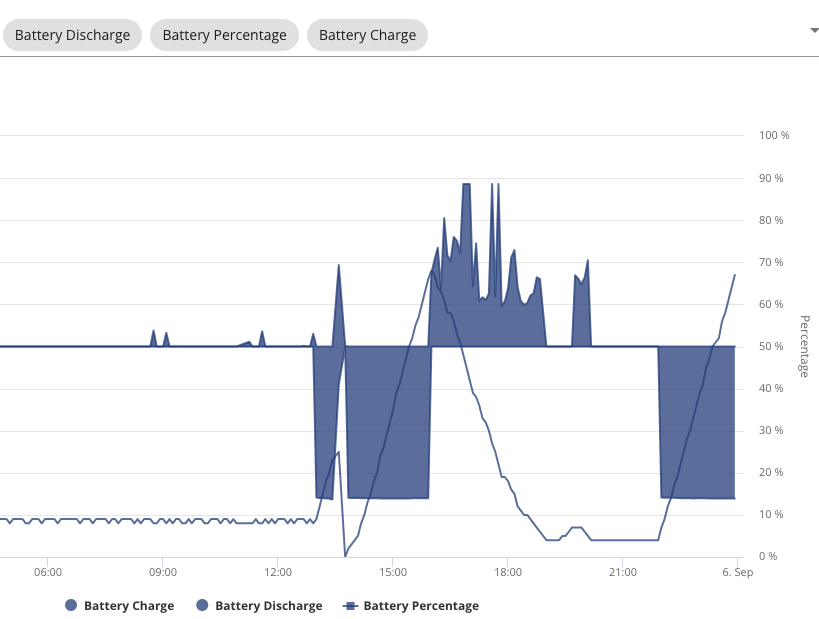
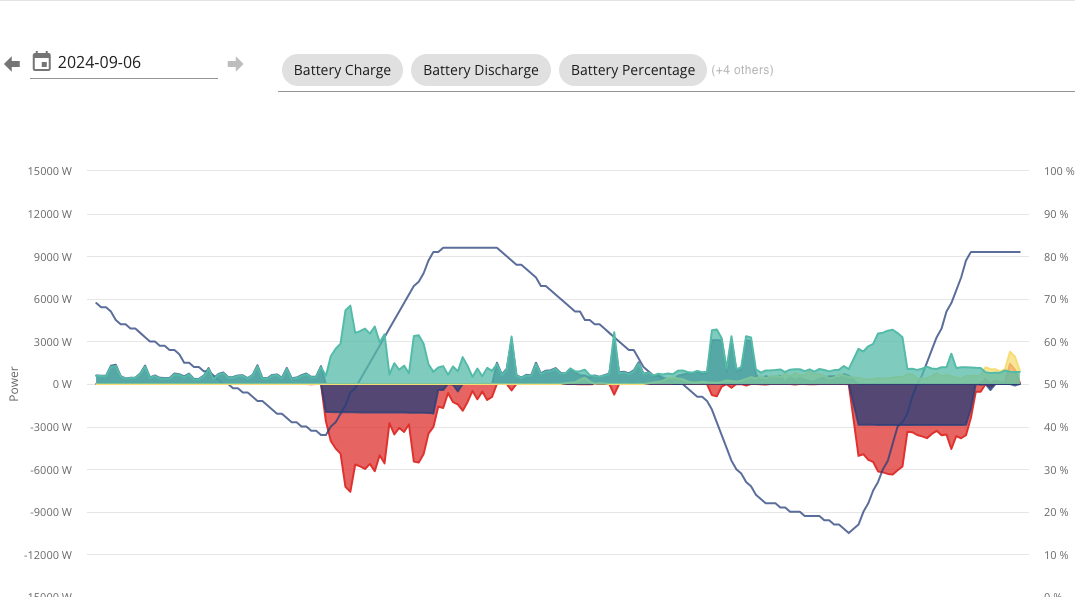
chrisdrye it looks like the charging power had dropped significantly before it stopped charging. This can be a sign that BMS has lost track of SoC a bit (and is being a bit cautious as it approaches max voltage). Does your battery regularly get filled to 100% ?
Mine did similar recently - it was a sunny day so I just let it slowly charge to 100% in it's own time. Next day, it got to 100% without trouble.
I notice it was only charging at around 2k - I think this is a feature of WW to calculate charging power required. Not sure if that can be overridden.
WonderWatt have just published their subscription model.
chrisdrye Slightly odd behaviour around 1pm ? Looks like it started charging, but then something changed and it started discharging, but SoC very rapidly dropped to 0. This can be another sign that BMS tracking has got a bit lost (though can also mean a weak battery cell, but I hope that's quite rare).
If it's not yet cold enough where you are to be running the heating, I might be a good idea to give the battery a one-off charge all the way through from 10pm to 7am - yes, you'll take the hit of daytime rate between midnight and 4am (for your heating too), but might be worth it in the long run.
At the risk of reading too much into a single chart... is your heat-pump short-cycling between midnight and 4am, or is that something else in the house consuming power in cycles ?
There is supposed to be an inverter firmware update coming that will give some Gen1 inverters multiple charge slots.
This has been 'coming' for a few months though.
https://community.givenergy.cloud/d/2777-post-sn-2209-gen1-inverter-firmware-upgrades
chrisdrye I can't wait to try the predictive solar charging, but will start with the basic fixed windows
The cosy rate in my region is around 11p. If you have export of 15p, then it's not really an issue to charge from grid, and if there happens to be more (excess) solar than will fit in the battery, exporting it. At worst, it's cost-neutral (after round-trip losses), and possibly earns you a penny or two.
chrisdrye There was an inverter / battery firmware update so I’m just running that and will then take a look, thanks
Which firmware are you now on ?
DD I notice it was only charging at around 2k - I think this is a feature of WW to calculate charging power required. Not sure if that can be overridden.
Maybe you can thwart it by putting in multiple adjacent charging slots - rather than 100% from 0100 to 0400, ask for 100% from 0100 to 0200 and from 0200 to 0300 and from 0300 to 0400. That would probably force it to charge at full power for at least the first one.
Good spot - because of the hassle of changing the charging windows we have only been charging for a small duration recently and its not been anywhere near as sunny. So the battery hasn't been at 100% for quite a while
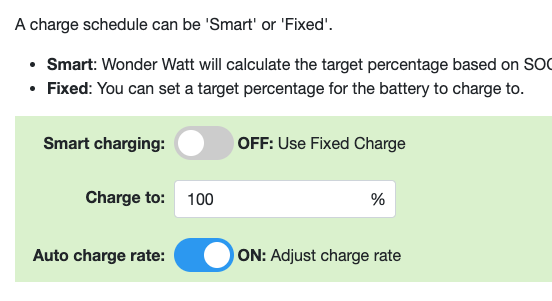
It has got this turned on, which I'm not sure exactly what this is doing?

The 1pm glitch was because I realised we only had it set to charge from 13:00-14:00, so I was adjusting it live to get the full 13:00-16:00, so I think it was a late change after it stopped to then restart.
Good idea to get the battery to 100% - I'll make a special schedule to do that and inactivate the others for one night
Yes, I think that is our Heat Pump short cycling in the night, we set washing and dishwasher (and hot water from the ASHP) to be between 04:00-07:00 so can't be those.
Good point! I was still remembering when our cheap rate was actually higher than our 15p export, so things have got cheaper on import since then. In which case, I'll keep it simple and just charge the battery in all cheap windows
chrisdrye It has got this turned on, which I'm not sure exactly what this is doing?
Yes, I'd guess the auto-charge-rate is the thing that calculates the required charging power. Eg if you need to add 3kWh in 2 hours, a power of 1.5kW is sufficient, which is probably kinder to the battery than charging at 3kW for 1 hour, then sitting idle for an hour. And in winter, keeps the battery warmer for longer. But that assumes a linear charging rate, whereas if it slows down as it gets full, it won't reach the target.
Turning auto charge rate off may get it to charge at fixed power.
chrisdrye The 1pm glitch was because I realised we only had it set to charge from 13:00-14:00, so I was adjusting it live to get the full 13:00-16:00
It's really the very quick drop to 0% that had caught my attention. It's quite a small spike above the axis, yet SoC dropped from 25% to 0%. Compared with a much bigger area under the axis where it charged from 10% to 25%.
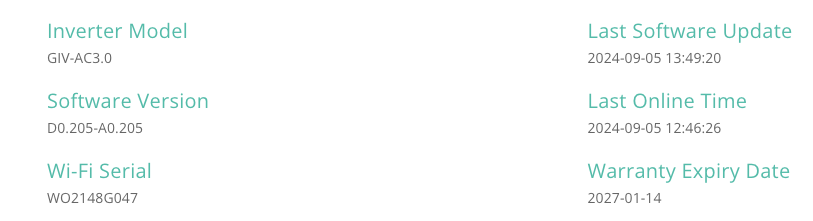
chrisdrye Firmware 205 looks like AC-coupled inverter. I don't know much about those, I'm afraid.
In a thread about that firmware, https://community.givenergy.cloud/d/4712-ac3-inverter-firmware-update/19 suggests it's known to slow down for the last 10%
chrisdrye The Auto Charge rate means that WW will look at the SOC before charging and calculate what charge rate would be required to get to the target charge over the time period.
So if your inverter can charge at 6Kw and if you needed 6Kw to "charge to" your target, if you leave this off, the system will charge at 6Kw, but if you set it on and your charge window is 2 hours, then WW will calculate the charge rate to 3Kw.
CW Good to know thanks. Once I have reestablished that the battery knows where it's SOC is I will give this a try. I have a 8kwh battery and the max charge is 3kw, but I can see the advantage of charging at lower power to be gentler on the battery and use the whole charge window
I'm on live chat with GivEnergy because the battery refuses to go above 80%
I checked in the App, and it is set to 100%. I tried to set it to 70% and then back to 100%, restarted the charge, and then it started and stopped again

@Wonder Watt Live Chat are pointing towards the API as a potential issue, but it is set to 100% so not sure why it would limit the charge point to 80%?
In WonderWatt I switched on Smart Chart to 100% on their advice, left Charge rate to max
They sent this log, is the API telling it to go to 81% for some reason?

chrisdrye Hi Chris. Don't know if you've read some of the other posts today, but it seems Wonderwatt are going to start charging people for their services at around £6pm from the beginning of October. Shame because you've only just found them! 😩
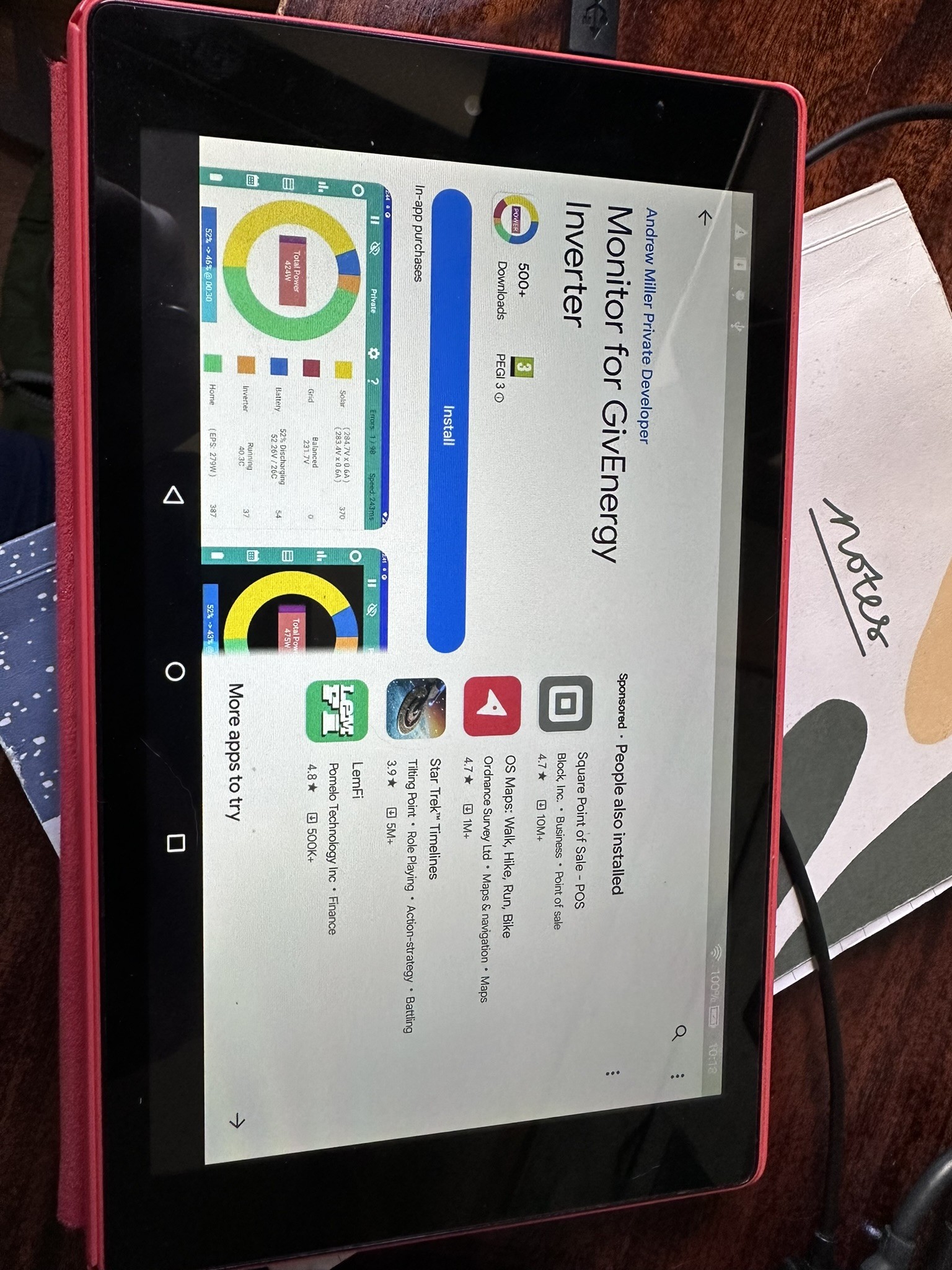
There is however another option. If you have an old Android phone or tablet or can get a cheap one from ebay or Amazon, there's an app you can use called 'Inverter' which basically does what you want with Cosy. It's free to use to monitor your equipment and have a play around, but for a one charge of £10, you can then unlock all the settings to set charge and discharge using the schedules. It's a bit more basic than wonderwatt, it's not cloud based as it operates locally, so you need to keep your old phone or tablet on all the time.
I've been using it since February and I haven't had any issues. I have my old Samsung phone sitting on cheap phone stand from ebay, and sits on the piano like an in home display.
Maybe worth having a look as it's ideal for Cosy or Flux. Here's a link.
https://givenergymonitor.wixsite.com/tutorials/tariffs
chrisdrye They sent this log, is the API telling it to go to 81% for some reason?
Can't tell from that. The api log would be at the bottom of the remote-control page - use the gears icon in the top right (perhaps hiding under the ...). At the top of the page, there's a 'jump to logs' button, or just scroll down. Then the API log would look like
2024-09-06 05:35:03 You Battery Charge Power Written Successfully 1333 3600 3600 API - Inverter Settings - givenergy.py
2024-09-06 05:35:03 You Battery Discharge Power Written Successfully 952 3600 3600 API - Inverter Settings - givenergy.py
2024-09-06 05:35:02 You Enable DC Discharge Written Successfully true false false API - Inverter Settings - givenergy.py
2024-09-05 23:25:03 You Battery Charge Power Written Successfully 1238 1333 1333 API - Inverter Settings - offpeak.py
2024-09-05 20:59:04 You Enable DC Discharge Written Successfully false true true API - Inverter Settings - discharge.py
2024-09-05 20:59:03 You DC Discharge 1 End Time Written Successfully 22:30 21:48 21:48 API - Inverter Settings - discharge.py
2024-09-05 20:59:02 You Battery Discharge Power Written Successfully 3600 952 952 API - Inverter Settings - discharge.py
2024-09-05 20:59:02 You Battery Charge Power Written Successfully 3600 1238 1238 API - Inverter Settings - discharge.py
It should show all the wonderwatt activity.
If trying to pin down a problem, I'd probably remove external depencies such as wonderwatt - no reason to suppose they're going anything wrong, but it is an extra complication...
There's an interesting tiny blip of battery charging after each charging period. The cells might be rebalancing and it decided it was ready for a little more charge. It's hard to tell. Perhaps you could add the battery voltage to that chart ?
Do you use android ? There's a free thirdparty app https://givenergymonitor.wixsite.com/tutorials that can show the individual cell voltages. That's useful to see if any are badly out of line. (There are other ways to get the info, but this is simplest.)
- same one as mentioned above, in fact.
DD I've revoked the API and tried to start the charge from the GIvEnergy App and it still won't charge above 81%. very weird
I don't own any android devices but might check out the suggestion from @TimHutchings above
chrisdrye but it is set to 100% so not sure why it would limit the charge point to 80%?
There is a bit of a weirdness on my hybrid system. It's unlikely that it's also on your system, since the firmwares are very different, but just in case...
My system has two different registers that control the target SoC. I keep forgetting which one is which, so I use an API call to copy one from the other.
2024-09-02 23:25:03 You AC Charge 1 Upper SOC % Limit Written Successfully 100 75 75 API - Inverter Settings - offpeak.py
...
2024-09-02 07:48:20 You AC Charge Upper % Limit Written Successfully 70 75 75 Mobile app presets - Timed Charge
At 07:48 I had used the app to set the charge target to 75%, and then at 23:25 my script had run and copied the 75% from "AC Charge Upper % Limit" to "AC Charge 1 Upper SOC % Limit". (Not sure why the previous values had got out of sync... perhaps I was playing around with the settings.)
I think it's actually the latter one that the inverter actually uses (though I've not re-tested since last firmware update.)
On the remote-control page, I have one one value up at the top, in the enable/disable section (and I think that's the same one the app uses), and then when I scroll down, there's a second register in the "Charge/Discharge Schedules".
When I enumerate the API settings available:
77 AC Charge Upper % Limit : Value must be between 0 and 100
101 AC Charge 1 Upper SOC % Limit : Value must be between 0 and 100
But since you only have one charge slot, I suspect this won't apply to you.

chrisdrye I've revoked the API and tried to start the charge from the GIvEnergy App and it still won't charge above 81%.
Is it showing no power at all going into the battery, or just a very small amount? When my battery was being a bit stubborn, it was as low as 50W for a time.
Could try using the app or portal reset all settings to default, just in case that is able to clear anything weird.
DD I've restarted the inverter and forced a charge to 100%. Its now charging at 2.86WK, and at 81%, I hope this gets it to 100% and I can relax that the baseline system is back to working again
I think £6 per month is quite a lot for the functionality, so once i know the cheap android phone/tablet route can do 3 slots, I'm tempted to go down that route
chrisdrye Drat. It goes to 81% and then stops charging again! Right, default settings and restart again
chrisdrye Currently in Cosy peak - might want to wait till after 7pm.
DD I decided to throw caution to the wind with the £/kwh as its annoying me that it won't charge above 80%. It just isn't prepared to do it. the API is revoked, all settings back to factory. Just doing an inverter restart and I'll try again at 19:00 to force it from 80% to 100%. I will also email GivEnergy and maybe call them in the morning
chrisdrye I'd suggest leaving it sitting in charging mode for a while (hours ?) just in case it does some rebalancing and then springs into action. And see if the battery voltage changes at all over that time.
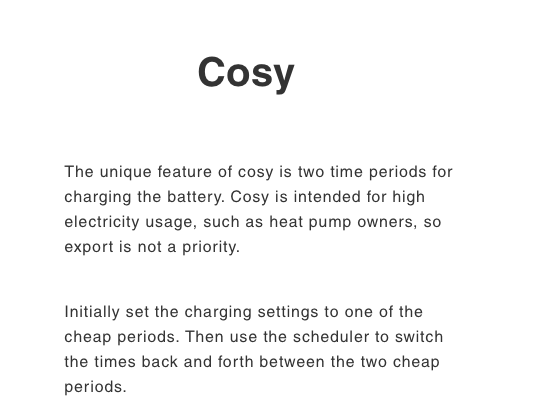
chrisdrye on their website it says "The unique feature of cosy is two time periods for charging the battery"
I think the third cheap slot for Cosy is a relatively recent addition.
@Rubikcube - https://givenergymonitor.wixsite.com/tutorials/tariffs needs updating
chrisdrye No problem Chris. You just schedule another charge. Cosy only recently changed to three cheap slots a day, a month or two ago I think, and I don't expect the websitehas beenupdated . I think you can schedule at least 12 instructions , maybe more, so you could fit in some discharges too if you're inclined. You can always email Rubikcube, the writer of the app, from the link I posted earlier. Think his name is Andrew Miller.
chrisdrye but can it also do 3 slots?
Yes, no problem, just add the changes at the appropriate times to the scheduler.
The app can send one command per minute. If you try to set another command for the same minute it just overwrites. The command is send shortly after the minute starts and if it fails it is retried every 6 seconds until the next minute.
Since there are 1440 minutes in a day, and you need two commands to switch start and end times the theoretical limit is 720 slots per day!
I will add updating the wix site to my to-do list.
chrisdrye any progress/news ?
DD Hi, having revoked the API, I didn't get through or any reply from GivEnergy, but started manually setting charge windows in the app. I am relieved that it has now managed to get to 100%

Next window is 13:00-16:00 today so will see if it charges again. But perhaps it has somehow righted itself
Rubikcube thanks,
I don;t have any Android devices, but I do have a 2021 Kindle Fire HD 10 tablet? Is this running a version of Android OS, do you think I could get the app working on here?
chrisdrye apparently it can be massaged into being a proper android device:
https://www.informationweek.com/it-leadership/turn-your-kindle-fire-into-a-real-tablet
Good news, I've "rooted" my Fire HD10 to get Play Store on it and downloaded the Monitor for GivEnergy inverter app.
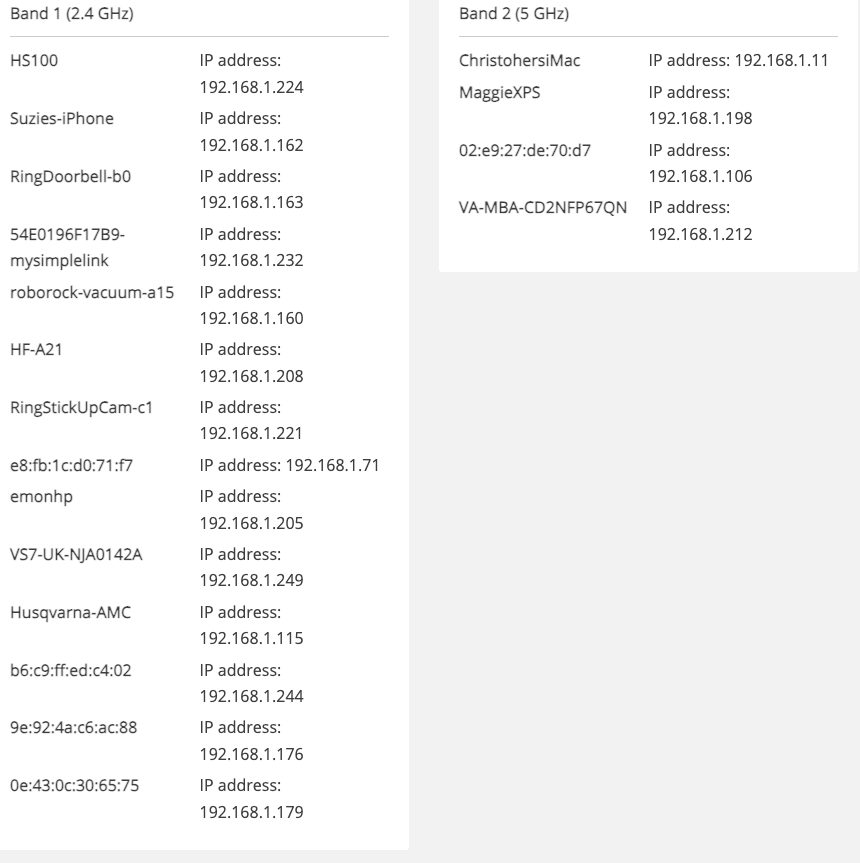
How do I find the IP address of my inverter?
Tried to look in the router config but nothing that stands out as the inverter?


chrisdrye The HF-A21 look like it (from memory)
Thanks, Bingo. I also googled it and same came up. I am connected!
Hi Rubikcube, I've purchased the premium app and I think I've programmed the 3 time slots correctly?

chrisdrye Looks good to me! Occasionally the router sends out a new IP address, so it's a good idea to fix the IP address in the router if you can. Also remember to keep the tablet plugged in so the battery doesn't run out. 😄
chrisdrye PS Just make sure your 'Charging' 'Timer' slider is On in the Controls tab, or it won't charge in those slots.
HI everyone, a quick update and thank you! The mildly jailbroken Fire HD8 with the "Monitor for GivEnergy Inverter" are working like a charm. Brilliant solution for a repurposed old unused tablet and a £10 app. Finally don't have to worry about the hassle of changing the time slot 2 times per day!