Battery calibration ......... ?

38 comments started 2024-09-06 last 2024-10-05
GivEnergy ProductsBattery
B
#1 Brassy

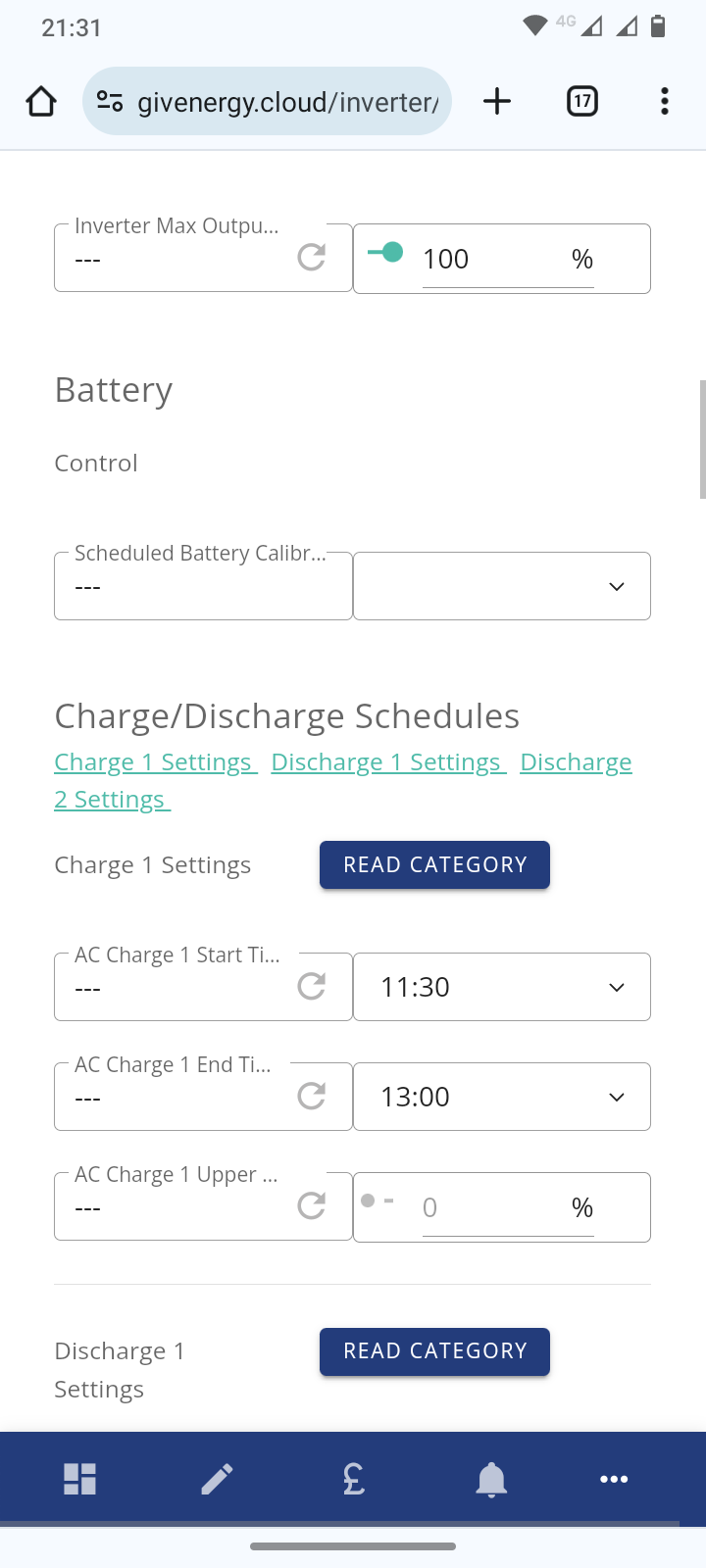
Last night after several weeks of battery "misbehaviour" and suggestions I should re-calibrate my battery (from more sources than people on this blog) I bit the bullet. Having found a "scheduled battery calibration" function in the remote control settings, and knowing that my battery was already at 5% SOC and that this morning would be sunny, I set the calibration to begin 2 minutes later. Nothing happened (until the same time tonight!)
When I checked it seemed that the system timer was ahead of my own clock, so I guess that the function is triggered by a one-shot when the system timer crosses the line. What exactly does it do in terms of timing, discharge rates, charge rates, and resets? Why do GE not provide easily accessible links (from the portal) to explain these things?

So I tried to re-schedule the function for much later and I just got a verification error. There is no button to cancel it, or re-schedule it. So it started at the same time tonight, one day later!!! And the active settings were not displayed after the error.
Does anyone from GivEnergy read any of this stuff?
I guess I'll let it run and see what happens.

M
#2 M_J

I didn't think that you could schedule your own battery calibration? I will look to see if I can see what you have found.

M
#3 M_J


Ok found it. Not seen that before. A new option?

B
#4 Brassy

I think I had not seen it before either. It's probably new, but it could do with a bit more flexibility and an explanation from GE.

#5 ProximusAl

I’ve just tried it. Works perfect.

At 21:54 I scheduled a calibration at 22:00, and at 22:00 the calibration has started.

Perfect timing as I had about 25% of 16.4 kW, and now charging up in the cheap slots.

Even better is PredBat has recognised it’s calibrating, so stood down for now.

T
#6 treborUK

Battery Calibration is just a display when I go in, no option to select a time.
Suspect it may be some WIP on the portal and for a while it was allowing us to select it.

M
#7 M_J

It's the one thing that GivEnergy has been reluctant to give control to the users. I wonder if they are reconsidering?

It would help their tech support as the owner of the battery can decide when to do it.

It always annoys me that I can't specify a time as on Agile tariff there are times I would want to avoid.

I will look again to see if I still have access to it.

B
#8 Brassy

ProximusAl
My battery calibration has worked too.

This is user remote control from the cloud portal. Probably new. As I said above, my principal observations with it are:
1) You can't see when it has already been activated.
2) You can't see what the time values are in the cloud portal remote settings after it has been activated.
3) You can't delay the time settings or cancel the activation once it has been set.
4) My system "missed" the start time on Thursday evening (probably my setting it to19:21 at 19:20, too soon) and since I could not cancel or delay it, so it then commenced at the set time the following evening which I would have preferred to avoid.

Just as a recap:
Inverter GIV-HY5.0, Software Version D0.309-A0.309
Battery GIV-Bat 9.5 Firmware Version 3017
18 panels @ 435W, direct on south.
No EV
Commissioned 29 Feb 2024

J
#9 Jellybaby

Nice the option has been added but will refrain from using until told to do so.

A
#10 arczi19

Brassy Has the calibration fixed the problem you had with your battery?

B
#11 Brassy

arczi19
I don't think so. The battery capacity is lower than it was 6 months ago, I think the re-calibration has simply moved the SOC boundaries to match the reduced capacity.

A
#12 arczi19

Brassy Interesting. I'm looking at the battery capacity entity in home assistant and it looks like mine has increased since the overnight calibration.

Not sure what to make of it really.

G
#13 geoffreycoan

I see the option is also available for my Gen 1 hybrid inverter running 191/193 ‘fast response’ firmware. It appears right next to the battery pause control options.

I also have a new ‘inverter meters’ screen which shows inverter meters 1-8, appears to be expecting a 3-phase inverter setup as its showing all 3 phases. But no data at all on any of the meter tabs. My meter data appears to still be in its old place on the ‘inverter data’ screen

#14 Woodstock

Brassy I scheduled a calibration last night and it ran successfully (including start and finish notifications).

Your observations 1,2 & 3 applied to me also. Regarding observation 4; my calibration ran at the scheduled time but this was set for several hours in the future.

Only slightly disturbing thing is that my already low 100% SOC voltage is now even lower than it was before running the calibration!

Gen 1 AC-3.0 inverter, software version D0.205-A0.205
Single 100% DoD 8.2kWh battery, firmware version 3017
Installed November 2021.

16 panels @ 220 W (3.52kWp)
Installed August 2009.

G
#15 geoffreycoan

Brassy 4) My system "missed" the start time on Thursday evening (probably my setting it to19:21 at 19:20, too soon) and since I could not cancel or delay it, so it then commenced at the set time the following evening which I would have preferred to avoid.

I wonder if you had of put another calibration request in via the portal with different times whether that would have overridden the first, or whether you’d have got two calibrations ?

C
#16 CW

Brassy Could I ask about this. I did start another thread with my questions, but then came across this one, so...

What do you need to do in order that the charge phase of the calibration starts at the cheap slot start time?

Is it:

  1. Look at SOC
  2. Calculate how many kWh will need to be discharged to get to 0 (ignore the 4%)
  3. Divide this by the maximum discharge kW rate set on the inverter to get number of hours to discharge
  4. Set calibration time to cheap rate start time - (3)

e.g.

  1. SOC is at 50% on an AIO
  2. 6.75 kWh needed to empty battery
  3. At 3kW discharge rate this would take 2.25 hours
  4. Set calibration to start at 23:45 (02:00-02:15)
#17 Woodstock

geoffreycoan As Brassy and I have found, it is not possible to add, amend or delete a scheduled calibration once you have entered a time. Bit of a limitation in the coding; you have to make damn sure that the time you enter is what you really want as there is no going back!

#18 Woodstock

CW Had you asked this before I ran the latest calibration I would have said yes (and indeed that is exactly what I did to determine my start time) but the discharge operation seems to have been amended. The battery discharge phase now ignores any maximum battery discharge power settings and uses its own step down schedule. In my case I had a maximum battery discharge setting of 3000W and the battery actually discharged at 3172W, 2436W, 815W and 381W. This meant that discharge took longer than anticipated and start of the charging phase was delayed by about 1.5hrs.

The charging phase also ignored my maximum battery charge power setting and used its own ramp down schedule. I had a maximum of 1300W set and battery actually charged at 3172W, 2436W, 815W and 381W. This step down schedule is rather crude and may be the cause of my 100% SOC voltage having dropped. Normal solar charging in Eco mode uses a much finer taper as the battery approaches "full".

Just for interest, I have run a calibration in the past with a very low maximum battery charge setting. This took several days to complete but did raise the 100% SOC voltage. Seem like this is no longer an option.

C
#19 CW

Woodstock Thanks for this. In some ways now that you've mentioed it, it does make sense that the charge/discharge rate changes as the batteries get to their lower/upper limits - it would be nice if the portal would allow you to put in a time for the charge cycle to occur and to then tell you when the discharge would commence (along with a "Continue?" option) - that would be really good

B
#20 Brassy

CW What do you need to do in order that the charge phase of the calibration starts at the cheap slot start time?

Since I have no EV, and I am on the Flexible Octopus and Outgoing Octopus tariffs I did not try to time my calibration to a cheap electricity slot. In future (if no change of tariff) I will try to time it to re-charge the battery when the sun is due to come out.
However I have been investigating inverter settings to take advantage of the "free electricity" that Octopus have been offering occasionally between 13:00 and 14:00. (Note that only the excess over "what you would normally use in that window" (ie import) is free.) My factory default maximum charge and discharge rate for my 9.5kWh battery is 3600W. Therefore in the free hour I can only hope to pump up the battery by a maximum of 3600W. So I do not want to discharge my battery lower than about 6kWn, which is around 65% SOC. In the ordinary system settings tab (not remote control) I activate Timed Export from 12:00 to 13:00 with a battery discharge floor of 65% to sell battery power to the grid. Then I also activate Timed Charge from 13:00 to 14:00 with a battery charge ceiling of 100% to use the "free electricity". If the sun is out then the solar generation always gets used first (only limited by the 5kW capacity of the inverter). This appears to work although some fine tuning may be needed. At 13:00 we also start the washing machine, dishwasher and oven if needed and "free" electricity is also imported to run them at the same time as charging the battery.
The savings for each session have been pennies, but may rise as unit rates do, and I'm also learning how the system behaves.
So far I'm not sure if the Timed Discharge setting has any role to play in the saving sessions.

T
#21 TimHutchings

Just used the portal to do a battery calibration today on my 9.5Kw. All went well, but the battery now has decided that fully charged is 194Ah instead of 195Ah. I guess that this might be something to do with the fact that it's not far off 2 years old and has done 618 cycles.
I set the calibration today about 10 mins before I wanted it to start at 9.15am, as I had around 16% in my battery. Forecast was sunny skys all morning with sunny periods from around midday. Off it went as expected at 9.15am, started discharging , then 5 minutes later was reading 0%. Inverter is a Gen1 5kw with the faster firmware, so exports at around 2.88 kwh, so there's no way it would only take 5 mins to get to 0%. Made me think I'd done the right thing to recalibrate.
Unfortunately I get quite a bit of shading on the East roof between 9am and 10am (giving me only about 1.5 - 2kw) now we're into September, so because the SOC dropped earlier than expected, I started drawing a 1kw from the grid.
No problem I thought, till the wife said she wanted to put on a couple of washes, then bake a cake for an hour and a quarter as the weather is nice!!! Oh well!
Anyhow, so I then decided to reduce the charge level from 2600w to 1500w, which I did using the app. It's probably kinder to the battery anyway, and using the Inverter app, that said the battery would would be full around 3pm which is before the Flux 4pm expensive period.
Sure enough the cloud started appearing around midday, but it was still fully charged by around 3.30pm, and I only used around 1.5 Kwh's of imported electric, so quite pleased with that.
The moral of the tale is ban the wife from the house, unless she's baking a nice lemon and blueberry cake and doing the washing for you! 😂

#22 Woodstock

TimHutchings Did manually reducing the charge level from 2600W to 1500W actually do anything? My calibration totally ignored charge/discharge level settings and performed a crude four step ramp down of its own (in both discharge and charge phases)!

Discharge phase: 3172W, 2436W, 815W, 381W
Charge phase: 2884W, 2529W, 1688W, 946W

(In my post above I inadvertently repeated the discharge figures when listing the charging steps.)

R
#23 Ra

Pretty sure the system reduces the charge / discharge rates to prevent hitting the lower / top buffers too hard?

Don't EV cars do this as well?

T
#24 TimHutchings

Woodstock Yes it did! My gen1 has an official discharge rate of 2600w, but with the new inverter firmware, it discharges at 2880w. It always starts reducing in about 10 steps between 90% and 100% with the new faster firmware now it was updated in May, which stopped the BMS overvoltage warnings. Previously had the battery recalibration done by support back in May and I was able to reduce it then, and I was able to manually do it yesterday from around 10am using the app without a problem. The app was showing around 1500w, as was the portal, and the Inverter app on android.
The one thing I did notice is that when the sun was behind the clouds and generating around 1000w instead of 4kw, the charging started started pulling from the grid to top up to 1500w, instead of reducing the charging rate like it usuall does in eco.

#25 Woodstock

Ra Exactly; the charge/discharge rate normally tapers down as the extremities are approached.

My calibration behaved very oddly with the charge/discharge periods each being divided into four roughly equal time blocks and the rate dropped at the end of each block. Not something I have seen in any previous calibration.

Battery (8.2kWh) started at 89% SOC and the discharge rate dropped at the end of the first, second and third hours.
Similar behaviour during the recharge cycle with four distinct charge rates spread evenly throughout the 0-100% SOC period.

Manually set maximum discharge/charge rates were ignored and the system did its own thing!

Not saying there is necessarily anything wrong with this approach, just noting that it is different from how all previous calibrations have run on my system. It does, however, make setting a start time tricky when you have no control over the charge/discharge rate. No idea why TimHutchings calibration did not display this new behaviour.

R
#26 Ra

I've just done my own calibration today, made the mistake of upgrading about a month ago from 3012 to 3015 and since then have had about 6 undervoltage BMS errors and a couple of SOC drops whereas beforehand had none of these issues, system was working perfectly, really wish I'd just left it alone not gonna lie 🙁

Will hopefully see this sort out the bottom/top limits. Not sure the current thinking of new battery firmwares not needing a calibration is correct or not??

#27 Woodstock

Ra I was getting overvoltage BMS errors on 3015. Not had any since installing 3017 (no calibration). I think 3017 is definitely worth a try if you get the chance.

Recent standalone calibration does not appear to have achieved much other than dropping my 100% SOC voltage (and hence battery capacity?) which was already on the low side. ☹️

#28 AlanWells

Had my hybrid inverter, solar and 2x9.5's installed a week ago, I was a bit worried yesterday about cell 9 on secondary battery as the voltage was 3.005v when all other cells were at 3.25 with total SOC at 18%. I decided to do a recalibration from the Givenergy cloud portal (hadn't seen this thread, just spotted the setting). I had also been concerned as the system battery export which had initially been a consistent 4kW, even though I was expecting 3.6kW, had changed and after a couple of days to be - 4kW for the first few minutes and then just drop to 2.3kW and continue droping to as low as 1.5kW over the next few hours. This drop in export level seemed to be present at any start SOC. Not great as it defeats the object of exporting which I plan to maximise.

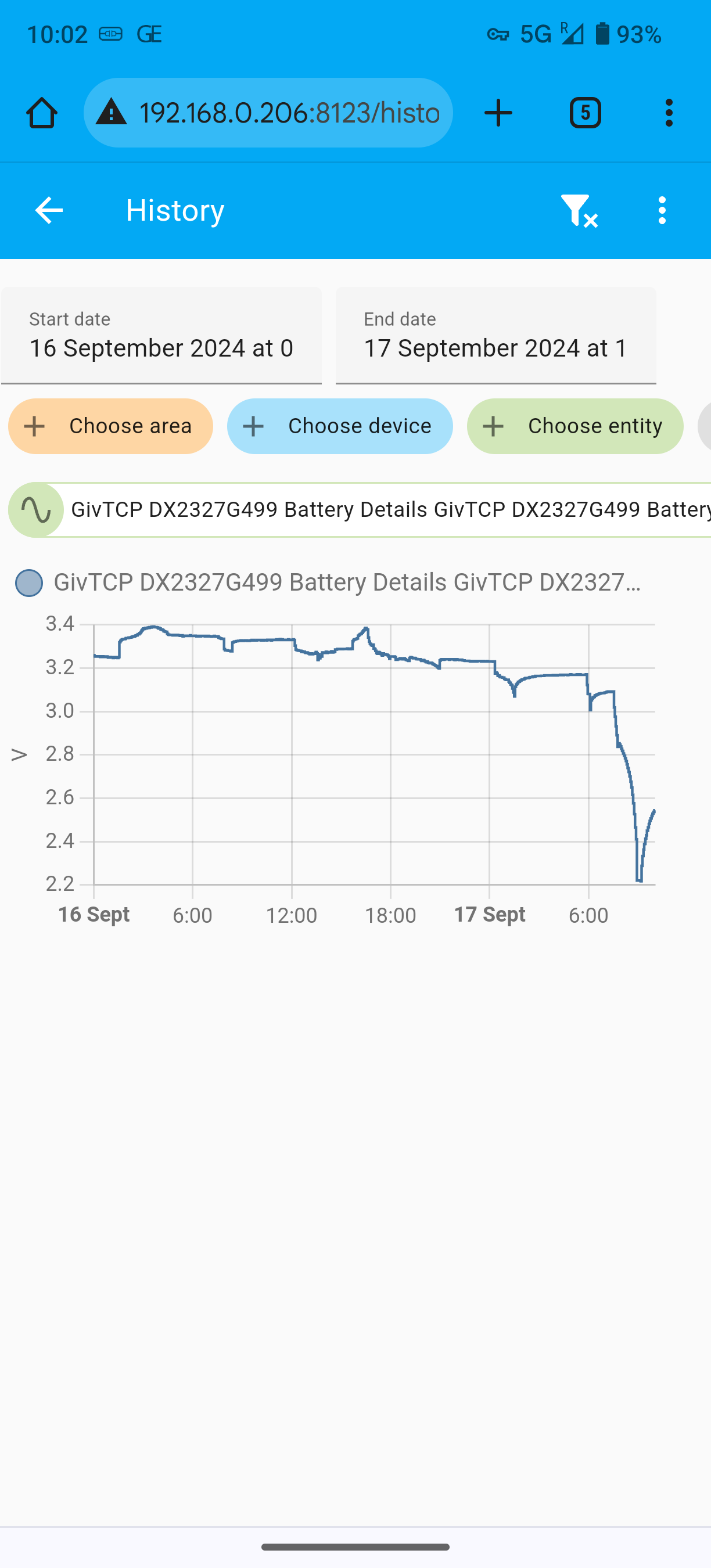
Anyway, that was just my initial concern for context, what I'm now concerned about is that cell 9's performance during the calibration as it dropped to 2.2v.

I'm now on the charge phase of the calibration and it's back up to 2.7v at 8% (for that secondary battery) other cells are at 3.301-3.325.

The primary battery is lagging behind this with a SOC of 1% which was also one of my concerns, the level of the 2 batteries is never consistently aligned, any one can be above or below the other by up to 10%.

Probably be contacting GE if it doesn't all look perfect after the cal.

D
#29 DD

AlanWells I'm not sure that calibrating fixes weak cells - thought it just detected them ?

I've heard that allowing the battery to idle at relatively low charge gives it a chance to do some cell rebalancing. It might also do that at 100% - not sure.

Does that cell tend to lead the way when both charging and discharging, or is it consistently at a lower voltage than the others? I think the former might indicate a weak cell, but the latter just needs some rebalancing. But I'm certainly no expert.

V
#30 Vestas

AlanWells 2.2V on discharge suggests the cell is very unwell. I think you'll be needing an engineer visit.

#31 EricIoW

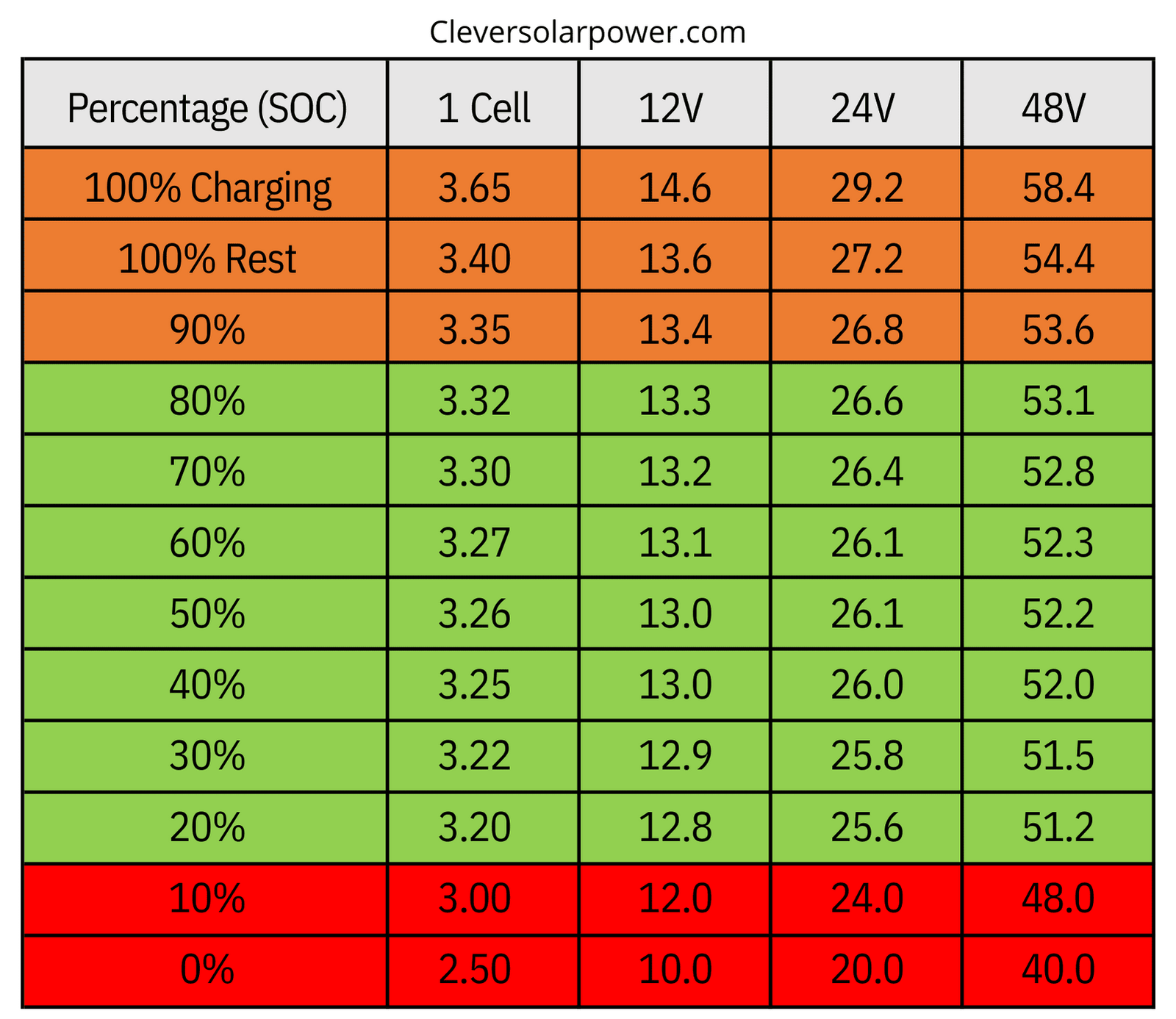
This is a useful chart that has been mentioned before.

#32 AlanWells

Well the calibration finished and both batteries now say 100% with similar total voltages, just exported for a few minutes to take the top off the charge and at 98% cell 9 is the same as the others. I'll see what it exports like when the sun goes down.

What's now concerning is the battery remaining capacity on this battery is showing 157(Ah?) with a design capacity of 186, not sure what the remaining on the other battery is though as it hasn't updated since the calibration and still shows 2.7 remaining.

Also, getting a nagging feeling I'm over thinking this as is usually the case with too much/potentially unreliable data at my fingertips.

V
#33 Vestas

Having (almost) done one of the remote calibrations for the first time there is a "gotcha".....

I'd expected this but most won't.

If you're picking a nice sunny day to do your remote scheduled calibration then bear in mind that while the battery is dumping to grid/load, your PV generation may/will be throttled back to zero. On G1 inverters I think its just throttled back to zero but maybe different on G2/G3.

That's another reason for discharging the battery to 10% or so before kicking off a calibration.

Apologies if this has been pointed out earlier in the thread.

P
#34 Pete UK

Vestas

Same on Gen 3 5.0 hybrid as well.

During the charging part of the calibration though, the solar panels come back to life. Not sure if that’s the same on the other Generation inverters. (Usually seems like mine start charging back up when the suns gone down because an engineer has initiated it 😂).

V
#35 Vestas

Pete UK Calibration completed (no notification) and yes the solar panels get used for charge.

It was more of a warning for people thinking "max out the export limit" with battery and PV on the discharge cycle, sounds like PV is off regardless.

Makes sense I guess.

P
#36 Pete UK

Vestas

I realised that. Yes it makes sense for summer and/ or in daylight I guess. Better if it just throttled the solar back a bit, to maintain max DNO export limit but it is what it is and not a too frequent occurrence (normally).

So there isn’t really an “ideal” time to do a calibration then other than on a terrible winters day. But then maybe some peoples batteries will be quite cold.

C
#37 CW

Pete UK I'm guessing tho that this restriction would only apply to DC-coupled batteries. If you have an AC one then this would not be an issue?

P
#38 Pete UK

CW

The throttling solar generation back to zero while discharging during a calibration problem?

  • No idea. I’m DC coupled. In my case during a calibration discharge the batteries export at 8kW. And my DNO limit is 10kW so if I’m generating 7kW say from the panels in summer at the same time, something has to get throttled back. Otherwise I’d be 5kW over my DNO export limit. (Also the inverter can’t go to 15kW export - BUT it can do 10kW! And I guess that’s why the panels are re-enabled for the charging phase).
    Currently the panels get throttled down to zero for the whole calibration discharge but it would be nice if they just throttled back to 2kW max solar generation in my case (exporting at 10kW), so you could export that extra 2kW of solar available for the 6 hours or whatever as well instead of losing it all together. If you had a larger margin between DNO export limit and your inverter/ solar output power then I guess it would be much better.

Would it be any different if your system is AC? You’d still have to throttle something back to your DNO export limit, and if you didn’t throttle the solar then the batteries would have to get throttled back and would go on and on discharging for ages.

Maybe I’m missing the point you’re making though?

Like mentioned above. It’s always best to start off the calibration from almost empty in most situations.

In my case I have two inverters, so I at least have the benefit that I can calibrate one pair of batteries at a time and the discharging energy goes into the other battery pair. (Cross charging each other). Which is the only time I like the cross charging ‘feature’ ! I also have to contact GE first to get them so switch off the inverter balancer software running in the background though. And also try to start the other pair calibrating just when the discharge of the first pair has ended, so the energy goes back the other way; one pair is now in its calibration charging phase and the other pair is in its calibration discharging phase. Of course this is a complete headache as you never know exactly how long each phase will take and usually you miss all the cheap import time and hit the peak import time if your not lucky 😂
Also someone has to be available and willing at GE HQ to help out doing all this. And then re-enable the balancer at the end of it all. Which is usually at 4 am.
I’d say 50% of my calibrations have been set off by the engineers after replacing something and they just kick it off when they’ve put the last screw back in and are finishing their cuppa.

In my case, if it happens this way (or if/ when I’m only calibrating one pair of batteries) at least the majority of the energy gets preserved. A bit spills and a bit of topping up but it’s not extreme. And a bit of cross charging until the balancer gets turned back on. All the days solar export is usually lost though.

It’s a bit of a nicety idea for a niche situation and of very little real extra value apart from not losing all of that days solar, buying some peak and messing up your 100% off peak chart streak in Octo-Aid 😂

When something is fixed after a long wait, I’m like: yeah, whatever, just kick it off now.

Anyway sorry for the long ramble. I guess I’m excited my system is working again after such a long wait.