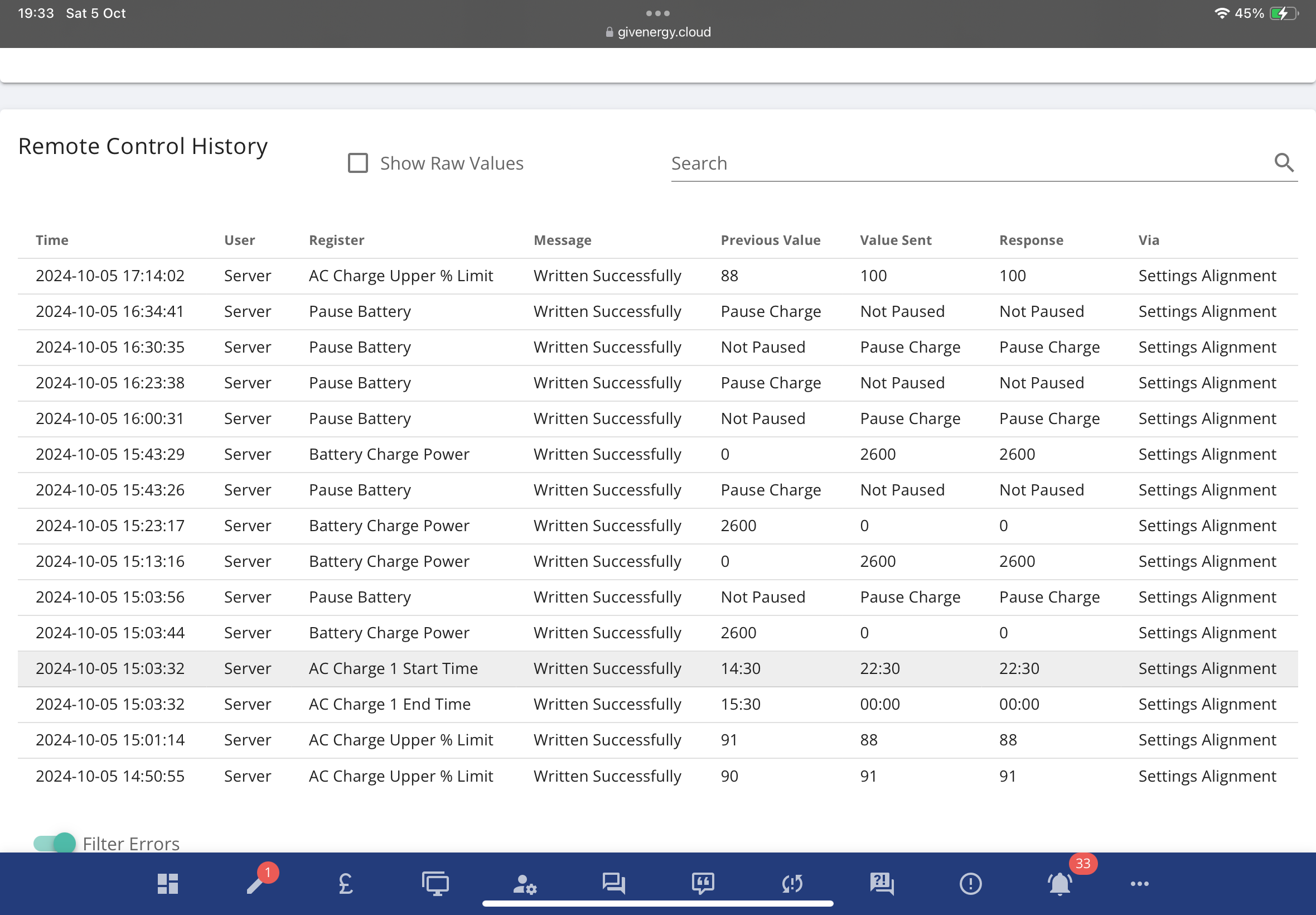
Don't know if anyone else has noticed this but at some point on 4/10/24 I've started seeing this in the remote control section of the inverter:
Looks like somebody finally worked out that having the portal/app settings different from those actually loaded on the inverter wasn't the best idea ever....
S
#2SJB
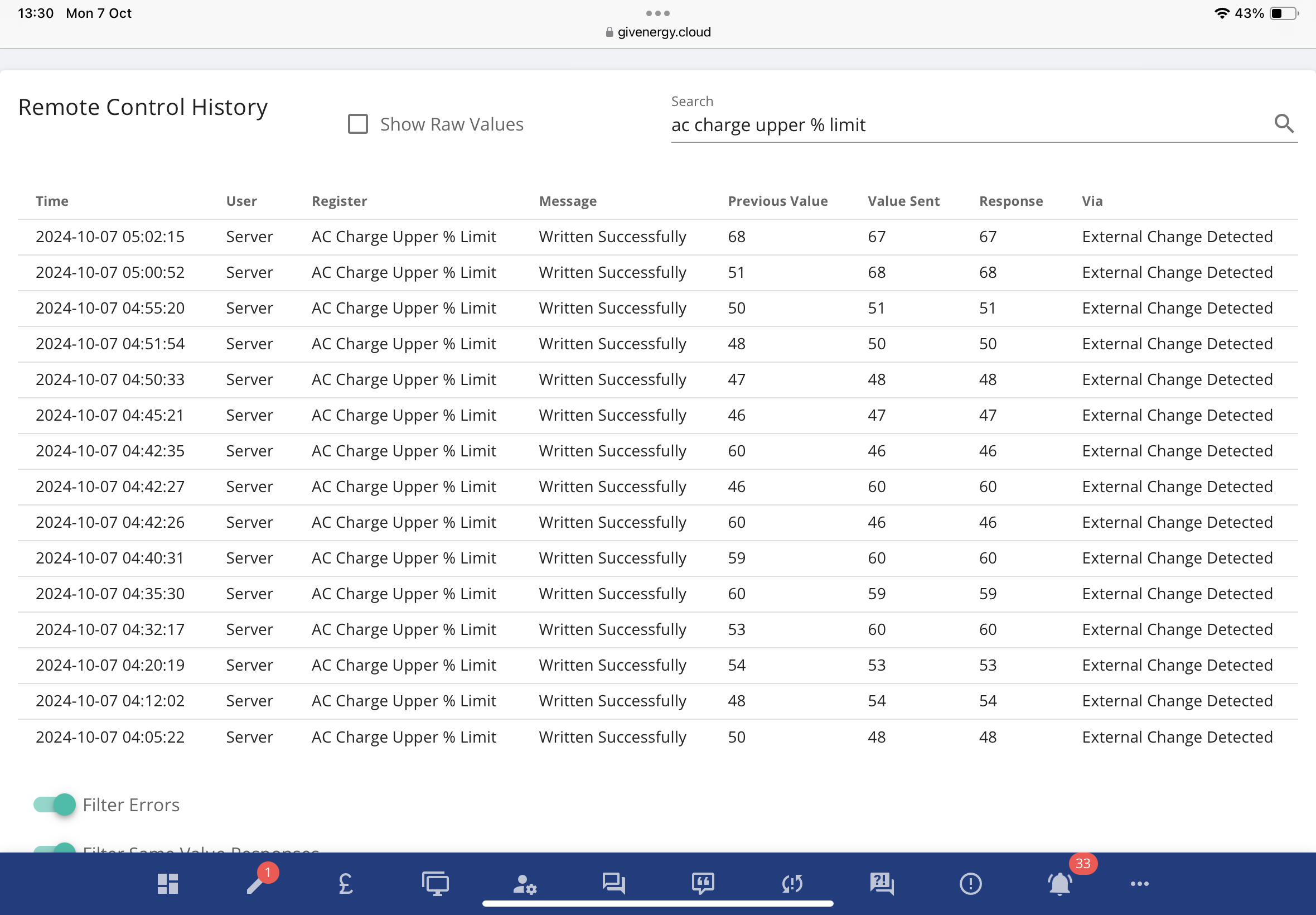
I hadn't noticed it but I've started getting them today:
It will be interesting to see how it behaves as Predbat changes the values today.
I understand the concept and why it makes it easier for new users, but it fills my logfile in the portal up with details of every change made directly by HA/Predbat to the inverter that frankly I have absolutely no interest in.
I have 6 pages of settings synchronisation just from today and its only 7pm.
Wish I could turn it off.
And of course, yet another change made where the community isnât informed or even communicated to about the change. Iâm all for agile and incremental development but a key part of that being successful is customer engagement.
I think you can filter the view (eg to show only user requests)
T
#8treborUK
Had 148 of these overnight, CT Direction seems to be toggling from one value to another!
Odd as never needed any CT direction changes in SW as were all installed the right way during install and commissioning.
D
#9DD
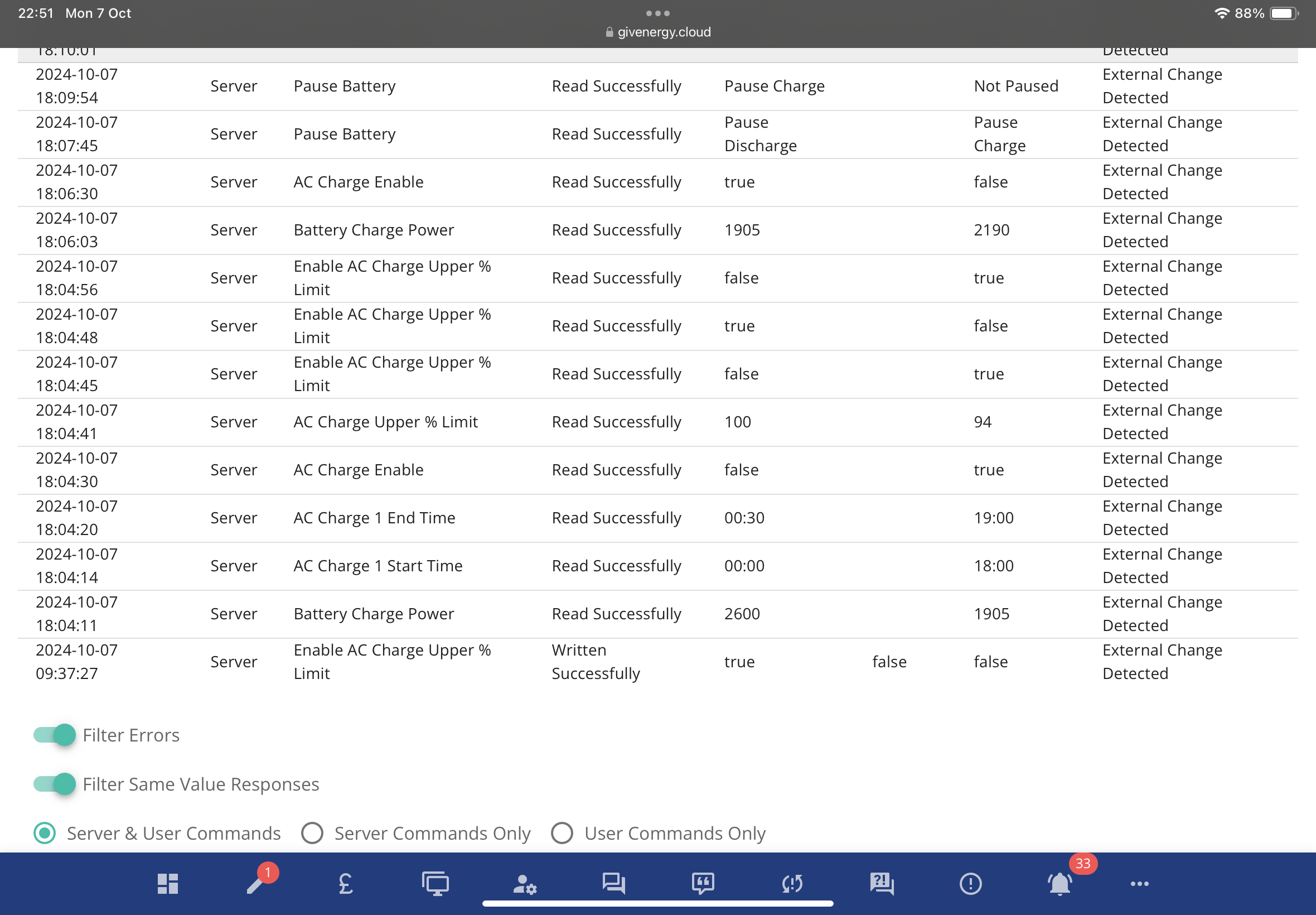
My log is now reporting these as "external change detected".
V
#10Vestas
DD Which is clearly complete bollox as its reporting the stages of the calibration I ran on Saturday as "External Change Detected".
Muppets.
S
#11SJB
Let's hope they have lots of storage to cope with this đ.
R
#12rjp
These "settings alignment" are WRITES? So it updates the inverter to what the portal was left at, rather than updating the portal to the inverter state???
Am I the only one that thinks that's a recipe for disaster when used with any external control system?
(I also get a mass of "CT Direction" writes from the server for no obvious reason. Seriously tempted to block this nonsense via firewall and use local control entirely.)
G
#13geoffreycoan
rjp These "settings alignment" are WRITES? So it updates the inverter to what the portal was left at, rather than updating the portal to the inverter state???
No this canât be right. I agree thatâs what it appears as in the portal but if it were updating the inverter to what the portal was left at then it would be continually writing the same value to the inverter whereas the value changes as Predbat does its thing through then night:
Just look at the amount of data being logged and thatâs just for one sensor. I really would like to turn this logging off
T
#14TX200
You could say it was written to the log successfully
But, I think weâd all agree, it should probably say âread successfullyâ đ
#15hoggy
Mine too seems to be hung up worrying about CT direction every 5 mins. Well, one system is, the other won't even load the remote control history, just timeout with a 504 error. (At least it's not clogging the history if there is none)
G
#16geoffreycoan
hoggy No recent âCT Directionâ logs at all for either of my inverters.
Trying to search for âDirectionâ or âCT Directionâ doesnât work. I had to manually page back to page 30 (of 44) to find the CT Direction changes when GivEnergy support accidentally misconfigured my inverters for a weekend. So they are there and the search doesnât work. Not surprised if the volume of records is going to balloon that much.
Did look at âwhatâs newâ in case there was any announcement of this change, but no, last announcement September 2022 when the smart plugs were launched.
S
#17SJB
They're obviously still playing with this, I see it now says 'External Change Detected' and that it's been read successfully.
G
#18geoffreycoan
SJB Looks like it changed part way through the day today. Its changed for the new logged messages but not rewritten the historical records. Most confusing
T
#19treborUK
Support are aware, âThis has been reported by multiple end users. It has been raised to our developers to look into.â
#20Icarus
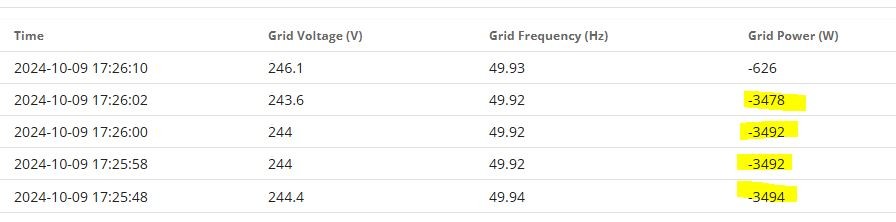
This is rather disconcerting: I put my kettle on at 17:25 and noticed on my kitchen energy monitor that I was drawing power from the grid. But I had a half-full battery (actually 47%).
Curious I looked at the logs & settings, sure enough
over 3kW from grid to house.
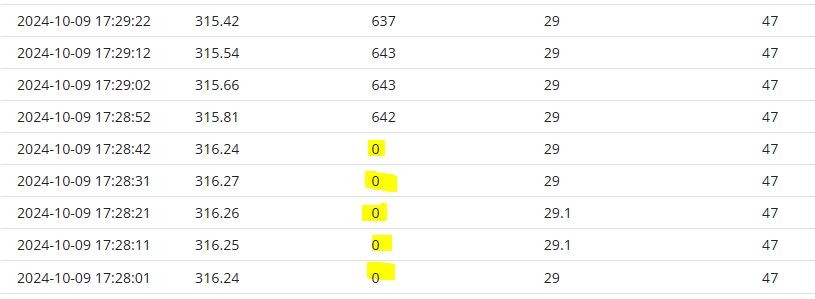
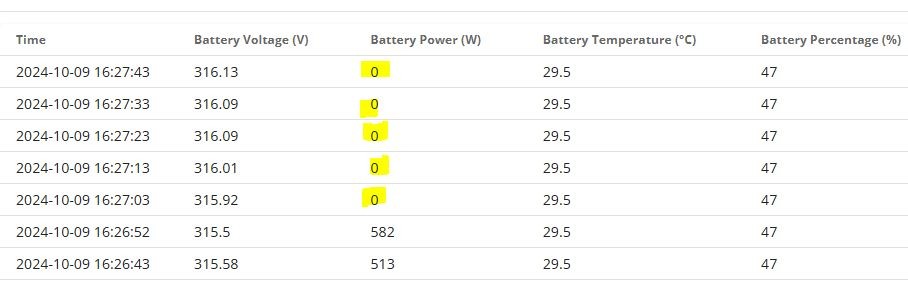
Checking that battery state confirmed drawing zero watts
This seemed to suggest I was no longer in Eco mode and scrolling back though the log it seems to have changed state around 16:27
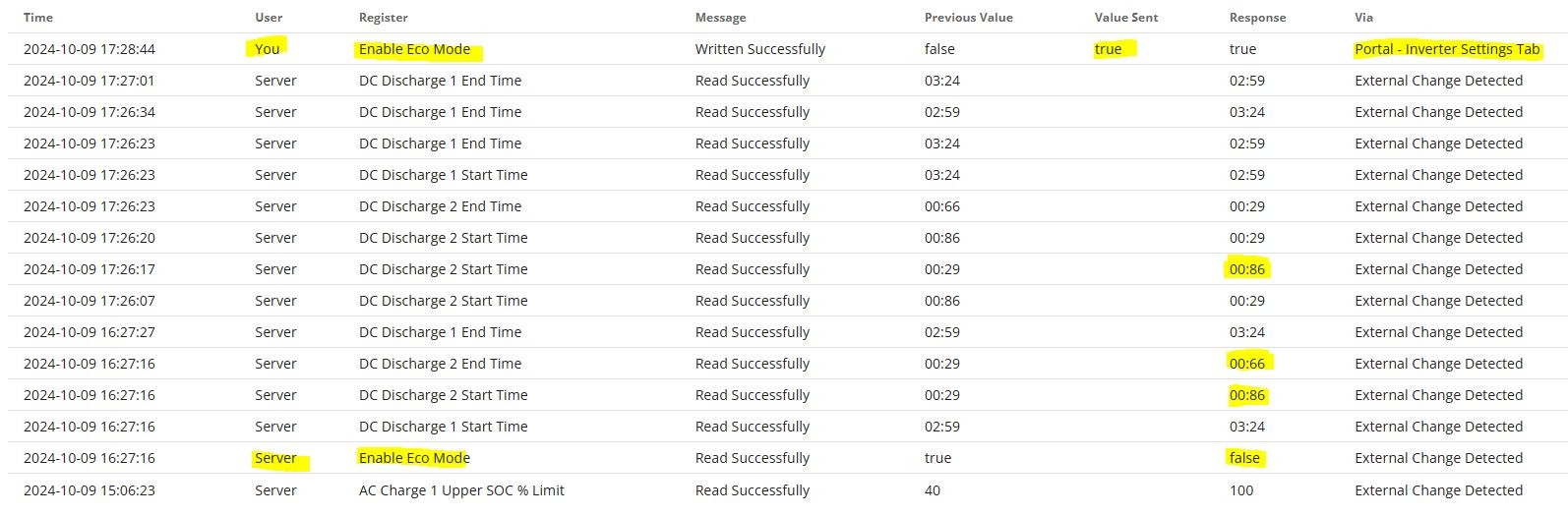
It looks like whatever is behind the scenes with the "External Change Detected" stuff which is currently manifesting itself frequently in my log, appears to have disabled my Eco Mode at 16:27:16 (despite the fact it suggests "Read successful" - rather than "write")
Kettle having boiled, I checked the setting and sure enough ECO was indeed disabled (but not by me).
Log confirms I manually set it back to "true" at 17:28:44.
Why has "server" mucked about with my settings?
I'm also seeing some dodgy time values with minutes > 59
Something amiss.
D
#21DD
Icarus Why has "server" mucked about with my settings?
My understanding of these 'external changes' was that it was simply the portal updating its state to match a change it has observed happening on the inverter. Are you running some sort of modbus-based automation locally ?
My activity log looks like it's correctly distinguishing changes done through modbus from changes done through the API.
T
#22treborUK
I have nothing like HA etc running any more on my system and havenât changed any settings via app or portal for a couple of weeks.
The log spamming seems to have stopped for me - no entries since Tuesday. Hopefully that means they are in the process of fixing it.
#23Icarus
DD Are you running some sort of modbus-based automation locally ?
I do have some automation scripting but that uses the GivEnergy API rather than modbus direct.
In the logs, any setting changed by my automation is annotated with "icarus" for my own convenience:

I also run Richard Russell's excellent inverter.bbc program for monitoring the state of the system (which does indeed communicate locally with modbus) but I use it only for reading values and it permanently runs in my kitchen on a R.Pi.
In the log fragment shown above, my automation intentionally changes the AC Charge 1 Upper SOC % Limit change from 40 to 100. However this results in two "External Change Detected" messages, one for value 40 (the previous value) and one for value 100 (the latest value). This seems like overkill, especially as all my changes are done by the GE API and it should already know the state.
Presumably the recent enhancement to the messaging is to cope with users that are modifying modbus registers without using the GE API?

R
#24rjp
Icarus In the log fragment shown above, my automation intentionally changes the AC Charge 1 Upper SOC % Limit change from 40 to 100. However this results in two "External Change Detected" messages, one for value 40 (the previous value) and one for value 100 (the latest value). This seems like overkill, especially as all my changes are done by the GE API and it should already know the state
I see the same. If WonderWatt updates a charge time from X to Y, there are two 'external change detected' messages. Agree that as it's all going through the API none should be displayed. Only local updates e.g. GivTCP should be logged as "external change"
D
#25DD
Icarus Presumably the recent enhancement to the messaging is to cope with users that are modifying modbus registers without using the GE API?

Yes, probably. It's interesting that I'm not seeing these anomalies when using the API:
2024-10-10 08:04:57 Server Pause Battery Read Successfully Pause Charge Not Paused External Change Detected
2024-10-10 05:35:05 You Battery Discharge Power Written Successfully 952 3600 3600 API - Inverter Settings - givenergy.py
2024-10-10 05:35:05 You Battery Charge Power Written Successfully 2000 3600 3600 API - Inverter Settings - givenergy.py
2024-10-10 05:35:04 You Enable DC Discharge Written Successfully true false false API - Inverter Settings - givenergy.py
2024-10-10 05:35:04 You Pause Battery Written Successfully Not Paused Pause Charge Pause Charge API - Inverter Settings - givenergy.py
2024-10-10 01:01:40 Server Enable Eco Mode Read Successfully false true External Change Detected
2024-10-10 00:25:03 You Battery Charge Power Written Successfully 2381 2000 2000 API - Inverter Settings - offpeak.py
2024-10-09 23:30:48 Server Enable Eco Mode Read Successfully true false External Change Detected
2024-10-09 21:59:05 You Enable DC Discharge Written Successfully false true true API - Inverter Settings - discharge.py
2024-10-09 21:59:03 You Battery Charge Power Written Successfully 3600 2381 2381 API - Inverter Settings - discharge.py
2024-10-09 21:59:03 You Battery Discharge Power Written Successfully 3600 952 952 API - Inverter Settings - discharge.py
#26nophead
I just noticed this in my log.
2024-10-08 09:05:56 Server CT Direction Read Successfully Unknown (3) Unknown (2) External Change Detected
2024-10-06 06:39:27 Server CT Direction Written Successfully Unknown (2) Unknown (3) Unknown (3) External Change Detected
It seems to change the CT direction value from 2 to 3 but then when it reads it later it is 2 again. Anybody know what the values mean? I would have expected only two different directions. I haven't noticed anything not working.
#27hoggy
nophead pretty sure that one has 3 states
Normal
Reversed
Auto Detect
(All from memory though!)
V
#28Vestas
hoggy Is this not one of the registers which should have been set by the installer but (currently) defaults to the "correct" value if the register contents are nonsense?
If it is then support/installer can write the correct value to the register and log entries should stop?
#29nophead
Looks like they wrote 3 to it and it auto detected reversed which is 2 then. Odd thing to do when the system has been working fine for a year.
V
#30Vestas
nophead When I got a f/w update done by Paul Landregan one of the things he did after the f/w update was set the CT clamp direction. I have a G1 hybrid so limited experience of f/w updates (thankfully).
Just wondering if this is possibly related to the installer assuming the default worked and then f/w updates cause this behaviour? Best way to test is get support to set it.
#31nophead
I haven't had a firmware update since April. I don't update firmware if it is working perfectly. I also don't update the app. Most apps and firmware hit a peak and then go downhill over time.
V
#32Vestas
nophead Ask support to set it manually then and see what happens.
#33nophead
If the server decides to change it again I will but this was a few days ago now. Changing it from 2 to 3 doesn't seem to have any affect anyway.
G
#34Goshiki2
I contacted support about it as I had over 20 CT direction changes within 24 hours last Sunday. I contacted them on live chat on Monday morning and the person on the other end had no clue as to why it was happening but said he would escalate it. He then said he had forced a change himself so it wouldnât happen again but 2 minutes after ending the chat it swapped direction again. A few people commented on Facebook last Sunday evening about the same problem and Paul Landregan asked if it was an AIO and then didnât reply again to the thread which made me think that Giv had cocked up somehow. Surprisingly (not), it happened a couple of times the next morning but then itâs been fine since.
#35nophead
Mine is a Gen 3 Hybrid. The server write was last Sunday but there was only one. Perhaps it is a problem that has been and gone.
D
#36DD
Hmm - just seen one of those weird mess-ups... I was doing an experiment with discharge limits, so used the api to temporarily set discharge limit 2 to 90. Then back down to 4 afterwards. But just looking at the remote control, it seemed to think it was still set to 90. (Yet the inverter was clearly behaving as if it was 4.)
2024-10-13 14:17:58 Server DC Discharge 2 Lower SOC % Limit Read Successfully 4 90 External Change Detected
2024-10-13 14:17:55 You DC Discharge 2 Lower SOC % Limit Written Successfully 90 4 4 API - Inverter Settings - givenergy.py
2024-10-13 14:17:11 You DC Discharge 2 Lower SOC % Limit Written Successfully 10 90 90 API - Inverter Settings - givenergy.py
2024-10-13 14:17:11 You Battery Charge Power Written Successfully 3600 762 762 API - Inverter Settings - givenergy.py
If I ask it via the api, it confirms 4. (Which confirms what I suspected - the API asks the inverter directly, rather than reporting the portal's view.)