L
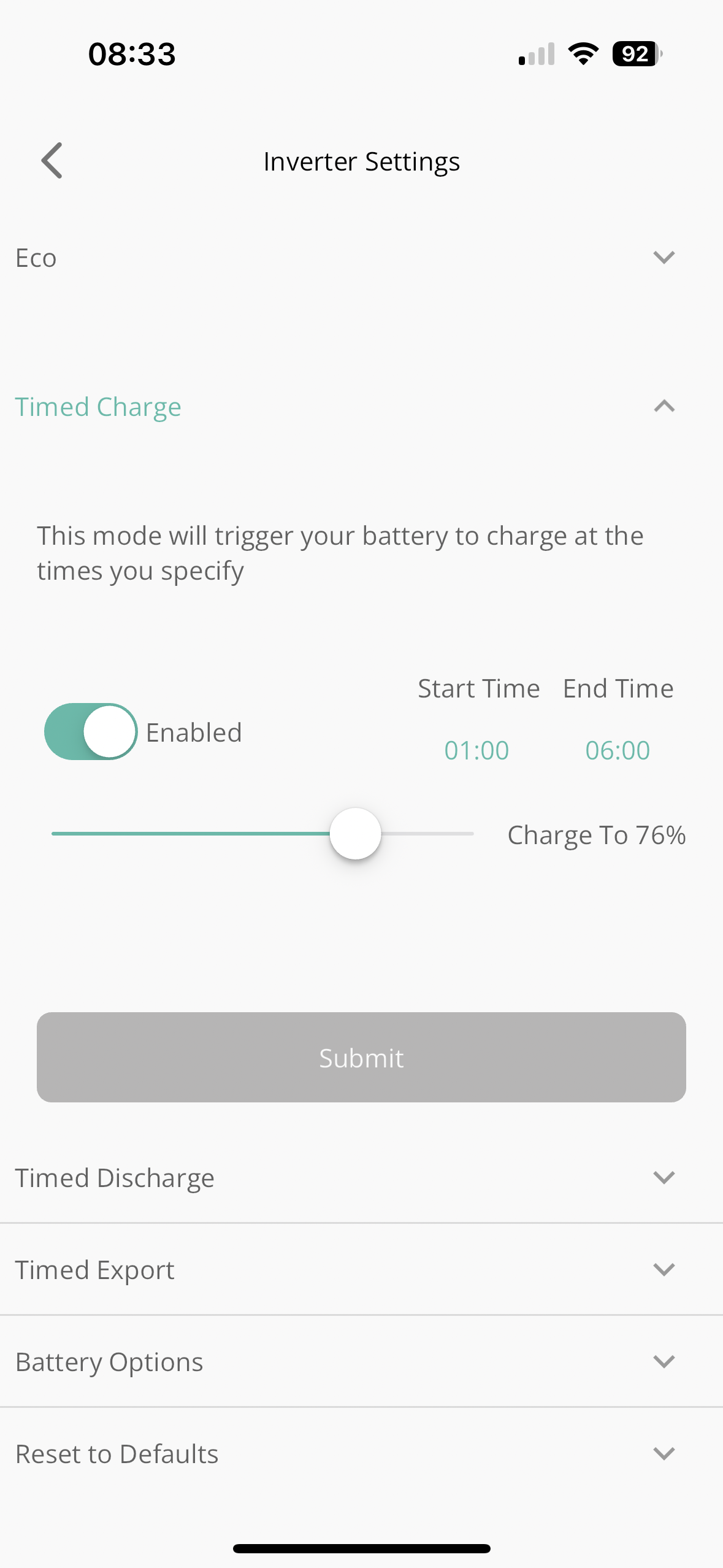
Is this the setting to charge the batteries? I’d like to charge them during the off peak but last night they did not charge? I did also have a ev on charge via ohm charger but should that make a difference?
Thank you

Is this the setting to charge the batteries? I’d like to charge them during the off peak but last night they did not charge? I did also have a ev on charge via ohm charger but should that make a difference?
Thank you
Yes that appears to be the right setting.
Note that the slider isn't at 100%
If the battery was full (or fuller than the percentage) it would empty to 76% during the timed charge period and then the house would use the grid until the end of the timed charge period.
Also make sure any timed discharge or timed export settings are off. Plus make sure eco is on.
Thank you. I’ve increased it to 80% but still doesn’t charge? Settings as you describe?
The battery in the morning was 15%
Loobeburt which model of inverter do you have? On those with multiple charging slots, there are actually two different registers that (appear to) control the target SoC, and I think the app shows the wrong one.
On the web portal, go to the remote-control section for the inverter. (Gears icon in top right.) Near the top, there's a setting for the charge target, which should match the value you see on the app. But if you scroll down, you may may find a section with multiple charge slots, and there's another register for charge slot #1. I think that's the one the inverter actually uses.
TerryWagstaff In a separate post I queried the software behaviour. Just before the peak period I want to make sure the battery is charged to 30%, and set an hours charge time. Unfortunately if the battery is over 30% it seems to switch off the battery and power the house from the grid. I would expect the system to continue using the battery until (or if) the battery fell to 30%
I think most of us expect the battery to remain idle and power the house from the grid.
However, an odd behaviour I stumbled upon recently... probably a firmware bug rather than an intended behaviour, but because they don't document anything, it's hard to be sure... If I configure a timed-export window, but don't
enable timed-export, then the discharge limit still seems to be active. Just trying it now - I have second discharge timer set to cover all day. If I set the discharge limit to 90%, then the battery starts charging. But if the limit is below the current value, there is no effect.
So maybe setting up a timed export window with limit of 30% will do what you need, but it very much depends on firmware version. (I'm on 309.)
DD, willing to try anything. Just one point, how do I set up a timed export event without enabling it?
TerryWagstaff Simplest would be to use the remote-control part of the portal (gears icon at top right of inverter page) - you'd have to go there anyway to configure the discharge limit. In there, in the top section there's 'enable dc discharge' - that's the one that actually enables it, so leave that off.
On the app, you could enable it, then set the time window, then disable it again, which should leave the time window configured. Then the last section is for discharge schedules: I have ten, each with a start time, an end time, and a discharge limit. The app shows only the first one, but I don't think it shows the correct limit register, and when you use the app to configure it, I think it's actually the overall reserve that gets set, which isn't what you want.
Thanks
I will try tomorrow - missed the period of 15.00 to 16.00 today
TerryWagstaff (Sorry, ignore the "on the app..." sentence - I meant to delete that.)
The cost of importing for a few seconds while you try an experiment is peanuts...