All-in-one, Gateway and EV Charger

11 comments started 2024-10-11 last 2024-10-20
GivEnergy ProductsBatteryEV Charger
M
#1 Mondriver

Hi guys

Could someone just clarify that the wired internet option for connecting a AOI, gateway and EV charger is:

  1. Ethernet cable to the Gateway LAN.
  2. Sperate ethernet cable to the EV charger LAN port.
  3. Gateway is already connected to the AOI? Or does the AOI need a separate ethernet line to it as well?

Thanks

T
#2 TX200

Mondriver I do believe the AIO needs it's own ethernet connection. There is a link between the gateway and the AIO, but both need their own LAN connections.

Have you checked the installation guides? I assume they are on the KB site kb.givenergy.cloud

J
#3 JasonF

Can confirm the gateway and AIO need their own LAN connections.

#4 PianSom

Mondriver
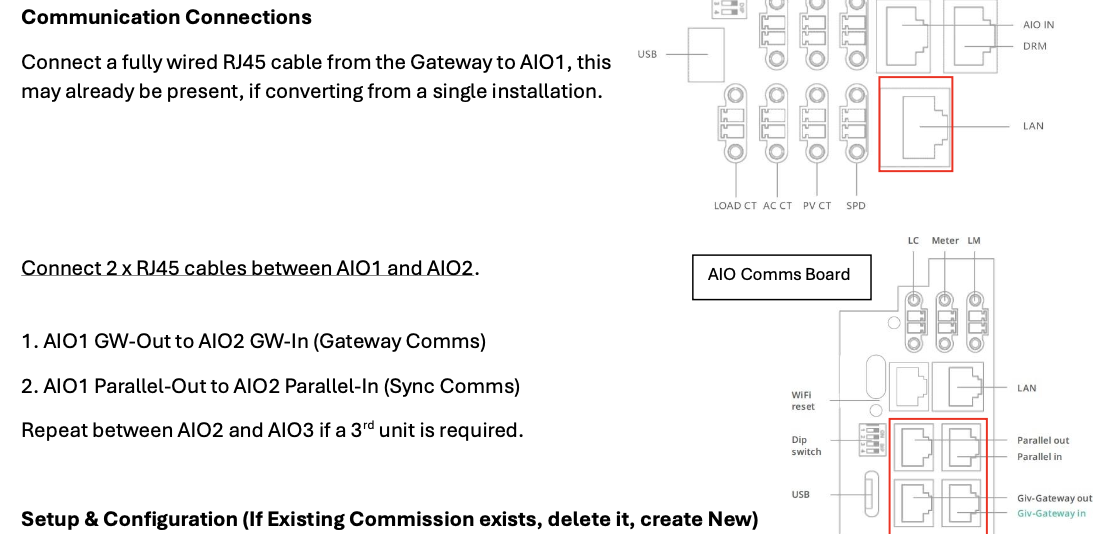
The Gateway and AIO both need their own wired connections, and both have IPs. If you have just one AIO then almost all comms are through the AIO. But if you have multiple AIOs then the Gateway is the primary comms portal. Subsequent AIOs do not need a wired connection back to the router, just to AIO1.

Can’t speak to the EV charger.

J
#5 JasonF

PianSom

No, both AIOs need a lan connection. I have my gateway and both AIO’s connected to a switch.

#6 PianSom

JasonF
Oh, that is interesting. And not what it says in the Installers manual

all-in-one-parallel-mode-installers.pdf
246kB
J
#7 JasonF

PianSom that’s for the internal communications. The gateway only connects to AIO1.

There are Ethernet cables that run from gateway > aio1 > AIO 2 but then there is also a lan cable for the internet connection from all 3 devices back to my network.

D
#8 Daveb01

I agree with Jason, however the GW is a little confusing.

As I have one of the first GW’s the port labelled LAN does not work, all the other devices do.
So AIO’s, EVC’s all work with LAN to your router/Switch etc.

My GW came with a female to female accessory, so Route/switch to female accessory, female accessory to a Ethernet cable that is located inside the GW bottom panel on the left hand side. All need the dip switches set to LAN.

There is also a communication network between GW, AIO’s and EVC etc.

D
#9 Daveb01

JasonF

Hi Jason,

Have you found a way to get an alert or notification if there is a grid outage and the GW EPS kicks in please? I have asked GE and they don’t reply.

T
#10 T-M

Daveb01 If you have Home Assistant and the GivTCP addon, you can monitor the Inverter Grid Frequency to achieve this as it goes to zero on grid failure. I have a Home Assistant template sensor that goes False when the Grid Frequency drops below 49Hz, and an automation that detects changes of state of this sensor and emails me Grid UP/Down alerts accordingly.

B
#11 bRhFDKtjRMK9

Daveb01 They didn't told me how to do it either. So I made a script (a stub for now) of my own. If you query this place via API:
url = f'https://api.givenergy.cloud/v1/inverter/{inverter_serial_number}/system-data/latest'

You will get current cloud status, snippet from JSON reply:

Inverter System Data:
        "grid": {
            "voltage": 242.5,
            "current": 0.7,
            "power": -1002,
            "frequency": 50.02

When grid is down, result is:

        "grid": {
            "voltage": 0,
            "current": 0,
            "power": 0,
            "frequency": 0