
Power graph displays "exporting" when "importing"

4 comments started 2024-10-16 last 2024-10-16
GivEnergy ProductsBattery
S
#1 solarzero

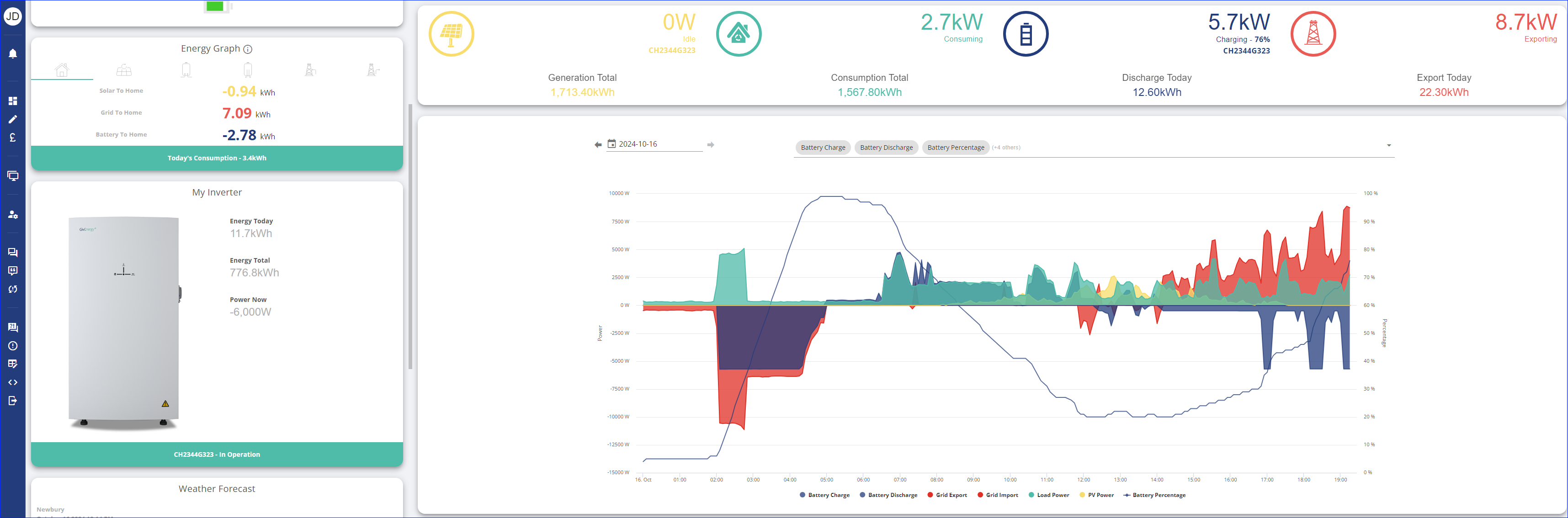
We have an AIO on Octopus Flux with power graphs that made sense until today: see attached.
We're on Octopus Flux where all seemed normal until around 14:30 when the battery starts charging intermittently during peak tariff.
More confusing: the power graph shows "exporting (8.7kW)" when there is consumption (2.7kW) and no solar.
How can this be???
N
#2 NorfolkMustard

Have you recently updated the firmware? This is quite a common occurrence with the latest AIO firmware if the hardware was installed in a certain way - the GE helpdesk can remote in to your install and correct the CT clamp reading direction and it should then be back to normal /voe

S
#3 solarzero

NorfolkMustard
Thanks very much. The AIO firmware has been on D0.612-A0.612 for several weeks, during which hadn't seen the issue, In case relevant the only change is use of our EV Charger to charge our new EV briefly for first time at lunchtime today, since which the AIO appears to be importing when it should be exporting.
The Gateway firmware is A0.008, which am trying to update to latest GAAA0011 but this is taking several hours already.
If a CT clamp is physically round the wrong then this does sound like an installer issue, but will check with helpdesk tomorrow.

N
#4 NorfolkMustard

The CTs are software controlled so can be reversed remotely easy enough.

AIUI if the installer left it on “auto” rather than setting the direction they can get flipped the opposite way by the firmware update. The helpdesk flip it back and set it to stay that way rather than leaving it back on auto.