Inverter time

30 comments started 2024-10-18 last 2025-10-25
Cloud PortalHome AutomationGivEnergy Products
S
#1 SteveCook

Gen1 Hy 5.0. Home Assistant and Predbat. Octopus Eco7 import. Fixed export.
My Eco7 import starts 00:30 and ends 07:30.
I have a HA automation to import 00#;30 to07:30
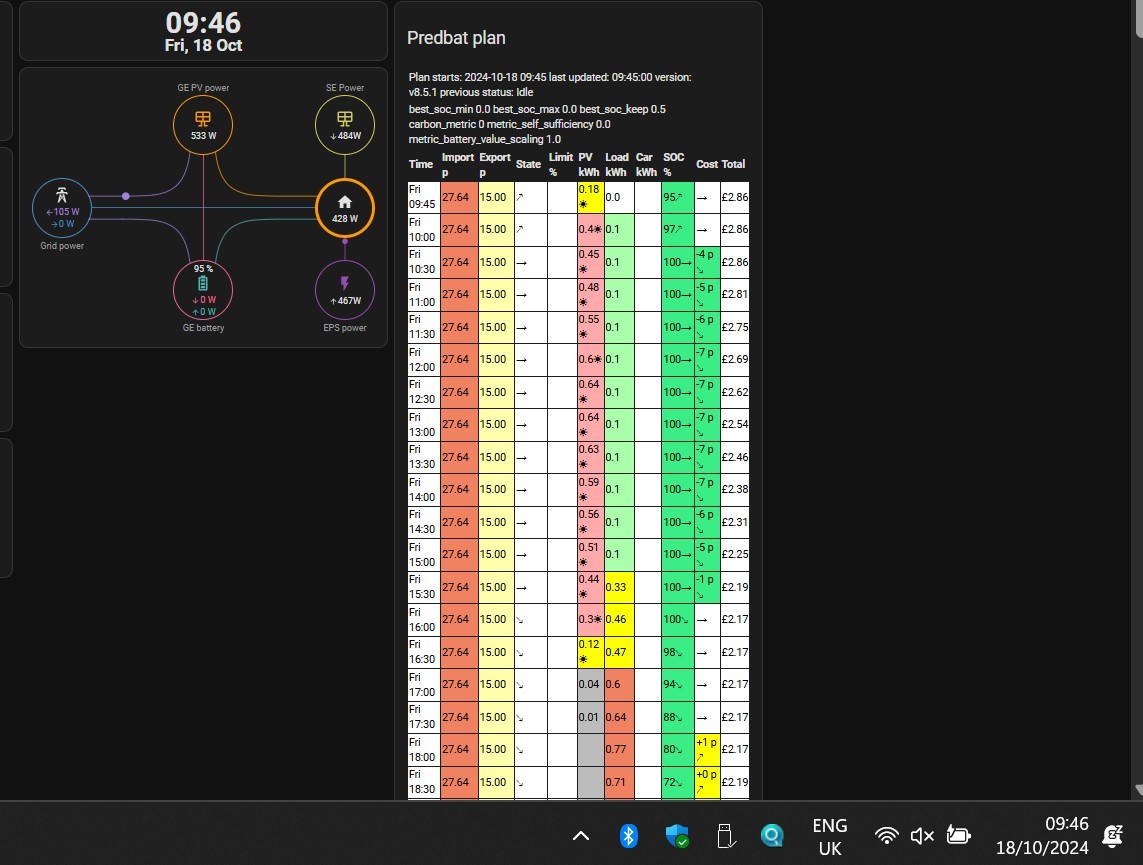
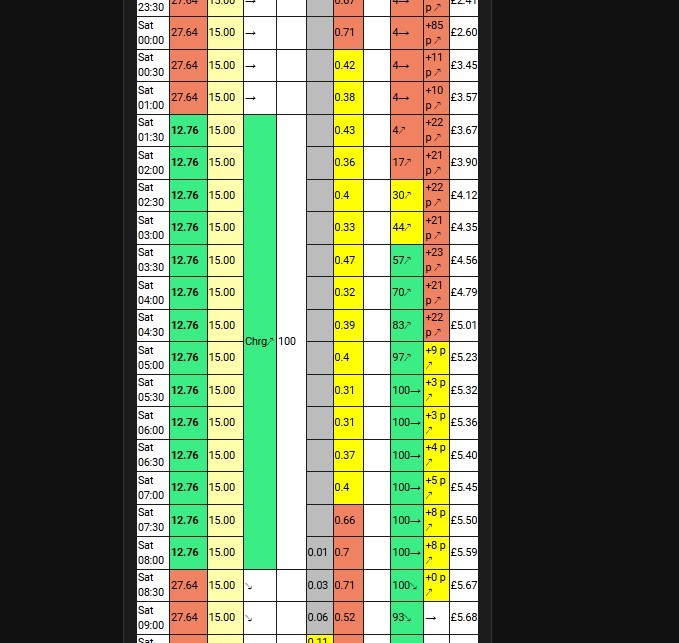
Predbat predicts import at 01:30 and end 08:30
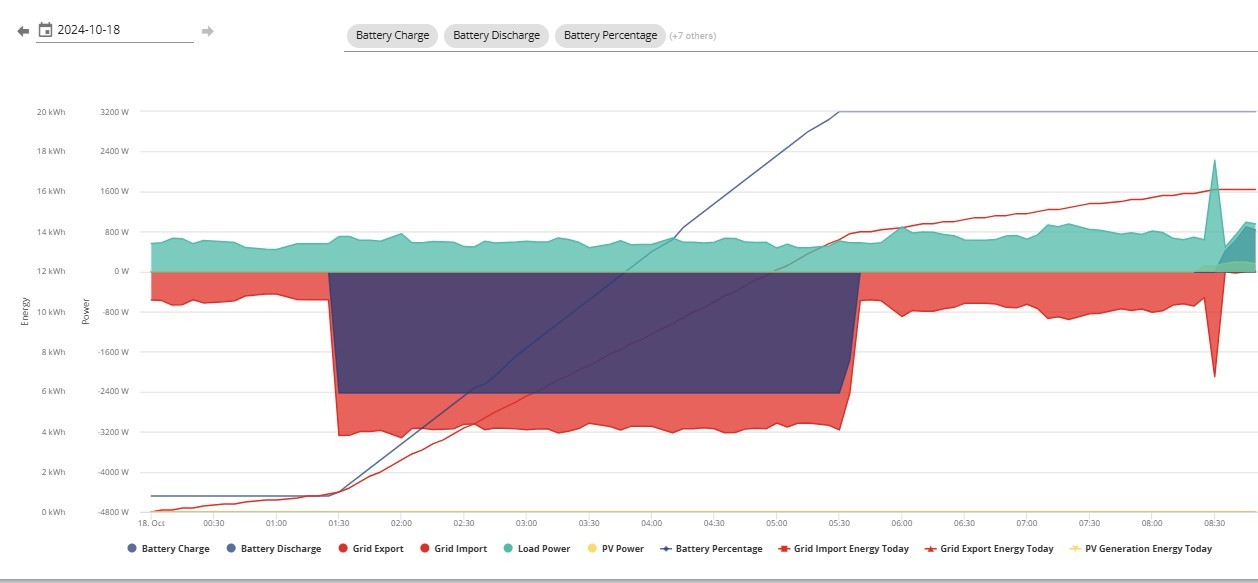
GivEnergy portal shows system is importing from 01:30

Where do I set all the clocks to the same timezone. I have looked everywhere I can find.
Watching Predbat plan update, it matches my PC clock.
The GivEnergy portal graphruns at the current time
I have gone to GivEnergy portal and hit "send time"

I seem to be an hour out somewhere

T
#2 TX200

Account settings in the giv portal?

S
#4 SteveCook

Thanks.
I am currently on (UTC + 1.0) GMT

I have hit the sync inverter time and received a notification. I will see what happens

D
#5 DD

SteveCook My Eco7 import starts 00:30 and ends 07:30.

While most Octopus tariffs follow local time, I have a vague feeling that eco 7 might be fixed to UTC. Historically eco 7 meters were dumb mechanical switches that didn't know about clock changes. Then again, smartmeter-based eco7 could be different from traditional eco7.

You clearly don't need all 7 hours to charge battery - perhaps stick to 0130 to 0730 ?

S
#6 SteveCook

DD
Thanks. I finally have a working smart meter - with antenna -.
I can switch the automation times as you suggest, but really want Predbat to do it all.
Predbat seem to be seeing times plus 1.

S
#7 SteveCook

HA, Predbat plan and PC all showing same time. plus GE portal graph all match.

D
#8 DD

SteveCook HA, Predbat plan and PC all showing same time. plus GE portal graph all match.

I'd expect HA and predbat to be using the PC's clock. The GE portal will use the server's time. But the inverter has its own clock, and if predbat configures inverter timers to actually start/stop charging, then that will matter too. You can use a third-party app to see the inverter's time - https://givenergymonitor.wixsite.com/tutorials or see https://community.givenergy.cloud/d/438-how-accurate-are-the-import-from-grid-metrics/16 for various platforms for a bbc basic app.

D
#9 DD

SteveCook I can switch the automation times as you suggest, but really want Predbat to do it all.

Can you manually configure the tariff information that predbat uses - so that predbat will still be doing the work, but you can influence the parameters it uses.

S
#10 SteveCook

Thanks. Getting complex now

T
#11 TX200

DD yea, I think you're right, certainly some suppliers (not sure if octopus included, but guessing yes) have their eco 7 tariffs run in UTC all year around.

S
#12 SteveCook

Look like i need to tell Predbat yaml that I am at London but plus 1 (BST)
Any ideas plz

D
#13 DD

SteveCook Look like i need to tell Predbat yaml that I am at London but plus 1 (BST)

No... London is at BST (UTC+1). If Eco7 is 0030 to 0730 UTC, that would be 0130 to 0830 local time (BST) at the moment. When the clocks go back, it will be 0030 to 0730.

S
#15 SteveCook

NorfolkMustard
Thanks. That looks like the answer then
Your smart meter will have a fixed off-peak 7 hour period from 00:30 to 07:30. This time period takes place according to Coordinated Universal Time (UTC), so during British Summer Time (BST) the 7 hour period will take place between 01:30 and 08:30. This may differ from your existing off-peak period on your current non-smart meter.

T
#16 TX200

SteveCook wondering if you can do some automation, along the lines of

If BST status true
Set start time to 0130
Set end time to 0830
Else
Set start time to 0030
Set end time to 0730

I think that's right, the start and end times would be in BST, as that is what the inverter and predbat would use. But it should start charging at 0030 UTC (aka 0130 BST) therefore be correct from a meter point of view. Hopefully!

Just need to find a way to check the time automatically (not sure if there is a flag to say it is BST) - or manually change the timed charge twice a year? Calendar reminder?

D
#18 DD

geoffreycoan any danger of tearing ? If that returns microseconds, can you even be certain that
utcnow() == utcnow()
would return true? utcnow().hour == now().hour perhaps ?

G
#19 geoffreycoan

DD debugging code handed to you on the internet is left as:

(a) an exercise for the reader
(b) a lesson in not accepting someone else's dodgy code at face value
(c) a 'growth' experience

;-)

T
#20 TX200

DD at the change of hour it could be different too, ok so less likely, but still possible.

I guess: local time minus UTC time. Then if it's > 55 minutes different, it's summer (well, timezone, weather not so sure!).

D
#21 DD

TX200 same problem, I think.

T
#22 TX200

DD no, you compare the entire time year month day (if the format includes that) hours minutes seconds, subtract one from the other, then see what the answer is, how close is it?

As a rough example

20241017190500-20241017180501 = 9999

20241017190500-20241017190503 = -3

20241017190502-20241017190501 = 1

Etc

D
#23 DD

TX200 Sorry, yes, you're right.

Just to confirm:

>>> print(datetime.datetime.utcnow() == datetime.datetime.utcnow())
False
>>> print(datetime.datetime.utcnow() - datetime.datetime.utcnow())
-1 day, 23:59:59.999995

No way to just get hold of the current timezone info ? How about (seems rather longwinded):

>>> print(datetime.datetime.now().astimezone().tzinfo)
BST

(not entirely sure what that's actually doing - utcnow() gives the same result)

#24 PianSom

TX200 If BST status true

{{ now().timetuple().tm_isdst > 0 }} evaluates to True or False, depending on if we are currently using daylight savings.

D
#25 DD

But there's still a problem that, on the night the clock changes, the start time is correct, but the end time will move. So 0830 is the correct time to stop when you calculate on the saturday evening, but it will become one hour after the end of the cheap period on the sunday morning. Depends how often predbat runs updates.

Plus the added complication that the clock change doesn't happen automatically on the inverter based on timezone information - GE have to send a remote request to actually make the change. They might not send it until

(Would be nice if you could ask GE not to do your inverter, and that you will do it yourself. I'd probably make the change myself the night beforehand; that way I know it's now running on UTC, and the update from GE will be a no-op.)

T
#26 TX200

Hopefully the end time being wrong, at the clock change, wouldn't matter too much

Hopefully the battery would already be at 100% charge (if the charge rate is set to an appropriate percentage), so then you've just got the baseline house usage to worry about (as it would be from the grid if the timed charge window was on). Hopefully not too many pennies.

P
#27 PhilipBosworth

My 1st attempt at downloading data today and I realise that the data timebase is in UTC. I guess I'm stuck with that but it got me looking around at one or 2 options in the portal. Here's the question: I can find the 'SYNC' button for synchronising an off-time inverter but... where can I actually see what time the inverter is working to ie how can I even know if it's right or wrong?

T
#28 TX200

[unknown] it is hiding in account settings.

D
#29 DD

PhilipBosworth I'm not aware of reading it through portal or app. You can get it from the BBC Basic app or the Android inverter monitor app.

#30 ChrisLav

DD the Android inverter monitor app.

Tap on 'Home' and it'll show you both the inverter time and Android time

W
#31 wrefordj

ChrisLav Best to wait until BST ends at 2am tomorrow...