G
Sorry I'm completely new to all of this but I've just noticed that the last few months my battery is just at 0% and all excess generation is sent straight to the grid. How can I check if it's a battery issue or a something I've done issue?

Sorry I'm completely new to all of this but I've just noticed that the last few months my battery is just at 0% and all excess generation is sent straight to the grid. How can I check if it's a battery issue or a something I've done issue?
Check the DC breaker, the battery switch, and also charge setting and battery pause.
greyseason If it's a configuration issue, there's an option on (I think) app and web portal to reset the inverter back to its default settings. Might be worth using that if you're not sure of the current state. But you will have to reapply any overnight charging settings, etc.
wrighar I have had two of these DC switches go!
The switch is there between a 8.2 kWh battery and inverter.
The green switch should be in the up position.
This is the first thing to check.
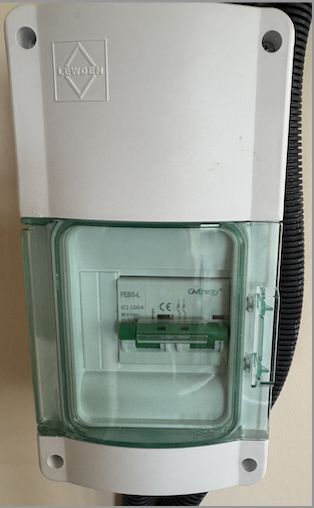
If the switch is down, switch it up and see if the battery leaps into action.
If this fails, check the consumer board breaker.
For me, the switch stayed on for a while but then got hot and switched off.
I contacted GE and they redirected me to my installer.
If the switch is on, GE should be able to see it.
Rob
DD I think on gen-2 battery the switch is on the side of the battery itself?
Agreed. The connection between inverter and battery depends on the types.
greyseason Can you tell us the type of inverter and battery that you have and whether you can see a manual switch between them?
Can you see the battery in the app or web portal (Inverter area)?
Also, check the breaker at the consumer unit.
This is looking like calling GivEnergy. They will be able to help if they can see the battery from their end.
@"DD" Anything else?
Rob
FIXED (not solved I guess sorry)
Hey, sorry for the delay - thanks for all of your suggestions. Here's what I tried:
1) checked the breaker, battery switch, and charge / pause settings -- all were fine
2) reset the inverter -- did this on the app
3) checked the green switch between the battery and inverter -- it was up / on
4) checked to see if the battery was showing in app / portal -- it was and had voltage
5) checked it was on by pressing button on side of the unit
None of those things worked so I got in touch with the installer and they came out to have a look and did some kind of reset physically and "charged the battery up"(?) and here's what they said:
"We are not sure why the battery initially stopped working, but it seems to be a system error. They are usually set to not drop below 4%, on rare occasion they can drop under..."
The battery is charging again and seems to be discharging too and functioning in the app / portal as normal. When I was looking through the data I did see that initially the battery went from 63% to 0% all of sudden in the middle of the night but otherwise everything else seemed fine ie. it was showing in app and had voltage etc.
Hopefully this helps someone or if anyone gets this same issue and comes across this thread at some point!