4% Limit on AIO

13 comments started 2024-11-16 last 2024-11-21
GivEnergy ProductsAC CoupledBattery
C
#1 CW

I am getting confused about the percentage limits on the AIO. My understanding is that the described 13.5kWh capacity is fully available for use (i.e. 100% DoD). However on the inverter page on the web portal there is 4% reserve set by the installer and cannot be changed.

Is this 4% limit on the AIO against the whole battery capacity, or against the 13.5kWh that is usable. I ask because when I look at the discharge slots on the web portal, you can discharge down to 0%. It starts at the 4% level but you can adjust it down to 0%

Is this 0% down to the full 13.5kWh or the whole battery? If I did this, would it fully empty the battery (and would that cause problems), or just down to the 13.5kWh limit? Or is this a bug?


G
#2 geoffreycoan

CW The 13.5kWh is what’s marketed as being available capacity. The actual battery capacity is physically higher than this, but some is not accessible because the batteries don’t like being fully charged or discharged so what you “see” as available is actually in the 20-80% capacity range.

Anyway, putting that to one side, you can use all the 13.5%

Except there is a 4% reserve that you can’t use. You can actually increase that reserve to a higher figure if you want to keep more battery back in case of a power cut - the extra reserve capacity can be used to power your home in the event of a power cut (and assuming your installer wired it in that way).

But in short, you get to use 96% of 13.5kWh. It is a bit disingenuous to say its 100% depth of discharge, but its what it is

C
#3 CW

geoffreycoan Thanks for the info. Do you know what setting the discharge setting to 0% does? Does that take you down past the 4% reserve?

G
#4 geoffreycoan

CW geoffreycoan Thanks for the info. Do you know what setting the discharge setting to 0% does? Does that take you down past the 4% reserve?

You shouldn’t be able to discharge below the 4% reserve figure. I think if you set the discharge setting to below 4% then it will just discharge the battery down to “empty” (i.e. the reserve figure).

I don’t have an AIO but I believe the inverters all work the same. Occasionally I have seen my own battery get down to 2 or 3%, and after a while idling the battery will recalibrate whether it is truly empty or not, and if its below its minimum voltage level I’ve seen the inverter charge the battery up to 4% without any intervention or command from me. So 4% is the usable floor limit.

D
#5 Daveb01

CW

Hi yah,

I have just had a look at my settings and your right, mine now goes to 0% (it never went below 4% previously)
So have GE updated the AIO’s without telling anyone. They have said in the past they would allow 100% discharge (coming soon)

You may be the first to notice this 👍🍺, I will now have to see if there is any documentation saying this is now the case.

D
#6 Daveb01

CW

So after some investigation, I can not find any documentation to say this has been implemented by GE.
In the app (on my iPhone) it will not go below 4% still.
In the cloud it now goes below 4% but not sure why or if it will make any difference?

There are 2 settings that mean different things

I have now changed mine to 5% for both.


C
#7 CW

Daveb01 I really do wish that they stop changing stuff, seemingly on-the-fly and without any supporting documentation. It maybe that this is intentional, or it maybe a bug that could potentially damage your battery if you set it to 0 - I don't know because as you say there is no documentation on it. One could take the view that anything that is supported on the portal is safe to use without causing problems to the hardware, but if it did cause the batteries a problem, I wonder how long it would take for them to be replaced.

D
#8 Daveb01

CW

So my understanding of the difference:-

  1. Battery Resurve % limit - this is how far the battery can go down to (13.5 - 4% = 12.96 kWh)
  2. DC Discharge lower SoC % limit - this is how far you would like the SoC to be calculated reference to 100%, this means if you set it to 0% it will run the battery down to 12.96 kWh. If you set it to 5% (12.96 - 5% = 12.312 KWh available). In easier terms set 0 and you get 13 kWH, set it to 5% and you get 12 kWh.

I have now done this:-

I would like my battery to have a bit of reserve so at the moment have set it to 5% = 12.82 kWh
I would like the battery to use all this capacity so I have set the DC Discharge to 0.

If I think there maybe power cuts etc, then I will change the setting in number 1 to say 10% and leave the DC (number 2 at 0%). This way I don’t have 2 things going on to disrupt any calculations?

Hope this makes sense.

C
#9 CW

Daveb01 Thanks Dave - that does make sense so I shall have a think on how best to configure my setp-up. A comment directed to GE (not you) - so much for the 100% DoD then. How on earth can we be told there is 100% DoD on the battery (so 13.5 kWh) but actually only be allowed 12.96???

B
#10 Blasteh

In my experience (when the AIO actually works) you will get 13.5kWh from 100% to 4%
the 4% is a pointless number that GE should have hidden from the users. (for the same reason you don't see 120% when the battery is charged to 16kWh max capacity)

D
#11 Daveb01

Blasteh

Now you mention it I agree that sometimes I get the full 13.5 kWh even when it gets down to 4% and they should have either hidden it or given us the extra 4% back.

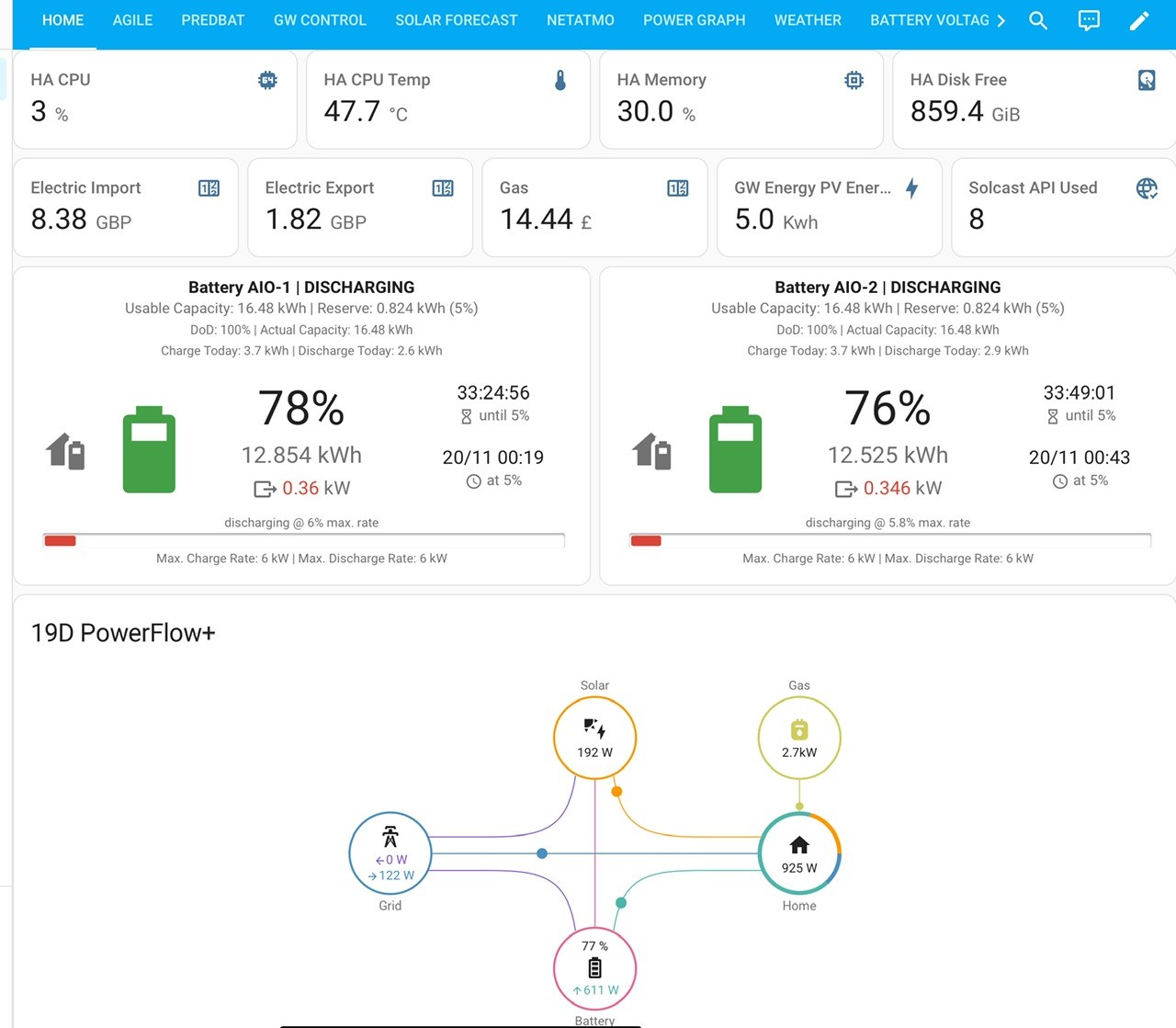
As the AIO has 4 x 4 kWh batteries, which should = 16 kWh. I now see much more now I have installed HA.
Each battery has 24 cells.
This is now what I can see in my Card for AIO batteries. 16.45 kWH 👍
I have put my resurvey to 5%

#12 Tenkaykev

Blasteh
I vaguely remember when doing my research over a year ago there was mention of the possibility of extra capacity being made available on the AIO. I think it was one of the youTube channels such as Tim and Kat or somesuch.

B
#13 bRhFDKtjRMK9

geoffreycoan Except there is a 4% reserve that you can’t use. You can actually increase that reserve to a higher figure if you want to keep more battery back in case of a power cut - the extra reserve capacity can be used to power your home in the event of a power cut (and assuming your installer wired it in that way).

I have AIO and Gateway and actually I tested that setting, reserve to 20% did not prevented entire house going dark, when I flipped the grid isolator. And battery was sitting at 20%. if anyone has confirm or reject this, please let me know, I am still discovering ways to work with the AIO product.