Getting started after commissioning

23 comments started 2024-11-23 last 2024-11-25
GivEnergy ProductsBattery
P
#1 P_and_L

Hi all,
My system of Solar, AIO and a Gateway was commissioned yesterday and is currently running on defaults with the exception that I have linked the Smart Tariff section of the system to our Octopus Intelligent account.

Could someone please point me in the direction of videos or documentation that would allow me to configure the system in an appropriate way? As the system's default seems to be set in ECO mode (What else would you want?), I was hoping that the system knowing that the Octopus Intelligent tariff provides low cost energy over night would use that to charge the battery. That hasn't happened. Also, the dashboard widget for the Inverter, Gateway section, is showing all zeros for energy statistics. Is this correct.

Many thanks for your help in advance.
Paul
D
#2 DD

P_and_L hi, welcome to the forum?
I assume that's intelligent go, rather than intelligent flux (since only the former has cheap overnight power)

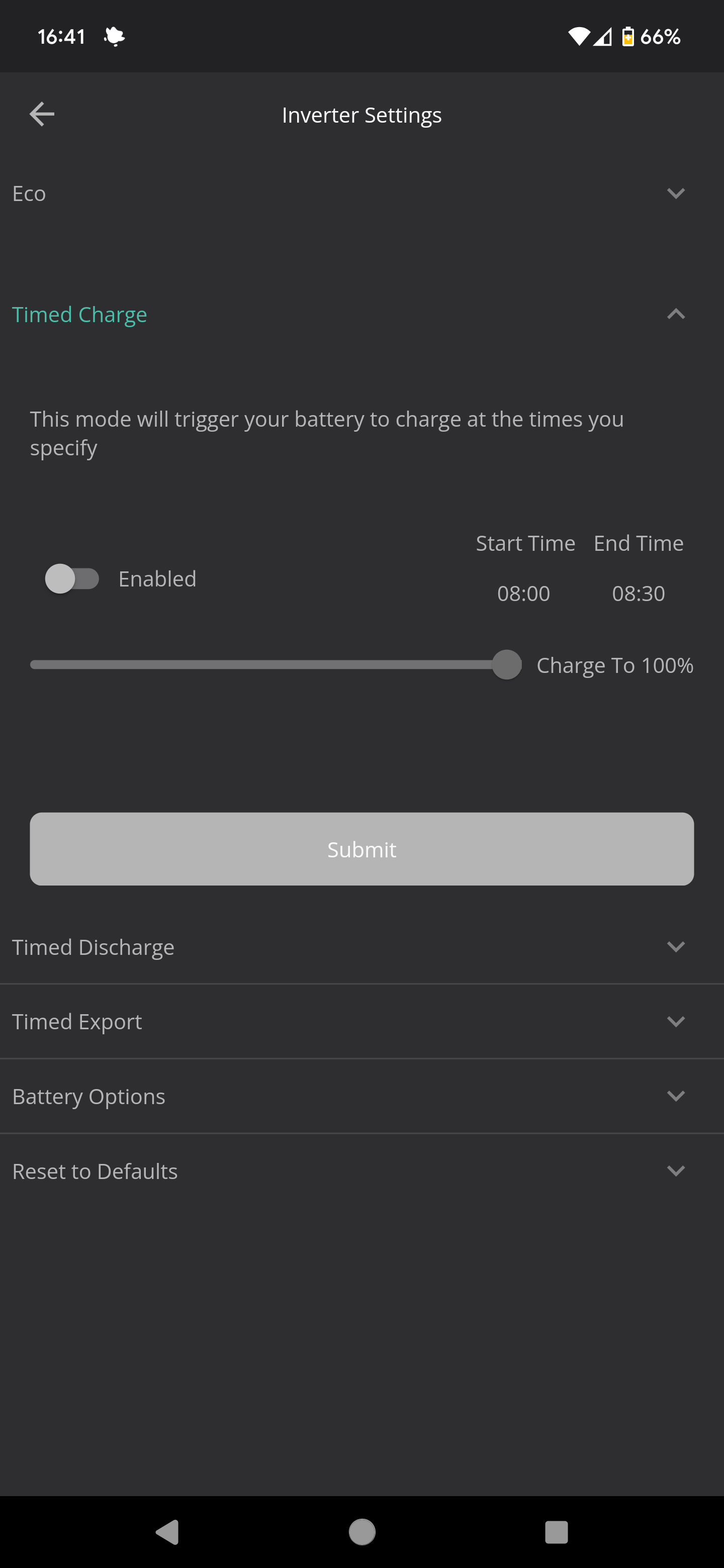
I don't use the smart tariff feature, but unless it is aware of the potential bonus charging slots, I'm not sure you need anything special over just a static charging timer.(In the app, gears icon at top right, then choose timed charge, and set up one of the timers to be the cheap period, with target of 100%)

What car chargepoint do you have? One of the bigger obstacles is ensuring that the battery doesn't attempt to charge the car during bonus slots.

Oh... BTW I think there's a beta version of the smart tariff card, as well as the original one. Beta one is probably better, but maybe not covered by any videos)

J
#3 Jon798

Hi,
My system was commissioned this week also (just hybrid inverter and batteries; solar to follow).

From what I can work out, "Eco" mode basically means "do your thing" and use solar/battery when possible, grid when not to meet house demand.

I am on Intelligent Octopus Go and added the info to both the Smart Tariff card and the Smart Tariff (beta) card (found at the bottom when you "edit dashboard"). I've set the Daily Charge Capacity to 150%, price limit - floor to 7p and price limit - ceiling to 10p and turned the automation on. I've left 'recalcuate at midnight' unticked.

It works as expected and my batteries get charged between 23:30 and 05:30 and then discharge through the day till they run out.

Not sure which of the smart tariff cards is actually driving the charge schedule, but the way it seems to work is that GE's server "dials in" to the inverter at close to 23:30 and sets Charge Slot 1 to 23:30-00:00 and turns it on. Then at about midnight it "dials in" again and sets Charge Slot 1 to 00:00-05:30 and turns it on. Then at 05:30 it turns AC Charge off.

You can see this by looking at the bottom of the 'remote control' section under 'more' at the top right of the 'my inverter' tile where the commands from "server" are shown.

I have not set any timed charge/discharge slots up myself.

Hope this helps in some way...

Jon.

P
#4 P_and_L

DD Thanks for your reply. Indeed, our tariff is Octopus Intelligent Go and gives us 6 hours of cheap electricity. We have a Rolec EV charger and our EV is a Tesla and it is the car that qualifies for the Intelligent Go tariff.

Do you have to choose between charging the battery and the car? I would have hoped that you could do both as well as handling any heavy duty loads such as washing machine, driers etc.

L
#5 Lincs_Will

I'm using Home assistant and Predbat to control my setup (G2 inverter, 4.1kw solar and 9.5kwh battery) with a lot of help from people on this forum. I also have a Zappi EV charger and I'm on IOG. Predbat reads when IOG is giving extra cheap power slots outside of the standard 2330-0530 and works how to to charge/discharge the battery to minimise costs.

The simplest way to to set the battery up is to go into the GE inverter settings (cog in the top right corner of the app) and set a timed charge for 2330-0530. Octopus will then control your EV charger/car separately so yes you can have the car and GE battery charging simultaneously, as well as any house loads you have running. Just make sure you don't exceed the limits of your breakers or main fuse!

P
#6 P_and_L

Jon798 Hi, thanks for your reply. I didn't notice the beta Smart Tariff widget. That looks like the functionality that I was expecting to be in place. I'm going to follow your advice and set mine up the same.

Ok the beta Smart Tariff widget is configured. Where do you setup the Daily Charge Capacity and turn on the automation?

Thanks for your assistance, its really appreciated.

Paul

D
#7 DD

P_and_L

P_and_L Do you have to choose between charging the battery and the car? I would have hoped that you could do both as well as handling any heavy duty loads such as washing machine, driers etc.

Yes, all power is cheap rate between 2330 and 0530 and during any bonus charging sessions. So charging the house battery, running washing etc is fine

The complication cam come if Octopus decides to charge your car outside the standard hours - eg my car charged this morning from 0530 to 0630, then 0700 to 0730, then 0800 to 0830. If you are not prepared, your AIO would typically discharge to try to cover the car during those extra hours. To prevent this, you need to either ensure the AIO is also charging during those bonus slots, or at least set to not discharge, or have the kit installed in such a way that the AIO is not aware that the car is charging.

Maybe the smart tariff is integrated with IOG sufficiently that it will take of this detail for you. I don't know that detail. I went for the latter option (hide chargepoint from GivEnergy), but also have my own software to turn off discharge during bonus charging slots.

P
#8 P_and_L

DD Prior to the getting the GivEnergy System, we have had problems with charging the Tesla on the OIG tariff. When we plug it in after work, ready for the evening's cheap rate period, the charging always starts immediately. We have read that the charging is supposed to stop after a short period and a cheap rate schedule is generated. We do receive the schedule but the car continues to charge until it reaches 80% - set up within the car.

To stop this expensive charging happening, we have added the 23:30 to 05:30 charging schedule directly in the car. This means that Octopus are not actually controlling the charging because they cannot be trusted to charge only during the cheap rate period.

If we could sort out the above issue, we may then be able to trust Octopus to control charging at other ad hoc low cost periods.

The problem may be due to our simple Rolec EV charger.

P
#9 P_and_L

Lincs_Will Thanks for the information. I am going to try and keep it simple until I get my head around everything but will look into Home assistant and Predbat at some point. I assume they are both apps?

S
#10 SteveClubley

P_and_L

Is the Rolec EV charger one that is supported by Octopus? If not you’ll need to rely on the car being in control instead. In this scenario set to car to only charge between 23:30 and 05:30 and you’ll be sure to be charging at 7p per kWH. The house load and battery at the same rate too.

#11 Watcher

P_and_L
No, HA and predbat require a pc running 24/7.
Have a look at Wonderwatt for a more app like approach, works well for me.

P
#12 P_and_L

SteveClubley No Rolec isn't supported by Octopus, so yes, we've had to put the schedule into the car. As Teslas are supported, i would have thought that Octopus could control the car direct, regardless of whether the Rolec was supported or not.

P
#14 P_and_L

Watcher Thanks, will do.

D
#15 DD

P_and_L We have read that the charging is supposed to stop after a short period and a cheap rate schedule is generated. We do receive the schedule but the car continues to charge

What I've heard is that it's okay to use the car's API to immediately stop the charge - being plugged in is sufficient to generate the schedule.

D
#16 DD

Watcher No, HA and predbat require a pc running 24/7.

Or a low-power system such as raspberry pi, or I think some sort of wyse thin client?

L
#17 Lincs_Will

P_and_L

DD

I have a Synology NAS that can run virtual machines so that's how I'm running Home Assistant for minimum extra watts used. You can also use things like a raspberry pi or their own hardware Home Assistant Green or Yellow. Predbat is an add on to HA (all free). I'm hugely grateful to Trefor who made Predbat for his informative YouTube videos and to Geoffreycoan for sorting all the documentation as well as being active on this forum to help.

P
#18 P_and_L

Lincs_Will DD @Jon798
Thanks everyone for your help. I've got it configured to use smart tariffs and the battery charge worked as expected.

I have a remaining question that hopefully someone can help with.

When I look at the Inverter widget on the dashboard and select the Gateway, literally all the statistics are zero in all of the tabs. The Gateway is obviously working but I was expecting to see something. The General tab contains data and the Software tab contains the firmware version but all the other tabs contain zeros. The Battery page however contains loads of data. Is this correct?

Many thanks,
Paul

D
#19 DD

P_and_L I don't know much about the AIO/gateway. I think that a single AIO can operate without the gateway, so when its on its own, perhaps the AIO unit does all the reporting, even if there's a gateway present. But if you expand that with additional AIOs, it's the gateway that becomes the master device, so perhaps that's when the data switches to being stored by the gateway.

C
#20 CW

P_and_L I have a single AIO - I only connect to the AIO inverter and not the gateway - the gateway doesn't seem to have anything of use to report. As DD said, you would probably need to connect to the gateway if you get multiple AIO's as this becomes the primary source

P
#21 P_and_L

CW DD
Thanks for the replies. I know that at least one AIO can operate without the Gateway, I don't know about multiples. Its good to hear that my gateway isn't the only one not showing data, so I won't worry about it as much!

J
#22 Jon798

P_and_L I've got the opposite problem - lots of data in the my inverter section for meter, inverter, grid, but the battery section is missing (think accidentally turned off by installer). Waiting on GE to pick up my email/feedback ticket and hopefully turn it back on!

I did find the iPhone app gives all the graphs even though the cloud portal is currently not showing things properly...

Cheers,
Jon.

R
#23 Roy124

DD rather than intelligent flux (since only the former has cheap overnight power)

We were on OF which did have a variable tariff, 0200-0500 (iirc) low tariff, and 1600-1900 high tariff, with standard outside these hours. The export tariff also at the same times.

D
#24 DD

Roy124 Yes, but Intelligent Flux only has two rates.