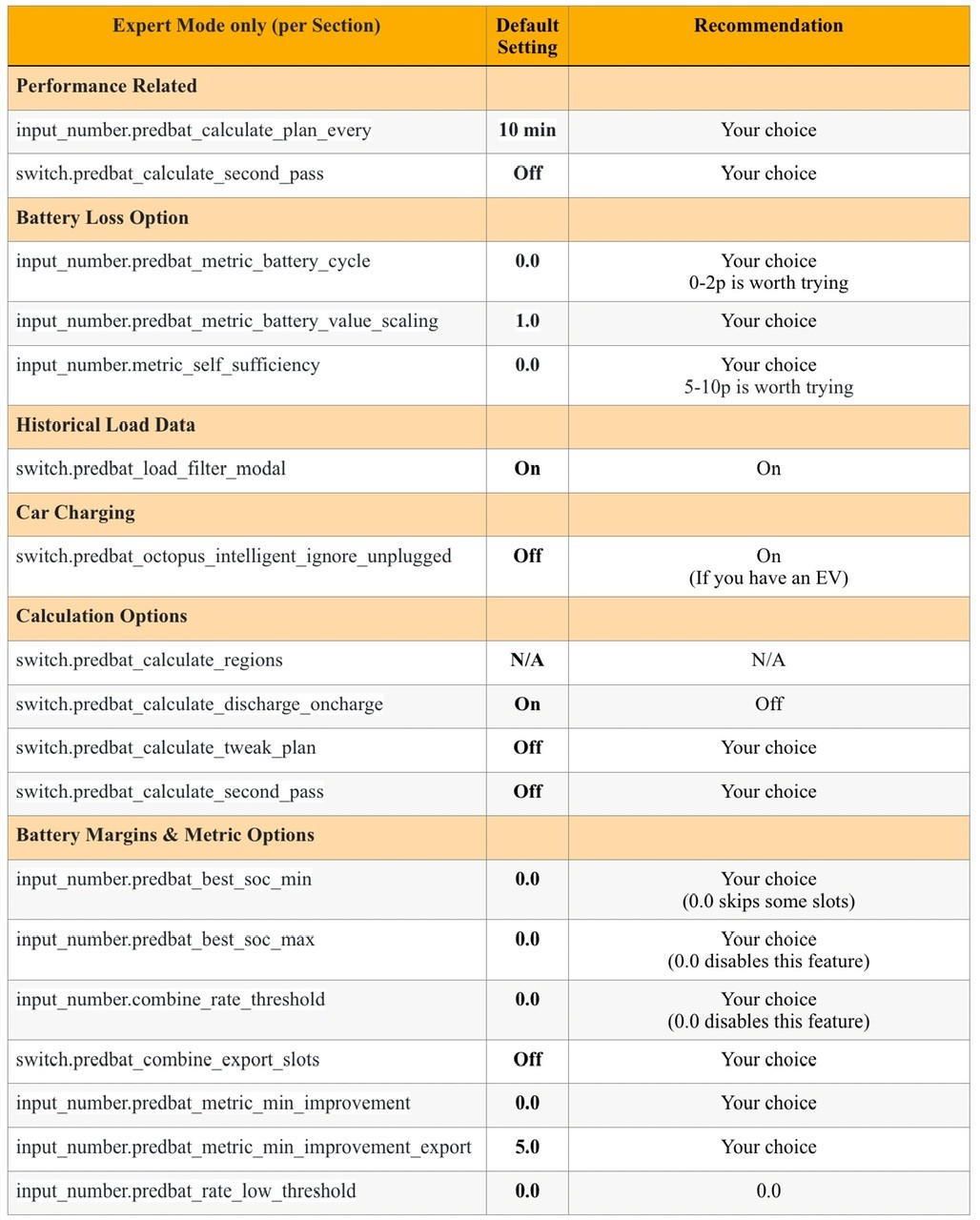
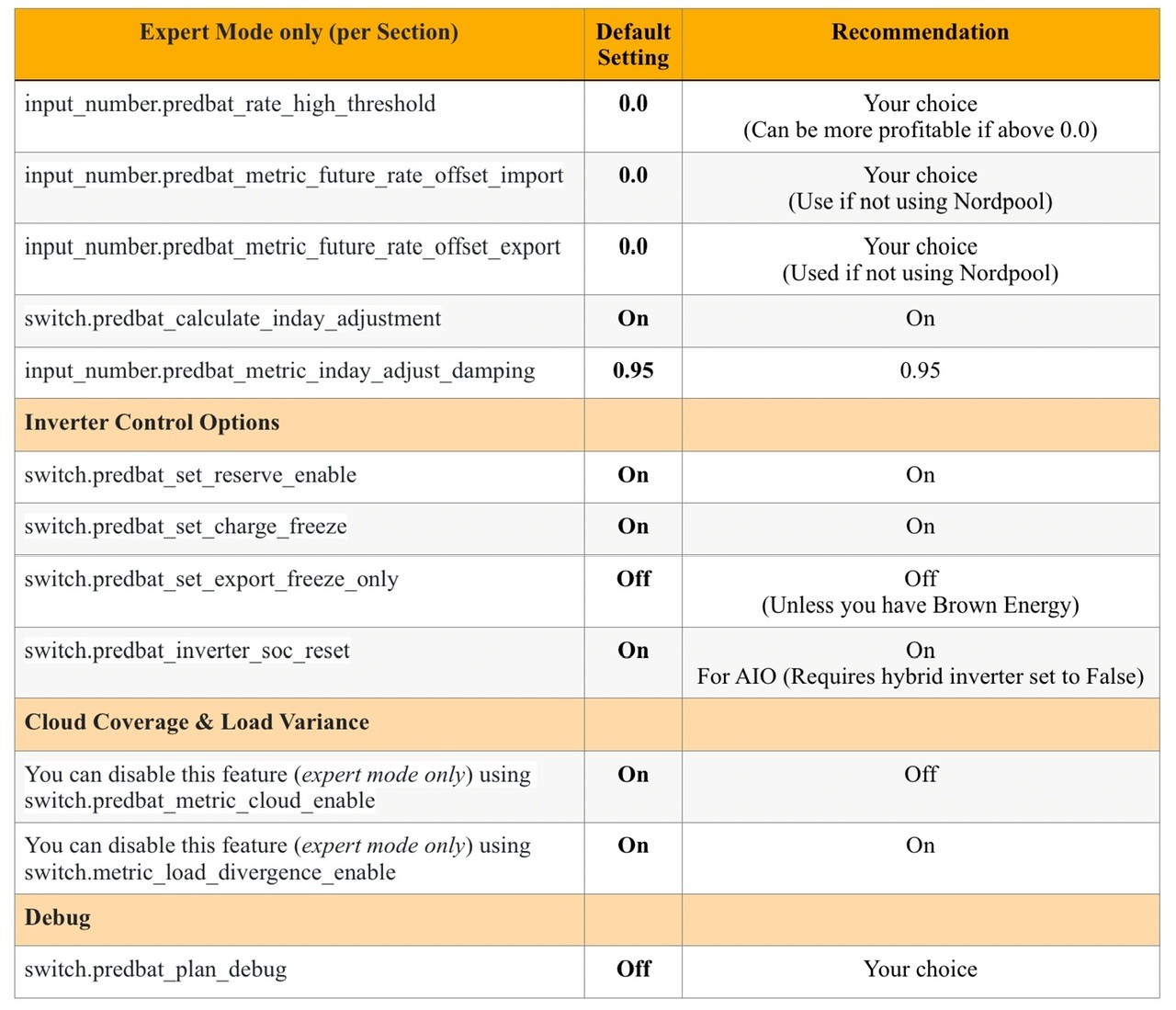
First Night on Predbat (Expert Mode only)

22 comments started 2024-11-24 last 2024-12-15
Home Automation
D
#1 Daveb01

Hi all, as I have been promoted to šŸ‡ and have been instructed to switch on Expert Mode, I thought I would start another post to separate the general chat on First Night on Predbat (if that’s OK)

This will just be for settings & any issues that involve Expert mode only.

I am also looking forward to the new post for those starting their second year on Predbat šŸ˜€

D
#2 Daveb01

I have been reading the docs as the weather is crap. Are these settings worth looking at and turning on please?

switch.predbat_calculate_tweak_plan (expert mode) When True causes Predbat to perform a second pass optimisation across the next 8 charge and discharge windows in time order.

This can help to slightly improve the plan for tariffs like Agile but can make it worse in some fixed rate tariffs which you want to discharge late.

switch.predbat_calculate_second_pass (expert mode) When True causes Predbat to perform a second pass optimisation across all the charge and discharge windows in time order.

NOTE: This feature is quite slow and so may need a higher performance machine.

This can help to slightly improve the plan for tariffs like Agile but can make it worse in some fixed rate tariffs which you want to discharge late.

G
#3 geoffreycoan

Daveb01 I have both of these switches off. I have tried them individually in the past and concluded for them to be off as they didn’t give me a better plan when on. I think I did used to use second_pass all the time for quite a while, but later versions of Predbat meant it wasn’t particularly beneficial to me. Your mileage may of course vary.

Some other expert mode controls you could consider:

input_number.predbat_metric_battery_cycle - this initially defaulted to 1p then 0.5p and now 0p. If you set it, it will reduce the amount of churning import and export through the battery.

input_number.predbat_best_soc_min - minimum charge to retain in your batteries eg for power cuts

switch.predbat_metric_cloud_enable and switch.metric_load_divergence_enable - model varying cloud and load in the half hour period. Turning these on or off makes no difference to the overall plan, but can change the 5 minute granularity plan

R
#4 Rbor

Daveb01
switch.predbat_calculate_tweak_plan (expert mode)
Calculate full second pass (slower)

I have both of these off.

The friendly name for second pass is "Calculate full second pass (slower)".
I suspect I was influenced by the word 'slower' and documentation states that it is CPU intensive.
I couldn't see much advantage is switching on "Calculate full second pass (slower)" which seems to be linked to "second pass".

Rob

D
#6 Daveb01

Hi all, I have been though a few docs and found these (expert mode options). I have found 30
I have numbered them 1-3, to make it easier to suggest a recommend. E.g number 5 recommend On

I am guessing there are 5 options:-
ON
OFF
Number
Your Choice

Here is v1 with the list. V2 will be recommendations from you guys (if your willing to help)
I have tried to make it easier with numbers 1-30 (rather then each line of code)

Customise Options Document
(please read to get an understanding of the meaning of each setting). Some of the settings in this doc have not been updated yet, but I have updated the below (e.g discharge is now export)

https://github.com/gcoan/batpred/blob/main/docs/customisation.md

Performance Related

  1. input_number.predbat_calculate_plan_every (expert mode)
  2. switch.predbat_calculate_second_pass (expert mode)

Battery Loss Options

  1. input_number.predbat_metric_battery_cycle (expert mode)
  2. input_number.predbat_metric_battery_value_scaling (expert mode)
  3. input_number.metric_self_sufficiency (expert mode)

Historical Load Data

  1. switch.predbat_load_filter_modal (expert mode)

Car Charging

  1. switch.predbat_octopus_intelligent_ignore_unplugged (expert mode)

Calculation Options

  1. switch.predbat_calculate_regions (expert mode)
  2. switch.predbat_calculate_discharge_oncharge (expert mode)
  3. switch.predbat_calculate_tweak_plan (expert mode)
  4. switch.predbat_calculate_second_pass (expert mode)

Battery Margins & Metrics Options

  1. input_number.predbat_best_soc_min (expert mode)
  2. input_number.predbat_best_soc_max (expert mode)
  3. input_number.combine_rate_threshold (expert mode)
  4. switch.predbat_combine_export_slots (expert mode)
  5. input_number.predbat_metric_min_improvement (expert mode)
  6. input_number.predbat_metric_min_improvement_export (expert mode)
  7. input_number.predbat_rate_low_threshold (expert mode)
  8. input_number.predbat_rate_high_threshold (expert mode)
  9. input_number.predbat_metric_future_rate_offset_import (expert mode)
  10. input_number.predbat_metric_future_rate_offset_export (expert mode)
  11. switch.predbat_calculate_inday_adjustment (expert mode)
  12. input_number.predbat_metric_inday_adjust_damping (expert mode)

Inverter Control Options

  1. switch.predbat_set_reserve_enable (expert_mode)
  2. switch.predbat_set_charge_freeze (expert mode)
  3. switch.predbat_set_export_freeze_only (expert mode)
  4. switch.predbat_inverter_soc_reset (expert mode)

Cloud Coverage & Load Variance

  1. You can disable this feature (expert mode only) using switch.predbat_metric_cloud_enable
  2. You can disable this feature (expert mode only) using switch.metric_load_divergence_enable

Debug

  1. switch.predbat_plan_debug (expert mode)

Recommended Options

  1. Default 10 min - Your choice

  2. Default Off - Your choice

  3. Default 0.0 -

  4. Default 1.0 -

  5. Default 0.0 -

  6. Default On -

  7. Default Off -

  8. Default

  9. Default On - Recommend Off

  10. Default Off - Your choice

  11. Default Off - Your choice

  12. Default 0.0 -

  13. Default 0.0 -

  14. Default 0.0 -

  15. Default Off -

  16. Default 0.0 -

  17. Default 0.1 -

  18. Default 0.0 -

  19. Default 0.0 -

  20. Default 0.0 -

  21. Default 0.0 -

  22. Default On -

  23. Default 0.95 -

  24. Default On -

  25. Default On -

  26. Default Off -

  27. Default On -

  28. Default Off -

  29. Default On -

  30. Default Off - Your choice

D
#7 Daveb01

Hi all, I have spend the last few days reading the doc and looking at just Expert Mode settings. I do not understand all the settings (yet).

The first pass, I have updated the numbers on what one of the 4 options should be set. If I have put Your choice, this really means you should read the doc and decide yourself it it’s needed.

I have also put any recommendation that a Trevor has added to the doc, and the one or two Geoffrey and others have suggested.

Please let me know if I have got anything wrong, plus if I have missed a recommend that should not be the default.

Note: I think the documentation may need an update in the link e.g now export not discharge.

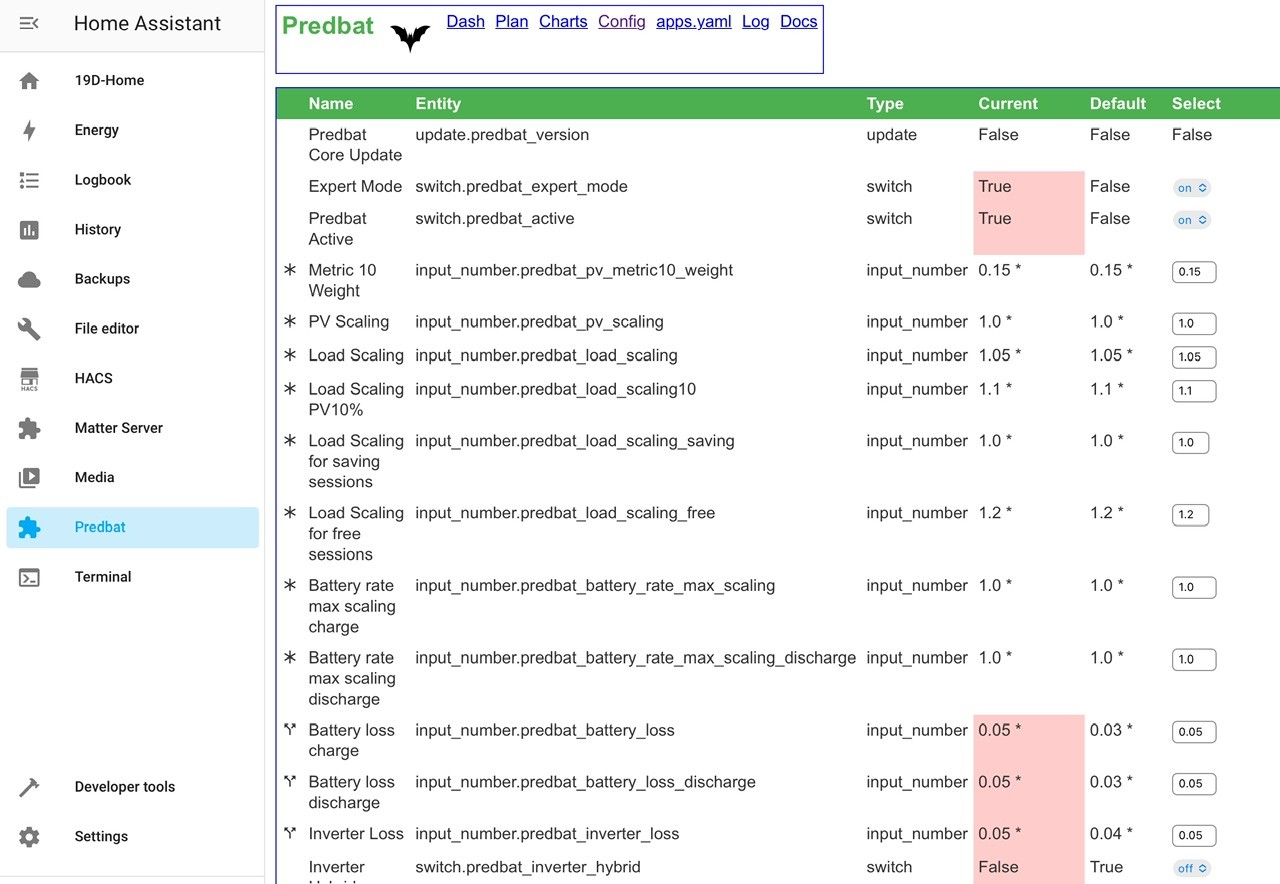
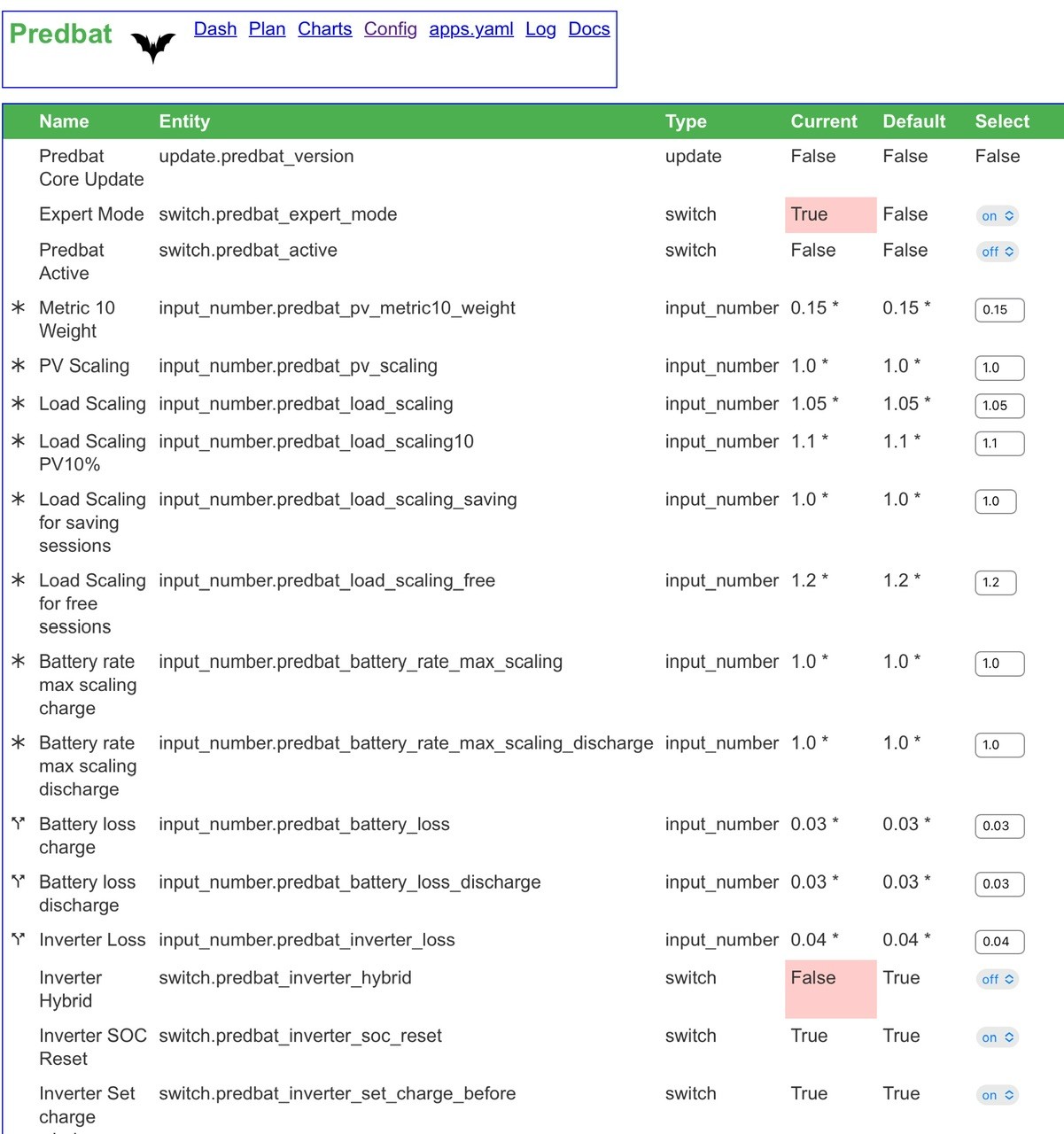
A Trevor via Geoffrey request for a future update, I noticed while doing this work. Would it be possible to have some kind of symbol (far left, I can see a *) or separate column to identify Expert mode items in Predbat configuration to make it easier please?

D
#8 Daveb01

V2

Customise Options Document
(please read to get an understanding of the meaning of each setting)

https://github.com/gcoan/batpred/blob/main/docs/customisation.md

Performance Related

  1. input_number.predbat_calculate_plan_every (expert mode)
  2. switch.predbat_calculate_second_pass (expert mode)

Battery Loss Options

  1. input_number.predbat_metric_battery_cycle (expert mode)
  2. input_number.predbat_metric_battery_value_scaling (expert mode)
  3. input_number.metric_self_sufficiency (expert mode)

Historical Load Data

  1. switch.predbat_load_filter_modal (expert mode)

Car Charging

  1. switch.predbat_octopus_intelligent_ignore_unplugged (expert mode)

Calculation Options

  1. switch.predbat_calculate_regions (expert mode)
  2. switch.predbat_calculate_discharge_oncharge (expert mode)
  3. switch.predbat_calculate_tweak_plan (expert mode)
  4. switch.predbat_calculate_second_pass (expert mode)

Battery Margins & Metrics Options

  1. input_number.predbat_best_soc_min (expert mode)
  2. input_number.predbat_best_soc_max (expert mode)
  3. input_number.combine_rate_threshold (expert mode)
  4. switch.predbat_combine_export_slots (expert mode)
  5. input_number.predbat_metric_min_improvement (expert mode)
  6. input_number.predbat_metric_min_improvement_export (expert mode)
  7. input_number.predbat_rate_low_threshold (expert mode)
  8. input_number.predbat_rate_high_threshold (expert mode)
  9. input_number.predbat_metric_future_rate_offset_import (expert mode)
  10. input_number.predbat_metric_future_rate_offset_export (expert mode)
  11. switch.predbat_calculate_inday_adjustment (expert mode)
  12. input_number.predbat_metric_inday_adjust_damping (expert mode)

Inverter Control Options

  1. switch.predbat_set_reserve_enable (expert_mode)
  2. switch.predbat_set_charge_freeze (expert mode)
  3. switch.predbat_set_export_freeze_only (expert mode)
  4. switch.predbat_inverter_soc_reset (expert mode)

Cloud Coverage & Load Variance

  1. You can disable this feature (expert mode only) using switch.predbat_metric_cloud_enable
  2. You can disable this feature (expert mode only) using switch.metric_load_divergence_enable

Debug

  1. switch.predbat_plan_debug (expert mode)

Recommended Options

  1. Default 10 min - Your choice

  2. Default Off - Your choice

  3. Default 0.0 - Your choice 0-2p is worth trying

  4. Default 1.0 - Your choice

  5. Default 0.0 - Your choice 5-10p is worth trying

  6. Default On - Recommend Default

  7. Default Off - Recommend On (if you have an EV)

  8. Not in Predbat settings (this needs to be updated in the documentation)

  9. Default On - Recommend Off

  10. Default Off - Your choice

  11. Default Off - Your choice

  12. Default 0.0 - Your choice (0.0 skips some slots)

  13. Default 0.0 - Your choice (0.0 disables this feature)

  14. Default 0.0 - Your choice (0.0 disables this feature)

  15. Default Off - Your choice

  16. Default 0.0 - Your choice

  17. Default 0.1 - Your choice

  18. Default 0.0 - Recommend default

  19. Default 0.0 - Your choice (can be more profitable it above 0.0)

  20. Default 0.0 - Your choice (could be used if not using Nordpool)

  21. Default 0.0 - Your choice (could be used if not using Nordpool)

  22. Default On - Recommend default

  23. Default 0.95 - Recommend default

  24. Default On - Recommend default

  25. Default On - Recommend default

  26. Default Off - Recommend default (unless you have Brown Energy)

  27. Default On - Recommend default (especially for AIO)(requires hybrid inverter set to False)

  28. Default On - Recommend default

  29. Default On - Recommend default

  30. Default Off - Your choice

W
#9 wrighar

So I have there set:

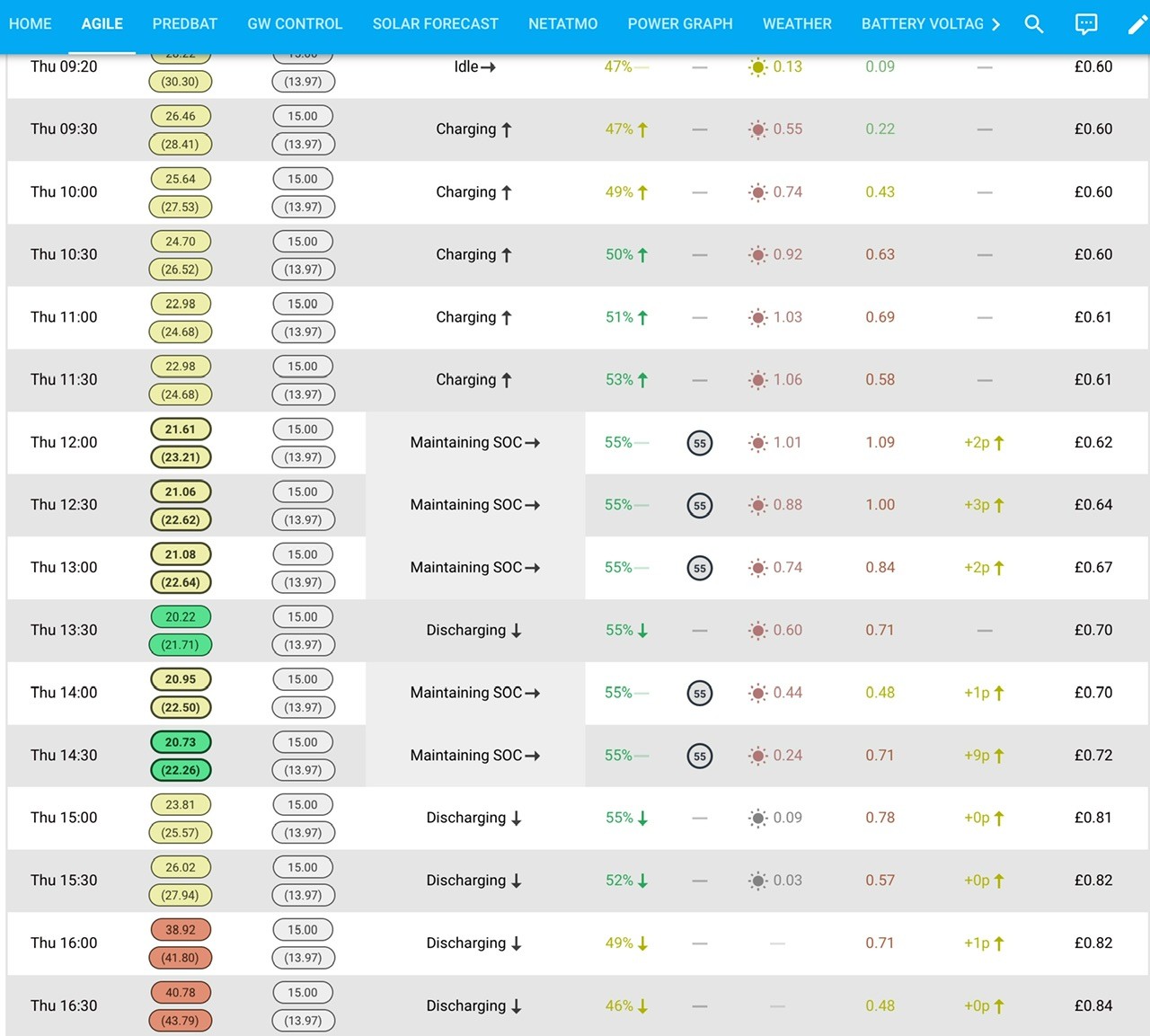
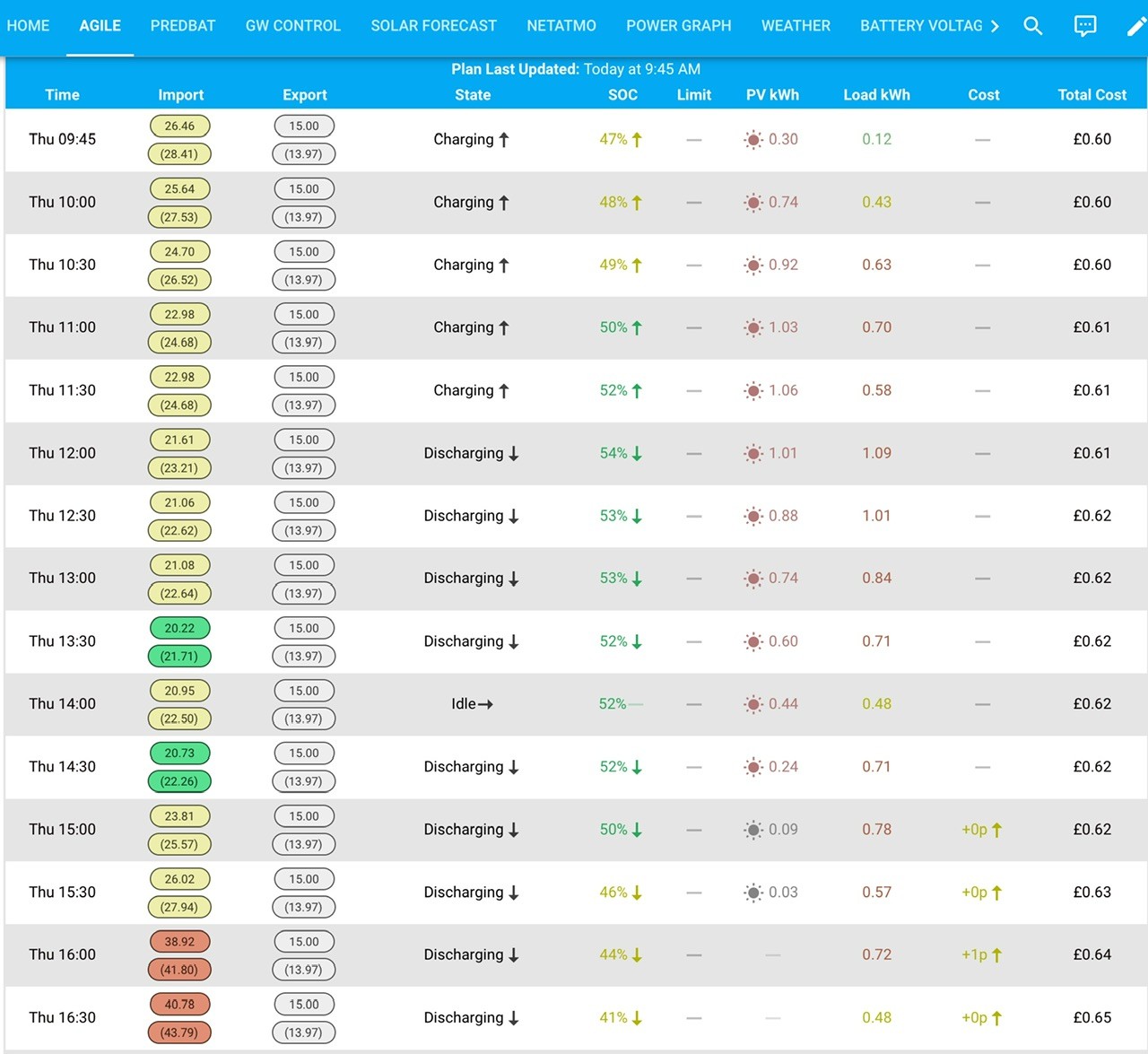
I thought the charge freeze and export freeze would mean solar would be exported and the battery level held during sunny times.

but it's charging the battery in preference to exporting (import cheap rate is 12.5p, export is 15p...

D
#10 Daveb01

wrighar

Mine seems to be holding charge (SoC) and exporting Solar.

This is what happened when I turned it off

G
#11 geoffreycoan

wrighar I thought the charge freeze and export freeze would mean solar would be exported and the battery level held during sunny times.

No, it doesn’t quite work like that https://springfall2008.github.io/batpred/customisation/#inverter-control-options

Setting these options on ALLOWS predbat to freeze (hold) the battery level and bypass charging the battery up, exporting solar generation if it’s not worth charging the battery up (freeze export) or prevent discharging to meet home demand (charge freeze). It all depends on the future home demand, grid rates and solar generation as to what Predbat will do.

If I turn set charge freeze off then Predbat charges from solar and discharges to home demand regardless of what the import rates are. If I turn charge freeze on then (depending on the rates) I see a different plan, quite often I’ll see the battery level being held and grid importing rather than the battery discharging.

D
#13 Daveb01

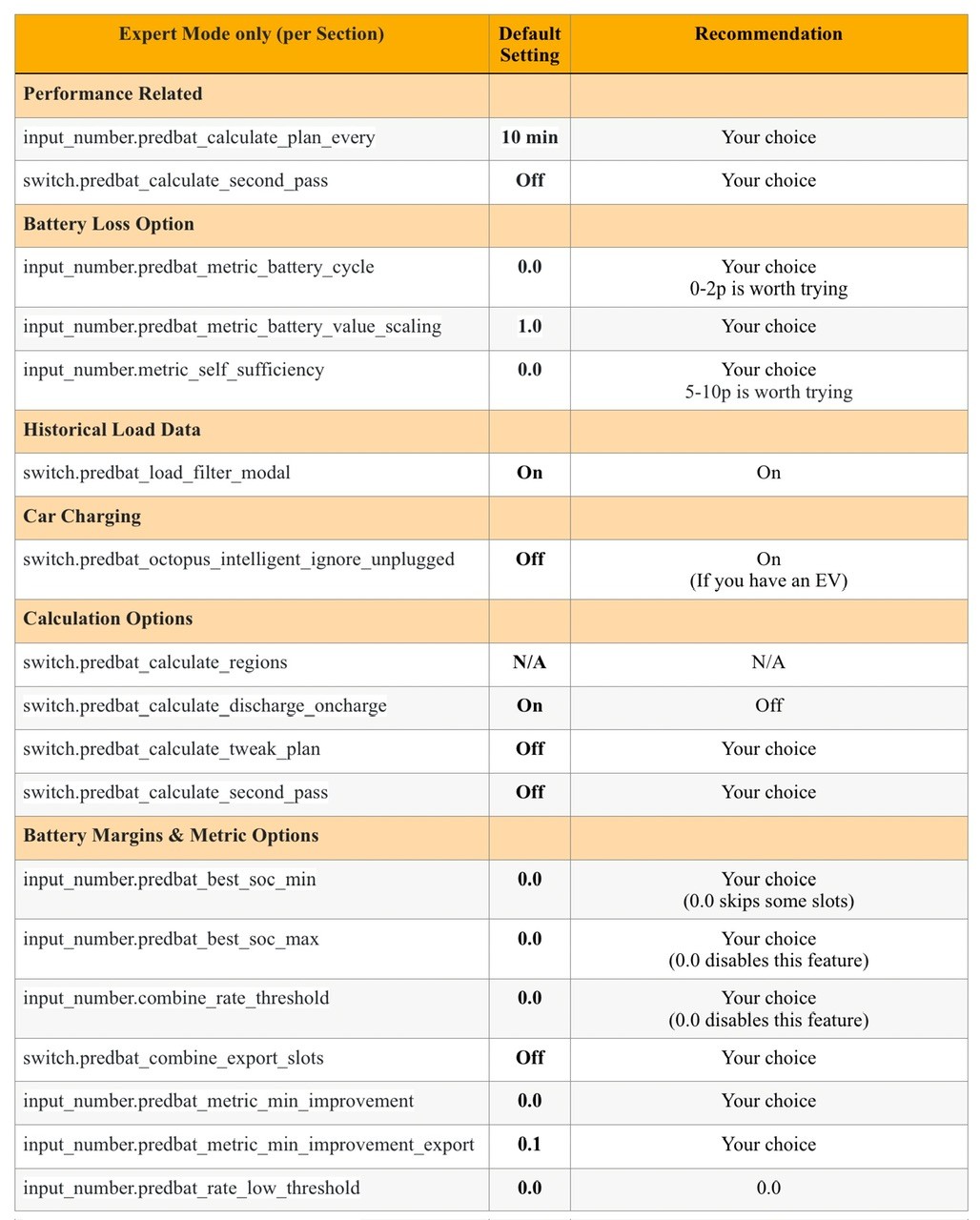
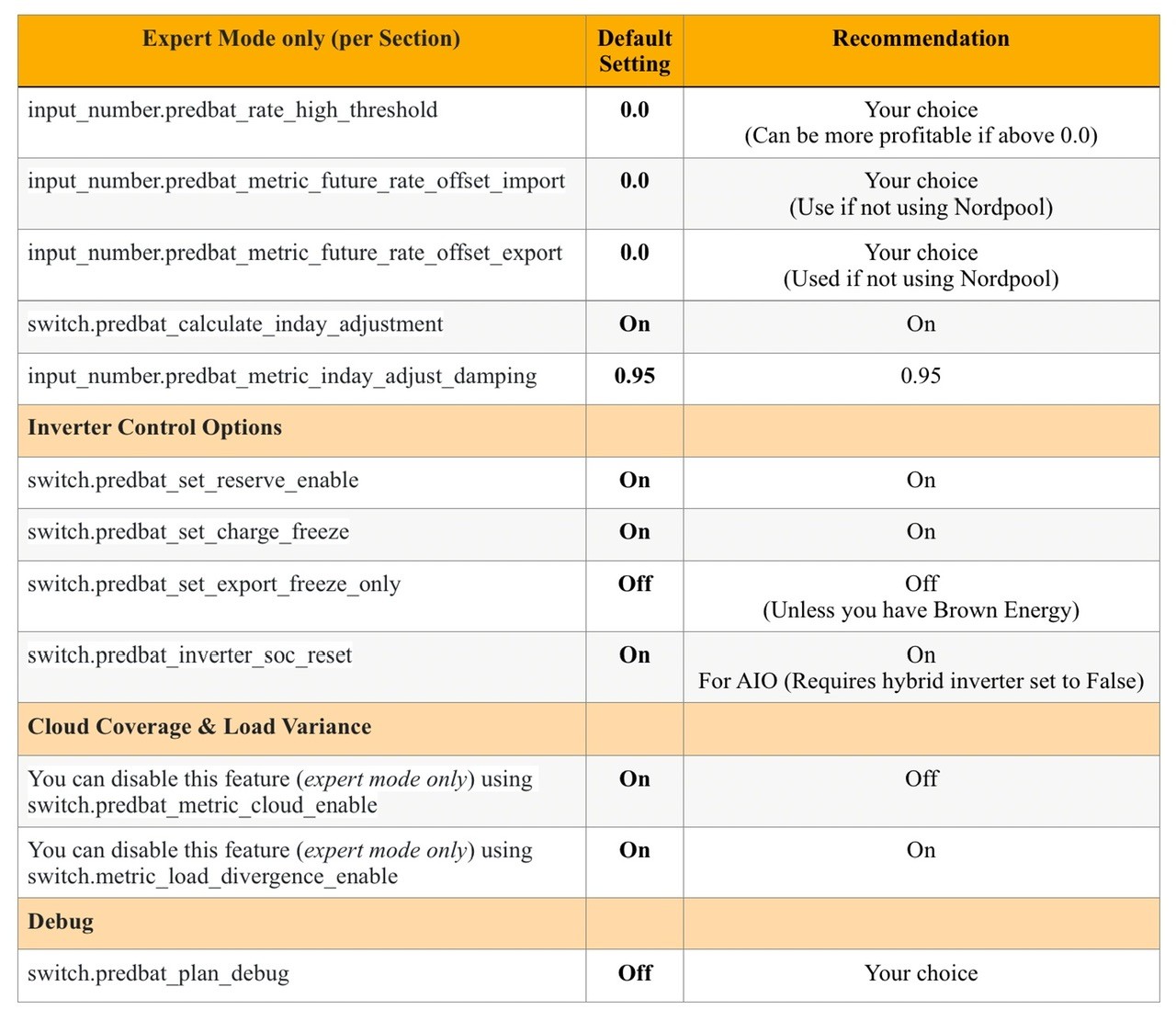
Updated for metric_min_improvment_export

predbat-expert-mode.pdf
116kB

H
#14 Henry3rd

This is very helpful, i have turned export mode on but I don't see all these options. My dashboard is the one that is generated in /addon_configs/6adb4f0d_predbat/predbat_dashboard.yaml Predbat - Dashboard - v8.8.6. Is there an updated version that I should be using?

D
#15 Daveb01

Henry3rd

I click Predbat in main menu (left hand side), then config. There is no way at the moment to just see the Expert mode settings. This is why I have done a spreadsheet, so it’s easy to see, then check your settings.

H
#16 Henry3rd

Daveb01 That's great, I hadn't set the show in side bar on. šŸ™‚

G
#17 geoffreycoan

Henry3rd have turned export mode on but I don't see all these options. My dashboard is the one that is generated in /addon_configs/6adb4f0d_predbat/predbat_dashboard.yaml Predbat - Dashboard - v8.8.6

Predbat generates the dashboard each time it runs, so if you copied the dashboard before you switched expert mode on, these extra controls won’t be included. You just need to manually copy the dashboard across, or add the extra controls manually to your dashboard

Daveb01 There is no way at the moment to just see the Expert mode settings

It’s on my list …

R
#18 Rbor

There is a setting:
Use the Battery Capacity Nominal size switch.predbat_battery_capacity_nominal

What does it do?
The default is 'False'. I used to have this set and True but I have changed to the default.
I can't find it mentioned in the documentation, so what is it?

... a mystery .....

Thanks

Rob

G
#19 geoffreycoan

Rbor There is a setting:
Use the Battery Capacity Nominal size switch.predbat_battery_capacity_nominal

What does it do?

As ever, it is covered in the documentation https://springfall2008.github.io/batpred/customisation/#scaling-and-weight-options

Unlikely you need to turn it on unless your battery/inverter requires it

Most of the switches and input numbers used by Predbat are in the ā€˜customisation’ page of the documentation, apart from those related to car charging that are in the specific page. The ā€˜configuration guide’ contains sets of settings useful for different tariff types, and the apps.yaml settings are all described in their own specific page

R
#20 Rbor

geoffreycoan Arghh! I have searched long and hard for this, thinking
"surely @geoffreycoan can't have missed this one out".
........so back to the naughty step for me.

I have the setting set as False now and my battery SOC is correct anyway.

Rob

D
#21 Daveb01

Rbor

I would like to find this as well, how do I find what GivTCP is reporting as the battery size please?

What could I see change if I turned this on? And where would I see any changes please?

switch.predbat_battery_capacity_nominal - When enabled Predbat uses the reported battery size from the GivTCP 'Battery Nominal Capacity' field rather than from the normal GivTCP reported 'Battery Capacity kWh' size. If your battery size is reported wrongly maybe try turning this on and see if it helps.

The GW has only one capacity size 27 kWh
The AIO’s have two 16.48 and 13.5 calc

R
#22 Rbor

Daveb01 When I originally set up the Apex charts, I am pretty sure that the y axis only went up to 10 kWh. My two 8.2 kWh batteries give me 16.4 kWh and the battery SOC line was cut off.
I increased the y axis scale to 20 kWh in the yaml code and my battery SOC line reached 16.4 kWh so that looks right! But I selected 'True' for switch.predbat_battery_capacity_nominal anyway although I didn't really understand what it did..

I have now turned the switch to 'False' to match the default and it makes no difference.

See how your Battery Chart looks.

Rob

G
#23 geoffreycoan

Rbor When I originally set up the Apex charts, I am pretty sure that the y axis only went up to 10 kWh. My two 8.2 kWh batteries give me 16.4 kWh and the battery SOC line was cut off

The default battery chart is hard coded with a y axis limit of 10kW because Trefor has a 9.5 battery so if you have more you have to increase it.
Apex charts are supposed to be able to auto scale the axis but there’s been a bug open on the auto scaling for ages. Not got Trefor working on it!