
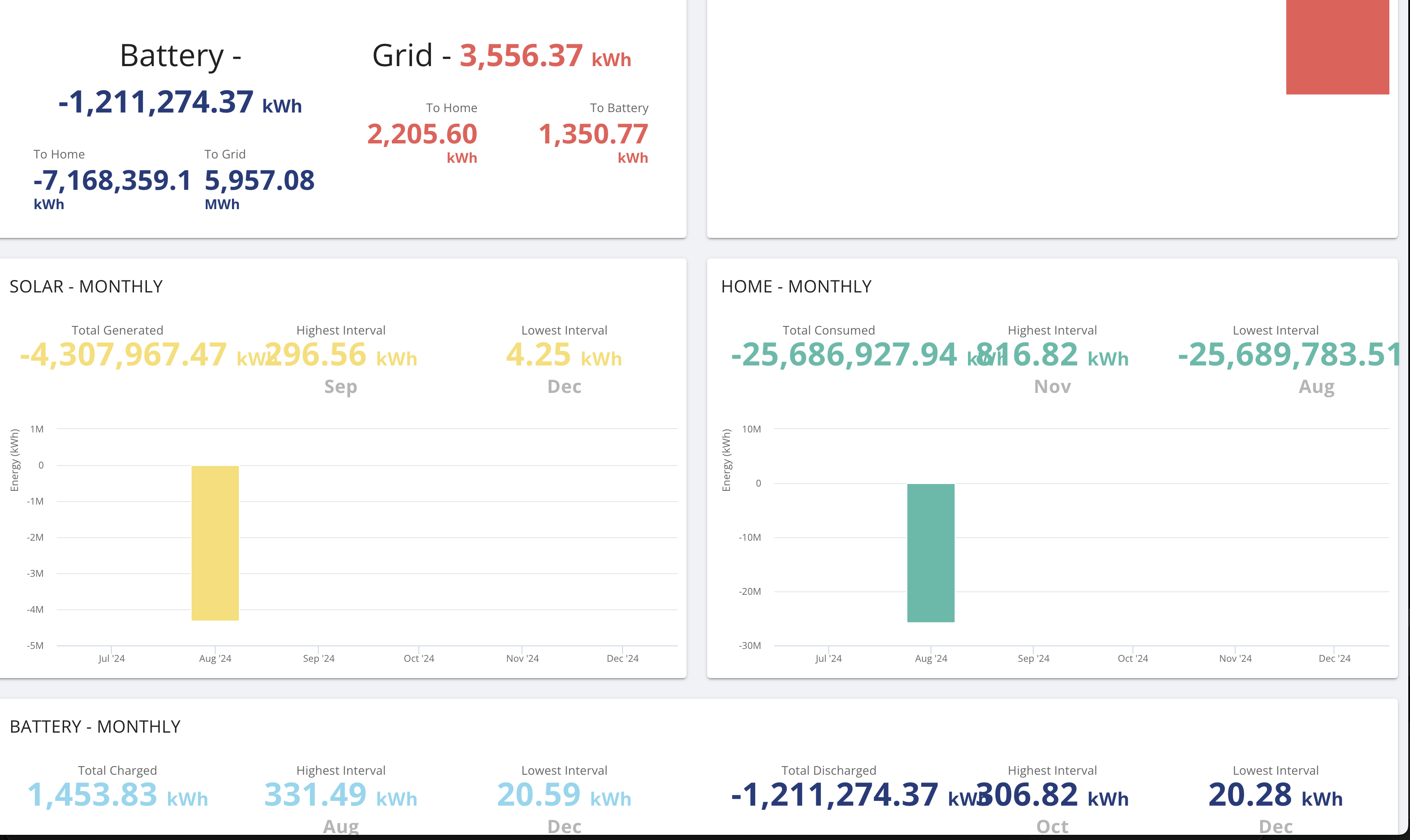
Generating a report for a custom timeframe from the dashboard produces inaccurate results, values to unreadable precisions and layout/readability problems.
See screenshot - in August I generate -4.3 million kWh of energy which may mean I'm expectedly living in a mini blackhole. Then nothing for any months beyond that on the graph but headlines show some spurious values.
Is everyone seeing the same kind of results or just me?
T
#2TerryWagstaff
There appears to be discrepancies at the more 'micro' level. Virtually every day the GivEnergy daily report shows that I have exported over 3% more energy than the meter/Octopus record. Though the percentage is less, Givenergy records for the imported electricity the same amount less for the imported energy.
GivEnergy clearly reports a more optimistic picture than Octopus ie less imported, more exported. As I pay on the meter readings, I have come to discount the Givenergy values for import and export. I have no way of knowing if the total consumption and total solar generated figures have similar variances, but I cannot get them any other way have to rely on them
Terry
R
#3R0ss
Interesting, the discrepancies I'm seeing are very much at the macro level!
P
#4pwdst
AFAIK the GivEnergy values suffer from low sampling frequency/high sampling intervals. If I am exporting 1kW now and I was exporting 1kW five minutes ago then I was exporting at that rate continuously for the last five minutes right? What it misses is the cloud that briefly moved over and halved generation for a few minutes between those times.
R
#5Rubikcube
The reports are created from the "meter readings" that you can view in the portal inverter card.
If you power off your system, it can result in the meter readings "going backwards", i.e. the first reading after you power back on is less than the last one before you powered off. This can result in crazy negative numbers.
If possible use the restart inverter function in the portal to restart your inverter, which causes the readings to be saved correctly. Then if necessary you can power off without corrupting the data.
If you have the premium version of my android app https://givenergymonitor.wixsite.com/tutorials
There is a restart inverter button in the controls page which does the same as the one in the portal (but without using the portal).
#6Windy Miller
TerryWagstaff My annual meter values show that GE meters are slightly below the smart meter values but only by a couple of %.
G
#7geoffreycoan
Windy Miller Mine are similar, the import and export meters on the inverter are surprisingly close to the smart meter readings (which have their own degree of inaccuracy as well)
Its worth highlighting that the givenergy meters have separate daily and total figures.
Part of the problem is as pwdst says the GivEnergy reports run from the 5-minute meter snapshots (which go into the daily total) which assume you exported/imported/generated at a consistent level for the 5 minute period since the last reading. They don’t use the total figures


