
I've always had my inverter set to ECO. However, I'm on the Octopus Tracker tariff and there have been quite pronounced changes in the daily unit charge over the last week and I've started to check the next day's unit charge. Tomorrow the unit charge will be 5p per unit hogher than today so I've tried to set my inverter up to charge my 8kw battery to 100% before midnight tonight. I've turned off Eco and set the timed charge to enabled with the timeframe 18.00 to 23.50 tonight but all that's being imported is enough to meet my current consumption.
Any help /advice on this would be appreciated
G
#2geoffreycoan
142LymingtonRoad You shouldn't need to turn Eco off when you are doing a forced charge.
Check what the target charge % is, it should be 100% (sounds like it is), and check what the battery charge rate is, it should be set to max
1
#3142LymingtonRoad
Hi Geoffrey and thanks for the quick reply.
Target charge set to 100% and battery charge rate set to max.
With ECO disabled my current consumption is being matched by import and nothing taken from my battery which is currently at 21% charge. Battery is not being charged.
With ECO enabled my current consumption is being drawn from the battery and the battery is not being charged
G
#4geoffreycoan
142LymingtonRoad Hmm, that doesn't sound like your inverter is behaving.
One final thing to check in the portal, you haven't got Battery Pause mode set to Pause Charging?
Otherwise I'd suggest doing a 'reset to defaults' in the portal and then re-setting up your charge when the inverter restarts
1
#5142LymingtonRoad
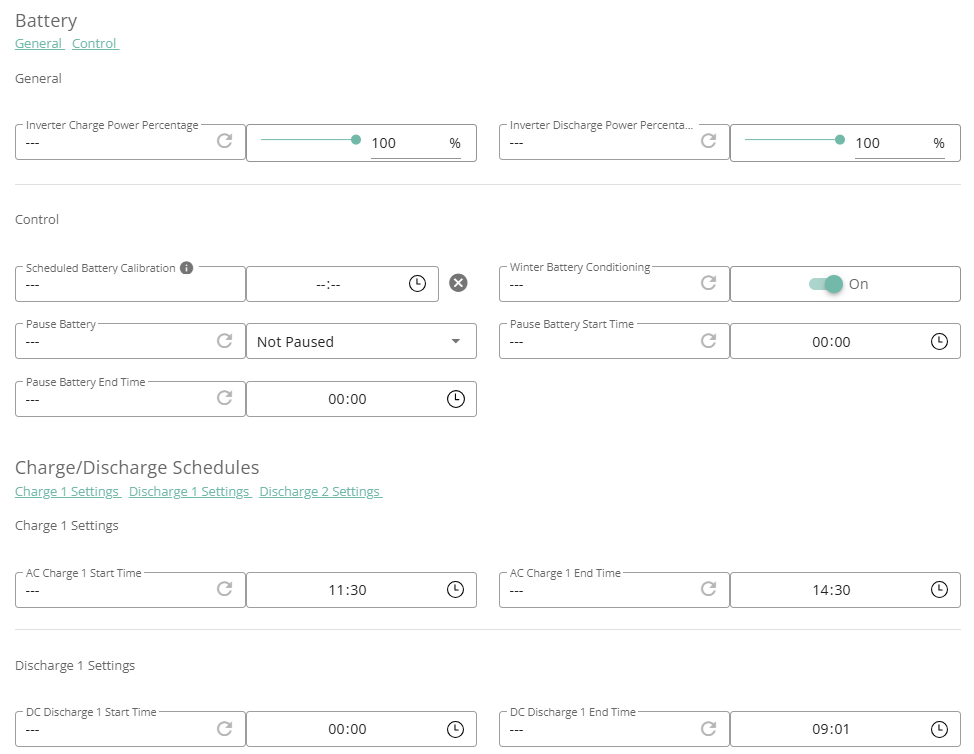
Where’s battery pause mode? Had a good look around but can’t see it.
If I do a set to defaults presumably it’s just my timed charge setting that will go and my selected battery reserve.
Didnt know that’s et to defaults restarts the inverter
G
#6geoffreycoan
142LymingtonRoad you've not mentioned what type of inverter you have and firmware, but assuming it is anything but a Gen 1 hybrid or AC coupled on the older original firmware, you should have this option on remote control under battery / control.
Here's mine
When you do a reset to defaults it should reset ALL inverter settings to their default values (apart from the clock), so any charge/discharge schedules, limits, set. Then at the end it restarts the inverter
You will see precisely what got changed in the bottom of the remote control section
1
#7142LymingtonRoad
Thanks. Found it. Battery not paused.
So looks as if I’ll need to click on default settings. How long will the inverter be off before back up?
Thanks. Will do it in the morning and keep you posted. Thanks again
1
#10142LymingtonRoad
Morning Geoffrey
Set a timed charge this morning which started charging the battery but it stopped charging it when it reached 20% capacity.
Subsequently clicked on default settings and set up a timed charge. At the moment it seems to be charging the battery as it should.
If clicking default settings actually restarted the inverter it must have done so instantly - no delay whatever.
G
#11geoffreycoan
142LymingtonRoad Set a timed charge this morning which started charging the battery but it stopped charging it when it reached 20% capacity.
I wonder if you had a 20% charge limit set somewhere in the configuration, or at least your inverter thought it had.
I've only got a gen 1 hybrid so can't comment on the restart time on other kit, but mine its noticeably a minute or two to restart. Anyway, sounds like you are working now. The remote control log might give an indication of what the reset to defaults actually changed
Pretty sure the 20% is the key hear. Sure I've read similar threads where it charged to the same value.
Suspect there will be a corrupt register somewhere that only giv can clear. A reset to defaults sadly doesn't fix it.
1
#13142LymingtonRoad
TX200 Battery charge setting set to 100% max. Will fiddle around and test over the next few days to see if reset to defaults has cured it
B
#14bRhFDKtjRMK9
142LymingtonRoad Target charge set to 100% and battery charge rate set to max.
Target charge % and charge rate are only taken into account when you are on charging schedule. Outside charging schedule, they do nothing. Exception maybe being charging from excessive solar production.
Furthermore, individual charging schedules have their own target charge to be set as well.
With ECO disabled my current consumption is being matched by import and nothing taken from my battery which is currently at 21% charge. Battery is not being charged.
That's right. Eco means you power your house using stored energy. You should not disable Eco, unless you don't want to power your house from the battery at all? Eco does not have any schedule, so you can't really change it back and forth with ease. Powering the house with battery (Eco mode) is what this kit has been designed for.
With ECO enabled my current consumption is being drawn from the battery and the battery is not being charged
Sounds like normal operation, while being outside of charging schedule.
1
#15142LymingtonRoad
Will be testing the timed charge scheduling again when the Octopus tracker rate makes it sensible to do so.
Had I been able to charge my 8kw battery up last night I would have saved a bit on today’s unit costs!!
D
#16DD
142LymingtonRoad Will be testing the timed charge scheduling again when the Octopus tracker rate makes it sensible to do so.
It wouldn't cost you much to do a few 2-minute charges while trying to understand how things work. Esp. if you were to also reduce the charging power. Cost would certainly be a lot smaller than having it fail to charge fully prior to a more expensive day.