
Eco mode not producing any power

20 comments started 2025-01-04 last 2025-01-06
Mobile AppHome AutomationGivEnergy ProductsAC CoupledBatteryHome Assistant
X
#1 XAPBob

This morning, and throughout today, eco mode has produced no power at all. Initially setting the max export rate wasn’t working either…

It’s taken a restart (software), a full restart (AC isolator, and battery isolator, off for 30s), reset of configuration to standard….
But now at least I can set the export power level and force discharge to cover base load… but I’m over exporting and will run out by the end of the day 🙁

Nothing I can think to do is making eco mode work at all…
Which is a bit of a serious issue, I don’t want to have to automate the max discharge rate continuously.

AC coupled inverter and 9.5kWh battery.
Mostly controlled through home assistant, since the GivEnergy can’t deal with Octopus intelligent charging.

Anyone else encountered this, or have any other magic reset button shenanigans that might help?
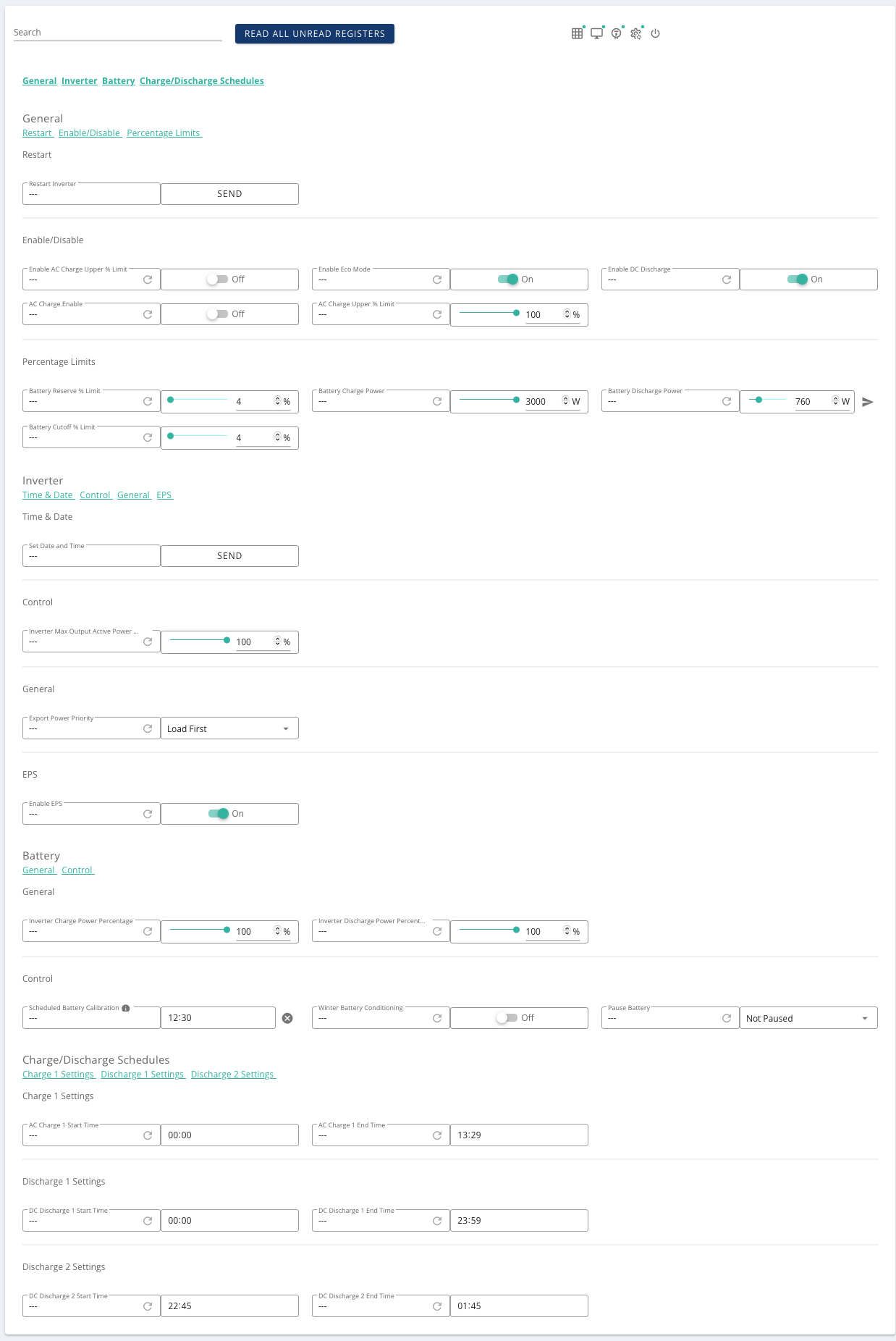
X
#3 XAPBob

Sure can...

X
#4 XAPBob

Automation just kicked it back to eco mode (peak import detection, my load has risen a bit) and it went back to doing nothing... just upped the discharge rate and it's blindly discharging again.)

T
#5 TX200

If you're using eco mode, don't set a timed discharge. Just just eco and timed charge.

It gets very complicated if you try to use the timed discharge features so you need to understand what they do (not necessarily what they should do) and how to work around it.

There's a few posts in this forum about the subject so if you want to learn more search for timed discharge.

X
#6 XAPBob

TX200

It's only set because eco mode isn't doing anything at all.
I usually only use it for the force discharge at the end of the day (set via GivTCP though HA as previously described on this forum).

G
#7 geoffreycoan

XAPBob are there any messages in the notifications log, things like comms error talking to the EM115?

It could be that the data cable from the EM115 (grid CT clamp) has come loose in the bottom of the inverter and without that the inverter can’t detect what the house load is, which would give the symptoms you describe.

Check the notifications and maybe unplug and replug the cable back in the bottom of the inverter - check the installation guide to make sure you are putting it in the right socket.

Also check that the lights on the EM115’s are flashing and that there’s no circuit breakers off

X
#8 XAPBob

It’s correctly reporting the load, it just doesn’t do anything to supply the electricity required…

G
#9 geoffreycoan

XAPBob I notice your battery discharge power in the above screenshot is set to 760W not the maximum 3000W for your inverter.

Other than that, sorry, no further ideas. Will need a givenergy “kick” I think

X
#10 XAPBob

geoffreycoan

Set to that to get me through as much of the day as possible.
I agree, I think a Monday morning response to a support ticket is the best I can hope for, which is a right pain.

K
#12 KevinB

XAPBob I notice you have a battery calibration scheduled, I wonder if it was in the middle of that and somehow got interrupted and is now in a weird state? Just guessing, though.

X
#13 XAPBob

Can I force another one in a bit? Calibration is discharge followed by charge IIRC

G
#14 geoffreycoan

XAPBob correct a calibration is a full discharge then a full charge

worth trying to kick another one off

X
#15 XAPBob

Scheduled a calibration - it took one minute.... something tells me that didn't work.

Scheduled another, and it's ramping up... I just hope that I get something useful working overnight.

X
#16 XAPBob

Well it's (sort of) working this morning, though not without some manual fettling - which is really annoying given that it's been working well for months with HA correctly controlling charge according to time and car charging.

A
#17 andydsmith

XAPBob

I had exactly this problem a few weeks ago. You need to call customer support. Use the installer option if the customer line is still closed. They sorted the problem for me in a few minutes. The problem was something to do with a grid code but I didn't really understand it.

X
#18 XAPBob

And now it won't do anything other than max discharge... Decided to do that when it was put into eco mode, and I can't even force it to charge. I can reduce the max discharge rate, but it's mostly emptied itself into the car since 6 am (when it should have been force charging since power was cheap)
This is so stupidly frustrating.

#19 nophead

Battery calibration includes a full discharge.

X
#20 XAPBob

This is >24 hours after calibration- and a day when it did the right thing

X
#21 XAPBob

Poked another calibration this evening, and it decided not to discharge, but to carry on charging as if there was no calibration…. So utterly frustrating

Tried three more times, and eventually managed to get something working, and it's been fine since.
Really, really confused as to what state it can have got itself in...
