
Default settings for All-In-One Battery/Invertor and Gateway.

3 comments started 2025-01-14 last 2025-01-14
GivEnergy ProductsBattery
B
#1 babylon5

Hi
Can someone provide default settings for AIO and Gateway as I was trying to change reserve battery limit from default of 4% to 20/25% and I think I have changed something I should not. (remote control settings)

I have had 4 power cuts since November which on this discussion board it was stated possibly due to Gateway load being over 80A but one power cut was at 00.50 when I was sleeping. I thought firmware update would help with this- still to see if this issue continues but I have emailed GivEnergy support but no reply yet.

I have 13.58Kwh system and Gateway. What settings do I need to change to keep a reserve of 20/25% battery.
B
#2 bRhFDKtjRMK9

babylon5 I have 13.58Kwh system and Gateway. What settings do I need to change to keep a reserve of 20/25% battery.

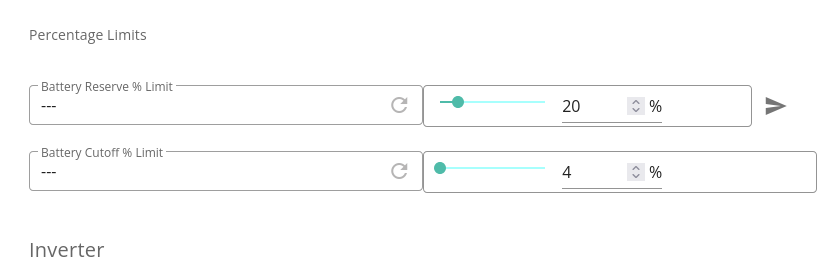
Here:

Change that to 20% as pictured and apply. Your battery will not discharge into home below 20%, but instead it will start idling. I think it will allow itself to drain below 20% (all the way to 4%) only during power cut.

B
#3 babylon5

Thanks. I have that set already but just wanted to check. Also do you know what the other default settings on the Battery/Inverter and Gateway should be?

Gateway: Control=100% General =Load First

Battery/Inverter Settings:
Enable/Disable -Enable Eco Mode is on, AC Charge Upper % limit is 100%. All others are off.
Percentage Limits-Battery Reserve % Limit 25%, Battery Discharge Power-6000W, Battery Charge Power-600W,Battery Cutoff % Limit 4%.
Control-Inverter Max Output Active Power Percentage-100%
General-Load First
EPS-On
Battery- Inverter Charge Power Percentage-100%, Inverter Discharge Power Percentage-100%
Control-all off or not paused
Grid-off
Charge/Discharge Schedules-Charge 1-10 settings no time settings, AC Charge Upper SOC % Limit for 1-10 -100%. Discharge 1-10 settings no time settings, DC Discharge Lower SOC % Limit for 1-10 -4%

I had to manually enter readings as not figured out how to copy what appears on screens on to here.