
This morning we have had a mains outage that lasted one or two minutes but, our all in one simply cut out when the mains failed. I understand from talking to our installer that several other units have also had the same issue. I have raised this as a technical support issue and I’m awaiting their response.in the mean time has anyone else had a similar problem this morning?
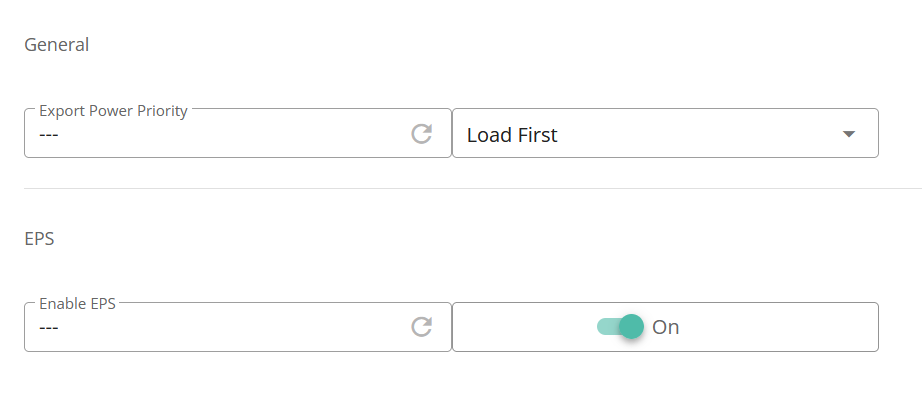
All in one failing to cover mains outage.
brinmcallister Not this morning but have had problems in the past. In my case the AIO breaker was tripping when the power was cut and I believe that was due to one of the wires going into the AIO breaker not being fully tightened up (from my observation that the GE engineer needed a lot of screwdriver turn on that particular wire as he was tightening all the connections AND the fact that the breaker has never tripped since during testing).
But there could be many reasons for this not working - so firstly what do you mean it is not working? Is it taking a long time to cut-over, is the breaker tripping, does it do nothing etc?
There are all kinds of reasons why (so for instance have you checked via the web portal that the EPS is switched on?)
So could you be more specific about what actually happens when the grid goes (you can test off-grid by switcing the gateway grid breaker to off for instance)
CW unfortunately it just does nothing. when the mains fails everything goes off. There is no attempt to maintain the supply, I dont know the device well enough yet to see if there is an event log I can look. Once the storm has passed I will take a good look at the AOI and see if there are any clues as to what has happened.
OK - in the first instance I would check that you have EPS switched on (via the remote control section on the web portal)

Then I would check through the logs to see if the setting to allow quick cut-over is set (sorry can't remember what is is called and can't find it in my logs!) but your installer should be able to check/set if required.
Also, if you are still without power, just open up the Gateway and see if any of the breakers have tripped - the AIO for instance usually has a 30mA RCD which could trip if all the circuits on it leak around that figure.
Another thing to check is that smart plugs are off. My EPS would not activate as the GE smart plugs were preventing it connecting. I think what was happening was that the EPS tried to switch but picked up earth leakage due to the plugs that were controlling 2 dehumidifiers. Switching these off solved the problem and we have been on the EPS since the grid went off at 10:00 this morning.
Thanks for the replies. I’ve heard nothing back from GivEnergy yet. Hopefully this is not typical.
I will check the settings as suggested.
CW eps is switched on. I will see if I can talk to my supplier on Monday. I know that they were going to raise the issue with GivEnergy. It’s probably been a busy day for them.
The system is now working. I set eps off then back on but darent test it due to the storm still raging. I thought no more of it until this evening when I noticed my smart meter was not reading and showing loss of comms. The app was also showing no mains. Unbeknown to us the mains supply had gone off again this time the battery had taken over and was down to 39% so a quick mad dash around the house to switch off everything to try to maintain as much charge as possible until the mornings sunshine. I think we are going to be off supply until 18:00 tomorrow. But at least the system is now working as it should be.
CW It's called "Enable 0 Second EPS Countdown" and just like "N-PE Relay Toggle" it isn't explicitly visible in the portal, though they will show in the log if their values are ever read or changed.
The portal log filtering doesn't seem to work properly (for me at least), so downloading the whole log and opening it in Excel or LibreOffice Calc, and filtering it there may be a better option for you.