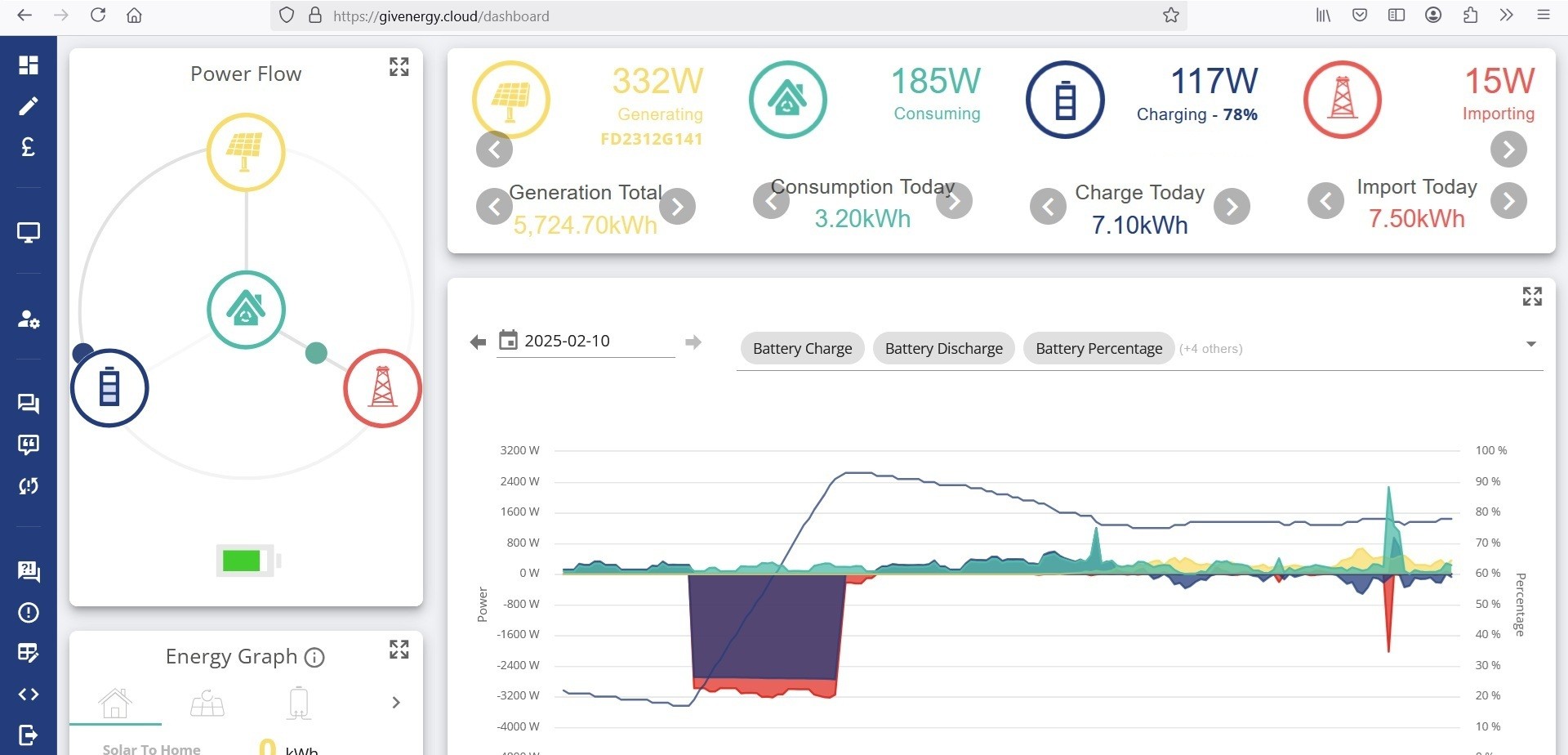
I have a scroll problem with the Givenergy dashboard on my HP laptop. If I select an item from the LHS e.g. “my inverter” to appear in the bottom right hand panel, it appears, but the inverter panel will not scroll. This becomes a problem if I want to change the settings. For instance if I now select “settings” and “timed charge” this works but the submit button is now off the page at the bottom. I used to scroll the panel to this button, but this does not work now. Any ideas? Even if I expand the panel to the full screen the page still will not scroll. I can still adjust the settings from my phone but I would like to do it with the laptop as I used to do.
Dashboard problem
dorset Can you demonstrate on the video what you mean exactly?
Have you tried Page Down key on the keyboard?
Maybe try different browser or scrolling with USB mouse, not touchpad?
Thank you for taking the time to reply to me. I have tried the Page Down key, touchpad, URL mouse all to no avail. If you look at the image that I have hopefully included and you look at the power graph displayed in the bottom right corner. It used to scroll successfully, but since a week or so ago when I placed the cursor in the panel, the panel reacts when the cursor is placed in the frame but the whole panel will not now scroll up so that I could see the bottom half of the frame. The same would happen with the inverter panel if place in that function in the dashboard, and as I previously mention I cannot scroll the frame to see the submit button when setting the “timed charge” etc. I have not as yet tried a different browser but I am using Firefox at the moment.
dorset Hmm, I use Firefox and am getting the same behaviour
Edit: Just tried on Chrome and same behaviour
I’ve noticed the same behaviour. At the same time the legacy Power Usage graph now also doesn’t download daily rates (if looking across multiple days) but all the half hourly data. I’m wondering if they have made some changes in the background.

The bottom edge of the dashboard seems to be off the bottom of the screen. I used to have a similar problem on an older, much smaller laptop where the display resolution in Windows (of a particular app) was different from the screen's display resolution. Have you tried Settings/system/display/scale or .../display resolution?
dorset Thanks for the screenshot, now it is clear what's the issue, others have confirmed it, and I can see it also. The problem only arises when screen resolution is low enough that you have to scroll (and now you can't because they have changed their page).
To mitigate it, on your keyboard, press CTRL and hyphen-minus (-) sign together, it will zoom out the page, you will be able to see cut out content. To zoom in again, press CTRL + plus sign.
I observed that small tiles on the left can scroll just fine. It's just the right hand side with main big tile which cannot scroll.
Thank you very much for that work-a-round for the problem. It is a help, but not a solution to the problem. The zooming out works but not sufficiently well if I want to change the settings of the 9 time charge slots in the inverter which then puts a lot of information in the frame. My computer will not zoom out far enough to still see the submit button. The solution surely must be for GivEnergy to once again permit scrolling in that frame?
dorset I suggest changing charging schedules in My Inverters -> Remote Control page. That one can scroll well, and it has everything you need.
- Click My inverters on left vertical panel
- Find your Inverter (or AIO, if you have AIO+Gateway), and Click Remote Control cog
- On new page, you will be able to see everything and scroll to all charging slots.
Great that works! Thanks for your input.
I still hope that GivEnergy will reinstate scrolling in the standard dashboard frame in the future.
Cheers.
dorset Glad you were able to access what you need.
Don't forget to leave them a note on e-mail, describing this problem. They may not be aware that taking away scroll bar has impacted lower resolution screens.
Thanks. Sent an email a few days ago but no reply.
idrobbo yes, I've noticed that the legacy Energy data seems to have disappeared, and the current one only allows downloading a CSV of half-hour rates regardless of what setting is chosen on the display. Much less useful than before, I'll need to resurrect my Google sheets to get the daily consumption and exports now. Hopefully it will be changed back to what it was before. I might ask on the Facebook group
CW Thanks for that, may be useful to others. For me I want to monitor the difference between what my energy provider (in this case Octopus via the DCC) say and the GE system.
dorset I have had this behaviour even since the old dashboard got retired and I had to use the new one. Sometimes it scrolls, sometimes not. I have found that changing the size of the browser window by dragging a window frame can unblock the scrolling. YMMV Happens a lot with Firefox. Doesn't seem to be so bad with Opera.
It's back working for me now. I don't know if it was me or GivEnergy that fixed it, but the frame has started to scroll again!
CW thanks for the link, I have used that in the past, the downside is it doesn't split export from battery or PV, etc., which is what I'm interested in particularly
regards,
iain