
I was told that you can/will be able to monitor smart plugs usage? As in how much power it consumes?
If so, which one do you recommend?
Thanks.

I was told that you can/will be able to monitor smart plugs usage? As in how much power it consumes?
If so, which one do you recommend?
Thanks.
I have been looking around for solutions and this product seems a good fit. TP-Link Tapo Smart Plug with Energy Monitoring, ideally I would like a faceplate to do this. However I am also looking at Electric Rad's as we do want to get rid of oil!
US versions of Alexa enabled kit have a power monitor option - it's not hit the UK yet and obviously doesn't include smart plug monitoring.
Ideally you would want one that has API type access as it could potentially be added to Home Assistant or other control apps that way.
There are lots to choose from. Important consideration is whther now ot in the future you want local control monitoring.
The ones I have:
1) SonOff are really flexible. Use their EWeLInk as to control from the cloud. New versions have local API. Really easy to refleash to Tasmota that gives unlimied local control
2) Tuya ( loads of manufacturers use Tuya chips ) use Smartlife app for the cloud, have very large cloud API platform, very large diversity of devices avaialble, can be locally controlled ( but a bit harder). Older ones can be flashed to Tasmota but newer ones cant
3) TPLink ( kasa ) works well but is a bit more expensice. App experience but also has local http port for getting the data
4) BG. I have not been able to connect to mine locally as they dont use the standard Broadcom access method. BG do do faceplate versions but I havnt gone that route as theie local control is too hard
If they have apps they should all integrate to Google and/or alexa seemlessly
Other things to consider:
a) Passthrough plug or in line with the cable like an extension lead?
b) Does it allow just monitoring, so the device cant be inadvertently switched off ( EWeLink / Tasmota best for that )

We are in the process of adding smart plug control and monitoring to the portal! We are hoping to integrate as many smart plugs as possible so you can have your choice of pick. We will be looking to incorporate smart plugs that offer energy monitoring first.

DeveloperDavid (GivEnergy) Is there any chance of IFTTT support in the future?
DeveloperDavid (GivEnergy) Thanks, at least I know there is a possibility at some point.
a word about TP-Link ... they have two ranges, KASA and TAPO; they are incompatible, so if you mix and match, well they don't match and you need two apps to control. Seems they have no plans to combine them either.
Which is a good reason to use an orchestration service to interact with the devices e.g. Google/alexa/smart things/GE?. They act as a tier above the manufacturer apps to give a cohesive user experience. That approach enables many makes of devices to be managed via a single control plane.
I believe that is ultimately where the goal is, to allow mix and match of devices. There are so many out there though so identifying potential targets may be helpful for the devs.
I use a mix of Kasa, Tuya, Tasmota and BG devices
I moved away from Ifttt when they introduced charges. You can now only have 5 applets for free. For a smart home that isn't enough so I jumped to alternative free solutions
If using cloud based soultions you can just use Google ( routines ) or Alexa (Skills).They have numberous triggers eg time or event tht can initiate maby actions like switching on plugs, lights, changing temperatures etc. The manufacture of the device just needsto expose those functions soonly buy kit the "works with Google / Alexa"
I use my own solution via local control. I just use NodeRed now. I have used OpenHab, many use HomeAssistant
They give you total control and are completley free. Yes you need a device to run them on but an old pc, NAS or Pi do the job fine
DeveloperDavid (GivEnergy) hi any update on progress of adding this feature? Thanks Keith

Ive just ordered a pack of 4 on Amazon for 28 quid. Will see how they work and integrate
I've been messing around with the tapo p110 (tp-link) for a bit. Has energy consumption tracking and an integration for home assistant. Very happy. Not sure I'll buy many tho as can't see the use case in a regular house for more than a couple given the price Vs savings

DeveloperDavid (GivEnergy) Just stumbled across this thread after looking at the IFTTT site and expecting to see some recipes in there given the availability of the API and a large HA community.
Having a casual look around to see if anyone knows anymore about the 'smart plugs' feature in the GE app.
I see the post about as many integrations as possible. At the moment looks like GE plugs may be coming.
Anyone any insights? All the best.
Couldn't get the app to connect to my smart plugs. It can see them, but won't connect. Think GE software is not yet fully enabled.

anthonypar it has to be their (GE) smart plugs.
Although they look like the standard ones you can get off ebay / Amazon (that use Tuya) they are linked to the GE API / ecosystem.
Trying to add a smart plug to app and get on fine until it asks for Step 6 - serial number and verification code 'located on the box' - I don't have a box anymore. Anything I can do about that ?
The gosund plugs allow you to monitor voltage and power consumption through their app. It seems that the GE smart plugs are rebranded versions of the gosund plugs.
I've got an old TP-Link Kasa socket that I use with HomeAssistant. Using the GivTCP inverter temperature, HA will turn on a small fan to cool the inverter if it goes over 45'C.
You can add any Tuya based plug, tested in an earlier version of the app when it wasnt asking for the serial number and verification code. But you need the serial number bit. Which is what links them to your GE account.
They have been asked about selling just codes, which would basically be paying for your use of the Business grade IoT feed.
Yet to get an answer
TheDragon (GivEnergy) Any update on this and who the distributor will be (well, where I can buy one once they become available) ?
crackersfamily The Smart Plugs should be going out in the next week or so, we are just confirming our list of vendors you can purchase these from so no confirmation on that just yet
DeveloperDavid (GivEnergy) will the details of the approved vendors be put in this thread?
DeveloperDavid (GivEnergy) ANy update on the new Smart Plugs ?

jkraushaar they were mentioned in this week's What's New (https://portal.givenergy.cloud/whats-new) but the only place I've seen them is the wholesaler Segen so far
It seems many people are using Home Assistant and for those people I would recommend the Athom smart plugs https://www.athom.tech/esphome
The Athom plugs have Esphome already installed and have power monitoring capability. It is a simple matter to add them to Home Assistant, and as it is Esphome you can change the functionality should you wish.
I don't use the Tuya based devices as I don't like having to go through the Tuya cloud just to be able to control plugs in my own home.
I also have quite a few Sonoff devices light switches etc that have Esphome installed (it's a little more involved installing Esphome on these though!).
Pandorian Athom also sell their devices pre-flashed with Tasmota. I bought one of their 3 gang switches so I can "manually" operate remote devices without having to use an app.
I'll probably buy a couple of their plugs to move around the house to monitor energy consumption. What I'd really like is a smart double switched socket but the only ones I can find use a Broadcom chip and so needs some middleware available on Github for integration.
TheDragon (GivEnergy) Does Tuya speak MQTT? I like the look of the Knightsbridge ones but couldn't find a version that I could control without getting the relevant cloud app. I can see a Home Assistant integration, and maybe I'll end up there, but I'd like to control it without a specific app.
TheDragon (GivEnergy) I'm still trying to avoid HA, but maybe I need to cave and go with everyone else!
TheDragon (GivEnergy)
Now 4 doubles. After one of my gosunds failed. Dropped off wifi, wouldn't power on, so sent it back, got refunded for all 4, bought one more knightsbridge, configured and back up and running

I have a gosund that fails driving an immersion heater. overheats and disconnects.
Now using an early tp link kasa that works fine on an immersion and logs power (hs110)
Erm, it's a week since we were told on 'Whats New' that the Smart plug was available 'contact Segen'. I did contact them but they wouldn't sell me one as I don't have an account.
Anyone know who will sell you one?
Or is this another mythical Giv product like the EV charger which I continue to wait for - my installer now says will be available late November?
Am I daft to continue to wait for the EV charger (which I hope will integrate with my system nicely?)
I thought Giv was a great system - until my SOC started to dive unexpectedly.........now I'm not so sure?
pjb904 If your on FB try this group https://www.facebook.com/groups/5243922612384710/
Mark Cassey sells them on:
https://www.facebook.com/groups/325444146263231/?ref=share
Edit: beat me to it!
Another vote for Mark
any none FB links?
Hello everyone. I’m Mark and the person selling the GE smart plugs. You can get me at
mark @ makse dot co dot uk
Cheers
Mark

Why are we needing to buy them off some bloke on facebook, rather than a retailer or distributor? I prefer to have a little more detail on the what the product does, return instructions and some details on the warranty etc.
no offence intended Mark - perhaps you can provide a bit more info for those of us who don't us FB?
Specs that have been released by Givenergy can be found -https://hcpanywhere.hitachivantara.com/u/-C4oePWuKNvqLih9/6a06aad8-18ad-4d92-8817-7f1791c66ac9?l
More capability is coming but no idea when, that is down to Givenergy.
Returns are as per standard consumer rights
Warranty - 12 months
HTH
Mark
They seem to have some in stock here: https://www.usolarshop.co.uk/attribute/supplier-part-no/giv-sp-16-2-4-tc-01/
If you are on facebook there is now a Givenergy page for the plugs. Taking orders now.
https://www.facebook.com/groups/5243922612384710/
about 9 quid. email address if not on fakebook, is higher up.
positor1 tp link kasa that works fine on an immersion and logs power (hs110)
update. that device (tp link) has now failed using it for 2 weeks on the immersion heater, looks like the relay contacts have failed. there is a possible repair using a higher rated relay (G2RL-1A-E2-CV-HAdc5) but there is no stock anywhere.
I think most "smart plugs" are rated at 10A. Mine certainly are, so I can't use them to monitor anything drawing 3kW.
These are rated at 16 amps. like most modern things they didn't perform to their rated ability.
The gosund that failed first is also labelled 16a.
positor1 I'm with @TheDragon (GivEnergy) here. If you want to automate the immersion, buy a 20A DP contactor from Screwfix or wherever and use the smartplug to energise the contactor coil. You get automated control, and the smart device isn't doing the heavy lifting. Of course, you lose the smart metering, but since it's drawing 13A all the time it's on, it's not rocket science to work out how much energy you've diverted to the DHWS.
TheDragon (GivEnergy) Smart plugs have a relay inside which isn't ideal for high current loads, but you can use the relay output to drive a contactor and that will work. I have 30A contactors on my immersion circuits and that works just fine.
Or just by a T-Smart and be done with it ;-)
I didn't know that thermostat existed, thank you. As i have an Eddi on back order I wont be going that route of course. I just need a way of turning it on when there is surplus solar in the meantime.
Another tp link smart switch (hs110) in use for now and hope eddi comes before it fails.
My plugs arrived yesterday.
They installed, but nothing useable from the App.
They do not display any activity in the GE App, cannot turn on off.
BUT SmartLife App can toggle on off BUT this isn't reflected in the GE App.
Or, have I 'given away ' control to Smart things App?
Known issue, and I've emailed support.
In the mean time, any work around folks?
TheDragon (GivEnergy) ahh, thanks.
BUT if I do that I have no way of setting a timer ? Or can I somehow get Alexa App to do that?
(Thanks for your suggestion!)
Ok stumbled on Alexa Giv skill, and control via Alexa App is ok
Thanks!
Just wondering, which shop is selling the Givenergy smart plugs?
Hi Newby here, was thinking of getting some of these, but having read this thread can someone tell me just what I can do with these plugs via the portal. Can I read energy usage and control them? or is it just monitoring?
michaelmcgoldrick Been searching around for ages trying to find an integration for the plugs. Any tips on how you were able to get them into HA?
I’ve got the Tapo P110 smart plugs which are WiFi enabled and have energy monitoring built in. Getting them into Home Assistant was a breeze, just installed the Tapo integration from the HACS store and it worked perfectly first time.
Only (minor) issue is that the integration goes via the TAPO cloud rather than being a local connection to the plugs, but so far no issues with doing it that way, the plug response when I turn them on or off in HA is near instantaneous
The best that I have found are the ones from Local Bytes,
https://www.mylocalbytes.com/products/smart-plug-pm
They are pre-flashed with Tasmota firmware. They can be used with Amazon Alexa, Google Home and work really well with Home Assistant.
Best of all is that all is that there is no vendor cloud so no chance of them being bricked once the vendor turns off their servers. No apps needed to set them up either.
geoffreycoan i have 4 of Tapo 110 and they give nice details of energy used and also i trigger them to control the inverter fan when its temp goes above 40 !
deepanshus I found they don't do live tracking, apparently none of the energy monitoring plugs do unless you buy the dumb ones with the screen.
I got some P110 and found them wildly inconsistent and failed to register peaks in power whilst gaming, peak vs highest I saw was substantial.
IMO Energy monitoring plugs is just as useless as givenergy system which does interval rather than live and since I cannot rely on the IHD thanks to solar+battery I can't track energy usage in my home accurately anymore.
7 grand for a system that can't give live info despite being tied into grid and drawing 80-130w on top of house load that it doesn't take into load balance you would think that extra 80-130w power draw on top of house load would be enough for live data tracking.
deepanshus How do you get second by second? Thought it was 10s interval in home as long as you keep app open and 1/5 minutes away and the only way to get home is to be on local network.
I use the Athom plugs that are pre-flashed with ESPHome (a native Home Assistant integration). The plug can be used to monitor voltage, current, power and energy with a suitable configuration.
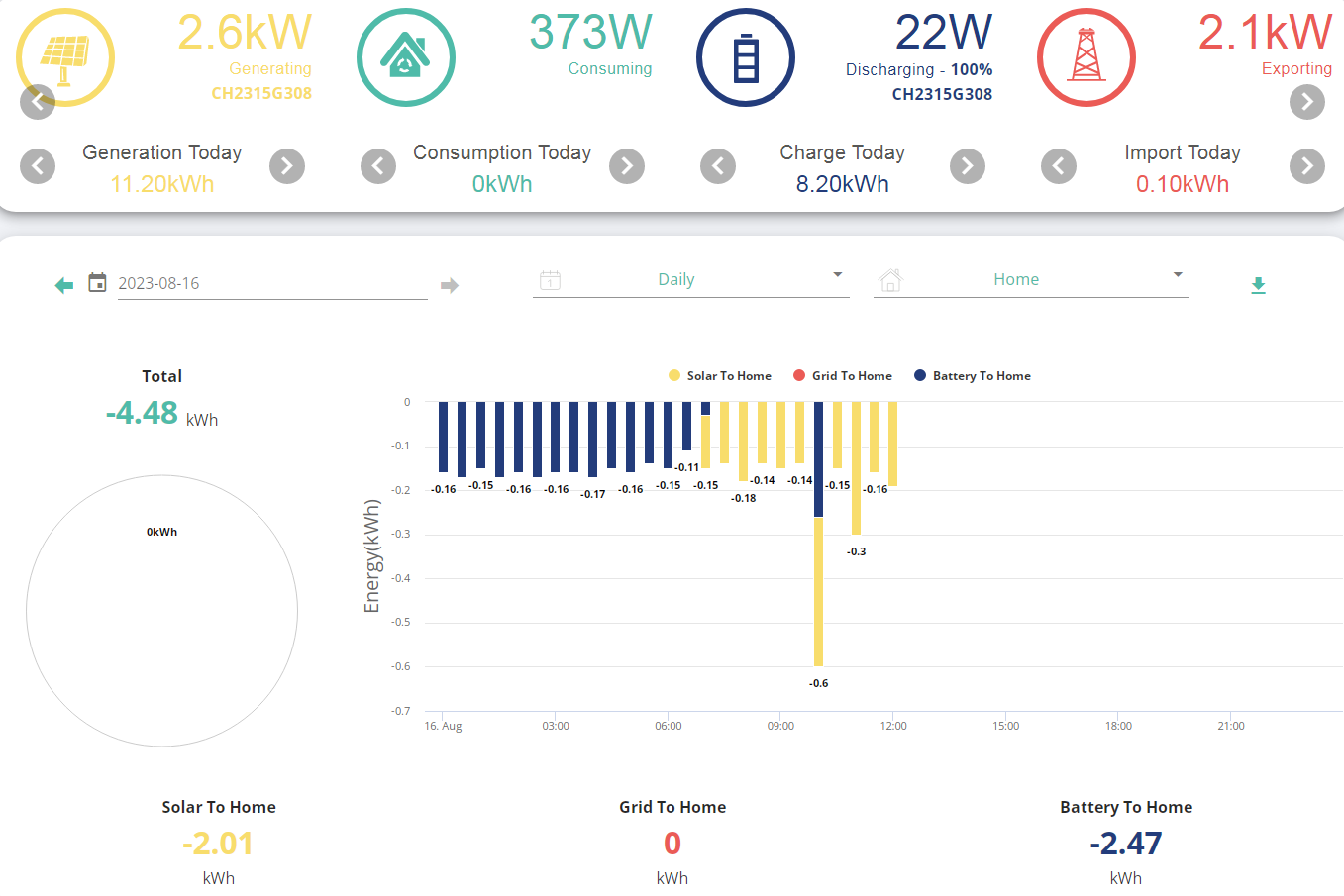
geoffreycoan I think my setup is a bit borked anyway, this is so far today and overall the consumtpion and total consumption keep resetting if they ever go up and the base house load excluding the additional 80-130w the inverter and gateway use is minimum 300w.
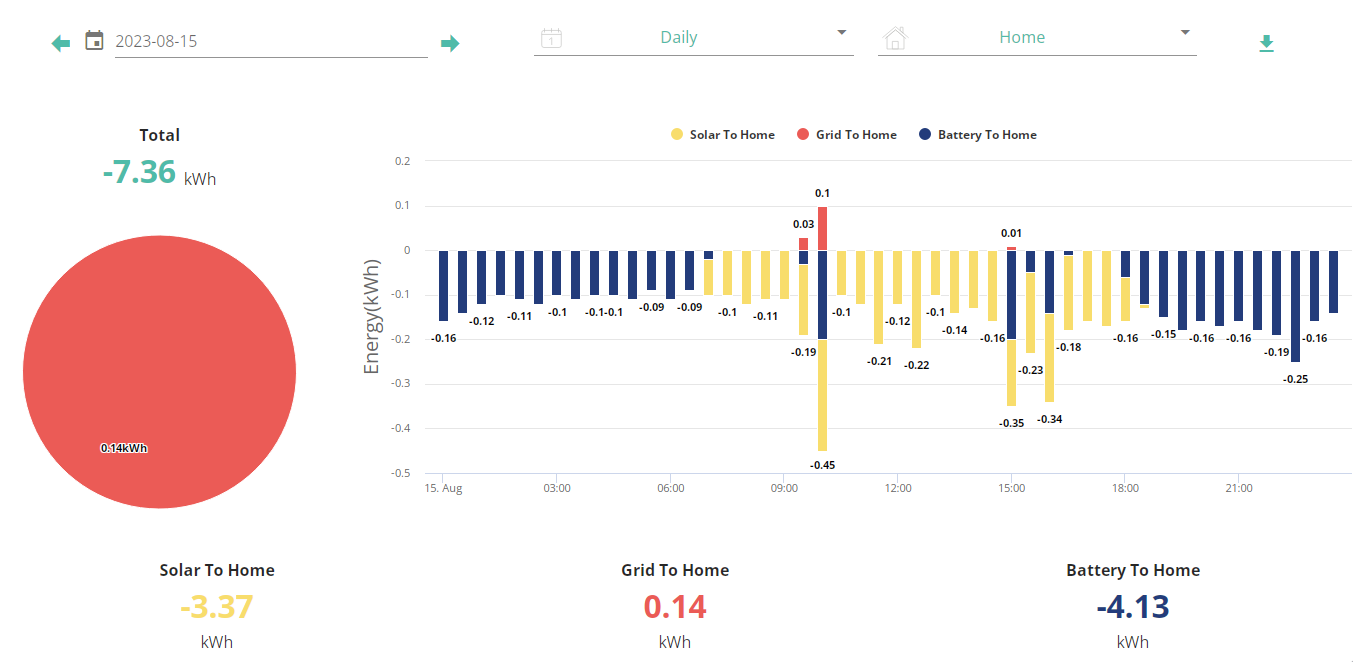
This was yesterday, before we got our AIO installed our usage was between 13-15kwh a day but I have absolutely no idea what it is now with the added power the gateway and aio inverter use which isn't included into house load and I have no way to monitor anything unless I buy a third party system.
geoffreycoan use home assistant which defaults to every 5 seconds but could pull second by second
In my experience, the inverters will miss calls for data if there are too many in a short time. If you have HA running at 5 second intervals and then start the app in home mode, you may find that either GivTCP responses are lost, or your Home updates exceed 10s, or just can't connect. I've set my GivTCP update period to 30 seconds and can usually get the app in local mode most of the time with two inverters.
TX200 The ‘self run loop timer’ on `my GivTCP is set to poll every 15 seconds. I don’t recall changing it, but the config instructions for GivTCP says it defaults to 5 seconds.
If it works fine at 30 seconds I’ll change mine now. I’m seeing some GivTCP timeouts in the log file but had put that down to network issues; my inverters are connected via a powerline wifi repeater as that was the only network they could see from the garage. I did have the HA server connected via the main house Wifi but swapped it to an Ethernet cable to reduce errors.
geoffreycoan I'm sure mine was default 15 seconds before I changed it.