Installing Home assistant on a raspberry pi5

36 comments started 2025-02-21 last 2025-07-03
GivEnergy Products
R
#1 Rbor

This afternoon, I transferred my HA installation from my pi4 to my pi5 with NVMe drive.
The installation went smoothly but I made sure that I was well-prepared doing the following.
I thought is useful to post my the steps in a separate thread.

1. Backup
First update HA and any other applications that need updating.
Then generate a full up-to-date HA backup using the 'Home Assistant Google Drive Backup' addon. I copied the backup from my Google Drive to the desktop on a computer.

2. Installation of HA on the pi5.
I connected the pi5 to an old keyboard and mouse and an HDMI port on a TV. You need the pi5 hardwired to a network cable and you can install HA directly from the network with no need to mess around with burning an image to an SD card. This also works with a pi4.
I recommend this video from 'Explaining Computers' which goes over preparation of the NVMe and how to install HA:
https://www.youtube.com/watch?v=Ll9Tmp3tppU&list=PL2m2YvnrOYxIruF90iAnw3LDym1FeNQ2c&index=6&t=846s
Not only is the video very informative, it is entertaining.

3. Accessing HA from a computer.
Using the network, HA is installed on the pi5 as a CLI (Command Line Interface).
The CLI displays the IP address. Mine is 192.168.68.83.
I checked that I could access the pi5 on Mac terminal or PC command line using ping.
My command was: ping 192.168.68.83
You now need to 'complete' the installation using a web browser from your computer with the backup on the desktop.
In the browser, I input 192.168.68.83:8123, logged on with a username and password and restored from my earlier HA backup.
Before I did this, I completely shutdown my pi4! I used the IP address rather than homeassistant.local in case my computer got confused.

4. Checked that predbat works!
I then checked any other devices that I use to access HA and changed the server setting to 192.168.68.83:8123.
I finally sighed with relief.

The pi5 with NVMe is certainly a lot faster than the pi4 with SSD, which was hardly a slouch .

If you do go the pi5 route, I hope these steps help and that I haven't made any mistakes.
Do get back to me if you need further advice.

Be very careful!!

Rob

#2 TheDragon (GivEnergy)

I couldnt justify a Pi5. When a NUC with more power, more RAM, larger drive and the option to run multiple was the same cost.
I now use a NUC
32GB RAM, 1TB NVMe SSD.
quad core intel CPU, think its an atom variant

ProxMox hypervisor
sat in it are containers
HA x 2
AdGuard
Windows 11 Sandbox

J
#3 JasonF

TheDragon (GivEnergy) yeah I agree, I used to have a pi4, ended up changing to a nuc cluster. Needed quicksync for Plex transcoding.

S
#4 SteveCook

Thanks Dragon and Jason for just confusing me even more!! I have no idea what you are talking about and felt pretty pleased with myself in getting my pi working and then adding an ssd

#5 Tenkaykev

SteveCook
Had a quick search for NUC, there's a bewildering amount of them. Was wondering which one TheDragon (GivEnergy) chose and the power draw compared to a Pi5 as they're on 24/7/365.

R
#6 Rbor

TheDragon (GivEnergy) When a NUC with more power,

I was attracted to a pi for its low power requirement and small footprint.
As it runs 24/7, just for HA and predbat, I wanted something with a small energy pull.

But it is great that we have the versatility to have different setups that suit our particular needs.

My old pi4 may well become my experimental device. I may even teach myself about Docker!
Or it becomes a low energy storage for my music collection which I have been slowly digitising from my vinyl collection.
I can't see me using it for another HA installation, although I might. Or a linux machine. So many possibilities.

Rob

J
#7 JasonF

Rbor now you have something you can also tinker with! Let it begin 😉

G
#8 geoffreycoan

Tenkaykev Power draw was exactly what I was wondering about as well.

I’m using a Lenovo Tiny PC at the moment with Windows 10 and HA as a VM, at this moment in time its drawing 40W which doesn’t sound much but it adds up to around 1.1kWh a day.

Again doesn’t sound much but at ~ 20p/day is £80 a year.

The power draw is one of the main reasons I am thinking of upgrading the hardware, that and I’d like to be able to more comfortably run a test HA alongside my production one. My PC will run two VMs and most of the time its fine but randomly one will just stop execution completely, no out of memory, errors, it just stops dead. Swapping windows, shutting down the test VM and it bursts into life again.

I do like having the PC because its useful to be able to open multiple tabs and browser windows when fiddling, so if I did get a Pi I’d retain it for occasionally running the test VM and the browser but wouldn’t need it on 24x7.

W
#9 wrighar

I'm currently running a donated Pi4 4Gb as my old Pi3 1Gb was struggling.
Using a USB3 to NVME converter with a 512Gb NVME drive as storage.

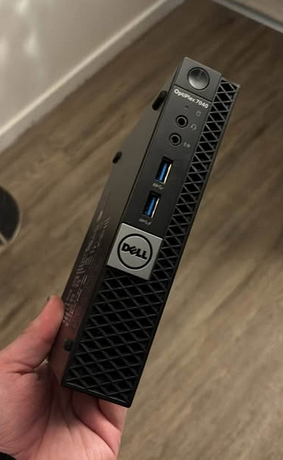
Works a treat, but will be moving to a Dell Optiplex 7040 MFF soon with Proxmox.

#10 TheDragon (GivEnergy)

One of these.
Says 6w. I run it on a PoE to 12v powered from the switch. So can't draw that much
power.

R
#11 Rbor

geoffreycoan its drawing 40W which doesn’t sound much but it adds up to around 1.1kWh a day.

Divide the 40W by 10 and you have a good indication of the energy requirement of a pi. It is less when idling. For you, that would be £8 rather than £80 annually.
Plenty of links on the web to investigate.

My pi5 does have a fan but it is off nearly all the time. I have it caseless at the moment.
Just a power lead and ethernet cable. The NVMe drive is underneath on a 'HAT'.
It can also be run POE.
I have tried to attach a piccy but just get the dreaded red error messages.

I ran the pi4 fanless using a small aluminium case.

Rob

#13 PianSom

TheDragon (GivEnergy)
People RAVE about these N100 nucs. Even as a server streaming 4k. I was very tempted, for my replacement media server as an update of a 2020 i3 nuc.

But in the end I went for a M4 Mac Mini. 2-3x the price but equally low power, a ridiculous amount of CPU on tap (ideal for transcoding etc) and will hopefully last (and be supported) for many, many years.

H
#14 Henry3rd

PianSom I would be interested in this option as I would need to relace my macbook at some stage. But the spec says max continuous power is 155W. Have I misread this?

R
#15 Rbor

PianSom Yes the M4 Mac Mini is a mean machine.
It has the added advantage, certainly for me, of not using Windows!
Through the terminal, the Mac is perfect for ssh, etc, all the linux commands.

I have an M1 iMac which is great to work with. The M4 machines should really fly.

Out of curiosity, I will have to see for myself what these other devices such as the N100 do.

Rob

#16 PianSom

Henry3rd
Yes, I think you might have misread. They idle at 4-5W - about the same as a Pi. At peak draw (and I suspect it would be very hard to find any reasonable task that can sustain a peak draw!) they say it takes 65W

https://support.apple.com/en-gb/103253

R
#17 Rbor

PianSom You will rarely be on peak draw. My iMac uses very little energy in everyday use.
A couple of years ago, I measured the energy pull of different devices.
My iMac typically used 23 W when running and 2 W when in sleep mode.
My old Intel Mac used much more energy.

I did have a Sky Q Box before I cottoned on the the ££ that Sky wanted each month.
That used 11 W when running and a ridiculous 9 W on Standby. The older Sky boxes used about 30 W on Standby!

My worst energy guzzler is my large TV: 138 W in use! But rescued by Standy of 0 W.

I think a pi idles close to 2.5 W and runs slightly higher, depending on the load. pi5 needs a little more than pi4. I must measure the energy that my pi uses.

Rob

V
#18 Vestas

Pi5 in a case/heatsink here, fan rarely comes on. The PSU probably eats more power than the Pi5.

I hear what people say about NUCs in the thread but its horses for courses really and I don't use x86 in this area - its too high maintenance in the long run. Never mind the fact Intel binned the NUC/handed it to Asus and are themselves in what might be a terminal decline if the orange one doesn't help out.

ARM and probably RISC-V are the way to go IMHO for low-power general purpose devices like the Pi.

YMMV of course.

J
#19 JasonF

PianSom I was considering this, do you use Plex?

#20 PianSom

JasonF
Yep. And got an arr stack on there too.

It's a woefully under-used machine atm

J
#21 JasonF

PianSom yeah similar. I used proxmox though. Do you run it all in docker?

#22 PianSom

JasonF
I left Plex native, the rest in a Docker compose stack.

I've not run Docker on OSX before. Not as nice as Ubuntu, for sure. Bit flaky to start up, needs a manual intervention which is a pain. Also some teething issues with an external hdd. I suspect things will sort themselves out soon.

R
#23 Rbor

geoffreycoan
I have run my new pi5 with ha and predbat installedn through a smart plug for a day.
The average energy pull is 3 Wh.

It is clear that when predbat is active and doing something, the power goes up a few W but this is extremely brief.

If this is correct, my daily energy pull will be 3 x 24 =72 W, costing about 2 p @ 25p/kWh
So annually, that would be £7–£8
So minimal cost and near to my 'finger in the air' estimate in my earlier reply to your post.

Rob

H
#24 Henry3rd

[unknown] What size ram did you go for?

R
#25 Rbor

Henry3rd I got the 8GB pi5
I also got the Pi official PSU and Active cooler.

For storage, I got a HAT base and 256 NVMe.

I purchased the kit from pimoroni. They have excellent support, even including videos on attaching a HAT. They delivered in 1 day. There is always Amazon (I got the NVMe drive there)
Good Youtube playlist videos on all things pi5 are from
Explaining Computers
Jeff Geerling.

I recommend doing a lot of homework and research on options.

I run mine without a case on the basis that it just sits in a small cabinet.
I am still drawn to the Argon ONE V5 case with M2 NVMe slot.
Expensive but you save by not needing an NVMe base of active fan.
I may still go this way.

I found it quite exciting setting up the gear, like the old computer days where you assembled bits that could be upgraded, rather than having everything sealed.

Do take a good look around before taking the plunge.

Rob

H
#26 Henry3rd

Rbor Thanks Rob, I have the permission to buy a Mac mini, but it seems like a sledgehammer to crack a nut. I shall probably remain undecided for some time to come unless I can identify another project to make use of the mac.

R
#27 Rbor

Henry3rd Good policy.
I procrastinated for ages!

The new mac M4 minis are mean machines at a good price. Very attractive.
They fly but do note a lot of comments about price of apple storage and workarounds.
This is the route adopted by PianSom

My M1 iMac is great workhorse but next time around I may go the mac mini route.
But I have years of service from my iMac and it's nearly 4 years old now!

My old Intel iMac is 10 years old and is still a great computer.
It is my Windows machine via bootcamp! ... but I hate Windows and only use it if I have to .....

Rob

#28 PianSom

Rbor
I umm'ed and ahh'ed for ages too - couldn't decide between a N100 or a Minisforum M100 i7/i9 or M4 Mini

In the end I thought I'd go for a long term solution, even with a higher upfront and got a base M4 (though I did pay up for 10GbE so that networking would not be a bottleneck to CPU in the future). As with solar/batteries I will only find out if I made the correct decision years from now 🙂

R
#29 Rbor

PianSom As with solar/batteries I will only find out if I made the correct decision years from now

Agreed.
I started with solar/batteries in 2022 and my kit is well out of date.
I have sort of decided that I will continue with what I have until things really break. Who knows how tariffs, etc will change over the next few years.

I purchased my M1 iMac before this in 2021. Although superseded, this iMac still flies and may outlast my solar/batteries (costing a darn site less).
........ but that doesn't stop me from being envious of your M4 Mac Mini.

Rob

H
#30 Henry3rd

My switch to Intelligent Octopus Flux in the last couple of weeks has meant that I can take down my pi4 and get up and running on my new improved pi5. It took several go's as for some reason it refused to boot up properly for the first few start ups.
It's now working yay!
Compare now takes 38 mins rather than the previous 1hr 40min

M
#31 mikes01666

I know this thread relates to transitioning from Pi4 to 5, but does HA work satisfactorily on a Pi4?
I have one lying about. It was always a solution looking for a problem, HA may be the answer.
It will only run HA, no need for transposing, Plex etc.
The plan is for a Pi4 with 128 Gb micro sd card to manage a Givenergy AIO and PV panels.
I just want to set up and forget.

#33 PianSom

mikes01666

Yes, you’ll be absolutely fine on a Pi4

Though you will probably get a longer trouble-free life with a usb disk than an sd card.

M
#34 mikes01666

PianSom
An old bog standard 2.5" SSD in a caddy would do?
I'll get it set up using the SD card to test it out then move to a more permanent set up. This is using old hardware I've got sitting in my 'essential stuff' drawer. I don't want to spend a lot only to find HA is too complicated for my primitive programming skills.
Thanks for your help.

#35 PianSom

mikes01666
That would be perfect.

There are tons of easy setup guides to HA out there, and also plenty of guides on transferring to a USB when you are up and running. If you are struggling with GivTCP or anything solar specific then post around here and someone will point you in the right direction.

T
#36 TX200

I set mine up by following the guides and videos from "Speak to the Geek"

(Search YouTube for that).

V
#37 Vestas

FWIW my Pi5 has been running on an "endurance" SD card* for well over a year now. The HA database has not been pruned in that time. All works fine as I'd expect it to.

This is just so people are aware there are alternatives to using a SSD.

*has similar number of read/write cycles before failure as a consumer SSD so its essentially the same thing, just slower due to the interface/cache