App and WiFi interference

58 comments started 2025-03-03 last 2025-04-21
Mobile App
C
#1 Coys68

This is a tricky one to explain but bear with me..........
I've noticed for a while now that my Sonos, my Sky Q mini box and the better Half's work VPN suffer drop offs at times. These drop offs seem to be triggered by an action I take on the GE app.
Some may be aware that at times the app seems to stick on 'away' so doesn't update often. Getting it to switch to 'home' can require some toggling between the two which can take a while. On occasions the phone will drop off the WiFi network whilst doing this but the other devices also lose connection. Most troubling is that when I've tried to switch the app to read 'home' I've cut the wife from her VPN. To start with I thought it was coincidence but it's happened way too often. Yesterday the sky Q mini box lost connection to the main box exactly as I toggled the app settings. It's only momentary 2 or 3 seconds but frustrating.

Anyone come across anything similar or know a solution?

R
#2 Rubikcube

You don't say what type of phone. I presume you are using an iPhone? Have you tried the GE app on an android device?

C
#3 cluelesscris

Is your app configured with the correct IP address of the inverter? Does the inverter maintain the same IP address or is it using DHCP and might get moved about?

In the above cases the app will 'search' for the inverter. I'm not sure but this might involve a 'subnet' poll - in which the app will attempt an identification request on each IP address on the subnet. Perhaps these polls are tripping some devices up? Is your router sufficiently under powered that rapid ip polls trip it up? Most routers supplied by the BB providrs are rubbish - it's always worth getting your own which has the added benefit of allowing you to change BB providers without th issues we constantly see here of people having to reconfigure all their devices for each new router.

Just a thought.

C
#4 Coys68

Thanks guys.
It's an android phone.
I'm afraid the IP stuff is a bit beyond me. How would I know about DHCP etc?

C
#6 Coys68

Rubikcube
Thanks for the suggestion.

Even someone as technically inept as me actually managed that.

Unfortunately it hasn't made any difference - I just kicked the Mrs kicked out of her work VPN again - not happy

Any other thoughts? It's all a bit odd

G
#7 geoffreycoan

Coys68 have you programmed your phone with the IP address of your inverter to stop the network scan each time you go into home mode?

  • hamburger
  • settings
  • local monitoring
  • scan for your inverters
  • then click and save on the IP address found

This should stop a network scan which cluelesscris mentioned

#8 Maxwell

Coys68 I wonder how aggressive the GE app is when it does its inverter discovery ? Not sure if anyone on here has had a look at that with something like wireshatk. But it could be that either your devices or router are trying to protect themselves from what they see is an aggressive scan. I have recently changed my local network and have put my inverter on the same lan subnet as my tv and sky q box. Haven’t seen any obvious issues with those. But will do some testing later and see if there are any noticeable drops for these. I have previously noticed that my app doesn’t find the inverter and I have to manually add the inverter ip. Not sure if that is an app feature or a network latency issue at my end.

C
#9 Coys68

geoffreycoan

You guys on here are soooo knowledgeable - thanks Geoffrey.

Hamburger threw me - still not sure what that is but found all the way down to 'scan for inverters'.

There was a kind of a globe symbol - clicked that and got a tick - should that mean it is saved?

Thanks again

V
#10 Vestas

Maxwell sky q box

That's most likely the problem.

They're crap - proprietary "wifi" links to the minis and even if you wire them up then they'll still use the proprietary "wifi" link unless you use the engineer-only menu. Even then they're a nightmare and will cause network loops - anyone with Unifi switches will know all about this, UI can't design a L3 switch to save their lives and Sky aren't any better. There was (maybe still is) a monster thread on the UI forums detailing the many and varied ways SkyQ is broken when using L3 UI switches (which are also appallingly broken).

The problem in this instance is most likely due to the SkyQ router shutting down every night so maintaining any sort of DHCP consistency isn't likely. There's ways of turning off this "powersaving" behaviour but I have no idea whether that setting "sticks" any better than it used to.

Worth noting that Sky don't want anything to do with SkyQ now - any problems and you either accept a new router (which won't work with SkyQ minis) or you're on your own.

G
#11 geoffreycoan

Coys68 Hamburger threw me - still not sure what that is but found all the way down to 'scan for inverters'.

There was a kind of a globe symbol - clicked that and got a tick - should that mean it is saved?

Hamburger, ha ! I meant the three bars for menu option, looks like a hamburger

Then yes, click the globe symbol and the IP address should appear saved at the bottom of the screen and it shouldn't then scan for the inverter each time you swap to home mode.
If ever the router allocates a new IP address you'll have to repeat this process but if you set your router to use a static address for the inverter this shouldn't happen

C
#12 Coys68

geoffreycoan

So, I actually did manage to do it right!!! wonders will never.....

I don't know whether it will cure the problem but initial impressions are good. It is way quicker to load up 'home' than it was.

Thanks again

V
#13 Vestas

Coys68 Check the main SkyQ router (and minis) to disable overnight shutdown/powersave or changing the app each day might get a bit old 😉

#14 Maxwell

My limited testing of switching the app from away to home has had no visible impact on the sky box or tv, both on the same sunbet as the inverter. Although i don't have s sky mini box. I do however have the sky q box wifi disabled using the engineer menu option. And it is via ethernet to the router. Have you checked to see if your q boxes are up to date with their latest software versions ?

V
#15 Vestas

Maxwell Its the minis which are the issue (network loops) rather than the main router and the engineer menu isn't what you (probably) think it is as its on the minis, not the main router and isn't user-accessible without some playing around.

M
#16 mrand31

Would it not be simpler to change the DHCP lease time to 24 hours on the router?

S
#17 SteveCook

I had my minis on the power save option and every morning they would have shutdown(?) and lost network IP even though all on Lan cables and "always use same IP address setting on router". I would then have to do a reset routine of minis - much to annoyance of wife!.
In the end I put them on "normal" mode and just turn them off with the remote button at night. I guess they just sit there consuming a bit of power , but it is better than the aggravation each morning

V
#18 Vestas

SteveCook Sky didn't have any choice other than set powersaving on SkyQ as the default because the total power consumed per year exceeds some standard/directive Ofcom made compulsory for equipment the major ISPs supply/rent to end-users.

Thankfully they don't sell this junk anymore - unless you phone up, get past the AI gatekeeper, get past first-line support and then insist you really REALLY want it. At peak times most people lose the will to live long before they get to speak to anyone who has a clue. No more satellite TV from Sky in 2029 anyway so its fairly obvious why they don't want to sell a 10 year old design that's only going to work for 4 years max. Anyone who does want it pays a fairly significant premium compared to Sky Glass/Stream.

S
#19 SteveCook

Vestas Thanks. I just wish I could get FTTH. They have been cabling the streets and telegraph poles for 2 years now, but still no chance of a date. Then I can understand getting rid of dishes

V
#20 Vestas

SteveCook We're off-topic but getting rid of satellites has been Sky UK & Ireland's "holy grail" for two decades. Its the entire reason they bought Easynet (they built the original network) back in 2009.

Add in the takeover by Comcast (until then a 100% cable company), the Astra satellite end-of-life and its done. Sky aren't going to pay £100m to launch a replacement satellite for the UK & Ireland plus £10m/annum minimum, the market is tiny and shrinking by the day.

Who's doing FTTP in your area? If its CityFibre then they have a reputation for abandoning rollouts half-way through and even when they don't it can easily be 12 months after they run the fibre spine before the first install actually happens. Openreach are usually better - they at least stick with it unless there's blocked ducts which require streetworks, which can delay things for months as the cabling teams will be moved elsewhere until the civils are done.

S
#21 SteveCook

It is Openreach. The poles all have the outlet boxes(?) on them at the tops with ID tags. I guess they need to join it all together and do the exchange, but it goes in fits and starts. Some weeks Openreach vans everywhere and then nothing for 6 weeks. Been like that for 2 years

G
#22 geoffreycoan

Vestas Ironic you are talking about FTTH, I had the FTTH people here today trying to run the fibre up to my house.

Original installation date was 28th December, they came and discovered the cable duct was blocked. I wasn't convinced there was a duct but they said there was. Another visit a week later and they decided they needed wayleave from someone (wouldn't tell me who) to clear the blockage.

Phoned me last week to say they didn't need a wayleave and would be here today to run the cable through "but didn't need access to the house". Ha. When they arrived they wanted to see where the BT cable came into the house so took me ages to take off the replacement stair tread I'd made a few years ago, to show them the entry point which I knew was under the stairs.
Climbed in the hole and said that the duct was blocked.

An hour or two later of wandering round my garden and the neighbours with a meter they dug a hole in my neighbours garden and discovered that the ducting ran out just at the side of his house and the phone lines are just run straight under the lawn and driveway to mine and his houses, no ducting. Which is what I thought.

Anyway they are going away to reconsider what to do. Talking about digging the driveway up that my neighbour and I share to lay a new duct.

How they will ever make any money from this I am very doubtful.

This is Gigaclear who specialise in rural FTTH. They've cabled most of our village up but only do the last bit to each house as they want to onboard. I can see I will be renewing my current FTTC broadband again this year ....

V
#23 Vestas

geoffreycoan How they will ever make any money from this I am very doubtful.

All the altnets have staggeringly large debts* to service now and one by one they're being bought up. Many are effectively coming under the control of Liberty Global (Virgin Media owners) but Liberty Global are working very hard to obfuscate that fact as they'd then have to provide access to their ducts just like Openreach has to.

*cheap as chips to service the debt back when the majority was taken out in the mid 2010s, not so now.

C
#25 CW

geoffreycoan This is Gigaclear who specialise in rural FTTH

Interesting - I too decided to move to Gigaclear and had an appointment arranged for them to cable up my house, only for them to discover that the termination point (the box in the pavement by the boundary) it outside my neighbours house and not mine, with no way to run cable to me without crossing the neighbour's land. I'm still waiting to find out what, if anything, they are planning to do

S
#26 SteveCook

Vestas
Did that before, but means nothing to me

V
#27 Vestas

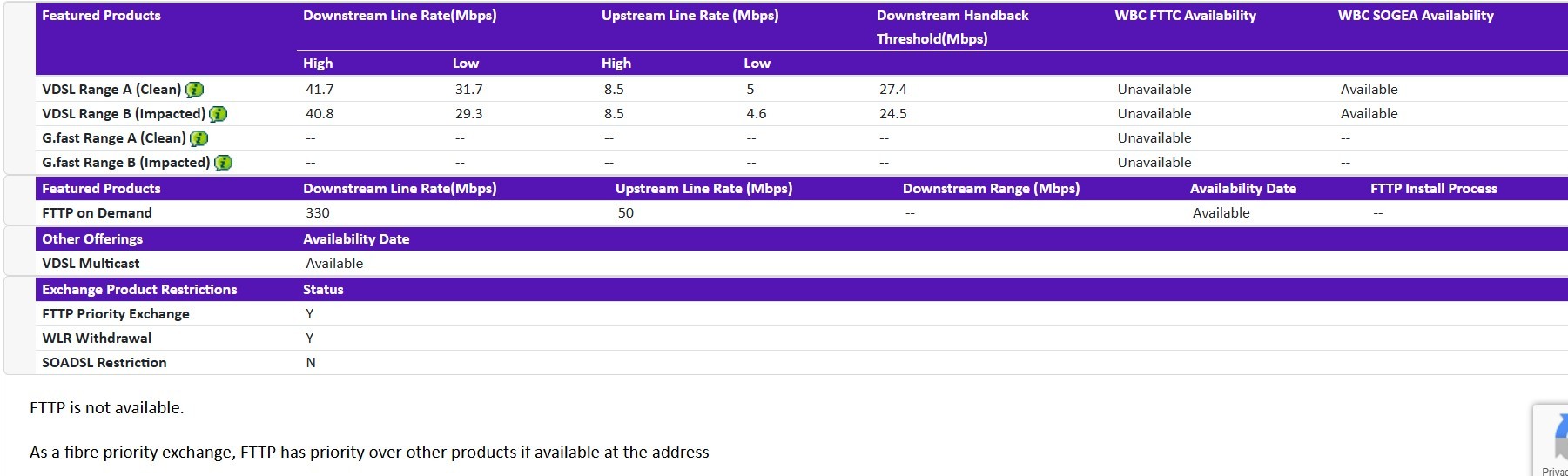
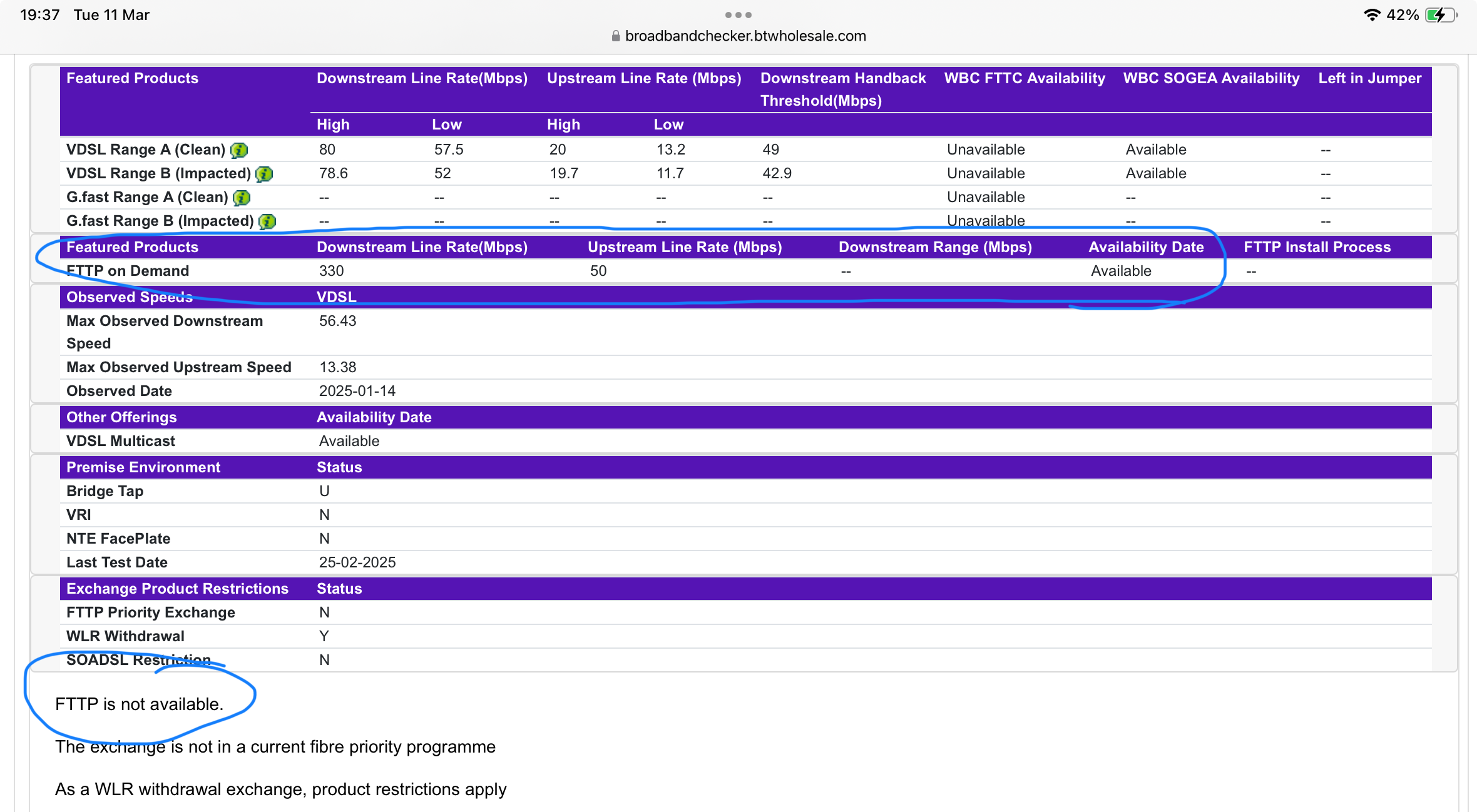
SteveCook Is it the same if you put in the address(es) of nearby houses? ie FTTP is not available?

You're on a fibre priority exchange so it shouldn't be taking 2 years.....

S
#28 SteveCook

[unknown]
If I put neighbours house that is on the street and right opposite the cabinet I get

S
#29 SteveCook

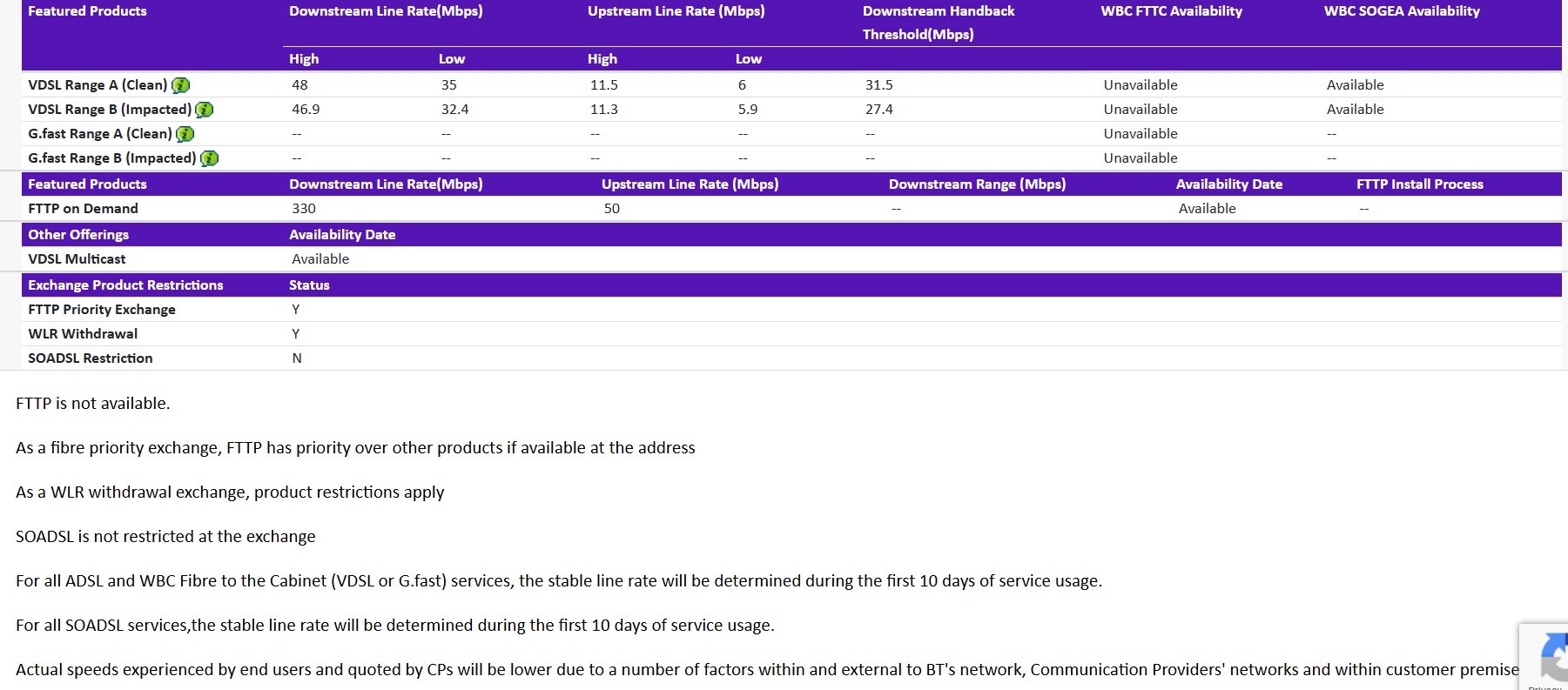
If i put neighbours house that is right on the street and opposite a cabinet, this is what I get. I note that when I walk round the village and look up at the black boxes on the poles, the ports are all still capped.
Either nobody has gone that way yet, or still not "live"

Why is posting - particularly images so difficult on this forum

S
#30 SteveCook

This is a house in the middle of the village (we are about 300 yds outside)
I guess because we have about 100yrds of cable via 2 poles to the street that I am on the "dont want to offer to customer list"

S
#32 SteveCook

Vestas
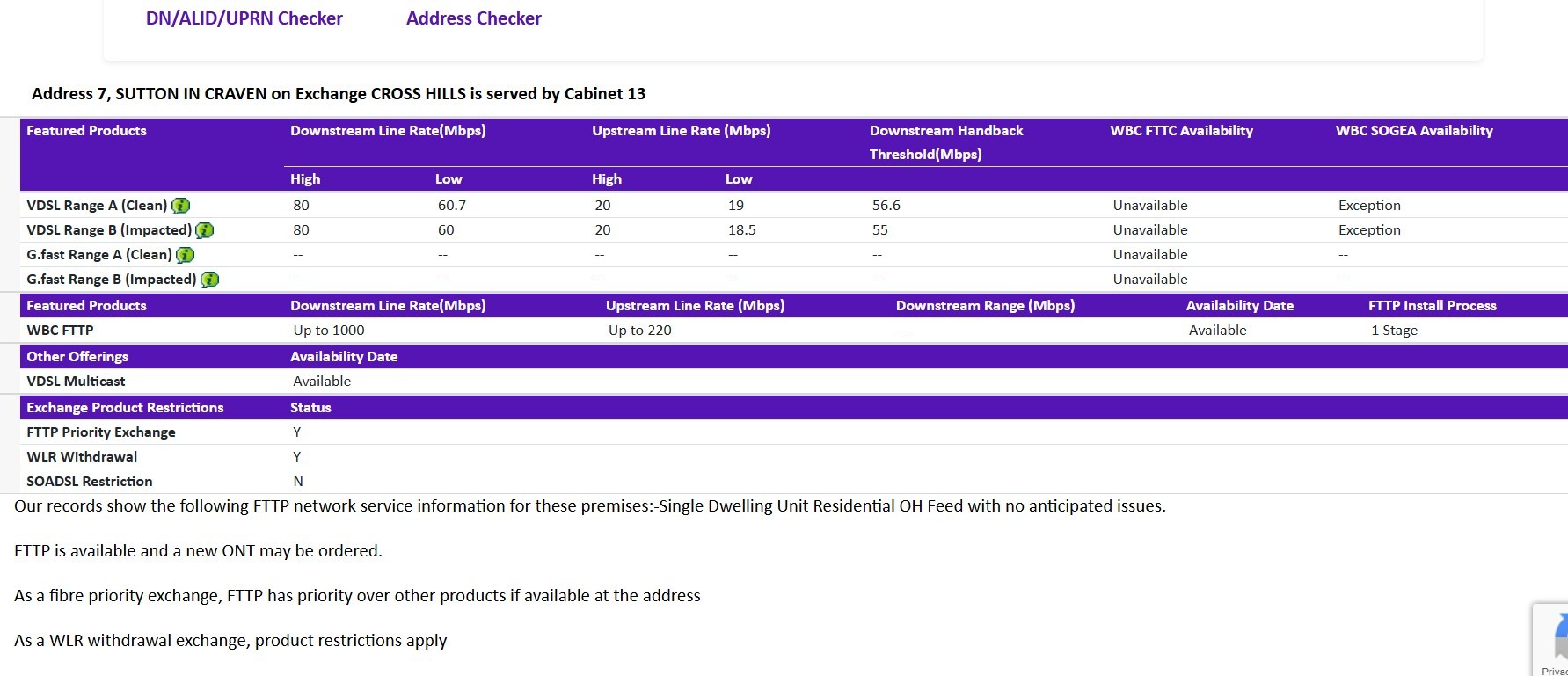
Thanks followed that link and submitted. That also has a checker and this is what it says.
I would post the image if I could. aaghhhh. Got it after 5 goes

G
#33 geoffreycoan

SteveCook I get similar results for my phone number, but I think they are ambiguous, it says that FTTP is Available, but also Not Available 🤷‍♂️

CW Interesting - I too decided to move to Gigaclear and had an appointment arranged for them to cable up my house, only for them to discover that the termination point (the box in the pavement by the boundary) it outside my neighbours house and not mine, with no way to run cable to me without crossing the neighbour's land. I'm still waiting to find out what, if anything, they are planning to do

My understanding is that as a telecommunications provider they pretty much have authority to dig across your land or your neighbours to lay a cable. That’s what they’d have to do for me as I am down a driveway off the main road with my neighbours house first, then mine, so they’d have to lay a new duct down the drive.

Alternatively they could run the cable off a telegraph pole, which personally I’d not want as all of the existing cables to my house are underground.

We shall see what they say

V
#35 Vestas

geoffreycoan My understanding is that as a telecommunications provider they pretty much have authority to dig across your land or your neighbours to lay a cable.

They don't. They need a wayleave signed to transit land owned by a third party. Openreach will have that for the existing ducting but Gigaclear don't so they'll have to get your neigbour to grant them wayleave to cross their property.

Also FTTPoD isn't really a thing anymore, Openreach don't want anyone ordering it now so they quote high 5 figure sums to install (on top of a couple of grand for a survey). Don't expect change out of £30k.

In addition (not that it matters if you're getting FTTP) you have a bridge tap on that line, probably because you have an old style faceplate with unfiltered extensions running from it.

G
#36 geoffreycoan

Vestas In addition (not that it matters if you're getting FTTP) you have a bridge tap on that line, probably because you have an old style faceplate with unfiltered extensions running from it.

Don’t know why there should be a bridge tap on my line, the last open reach engineer that came to fix my broadband maybe 6 months ago stripped all of my sockets out to improve line speed, its basically just a single socket now where the router is. We don’t use the landline so I was happy to have the sockets disconnected.

Will see what gigaclear have to say. If a wayleave is required then won’t be happening soon

S
#37 SteveCook

[unknown]
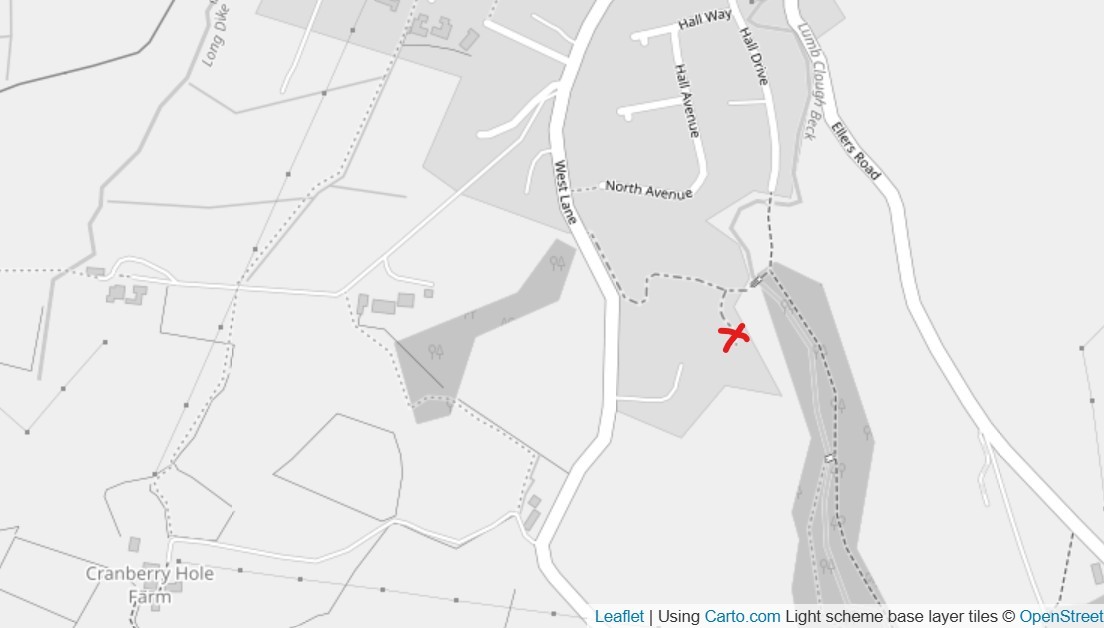
Thanks. I am just off the map at x marks the spot, although the poles with the boxes run up West Lane

S
#38 SteveCook

Vestas
Thanks. I am just off the map at x marks the spot, although the poles with the boxes run up West Lane. Sorry about the double post. This forum is driving me mad.

#39 Maxwell

Gigaclear fun here. Although doesn’t improve the ability to upload images to forum posts..

S
#41 SteveCook

Vestas
Thanks
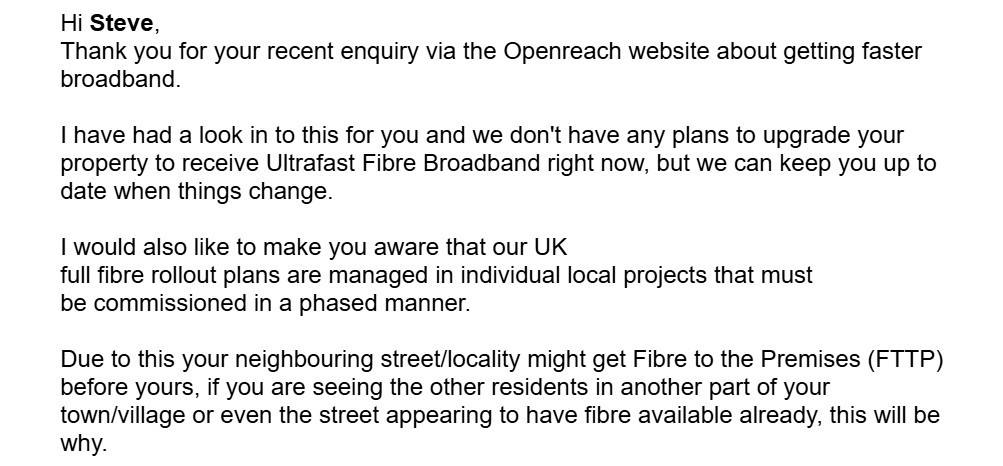
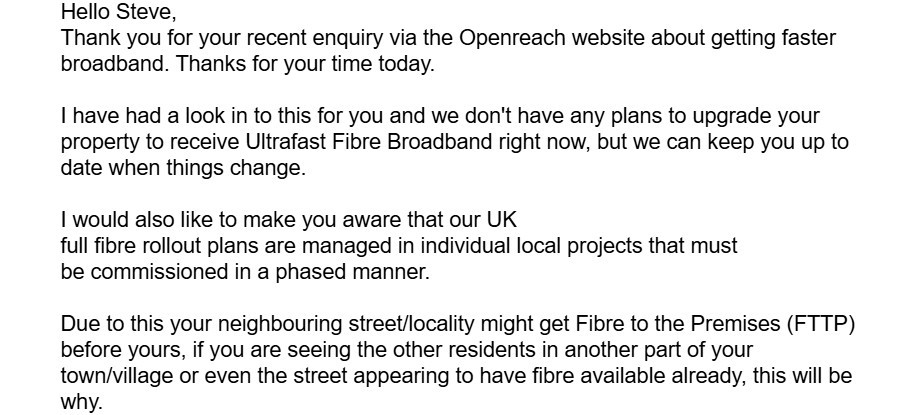
I got a reply and it looks like they dont plan to "upgrade" me.
6 attempts to post an image. Aargh!!

V
#42 Vestas

SteveCook Get back onto them and point out you are on a fibre priority exchange. Also ask for a specific reason why your property is not in scope when all of the rest of the areas served by Cross Hills exchange are in scope. Don't get fobbed off and escalate to the BT/Openreach CEO if necessary.

S
#43 SteveCook

Vestas Thanks. Will do

G
#44 geoffreycoan

geoffreycoan Will see what gigaclear have to say. If a wayleave is required then won’t be happening soon

Gigaclear phoned me on Thursday last week and said that they would be coming on Friday to complete the work for mine and my neighbours house. Anyway Friday came and went and then they phoned me again to say that they were now coming this Wednesday.

Since they found that the existing duct ends at the edge of my neighbours lawn I’m expecting they’re going to have to dig and lay a new duct to my house and my neighbours. That’s what they discussed with me when they were here last.
Wayleave, what wayleave ?

Anyway, will see what happens, I might be days away from being connected !

V
#45 Vestas

SteveCook When I say "escalate" I mean email directly - the email address is easily obtainable and the BT/Openreach CEOs have "executive complaints teams" who handle this (usually very well).

You need to find out the EXACT reason that your property isn't in scope.

V
#46 Vestas

geoffreycoan Not sure you actually mentioned that your neighbours were getting Gigaclear too?

If they are then that obviates the need for any wayleave to cross their land.

G
#47 geoffreycoan

Vestas Not sure you actually mentioned that your neighbours were getting Gigaclear too?

They’re only installing the duct and fibre to the tap-off point outside the property, I think its a different team that then comes an does the last few metres from there into our property and the neighbours if/when they want gigaclear.

So yes, some wayleave could be required as the duct has to go across my neighbours drive to get to my property (as we’re down a small drive of the two of us and we cross his drive to get to ours), but am not rocking the boat. Will see what happens on Wednesday; I wouldn’t be surprised if the plan changes again

#48 Maxwell

[unknown] Myself and a number of neighbours all originally got letters from gigaclear telling us we needed to sign over rights to allow their folks access to our properties in perpetuity to allow them to conduct installs/maintenance as there were shared drives to access and they said they were unable to put the optical termination points on the private/prublic boudary as they usually did. So, they had to put those on private land. But, in the end they went with physical infrastucture access (PIA) and used the exisiting BT ducts to get to houses from the street.

G
#49 geoffreycoan

Maxwell the problem for me is that Gigaclear cable is in the duct across our road, there is then a BT box at the top of the drive which I assume they’ve put the cable under the road to, the BT duct then runs from their down the side of the shared private driveway to me and my neighbours house, but they couldn’t push the cable through, said there was a blockage, and by digging a hole they found that the duct actually just stops prematurely with the two BT cables running out of the end of the duct and running buried underground.
So they’ll have to put a new duct in for me and the neighbour which will just contain the gigaclear fibre. I can’t imagine they will re-duct the BT cable

G
#50 geoffreycoan

geoffreycoan men at work today, digging a trench and laying the fibre ducting

3 men, mini digger, two vehicles, got to be a £1000+ job

C
#51 CW

geoffreycoan I should be getting mine done next week

G
#52 geoffreycoan

[unknown] I tried to post a picture but after dozens of failed upload attempts I gave up.

They’ve dug a trench across my driveway and my neighbours (which is fortunately all gravel), laid the duct to a junction box in my lawn, and a separate one to my neighbours, and then knocked off at 3pm. They’ll be back tomorrow to lay the rest of the ducting up the drive to the manhole.

So its turning into a 2 day job. They could have done it in one day, but I suppose they get paid more for 2 days work….

How Gigaclear will ever recoup this I don’t know. Will have to work out exactly how much I will get charged because they keep on throwing different offers at me:

  • £3 credit per month for 18 months to compensate for the price increase in April 2025
  • first 6 months free
  • £35 discount on the normal £54 monthly fee for 18 months
  • £30 discount on the £30 activation fee
S
#53 SteveCook

Vestas
I have messaged OpenReach 3 times and this is the answer I always get.
They phoned me today and said "budgets had been looked at and the scope had changed"
I dont really know what it means to be on a priority exchange and what exactly they are obliged to do and when.

#55 Maxwell

[unknown] Did gigaclear get you to sign over access rights to your land to enable future maintenance etc ?

S
#56 SteveCook

[unknown]
One of Clive Selley's team called me yesterday.
The basic message was "you may have been in scope, but when we started looking at the economics of connecting properties, if the economics don't look as favorable as originally envisaged, then the scope may change. We have to take a view on returns".
It looks as though they are going as far as a small cul-de-sac of 20 or so houses and then when property density thins out will pull the scope back.
He has promised to investigate further and will call back on the Thursday after Easter.

V
#57 Vestas

SteveCook At least you're getting somewhere.

If they're not going to install fibre there then I'd ask them for indicative costs to install to you/your neighbours. They shouldn't need to do a survey as they must have the costs already.

Once you've got those you can at least make neighbours aware of the situation & if costs aren't prohibitive then a joint approach to Openreach (via the same contact) on sharing costs might get things moving.

The problem you're eventually going to run into is the same as people on G.fast* connections are finding - less and less ISPs will offer service on your current copper wire (VDSL2) rather than fibre. Offering services over fibre costs a lot less in both "rental" and "support" terms when compared to VDSL2.

*G.fast is a higher speed, shorter range version of VDSL2 (the service most people have). BT rolled it out in a last desperate attempt to sweat the copper lines rather than install fibre but as was entirely predictable it turned into an expensive mess. ISPs hate it due to the support issues.

G
#58 geoffreycoan

geoffreycoan We’re on fast fibre !

The installation appointment was for Thursday last week. About a week before two men turned up in a Gigaclear van, they said they were hear to do a survey for my installation. I explained that the ducting was all laid and all it needed now was a cable pulling through the duct in my lawn and it running the few metres across the lawn to the house.

So after a bit and phoning the office, that’s what they did. The cable across the lawn was laid literally at a spade’s depth, they cut a slit trench with a spade, put the cable in and pushed the grass back down.

Then the actual installation engineer came last Thursday. I showed him where I wanted the termination point in my 1st floor study. He ran his detection meter across the wall and declared that he couldn’t drill through the study wall into the hallway as he wasn’t getting 3 greens. But if I drilled the hole could use it! My much cheaper detector said there was nothing there (I was pretty confident there wasn’t) so I drilled the hole into the hallway, he drilled the hole through the outside wall and I channelled a two foot section out of the hallway wall between the two.
Cable laid into my study, I covered it with plastic trunking and have subsequently filled the plaster back in.

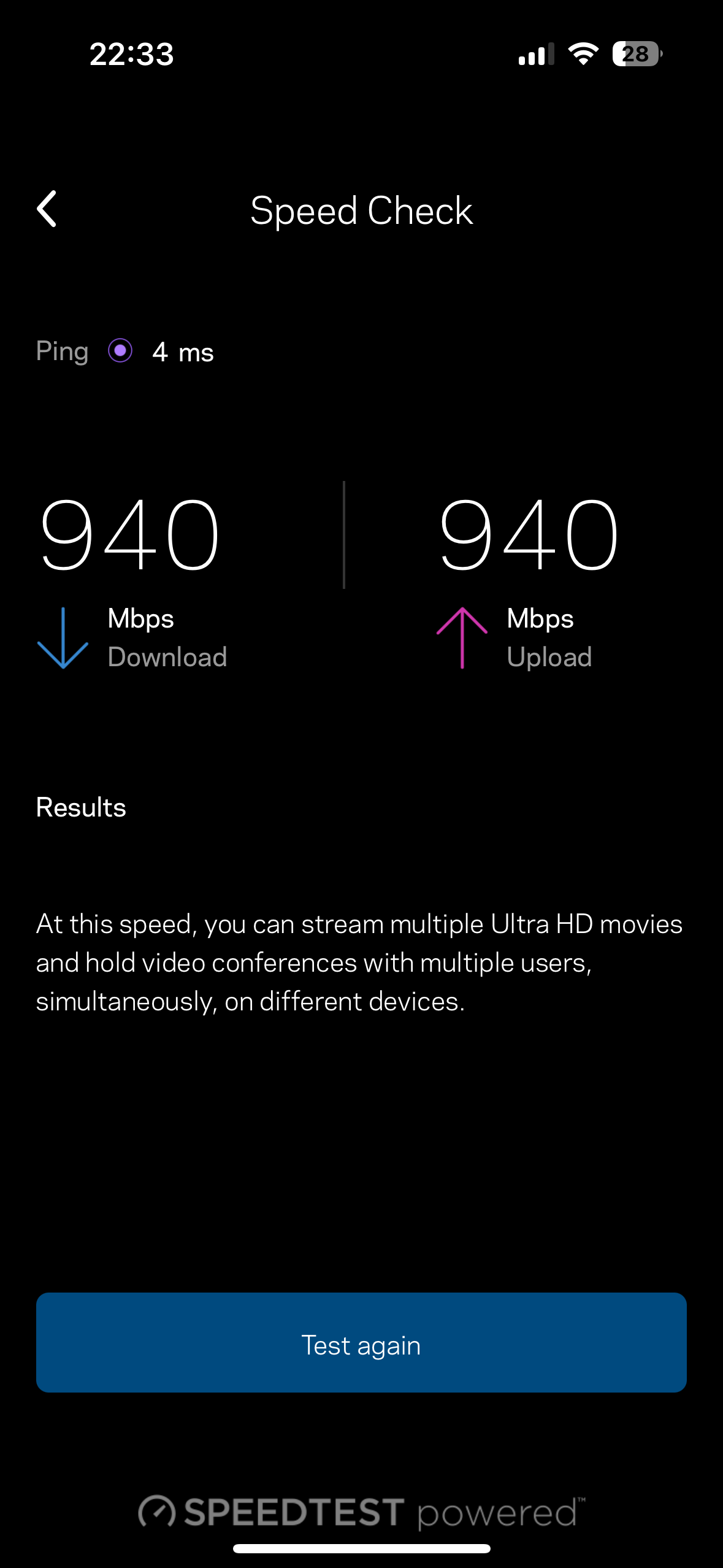
Engineer connected it up, got it commissioned and I’ve now got 600Mbps fibre to the home, compared to the 35Mbps I was getting on FTTC.

I had planned to keep my existing mesh network in place so all the devices are unaffected by the new fibre. Will be a bit more work than just plugging it in as I realise that my IP allocation is currently being done by my Plusnet router as the mesh is in passthrough mode. Will have to change this over and set all the fixed IP’s on the mesh now.
But getting there

Maxwell unknown] Did gigaclear get you to sign over access rights to your land to enable future maintenance etc ?

No, no wayleaves were presented at all. The fibre runs from the top of the driveway that actually my neighbour owns, down the driveway, across the front of his house and then under my part of the driveway to my house. I’m pretty sure he hasn’t signed anything either or he would have said


C
#59 CW

geoffreycoan I had planned to keep my existing mesh network in place so all the devices are unaffected by the new fibre. Will be a bit more work than just plugging it in as I realise that my IP allocation is currently being done by my Plusnet router as the mesh is in passthrough mode

Hmm, that is what I am planning to do once they have installed everything. I use BT Whole Home mesh network - I don't suppose you know how I can see if this is the same?