Setting up your EV Charger for the first time with HA and Predbat

28 comments started 2025-03-10 last 2025-03-21
Home Automation
R
#1 Rbor

A lot of recent posts are requesting help in setting up and automating an EV charger using HA and predbat.
This topic has many nuances with different charger, different cars, different tariffs, etc ..........
Many of the queries seen in 'Second Year Live on Predbat' relate to GE EVC, Zappi & Ohme chargers.

Between us all, we will have a lot of experience which we can share.
So please share away.

If you are using HA and predbat, your starting point should be predbat documentation related to Car Charging.
Here are the direct links:
Car charging integration in apps.yaml
https://springfall2008.github.io/batpred/apps-yaml/#car-charging-integration
Car Charging Planning in predbat
https://springfall2008.github.io/batpred/car-charging/

For specific chargers, you should be able to get further information from company websites.
e.g. This is for a zappi EV charger being used with the Intelligent Octopus Go tariff:
https://support.myenergi.com/hc/en-gb/articles/18470101583377-zappi-Intelligent-Octopus-Go
I found this link from a Google search so the same technique should work for other EV chargers.

Rob
Z
#2 Zakalwe

Thanks for this Rob.

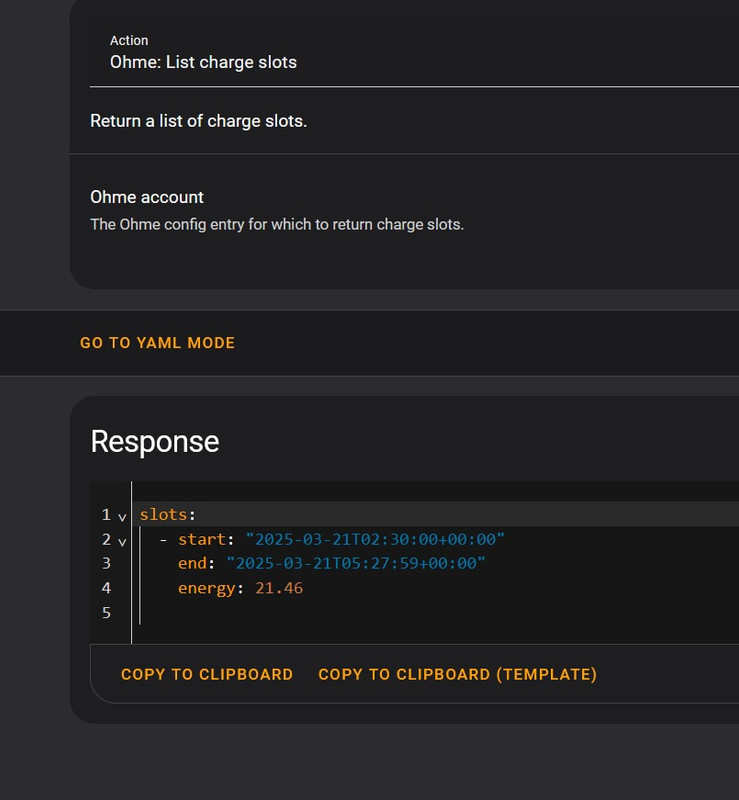
I still haven't managed to get my Ohme working with Predbat. I've clearly got something wrong in apps.yaml as HA can see the Ohme charging status. The ohme.list_charge_slots Action will report back the charging slots and the integration appears to be working correctly. Even so, Predbat is not recognising when the car is charging and is draining the the batteries into the car when an out-of-hours slot is created.

I'm sure that it will be something dead simple that I have overlooked, but whatever it is I haven't found it yet!

Current apps.yaml

pred_bat:
  module: predbat
  class: PredBat

  # Sets the prefix for all created entities in HA - only change if you want to run more than once instance
  prefix: predbat

  # XXX: This is a configuration template, delete this line once you edit your configuration
#  template: True

  # Timezone to work in
  timezone: Europe/London

  # Currency, symbol for main currency second symbol for 1/100s e.g. $ c or £ p or e c
  currency_symbols:
   - '£'
   - 'p'

  # Number of threads to use in plan calculation
  # Can be auto for automatic, 0 for off or values 1-N for a fixed number
  threads: auto

  # If you are using Predbat outside of HA then set the HA URL and Key (long lived access token here)
  #ha_url: 'http://homeassistant.local:8123'
  #ha_key: 'xxx'

  # Set to auto-match with a GivEnergy serial number, but you can override the serial or the sensor names
  # if it doesn't work or if you have more than one inverter you will need to list both
  geserial: 'SD2137G122'
  #geserial: 're:sensor.givtcp_(.+)_soc_kwh'


  # Sets the maximum period of zero load before the gap is filled, default 30 minutes
  # To disable set it to 1440
  load_filter_threshold: 30

  #
  # Sensors, more than one can be specified and they will be summed up automatically
  #
  # For two inverters the load today would normally be the master load sensor only (to cover the entire house)
  # If you have three phase and one inverter per phase then you would need three load sensors
  #
  # For pv_today if you have multiple solar inverter inputs then you should include one entry for each inverter
  #
  load_today:
    - sensor.givtcp_{geserial}_load_energy_today_kwh
  import_today:
    - sensor.givtcp_{geserial}_import_energy_today_kwh
  export_today:
    - sensor.givtcp_{geserial}_export_energy_today_kwh
  pv_today:
    - sensor.givtcp_{geserial}_pv_energy_today_kwh

  # Load forecast can be used to add to the historical load data (heat-pump)
  # To link to Predheat
  # Data must be in the format of 'last_updated' timestamp and 'energy' for incrementing kWh
  #load_forecast:
  #  - predheat.heat_energy$external
  #
  # If you enable ge_cloud_data then the load/import and export data will be fetches from the GE cloud instead of from GivTCP sensors
  # this is usually less efficient and of course prone to internet downtime, but could be useful if you lost your GivTCP data
  # Set the serial to the inverter serial to pull the data from and the key to your API key
  # When this is set load_today, import_today and export_today are not used
  #
  ge_cloud_data: False
  ge_cloud_serial: '{geserial}'
  ge_cloud_key: '[GE API KEY REDACTED]'
  #
  # Controls/status - must by 1 per inverter
  #
  inverter_type:
    - "GE"
  num_inverters: 1

  #
  # Run balance inverters every N seconds (0=disabled) - only for multi-inverter
  balance_inverters_seconds: 60
  #
  # When set use the REST API rather than HA entity for control, should be more reliable/faster to control
  # Set one per inverter
  # If using Docker then change homeassistant.local to the Docker IP address
  givtcp_rest:
    - 'http://homeassistant.local:6345'
    - 'http://homeassistant.local:6346'

  # When enabled automatic restart will restart the add-on if communication fails
  # Example below is auto-restart for GivTCP add-on itself
  #auto_restart:
  #  - shell: 'rm -rf /homeassistant/GivTCP/*.pkl'
  #  - service: hassio/addon_restart
  #    addon: a6a2857d_givtcp

  #  Example on how to restart the inverter via GivTCP
  #  - service: switch.turn_on
  #    entity_id: switch.givtcp_{geserial}_reboot_invertor

  # If not using REST then instead set the Control here (one for each inverter)
  # You should keep this section even when using REST as a fallback if it fails and for charge curve calculations
  charge_rate:
    - number.givtcp_{geserial}_battery_charge_rate
  discharge_rate:
    - number.givtcp_{geserial}_battery_discharge_rate
  battery_power:
    - sensor.givtcp_{geserial}_battery_power
  pv_power:
    - sensor.givtcp_{geserial}_pv_power
  load_power:
    - sensor.givtcp_{geserial}_load_power
  soc_kw:
    - sensor.givtcp_{geserial}_soc_kwh
  soc_max:
    - sensor.givtcp_{geserial}_battery_capacity_kwh
  reserve:
    - number.givtcp_{geserial}_battery_power_reserve
  inverter_mode:
    - select.givtcp_{geserial}_mode
  inverter_time:
    - sensor.givtcp_{geserial}_invertor_time
  charge_start_time:
    - select.givtcp_{geserial}_charge_start_time_slot_1
  charge_end_time:
    - select.givtcp_{geserial}_charge_end_time_slot_1
  charge_limit:
    - number.givtcp_{geserial}_target_soc
  scheduled_charge_enable:
    - switch.givtcp_{geserial}_enable_charge_schedule
  scheduled_discharge_enable:
    - switch.givtcp_{geserial}_enable_discharge_schedule
  discharge_start_time:
    - select.givtcp_{geserial}_discharge_start_time_slot_1
  discharge_end_time:
    - select.givtcp_{geserial}_discharge_end_time_slot_1

  # Pause mode is not supported by all firmware's and will be ignored if not present
  pause_mode:
   - select.givtcp_{geserial}_battery_pause_mode
  # - select.givtcp_{geserial2}_battery_pause_mode

  # Not all firmwares support pause start/end time, delete these if not supported
  # to avoid spurious writes/warnings
  pause_start_time:
   - select.givtcp_{geserial}_battery_pause_start_time_slot
  pause_end_time:
   - select.givtcp_{geserial}_battery_pause_end_time_slot

  # Only gen3 supports discharge target SOC, will be ignored if not present
  discharge_target_soc:
    - number.givtcp_{geserial}_discharge_target_soc_1

  # Battery temperature sensor per inverter, used outside REST mode to get current temperature
  #
  #battery_temperature:
  # - sensor.givtcp_battery_stack_1_bms_temperature
  # - sensor.givtcp2_battery_stack_1_bms_temperature

  # Battery temperature history, only one for modelling, used to predict future temperature
  #
  #battery_temperature_history: sensor.givtcp_battery_stack_1_bms_temperature

  # Battery temperature charge adjustment curve
  # Specific in C which is a multiple of the battery capacity
  # e.g. 0.33 C is 33% of the battery capacity
  # values unspecified will be assumed to be 1.0 hence rate is capped by max charge rate
  #battery_temperature_charge_curve:
  #  19: 0.33
  #  18: 0.33
  #  17: 0.33
  #  16: 0.33
  #  15: 0.33
  #  14: 0.33
  #  13: 0.33
  #  12: 0.33
  #  11: 0.33
  #  10: 0.25
  #  9: 0.25
  #  8: 0.25
  #  7: 0.25
  #  6: 0.25
  #  5: 0.25
  #  4: 0.25
  #  3: 0.25
  #  2: 0.25
  #  1: 0.15
  #  0: 0.00

  # Inverter max AC limit (one per inverter). E.g for a 3.6kw inverter set to 3600
  # If you have a second inverter for PV only please add the two values together
  inverter_limit:
    - 7500
    - 7500

  # Export limit is a software limit set on your inverter that prevents exporting above a given level
  # When enabled Predbat will model this limit
  #export_limit:
  # - 3600
  # - 3600

  # Some inverters don't turn off when the rate is set to 0, still charge or discharge at around 200w
  # The value can be set here in watts to model this (doesn't change operation)
  #inverter_battery_rate_min:
  #  - 200

  # Workaround to limit the maximum reserve setting, some inverters won't allow 100% to be set
  # Comment out if your inverter allows 100%
  inverter_reserve_max : 98

  # Some batteries tail off their charge rate at high soc%
  # enter the charging curve here as a % of the max charge rate for each soc percentage.
  # the default is 1.0 (full power)
  # The example below is from GE 9.5kwh battery with latest firmware and gen1 inverter
  #
  # Predbat can compute this curve automatically if you have enough data, restart the add-on and look in the logfile for the data
  # once set here Predbat will no longer re-compute the curve.
  # Can also be set to 'auto' to just use the calculation curve, not recommended if you are using low power charging mode.
  #battery_charge_power_curve:
  #  91 : 0.91
  #  92 : 0.81
  #  93 : 0.71
  #  94 : 0.62
  #  95 : 0.52
  #  96 : 0.43
  #  97 : 0.33
  #  98 : 0.24
  #  99 : 0.24
  #  100 : 0.24
  #battery_discharge_power_curve:
  #  4 : 1.0

  # Inverter clock skew in minutes, e.g. 1 means it's 1 minute fast and -1 is 1 minute slow
  # Separate start and end options are applied to the start and end time windows, mostly as you want to start late (not early) and finish early (not late)
  # Separate discharge skew for discharge windows only
  inverter_clock_skew_start: 0
  inverter_clock_skew_end: 0
  inverter_clock_skew_discharge_start: 0
  inverter_clock_skew_discharge_end: 0

  # Clock skew adjusts the Appdaemon time
  # This is the time that Predbat takes actions like starting discharge/charging
  # Only use this for workarounds if your inverter time is correct but Predbat is somehow wrong (AppDaemon issue)
  # 1 means add 1 minute to AppDaemon time, -1 takes it away
  clock_skew: 0

  # Solcast cloud interface, set this or the local interface below
  solcast_host: 'https://api.solcast.com.au/'
  solcast_api_key: 'API KEY REDACTED'
  solcast_poll_hours: 8

  # Set these to match solcast sensor names if not using the cloud interface
  # The regular expression (re:) makes the solcast bit optional
  # If these don't match find your own names in Home Assistant
  pv_forecast_today: re:(sensor.(solcast_|)(pv_forecast_|)forecast_today)
  pv_forecast_tomorrow: re:(sensor.(solcast_|)(pv_forecast_|)forecast_tomorrow)
  pv_forecast_d3: re:(sensor.(solcast_|)(pv_forecast_|)forecast_(day_3|d3))
  pv_forecast_d4: re:(sensor.(solcast_|)(pv_forecast_|)forecast_(day_4|d4))

  # car_charging_energy defines an incrementing sensor which measures the charge added to your car
  # is used for car_charging_hold feature to filter out car charging from the previous load data
  # Automatically set to detect Wallbox and Zappi, if it doesn't match manually enter your sensor name
  # Also adjust car_charging_energy_scale if it's not in kwH to fix the units
  ohme_home_pro: 're:time.ohme_home_pro(.+)_target_time'
  car_charging_energy: 'sensor.ohme_home_pro_energy'
  
  # Defines the number of cars modelled by the system, set to 0 for no car
  num_cars: 1

  # car_charging_planned is set to a sensor which when positive indicates the car will charged in the upcoming low rate slots
  # This should not be needed if you use Intelligent Octopus slots which will take priority if enabled
  # The list of possible values is in car_charging_planned_response
  # Auto matches Zappi and Wallbox, or change it for your own
  # One entry per car
  car_charging_planned:
    - - "sensor.ohme_home_pro_status"
  car_charging_planned_response:
    - "yes"
    - "on"
    - "true"
    - "connected"
    - "ev connected"
    - "charging"
    - "paused"
    - "waiting for car demand"
    - "waiting for ev"
    - "scheduled"
    - "enabled"
    - "latched"
    - "locked"
    - "plugged in"
    - "plugged_in"
    - "pending_approval"


  # In some cases car planning is difficult (e.g. Ohme with Intelligent doesn't report slots)
  # The car charging now can be set to a sensor to indicate the car is charging and to plan
  # for it to charge during this 30 minute slot
  #car_charging_now:
  #  - off

  # Positive responses for car_charging_now
  car_charging_now_response:
    - 'yes'
    - 'on'
    - 'true'

  # To make planned car charging more accurate, either using car_charging_planned or the Octopus Energy plugin,
  # specify your battery size in kwh, charge limit % and current car battery soc % sensors/values.
  # If you have Intelligent Octopus the battery size and limit will be extracted from the Octopus Energy plugin directly.
  # Set the car SOC% if you have it to give an accurate forecast of the cars battery levels.
  # One entry per car if you have multiple cars.
  #car_charging_battery_size:
  #  - 75
  #car_charging_limit:
  #  - 're:number.tsunami_charge_limit'
  #car_charging_soc:
  #  - 're:sensor.tsunami_battery'

  # One per car, when true only one car can charge at once, when False multiple cars can charge at once
  #car_charging_exclusive:
  #  - True

  # If you have Octopus intelligent, enable the intelligent slot information to add to pricing
  # Will automatically disable if not found, or comment out to disable fully
  # When enabled it overrides the 'car_charging_planned' feature and predict the car charging based on the intelligent plan (unless octopus intelligent charging is False)
  # This matches either the intelligent slot from the Octopus Plugin or from the Intelligent plugin
  octopus_intelligent_slot: 'ohme.list_charge_slots'
  octopus_intelligent_slot_action_config: '01JNCD4WRT52NWH9RTWP5KDSB4'
  octopus_ready_time: 'time.ohme_home_pro_target_time'
  octopus_charge_limit: 'number.ohme_home_pro_target_percentage'

  # Example alternative configuration for Ohme integration release >=v0.6.1
  #octopus_intelligent_slot: 'binary_sensor.ohme_slot_active'
  #octopus_ready_time: 'time.ohme_target_time'
  #octopus_charge_limit: 'number.ohme_target_percent'

  # Set this to False if you use Octopus Intelligent slot for car planning but when on another tariff e.g. Agile
  #octopus_slot_low_rate: False

  # Carbon Intensity data from National grid
  carbon_intensity: 're:(sensor.carbon_intensity_uk)'

  # Octopus saving session points to the saving session Sensor in the Octopus plugin, when enabled saving sessions will be at the assumed
  # Rate is read automatically from the add-in and converted to pence using the conversion rate below (default is 8)
  octopus_saving_session: 're:(binary_sensor.octopus_energy([0-9a-z_]+|)_saving_session(s|))'
  octopus_saving_session_octopoints_per_penny: 8

  # Octopus free session points to the free session Sensor in the Octopus plugin
  # Note: You must enable this event sensor in the Octopus Integration in Home Assistant for it to work
  octopus_free_session: 're:(event.octopus_energy_([0-9a-z_]+|)_octoplus_free_electricity_session_events)'

  # Alternative scraper from Octopus web site if the above is not working
  # octopus_free_url: 'http://octopus.energy/free-electricity'

  # Energy rates
  # Please set one of these three, if multiple are set then Octopus is used first, second rates_import/rates_export and latest basic metric

  # Set import and export entity to point to the Octopus Energy plugin import and export sensors
  # automatically matches your meter number assuming you have only one (no need to edit the below)
  # Will be ignored if you don't have the sensor but will error if you do have one and it's incorrect
  # NOTE: To get detailed energy rates you need to go in and manually enable the following events in HA
  #       event.octopus_energy_electricity_xxxxxxxx_previous_day_rates
  #       event.octopus_energy_electricity_xxxxxxxx_current_day_rates
  #       event.octopus_energy_electricity_xxxxxxxx_next_day_rates
  # and if you have export enable:
  #       event.octopus_energy_electricity_xxxxxxxx_export_previous_day_rates
  #       event.octopus_energy_electricity_xxxxxxxx_export_current_day_rates
  #       event.octopus_energy_electricity_xxxxxxxx_export_next_day_rates
  # Predbat will automatically find the event. entities from the link below to the sensors
  metric_octopus_import: 're:(sensor.(octopus_energy_|)electricity_[0-9a-z]+_[0-9a-z]+_current_rate)'
  metric_octopus_export: 're:(sensor.(octopus_energy_|)electricity_[0-9a-z]+_[0-9a-z]+_export_current_rate)'

  # Standing charge in pounds, can be set to a sensor or manually entered (e.g. 0.50 is 50p)
  # The default below will pick up the standing charge from the Octopus Plugin
  # The standing charge only impacts the cost graphs and doesn't change the way Predbat plans
  # If you don't want to show the standing charge then just delete this line or set to zero
  metric_standing_charge: 're:(sensor.(octopus_energy_|)electricity_[0-9a-z]+_[0-9a-z]+_current_standing_charge)'

  # Energy data service (https://github.com/MTrab/energidataservice)
  #metric_energidataservice_import: 'sensor.energi_data_service_import'
  #metric_energidataservice_export: 'sensor.energi_data_service_export'

  # Or set your actual rates across time for import and export
  # If start/end is missing it's assumed to be a fixed rate
  # Gaps are filled with zero rate
  #rates_import:
  #  -  start: "00:30:00"
  #     end: "04:30:00"
  #     rate: 7.5
  #  -  start: "04:30:00"
  #     end: "00:30:00"
  #     rate: 40.0
  #
  #rates_export:
  #  -  rate: 4.2

  # Can be used instead of the plugin to get import rates directly online
  # Overrides metric_octopus_import and rates_import
  # rates_import_octopus_url : "https://api.octopus.energy/v1/products/FLUX-IMPORT-23-02-14/electricity-tariffs/E-1R-FLUX-IMPORT-23-02-14-A/standard-unit-rates"
  # rates_import_octopus_url : "https://api.octopus.energy/v1/products/AGILE-BB-24-10-01/electricity-tariffs/E-1R-AGILE-BB-24-10-01-A/standard-unit-rates/"

  # Overrides metric_octopus_export and rates_export
  # rates_export_octopus_url: "https://api.octopus.energy/v1/products/FLUX-EXPORT-BB-23-02-14/electricity-tariffs/E-1R-FLUX-EXPORT-BB-23-02-14-A/standard-unit-rates"
  # rates_export_octopus_url: "https://api.octopus.energy/v1/products/AGILE-OUTGOING-BB-23-02-28/electricity-tariffs/E-1R-AGILE-OUTGOING-BB-23-02-28-A/standard-unit-rates/"
  # rates_export_octopus_url: "https://api.octopus.energy/v1/products/OUTGOING-FIX-12M-BB-23-02-09/electricity-tariffs/E-1R-OUTGOING-FIX-12M-BB-23-02-09-A/standard-unit-rates/"

  # Import rates can be overridden with rate_import_override
  # Export rates can be overridden with rate_export_override
  # Use the same format as above, but a date can be included if it just applies for a set day (e.g. Octopus power ups)
  # This will override even the Octopus plugin rates if enabled
  #
  #rates_import_override:
  # -  date: '2023-09-10'
  #    start: '14:00:00'
  #    end: '14:30:00'
  #    rate: 112
  #    load_scaling: 0.8

  # For pv estimate, leave blank for central estimate, or add 10 for 10% curve (worst case) or 90 or 90% curve (best case)
  # If you use 10 then disable pv_metric10_weight below
  # pv_estimate: 10

  # Days previous is the number of days back to find historical load data
  # Recommended is 7 to capture day of the week but 1 can also be used
  # if you have more history you could use 7 and 14 (in a list) but the standard data in HA only lasts 10 days
  days_previous:
    - 7

  # Days previous weight can be used to control the weighting of the previous load points, the values are multiplied by their
  # weights and then divided through by the total weight. E.g. if you used 1 and 0.5 then the first value would have 2/3rd of the weight and the second 1/3rd
  # Include one value for each days_previous value, each weighting on a separate line.
  # If any days_previous's that are not given a weighting they will assume a default weighting of 1.
  days_previous_weight:
    - 1

  # Number of hours forward to forecast, best left as-is unless you have specific reason
  forecast_hours: 48

  # Specify the devices that notifies are sent to, the default is 'notify' which goes to all
  #notify_devices:
  #  - mobile_app_treforsiphone12_2

  # Battery scaling makes the battery smaller (e.g. 0.9) or bigger than its reported
  # If you have an 80% DoD battery that falsely reports it's kwh then set it to 0.8 to report the real figures
  # One per inverter
  battery_scaling:
    - 1.0

  # Can be used to scale import and export data, used for workarounds
  import_export_scaling: 1.0

  # Export triggers:
  # For each trigger give a name, the minutes of export needed and the energy required in that time
  # Multiple triggers can be set at once so in total you could use too much energy if all run
  # Creates an entity called 'binary_sensor.predbat_export_trigger_<name>' which will be turned On when the condition is valid
  # connect this to your automation to start whatever you want to trigger
  export_triggers:
     - name: 'large'
       minutes: 60
       energy: 1.0
     - name: 'small'
       minutes: 15
       energy: 0.25

  # If you have a sensor that gives the energy consumed by your solar diverter then add it here
  # this will make the predictions more accurate. It should be an incrementing sensor, it can reset at midnight or not
  # It's assumed to be in Kwh but scaling can be applied if need be
  #iboost_energy_today: 'sensor.xxxxx'
  #iboost_energy_scaling: 1.0
  # Gas rates for comparison
  #metric_octopus_gas: 're:(sensor.(octopus_energy_|)gas_[0-9a-z]+_[0-9a-z]+_current_rate)'

  # Nordpool market energy rates
  #futurerate_url: 'https://dataportal-api.nordpoolgroup.com/api/DayAheadPrices?date=DATE&market=N2EX_DayAhead&deliveryArea=UK&currency=GBP'
  #futurerate_adjust_import: True
  #futurerate_adjust_export: False
  #futurerate_peak_start: "16:00:00"
  #futurerate_peak_end: "19:00:00"
  #futurerate_peak_premium_import: 14
  #futurerate_peak_premium_export: 6.5

  # Tariff comparison feature
  # Adjust this list to the tariffs you want to compare, include your current tariff also
  # Octopus region code (https://energy-stats.uk/dno-region-codes-explained/)
  octopus_region: "G"
  compare_list:
    - id: 'current'
      name: 'Current Tariff'
    - id: 'cap_seg'
      name: 'Price cap import/Seg export'
      rates_import:
         - rate: 24.86
      rates_export:
         - rate: 4.1
    - id: 'igo_fixed'
      name: 'Intelligent GO import/Fixed export'
      rates_import_octopus_url: 'https://api.octopus.energy/v1/products/INTELLI-BB-VAR-23-03-01/electricity-tariffs/E-1R-INTELLI-BB-VAR-23-03-01-{octopus_region}/standard-unit-rates/'
      rates_export_octopus_url: 'https://api.octopus.energy/v1/products/OUTGOING-VAR-BB-24-10-26/electricity-tariffs/E-1R-OUTGOING-VAR-BB-24-10-26-{octopus_region}/standard-unit-rates/'
    - id: 'igo_agile'
      name: 'Intelligent GO import/Agile export'
      rates_import_octopus_url: 'https://api.octopus.energy/v1/products/INTELLI-BB-VAR-23-03-01/electricity-tariffs/E-1R-INTELLI-BB-VAR-23-03-01-{octopus_region}/standard-unit-rates/'
      rates_export_octopus_url: 'https://api.octopus.energy/v1/products/AGILE-OUTGOING-BB-23-02-28/electricity-tariffs/E-1R-AGILE-OUTGOING-BB-23-02-28-{octopus_region}/standard-unit-rates/'
    - id: 'go_fixed'
      name: 'GO import/Fixed export'
      rates_import_octopus_url: 'https://api.octopus.energy/v1/products/GO-VAR-BB-23-02-07/electricity-tariffs/E-1R-GO-VAR-BB-23-02-07-{octopus_region}/standard-unit-rates/'
      rates_export_octopus_url: 'https://api.octopus.energy/v1/products/OUTGOING-VAR-BB-24-10-26/electricity-tariffs/E-1R-OUTGOING-VAR-BB-24-10-26-{octopus_region}/standard-unit-rates/'
    - id: 'go_agile'
      name: 'GO import/Agile export'
      rates_import_octopus_url: 'https://api.octopus.energy/v1/products/GO-VAR-BB-23-02-07/electricity-tariffs/E-1R-GO-VAR-BB-23-02-07-{octopus_region}/standard-unit-rates/'
      rates_export_octopus_url: 'https://api.octopus.energy/v1/products/AGILE-OUTGOING-BB-23-02-28/electricity-tariffs/E-1R-AGILE-OUTGOING-BB-23-02-28-{octopus_region}/standard-unit-rates/'
    - id: 'agile_fixed'
      name: 'Agile import/Fixed export'
      rates_import_octopus_url: 'https://api.octopus.energy/v1/products/AGILE-24-10-01/electricity-tariffs/E-1R-AGILE-24-10-01-{octopus_region}/standard-unit-rates/'
      rates_export_octopus_url: 'https://api.octopus.energy/v1/products/OUTGOING-VAR-BB-24-10-26/electricity-tariffs/E-1R-OUTGOING-VAR-BB-24-10-26-{octopus_region}/standard-unit-rates/'
    - id: 'agile_agile'
      name: 'Agile import/Agile export'
      rates_import_octopus_url: 'https://api.octopus.energy/v1/products/AGILE-24-10-01/electricity-tariffs/E-1R-AGILE-24-10-01-{octopus_region}/standard-unit-rates/'
      rates_export_octopus_url: 'https://api.octopus.energy/v1/products/AGILE-OUTGOING-BB-23-02-28/electricity-tariffs/E-1R-AGILE-OUTGOING-BB-23-02-28-{octopus_region}/standard-unit-rates/'
    - id: 'flux'
      name: 'Flux import/Export'
      rates_import_octopus_url: 'https://api.octopus.energy/v1/products/FLUX-IMPORT-23-02-14/electricity-tariffs/E-1R-FLUX-IMPORT-23-02-14-{octopus_region}/standard-unit-rates'
      rates_export_octopus_url: 'https://api.octopus.energy/v1/products/FLUX-EXPORT-BB-23-02-14/electricity-tariffs/E-1R-FLUX-EXPORT-BB-23-02-14-{octopus_region}/standard-unit-rates'
    - id: 'cosy_fixed'
      name: 'Cosy import/Fixed export'
      rates_import_octopus_url: 'https://api.octopus.energy/v1/products/COSY-22-12-08/electricity-tariffs/E-1R-COSY-22-12-08-{octopus_region}/standard-unit-rates'
      rates_export_octopus_url: 'https://api.octopus.energy/v1/products/OUTGOING-VAR-BB-24-10-26/electricity-tariffs/E-1R-OUTGOING-VAR-BB-24-10-26-{octopus_region}/standard-unit-rates/'
    - id: 'cosy_agile'
      name: 'Cosy import/Agile export'
      rates_import_octopus_url: 'https://api.octopus.energy/v1/products/COSY-22-12-08/electricity-tariffs/E-1R-COSY-22-12-08-{octopus_region}/standard-unit-rates'
      rates_export_octopus_url: 'https://api.octopus.energy/v1/products/AGILE-OUTGOING-BB-23-02-28/electricity-tariffs/E-1R-AGILE-OUTGOING-BB-23-02-28-{octopus_region}/standard-unit-rates/'
    - id: 'snug_fixed'
      name: 'Snug import/Fixed export'
      rates_import_octopus_url: 'https://api.octopus.energy/v1/products/SNUG-24-11-07/electricity-tariffs/E-1R-SNUG-24-11-07-{octopus_region}/standard-unit-rates/'
      rates_export_octopus_url: 'https://api.octopus.energy/v1/products/OUTGOING-VAR-BB-24-10-26/electricity-tariffs/E-1R-OUTGOING-VAR-BB-24-10-26-{octopus_region}/standard-unit-rates/'

  # Alert feeds - customise to your country and the alert types, severity and keep value
  #alerts:
  #  url: "https://feeds.meteoalarm.org/feeds/meteoalarm-legacy-atom-united-kingdom"
  #  event: "(Amber|Yellow|Orange|Red).*(Wind|Snow|Fog|Rain|Thunderstorm|Avalanche|Frost|Heat|Coastal event|Flood|Forestfire|Ice|Low temperature|Storm|Tornado|Tsunami|Volcano|Wildfire)"
  #  severity: "Moderate|Severe|Extreme"
  #  certainty: "Possible|Likely|Expected"
  #  keep: 40

  # Watch list, a list of sensors to watch for changes and then update the plan if they change
  # This is useful for things like the Octopus Intelligent Slot sensor so that the plan update as soon as you plugin in
  # Only uncomment the items you actually have set up above in apps.yaml, of course you can add your own as well
  # Note those using +[] are lists that are appended to this list, whereas {} items are single items only
  #watch_list:
  #  - '{octopus_intelligent_slot}'
  #  - '{octopus_ready_time}'
  #  - '{octopus_charge_limit}'
  #  - '{octopus_saving_session}'
  #  - '+[car_charging_planned]'
  #  - '+[car_charging_soc]'
  #  - '{car_charging_now}'
Z
#3 Zakalwe

I keep going round the loop here and have still not got to the bottom of why Predbat is not picking up when Ohme is charging. As far as I can see I have followed the documentation to the letter.

Would someone mind having a look at my apps.yaml and see if there's anything obvious that I have done incorrectly?
@geoffreycoan Would that be possible?

R
#4 Rbor

Zakalwe I have looked back at car charging lines in your apps.yaml and they do look in agreement with documentation.

I am on iOG and when I first set up charging with iOG, the slots were not showing in predbat.
The solution was in the Octopus energy integration.
Take a look here:
https://bottlecapdave.github.io/HomeAssistant-OctopusEnergy/entities/intelligent/

There are entities that are needed for iOG that are not enabled by default.
When I found this, I got the extra 8 entities.
I also found that there are 2 target time entities and the one that you need (see apps.yaml) is the one has not been selected by default.

Anyway, have a look and see if this leads you in the correct direction.
It may need a little more work but get those entities loaded.

Rob

G
#5 geoffreycoan

Zakalwe there’s a few things that look wrong to me.

In the documentation https://springfall2008.github.io/batpred/devices/#new-ohme it says

ohme_name: 're:time.ohme(.+)target_time'
car_charging_energy: 'sensor.ohme{ohme_name}energy'

looks like this is working out what the name of your ohme is. You have hard core car_charging_energy to ‘sensor.ohmo_home_pro_energy’ so as long as this is the correct sensor name (and its enabled), it should be OK

Zakalwe
car_charging_planned:
- - "sensor.ohme_home_pro_status"

this is bad YAML, should only be one dash

The other OIG config items (octopus_intelligent_slot, octopus_intelligent_slot_action_config, octopus_ready_time and octopus_charge_limit) look OK

Assume you have turned switch.predbat_octopus_intelligent_ignore_unplugged on per the device guidance and also turned switch.predbat_octopus_intelligent_charging on per the car charging instructions?

Z
#6 Zakalwe

Rbor
I have the Octopus integration loaded already.

Z
#7 Zakalwe

geoffreycoan
Thank you...much appreciated.
I'll have a look at this tomorrow.

R
#8 Rbor

geoffreycoan So much for me checking the apps yaml and it comes down to an error in yaml rules. 😟

Getting competent at HA is so hard .....
I will persevere but it is such a long journey.

Rule 1: Check the yaml spacing, extra hyphens, etc.

Thanks for all the yaml lessons over the past year.
As someone quoted in a post "Every day is a school day".

Rob

Z
#9 Zakalwe

[unknown] ohme_name: 're:time.ohme(.+)target_time'
car_charging_energy: 'sensor.ohme{ohme_name}energy'

looks like this is working out what the name of your ohme is. You have hard core car_charging_energy to ‘sensor.ohmo_home_pro_energy’ so as long as this is the correct sensor name (and its enabled), it should be OK

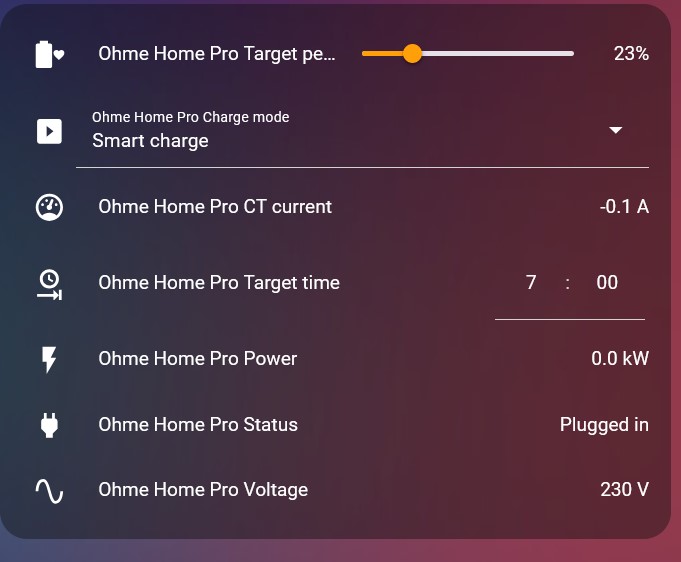
Yes, that is correct and is working. I have a small dashboard showing that HA is reading correctly from the charger.

[unknown] this is bad YAML, should only be one dash

Got it. Now corrected.

[unknown] Assume you have turned switch.predbat_octopus_intelligent_ignore_unplugged on per the device guidance and also turned switch.predbat_octopus_intelligent_charging on per the car charging instructions?

Yes, both of those were enabled.

I'll give it a whirl when I plug in tonight.
Thanks again for the assistance.

Z
#10 Zakalwe

Righto, so plugged the car in and got the usual immediate notification from Ohme that the charge has been scheduled.

Ohme.jpg

Running the List Charging Slots Action in Developers tools shows that HA is picking up the charging slot from Ohme.

Ohme-Slots.jpg

The Octopus Integration is seeing the Ohme charger:
Octopus-Integration.jpg

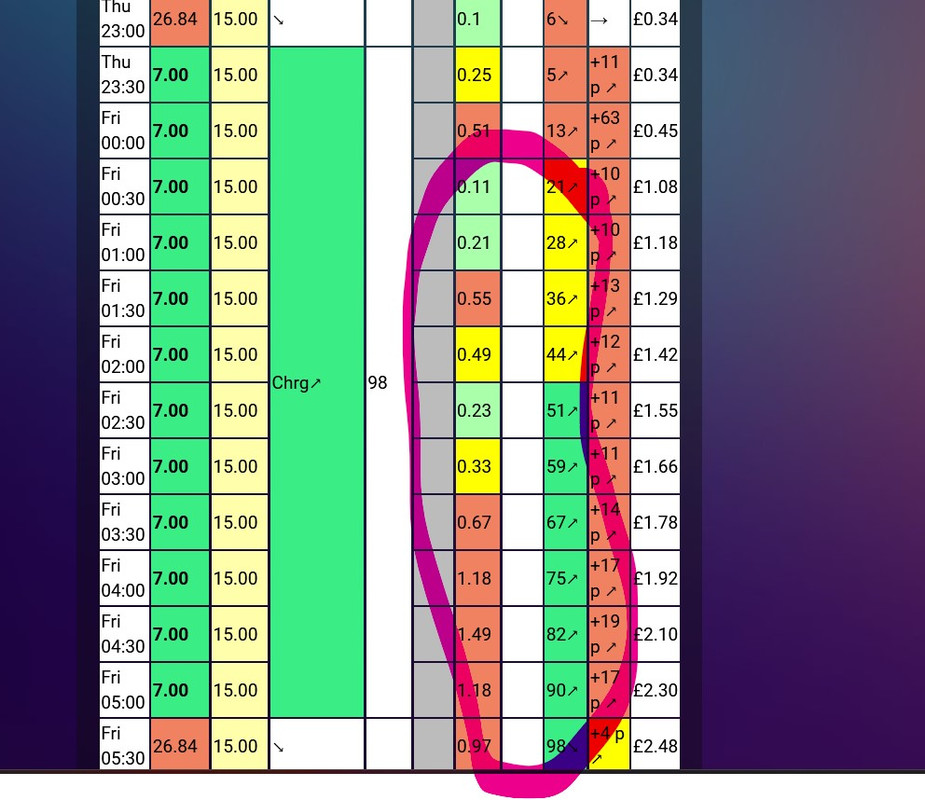
But still, Predbat is not integrating it into the plan. The Car column remains empty

Predbat.jpg

G
#11 geoffreycoan

Zakalwe What’s it say in the predbat logfile when it executes with the car plugged in. Looking for any lines that refer to ‘car’

Otherwise am running out of ideas, it looks to be setup correctly

#12 PianSom

Zakalwe
I don't have an Ohme, but two thoughts strike me.

1 Your apps.yaml says

  # In some cases car planning is difficult (e.g. Ohme with Intelligent doesn't report slots)
  # The car charging now can be set to a sensor to indicate the car is charging and to plan
  # for it to charge during this 30 minute slot
  #car_charging_now:
  #  - off

Have you tried uncommenting, and inserting an appropriate sensor (and checking that the state just below is appropriate)?

2 It also says

  # The list of possible values is in car_charging_planned_response
  # Auto matches Zappi and Wallbox, or change it for your own

Have you confirmed that the list of responses includes those that your Ohme produces?

Z
#13 Zakalwe

I can attach the full log if that helps?
Searching for "Car" finds lots of stuff like this:
025-03-20 15:15:01.021879: Cars 1 charging from battery False planned [False], charging_now [False] smart [True],
2025-03-20 15:15:04.497086: Car 0 using Octopus Intelligent is unplugged
2025-03-20 15:15:04.497259: Cars: SoC kWh: [0.0] Charge limit [23.0] plan time ['07:00:00'] battery size [100.0]
2025-03-20 15:15:05.396112: Car 0 on Octopus Intelligent, no active plan
2025-03-20 15:15:06.781233: CAR0: [ 0.0, 0.0, 0.0, 0.0, 0.0, 0.0, 0.0, 0.0, 0.0, 0.0, 0.0, 0.0, 0.0, 0.0, 0.0, 0.0, 0.0, 0.0, 0.0, 0.0, 0.0, 0.0, 0.0, 0.0, 0.0, 0.0, 0.0, 0.0, 0.0, 0.0, 0.0, 0.0, 0.0, 0.0, 0.0, 0.0, 0.0, 0.0, 0.0, 0.0, 0.0, 0.0, 0.0, 0.0, 0.0, 0.0, 0.0, 0.0, 0.0, 0.0, 0.0, 0.0, 0.0, 0.0, 0.0, 0.0, 0.0, 0.0, 0.0, 0.0, 0.0, 0.0, 0.0, 0.0, 0.0, 0.0, 0.0]

2025-03-20 15:20:00.595604: Cars 1 charging from battery False planned [False], charging_now [False] smart [True], max_price [0.0], plan_time ['07:00:00'], battery size [100.0], limit [100.0], rate [7.4], exclusive [False]
2025-03-20 15:20:04.047829: Car 0 using Octopus Intelligent is unplugged
2025-03-20 15:20:04.048024: Cars: SoC kWh: [0.0] Charge limit [23.0] plan time ['07:00:00'] battery size [100.0]

It's not picking up that the car is plugged in and Ohme has set charge periods, is it?

Z
#14 Zakalwe

PianSom

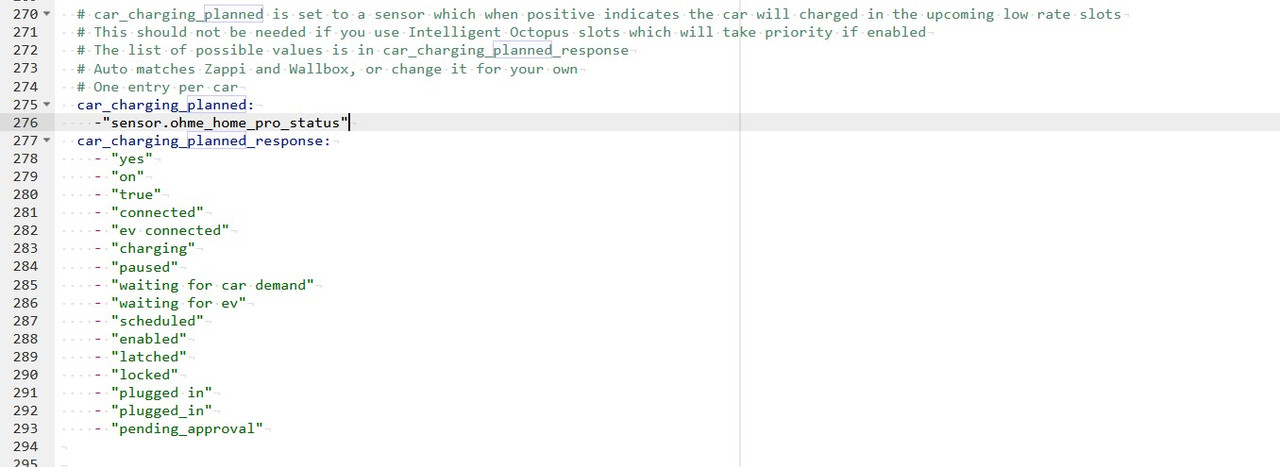
PianSom Have you confirmed that the list of responses includes those that your Ohme produces?

I think so:
apps-yaml.jpg

G
#15 geoffreycoan

Zakalwe what value does that sensor return when the car is plugged in?

It's not seeing the car as being plugged in in the predbat logfile

Z
#16 Zakalwe

geoffreycoan Zakalwe what value does that sensor return when the car is plugged in?

It's not seeing the car as being plugged in in the predbat logfile

It is showing as "Plugged In"
Status.jpg

This is what I am not getting...everything is pointing to HA seeing and reading the Ohme status and the charging slots, but Predbat is not picking up on it.

Very frustrating!

R
#17 Rbor

[unknown]
Hi
In a previous post, [unknown] spotted that you have bad YAML as you had two '-' in the car_charging_planned line:
- - "sensor.ohme_home_pro_status"

You corrected this and showed an extract of your code: [unknown]
However there is now no space after the –.
You have:
` -"sensor.ohme_home_pro_status"

Try adding add a single space after - so that the entry is:
- "sensor.ohme_home_pro_status"
I am following documentation under Now Ohme:
https://springfall2008.github.io/batpred/devices/

See if this works.

Rob

R
#18 Rbor

Zakalwe
Hi
In a previous post, geoffreycoan spotted that you have bad YAML as you had two '-' in the car_charging_planned line:
- - "sensor.ohme_home_pro_status"

You corrected this and showed an extract of your code: Zakalwe
However there is now no space after the –.
You have:
` -"sensor.ohme_home_pro_status"

Try adding add a single space after - so that the entry is:
- "sensor.ohme_home_pro_status"
I am following documentation under Now Ohme:
https://springfall2008.github.io/batpred/devices/

See if this works.

Rob

#19 PianSom

Top tip - you can check for any issues with your apps.yaml by copying it and pasting it in to any one of a number of yaml checking websites.

Google "yaml lint".

I've always used yamllint.com, because I am too lazy to find a more modern, better one.

G
#20 geoffreycoan

Zakalwe It is showing as "Plugged In"

the status returned in the entity must match exactly one of the values in the apps.yaml list

In the screenshot above it shows as 'Plugged in' (capitalised P)

In apps.yaml the options include 'plugged in' and 'plugged_in' (both lowercase P)

But check exactly what the value is - go into developer tools / states and filter on the entity name and you can see precisely what the value is

It might be as simple as a capital P

Z
#21 Zakalwe

[unknown]

Sensor.ohme_home_pro_status shows these:
options: unplugged, pending_approval, charging, plugged_in, paused, finished
device_class: enum
friendly_name: Ohme Home Pro Status

The current apps.yaml had that included. I have added a line:
- "Plugged in"
in to belt and braces it though.

Z
#22 Zakalwe

Finally!!!!

Finally.jpg

Looks like it was the missing space (as per @Rbor eagle eyes) or the capitalised "P" (as per @geoffreycoan ).
Thank you so much guys!

Z
#23 Zakalwe

@geoffreycoan
Can you amend the Predbat helpfile (https://springfall2008.github.io/batpred/devices/#new-ohme) to this:

car_charging_planned_response:
- "yes"
- "on"
- "true"
- "connected"
- "ev connected"
- "charging"
- "paused"
- "waiting for car demand"
- "waiting for ev"
- "scheduled"
- "enabled"
- "latched"
- "locked"
- "Plugged in"
- "plugged_in"
- "pending_approval"

G
#24 geoffreycoan

Zakalwe glad you are sorted. Can you check what the sensor value is in developer tools / states please - not what you see on a dashboard or integrations/entities list because these can be reformatted by the HA front end

Developer tools/states shows the actual value and I can add it to the documentation.

Edit: I just saw your post, it needs Capitalising Plugged in

B
#25 browellm

Will be watching this thread closely as Hypervolt have now announced formal support for v2 chargers is about to go into alpha testing. Have applied to get on it but will be very lucky to be accepted on the alpha as it's for 10-15 users. Hopefully will get on the beta later in April and the go live is due in May.

BMW direct integration is still down and reports are that it was very flaky when it was working.

R
#27 Rbor

Zakalwe
Well done. 👍
Persistence has worked for you. I am much the same, not wanting to get beaten by IT.

One big lesson here is the importance of getting yaml correct, done to spaces, UC/LC, etc.

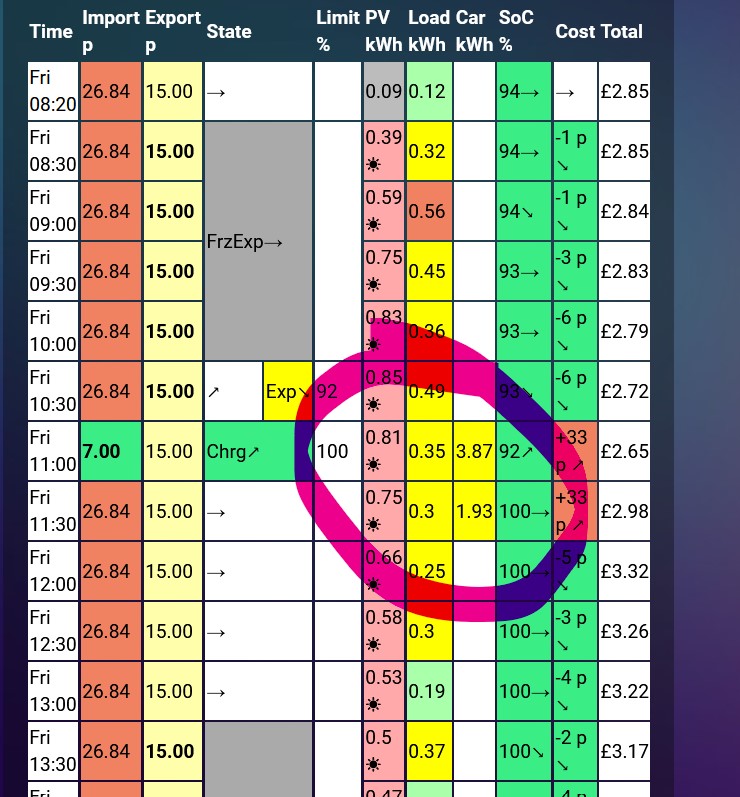
The only glitch is that the 11:00 slot is shown costed at 7.00 but the 11:30 slot is 26.84.
Is this just a case of predbat still catching up?

Rob

Z
#28 Zakalwe

Rbor
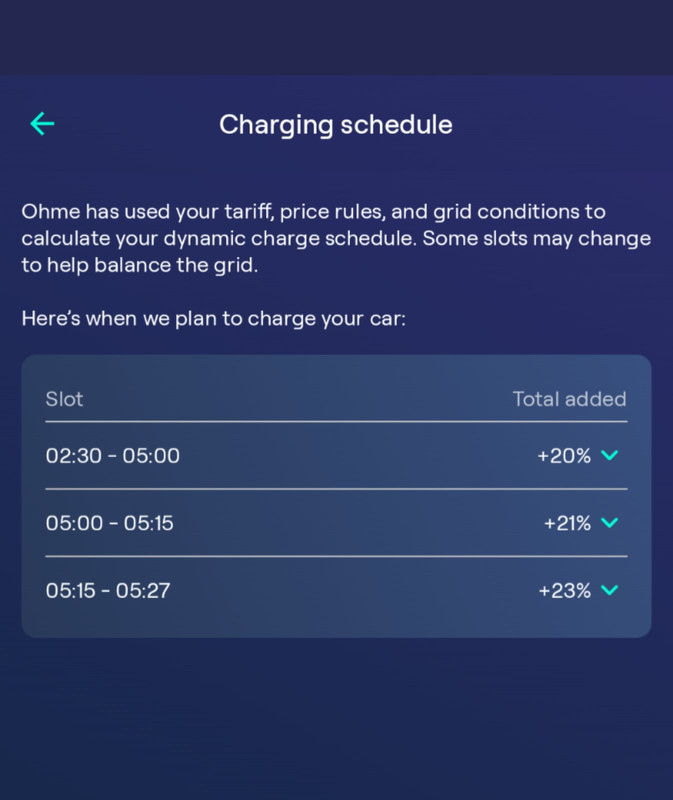
No, the slot only ran from 11:30 to 11:43