
Struggling to resuscitate a Gen1 system (several issues?)

10 comments started 2025-04-01 last 2025-04-02
GivEnergy Products
C
#1 Carder18

Hi all,

I didn't know much about my system until a few days ago. It had been installed for 4ish years and just worked for me. But then last week that changed and I started to learn, fast! Nowhere near the level of knowledge detail in this community - but hoping I can represent my issue, and someone can advise.

Inverter: GIV-HY5.0 (firmware: D0.449-A0.449)
Battery: 5.2 Gen 1 (firmware: 1041)

Last week (26th) I noticed the battery lights had all gone out. Its in the garage so I missed this for 2 months. My system is installed against a right hand wall, But I managed to find the on/off pulse button in the small cavity and all looked good (to my eyes; back to 100% overnight and into the 27th, used at twilight, but by 3am on the 28th it was 0%)

My diagnosis on the portal suggest battery issues go back to 11pm on 7th Jan, when it emptied to 0% and never returned. Lights are currently suggesting 50%, contrary to portal 0%.

I didnt spot the situation on the weekend. Fast forward to yesterday and I looked again and there seemed to be inconsistencies all over the place. Battery lights suggested 50% but portal showing 0 etc. I forget what else, maybe solar output zero when sun was shining etc.

I got distracted/waylaid by the thought of a firmware update for the battery. Since when I have tried for the auto battery update to 3017 several times. It never completes.

GivEnergy support this morning were helpful but confusingand went down a different path (and referred me back to my installation company, I see this is a trend!).

They pointed back to 19 Oct 2023, when around 12noon, they point to a change in behaviour on the Inverter. As I understand it (or dont quite yet) .....from this date onwards the demanded power reflects the solar power, or vice versa. My graphs since that date always look like this one:
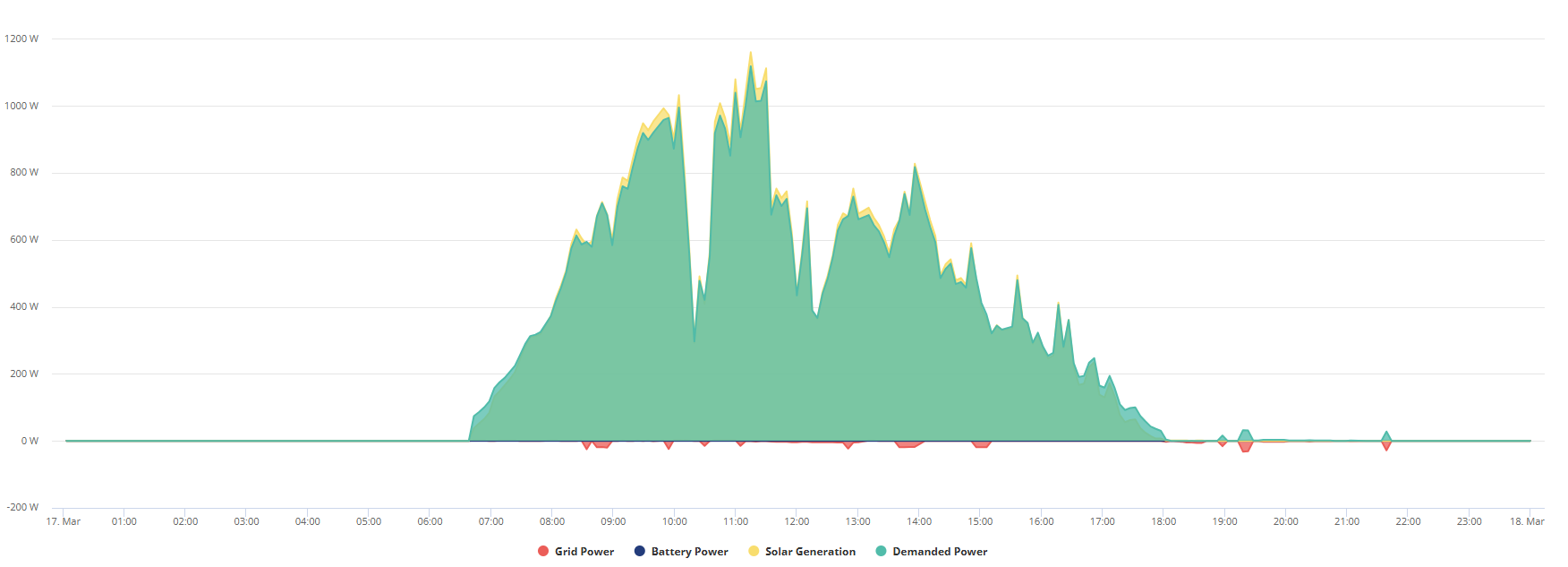
There were no maintenance or physical changes I am aware of at that time - so they are calling it a physical fault.

I recognise I am probably dealing with at least 2 layers of issues due to my own neglect/non-interest. What do i do next:

  1. Inverter issue. Its within a 5 year warranty period. I guess it could be some kind of hardware failure in Oct 2023. It didn't seem to stop the general operation of battery/export readings etc. Is it realistic to expect my installation company to rock up and troubleshoot this one? Potentially some kind of hardware switch out?

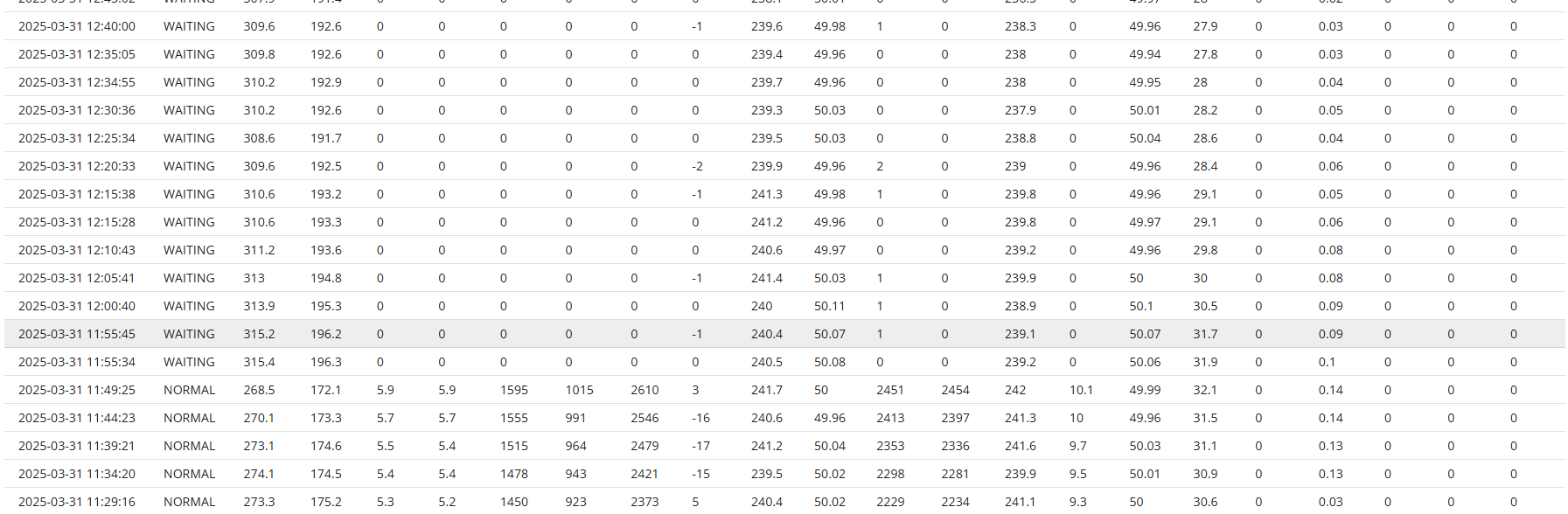
  2. Battery issue. I have seen and understood how to do the battery firmware update manually. I am super tempted to do a manual update. If only because I can see my total system behaviour has been seriously/completely impacted since I started that process at 11:50am yesterday. Many zeros recorded, and stuck at "waiting" rather than "normal" ever since.
T
#2 TX200

Is the battery breaker between the inverter and battery off?

Could it be a loose cable between the battery and inverter? (Comms cable). They don't clip in at the inverter end and sometimes come loose. Not sure re the battery end. But worth checking both ends.

C
#3 Carder18

TX200 No sign of any cabling issue. They are all screw in type connections and appear to be OK to the eye. I have tried complete system reboots. So as part of that the isolators have been on and off. Currently all on.

T
#4 TX200

Maybe the battery is completely flat. Might need a jump start by the installer.

Maybe it's not connected properly to your WiFi? Made any changes to the WiFi? Tried resetting it using the guides on the givenegy KB site?

G
#5 geoffreycoan

Carder18 no they are not all screw in cable types

going from your battery to the inverter are three cables, two thick ones which are the positive and negative, and then a thin data cable. The data cable goes through a grommet in the underneath of the inverter and then plugs into a socket there. As TX200 says, this cable can come loose as its not clipped in.

This would explain the symptoms you are seeing, the battery lights show 50% full, the inverter thinks the battery is empty.

You can carefully unscrew the cover that the cable goes through and re-plug it into the bottom of the inverter. There are two sockets that it will fit into, so easy to get the wrong one - look at the battery installation guide, but if you plug it into the wrong one there is no issue, it just won’t work.

Without the data cable connected you wont be able to do a firmware upgrade. No point in trying any upgrades until the battery is talking to the inverter.

I don’t think its realistic to expect your installation company to come back after 4 years, if this isn’t the problem and fix then its a warranty repair/replacement and givenergy should be coming out to fix it as the 5 years warranty is with them

S
#6 SteveCook

My data cable fell out. There is no mechanical restraint
I took the "boot" off the inverter, pulled some data cable slack though, wrapped a load of insulating tape around it so it would jam inside the boot. I then plugged it back into the inverter and screwed the boot back on.
Been fine for 3 years.

G
#7 geoffreycoan

SteveCook likewise mine dropped out of one of my inverters.

I cable tied the data cable to the other cables so it was supported and wouldn't accidentally drop down. Also been fine since then

C
#8 Carder18

Thanks to those above for ideas. All make sense.
Comms cable looks to be secure at both ends. I removed and reinserted to be sure.
Also checked the battery end, again nothing visible to suggest this is the issue.

With the front of the battery off I did go for the firmware update to the USB key. Interesting (or not), the original USB key would not format (FAT16/Default) in two different machines I tried. So wonder if that was corrupt.

I have tried my own key now with the latest 3020 bin file.

When I restarted after that I got a nice sequence of red-green lights whilst the firmware copied across (?)

But ultimately no change in behaviour.

C
#9 Carder18

Thanks to those above for ideas. All make sense.
Comms cable looks to be secure at both ends. I removed and reinserted to be sure.
Also checked the battery end, again nothing visible to suggest this is the issue.

With the front of the battery off I did go for the firmware update to the USB key. Interesting (or not), the original USB key would not format (FAT16/Default) in two different machines I tried. So wonder if that was corrupt.

I have tried my own key now with the latest 3020 bin file.

When I restarted after that I got a nice sequence of red-green lights whilst the firmware copied across (?)

But ultimately no change in behaviour.

G
#10 geoffreycoan

Carder18 Thanks to those above for ideas. All make sense.
Comms cable looks to be secure at both ends. I removed and reinserted to be sure.
Also checked the battery end, again nothing visible to suggest this is the issue.

any notifications showing in the portal for your inverter? I think I got BMS comms error or similar when my cable dropped out