
SOC 100%-0%-100%

6 comments started 2025-04-03 last 2025-04-05
GivEnergy ProductsAC CoupledBattery
T
#1 TvdK

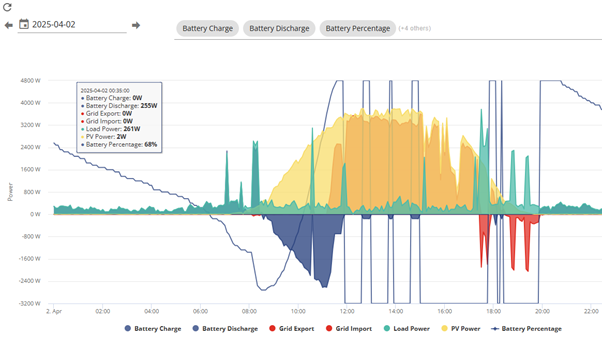
Any idea on what is happening with my battery? This issue has been made worse by a recent firmware update attempt (keeps failing) to D0.210-A0.210 currently stuck on .205. Only by rebooting the battery and restarting the inverter could I get the system to work properly again...will have to do the same again tonight. Thoughts?

T
#2 TvdK
#3 Windy Miller

This looks like your battery goes to 101% which the graph drawing bit is displaying as 0% or perhaps 1%. When the graph suddenly drops what does the app say your state of charge is?

I wonder if is as a result of the failed update and may sort itself out once the update takes.

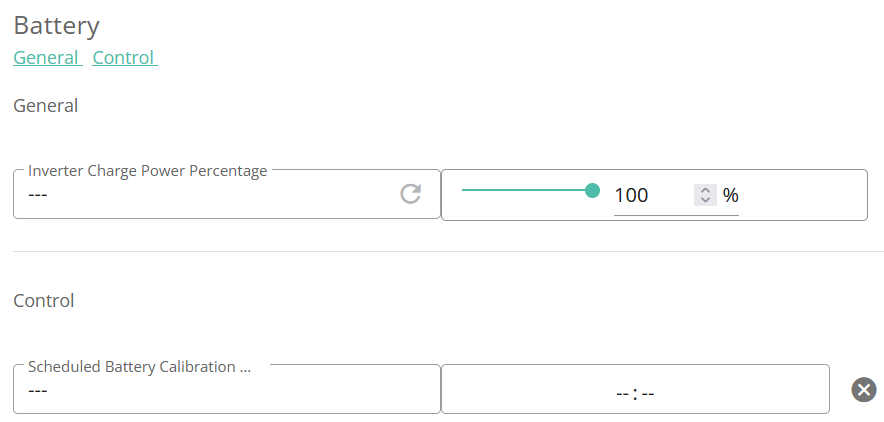
Your system may also need a calibration to re-find the 0% and 100% points for the battery.

D
#4 DD

Perhaps also look at the battery voltage at the same time. If you use android, https://givenergymonitor.wixsite.com/tutorials can show individual cell voltages.

Or on the standard app, when you drill into the battery details, it shows the BMS's view of the SoC, which tends to be 1 or 2 percent lower than the inverter's opinion.

T
#5 TvdK

Windy Miller Thanks for that, am I able to trigger a calibration or do GiveEnergy have to do that do you know?

C
#6 CW

TvdK You should be able to do it via the GE portal -remote control (not sure if you can with the App). Note once you set the system to do a recal you cannot "undo" it - the only thing you can do is to set the discharge power to 0 (I believe)

#7 TheDragon (GivEnergy)

[unknown] What is the inverter serial number, i will take a look for ya
