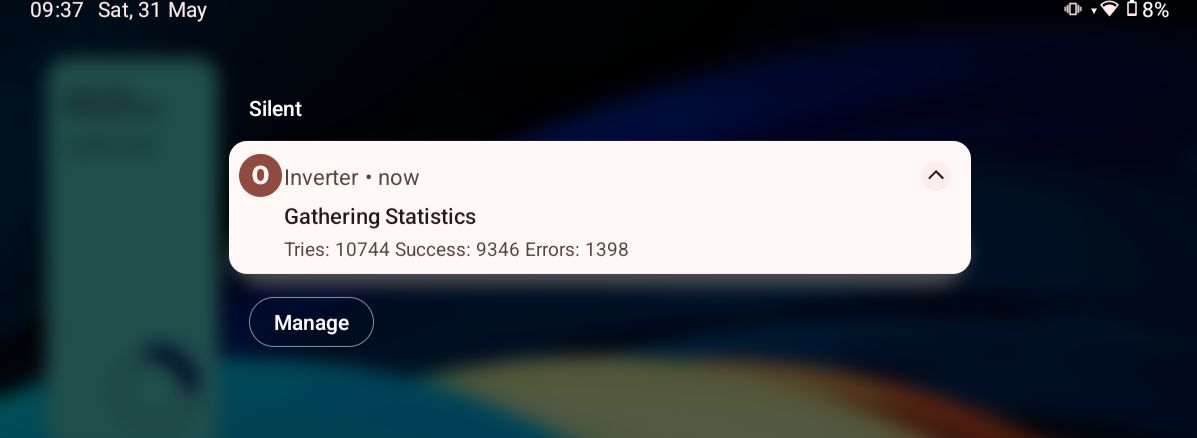
The battery data on my android app has randomly shown dips in the SOC and battery temp on my Gen2 inverter and 2 * 9.5 KW system. On the monitor for Givenergy inverter app (basic version) it has always been reporting a number of errors and I wondered if these point to issues with the GE inverter?
Givenergy app & Monitor for Givenergy inverter errors
Ortwin if you look in the givenergy portal at the inverter notifications, do you see any issues reported?
it could be that there’s a loose connection on the battery data cable, the thin black one that goes from the battery into the bottom of the inverter. On my gen 1 inverter the plug actually fell out as its not clipped in. Might be worth carefully removing the cover and removing and reinserting the battery data plug
Zero readings on the battery data in the GE app are a consequence of the way the timing loops work in the inverter firmware. They are nothing to worry about.
On the inverter app, the error count in the top corner is normal. Typically it should be about 2%. If you have an error rate over 10% then something is wrong. The errors have a variety of underlying causes. In settings, if you turn on "Persistent mode" some causes of error are eliminated and the error count should be less (likely below 1%).
This is the error message I got today from the monitor for Givenergy app

That error rate is CONCERNING, not a disaster but certainly not good. Most likely due to a poor wifi signal.
Check the signal strength by typing the IP address of your inverter into a browser. Login in using admin/admin (unless you have changed it). From the menu select "STA Interface Setting". On the "APs SSID" line press the search button. A window should pop up (make sure pop ups are enabled) and after a few seconds show a site survey. Look at the RSSI column for the row with your routers (SSID) name. The RSSI should be at least 80%.
To improve the RSSI use a wifi repeater. Best performance is with a cheap one that only supports 2.4g and WPA2; more expensive ones with 5g or WPA3 will be more problematic. I would recommend the TP-Link TL-WA854RE. The repeater connects to your router and creates a new network (typically if your router is called XX99, the new network is XX99_EXT), rename the new network (e.g. to XX99B) so that if you get further extenders they won't clash. Then repeat the site survey and check that the new network has an RSSI over 80%. Then configure the inverter to connect to the new network (e.g. XX99B) by selecting the radio button on the left, apply and follow the restart instruction.
I don't use WiFi but have it connected via a LAN cable directly to the router and have it set as a priority connection. Our broadband speed is 1Gb which should be more than adequate.
Ortwin You are the best placed to figure out what is going on. Check with "ping" and work your way up to wireshark as necessary. Is that a private 1Gb connection (i.e. not shared in a block of flats)? Try turning off the ONT for an hour and see if the stats improve whilst the broadband is disconnected. Check the graphs for a pattern, is it just flaky, random blocks, or longer outages? Also if the inverter is in range, try wifi.
Although yours isn't a wifi problem, the errors relate to a communications issue.
Can you break that down in to simple steps as I'm not a computer tech. I understand how to ping but wireshark?
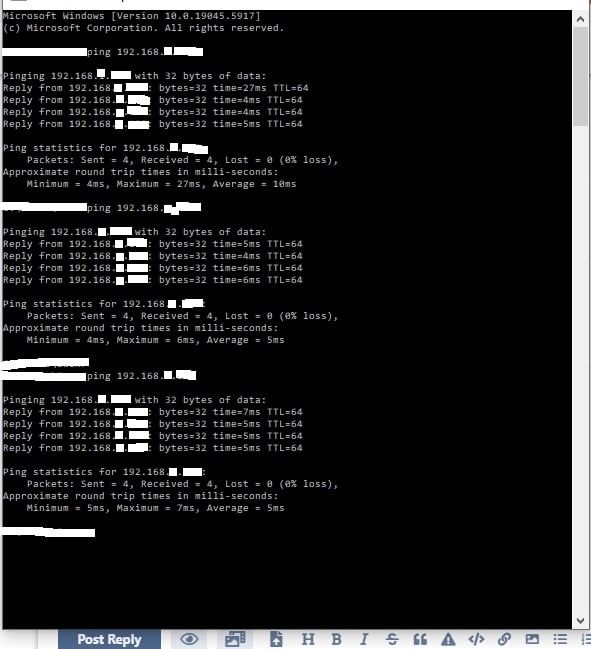
here is a ping to the inverter. I did download Wireshark but find it too complicated to workout what I need to do with it.

Ortwin Run ping for a while as it may show up packet loss.
Eg - ping -t 192.168.0.2
CTRL-Break will show stats and leave ping running; CTRL-C to stop ping. Leave it running for at least an hour.
FWIW I think its highly unlikely you have 13% packet loss on wifi, never mind wired LAN - far more likely to be the modbus on the dongle/inverter throwing errors.
Wireshark is for serious network nerds, you don't need it for a simple network reliability issue. I would delete that download.
The ping looks fine from that computer to the inverter. To check the connection from the tablet, there is an android app called Pingtools, it's free so I would give that a quick go.
You think the problem maybe be with the inverter, so you need to eliminate the network and connect the tablet direct to the inverter.
At the inverter open the cover, unplug the network cable. There are 4 dip switches, make sure they are all on (if they aren't, note the setting and put them all on).
On your tablet settings go the the wifi and forget any networks that it might connect to (and turn off mobile data if it has that). It may complain about no network connection, that's good. Reboot your tablet.
Connect the tablet's wifi to the inverter (the name will be 2 letters, 4 numbers, the letter G, and 3 numbers). If it needs a password try 12345678, or the serial number of your inverter. Launch my app, then in the app settings change to IP Address to 10.10.100.254.
The app should monitor the inverter directly. And you will be able to tell from the error rate if the inverter is faulty.

Many thanks for your detailed response. I will have a go when I get chance.
Well I have found out it's my Linksys router (SPNMX56) that's causing majorly of the dropouts. This is despite the solar system being directly connected via a LAN cable to the router. I now see less than 0.02 % dropouts rather than the 10%+ following firmware updates. So thanks Rubicube for your help with this.