Battery no longer charging to 100%

8 comments started 2025-07-21 last 2025-07-23
GivEnergy ProductsBattery
C
#1 ChrisMcK

Over the last three weeks or so, my Giv-Bat 9.5 (gen 1) battery has stopped charging to 100% - now it reaches 97 or 98% and stays there. I've tried restarting the inverter from the portal. I guess the only other thing I can try is a recalibration?

Thanks for any suggestions!

C
#2 Coys68

ChrisMcK

It's a little curious. My AIO has recently charged to 100% overnight but then drifted down to 98% by the time my charging period ends at 7.00.
Last night, for example, it reached 100% at around 3.30. It then bleeds a few watts (20 odd) for the rest of the night hitting 98% by 7.00.
It's been like this for a little while now but used to get to 100% and stay there until it started powering the house at 7.00.
Not a biggy but strange!

D
#3 duplada

I have dual AIO's system and have been having SOC % issues since my system was installed. Paul_L the dragon was taking a look at my system and I commented about the fact my system was not reaching 100% very often and then when it did it often dropped back to 99% again. His reply was as follows.

"Yes sitting at 99% is re-calibrating 100% on it own.
It can then get to 100%, but may drop back to 99, then will stay there. thats not an issue"

So straight from the horses mouth so to speak. it looks like that behavior is normal.

I don't know if you are aware but there is a new V13 Gateway Firmware and a V13 BMS update for the AIO's AO.618. I am not sure if these are on general release but it may be worth asking support if you can get an upgrade. The Gateway firmware is worth having as it incorporates a import limit which support can set to stop you overloading the gateway, they set mine at 80amps. I managed to overload my Gateway trying to charge the EV at the same time as importing 12kWH charging my batteries and then a kettle boil tipped it over the edge. I will spare you the details but it took all afternoon to get the system back online and running again. The AIO BMS 13 Software works in conjunction with the Gateway to throttle things if you get near to overload and has the latest SOC logic. The BMS 13 AIO firmware has made a difference to my SOC issues so it is worth having.

I hope this helps you.

D
#4 DD

ChrisMcK I wonder if it could be a cell balance thing? Charging has to stop when one cell hits the max voltage, even if the others are behind.

My own battery seems to ramp up to 98%, then jump to 100%, so I don't really know how it's supposed to be reported. I have one cell which is a little behind all the others. I've been trying very slow charges to see if I can get it to catch up - charge to 90% overnight, then the last 10% from solar at minimum charging power.

#5 Windy Miller

I too get this drifting around the 98% point. When it jumps to 100% it stops charging but then with no discharge it drops to 98% to sip a little more charge back to 100%. Sometimes its sits at 98% with no current going in or out. I think this is just how the charge balancing is working both within and between my 2 batteries.

Since the most recent battery/inverter software update I don't think the actual % being shown is an accurate reflection of the true state of charge. When I use the Android Inverter app to check the cell voltages I can see which cells are leading the way and can see why it occasionally jumps up to 100% as one of the cells reaches some cutoff (seems to be 3.4v).

Since I'm still getting around 8kWh storage (from 2x5.2kWh batteries 80% DOD 2.5 years old) I've taken to not being too worried about what the SOC is actually doing. I will have to keep an eye on what WonderWatt does though as it uses the 100% SOC point to determine what to do next and if the battery is reporting 98% WW will think it hasn't completed the charge.

R
#6 Rbor

Windy Miller I too get this drifting around the 98% point. When it jumps to 100% it stops charging but then with no discharge it drops to 98% to sip a little more charge back to 100%. Sometimes its sits at 98% with no current going in or out.

I experience the same behaviour and many folk have commented on this behaviour in different threads.
My system is an AC3.0 inverter daisy chained to two 8.2 kWh batteries, controlled by Predbat.
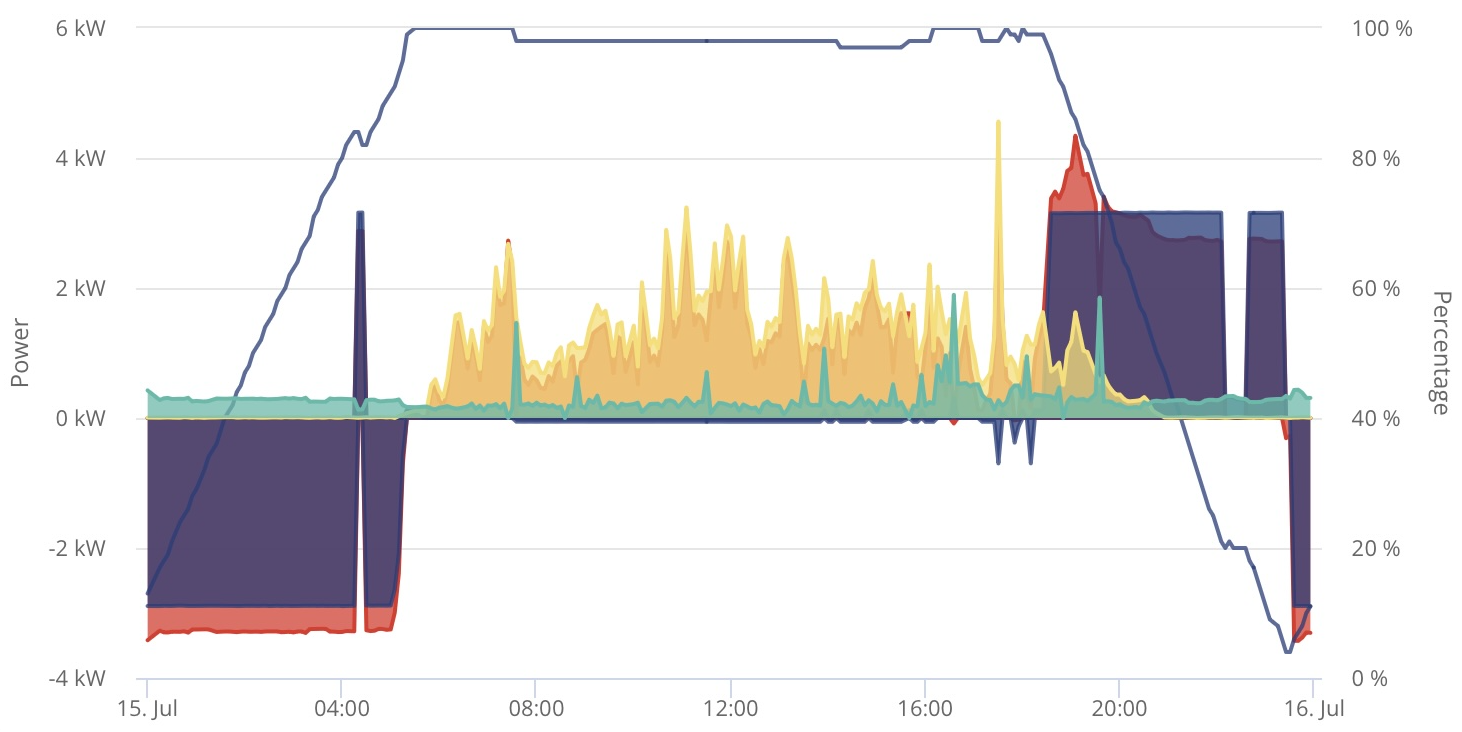
This is from 15th July (almost different days show different but similar patterns), the long horizontal section shows 98% SOC.

Rob

#7 hoggy

Depending on your inverter Gen this might be a quirk of battery FW against Inverter FW.
3020 on mine did this on an old Gen1 hybrid because the battery was calculating an SOC of 100% (which triggers the inverter to stop) & then after settling it would realise it wasnt quite full and adjust SOC down BUT the inverter wouldnt then restart charging. (Potentially because a soft OV alarm is used on the BMS or inverter which stops the battery accepting any more charge until it has seen a discharge?)

The battery on 3020 seems to be setting a flag that newer inverter FW could read as 'battery not full yet' which would trigger a recharge from the inverter until truly full - once I moved to newer firmware this seemed to work but unfortunately caused other issues so I got rolled back to 3017.
This was introduced in FW 3018 (item 3): https://givenergy.co.uk/firmware-revisions/g1-g2/

R
#8 Rbor

And there is this comment in documentation to add this line to apps.yaml:
https://springfall2008.github.io/batpred/faq/#when-my-battery-is-charging-to-100-it-fluctuates-between-98-and-100-andor-gives-an-error-setting-reserve

  inverter_reserve_max : 98

I remember adding this line but I then commented it out. It didn't seem to make any difference to my AC3.0. I am on D0.212-A0.212 and BMS 3020.

I am very reluctant to upgrade following my dreadful experience going to last firmware and BMS. The update didn't complete and I spent the best bit of a day getting the dongle to speak to the inverter again. I ended up using an uploaded GE file which eventually did the trick.
I have had so many problems over the last couple of years communicating with the dongle.
My wifi signal is excellent and I use only 2.4 Ghz for the dongle.

Rob