M
Just wondering if the Weather Forecast Card only works for the UK as I live in Australia and the card just shows "Unknown Location".
Cheers
Mark

Just wondering if the Weather Forecast Card only works for the UK as I live in Australia and the card just shows "Unknown Location".
Cheers
Mark
Same issue here - in the UK and details filled in correctly as far as I can see - but still says, "Unknown Location". Does anyone have this working?
No idea what I did, but it has always worked. I would post a screenshot with todays date on it but the forum is broken..
[later edit] Am UK based. Full address with postcode filled out in account settings (no gap in middle of postcode for some reason?) Maybe my installer did something?
Mine shows the correct location (Rugby). Can't say that it agrees with the Met Office's prediction though...
I must admit that I don't look at it except as a result of this thread.
The Solcast solar power predictions seem to be pretty close.
I don't know whether you are using the same weather card as me but I have this working.
I use the meteogram weather card: https://github.com/jm-cook/lovelace-meteogram-card
This creates a 'rough' forecast based on your longitude and latitude but you can obtain an accurate forecast based on your local met office weather site. The data is optimised for the UK.
The rough forecast should give you a good idea of what to expect.
You need to obtain an api from the met office using the met office integration.
Create an account here: https://datahub.metoffice.gov.uk and subscribe to the Global Spot option on the free tier. You will then be sent an api.
This is my weather chart based on my local met office weather station. You import this as your 'entity id' to replace the default entity id.
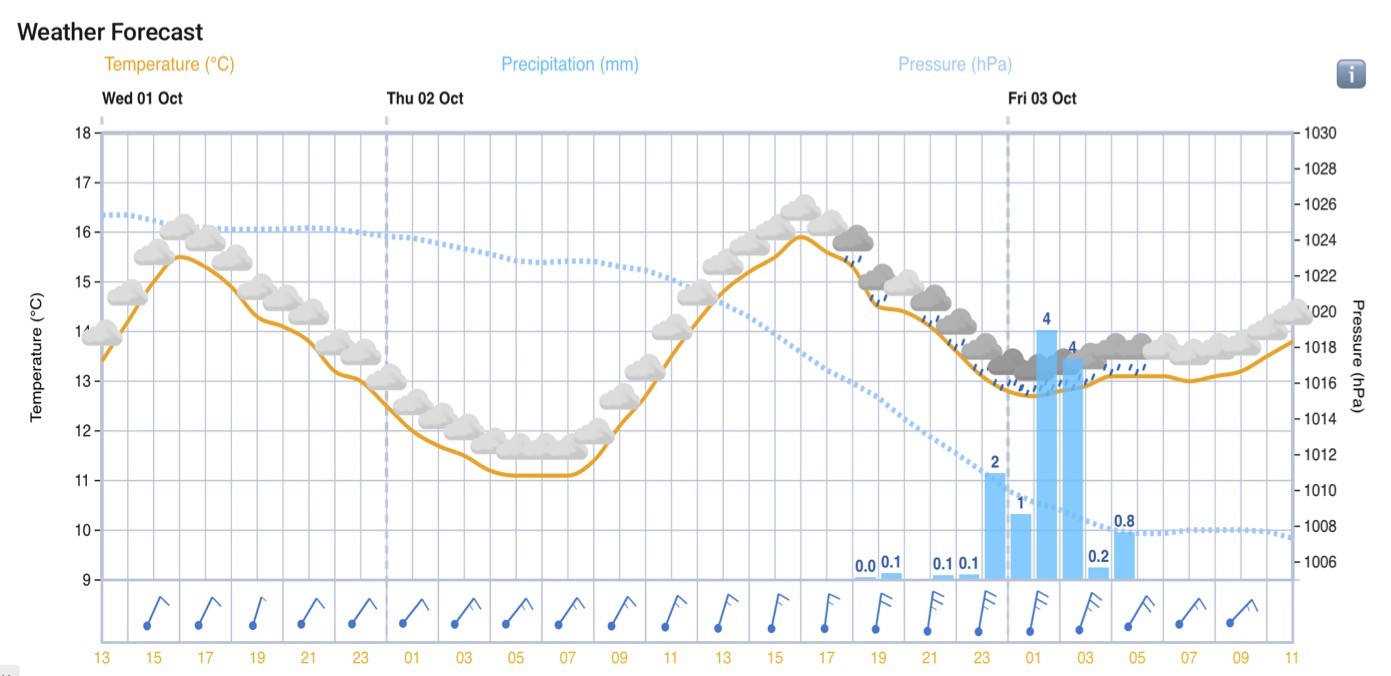
It's well worth the effort to get the weather card working.
Rob
Rbor Many thanks for the information. This looks great. However, the link you include has a readme file file which references a Home Assistant/HACS, which I don't recognise. I have an issue with the Weather Forecast Card on https://givenergy.cloud/dashboard (which I'm guessing is different to the "Home Assistant") and I can't see anything that allows me to add this card.
Am I missing something?
Iain M Am I missing something?
no you are not missing anything. The card above is for home assistant which runs on a raspberry pi, PC or similar and can be used to automate your home, battery management, etc.
the cards supplied in the givenergy portal are what they are, no possibility to change or add to them

Iain M Just a thought - I know my car GPS sometimes doesn't recognise a postcode address, usually when the destination is in a recently built estate. Perhaps the GE weather card has the same issue, in which case a reasonable workaround might be to enter a nearby, more established postcode (as the weather isn't going to differ that much!).
HTH
So mine is working now. It "magically" started to work after a call to Givenergy in Australia. Don't know if they did something to fix it after the call or not it just may be a coincidence. Our postcodes are no way near as accurate as the UK though the forecast isn't bad.
I'm also unable to get the weather forecast card working in the cloud - Unknown location. I am also in UK, not a new build. People who have it working - do you have your full address in House name or number? What about road name?